While they’re on your site
AI Website PersonalizationContent and offers for each visitorB2B PersonalizationEach company sees its own industryProduct RecommendationsWhat each shopper wants nextContent RecommendationsThe next article each reader wantsA/B TestingA winning version for each audienceDynamic Landing PagesPages that match the ad they clickedAI Search & Chat AgentAnswers from your own pagesBanners & Pop-UpsShown by behavior, source, locationAI Promotion ManagerAI picks each shopper’s best offerSocial ProofLive ratings, stock and recent buysReach them after they leave
Email PersonalizationEmail series, picked for each readerPush & SMSTriggered by what they just didHosted Landing PagesPer-visitor pages, hosted by usKnow who they are
Behavioral TargetingAudiences that update themselvesAudience DiscoveryBuyers you didn’t know you hadWebsite AnalyticsSessions and revenue, per personWhat visitors tell you
Reviews & TestimonialsReviews from 17 sites, per visitorSurveys & NPSAsk a question; use every answerAI Chat AgentAnswers, then hands over to peopleMeeting SchedulerThe right visitors book a callAI tools and your stack
Personalization PlatformEvery tool on one visitor profileAI AgentDescribe a campaign; it drafts itIntegrationsHubSpot, Salesforce, Segment, GTMApp MarketplaceBuilt-in and reviewed partner appsAPIs, SDKs & AutomationREST API, server and mobile SDKsMCP ServerRun Personyze from your AI assistantYour clients already pay for a CRM, an email tool, a shop and often a tool that names the companies visiting. Personyze connects to more than 50 of them and turns that data into personalization, testing and recommendations you sell as a service — every client from one login, under your own brand if you like.
Works with your clients’ stack — HubSpot, Shopify, Klaviyo, WordPress, 6sense & 50+ more
4.8 / 5 on G2


A redesign is paid once. Personalization is a program — new audiences, new tests and new results every month, billed every month.
The client’s CRM, email tool, shop and identification tool already know who is visiting. Personyze puts all of it to work on the page.
One tag or the official plugin per site, then every campaign is built in a visual editor — no developer queue between your idea and the client’s site.
Every service below is built in the same panel, for any client, on any platform — and each links to the feature behind it.
The company behind a visit comes from the client’s own Leadinfo, Snitcher, 6sense, Albacross, Leadfeeder, Clearbit or ZoomInfo — then the headline names it and sales hears about the accounts worth a call.
What a visitor read, where they came from and what they did last time decide what they see next — segments that update themselves.
Products and articles picked per visitor from the client’s own catalogue, on Shopify, Magento, WooCommerce, Shopware, WordPress and the rest.
Blocks inside Klaviyo, Mailchimp, Marketo and the client’s other email tools that choose their products at the moment the email is opened.
HubSpot, Salesforce, Dynamics 365 or Zoho fields as targeting — members greeted by name, open deals shown the next step, customers kept out of acquisition offers.
One question or a short survey that asks only when it matters — each answer saved to the visitor’s profile, used to target the next page, and sent on to the client’s CRM, Slack or email.
Messages placed where they convert, shown to the right visitors — and every lead sent on to the client’s CRM, Slack or a Zapier, Make or n8n workflow.
For retail, travel and SaaS clients: every banner, offer and coupon in one list, each visitor shown the one most likely to convert with a code of their own — and a held-out group that shows the client the lift.
Live counts, reviews and countdowns about the product this visitor is looking at, with thresholds that keep weak numbers hidden.
“Live on our site in a week.”
The review, testimonial or case study that fits each visitor’s product, category, industry or country — collected on the client’s own site or imported from where the client already has them.
Answers from the client’s own pages and catalogue, knows who is asking, hands over to a person when it should, and books the sales call right in the thread.
Visitors describe what they need and get a shortlist from the client’s catalogue or content, each pick with a reason — products for a shop, articles or courses for a publisher, resources for a B2B library.
Ad and email clicks land on a page made for them — on the client’s site, or hosted by us on the client’s domain.
A/B tests that report which version won for each kind of visitor, with a holdout and a goal — the result a client can read and renew on. Auto-pick declares the winner and deploys it, and a winner can also be applied audience by audience.
Short narrated tutorials of the real platform — the same few minutes it takes on a client’s account.

For every client, the AI agent suggests campaigns worth running, builds them end to end — targeting, design, placement — executes once you approve, and reports the results back. Your team sets the direction; the agent does the build. Every plan includes a monthly quota of AI tasks.
This is the agency program in practice: the sandbox wins the pitch, the first campaigns prove it, and the reports keep the retainer.

Sandbox pitch → signed retainer in 5 weeks
Program runningA sandbox slot goes to the prospect before they pay anything.
The official plugin on the site; the client’s own HubSpot and Leadinfo connected.
Logistics visitors see the logistics storyAn industry homepage built in the visual editor, staged, approved, published.
A scheduled report shows the lift by audience — nobody exported anything.
The proof of concept becomes a monthly program.
Audit → monthly optimization in 6 weeks
Program runningTracking, product feed and purchases set up by the app itself.
Recommendations from the store’s own catalogue, placed in the editor.
The client’s Klaviyo emails show products chosen when they are opened.
The test reports a different winner for new and returning shoppers.
The client renews on numbers it can read.
No re-platforming and no dev queue per client — the same three steps for every site you manage.
A free agency license for your own site and demos, a margin on every license you sell to clients, and certification for your team.
Open with an Inspire me plan drawn on the prospect’s own pages, then a proof of concept on their real traffic — three client slots at a time, thirty days each.
One tag or the official plugin, then the tools the client already has — CRM, email tool, shop, identification tool — become targeting.
Free agency license · sandbox slots for client pitches
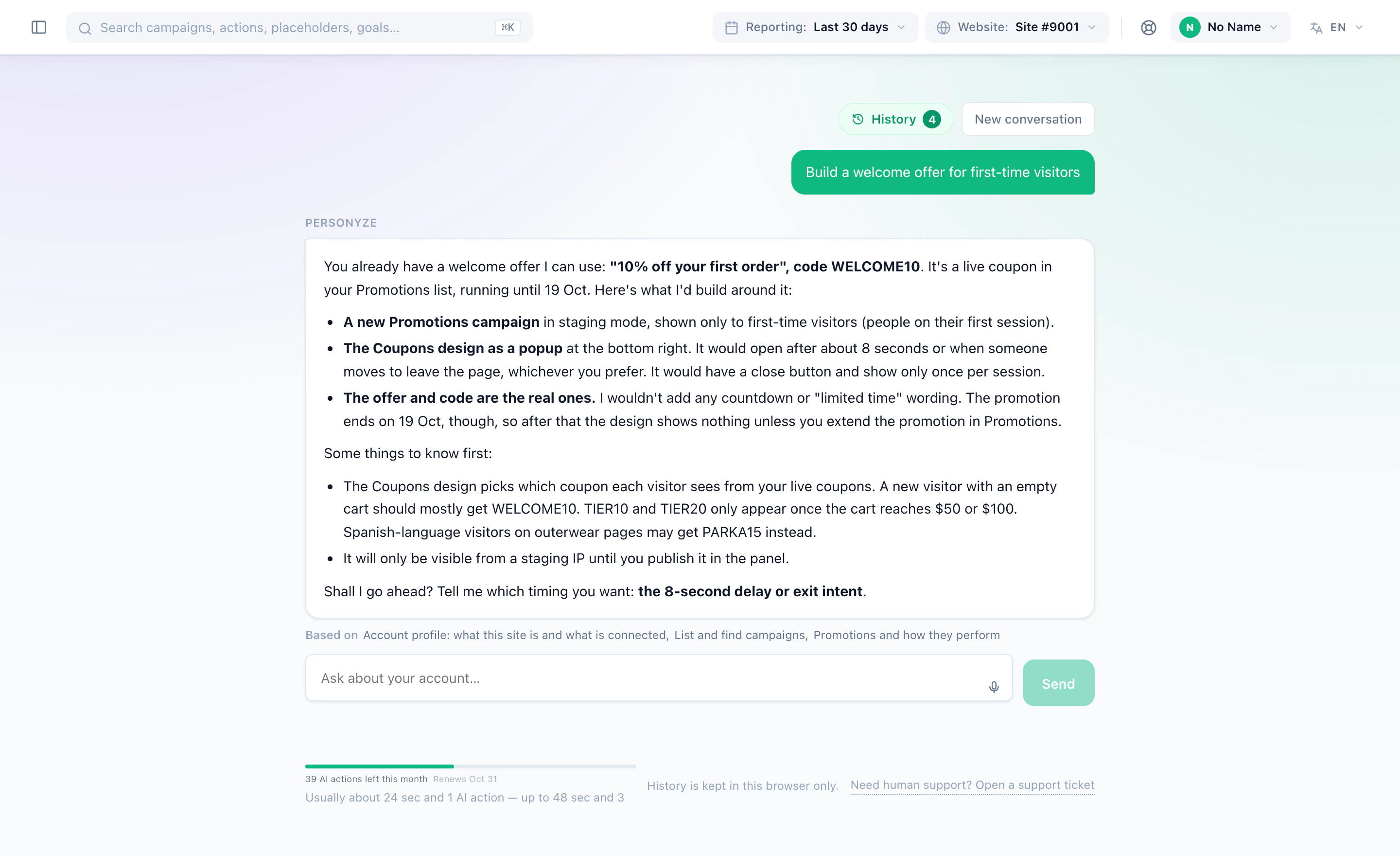
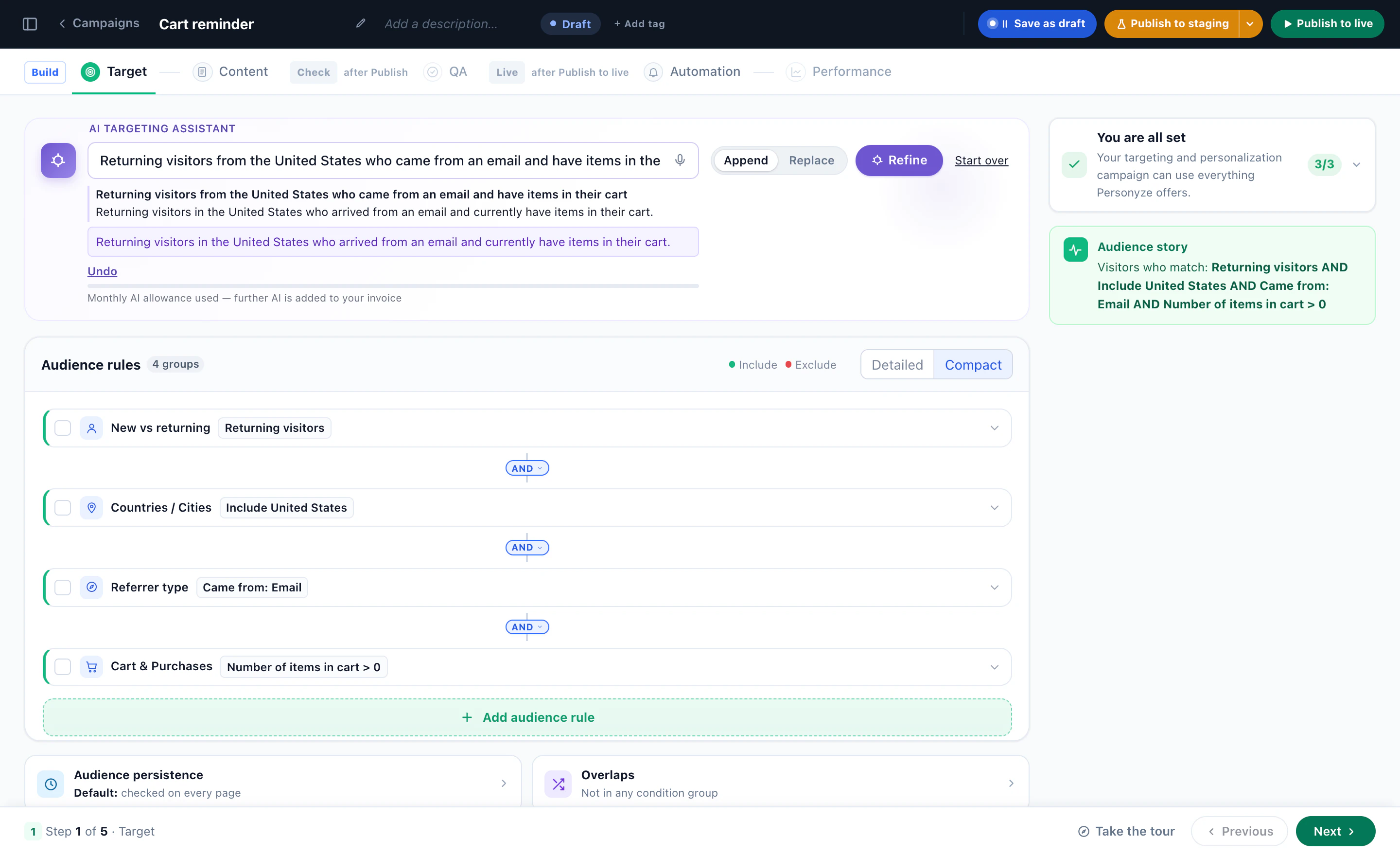
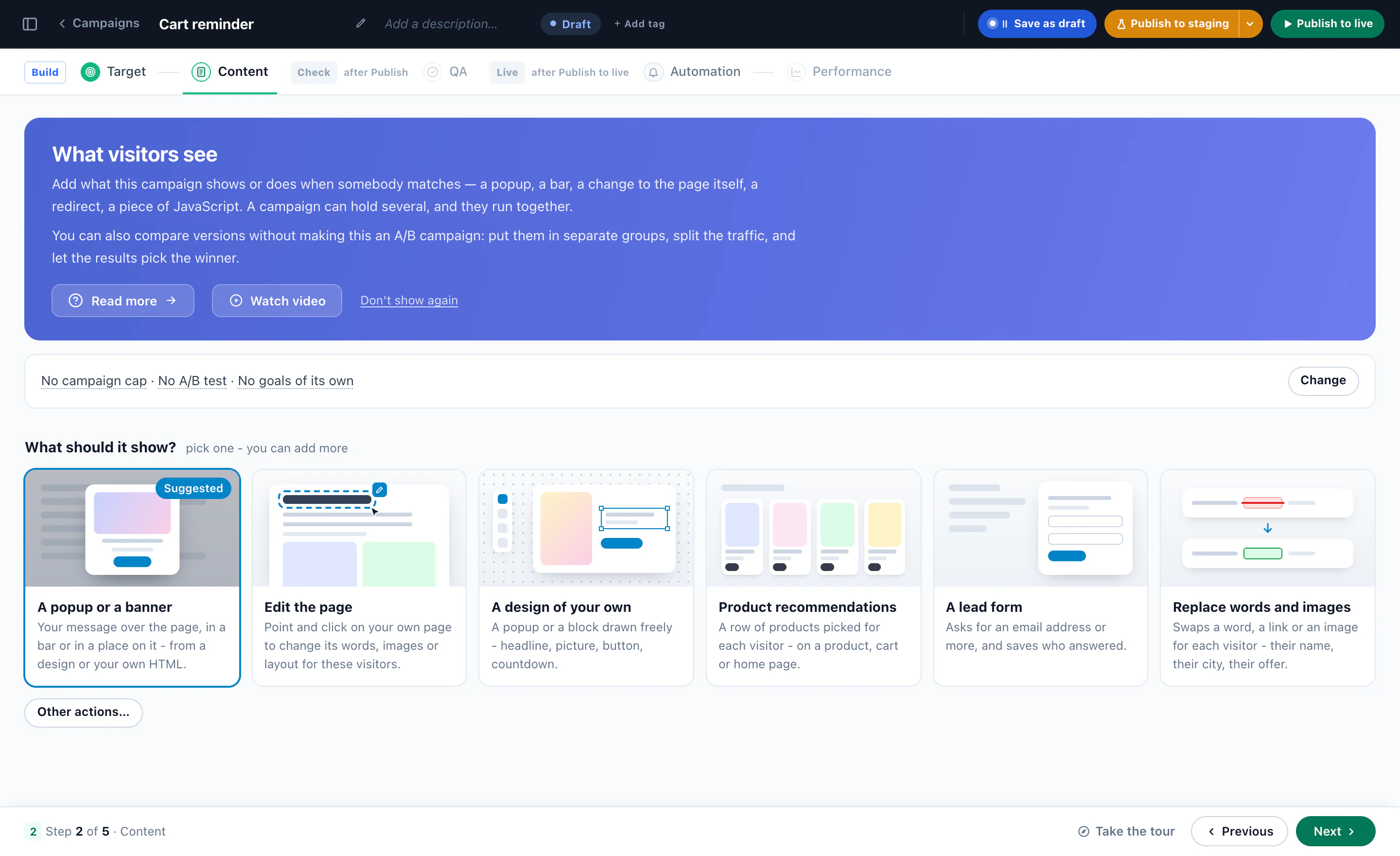
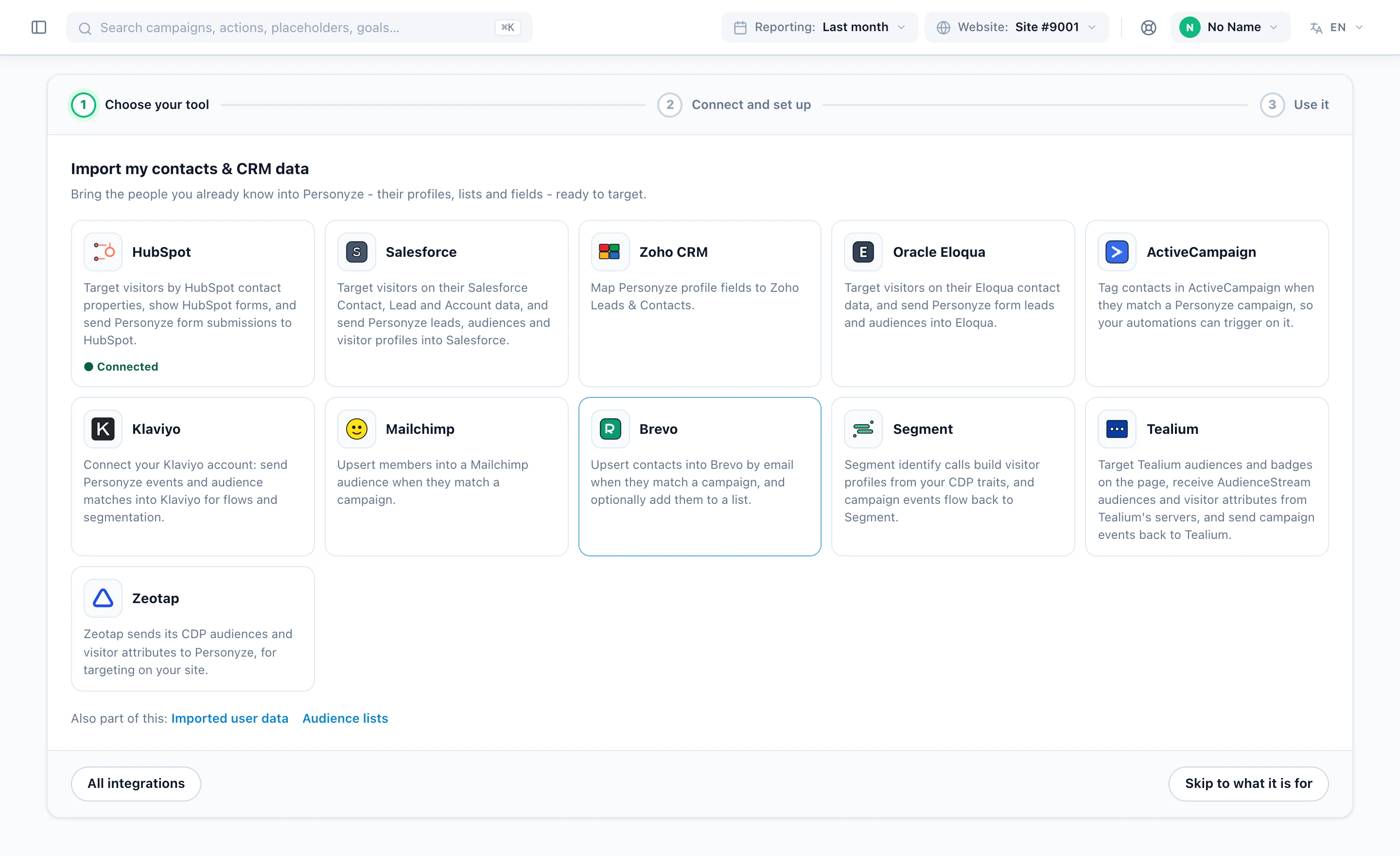
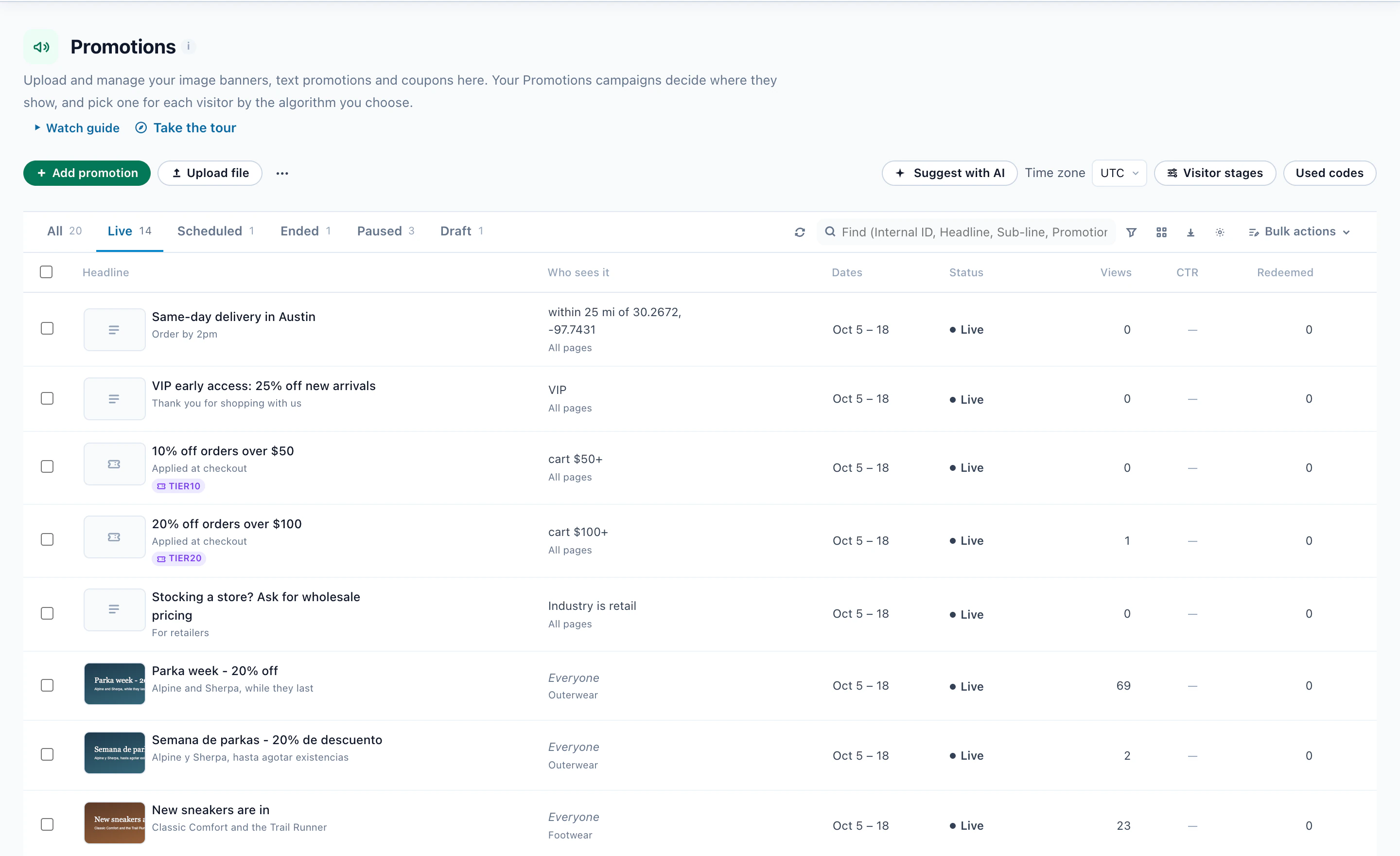
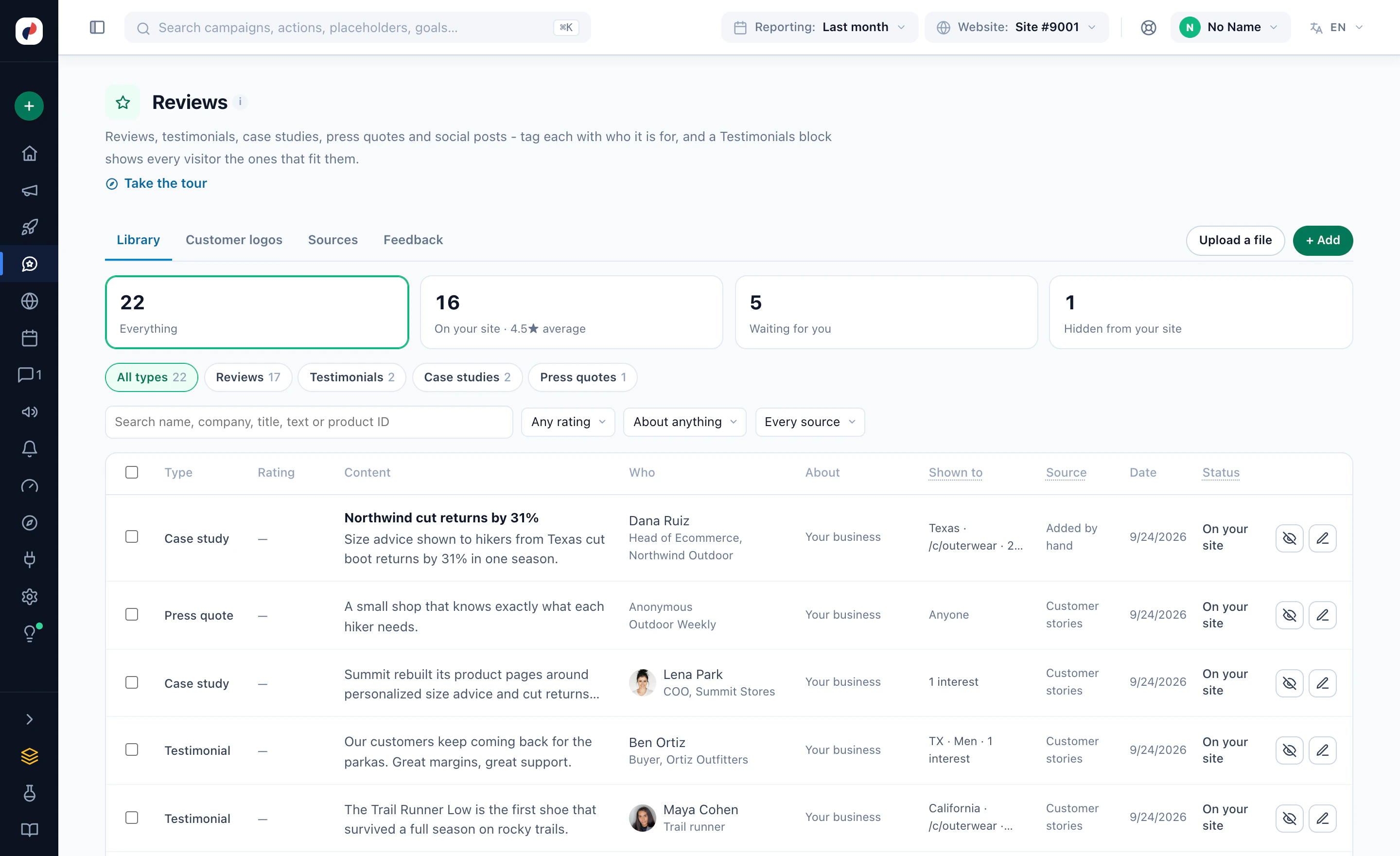
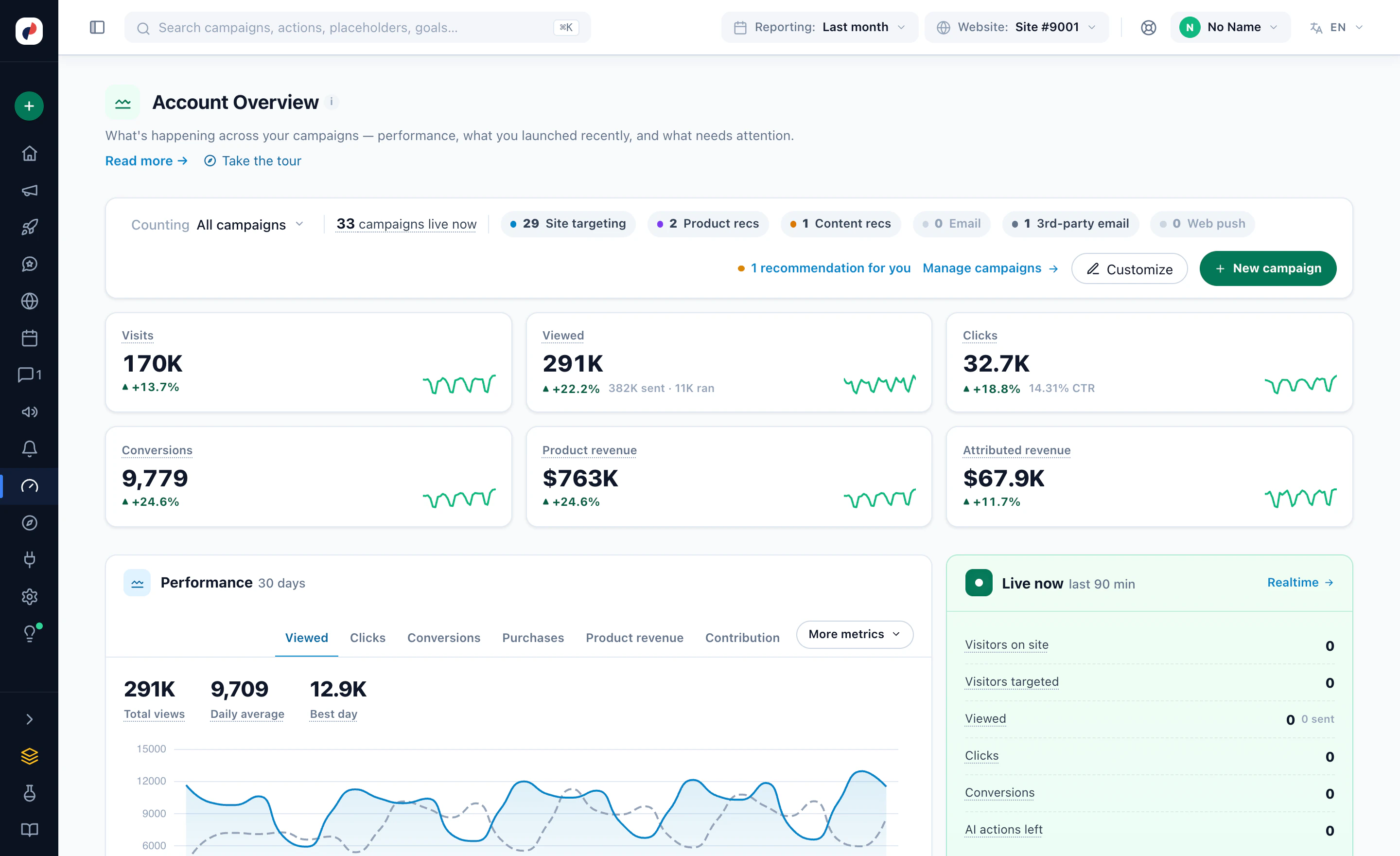
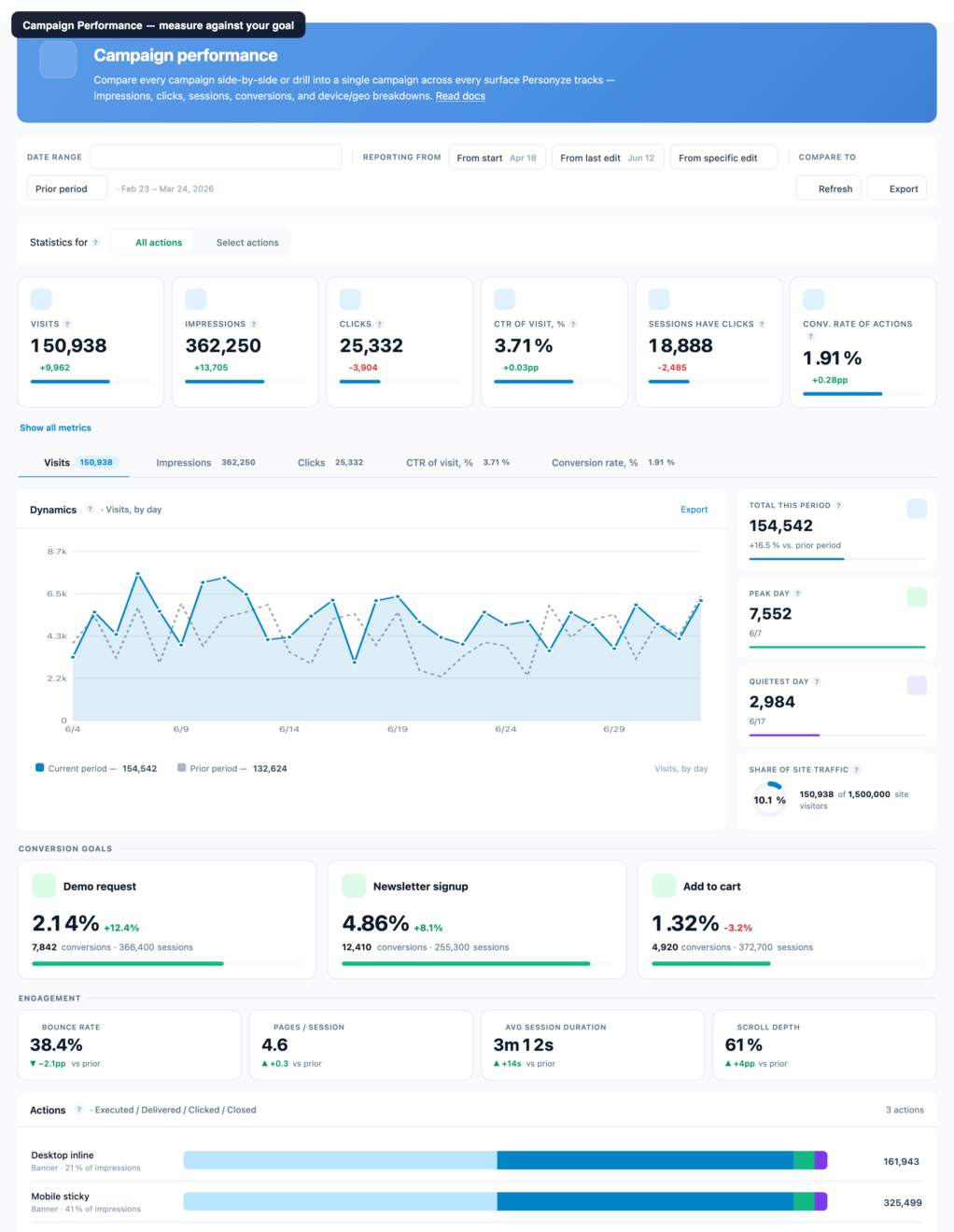
The same panel for every client: who sees it, what it shows, the AI that builds it, their own stack — and the overview you report from. Real screens from the panel.
Who sees it, which design, the real coupon and when it opens — and it asks before it builds.
“Returning visitors from the United States who came from an email and have items in their cart” became four rules, told back in plain words.
A pop-up or banner, an edit to the page, a design of your own, product recommendations, a lead form, or words and images swapped.
HubSpot, Salesforce, Zoho, Eloqua, ActiveCampaign, Klaviyo and more — contacts and companies onto visitor profiles.
Live promotions with who sees each one, their dates, status and views.
One library of proof, each item with who it is shown to.
Visits, views, clicks, conversions and revenue across all campaigns, with what is live now.
Screens from Personyze demo accounts. The numbers are illustrative.
Each client keeps its own account, data and users. Your team works across all of them, from one login.
Your login is added to each client’s account with the role you need, and you switch between them — no shared passwords, nothing of one client visible in another.

Scheduled reports by email on the timetable you pick, results per audience, and full website analytics down to the individual visitor.

On request, the panel runs under your agency’s name, logo and domain — and our team can build alongside yours when a client needs more hands.
Plugs into every client’s stack
Start from what the client already runs. Pick it to see the service it unlocks and how each tool connects.
Built on the identification tool the client already licenses — the company behind a visit becomes a targeting condition.
Account-based marketing →
LeadinfoIdentify the visiting company from the Leadinfo script already on your site — no API key.
How it connects →SSnitcherIdentify the visiting company with Snitcher and target on its industry, size, tags and segments — no API key.
How it connects →
6senseIdentify in-market accounts and adapt pages, banners, and CTAs.
How it connects →
AlbacrossReveal visiting companies and adapt content by industry/size.
How it connects →
LeadfeederTurn anonymous traffic into accounts and route by fit.
How it connects →
ClearbitCompany enrichment—industry, size, tech stack—for precise targeting.
How it connects →
ZoomInfoUse firmographic and intent signals to drive account-aware UX.
How it connects →Real-time company reveal & attributes for ABM targeting.
How it connects →
DemandbaseBring Demandbase account and intent data on-site to adapt pages, offers, and CTAs.
How it connects →Deal stage, plan and owner from the client’s CRM or CDP decide what each known visitor sees.
CRM targeting →
HubSpotBring CRM fields (stage, plan, owner, etc.) for personalization.
How it connects →Personalize on-site with Pardot prospect data and scores.
How it connects →
Dynamics 365Target on Dynamics CRM data via data layer or feed/API.
How it connects →
Zoho CRMSync Zoho CRM properties for granular targeting.
How it connects →
SegmentPersonyze is a Segment Destination—stream traits, events, and audiences.
How it connects →
Twilio SegmentActivate Twilio Segment CDP profiles, traits & audiences for live on-site personalization.
How it connects →
TealiumUse Tealium Audiences & Badges for live on-site targeting.
How it connects →
ZeotapUse Zeotap segments in Personyze with live audience sync.
How it connects →From the client’s own catalogue, stock and orders — on product pages, the cart, the homepage and in email.
Recommendation engine →
ShopifyPersonalize your Shopify store with AI recs and offers.
How it connects →
MagentoTargeted recs, promotions, and add-to-cart widgets.
How it connects →
WooCommerceAI product recs and offers on your WooCommerce store.
How it connects →
BigCommerceTailor product recs and banners to each shopper.
How it connects →
ShopwarePersonalize Shopware storefronts in real time.
How it connects →
commercetoolsComposable-commerce personalization and recs.
How it connects →
Salesforce Commerce CloudPersonalize SFCC storefronts in real time.
How it connects →
PrestaShopAdd personalized recs and offers to PrestaShop.
How it connects →
WixPersonalize Wix Stores with recommendations and promos.
How it connects →
SquarespaceTailor product recs and banners on Squarespace.
How it connects →The official plugin or one tag, then every campaign is built in the visual editor on the client’s own pages.
Website personalization →
WordPressContent recs via the official Personyze plugin.
How it connects →
DrupalOfficial module for Drupal 10 and 11 — add Personyze from one admin screen.
How it connects →
JoomlaOfficial plugin for Joomla 4 and 5 — add Personyze from the plugin manager.
How it connects →
TYPO3Official extension for TYPO3 12 and 13 — one Composer command, no TypoScript.
How it connects →
WebflowAdd the Personyze tag to a Webflow site in one click — you publish when you are ready.
How it connects →
Google Tag ManagerDeploy Personyze via GTM—no CMS back-end needed.
How it connects →Content chosen at the moment of opening, inside the tool the client already sends from.
Open-time email →
KlaviyoLive email recs rendered at open in Klaviyo.
How it connects →
MailchimpOpen-time recommendations in Mailchimp emails — and a server-side event destination that upserts the member into an audience.
How it connects →
MarketoPersonalize Marketo emails at open time.
How it connects →
ActiveCampaignOpen-time email recs for ActiveCampaign — and a server-side event destination that upserts the contact and adds a tag your automations trigger on.
How it connects →
BrevoDynamic email blocks for Brevo, live at open — and a server-side event destination that upserts the contact, optionally onto a list.
How it connects →
Constant ContactOpen-time recommendations in Constant Contact.
How it connects →
OmnisendPersonalize Omnisend emails at open time.
How it connects →Events to their analytics, audiences to their ads, leads into their workflows — and campaigns run from an AI assistant.
All integrations →Both directions: report Personyze events into GA4, and turn events GA4 already collects into Personyze goals by ticking them off a list.
How it connects →
Meta Conversions APISend events server-side for a website custom audience and a lookalike — a token from Events Manager, no App Review. Ad platform matching is one switch.
How it connects →
TikTok Events APIThe same shape as Meta: events for a custom audience and a lookalike, sent from our servers, matched on the identifiers TikTok recognises.
How it connects →
AmplitudeSend campaign events to Amplitude from Personyze’s servers — no SDK needed on the page. EU projects supported.
How it connects →
MixpanelSend campaign events to Mixpanel from our servers, with the project token, whether or not its script loaded on the page.
How it connects →
ZapierA listed app with a working trigger. Reaches more than 6,000 other applications.
How it connects →MMakeAPI key in, webhook out. The visual scenario builder, with Personyze as a module.
How it connects →
n8nA published community node, for workflows you host and control yourself.
How it connects →#SlackPost to a channel when a campaign matches or an alert threshold trips.
How it connects →</>MCP serverRun your account from Claude, ChatGPT or any MCP client.
How it connects →{ }REST APIOne authenticated API, plus server-side SDKs for Node, PHP and Python and native Android and iOS. Fail-open by design.
How it connects →Agencies and the brands they serve run on Personyze — and say so.
“We deliver personalized content and CTAs aligned to interest and location. Managed service helped on complex use cases.”
“Easy to use — we trained teams in other regions on it quickly.”
“Simple. Affordable. And does its primary function — recommendations — far better than tools that cost multiples more.”
Mike H.RefrigiWear
★ 4.8 / 5·
4.6 / 5·trusted by 1,500+ marketing teams
Yes. Each client has its own Personyze account — its own data, users and plan — and an existing login can be added to any number of accounts, each with its own role and the environments it may touch. You switch between accounts; nothing from one client shows up in another.
Yes, on request. The panel can run under your agency’s name, logo and domain, so your clients see your brand rather than ours. It is set up with our team — tell us about it when you apply.
Through the partner program: a free agency license for your own use and demos, a margin on every license you sell to your clients, and recurring revenue share on renewals. The exact terms depend on volume and are covered on the onboarding call. List prices are on the pricing page.
Yes. Inspire me reads the prospect’s public pages and in about 4 minutes makes a personalization plan: the audiences the site serves, the ideas worth running for each, and the best ones drawn on pictures of its own pages, as its visitors would see them. Send it as a link before the call — with a white-label license, under your agency’s logo.
Yes. Partners get sandbox slots — three client accounts at a time, thirty days each, with the full platform — to run a proof of concept on the client’s real traffic before the client signs.
Yes. Reviews & Surveys and the AI Promotion Manager are add-ons, included in the Power and Enterprise plans, and the AI Product and Content Finders run with the AI Chat Agent add-on. Each is switched on per client account, so every client gets the services it pays for, built in the same panel as the rest.
Yes. Personyze uses the data from the client’s own account with those tools: Leadinfo, Snitcher and 6sense are read from their script on the client’s site, while Albacross, Leadfeeder, Clearbit and ZoomInfo work from the client’s API key. The same goes for the CRM and the email tool.
Any site that can take a script tag, including single-page apps. There are official plugins for WordPress, Drupal, Joomla and TYPO3, a Shopify app and a Webflow installer, and the tag can also be published through Google Tag Manager.
Yes. The AI agent suggests campaigns for each client, builds them — targeting, design, placement — executes once you approve, and reports the results. Every plan includes a monthly quota of AI tasks, and the remaining balance is shown before anything runs.
Apply for a free agency license, pitch it from the sandbox, and run every client from one login.