
The whole platform
Everything Personyze actually does.
Seventy capabilities in one decision layer over your site, your email, your push and your data. Pick a group, then a feature, and open its own page.
Groups

Targeting and audiences
Behavioral targeting
Rules over what a visitor has actually done — pages and page groups seen, products and articles viewed, searches run, time on site, scroll depth, visit number, days since last visit, cart and purchase history.
More

Targeting and audiences
CRM and CDP targeting
Match the anonymous session to a record you already hold and target on it: lifecycle stage, plan, owner, renewal date, open opportunity.
More
The lookup is server-side, so the rule is decided before anything renders.

Targeting and audiences
Account-based targeting
Resolve the company behind an anonymous visit from its IP and firmographics, then treat every visitor from that company as one account — by industry, size and revenue band.
More

Targeting and audiences
Geo and locale
Country, region, city, timezone and language off the request, with no round trip.
More
Enough to greet a New Yorker differently from a Londoner, and to know what the weather is doing where they are.

Targeting and audiences
Visitor attributes
Your own fields on the visitor profile — written by the tracking code, an API call, a form submission or an integration — and then targetable like anything else.
More
First-party data, kept as yours.

Targeting and audiences
Audiences
Named, reusable segments built from any combination of the above, with a live forecast of how many visitors match before you turn anything on.
More

Targeting and audiences
Traffic source and campaign
Referrer, search term, UTM parameters, ad campaign and QR entry — so the landing experience can finish the sentence the ad started.
More

Targeting and audiences
Device and technology
Device class, OS, browser, screen size, connection and whether this is the first session on this device.
More

Targeting and audiences
Surveys and NPS
One question or a whole survey on the page.
More
Every answer lands on the visitor’s profile, so the next campaign can thank the fans and follow up with the critics.

On-site experiences
Popups and banners
Modal, slide-in, bar, corner, full-screen and inline — built in a visual editor, targeted by audience, capped by frequency, and measured against a control group.
More

On-site experiences
Exit-intent
Fire on the mouse leaving for the tab bar, on a back gesture, or on a mobile scroll-up — the last honest moment to make an offer.
More

On-site experiences
Inline content edits
Change the page rather than cover it: replace text, swap an image, change a number, rewrite a CTA, reorder a menu — picked with a visual picker, no code, no flicker.
More

On-site experiences
Forms and lead capture
Multi-step forms, live forms that save as they are typed, and refill forms that already know the returning visitor.
More
Submissions land on the profile and in whatever you have connected.

On-site experiences
Social proof and urgency
Recent-activity notifications, live viewer counts, stock scarcity, countdowns and review badges — driven by your real numbers rather than a fixed string.
More

On-site experiences
Reviews and testimonials
Reviews from 17 platforms, your own review forms and the case studies you add by hand, in one library — and each visitor sees the ones about their product, their industry or their country.
More

On-site experiences
Template gallery
Ready-made designs for every action type, editable in the same visual editor, and able to take on your brand — colours, fonts and voice — in one step.
More

On-site experiences
Gamification
Spin-to-win wheels, scratch cards and reveal mechanics, wired to the same coupon and audience machinery as everything else.
More

On-site experiences
Coupons and discount codes
Issue a code that belongs to one visitor — balance codes, AI-credit codes and percentage discounts — with the rules for who may receive one written once and enforced everywhere, including by the chat.
More

On-site experiences
Back-in-stock and price-drop alerts
A “Notify me when it’s back” or “Tell me if the price drops” button next to Add to Cart.
More
Shoppers choose email, a browser notification or a reminder on their next visit — and a waiting list shows what to restock.

On-site experiences
Multi-language support
One campaign can speak every language your site does.
More
Each language gets its own words, shown by the page address or the visitor’s browser language, from 39 languages, and Translate with AI fills the texts still missing in your site’s tone. A widget’s own words — its buttons, titles, dates — follow the visitor’s language too.

Recommendation engine
Product recommendations
Widgets that pick from your catalog per visitor — on the homepage, the product page, the cart, the category page and the 404.
More

Recommendation engine
Content recommendations
The same engine over articles rather than products, for publishers, media and anyone with a content library worth circulating.
More

Recommendation engine
The algorithms
Bought-together, viewed-together, also-read, recently viewed, best sellers, trending, category affinity, personal affinity and strongest-match scoring — chosen per widget or left to the engine.
More

Recommendation engine
Trending
What is gaining or losing momentum right now against its own 7-day and all-time baseline — as a widget, and as a report you can act on.
More

Recommendation engine
Catalogs and feeds
Products and articles arrive by feed, by crawl, by API or from the tracking code watching real pages.
More
Stock, price and availability stay current without anyone re-uploading a CSV.

Recommendation engine
Headless and JSON
Ask for the recommendation set as JSON and render it yourself — in a native app, a composable front end, or a framework we will never see.
More

Recommendation engine
Open-time email recommendations
The image is computed when the email is opened, not when it is sent — so a week-old newsletter still shows what is in stock and what that reader wants today.
More

AI that talks, builds and answers
AI chat agent
An assistant that answers from what you taught it and from your catalog, and refuses to invent a price or a promise.
More
It knows who it is talking to before the first word.

AI that talks, builds and answers
Greeting with the answer
The chat can open with the answer to a question the visitor never asked — built from their industry, their location, their account or their history.
More
They never see the variable that powered it.
AI that talks, builds and answers
Chat offers
What the assistant may offer, and to whom.
More
Each offer belongs to one of your audiences, and the assistant may only repeat what you wrote.

AI that talks, builds and answers
AI personalization agent
Describe the campaign in a sentence and it builds it — audience, action, design, goal — on brand, and stops for your approval before anything runs.
More

AI that talks, builds and answers
AI in the editor
Write a targeting rule in English, edit an element by describing the change, have the platform read your site and propose the goals and placeholders worth having.
More

AI that talks, builds and answers
MCP server and connector
Personyze speaks MCP in both directions: your assistant can build and inspect campaigns, and Personyze can call the tools you connect to it.
More

AI that talks, builds and answers
AI site search
Search over your own catalog and content that understands the question rather than matching the string.
More

Testing and optimization
A/B testing
Split any campaign, hold back a control, and read the lift with a confidence figure rather than a vibe.
More

Testing and optimization
Audience-based winners
The variant that wins overall usually loses for somebody.
More
Personyze reports per audience and can serve a different winner to each.

Testing and optimization
Multivariate testing
Test several elements at once and read both the winning combination and the main effect of each group.
More

Testing and optimization
Goals and conversion tracking
Define what counts — a page, a click, a form, a purchase with its value, an offline event pushed in later — and every campaign is measured against it.
More

Testing and optimization
Traffic allocation
Decide what share of traffic a test gets, ramp a winner, and pause anything that goes wrong without touching your site.
More

Channels
Email personalization
Personalized blocks, banners and recommendations inside emails you send from the ESP you already use — rendered at open time, from the same profile.
More
Channels
Web push
Browser notifications with the same targeting and the same recommendation engine, including product and article payloads.
More

Channels
SMS
The same campaign machinery over text messages, for the moments where a push notification is not enough.
More

Channels
WhatsApp chat button
A “Chat with us” button that opens WhatsApp with the question already written — shown only in the hours, countries and pages you pick, with an optional Call us.
More

Channels
Hosted landing pages
Pages Personyze hosts at your own domain, personalized on the server and served from a CDN — so the first paint is already the right page.
More

Channels
Meeting scheduler
Let a visitor book time with your team from a popup, a page or anywhere a campaign can reach — with the visitor profile attached to the booking, and hosts that cost no seat.
More

Channels
Server-side personalization
Ask for the decision over REST and render it yourself.
More
No tag, no flicker, and it works where a browser never runs.

Channels
External media
Personalized images rendered on request for places that will not run JavaScript — an email client, a marketplace listing, a partner site.
More

Analytics and reporting
Custom dashboards
The overview screen is a preset, not a fixed page.
More
Build your own from the same cards and keep the one that answers your question.

Analytics and reporting
Website analytics
Your own traffic — visits, visitors, sources, engagement — campaign or no campaign, and down to the individual visitor rather than a bucket.
More

Analytics and reporting
Campaign reporting
Per campaign, per action, per audience and per goal, with the control group kept beside the treated one.
More

Analytics and reporting
Live visitors
Who is on the site right now, what they are doing, and which campaigns they are seeing as they see them.
More

Analytics and reporting
Recommendation analytics
What the engine learned from real behaviour, which widgets earn their space, and which products move together.
More

Analytics and reporting
Scheduled reports and alerts
Have the numbers arrive rather than be fetched, and be told when one crosses a line you set.
More

Analytics and reporting
Automation rules
Rules that run without you: pause or publish a campaign on its own, call a webhook, notify a channel, react to a number.
More

Data and integrations
Tracking code
One tag, installed directly or through a tag manager, with first-class handling for single-page applications and consent gates.
More

Data and integrations
Ecommerce platforms
Catalog, cart and purchase events from the platform you already run, without a bespoke integration project.
More

Data and integrations
CMS platforms
Personalize pages you did not build, on the CMS you did not choose.
More

Data and integrations
CDPs and data platforms
Take the audiences you already built somewhere else and act on them on the page, in the same session.
More

Data and integrations
CRM and marketing automation
Two-way: target on the record, and write back what happened on the site.
More

Data and integrations
Email service providers
Recommendations and personalized blocks inside the ESP you already send from.
More

Data and integrations
Visitor identification
Put a company name to an anonymous B2B session, from the providers who do it best.
More

Data and integrations
Automation and workflow
Move an event out of Personyze into whatever runs your business, in the tool your team already automates in.
More
Data and integrations
REST API and SDKs
Everything the panel does, over an API — plus server-side SDKs for the decisions you want to make before a page exists.
More
Operations and governance
Team and seats
Named logins with roles, an operator seat for whoever answers the chat, and meeting hosts who need no seat at all.
More

Operations and governance
Frequency caps
How often one visitor may see one thing, and how often they may see anything — set per action and per campaign, so a good idea does not become a nuisance.
More

Operations and governance
Tags
One vocabulary across campaigns, actions, audiences and templates, so a large account stays findable.
More

Operations and governance
Consent and privacy
Consent-aware tracking, an unsubscribe page, data retention you set, and an opt-out that actually stops the profile.
More

Operations and governance
Plans and add-on modules
Chat, landing pages and the rest are priced as modules on top of the plan, so you pay for the ones you turn on.
More
Operations and governance
Support built in
Raise a ticket from inside the panel, on the screen you are stuck on, and follow it there.
More

Operations and governance
Agencies and white-label
Run many client accounts, clone a working setup between them, and put your own brand on the panel.
More
Who sees it
Targeting that starts with the person.
Every campaign begins with a rule about who is on the page. Personyze resolves that person from behaviour on your own site, from the systems you already pay for, and from the request itself — before the page finishes painting.
What they see
Everything a campaign can put on a page.
All of it is targeted by the same audience rules, all of it is A/B testable, and none of it needs a developer once the tracking code is in.
What to show them
One engine over your whole catalog.
It learns from real behaviour, and it runs in three places: on the site, inside an email at the moment it is opened, and over an API for a front end we never see.
The AI layer
Two assistants, and only one talks to visitors.
One answers your customers. The other builds the campaign for you, on brand, and stops for your approval before anything runs.
Proving it
A lift you can defend.
A number nobody can defend is a number somebody will ask you to remove. Split any campaign, hold back a control, and read the result per audience rather than as one blended average.
Beyond the page
The same visitor, somewhere other than your site.
One profile, one set of audiences and one recommendation engine — rendered into an inbox, a notification, a hosted page or your own server response.
Knowing
Numbers that come to you.
Campaign results and site traffic in one place, down to the individual visitor, and pushed on a schedule rather than waited for.
Plumbing
Everything it knows, and everywhere it answers.
Personyze is a decision layer, so most of its surface area is getting data in and getting decisions back out — into the tools you already run.
Running it
The parts procurement asks about.
Seats, caps, consent, retention and billing. Nobody puts these on a feature page, and everybody asks about them before signing.
Aim any campaign or test at the visitors it is for — built from what they do, where they come from and what your CRM knows.
See the full page: A/B testingTest the audience that needs it.
A change made for one audience shouldn’t be judged by everyone. Pinpoint who the test is for, and the result is about them.
Audience Discovery shows the groups that convert far less often than average — or pick the audience the change is for.
Run the test on that audience alone, so visitors the change was never for don’t dilute the data.
A lift that lives in one audience isn’t averaged away across the whole site, so it can reach a clear result sooner.
Pick a format and a place, and the widget appears on your pages — a slider under the product, a grid on the home page, a pop-up as they leave.
See the full page: Product recommendationsHow the widget comes to your site.
Show it as a slider, under the product.









Slider: One row that slides — on a phone, one card and a peek of the next. Under the product: In your page, after the element you pick — click the spot on your site, or give a CSS selector.
Quick add to cart: the widget’s Add calls your store’s own cart and the shopper stays on the page, and a heart saves a favourite. The slider and grid set their own count of cards for desktop, tablet and phone — and every word of it comes in your shoppers’ language.
Every test reads its own lift with a held-back control, step by step — and tells you when the answer is in.
See the full page: A/B testingStatistical rigor, without the statistician.
A test should only end when the result is real.
A change can look like a win and still lose
A new headline gets more clicks, a discount gets more orders — and the month still ends flat. Only a control group shows the lift a change really caused, not the season, a sale or a change in who visited. Personalization without a control is guesswork.
The bar is already high when you arrive
Personyze sets the bar before the first visitor arrives, and calls a winner only when a version clears it: tests ship demanding 98% confidence and a floor of 1,000 sessions. Turn on auto-pick and choose Cautious, Balanced or Fast — or set your own confidence, sample and minimum runtime — so a good Tuesday cannot win on Tuesday.
You decide what winning means
The statistics are done for you — you only choose what they measure. Point the test at any of your twelve goal events, or at purchases per session, order value, clicks, bounce rate, pages per visit or time on site. A test that optimises for clicks and a test that optimises for revenue do not always agree — so you say which one you meant.
A win has to be worth having
Set the smallest improvement you would actually act on, per goal. A variant that is ahead by a statistically real but commercially pointless margin does not get promoted, and does not get to waste a quarter of your traffic proving it again.
Auto-promotion when the winner is real
When the variant clears the confidence bar, the session floor, the runtime and your improvement rule, traffic moves to it — all of it, or the share you nominate, or none at all if you would rather keep the split and be emailed instead.
The winner for each audience
A test is read audience by audience, too. When version A wins on mobile while B wins overall, each audience can get its own winner — apply it with one click, or let Personyze apply it automatically. A holdout can keep running, so the result keeps being checked, and you can undo the change.
The audiences can be the ones Audience Discovery finds in your data, or any audience you build.
A holdout is just a split that does not add up
Variants are groups with a traffic percentage each. Give two variants 45% apiece and the remaining 10% see nothing at all — that is your control, and it keeps running for as long as the test does, so the lift you report is the lift you caused.
And it says when two tests are fighting
Before you launch, the editor shows you which other campaigns are aiming at overlapping audiences on overlapping pages. Two pop-ups arriving together is not a result, it is a collision — and you find out while you are still editing rather than from the numbers a fortnight later.
Or let the split manage itself
Some content is never finished — the hero banner, the seasonal offer, the block that runs all year. There is no winner worth calling, because the winner changes.
Switch the same test to AI: optimize continuously and it stops being an experiment. Every night the split shifts toward the version performing now, weighting recent traffic, moving only with statistical confidence, and always keeping 10% exploring so no version is starved of data. Nothing to declare, nothing to come back for.
How the nightly pass works, step by step →
The recommendations report: what each widget and each item brought in, and which ones to fix next.
See the full page: Product recommendationsSee what every recommended product earned.
Crowd wisdom and AI pick the products; the report shows what each one did for your bottom line — every widget and every item, from shown to clicked to bought. Nothing hidden.
- 1Counted when it is really seen
Times shown counts an item only when at least two thirds of it was on screen — not merely loaded.
- 2A sale follows a click
A purchase counts for an item when it comes within 7 days of a click on it in that widget, and the widget’s revenue is priced from your catalog.
- 3What to do next
Items shown a lot but rarely clicked, and items clicked well but rarely shown, flagged for you — by widget or by item.
And the rest of your traffic, side by side: website analytics.
Shopify, Magento, WooCommerce, BigCommerce, Shopware or a plain feed: connect the catalog once and it stays current on its own.
See the full page: Product recommendationsYour catalog and your orders, in sync.
Four ways in, one engine: your store, your feed or files, your own site — and your past and in-store orders, so it learns from every sale.



 BigCommerce
Shopify, Magento, WooCommerce, BigCommerce or Shopware, connected once by API with your own keys. Products, prices and stock, past orders and customers stay up to date on their own, and it only reads.
The feed you already give Google Shopping or Facebook at its address, a file you upload, files your system drops by SFTP, or the REST API — in CSV, Excel, XML or JSON.
No feed at all? We visit your product pages and read each product’s name, picture and price.
Upload past orders — one row per order line — and the engine starts from what already sold together instead of waiting weeks. A recurring feed or SFTP keeps it learning from every sale, in-store included.
And it learns from every signal.
Comprehensive, self-learning: it weighs many signals at once, and every round goes into the next build of the picks.
- 1ShownEach widget shows its picks — and only what was really seen is counted.
- 2Clicked and boughtEvery view, add to cart and purchase is recorded, for the item and the widget.
- It learnsFrom many signals at once: who the shopper is, what they view, add to cart, save, search for and buy, and where they are — the next build takes it all in, and clicks lift what works.
- 4A better pick next timeCloser to what sells; and an A/B test can hand the winner all the traffic.
Works on any site, whatever it is built on: one tag on any platform or custom build, with or without a store connection. Shopify also installs from its App Store. See Shopify, WooCommerce, Shopware or every integration. Your own fields: map products to up to two keys — Internal ID and SKU — so on-site events tie back, and add custom fields any time.
Free AI tool · Inspire me
See a personalization plan for your site.
Give Inspire me your address. It reads your pages the way a first-time visitor sees them, works out which audiences your site serves, and writes the ideas worth running: who, which page, what changes, why, and how to measure it.
Like an idea? Describe it to our AI personalization agent and it builds the campaign for you.
1What should the plan aim for?
2Your website
Free · nothing to install · it reads your public pages
Reading yourstore.com
As a new visitor would see it · about 4 minutes
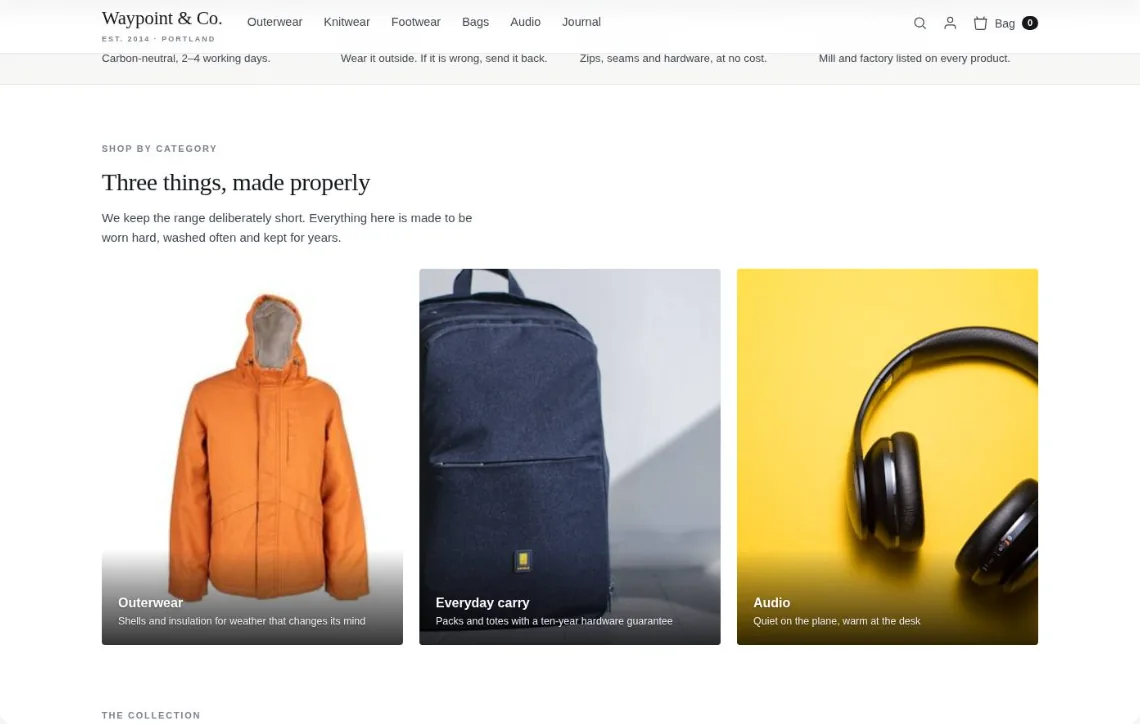
- Home page
- Outerwear
- Alpine Parka
- Sale
- Bag
Waypoint & Co. Done
Goal: More sales · your plan
1‘You might also like’: picks from what they viewed
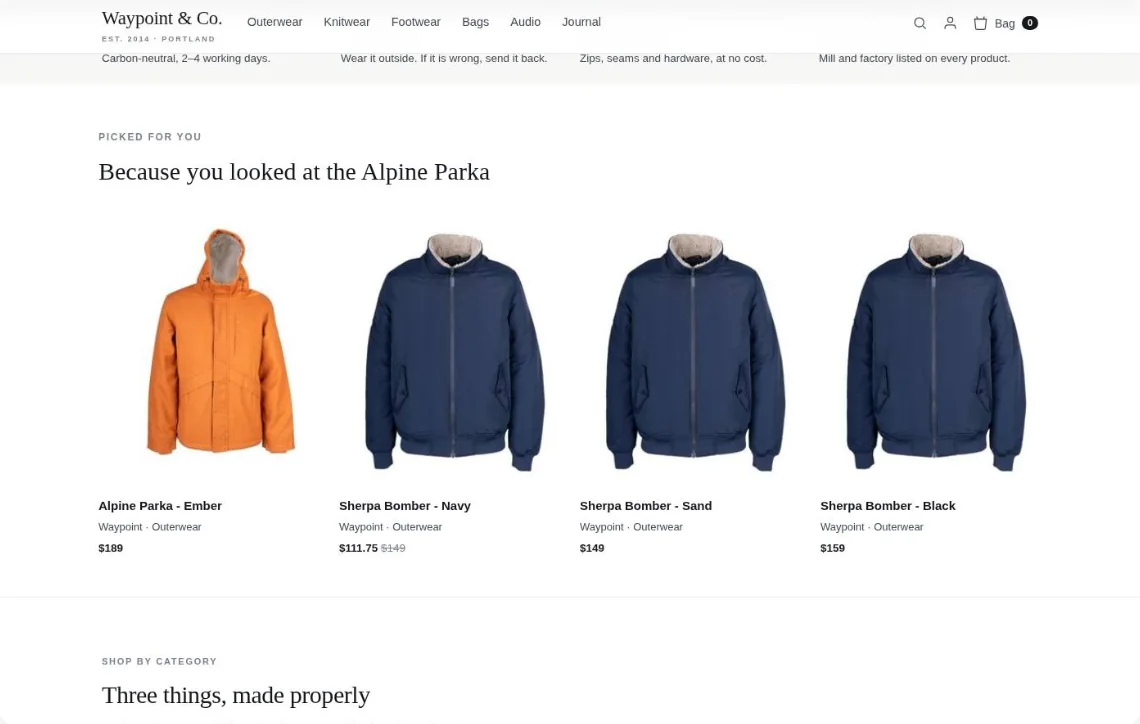
Drawn on your own page — for a returning visitor who viewed the Alpine Parka.
Put Personyze to work
I run an online storea B2B companya travel sitea news sitea universitya bank and I want to recover abandoned cartshelp shoppers find the right productgrow the average orderbring sold-out shoppers backgreet each account by nameshow each industry its own proofmatch landing pages to the adturn pricing-page exits into demosmatch trips to each traveler's stylespeak to business travelers and couplesoffer guides for each kind of tripgive each audience its winning heroopen every visit on something newkeep readers on the next storygrow newsletter sign-upspick the lead story at openmatch programs to each prospectspeak to each learner's goalguide international applicantsserve students, staff and prospectsgreet customers and newcomers differentlycross-sell what each customer lacksoffer products for each life stagebook more adviser sessions.
Pick your business and what you want from it: the card draws the campaign that does it, and opens a working example.
Business
 Sherpa Bomber, SandSize M · $148Still thinking it over?Your Sherpa Bomber in M is waiting.
Abandoned carts get a push, then an email showing today's price and stock.
See the example Alpine Parka, Slate$189Longest cut, down fill, hood
 Sherpa Bomber, Navy$148Shearling collar, $41 under
 Alpine Parka, Moss$189The same parka, in moss
Shoppers describe what they need and get a shortlist, with a reason for each.
See the example +
+ +
+ All three: $203Add all three
Product and cart pages suggest the add-ons others bought with it, lifting order value.
See the example
Sold out or too pricey? One alert when it's back or cheaper.
See the example
Identified accounts see their company name in the headline, before filling any form.
See the example
A bank sees a bank's case study and logos; a retailer sees a retailer's.
See the example The page they land onFleet tracking your dispatchers will actually useStart a fleet trial
Each paid click lands on a headline and CTA written for its keyword.
See the examplePricing-page leavers answer one question that routes them to a pilot or demo.
See the example Cancún
 Miami Beach
 San Juan
 Paris
Paris Ocean Drive
 Mountain air
Beach lovers see beaches, city-breakers see cities — recommendations learn each traveler's theme.
See the example Meeting rooms and airport transfersLate checkoutDesk in every roomSuites, spa and private diningSea-view suiteDinner for two
Business travelers see meeting rooms and transfers; couples see suites, spa and private dining.
See the example 3 days in Tokyo with kidsGuideFamily roomsBali spa retreatsGuideSpa villas
Families see '3 days in Tokyo with kids'; couples see Bali spa retreats.
See the exampleASun, sortedBGo furtherA hero test ships each audience its own winner, not one average winner.
See the example NewHow coastal cities prepare for higher seas
 NewOffshore wind’s next ten years
 NewInside the race for smaller chips
Followed topics rise and read stories drop, so every visit opens on something new.
See the exampleOffshore wind’s next ten years Solar on every old roof
 Measuring a glacier, by hand
Each article ends on the next one they'll want, lifting pages per visit.
See the exampleThe signup appears mid-article for engaged readers, pitched for the topic they're reading.
See the example Rates hold, and markets breathe out
 A comeback on clay
One send, a different lead story per subscriber, chosen the moment they open it.
See the example Westbrook University
 Data Science MSc · part-time
 Business Analytics MSc · online
 Computer Science MSc · evenings
Prospects see programs matching the subject, level and format they've explored.
See the exampleStart in tech without a computing degreePay monthlyCareer coachingLead the data team you’re already onEvening classesEmployer can payCareer switchers and upskilling professionals see different courses, pricing and success stats.
See the example
Overseas prospects see international admissions, scholarships and visa support, in their language.
See the example
Prospective students, current students and faculty each see the content they came for.
See the example Open an account in minutesOpen an account
Customers see savings and mortgage offers; newcomers see 'open an account in minutes'.
See the exampleNext for youHome insurance, from the bank you already useGet a quoteCustomers see the next product that fits them, never one they already own.
See the example Saving for a first home? Start a home saverRound-upsNo fees
 Turn your savings into a pension incomeTalk to an adviserIncome planner
Young savers see home-buying plans; those near retirement see pension options.
See the exampleReady-to-talk visitors book the right adviser on your own site, profile attached.
See the exampleGoal


Where to start
You will use four of these in the first week.
Nobody turns on sixty things. Most accounts start with one audience, one popup and one recommendation widget, prove the lift against a held-back control, and grow from there.