
Every learner gets their own path.
Program discovery, enrollment nurture, and progress-based nudges — AI-personalized to what each learner explores, starts, and finishes. Across site, email, and push.
Works with your stack — your LMS, CRM, ESP & any CMS
 4.8 / 5 on G2
 4.6 / 5 on Capterra













Every visitor used to see the same course list. Now each learner’s homepage leads with the programs that match their goals.
Most learners stall before the finish. Progress-aware nudges — on-site, email, and push — bring them back to the next lesson.
Learners who see relevant programs and timely nudges enroll and finish at multiples of those who don’t. Most education sites still treat everyone the same.
What personalization looks like across the learner journey.
Every capability below runs on one AI-powered learner profile — programs explored, progress, recency, and source — from first visit to certificate.
Program & course recommendations
AI matches programs and courses to what each visitor explores — subject, level, format — on the homepage, catalog, and program pages.
Enrollment nurture by interest
Prospects get follow-ups built from the programs they actually explored — deadlines, financial aid, and outcomes for their field.
Progress-based nudges
Started-not-finished is the biggest leak in e-learning. Progress-aware prompts bring learners back to the exact next step.
Emails that render at open
Every send fills with each learner’s next lesson, deadline, or recommended course at the moment they open — in your existing ESP.
Stopped-out learner win-back
Learners who stall get a reason to return — their progress front and center, a clear path to done, timed to terms and deadlines.
Surveys, NPS & feedback
Ask prospects what they’re looking for and learners how a course went — an NPS score, a quick poll, or a multi-step survey after a lesson, on exit, or by email — and every answer lands on the learner’s profile, ready to target with.
Audience-aware program pages
Working parents see evening formats; recent grads see full-time tracks — same program page, framed for the person reading it.
Proof that matches the program
Testimonials and outcomes rotate by program interest — a nursing prospect sees nursing graduates, not generic praise.
“Worth every evening I put in.”
Course reviews that match the learner
Each prospect sees the reviews closest to what they’re weighing — the same course, subject, or country — imported from your review platform or collected from your own learners on your site.
Prospects ask, the site answers
An AI chat answers from your own pages and program catalogue — and hands back programs, ranked for that prospect.
AI Content Finder
Prospects answer a few questions or simply describe their goal, and get a shortlist of programs and courses with a reason for each pick — ranked for that prospect by the same engine as your recommendations.
Book the advisor call
Prospects book time with the right admissions advisor for their program, on your own page — profile attached.
Campaign traffic gets its own page
Landing pages built in the same editor, personalized on the server and served from the CDN — recruitment campaigns land on a page made for each audience.
Test messaging and offers, measure in enrollments
A/B test program framing, deadlines, and financial-aid messaging per audience — measured in applications and enrollments, not clicks. Auto-pick declares and deploys the winner, and a winner can be applied audience by audience.
One learner’s path, orchestrated.
This is education personalization in practice: every touch below is a campaign from this page — same learner profile, right channel, right moment.

Sophie
Prospect → enrolled in 7 days
Journey running liveExplores programs
 Nursing programs rise to the top
Her subject interest shapes the catalog from the first visit.
The right guide
Deadlines, aid options, and outcomes — for her field.
Compares options
Side-by-side of her saved programs, evening formats highlighted.
Social proof lands
Outcomes from students like her, not generic praise.
Enrolls
From anonymous browser to enrolled student.

Sarah
Stopped out → certificate completed
Journey running liveGone quiet
Her progress and the term calendar trigger the journey.
The nudge
Her exact progress and next lesson, rendered at open.
Returns
The site resumes exactly where she stopped — no hunting.
Momentum
Progress milestones keep the streak alive.
Completes
A finished learner — and a warm prospect for the next program.
Live on your site before next term.
No re-platforming, no dev queue. One tag and your first personalized experience can ship the same day.
Add one tag
A single script starts profiling every visitor — programs explored, progress signals, recency, device, and source.
Connect your catalog
Courses and programs sync via feed, API, or Personyze’s crawler — AI tags each by subject, level, and format automatically.
Personalize every surface
Visual editor, campaign builder, and an AI copilot that drafts campaigns and copy with you. Marketing and enrollment teams ship; IT stays on the roadmap.
Free plan · 5K page views · no credit card
See it in Personyze, screen by screen.
The rules, the programs picked for each learner, the nurture emails and the proof they see — and who each step reached. Real screens from the panel.
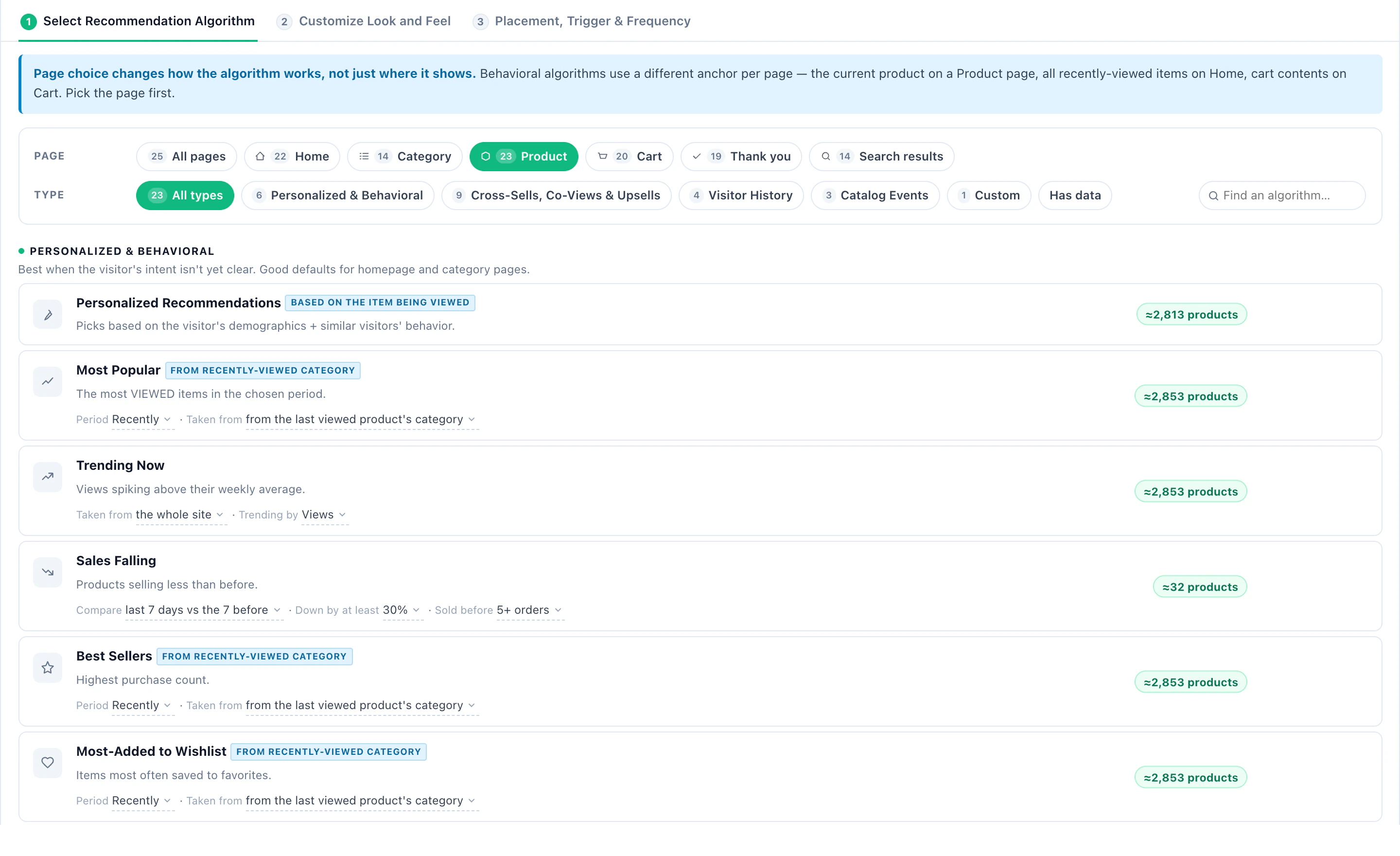
Pick how products are chosen
The algorithm picker for a product page, each algorithm with how many of your products it has data for.
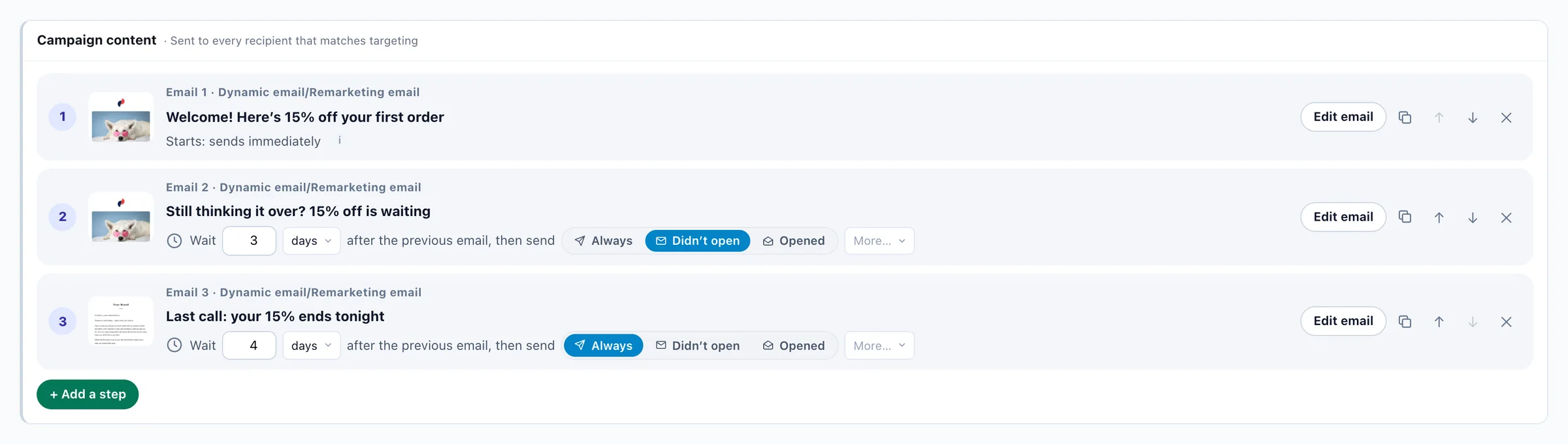
A sequence of emails
Three emails in a sequence, with the waits and conditions between them.
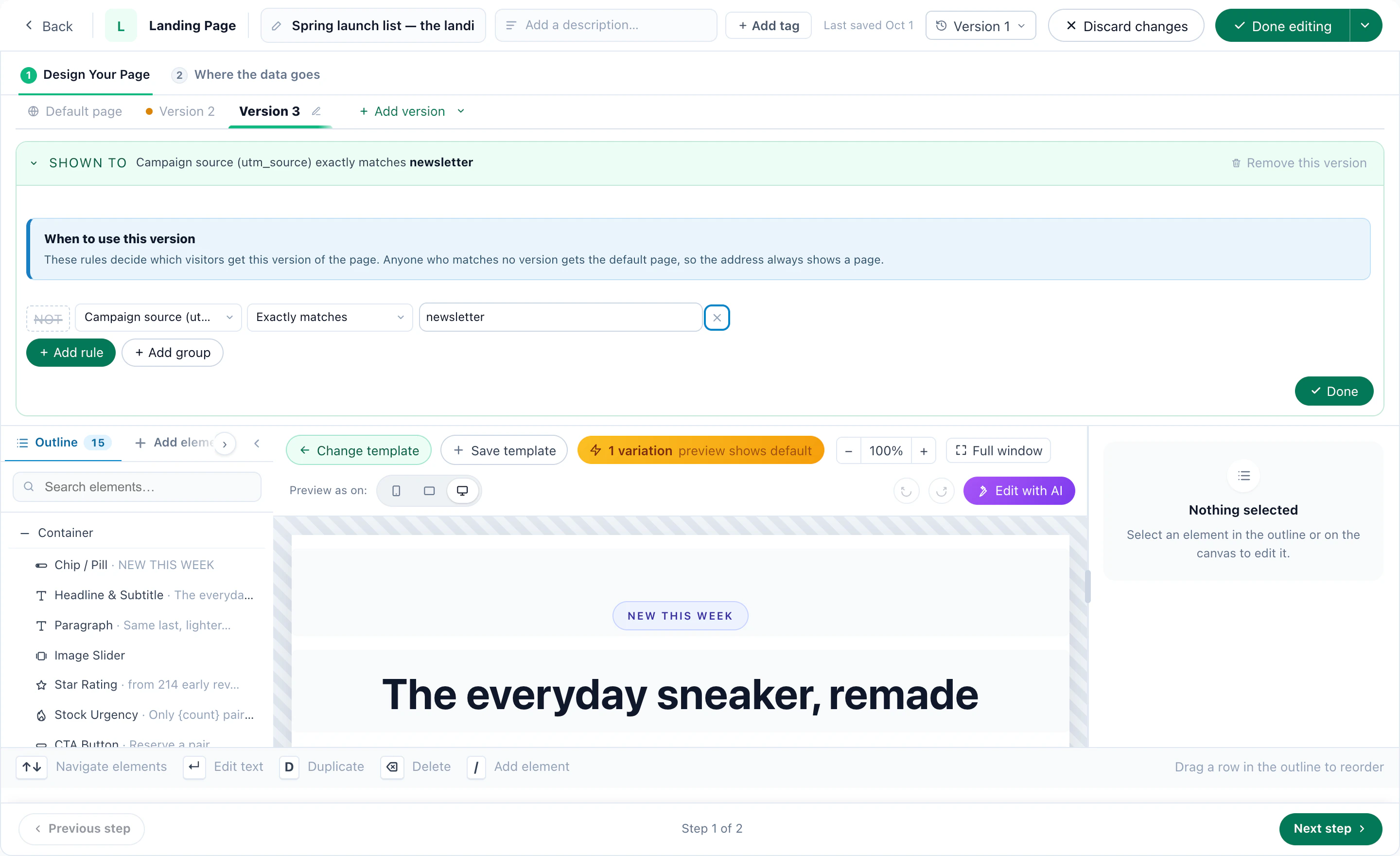
A page for each audience
One address, a version for newsletter visitors — everyone else gets the default page.
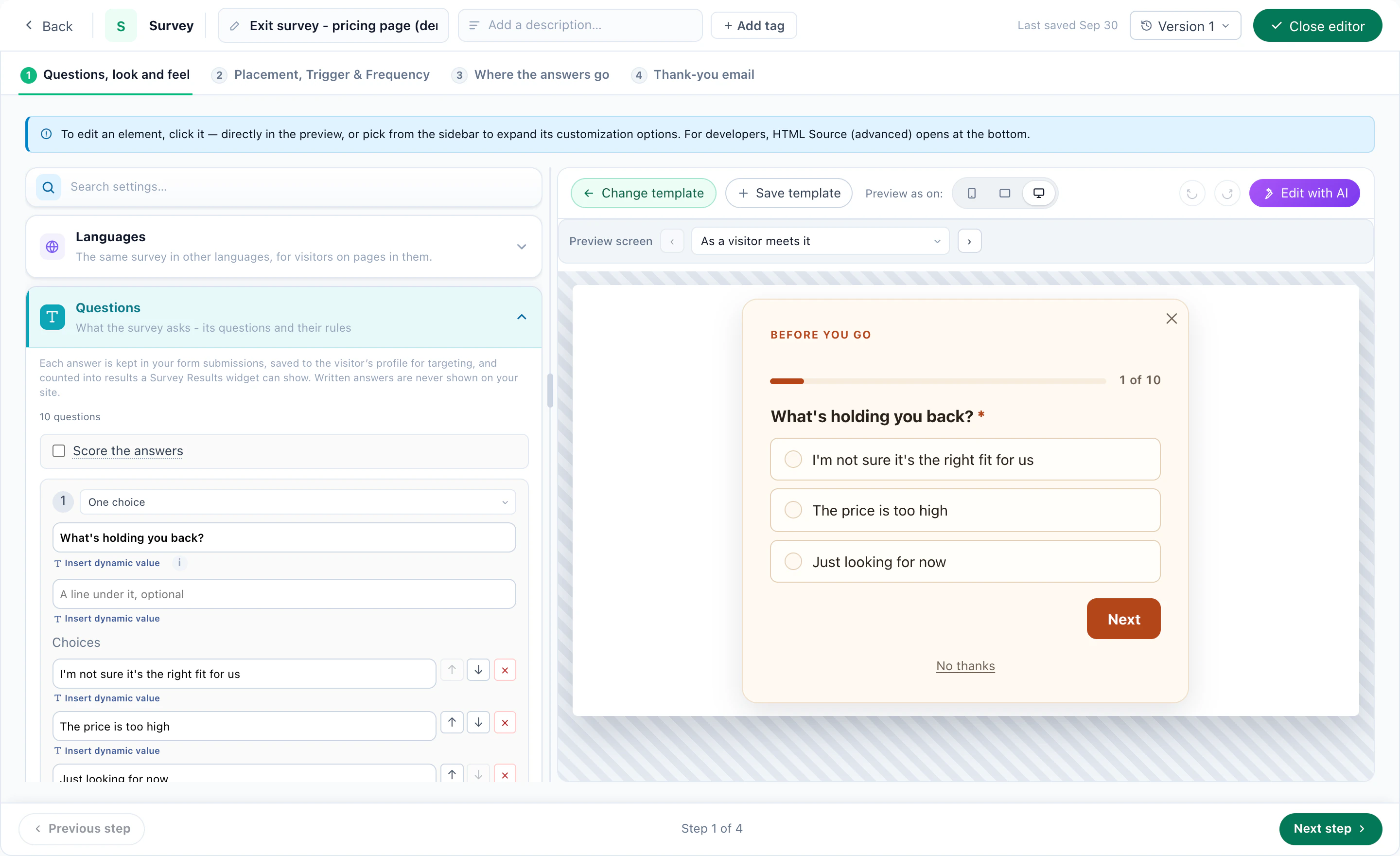
A survey in its designer
The questions on the left, the survey as a visitor meets it on the right.
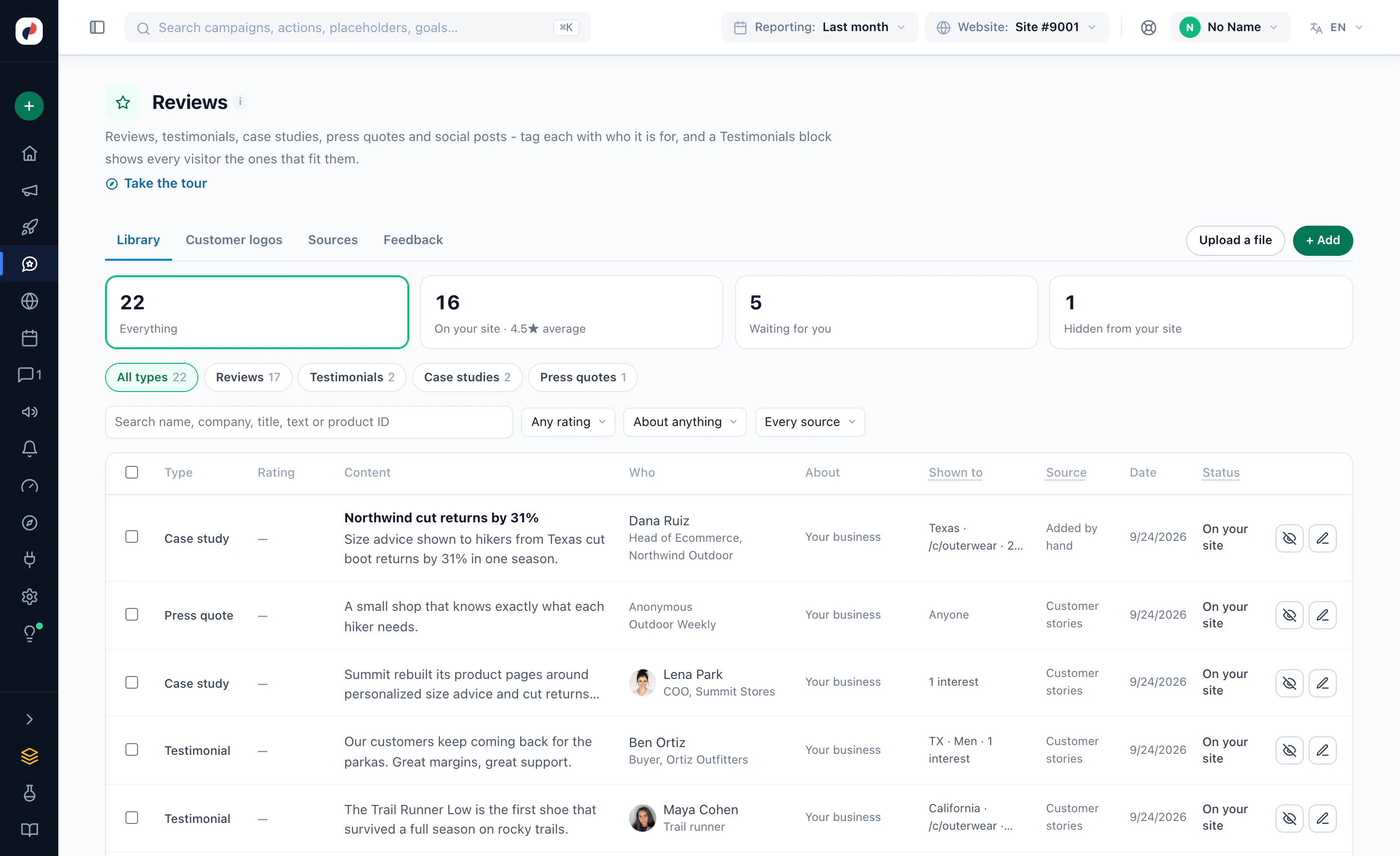
Case studies, testimonials and reviews
One library of proof, each item with who it is shown to.
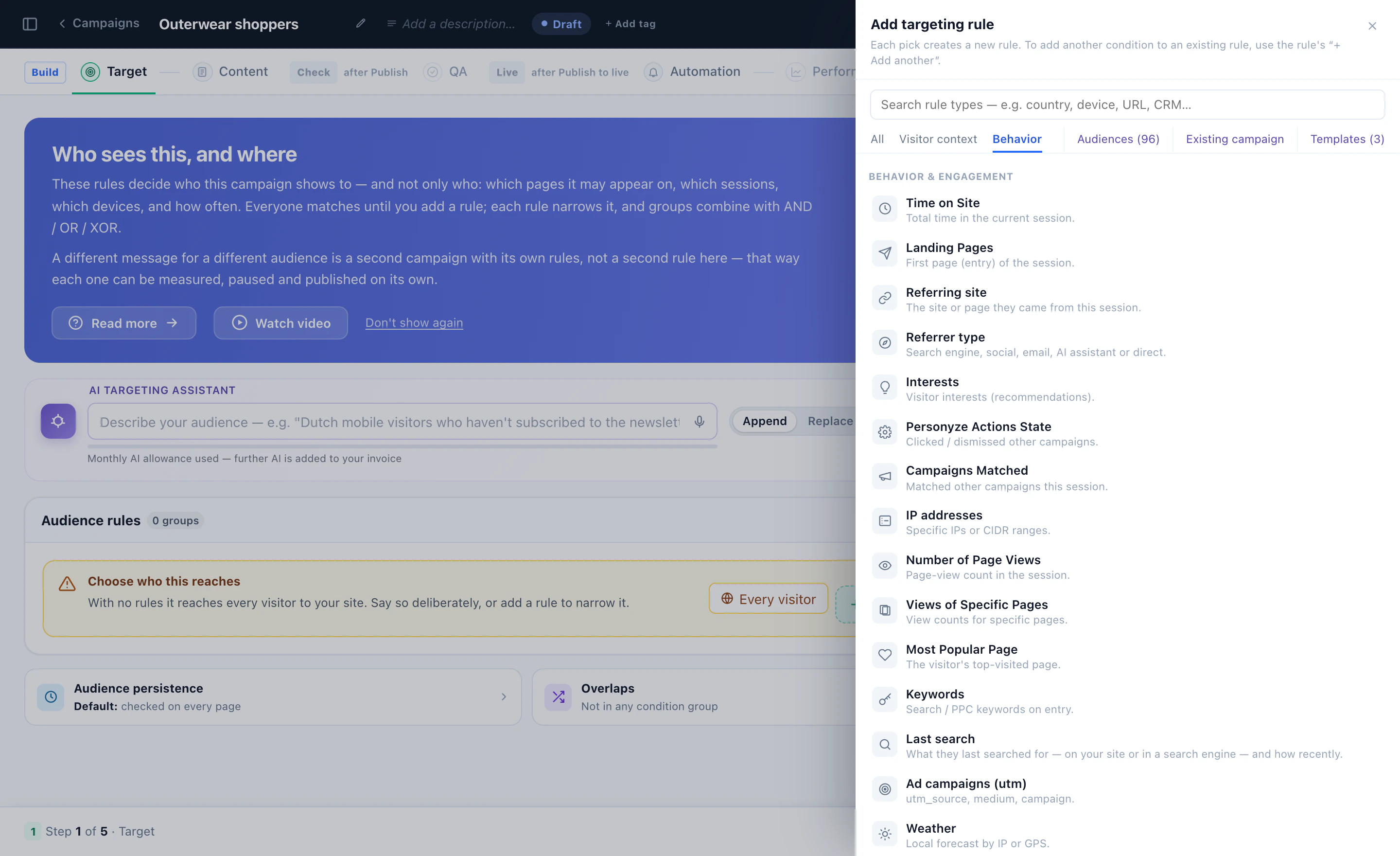
Target on what you know
Time on site, landing page, referrer, interests, campaigns seen and more — picked from one list.
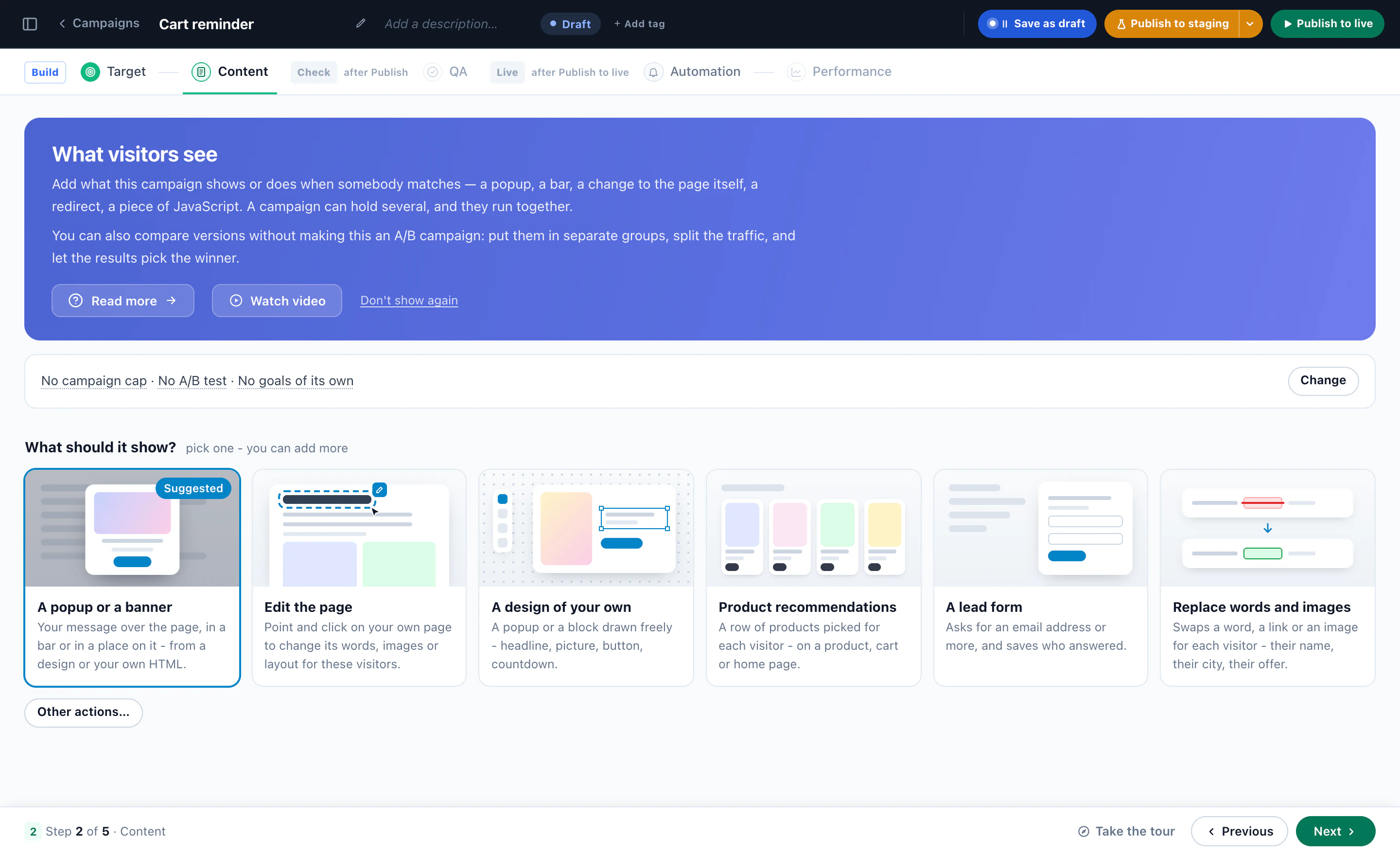
Pick what the visitor sees
A pop-up or banner, an edit to the page, a design of your own, product recommendations, a lead form, or words and images swapped.
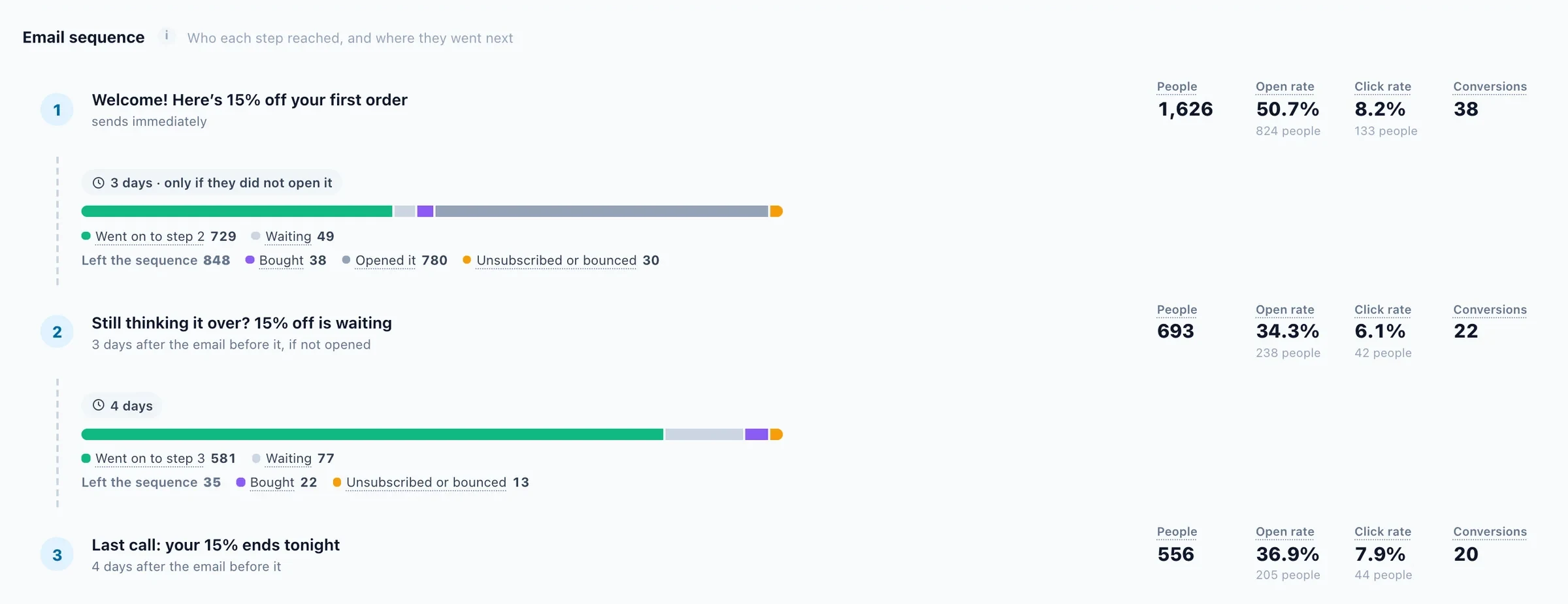
Who each step reached
Who each email reached, who went on, who is waiting and who left.
A complete campaign, end to end 2:13
Who sees it, what they see and when — narrated, in the real panel.
Build a survey 2:28
Questions, logic and where the answers go.
Screens from Personyze demo accounts. The numbers are illustrative.
One platform doing the heavy lifting.
Every campaign on this page runs on the same engine — nothing to stitch together, everything reporting to one place.
One tag, one learner profile
Programs explored, progress, recency, geography, and device unified per learner — the profile Personyze’s AI reads on every pageview to decide what each person sees.
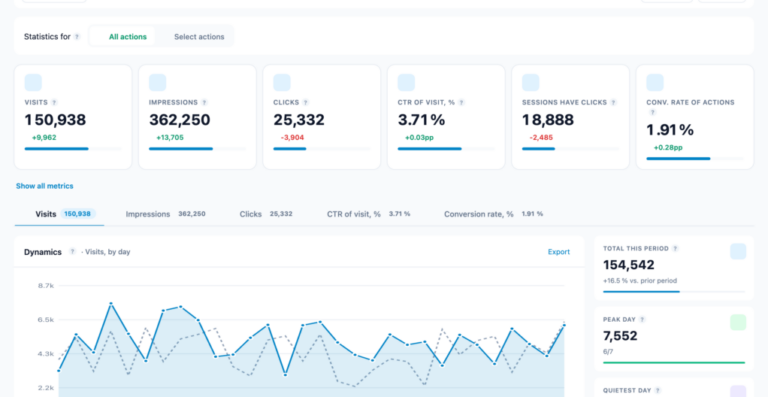
Enrollment & engagement reporting
Every campaign measured against applications, enrollments, and completions — per program, per segment — in dashboards built for marketing and enrollment teams — beside full website analytics for the site itself, down to the individual prospect. Auto-pick deploys A/B winners for you.

Managed service, when you want it
Our team can design, build, and optimize campaigns with you — from your first program-recommendation widget to full learner-lifecycle journeys.
Plugs into the stack you already run
LMS-agnostic by design — the tag personalizes your marketing site and portal pages alongside any LMS; catalog data flows in via feed, API, or crawler.
 HubSpot
 Salesforce
 Mailchimp
 SegmentHubSpotSalesforceMailchimpSegment
Education and content-heavy teams run on Personyze — and say so.
“We deliver personalized content and CTAs aligned to interest and location. Managed service helped on complex use cases.”

“Simple. Affordable. And does its primary function — recommendations — far better than tools that cost multiples more.”
 Mike H.RefrigiWear
“Dynamic recommendations delivered a measurable uplift in conversion.”
 Kaan SaraçDugun.com
★ 4.8 / 5· 4.6 / 5·trusted by 1,500+ marketing teams
Education personalization, answered.
What is education website personalization?
Education website personalization is the practice of adapting an education or e-learning site to each visitor — recommending programs by their interests, nurturing prospects with content for their field, and nudging enrolled learners back to their next lesson. Instead of one catalog for everyone, each learner sees their own path.
Does it work alongside our LMS?
Yes — Personyze personalizes your marketing site, catalog, and any portal pages where the tag runs, and its emails and push complement your LMS. It doesn’t replace the LMS — it fills the personalization layer around it.
How do program recommendations work?
Your catalog syncs via feed, API, or Personyze’s crawler; AI tags each program by subject, level, and format, then matches them to each visitor’s browsing and goals. See content recommendations.
Can it help with stopped-out learners?
Yes — inactivity plus progress triggers win-back journeys: their completion status, next lesson, and term deadlines, delivered on-site and by email or push.
Can prospects find the right program by describing their goals?
Yes. The AI Content Finder asks a few questions — subject, level, schedule — or lets prospects describe their goal in their own words, and hands back a shortlist of programs and courses, each pick with a reason, ranked by the same engine as your recommendations. It runs with the AI Chat Agent add-on.
Can we survey learners and show course reviews?
Yes. Ask an NPS, a quick poll, or a short survey at the right moment, show each prospect the reviews and testimonials closest to the program they’re weighing, and every answer lands on the learner’s profile — ready to target with. Reviews & Surveys is an add-on, included in the Power and Enterprise plans.
How is learner data handled?
You control what’s collected and stored — tracking is consent-aware with EU data options, and profiles can be limited to the signals you choose.
Does it work on WordPress or a custom CMS?
Yes — one tag works on WordPress, custom stacks, and headless sites alike; no CMS plugin required.
What does it cost?
Plans scale by page views from free to Enterprise — see transparent pricing.
More enrollments. More finishers.
Start free, connect your catalog, and stop showing every learner the same course list.