
The AI agent that turns a static site
into a personalized one.
AI personalization software that works like an agent: ask for more signups, a bigger basket, a page that speaks to enterprise buyers. Personyze AI works out who should see what and builds it in your own colours and fonts. You decide what goes live.
Works where you work — the Personyze panel, WordPress, Claude & ChatGPT
Not sure what to ask for? See a free plan for your site








The same agent, wherever you work.
One account, one set of permissions. Ask in the panel, from your assistant, or inside the CMS you publish with — it is the same agent reading the same data and building the same campaigns.
In the Personyze panel
The agent sits beside your campaigns. Describe a goal and it writes the targeting, picks a design from a gallery of 450+, places it and sets the timing — then hands you a link to the finished campaign.
In Claude, ChatGPT and any MCP assistant
On Claude it is a one-click install from the connector directory; on ChatGPT and other assistants, add the MCP server URL as a custom connector. Sign in with your own account, then ask how campaigns are performing, build one, pause an action — without leaving the conversation. Revoke access at any time.
MCP, in both directions
MCP is the open standard assistants use to reach outside services. Personyze runs one, so there is nothing to install and no integration to build — you sign in as yourself, the assistant gets its own credential, and revoking it takes one click. It also works the other way: the agent can call your MCP servers mid-task, so a campaign it builds can read from a system we have never heard of.
In WordPress admin
Install the plugin and the agent appears in wp‑admin. No second tab and no separate login — you personalize the page from the same screen where you edit it.
In Shopify
The same in‑CMS agent is rolling out to Shopify next, then across the other platforms Personyze integrates with. The storefront integration itself is already live and refreshed for the current API.
In scripts and IDEs
For tools that cannot open a browser to sign in, use an API key instead. Same server, same permissions — and deleting a key disconnects anything using it.
Rewrite a whole page for one audience
The visual editor takes a single instruction aimed at the entire page. Every edit lands as a reviewable row you can undo one at a time.

 New
New −20%
−20%
“We rolled out across 40 properties without a single ticket to engineering.”
Operations Director · hotel group, 40 properties



- Coral pill — matches the sale badge already on your grid
- Outline — quieter, lets the product photography lead
- Keep current dark square
- Headline to name the segment, not the company size
- Sub-heading to lead with rollout, SSO and audit logs
- Swap trial CTA for a sales conversation
- Heading to orient a newcomer instead of dating the issue
- Standfirst to explain the beat
- Reorder the grid to lead with entry points
Two ways in: click any element and ask for a different look, or hand the whole page a goal. Either way it suggests first — you apply. Open the interactive editor demo.
“The cruise one Sara built in June”
Most campaigns are not built from nothing. They are last quarter’s campaign with a different audience, a different offer and a different page.
Duplicate the cruise one Sara built in June, but for the ski trips
Shows on the third page of a session Returning visitors only Desktop and tablet Caps at one view per week Goal: booking started
Catalogue: Cruises → Ski trips
Offer: $150 onboard credit → Free lift pass
Pages: /cruises/* → /ski/*
Runs Nov–Mar, not Jun–Aug
UNTOUCHEDThe June campaign keeps running. You end up with two — this is a copy, and nothing about the original changes.
Anything else that should differ for ski?
You do not have to know what to ask
Ask what to improve this week and the agent looks across your pages, products and campaigns, then comes back with ranked, specific opportunities.
What should I improve this week?
/pricing loses 38% of returning visitorsThey came back, looked, and left without reaching checkout.
12 products get looked at and not boughtHigh view counts, almost no orders — interest you already paid for.
Your checkout pop-up has not shown for 9 daysStill switched on. Its targeting stopped matching anyone.
NOT RANKED/careers — 100% bounce. 3 sessions is too thin to mean anything, so it is not competing with the three above.
Want me to start with the pricing-page offer?
It already looks like your site
Ask for a popup and the agent scans your live pages first — your colours, your heading font, your button style — then builds the campaign to match.
Add a popup offering 10% off to first-time visitors
First time here? Take 10% off.
One code, any order, no minimum. Yours for the next 20 minutes.
Get my codeKEPTYour offer is untouched. Restyling changes how it looks, never what it says — and anything you set by hand survives the next rescan.
Want it in a different shape, or a different colour?
Plain words in, real rules out
Say who should see it and the agent compiles that into actual targeting rules — then reads them back to you in plain language.
Show it to people from big companies who have been here before but never bought
In plain words: someone from a company of 500 or more, who has visited before and has never bought. It does not exclude people mid-checkout right now — say so if it should.
Keep 500, or widen it?
It does the work. You decide what ships.
The reason to trust an agent with a live site is not that it never gets anything wrong. It is that everything it does is visible, reversible, and staged until you say otherwise.
- It suggests, you applyNothing changes on the strength of a prompt alone. The agent proposes, shows you what it would do in plain words, and waits.
- Staged by defaultNew campaigns are shown only to visitors arriving from a staging IP. Real traffic keeps seeing what is live now, and you publish yourself.
- A link to the finished resultYou get the campaign with every setting in place — open it, look at it, decide. The build is the agent’s; the verdict is yours.
- Your existing permissionsIn the panel, in WordPress or through an assistant, the agent can only do what your own Personyze user is allowed to do.
- It never publishes to live visitors. Going live is always a person’s decision in the panel.
- It works on one account — the one you are signed into.
- It will not choose who receives a report. Recipients are set by a person, deliberately.
- It does not guess. Every number comes from your account’s data, and it says so when it cannot answer.
Free AI tool · Inspire me
See a personalization plan for your site.
Give Inspire me your address. It reads your pages the way a first-time visitor sees them, works out which audiences your site serves, and writes the ideas worth running: who, which page, what changes, why, and how to measure it.
1What should the plan aim for?
2Your website
Free · nothing to install · it reads your public pages
Reading yourstore.com
As a new visitor would see it · about 4 minutes
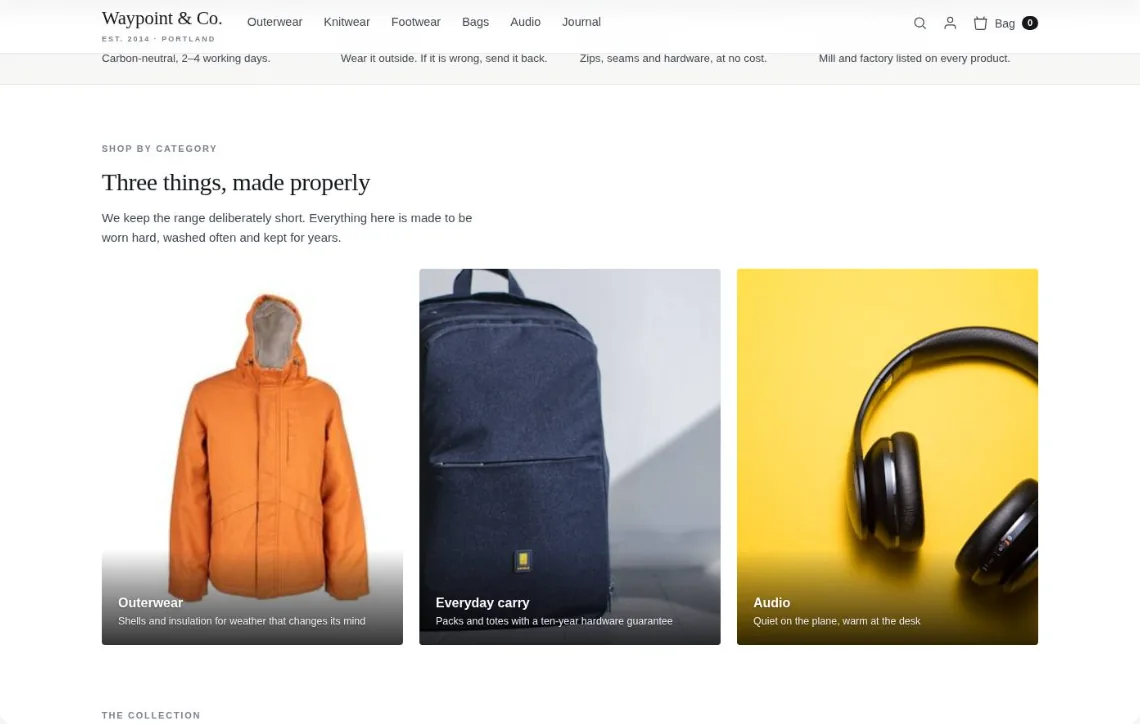
- Home page
- Outerwear
- Alpine Parka
- Sale
- Bag
Waypoint & Co. Done
Goal: More sales · your plan
1‘You might also like’: picks from what they viewed
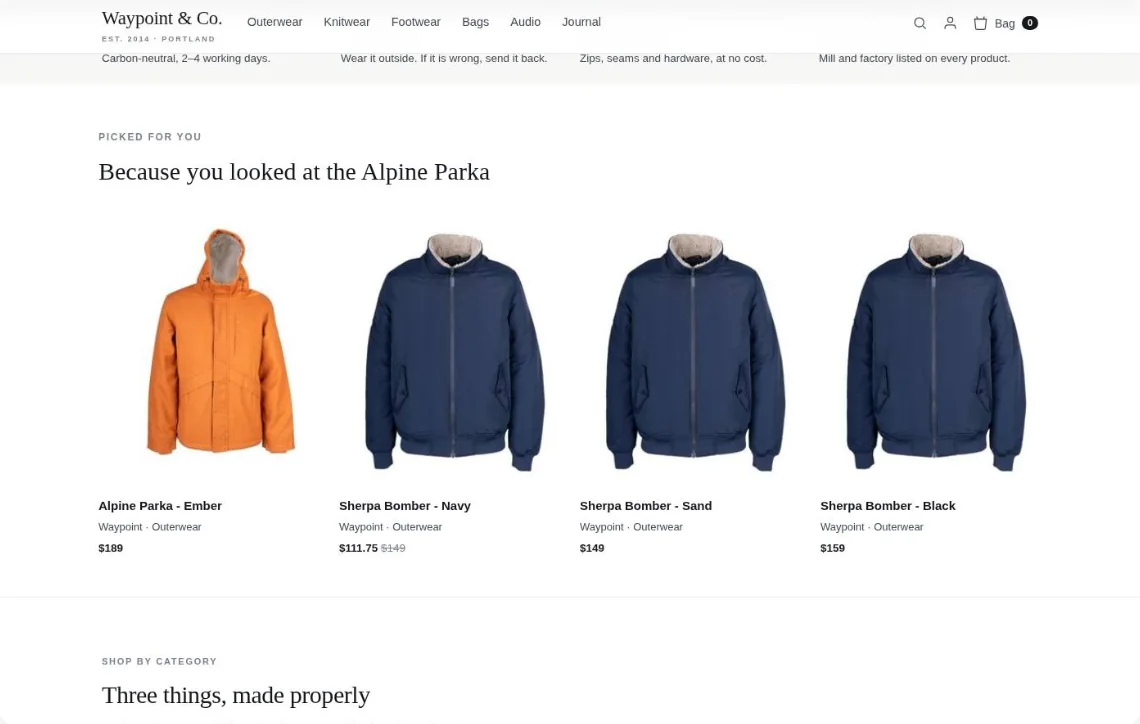
Drawn on your own page — for a returning visitor who viewed the Alpine Parka.
The way people actually talk to it.
Not commands, and not a query language — the sentence they would have said to a colleague. Six of them, from three kinds of site, with what came back underneath.






Plain words in, real rules out. Every one of these lands as a reviewable draft you can change or throw away before anybody sees it.
And one that talks to your visitors.
The same platform runs a chat on your site — answering from the pages and documents you give it, looking things up in your catalog, and handing the conversation over when it should.
- It answers from your sources, or not at all. Add pages and documents as knowledge. With nothing added it declines almost everything — which is the behaviour you want from a chat on a live storefront.
- It can reach your catalog. Stock, price and product questions are answered from the same feed your recommendations run on, not from a summary written months ago.
- You choose whose face it wears. Your logo alone, one named person, the team on rotation, or whoever is signed in right now — and whenever a human face is shown, a disclosure line is required. It cannot pretend to be a person.
- It looks like your site. Accent colour, which corner it sits in, the header and launcher wording, how long before it opens itself, and whether it appears on phones at all — with any of it overridable by a single campaign for its own pages.
- You can read every conversation. A transcript screen, the roster of who answers, and a conversation quota enforced before a chat starts rather than halfway through.
 Maya from AcmeUSUALLY REPLIES INSTANTLY
See it in Personyze, screen by screen.
Ask what to build, describe a goal, change it in plain words — in the panel, from Claude or ChatGPT, or on your own page. Real screens from the panel.
A version of your site for each audience 2:00
Personyze reads your site, proposes the segments your pages speak to and writes each its own hero and message bar. Nothing shows until you approve it.
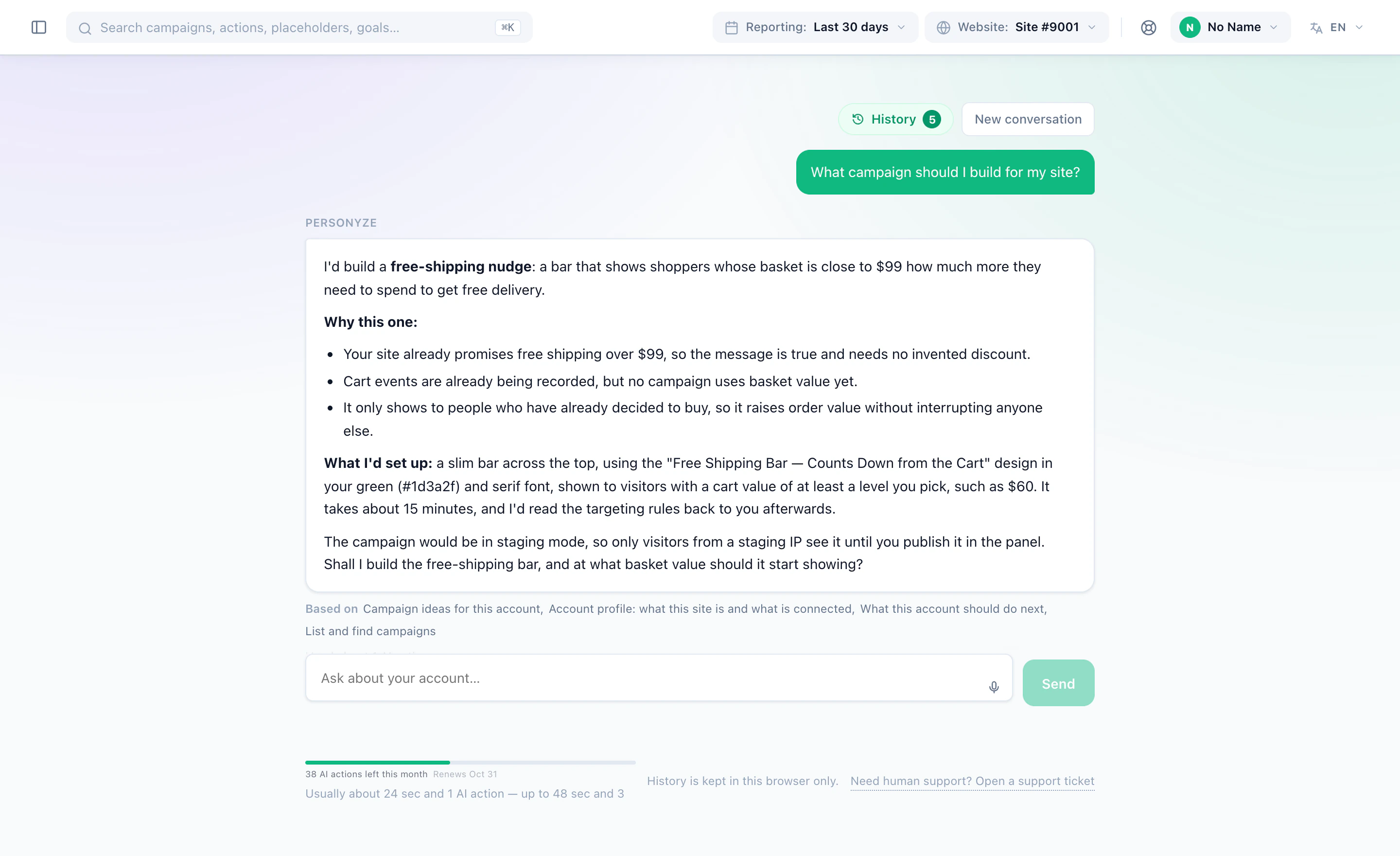
Ask what to build next
It reads your catalog, your goals and what already runs, then names one campaign and why — in your colours and font.
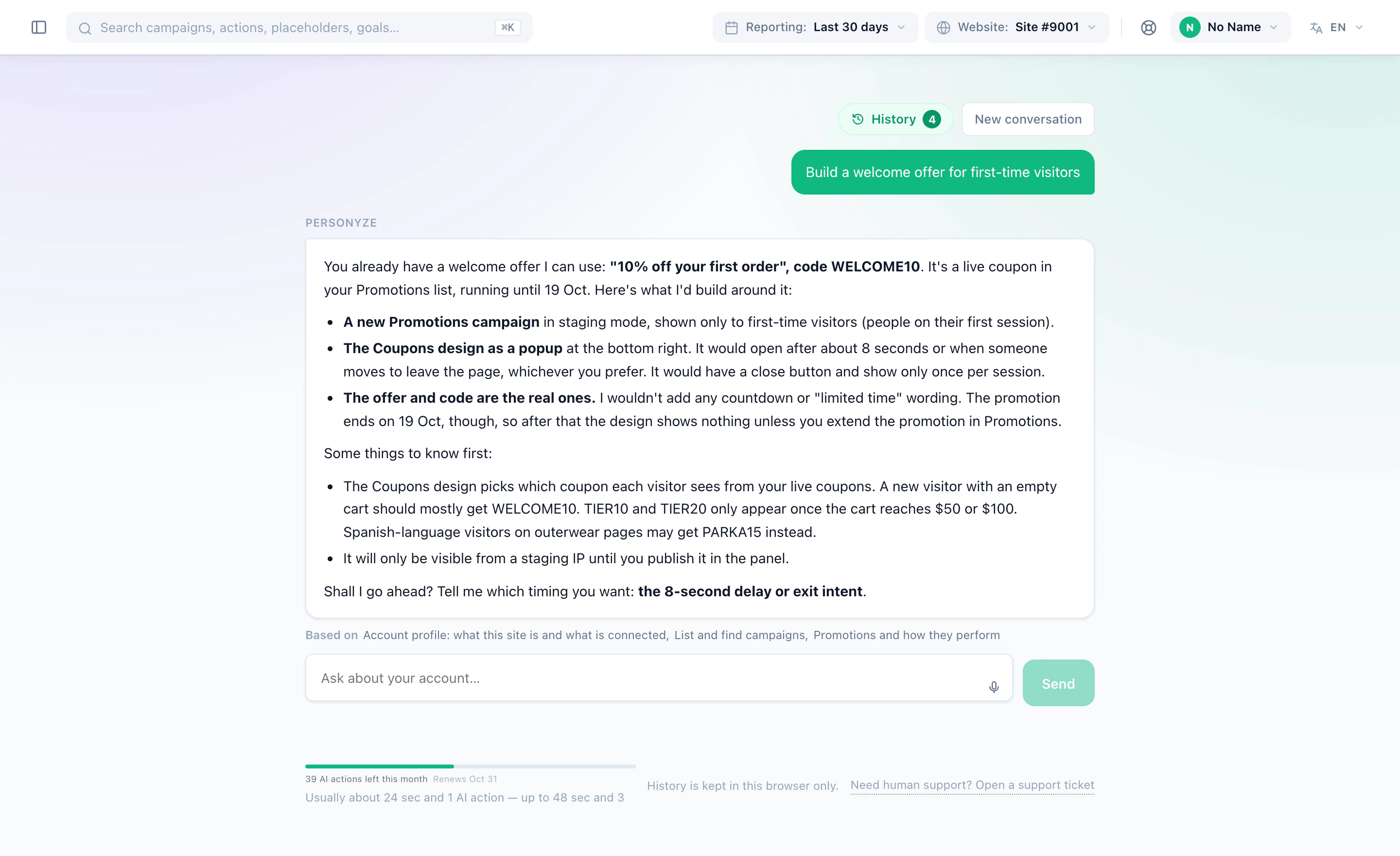
Describe a goal, get a plan
A welcome offer for first-time visitors: who sees it, which design, the real coupon and when it opens — and it asks before it builds.
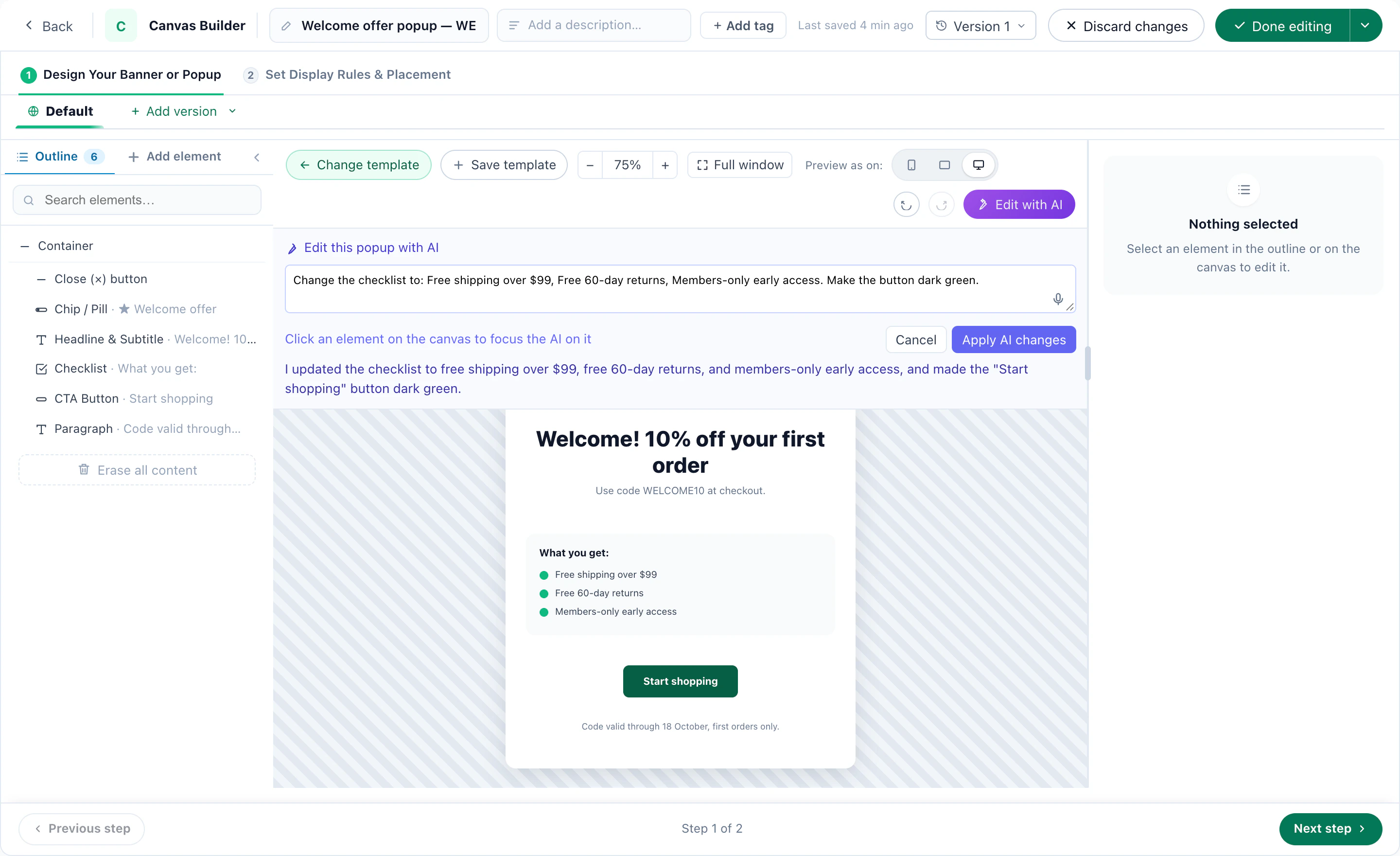
Change what it built in one sentence
Edit with AI on the pop-up it made: the checklist rewritten and the button turned dark green — keep it or discard it.
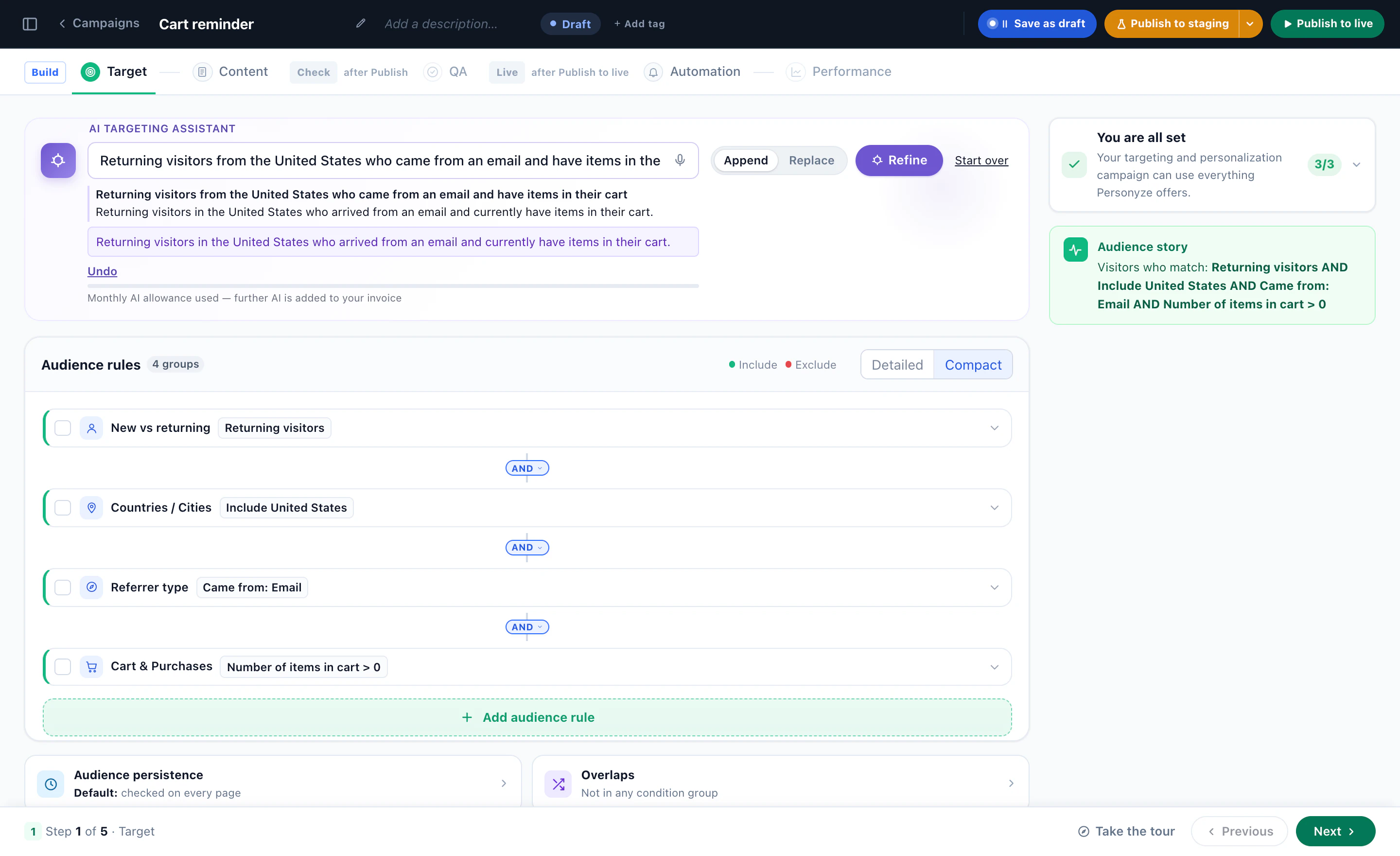
Targeting from one sentence
Describe the audience in plain words and it writes the rules, then tells the audience back to you.
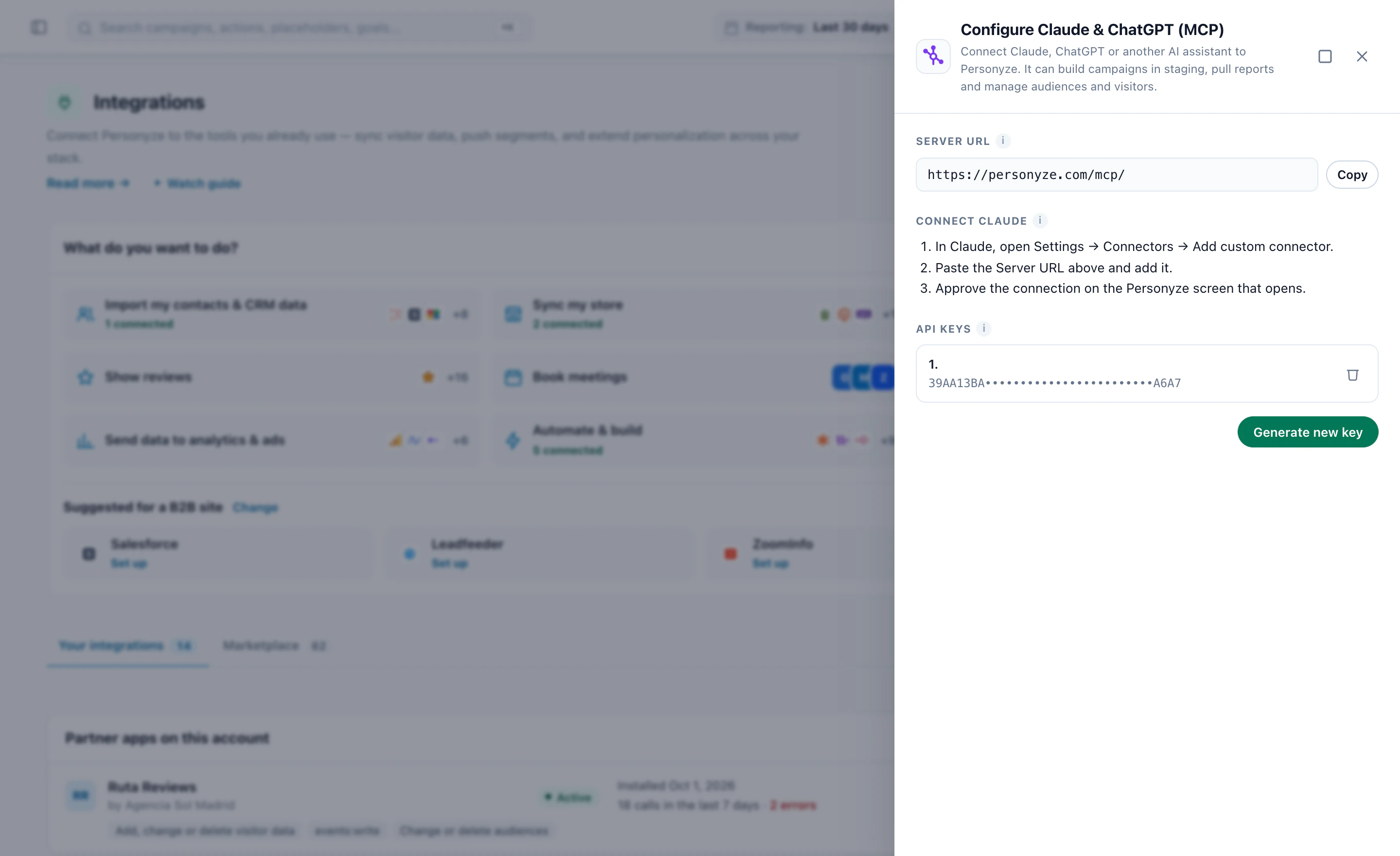
The same agent in Claude or ChatGPT
One server address and three steps to connect — or an API key for scripts. Same account, same permissions.
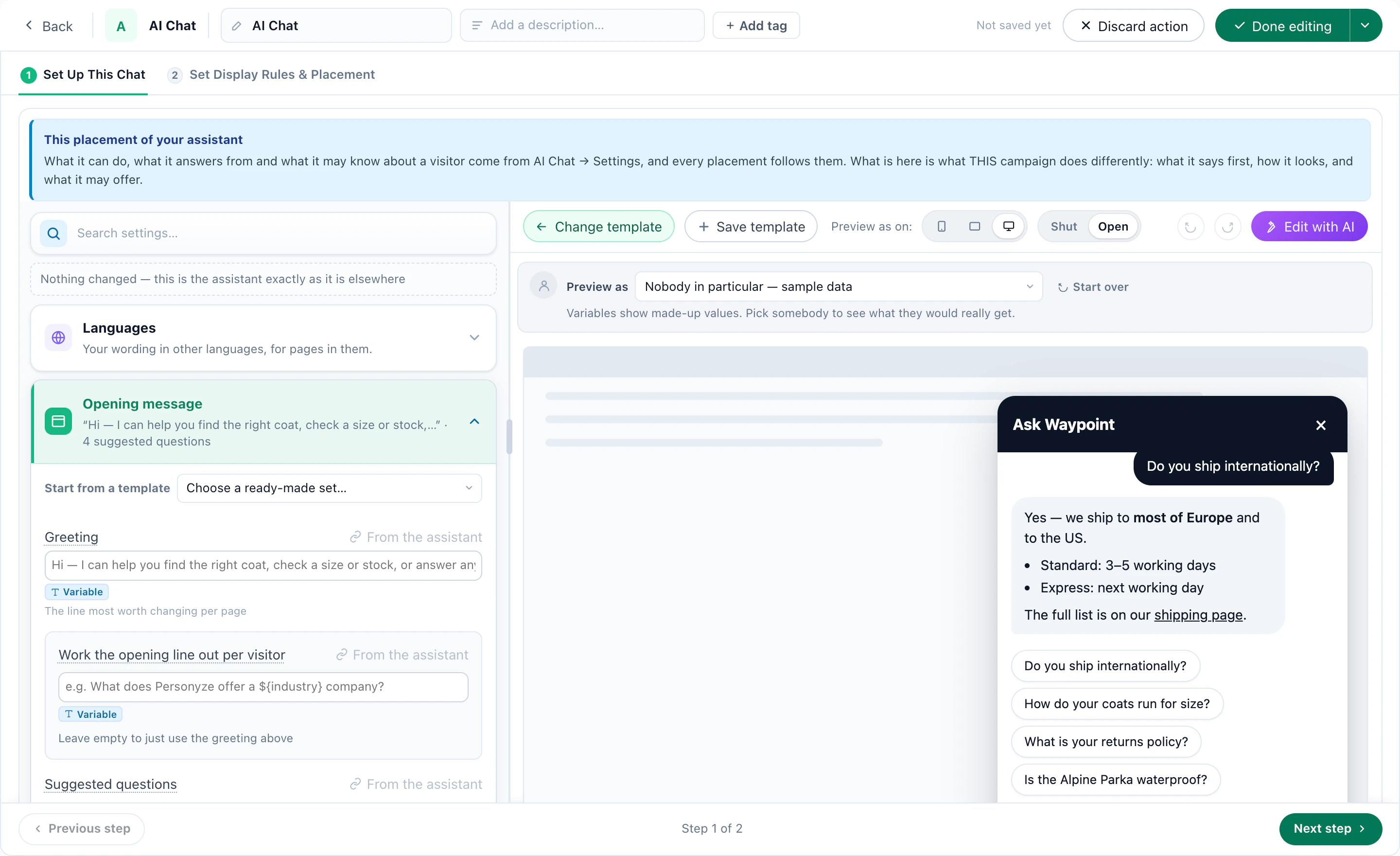
And one that talks to your visitors
The opening message and suggested questions beside the chat itself, answering a shipping question from what you gave it.
Edit your pages with WYSIWYG and AI 2:02
Your own page opened in the editor, the headline rewritten with AI, and Page-level AI for changes across the page.
Screens from a Personyze demo shop. The numbers are illustrative.
Personyze AI, answered.
Will the AI change my live site without asking?
No. Everything it builds starts in staging, visible only to you, until you publish it. Changes that would affect real visitors — pausing an action, for instance — are confirmed in concrete terms first and are fully reversible.
Does the generated content look like a template?
It should not. The agent scans your live site before it builds, reading your colours, fonts, button style and the tone of your copy, then builds to match. Anything you set by hand survives a later rescan, and you restyle by asking rather than by editing CSS.
What can I ask it to do?
Build and restyle campaigns, compile targeting from plain words, pause and resume actions, create and populate audiences, look up visitor profiles, manage placeholders, read campaign and traffic performance, and answer product questions from the documentation. For anything the dedicated tools do not cover, it can call the Personyze REST API directly.
How is this different from a chatbot on a dashboard?
It reads your real account data and writes real configuration. Targeting becomes rules you can inspect in the panel; campaigns become actual campaigns. It also declines to quote a click-through rate on a sample too small to be meaningful rather than producing a confident number.
Do I need to install anything to use it from Claude or ChatGPT?
No. Add the Personyze MCP server URL as a custom connector and approve the connection on the Personyze screen that opens. The assistant receives its own credential, there is nothing to paste, and you can revoke access at any time.
Which platforms have the agent built in?
WordPress today, through the Personyze plugin, which puts the agent directly in your WordPress admin. Shopify is next, with the remaining supported platforms following. See WordPress personalization and Shopify personalization.
What stops it running up a bill?
Caps you set. Spend is limited per assistant instance and across the account as a whole, and a ceiling sits above both that can be tightened but never widened from inside the account. When the allowance is gone the AI stops and offers credits rather than continuing quietly.
Does using AI cost extra?
There is no separate AI subscription. Each package includes a monthly allowance of AI actions, and the remaining balance is shown before you run anything — under the prompt box, and live in the Visual Editor while a session is running. If the allowance runs out the AI stops and offers credits — it never runs up a bill you did not choose. See pricing.
Personalization without the build time.
Tell Personyze AI what you want to happen — a welcome offer, a recommendation row on the cart page, an A/B test on your pricing headline, a homepage rewritten for one audience, or just a read on what is worth fixing this week. It handles the targeting, the design and the staging.
More: all features · A/B testing · behavioral targeting · templates