Skip to content
Personyze
Promotions · AI promotion management

The right promotion.
Picked by AI.

Personyze learns which promotions visitors like each one actually bought from — and shows every visitor the banner, offer or coupon most likely to convert them. In an online store, on a travel site or in a SaaS product.

List your promotions once. The AI keeps learning from every view, click and purchase, each visitor can get a code of their own, and the report shows the lift over visitors who saw nothing.

Not sure which offer to run? See promotion ideas for your site
G24.8 Capterra4.6
One list

Stop building one campaign per offer.

Every promotion is a row with its dates, pages, audience, language and code, and your widgets pick from the list – so a new offer is a new row, not a new campaign. Add rows by hand, upload a CSV or Excel file, connect a Google Merchant Center feed, or let AI draft them – headlines, variants to test and translations – for your approval.

Make the picture

No banner image yet? It makes one from the products.

Pick the offer and Personyze builds its banner from the products it promotes, in your brand’s colour – ready to edit like any design. No designer needed for a weekend sale.

Free AI tool · Inspire me

See promotion ideas for your site.

Not sure which offer goes to whom? Give Inspire me your address. It reads your pages the way a first-time visitor sees them and writes the promotions, banners and pop-ups worth running: what to offer, to whom, where, and how to measure it.

Like an idea? Describe it to our AI personalization agent and it builds the campaign for you.

Free · about 4 minutes · no email needed · see an example plan

1What kind of ideas?

OnlyBanners & pop-upsA/B testsRecommendationsSocial proof

2Your website

Scan my site

Free · nothing to install · it reads your public pages

Reading yourstore.com

As a new visitor would see it · about 4 minutes

  • Home page
  • Outerwear
  • Alpine Parka
  • Sale
  • Bag

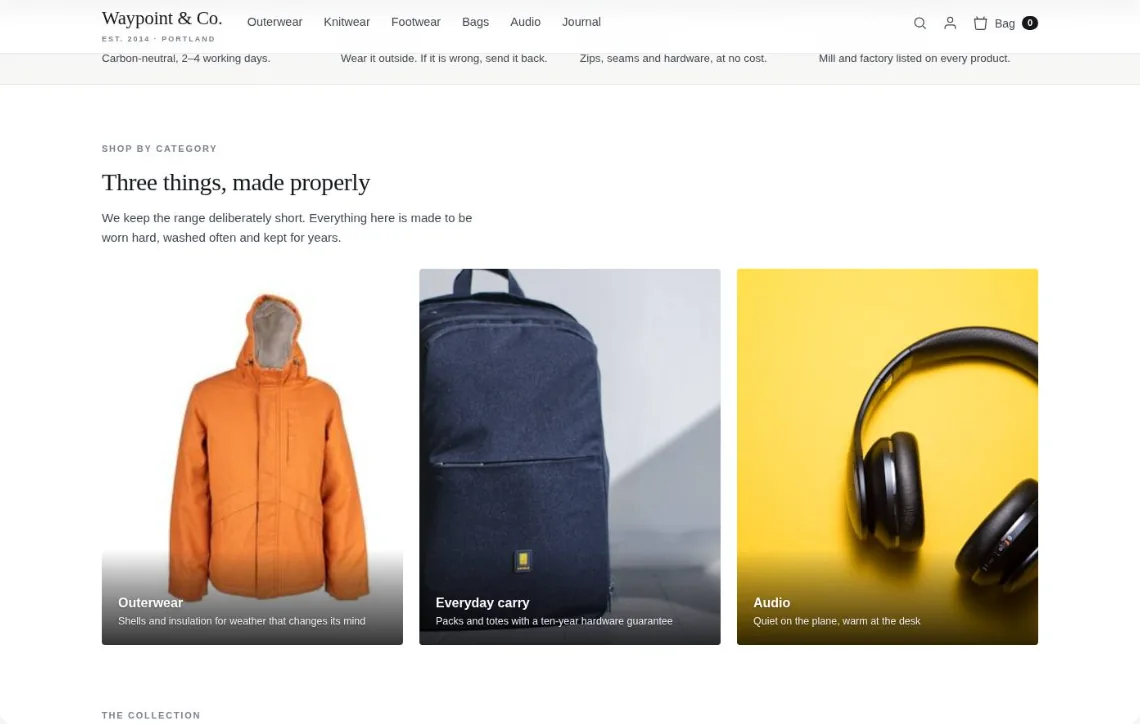
Waypoint & Co. Done

Only: Banners & pop-ups · your plan

1
A welcome-back bar with the sale pieces they viewed
For: returning visitorsEvery page
Measure: return visits that buy
2
A free-shipping nudge for carts under $75
For: carts under the thresholdCart
Measure: average order value
3
The sale tiles first, for deal-seekers only
For: visitors who opened SaleHome page
Measure: revenue per visitor

1A welcome-back bar with the sale pieces they viewed

TodayWith Personyze
Welcome back: the Alpine Parka you viewed is 20% off this week →

Drawn on your own page — for a returning visitor who viewed the Alpine Parka.

Picked by AI

The AI chooses. Then it keeps learning.

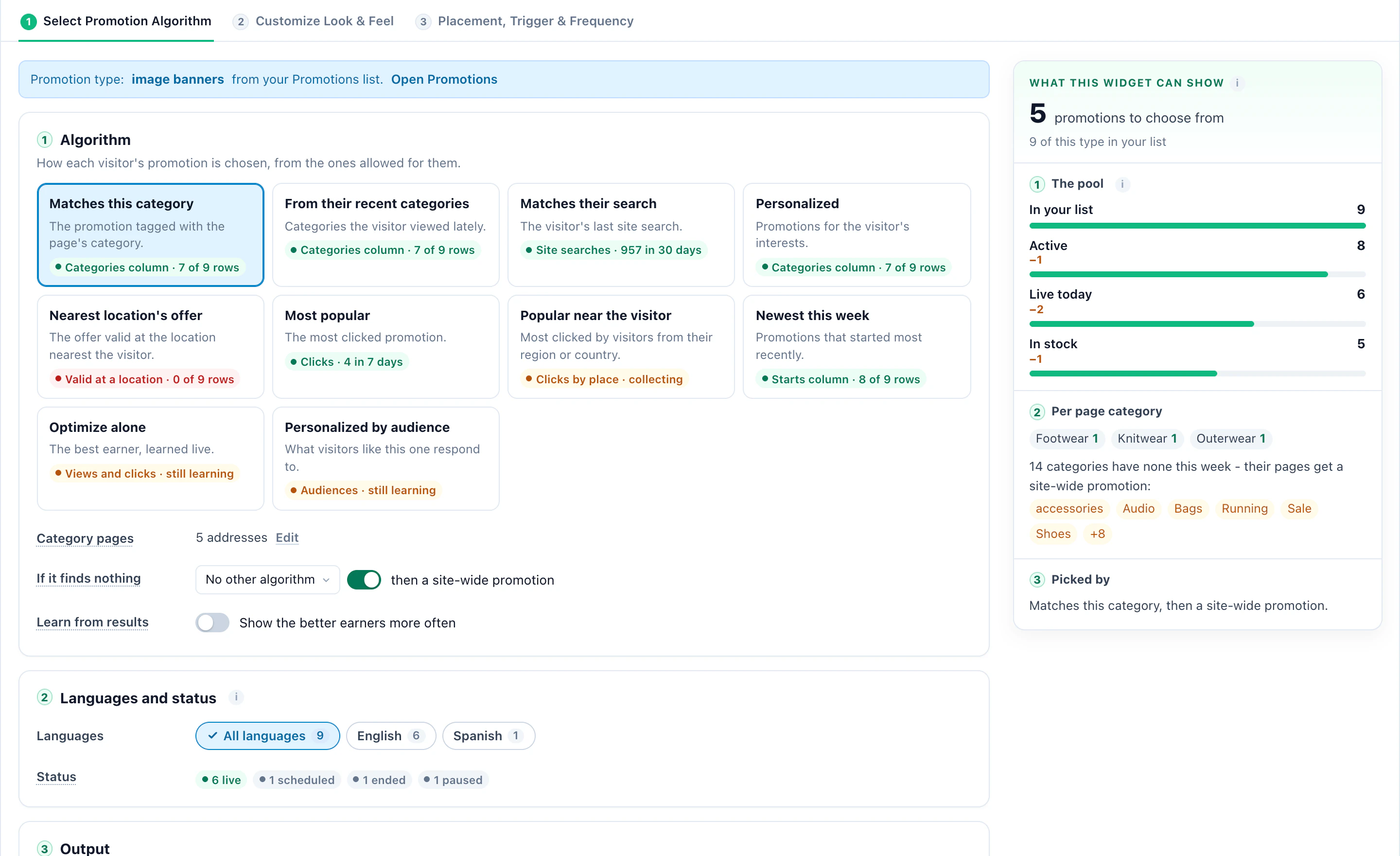
Personyze learns which promotions visitors like each one bought from – by device, traffic source, new or returning, and what they browsed – and shows the one most likely to convert. Optimize keeps testing the rest, so a new promotion gets its chance.

Ten ways to choose, each telling you whether your data supports it:

  • Matches this category
  • From their recent categories
  • Popular near the visitor
  • Newest this week
  • Matches their search
  • Personalized
  • Most popular
  • Nearest location’s offer
  • Optimize alone
  • Personalized by audience
Who sees it

Every promotion knows who it’s for.

Give any row its own audience with simple pickers. The algorithm then chooses only among the promotions that fit the visitor in front of it – a shopper, a traveller or a trial user.

  • Country, state, or distance from a place
  • Cart value
  • Lifecycle stage
  • CRM and profile fields
  • Categories viewed lately
  • Device
  • After redeeming another promotion
Designs, where and when

9 designs, shown where and when it fits.

Image Banners, Text Promotions, Coupons and Show Store each come with designs of their own – ready to place, and editable like any Personyze design. Every one of them draws from the same list. Pick one, then put it in the page or on top of it, and choose what opens it.

From BostonParis city breaks, 15% offSee dates →
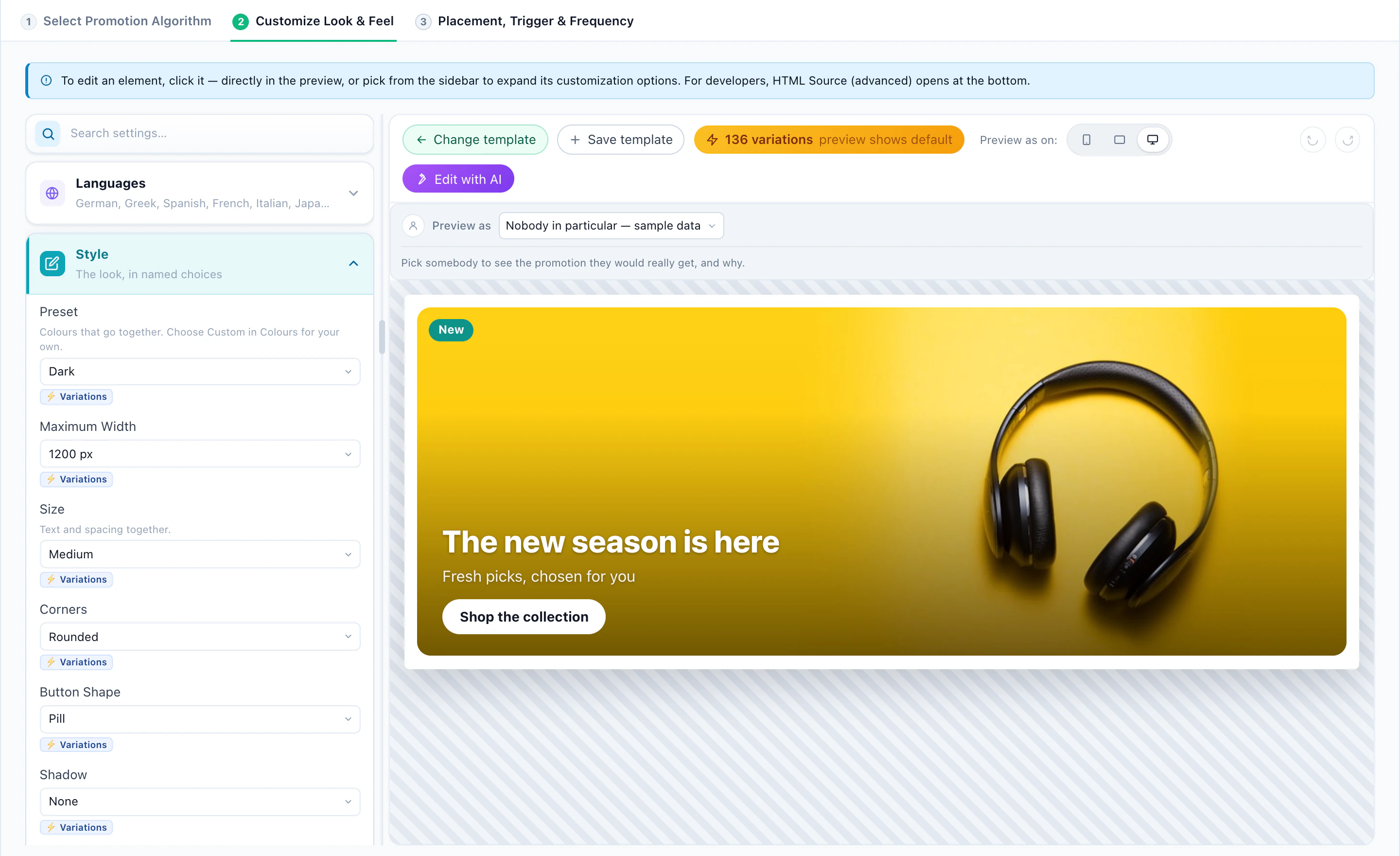
Image BannersHeroA wide banner with a headline and a button
Parka week – 20% offNew sneakers are inBeanie season: two for $40Parka week – 20% off
Image BannersSliderSeveral promotions taking turns
Annual plan: two months freeSee plans →
Text PromotionsStripA line inside the page
Free shipping over $99ends in 04:12:09
Text PromotionsBarAcross the top, with a countdown
Ends soonFly from Boston: $120 offRound trips this monthBOS120Copy code
CouponsCoupon cardThe offer and its code, side by side
20% off your first yearUPGRADE20Copy
CouponsCoupon barA slim bar with the code inline
Your nearest storeWaypoint & Co. · South CongressOpen now · closes 9 pm · 1.2 miDirectionsCall
Show StoreStore cardDistance, hours, phone, directions
  • South CongressOpen now closes 9 pm1.2 mi
  • The DomainOpen now closes 8 pm6.8 mi
  • Round RockClosed opens tomorrow at 9 am17 mi
Show StoreThree nearestThe closest three, with their hours
South CongressOpen now until 9 pmDirections
Show StoreOpen-now barOne slim line across the page

Then put it in the page or on top of it, at the moment that fits.

Put a promotion in a spot on the page, a bar, a slide-in or a pop-up, and fire it on page load, on scroll, after a delay, on exit intent or when the visitor goes idle – the same triggers as every Personyze campaign. Want to choose the audience for each banner or pop-up yourself? That is Banners & Pop-Ups.

And never too often
  • Once per session
  • Stop after 3 views
  • Hide for a week after a close
  • Not after a purchase
  • Wait 10 minutes after another campaign
Coupons

A code of their own, so it can’t leak.

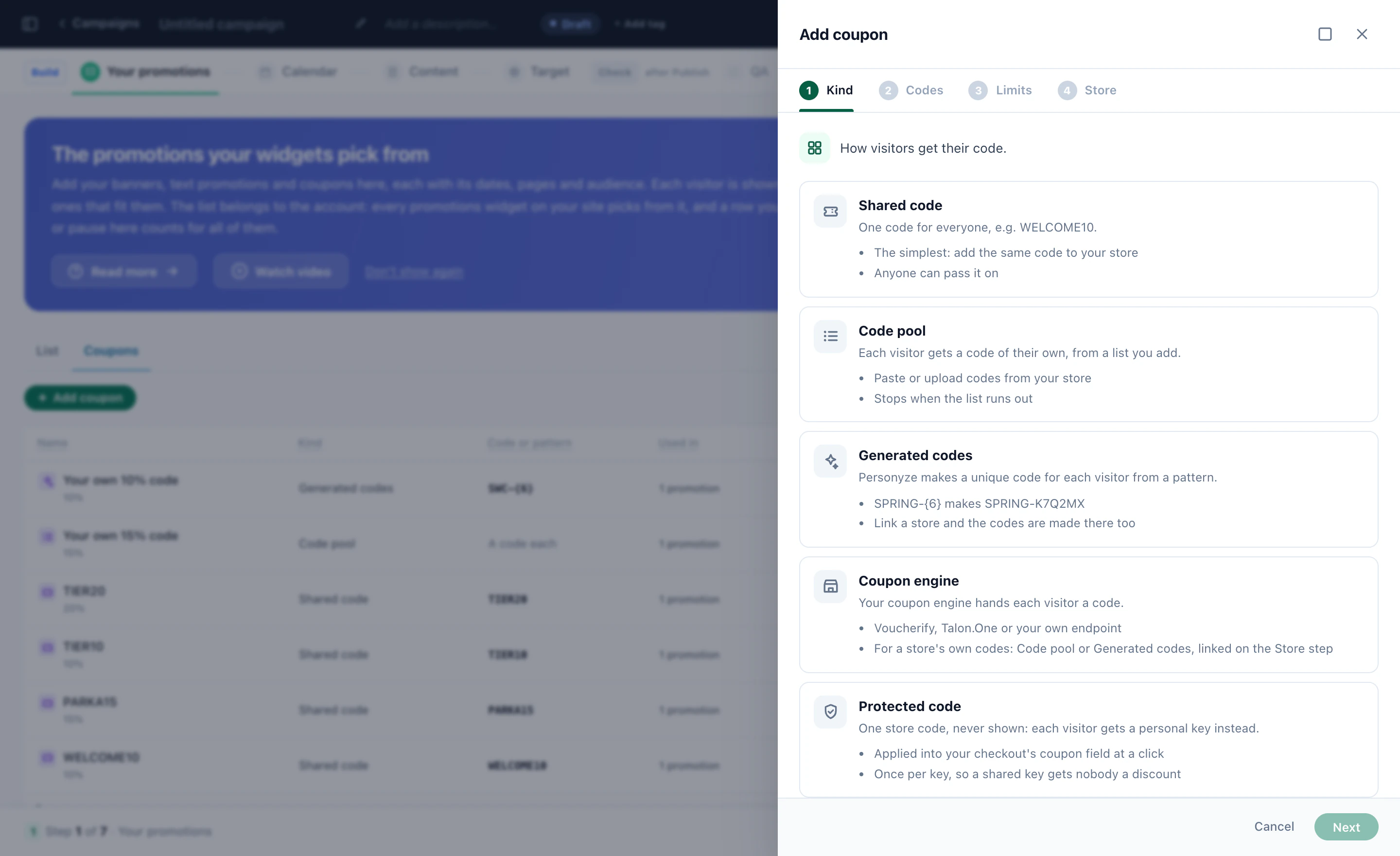
Give each visitor a code of their own – generated from a pattern, or taken from a pool you upload – so a discount can’t end up on a coupon site, and you can count what it actually brought. Shared codes, and a code that grows with the cart, still work wherever they fit.

  • One code per visitorGenerated from a pattern like SAVE-{6}, or handed out from a pool you upload.
  • The same code on returnA visitor who comes back sees the code they were given.
  • Limits you setHow many codes go out, and until when.
  • Every code countedHanded out, revealed with “Copy code”, redeemed at checkout – in Promotions › Coupons.
A/B test, one switch

Code or no code? Let your visitors decide.

Every banner design has a “Show the visitor’s code” switch. Run the same banner with and without it as an A/B test, and keep the one that converts. Off hands out no code at all.

Show the visitor’s code
Coupon near you

Their store, open now, with its own offer.

Show each visitor the store nearest them – how far it is, whether it is open, and the promotion valid there – so a web visit can end at your counter. For chains, dealerships, clinics and service networks: one campaign, not one per store.

  • Every store, uploaded onceA sheet or a Google Business Profile export: address, phone, photo, weekly hours and special hours.
  • Open now, kept current“Open now”, “Closes at 9 pm” or “Opens tomorrow at 9 am” – refreshed every 10 minutes, in each store’s own time zone.
  • The right store, not only the nearestStores that carry what they are looking at (by brand or category tags, or a store list in your product feed), or that fit what you know about them – a Toyota owner is sent to the nearest Toyota service centre. Matching stores first, or only matching stores.
  • Offers valid where you sayAt every location, at locations with a tag, or at stores you choose. Each visitor gets the offer of the one nearest them, with their own code and directions.

Nearest is worked out from the visitor’s city, from their IP address. See it for four visitors →

It looks after itself

The details you’d miss, handled.

Waypoint & Co.
Merino Watch Cap – 20% offKnitwear · 0 in stock
Paused · out of stock
Parka week – 20% offOuterwear · 412 in stock
Boosted · plenty in stock

Stock-aware

A promotion whose products are all sold out pauses itself. Promotions with plenty of stock can go first.

Halcyon Travel
Paris city breaks15% off from Boston
Ignored three times Resting

No banner blindness

A banner a visitor keeps ignoring takes a rest. Ones they already clicked or redeemed can be skipped.

Any site
Most popularEnds soon · 1d 04:12:09TrendingUsed todayMost redeemed

Badges that are true

Most popular, Trending, Ends soon and more appear only when they are true, with a live countdown.

LedgerlineENESFR
Upgrade now20% off your first yearCopy code
Mejora tu plan20% de descuento el primer añoCopiar código
Passez à Pro20 % de remise la première annéeCopier le code

Every language

One promotion in several languages. Each visitor gets theirs, and the buttons follow.

Every channel

One list feeds every channel.

The promotions you list once show up on the site and beyond, and every view, code and purchase is counted against the same promotion.

Best offer in email. One block shows each recipient the promotion picked for them, as an image any email platform can show. Someone holding an unused code from a pool sees that code, and when nothing fits you choose a default banner or nothing – never a gap in the email. With your stores loaded, it can show the offer of their nearest location, with its name and address.

In the AI Chat, a visitor who asks about an annual discount can be offered the promotion that fits them – and its code.

In the panel

See it in Personyze, screen by screen.

How a campaign starts, how each visitor’s promotion is picked, the designs, your list and codes, and what it all earned — real screens from the panel. Or watch the whole campaign being built, and take the recipes from the AI Promotion playbook.

StartDesignsManageResultsWatch
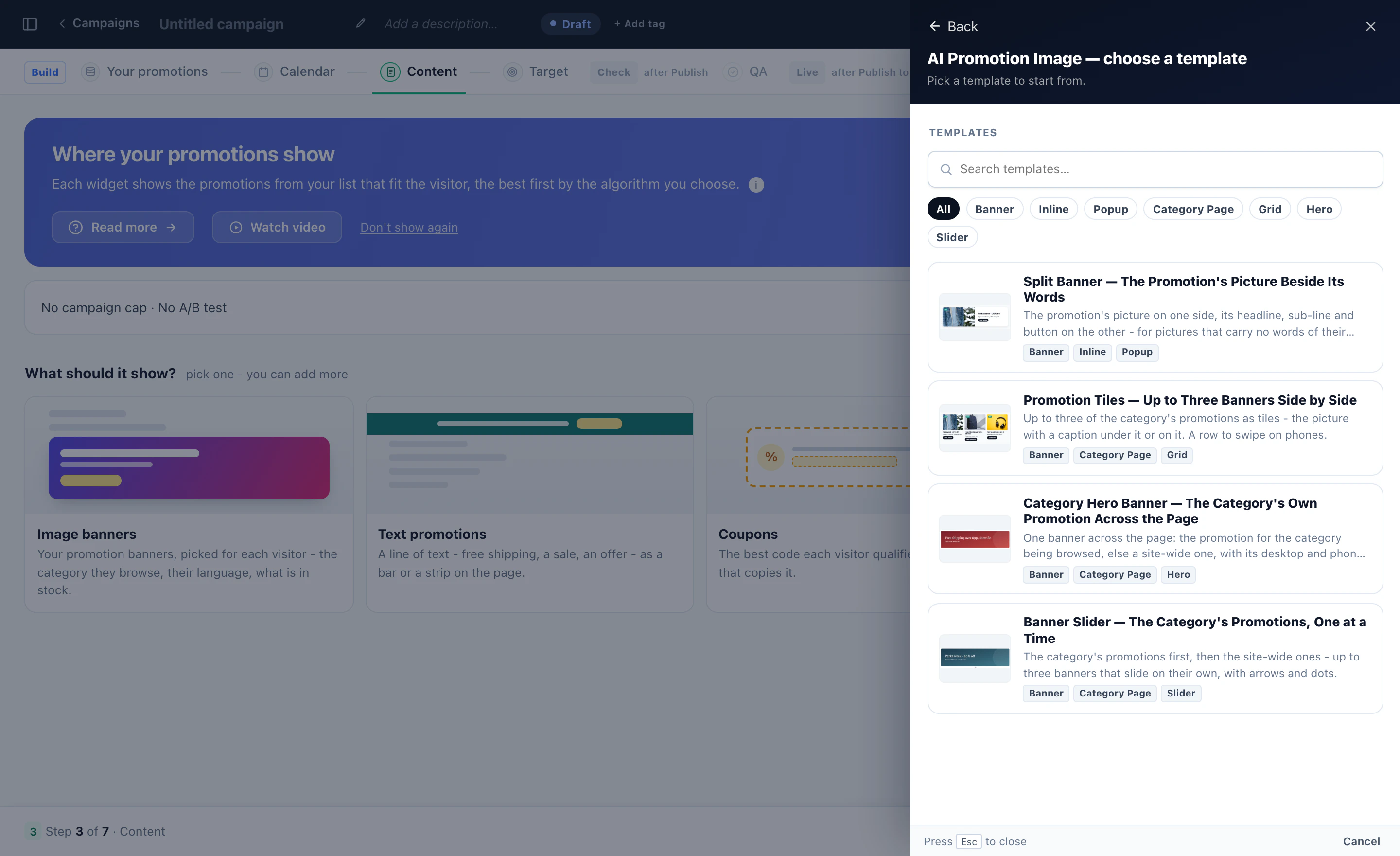
A new Promotions campaign: image banners, text promotions, coupons and nearest store as pictures, and the image banner templates
Open full size ↗
Start

Start from what it should show

A Promotions campaign asks what it should show — image banners, text promotions, coupons or the nearest store — and each opens the designs it can start from.

Start

Ten ways to pick each visitor’s promotion

This page’s category, their recent categories, their last search, what visitors like them respond to — each with the data it already has, beside the pool of promotions it picks from.

Designs

Banners, text, coupons and stores — each opens in the editor

The design on the right, its settings on the left — colors, width, size, corners, buttons. Sliders, tiles, bars, tickets and wallets work the same way.

Designs

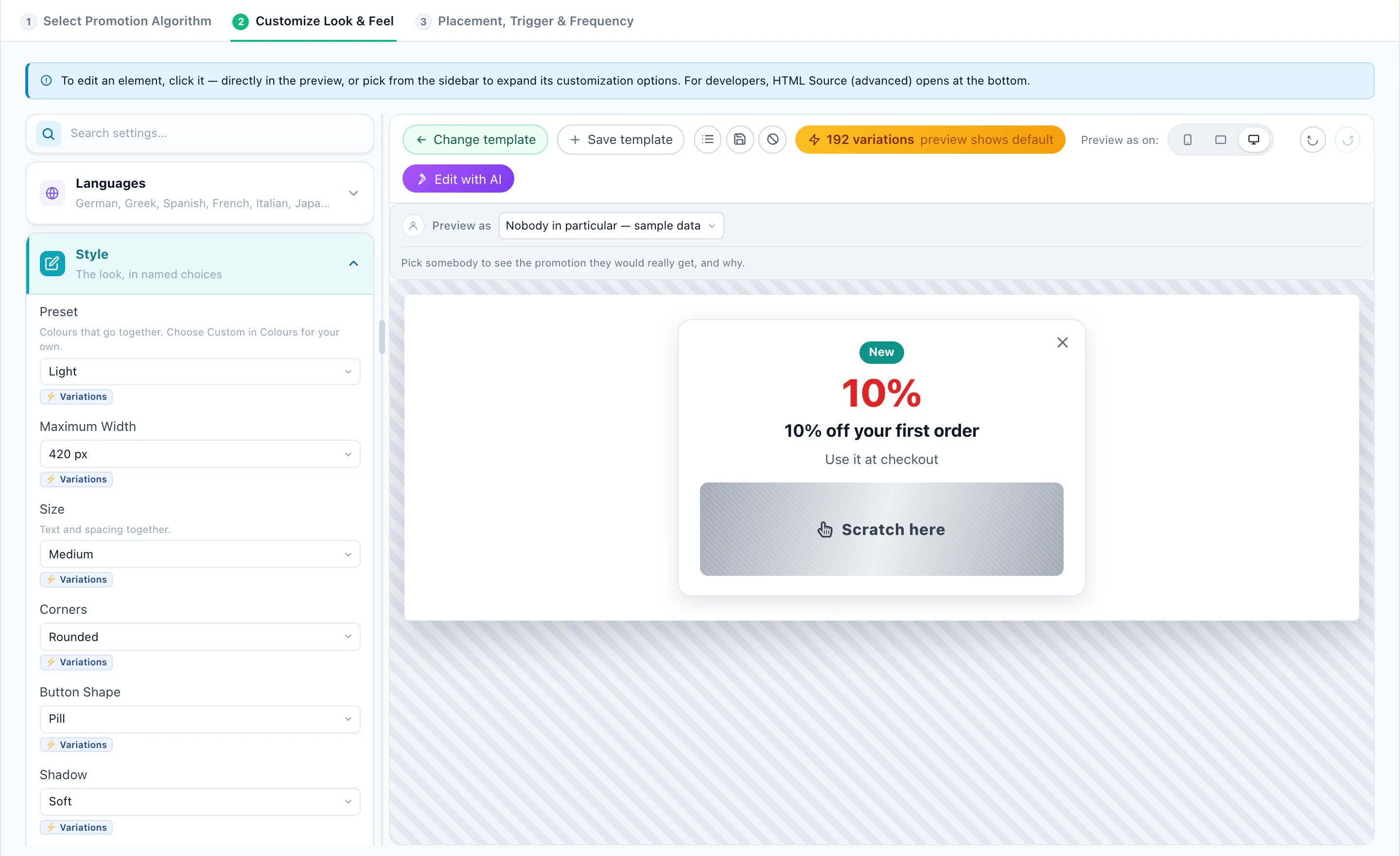
Scratch to reveal the code

The visitor scratches the foil with a finger or the mouse, and the code is underneath — counted as revealed, and remembered on later pages.

Designs

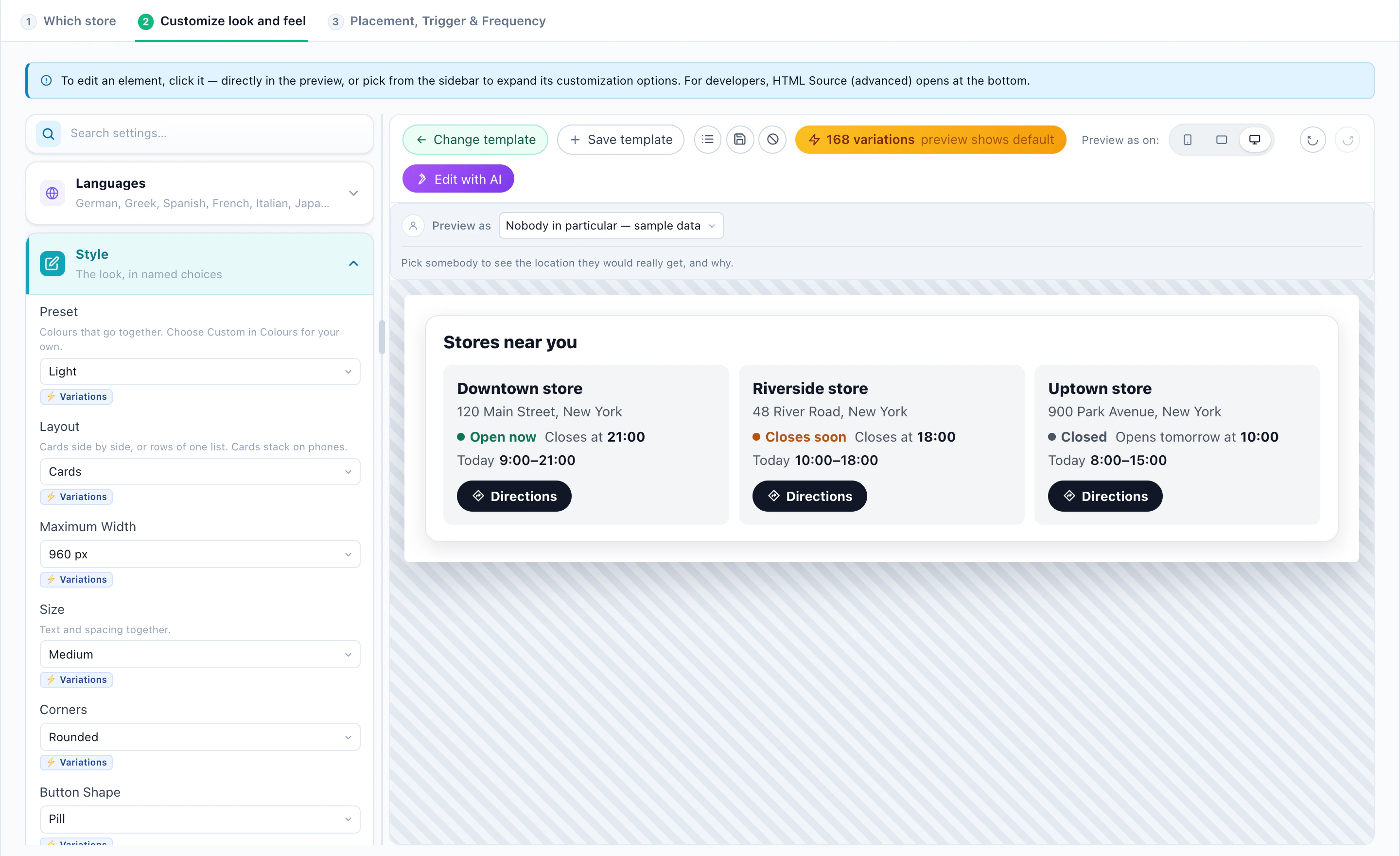
The stores near each visitor

Open now, closing soon or closed, today’s hours and directions — for every visitor, their own stores.

Manage

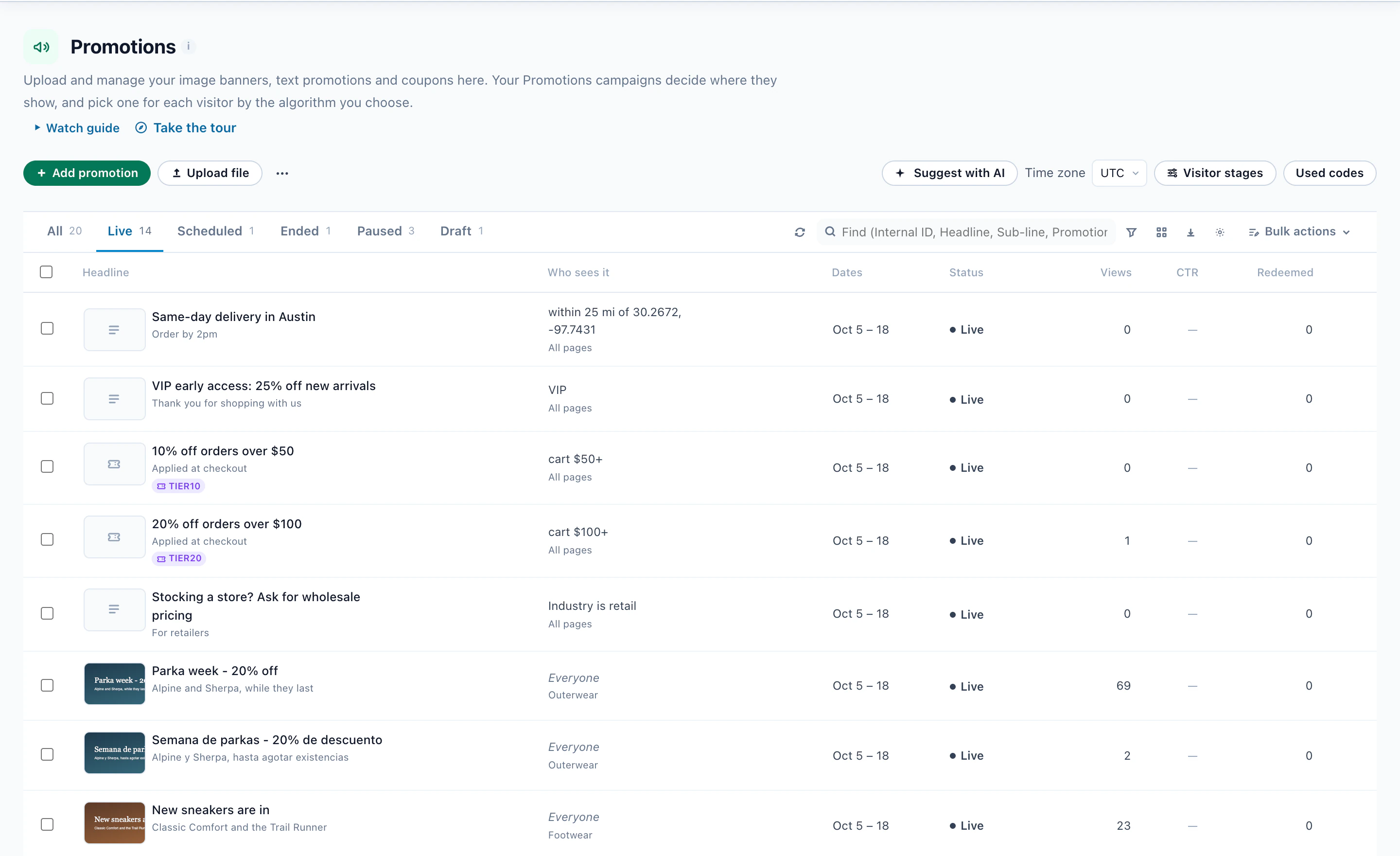
Every promotion in one list

Who sees each one — within 25 miles of a city, VIP, a cart over $50, retail buyers — with its dates, status and views.

Manage

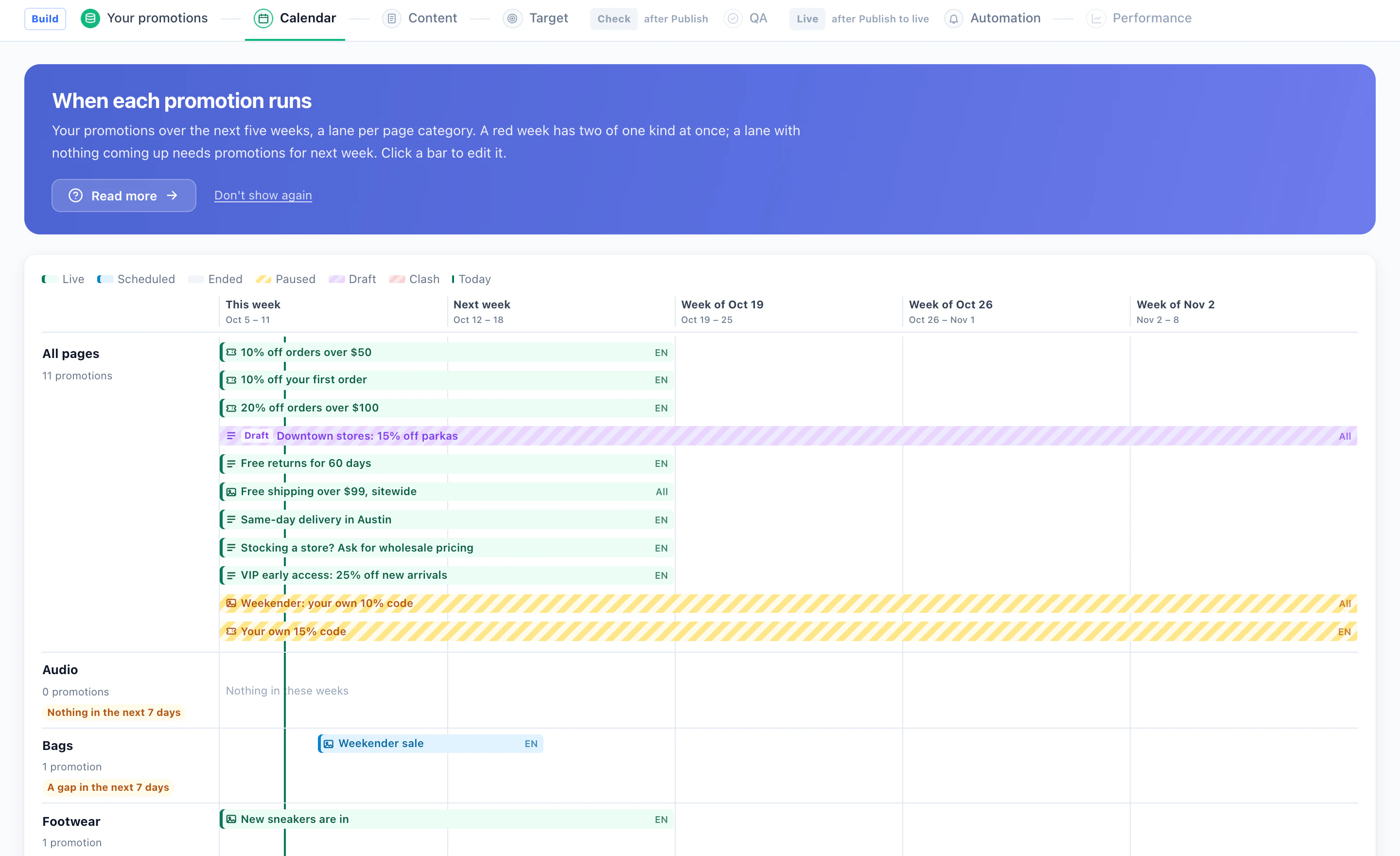
Five weeks ahead, by page category

What is live, scheduled, paused or a draft in each category, and the categories with nothing coming up.

Manage

One code, or a code each

A shared code, a pool you upload, codes made from a pattern, your own coupon engine, or a protected code applied at checkout.

Results

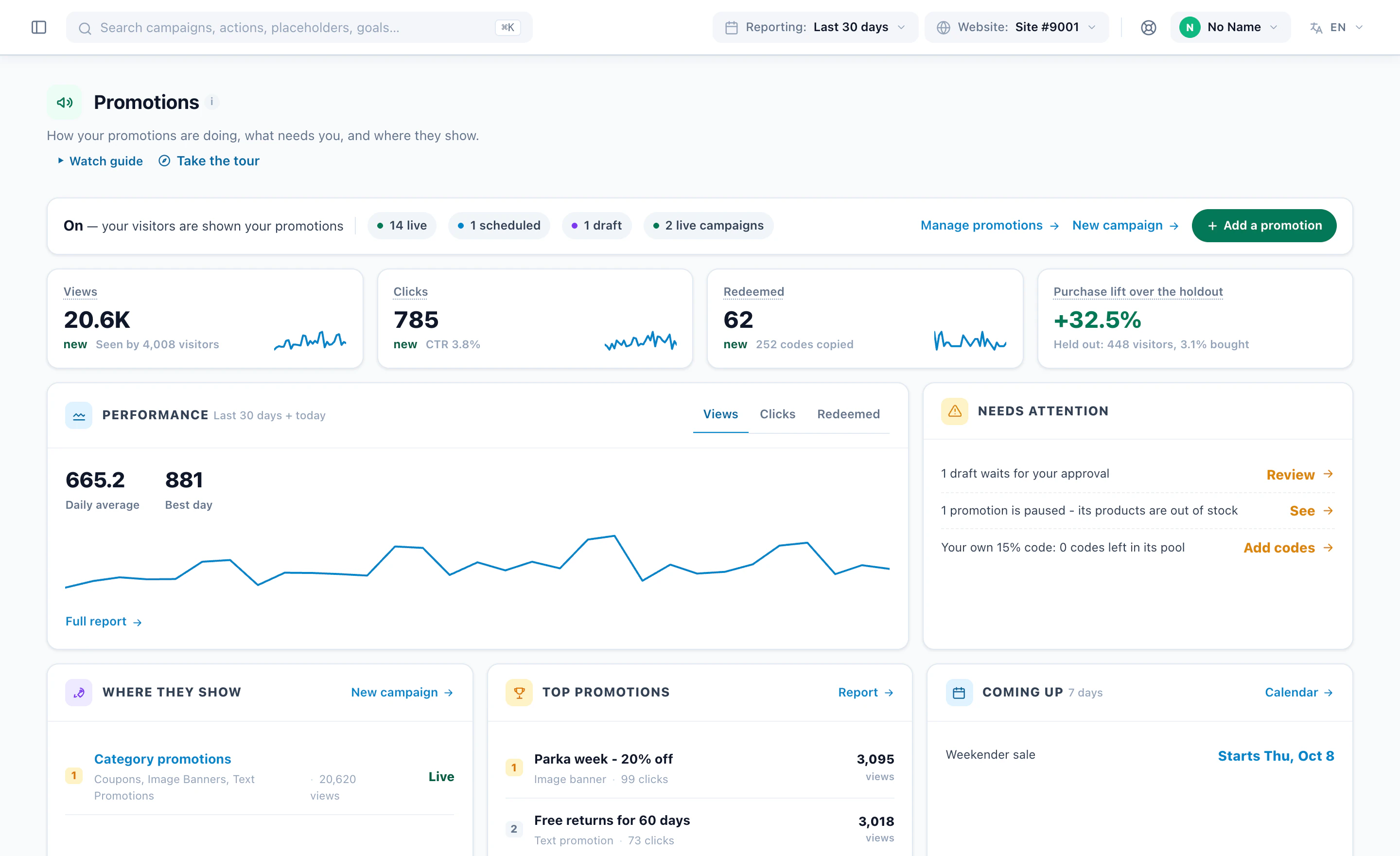
The whole program, on one screen

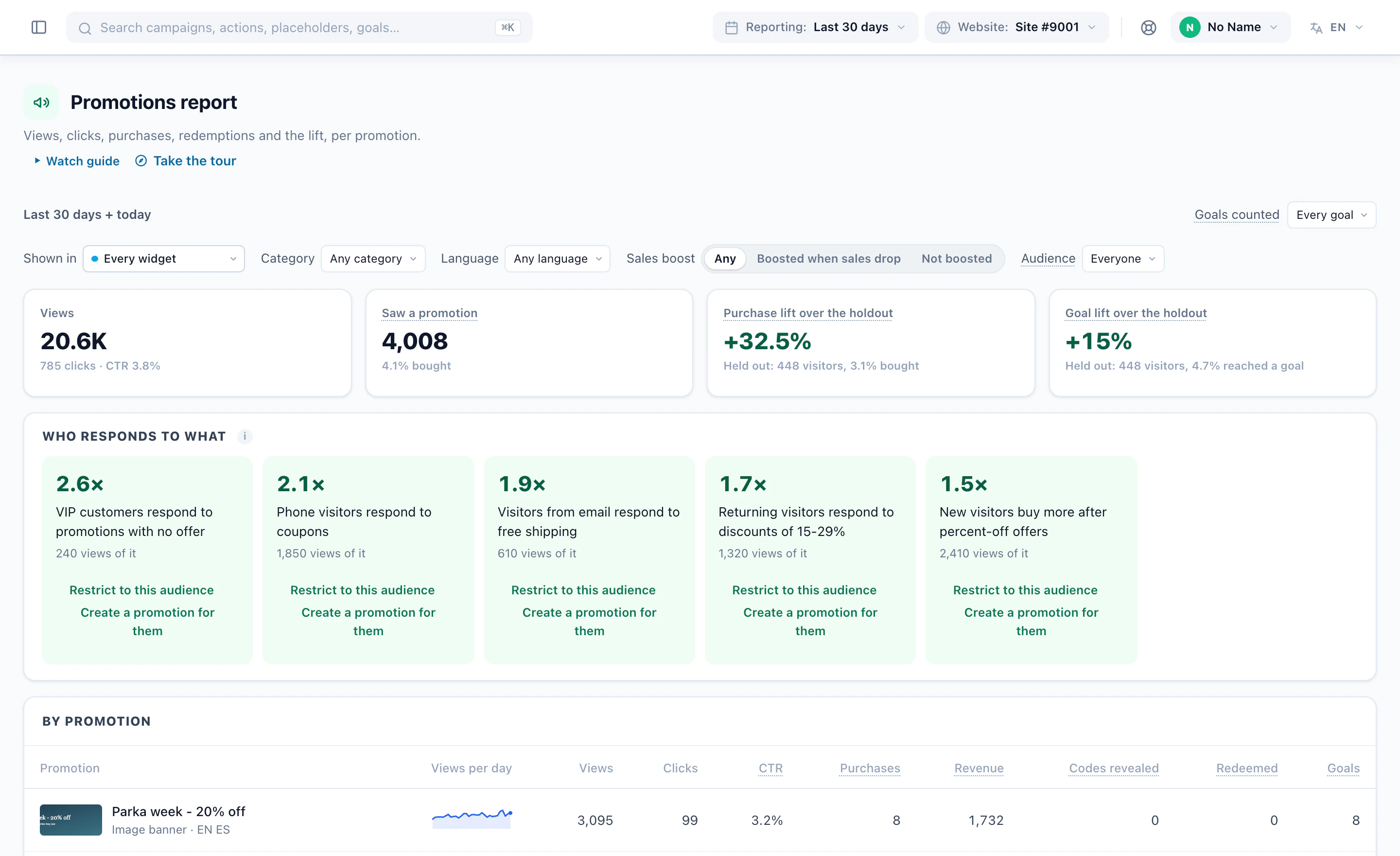
Views, clicks, codes redeemed and the purchase lift over the visitors held out, 30 days of performance, what needs you — a draft to approve, a sold-out promotion, a pool out of codes — and the promotions that lead.

Results

What each promotion earned, and who it moves

The lift in purchases and goals over the held-out visitors, what the AI learned about who responds to what, and every promotion’s views, clicks, purchases, revenue, codes and redemptions.

Watch

A Promotions campaign, start to finish 2:40

The list and its calendar, a banner design, the algorithm that picks one for each category page, and the report — narrated, in the real panel.

Watch

Coupons, in a minute and a half 1:22

The five kinds of coupon, codes made from a pattern, their limits and the detail of each code.

1 / 12

Screens from Personyze demo accounts: sample promotions and stores, and a demo shop’s list. The numbers are illustrative.

Proof, not guesses

See what each promotion actually earned.

The lift over a held-out group, why each banner was shown, and the whole program on one screen.

Measured against visitors who saw nothing – audience by audience

Hold back a share of visitors and the report shows how much more everyone else bought. Cut it by audience to see who a promotion really moves – and who would have bought anyway.

See why each promotion was shown

Preview a widget as a real visitor and read why each promotion was shown to them, or skipped.

The whole program, on one screen

What is live, the numbers against the period before, what needs you, and what starts or ends this week.

  • In the report, per promotion
  • Views
  • Clicks
  • CTR
  • Purchases
  • Codes revealed
  • Redemptions
  • Revenue
  • Goals
  • Lift
Calendar

Five weeks ahead, by page category.

  • What runs where, this week and the next four
  • Gaps flagged before a page goes quiet
  • Clashes and paused promotions at a glance
FAQ

Direct answers. No fluff.

The questions that come up before turning Promotions on. Send anything else our way and we’ll answer fast.

How does Personyze decide which promotion a visitor sees?

Only promotions whose dates, pages, language and audience fit the visitor are considered. Among those, the AI learns which promotions visitors like this one bought from – by device, traffic source, new or returning, and what they browsed – and shows the one most likely to convert. Optimize keeps testing the rest. Each widget can also use a simpler rule, such as Matches this category or Most popular: nine ways to choose in all.

Can a promotion show as a pop-up, or only in the page?

Both. Place it in a spot on the page, as a bar, a slide-in or a pop-up, and fire it on page load, after a delay, on scroll, on exit intent or when the visitor goes idle. Frequency caps work like any Personyze campaign: once per session, stop after a number of views, hide after a close or after a purchase.

Is it only for online stores?

No. Any site with offers can use it – a store, a travel or booking site, a SaaS pricing page or app, a subscription or an education site. A promotion can be a banner, a line of text or a coupon, and its audience can come from behaviour, location or your CRM.

Can I import promotions instead of typing them in?

Yes. Upload a CSV or Excel file, connect a Google Merchant Center promotions feed, or give a feed address that Personyze reads again on a schedule. You can also add rows by hand, or let AI draft them for your approval.

Can each visitor get their own coupon code?

Yes. Codes are generated from a pattern such as SAVE-{6}, or handed out from a pool you upload, and a visitor who comes back sees the same code. You can limit how many go out and until when, and every code handed out and redeemed is counted. Shared codes and codes by cart value work too.

How do I know the promotions are working?

Hold back a share of visitors on a widget: they see no promotion, and the report shows the lift in purchases or goals over them, beside each promotion’s views, clicks, codes revealed, redemptions and revenue.

Where can promotions appear?

On your site as banners, bars, pop-ups and text promotions; in email, as a Best offer block picked per recipient; in web push; in the AI Chat, which can offer a fitting promotion and its code; and in mobile apps.

How is this different from Banners & Pop-Ups?

Banners & Pop-Ups is for content you target yourself: you decide who sees each banner or pop-up, where and when. Promotions is for a list of offers: the AI picks the one each visitor is most likely to buy from, hands out codes of their own and measures the lift. Both use the same designs, placements, triggers and frequency caps.

How is Promotions priced?

Promotions is an add-on, included in the Power and Enterprise plans. On other plans you can try it free from the Add-ons page. See the plans for details.

Every visitor, their best offer.

Load your promotions once and let Personyze pick – for a store, a travel site or a SaaS product. Included in Power and Enterprise, or try it free as an add-on.