While they’re on your site
AI Website PersonalizationContent and offers for each visitorB2B PersonalizationEach company sees its own industryProduct RecommendationsWhat each shopper wants nextContent RecommendationsThe next article each reader wantsA/B TestingA winning version for each audienceDynamic Landing PagesPages that match the ad they clickedAI Search & Chat AgentAnswers from your own pagesBanners & Pop-UpsShown by behavior, source, locationAI Promotion ManagerAI picks each shopper’s best offerSocial ProofLive ratings, stock and recent buysReach them after they leave
Email PersonalizationEmail series, picked for each readerPush & SMSTriggered by what they just didHosted Landing PagesPer-visitor pages, hosted by usKnow who they are
Behavioral TargetingAudiences that update themselvesAudience DiscoveryBuyers you didn’t know you hadWebsite AnalyticsSessions and revenue, per personWhat visitors tell you
Reviews & TestimonialsReviews from 17 sites, per visitorSurveys & NPSAsk a question; use every answerAI Chat AgentAnswers, then hands over to peopleMeeting SchedulerThe right visitors book a callAI tools and your stack
Personalization PlatformEvery tool on one visitor profileAI AgentDescribe a campaign; it drafts itIntegrationsHubSpot, Salesforce, Segment, GTMApp MarketplaceBuilt-in and reviewed partner appsAPIs, SDKs & AutomationREST API, server and mobile SDKsMCP ServerRun Personyze from your AI assistantBring every review, testimonial and case study into one library — from 17 review platforms, a file, your own site or by hand — and show each visitor the ones that match them.

The reviews of the product on the page, a case study from their own industry, reviews from people near them — and a form that collects new ones for you to approve.
Not sure where reviews belong? See review ideas for your site ↓


Most review widgets show the same reviews to everyone. Personyze picks the ones that fit the person reading: the product on the page, their industry, the article they are on, where they are.
Product Reviews reads the product the visitor is looking at and shows that product’s reviews, with its own score — or the reviews of the product they last bought.
The Testimonial Wall shows a bank’s case study to banks and a retailer’s to retailers, matched on industry and company size.
Rate This Page puts stars and a comment under an article, and a widget shows each page the reviews written about it.
Country, region and city come from the visit itself, so a shopper in Hamburg reads reviews from Hamburg and one in Austin reads Texas.
Free AI tool · Inspire me
Give Inspire me your address. It reads your pages the way a first-time visitor sees them and writes where reviews and proof would help most: which ones, on which page, for whom, and how to measure it.
Like an idea? Describe it to our AI personalization agent and it builds the campaign for you.
1What kind of ideas?
2Your website
Free · nothing to install · it reads your public pages
Reading yourstore.com
As a new visitor would see it · about 4 minutes

Waypoint & Co. Done
Only: Social proof · your plan
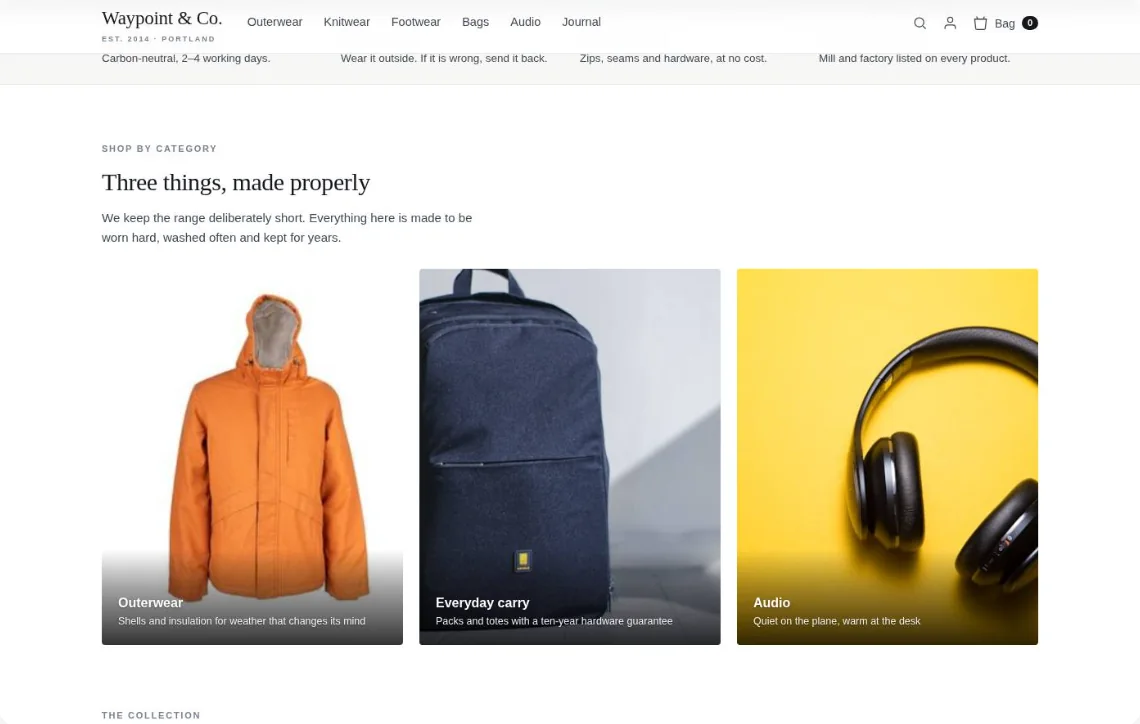
1Ratings on the category tiles
★ 4.8 · 214 reviews★ 4.7 · 168 reviews★ 4.9 · 96 reviewsDrawn on your own page — for a first-time visitor still deciding.
Each review can carry who it is for — several countries, an industry, a product category, a page. The widget compares those tags with the visitor and shows the ones that fit, with no audience to build first.
Match: product on the page · Only matchesMatch: industry · Matches firstMatch: industry · Matches firstMatch: last product bought + countryEvery match rule has a strength. Pick one per rule, and read the count before you publish rather than finding out on the live page.
Photos, the date, the platform’s name and link, your public reply, the verified-buyer label and an overall-rating line like “4.8 from 1,234 reviews” are each switched on or off on the card. Or put the reviews in a popup of your own design on the Canvas.
A grid of cards, each with its stars, words, date and where it came from.
One or two at a time, moving on by itself or by the arrows.
The product’s own score, then its reviews — the familiar block under a product.
Logos, job titles and case studies with a link to the full story.
Customer logos live on the same Reviews page, with the same “who it is for” tags. The Customer Logos action shows each visitor the customers most like them, and a visitor you know nothing about still sees the full strip.
Trusted by banks like yours
Trusted by retailers like yours
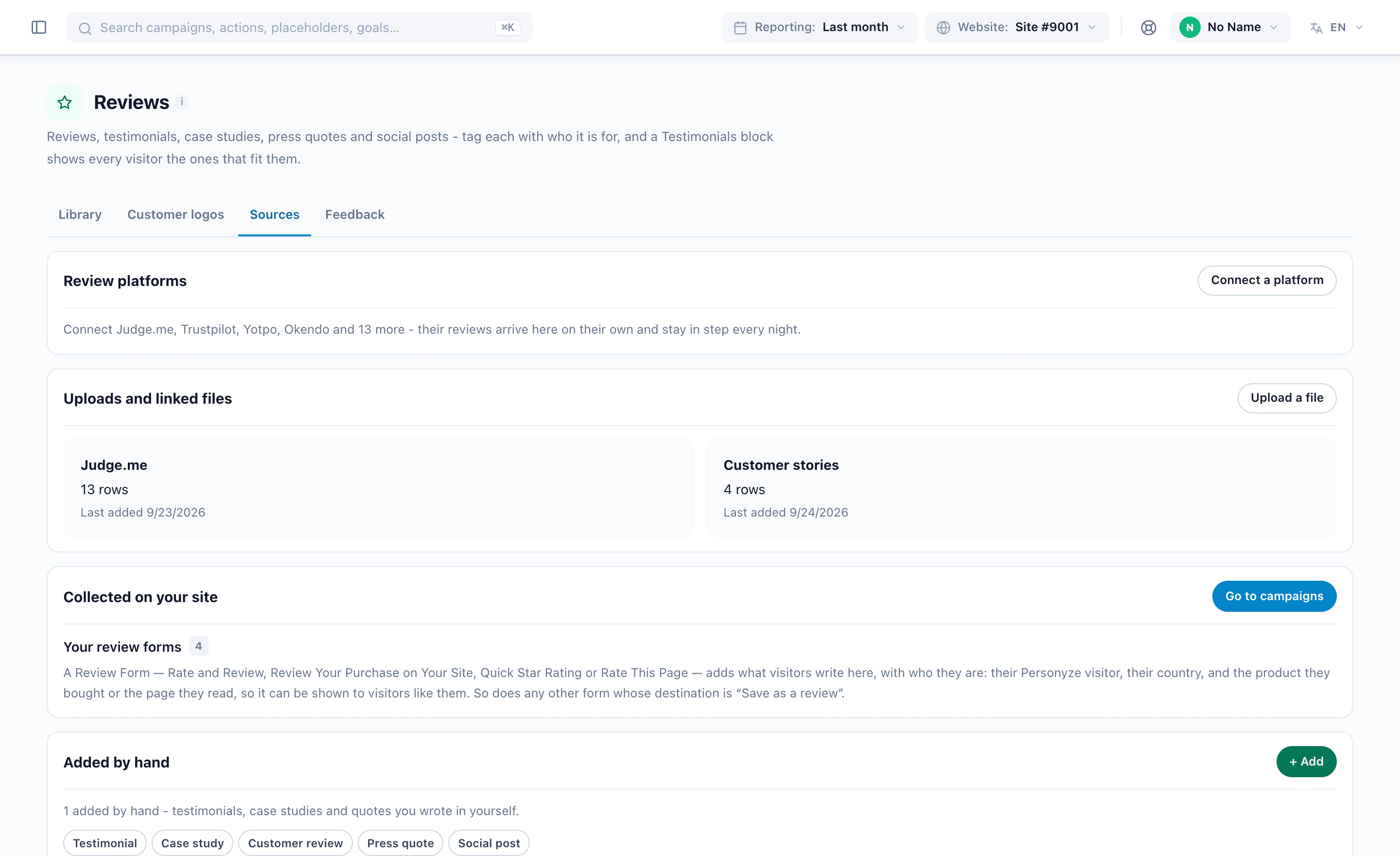
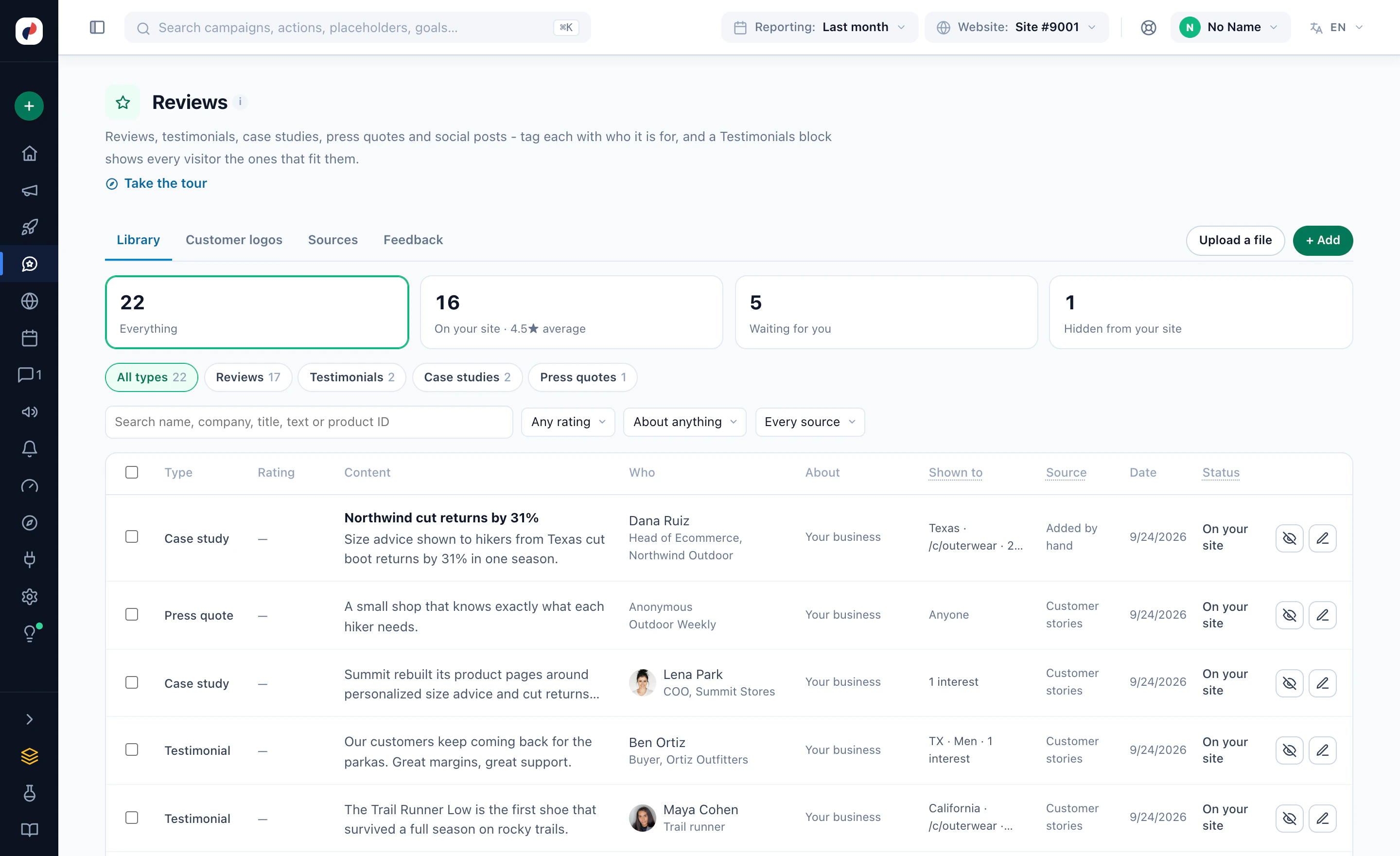
Where reviews come from, the library and who each one is for, which reviews a widget shows, and what they did — real screens from the panel. Or watch a reviews campaign built.
It counts your reviews, picks the strongest ones to show — their own stars and words, never reworded — and puts them right under the Add to cart button, drawn on your own page on a computer and a phone. Your reviews stay as they are until you publish.
Bring your reviews in, choose which ones each visitor sees, design the widget and place it on your pages.
A review platform such as Judge.me, Trustpilot, Yotpo or Okendo, a file you upload, a Review Form on your own site, or added by hand.
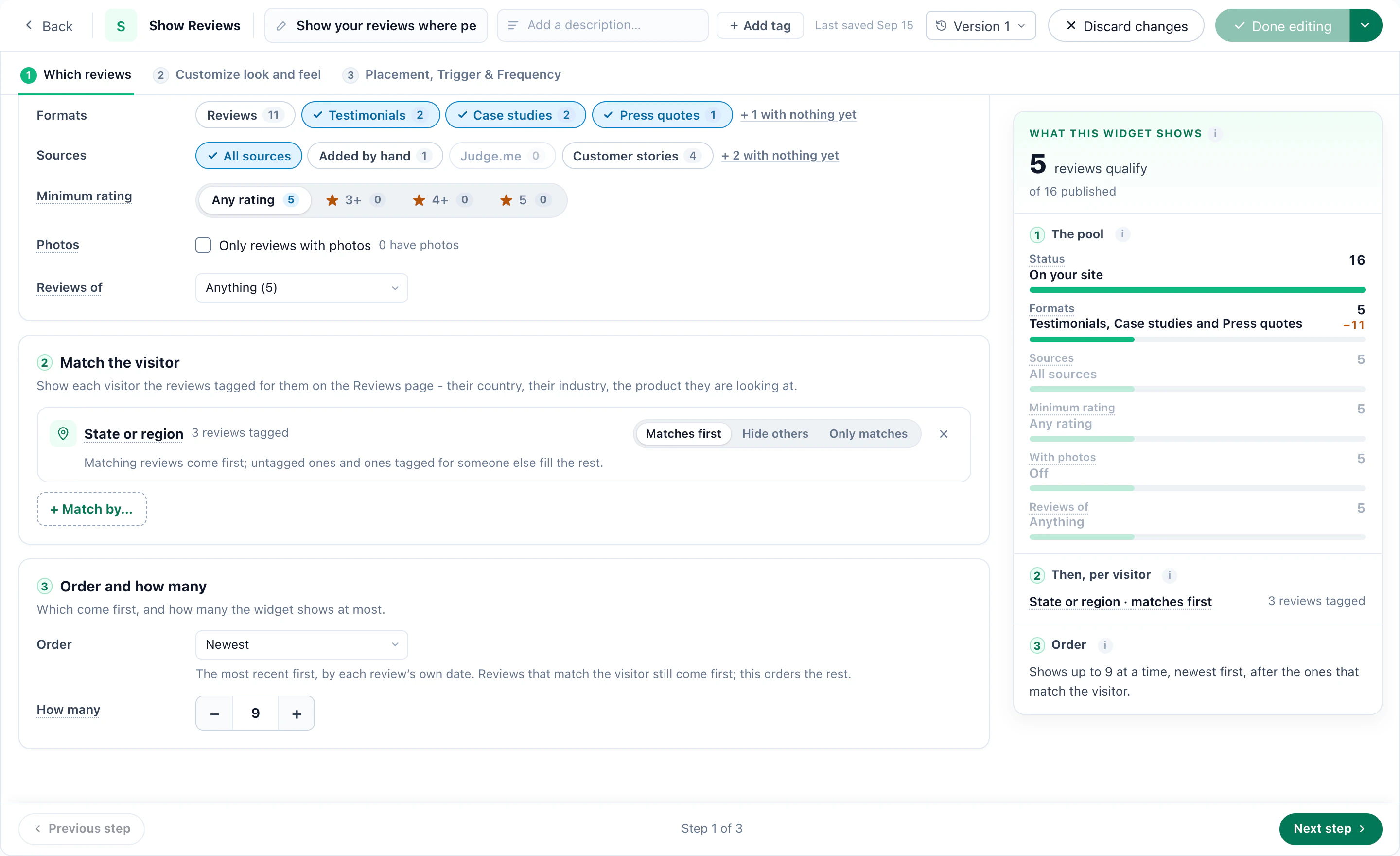
Case studies, testimonials, press quotes and reviews — each with who it is shown to and where it came from.
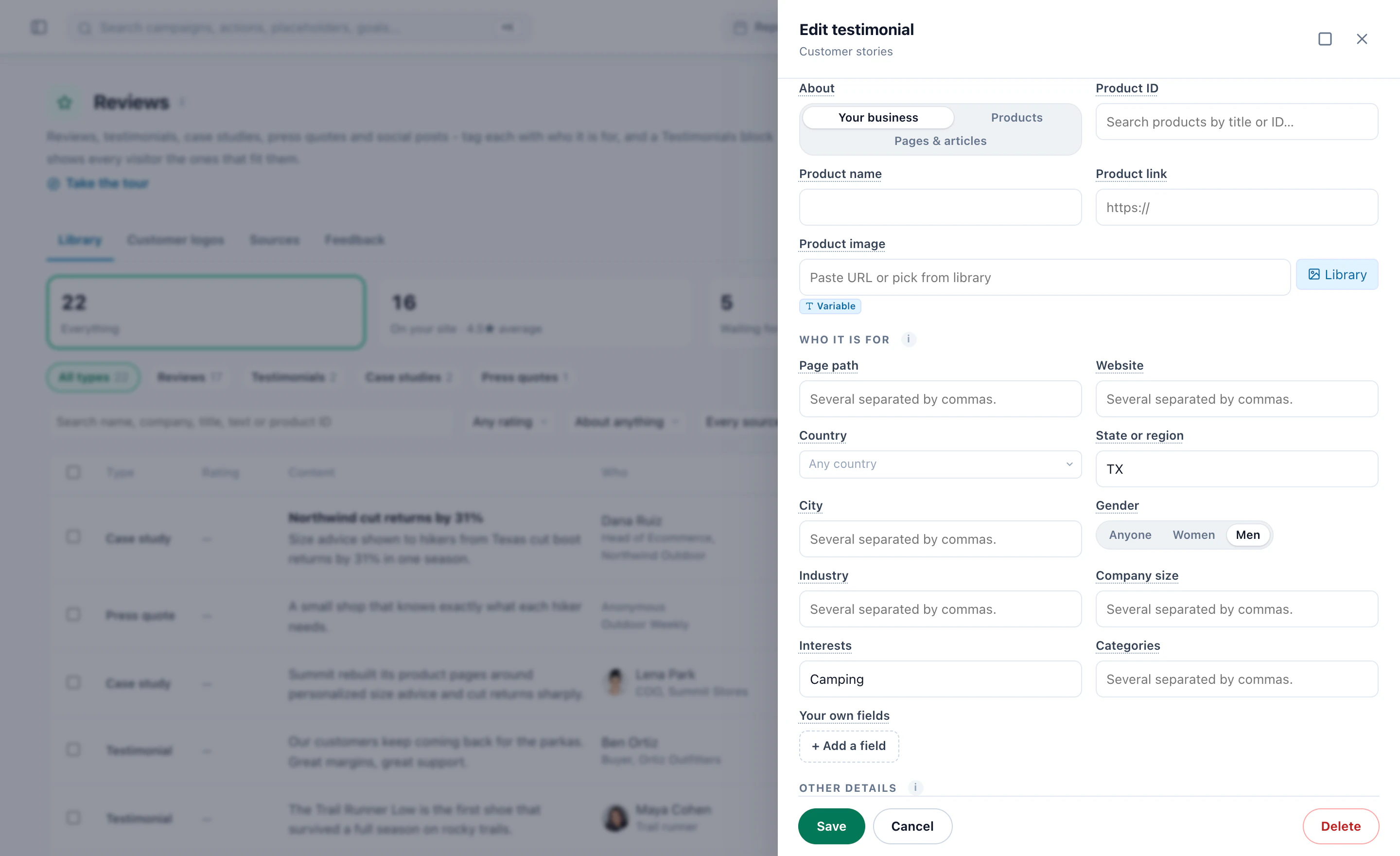
A testimonial tagged with a state, a gender and an interest, so it reaches the visitors most like the customer who wrote it.
Formats, sources and a lowest rating, then matching to the visitor — here, reviews from their own state first — with how many qualify.
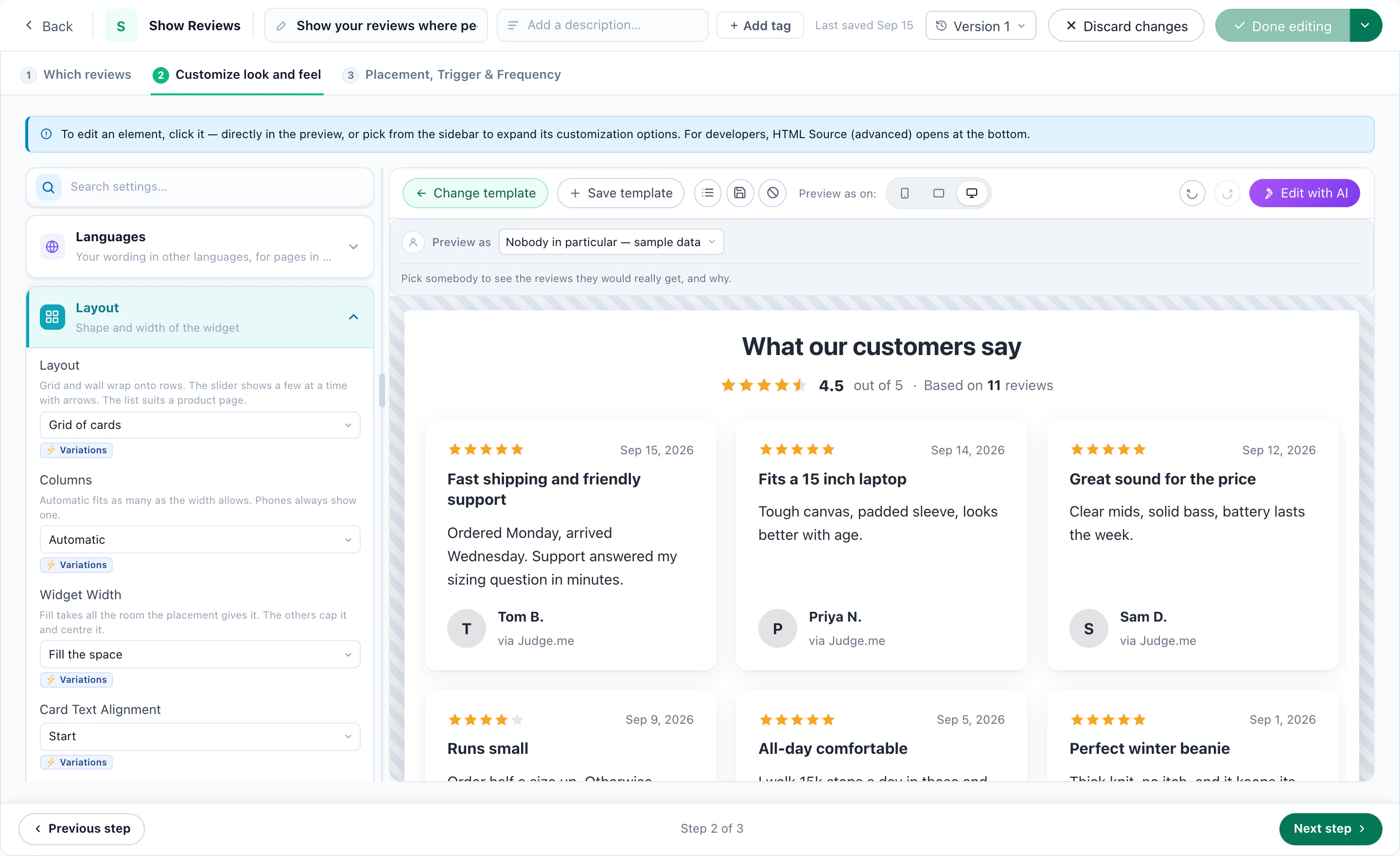
Review Cards: the average rating, then the reviews themselves with stars and names — one of the ready designs.
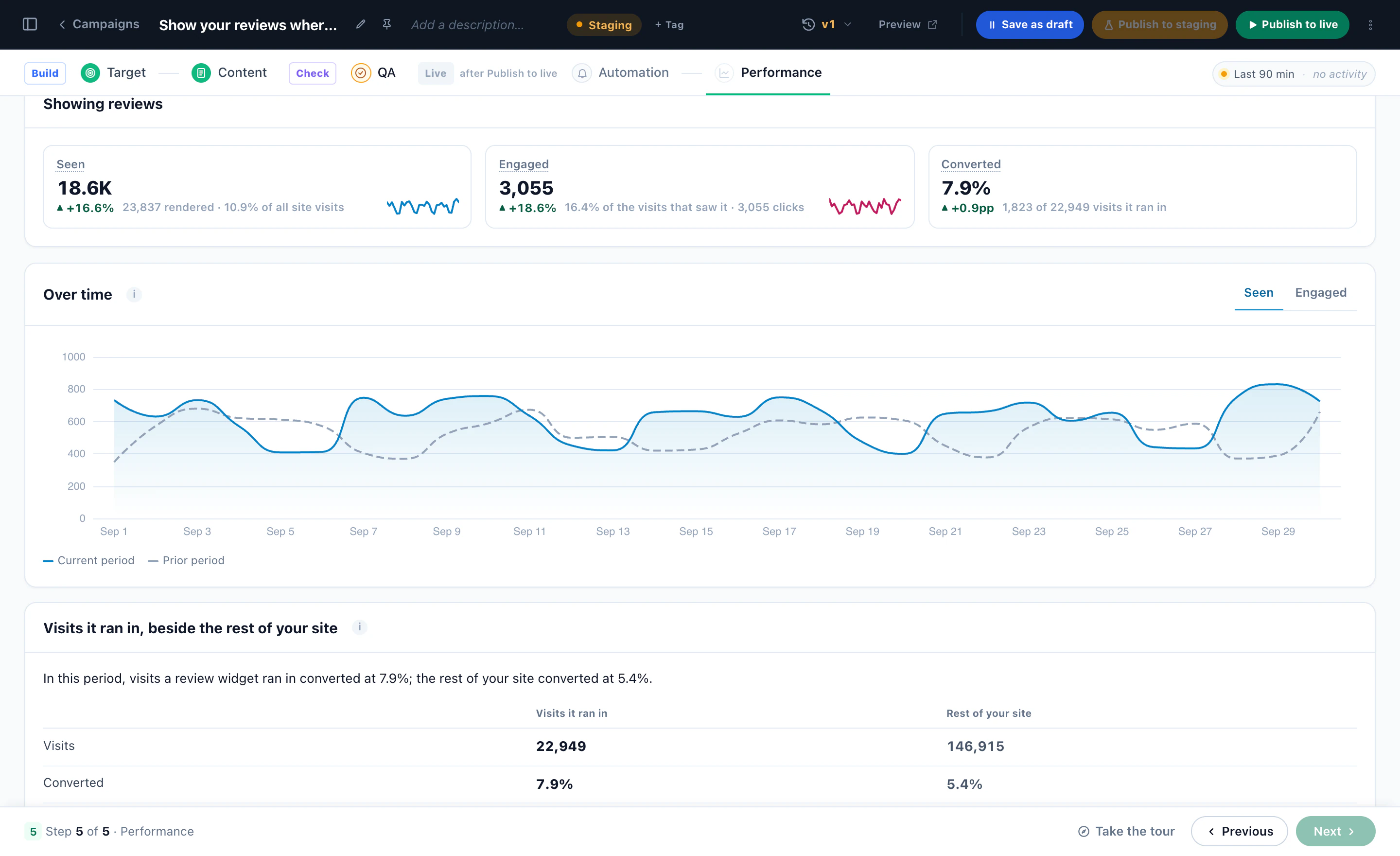
Who saw them, who engaged and who converted — and how the visits a review widget ran in converted beside the rest of the site.
A reviews campaign built, with a Review Form and a new review approved before it goes live — narrated, in the real panel.
Who saw the reviews, who engaged, and how those visits converted beside the rest of the site.
Screens from a Personyze demo shop. The numbers are illustrative.
A Review Form under the product, the article or the order confirmation — and every new review waits for your approval before anyone sees it.
The Reviews dashboard shows who saw a review widget, who engaged, and how those visits converted beside the rest of the site — plus how many reviews each campaign collected, and their ratings.
The same page, reviews never scrolled to
4.7 from 212 reviews, in view
The questions that come up before switching reviews on. Send anything else our way and we’ll answer fast.
Judge.me, Trustpilot, Yotpo, Okendo, Stamped, REVIEWS.io, Senja, Loox, Trusted Shops, Feefo, PowerReviews, Testimonial.to, TrustMate, Kiyoh, Klantenvertellen, Shopper Approved and eKomi. A connection is read every night: new reviews arrive, changed ones are updated, and ones hidden or deleted on the platform are hidden here. You connect them with your own account on each platform.
Yes. Upload a CSV or Excel file, or give a link that is read on a schedule, and map the columns once. It handles day-first dates, other rating scales (1-10 or 1-100 become stars), several values in one cell (“Indonesia, Vietnam”) and a type column in several languages.
Each review can be tagged with who it is for: countries, regions, cities, industries, company sizes, websites, page paths, interests, product categories or any visitor attribute. The Show Reviews widget matches those tags against the visitor — and against the product on the page or the one they last bought — with one of three strengths: Matches first, Hide others or Only matches.
With Matches first, untagged reviews and the rest fill in, so the widget is never empty. With Only matches, the widget is simply not shown to that visitor. Before you publish, the count beside the settings shows how many reviews qualify and turns red, naming the setting responsible, when none do.
Yes. The library holds reviews, testimonials, case studies (headline, summary, picture, link), press quotes and social posts, about your business, your products, or your pages and articles. The Testimonial Wall shows them with logos and job titles.
Reviews collected with your own Review Form wait on the Reviews page for your approval, unless you choose to publish at once. Imported reviews follow each connection’s auto-publish setting.
No — those platforms do not accept reviews written elsewhere. Ask for a Platform Review sends visitors to your Google, Trustpilot, G2, Capterra or Facebook page to write it there. Trustpilot, Trusted Shops, Feefo and several others can instead send their own invitation. Connect your Judge.me, Yotpo, Stamped, REVIEWS.io, Senja or Testimonial.to account to send reviews collected on your site to it.
Every customer you target is asked the same way, whatever they would rate — no setting sends or invites by score, and the optional thank-you email is the same for every rating and offers nothing in return. Asking only customers likely to be happy (“review gating”) is what Google, Trustpilot and the FTC prohibit, and it is not something Personyze can be set to do.
It is saved to the Reviews page, and you can add an email to you, a webhook, Zapier, Slack, HubSpot or Klaviyo, a conversion goal, and an optional thank-you email. The rating is written to the visitor’s profile, so a campaign can react to it — a support offer after a bad experience, for example.
Yes — that is Surveys & NPS: an NPS question, stars, faces or “Was this helpful?”, multi-question surveys, and every answer saved on the visitor’s profile for targeting. Those answers stay private; they are never shown as reviews.
The Reviews dashboard under Performance compares visits that saw a review widget with the rest of the site. That is a comparison, not proof; for proof, run the widget as an A/B test against a group that never sees it.
Connect a review platform or upload a file, put Product Reviews on one page, and read the count before it goes live.