Scan your siteSee what your site could show each visitor: a plan with the best ideas drawn on your own pages.Starts right away · about 4 minutes · no email needed
Personyze reads what every visitor does — pages, clicks, searches, carts, sources, your CRM — and turns it into audiences you can act on the second they match.
Build an audience from anything a visitor does, choose the moment it fires, and answer on the page, in a pop-up, by email or by push — then see what each audience earned.
Start with these four. Build any you can describe.
Cart abandoners, returning VIPs, B2B accounts, first-time visitors — the high-leverage segments, all from one engine.
Cart abandoners
Catch them at the moment of doubt.
Trigger an exit-intent or 30-second-idle message the second a real cart enters jeopardy. Personalize with the items, the cart total, and the right incentive for the right tier.
Live cart-state detection — no manual tagging
Tier-aware offers (no discount on VIPs, free ship for first-timers)
Continues across email + push if they leave
Audience match
Cart > $80Idle > 30sNot VIP
Trigger
Exit intent + idle
+22%Avg checkout recovery rate
Returning VIPs
Recognize them before they introduce themselves.
Match against CRM tier, LTV, and visit history. Skip the discount popups, surface the white-glove track instead — private restocks, early access, concierge support.
IP-to-company match plus firmographic enrichment turns anonymous traffic into named accounts. Swap headlines, social proof, and CTAs to match their industry — before they even fill anything.
Clearbit, ZoomInfo, 6sense integrations
Industry, size, revenue, tech stack signals
Per-account journey + Slack/CRM alerts
A
Acme Corp.
Logistics · 1,200 employees
FORTUNE 500SALESFORCE
Match
Logistics ICP
+58%B2B form-fill rate on matched ICPs
First-time visitors
Welcome them with the context they brought.
Source, geo, weather, device, the page they landed on — all of it is signal before they click anything. Swap the headline. Swap the social proof. Swap the offer.
UTM + referrer + paid-channel detection
Geo + weather variants, no extra tags
Auto A/B variants for cold traffic
Context detected
Source: GoogleMobileBerlin · 12°C
🧥 Berlin's cooling off — shop the new wool edit
+18%Bounce drop on context-matched LPs
Unified visitor profile
70+ attributes. One profile.
Every visitor is the sum of dozens of signals. Personyze stitches them together — first-party behavior, CRM, weather, device, session, and referral — into one identity that travels with them across visits, devices, and channels.
First-party + CRM + third-party — HubSpot, Salesforce, Clearbit, Segment, ZoomInfo, Tealium, all wired in.
Cross-device identity stitching — cookies, emails, CRM IDs reconciled into one visitor.
Real-time + historical — current session AND past 90 days, in the same query.
No data feed? No problem. — site crawler builds product/content feeds; visual scraper grabs cart totals, search inputs, form values.
📍Geo & Weather
🧠Behavior
🛒Session / Cart
🔗Referral
💼CRM data
🏢Companies (ABM)
📱Device & Browser
📈Site KPIs / Goals
Unified visitor profile
All 70+ attributes stitched into a single identity, queryable in real time across web, email, push, and API.
The vocabulary
The signals, said out loud.
Forty-one families of rule, and every one of them is a sentence a marketer can
say. Combine them with AND, OR and NOT, nest them as deep as the audience needs, and they are
re-read on every single request — not once a night.
Who they are
New, returning, or their Nth visit
Country, region, city — from IP or GPS
The company their IP belongs to
Ranked interests, by strength
Anything on their CRM record
Any list they belong to
What they are doing now
Pages seen this session, and the one they landed on
Time on site, and page-view count
Live session values — cart total, plan, signed in
Their most-visited page across every visit
Local weather where they are sitting
Device, browser and language
Where they came from
This visit’s referrer and UTM parameters
The first source they ever arrived from
What they last searched for — on your site or from a search ad
Reverse-IP firmographics from eight providers
Tealium audiences, HubSpot lifecycle stage
A random slice, for throttled rollouts
What they have done before
Products viewed, carted, wishlisted or bought
Articles read, by author or topic
Days until their birthday
How long since they were last here
Lifetime session count
What your campaigns already did to them
The first source they ever came from
Recorded once, the first time that visitor was ever seen, and never overwritten — separate from the source of the visit happening now. So the organic reader who converts eight visits later is still attributable to the ad that found them.
Not “has a cart”. This cart.
The commerce rule filters on any attribute in your catalog, with quantity, value and a time window: Apple products worth over $1,000, left in the cart, in the last seven days. The same rule shape works over content — three articles by one author this month.
What your other campaigns already did
Target on whether a specific action was shown, clicked, closed or converted in this session, or whether another campaign matched at all. This is how you stop two pop-ups arriving one after the other, without anyone maintaining a spreadsheet of who fires when.
Values read live off your own page
A container reads a value off the page as it renders — cart total, plan name, whether they are signed in, the tier on their account — and it becomes a targeting rule the moment it is captured. No feed, no nightly sync, no waiting.
And the company behind the IP
Whichever provider you already pay for — or none, and use ours.
Pick a behaviour, set the rule, combine it with others and read the audience back in plain words — real screens from the campaign wizard.
The Target stepWatch
Open full size ↗
The Target step
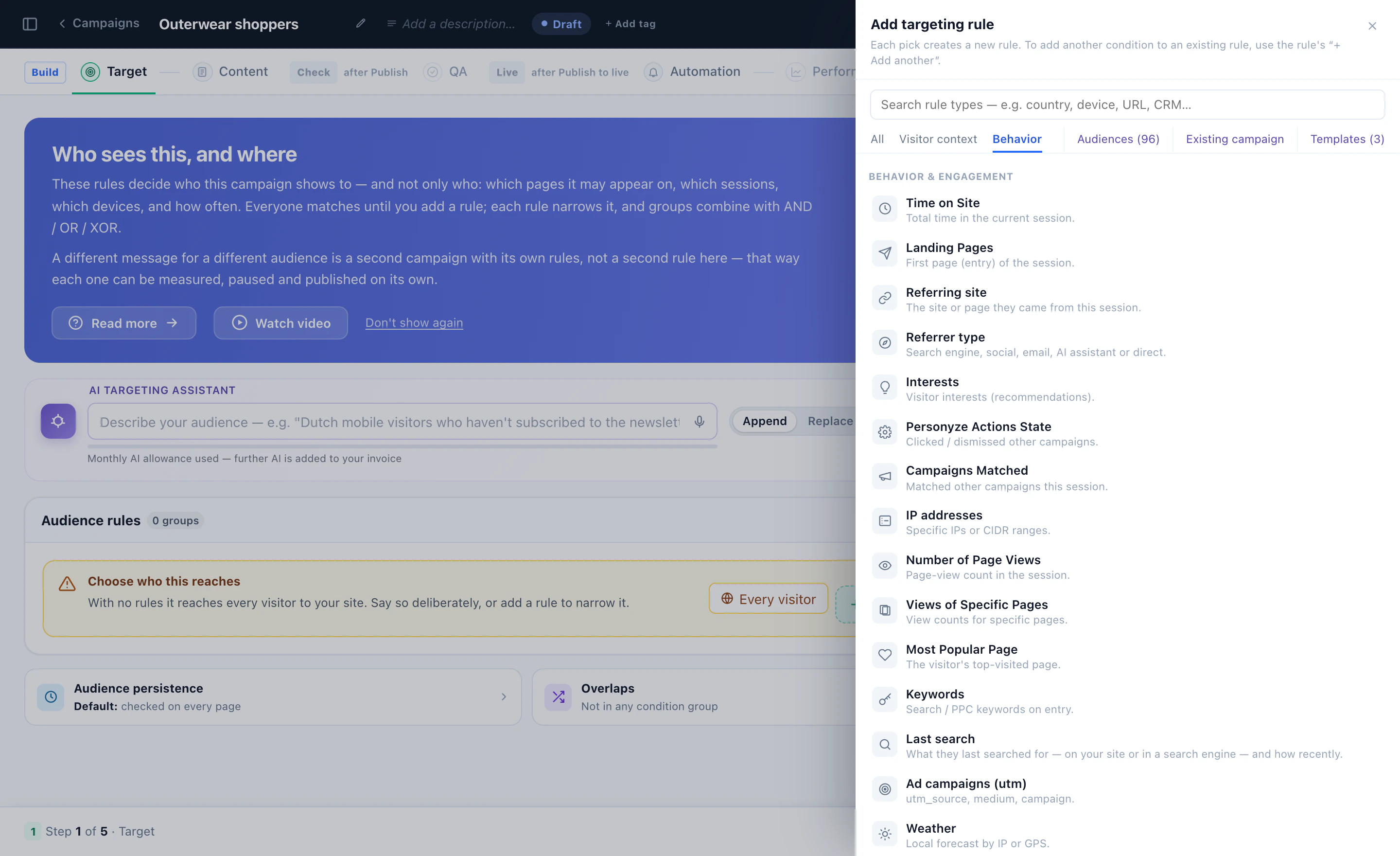
Every behaviour, a rule
Time on site, landing page, referrer, interests, campaigns clicked, page views, keywords, last search, UTM, weather — and the visitor context and CRM fields beside them.
The Target step
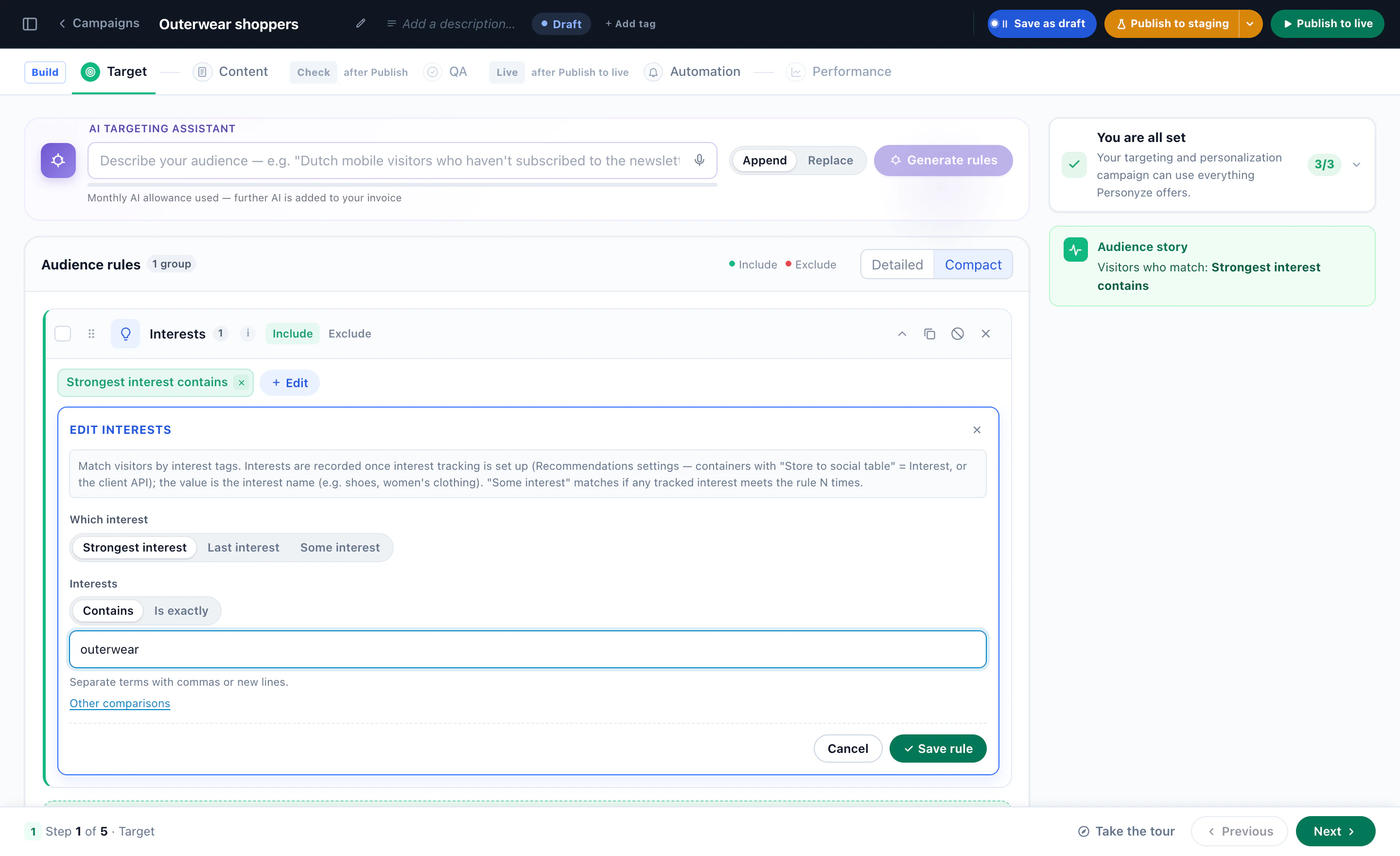
Set a rule in plain terms
Interests: the strongest, the last or any interest, contains or is exactly — here, outerwear.
The Target step
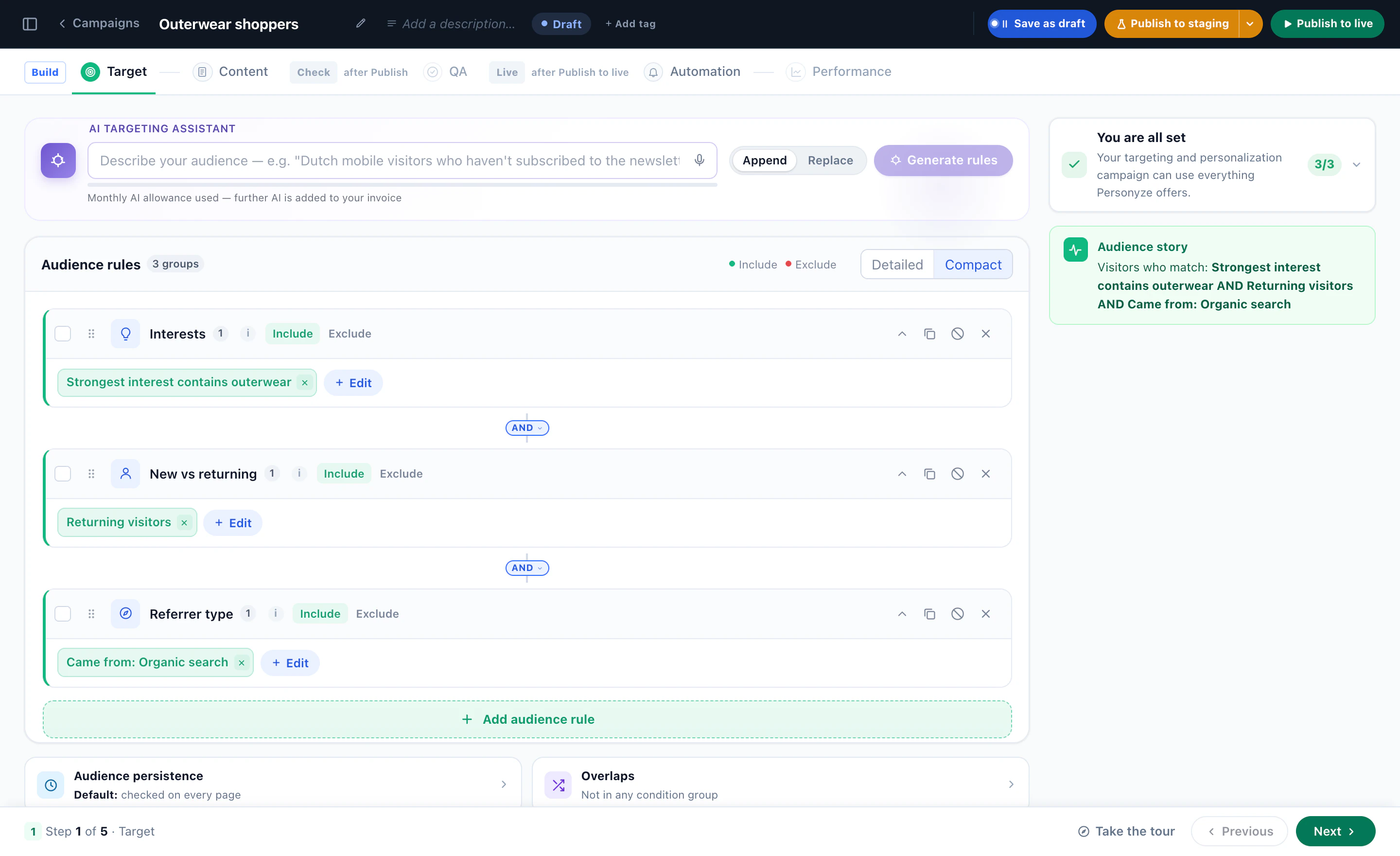
Combine rules, read it back
Three rules joined with AND, and the audience story in plain words: outerwear fans, returning, from organic search.
The Target step
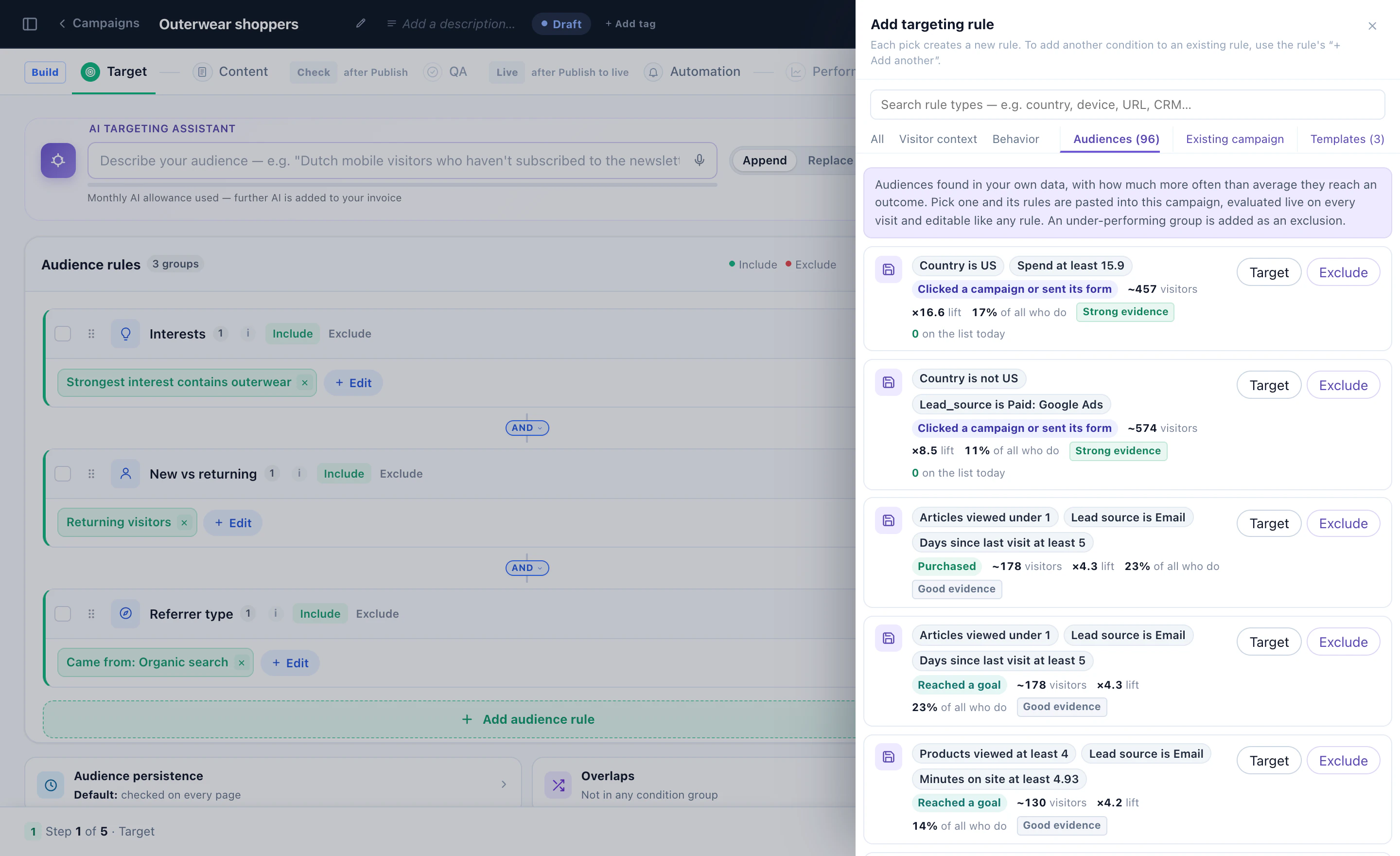
Or target an audience found in your data
Discovered audiences right in the rule picker — each with its lift and evidence, to target or to exclude.
Watch
Setting up campaign targeting: audience rules step by step 1:55
Rules, groups and the audience story — narrated, in the real panel.
Watch
Personalizing the home page for shoppers who browsed a category 2:25
A home page banner for the visitors who browsed one category.
Watch
Showing visitors what they searched for 0:48
The Last search rule, and recommendations for what they looked for.
From data integration to attributed lift — the full build flow, from your audience builder to live A/B-tested experiences.
Step 1 · Connect
Wire up your data sources
Drop the snippet, sync your CRM, or push events via API. HubSpot, Salesforce, Segment, Tealium, Clearbit — turnkey.
SourcesSnippet · CRM · API
Step 2 · Audience
Build segments visually — no SQL
Drag attributes into a visual builder. Combine any signals with AND/OR logic. Save segments, reuse across campaigns.
SegmentVIP · cart $80+ · idle 30s
Step 3 · Build content
Pick a widget. Style it. Bind dynamic data.
20+ widgets: banners, popups, in-line replacements, full page edits. WYSIWYG editor for marketers, custom JS for engineers when needed.
WidgetHero swap + sticky bar
Step 4 · Trigger
Pair audience with the right moment
Exit intent? Idle time? Scroll depth? Cart event? Any trigger combines with any audience. Frequency caps default-on.
TriggerExit intent + idle > 30s
Step 5 · Measure & optimize
Auto A/B, attribution, auto-shutdown
Built-in A/B testing splits traffic. Statistical-significance auto-shutdown rolls winners out, kills losers. Per-segment lift in your dashboard or GA4.
Tracked+24% lift · significance reached
Where it shines
Different industries. Different plays.
Behavioral targeting looks different for an e-commerce VIP than for a SaaS trial-expiry. Six common patterns, each tuned to the way real teams build campaigns.
E-commerce · Fashion
Recognize VIPs. Recover carts. Beat generic.
One-time deal-hunters and 7-visit VIPs both add to cart — but they shouldn't see the same banner. Tier-aware messaging means no discount given when full price would convert anyway.
VIP recognition via CRM tier + LTV — no discount popups for repeat customers
Cart-value-aware exit intent: $30 cart sees free ship, $300 sees concierge support
Cross-sell on PDPs based on category history + complete-the-look algorithms
Geo + weather variants for seasonal product surfacing (raincoat in Seattle, sun-hat in Miami)
SaaS · Product-led growth
Convert trials. Expand accounts. Cut churn.
The trial visitor on day 3 needs a feature tour. The day-12 trial needs an upgrade nudge. Same site, different in-app messaging, different outcome.
Trial-day-aware in-app messaging — feature tours early, upgrade nudges late
Account-based variants for ABM landing pages (firmographic match via Clearbit / 6sense)
Churn-risk surfacing: low-usage accounts see help-center prompts, not feature ads
Plan-aware pricing-page personalization (current plan dimmed, upgrade tier highlighted)
Newsletter prompts triggered by scroll depth + time-on-site, not pageview count
Subscriber win-back flows for lapsed readers (segmented by topic interests)
Travel · Hospitality
Match the moment of intent. Capture before they comparison-shop.
Origin-destination context, traveler type, search history, dwell time — the inputs are all there. The right offer at the right moment is the difference between a booking and a refresh of Kayak.
Origin-destination targeting (Miami→Cancun shopper sees direct flights, not connections)
Traveler-type segmentation: business, family, luxury — each sees its own room class
Abandoned-search recovery via push + email with the exact dates they were checking
Financial · Wealth & banking
Cross-sell with context. Onboard with relevance. Stay compliant.
A first-time visitor to a credit card page is not the same as a returning customer with a checking account. Personalize the next-best-product suggestion without violating account-data boundaries.
Next-best-product recommendations based on existing account mix and life-stage signals
Onboarding paths that adapt to product type (checking vs. wealth vs. business loan)
Geo + branch-affinity routing for in-person services and co-branded promotions
Recognize the company before the form. Personalize the pitch.
IP-to-company match plus firmographic enrichment turns anonymous traffic into named accounts. Swap headlines, social proof, and CTAs to match their industry — before they fill anything.
IP+firmographic enrichment: Clearbit, ZoomInfo, 6sense integrations out of the box
Industry-tuned hero copy + logo carousel (logistics co. sees logistics customers, not retailers)
Account-tier-aware demo CTAs (Fortune 500 visitors get a different form than SMB)
Per-account journey tracking pushed to Salesforce + Slack alerts to AEs
Live, in the platform
Build the audience. Watch it perform.
The visual builder lets you describe any audience in plain logic — combine attributes with AND/OR rules and smart triggers. Live performance dashboards show what's working, by segment, in real time.
app.personyze.com/audiences/builder
Live, interactive previews of the actual platform UI.
By the numbers
Proven at scale. Fast to launch.
+24%
Avg lift on targeted segments
70+
Visitor attributes & data points
20+
Content & targeting widgets
1,500+
Brands using Personyze
A/B testing built in
Test smarter. Win automatically.
One audience, one moment, two offers. Personyze splits traffic, watches per-segment lift, and auto-promotes the winner the moment statistical significance is reached.
Test #214 · VIP cart-recovery incentive
Test running · Day 9 of 14
Statistical significance reached (p < 0.01). Free-shipping variant will be auto-deployed to 100% of Gold-tier visitors at 99% confidence. Per-segment lift, holdout cohorts, and frequency caps all configurable in the same builder.
Everywhere a visitor shows up
One audience model. Every channel.
Build a segment once, target across web, email, push, in-app, and API — without re-creating it in five different tools.
Web
Banners, popups, hero swaps, in-line replacements, sticky bars — rendered on any page, any visitor.
20+ widget types
Email
Triggered drips and open-time personalization — same segment logic in your existing ESP.
HubSpot, SendGrid, Mandrill
Push
Web push and native iOS/Android with the same audience and trigger logic. Cross-channel orchestration built in.
SDK + REST API
In-app
Modal, slide-in, and rich content surfaces inside your iOS/Android apps — same segment, same data.
Mobile SDK
Server-side API
Query the segment engine from your backend. Render content server-side. Sync segments to any system.
REST + JSON
Webhooks
Fire events to any external system the moment a visitor crosses a segment boundary or hits a goal.
Real-time JSON
Ads & CDP
Sync segments to Tealium, Segment, and ad platforms for retargeting and lookalike audiences.
Tealium, Segment, Ads
Forms & CRM sync
Behavioral signals push back into your CRM. Lead-scoring, account stage updates, and sales-team alerts.
Salesforce, HubSpot
Go deeper
Go deeper. On your own time.
Strategy guides, audience builder docs, real examples, and integration walkthroughs — everything you need to ship targeted campaigns the right way.
White-glove onboarding, ready-made audience templates, performance dashboards, universal integrations, and pay-as-you-go pricing — the same platform Personyze customers run across web, email, recommendations, and push.
White-glove service
Onboarding team helps you build your first audiences and connect your CRM — live in the first week.
Audience templates
Pre-built segments for cart abandonment, VIPs, trial-end, B2B accounts, returning readers — ready to clone and tweak.
A/B + analytics
Built-in A/B testing with statistical-significance auto-shutdown. Per-segment lift in dashboard or GA4.
Sandbox previews, share links for stakeholders, role-based access, SSO, audit logs — ready for big-team workflows.
Flexible billing
Pay-as-you-go pricing scales with traffic. No commitments, no per-seat fees, no enterprise haggling required.
Direct answers
Seven questions, no fluff.
The real-world questions teams ask before shipping behavioral targeting — data sources, deployment time, privacy, and the hand-off with developers.
Do I need a developer to set this up?
For initial setup: yes, briefly — a developer drops the snippet into your site header (or your tag manager), about a 5-minute task. After that, marketers build audiences and content entirely in the visual builder. No code required for ongoing campaign work. Custom JS is available when you want it; never required.
What data do you actually use to identify visitors?
Anonymous visitors: cookies, IP-derived geo, device/browser fingerprint (in compliant ways), behavior on your site, referral source. Logged-in visitors: your CRM identifier (email, user ID) plus everything above. Identity stitching reconciles them across sessions and devices via your CRM, our SDK, or both.
How does this work with GDPR / CCPA / consent?
Personyze respects your existing consent infrastructure — we won't track or target a visitor who hasn't consented under your cookie policy. We support OneTrust, CookieBot, and any consent management platform. Data deletion requests are handled via API. We are GDPR-compliant and have a current DPA available.
Can I bring my own data — CRM, CDP, third-party signals?
Yes. Native integrations exist for HubSpot, Salesforce, Segment, Tealium, Clearbit, ZoomInfo, 6sense, Leadfeeder, plus open APIs and webhooks. Anything else: SFTP feeds, REST API, JSON webhooks, file upload, or Google Sheet sync. If you have data, we have a way to ingest it.
Do I need to send you a data feed?
No. Our site crawler indexes your live pages automatically — products, articles, landing pages, anything renderable. The contextual engine auto-tags content with topic, category, and intent signals. The visual scraper pulls dynamic values (cart totals, search inputs, form fields, signed-in user attributes) straight from the rendered DOM. If you do have feeds, sync them. If you have user lists, upload a CSV or sync via SFTP. Either way, no engineering ticket required to start.
How do I preview and QA before going live?
Every campaign has three modes: draft (live preview only, no traffic), test mode (visible only to test IPs or via a special preview link you share with stakeholders), and live. Shareable preview links work without logins, so legal, compliance, or account managers can review without seats. SSO and granular role permissions are built in for enterprise teams.
How fast can I go live?
Snippet install: 5 minutes. First audience built and tested: same afternoon. First live campaign: typically end of week one. White-glove customers usually have 3-5 priority playbooks (cart recovery, VIP recognition, B2B account targeting, reactivation, etc.) live within two weeks.
Does this replace my A/B testing tool?
It can. Personyze ships with built-in A/B testing on every campaign — statistical-significance auto-shutdown, GA4 attribution, control groups. Customers using Optimizely or VWO sometimes consolidate; others run side-by-side. We integrate with both if you want to keep them around.
Does behavioral targeting work with the rest of Personyze?
Build segments in a visual editor. Launch campaigns without engineering tickets. Your first behavioral test can go live today — sign up free and explore at your own pace.