Every week, Personyze reads your own visitor data and finds short, plain-language rules for the people who convert far more often than average — and the ones who convert far less.
Each finding is a card: the rule in words, how many visitors it covers, how much more often they convert, and how sure we are — measured on visitors the rule never saw. Target it in one click, turn it into a list, or dismiss it.


Over-performers by outcome, the ones that shrank on held-out visitors shown as shrunk, and the under-performers the ad budget should stop paying for.
A rule like Country is US · products viewed at least 6 · no interest in pen kits is exactly the sort of thing a person never thinks to write — and exactly the sort of thing a decision tree finds in a minute.
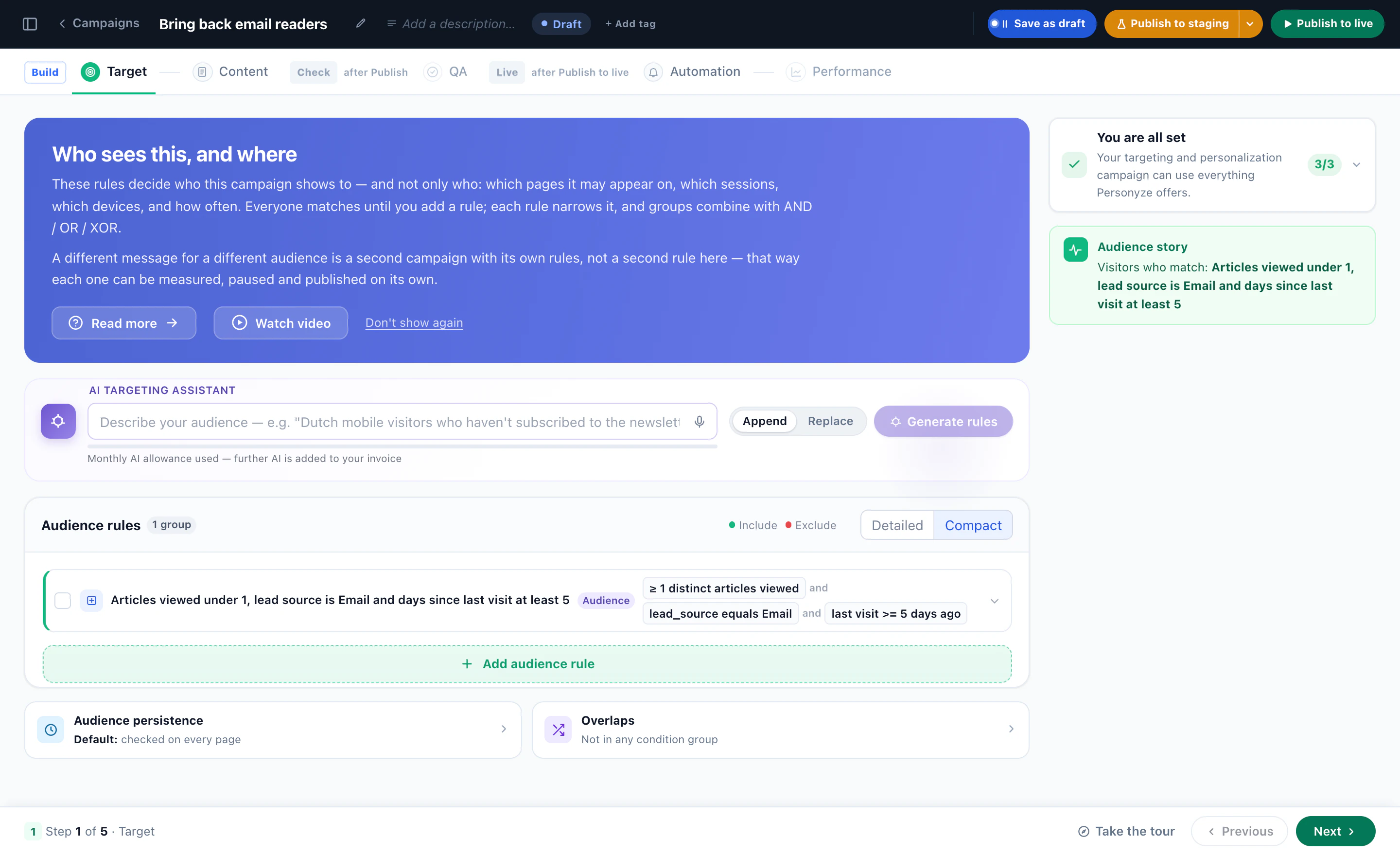
The audience joins the campaign as a live rule, so the visitor who comes back tomorrow is already in it — no list to rebuild, no export to schedule.
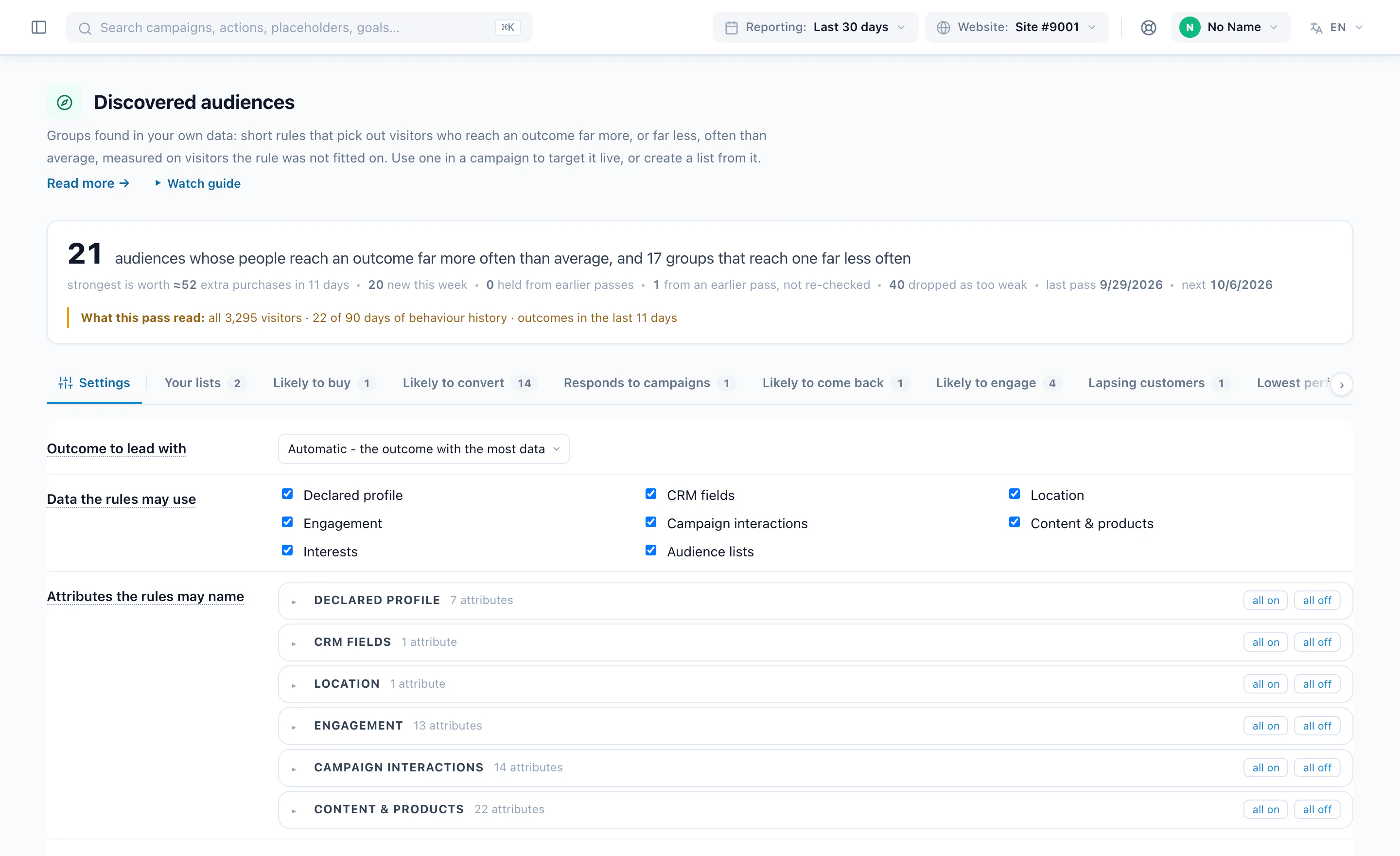
CRM fields, declared profile, location, engagement, campaign interactions, content, interests and lists are each a switch. Gold tier at three visits or more is a finding you can hand straight to sales.
Direct traffic that never buys, or a device and source combination that bounces, faces the same floor and the same held-out test as the winners. Exclude it in a campaign, or export it so the ad spend stops.
No model guesses. Once a week the miner reads your visitor archive, grows shallow decision trees and scans single conditions per outcome, then throws every candidate rule at held-out visitors it was never fitted on. Only what still holds becomes a card.
The site crawler reads your pages and AI categorises each one by what it is actually about — in your own categories, not a generic taxonomy. A visitor who views religious-gift products is flagged as interested in religious gifts, weighted by how much they viewed. Audience Discovery reads those interests like any other data group.
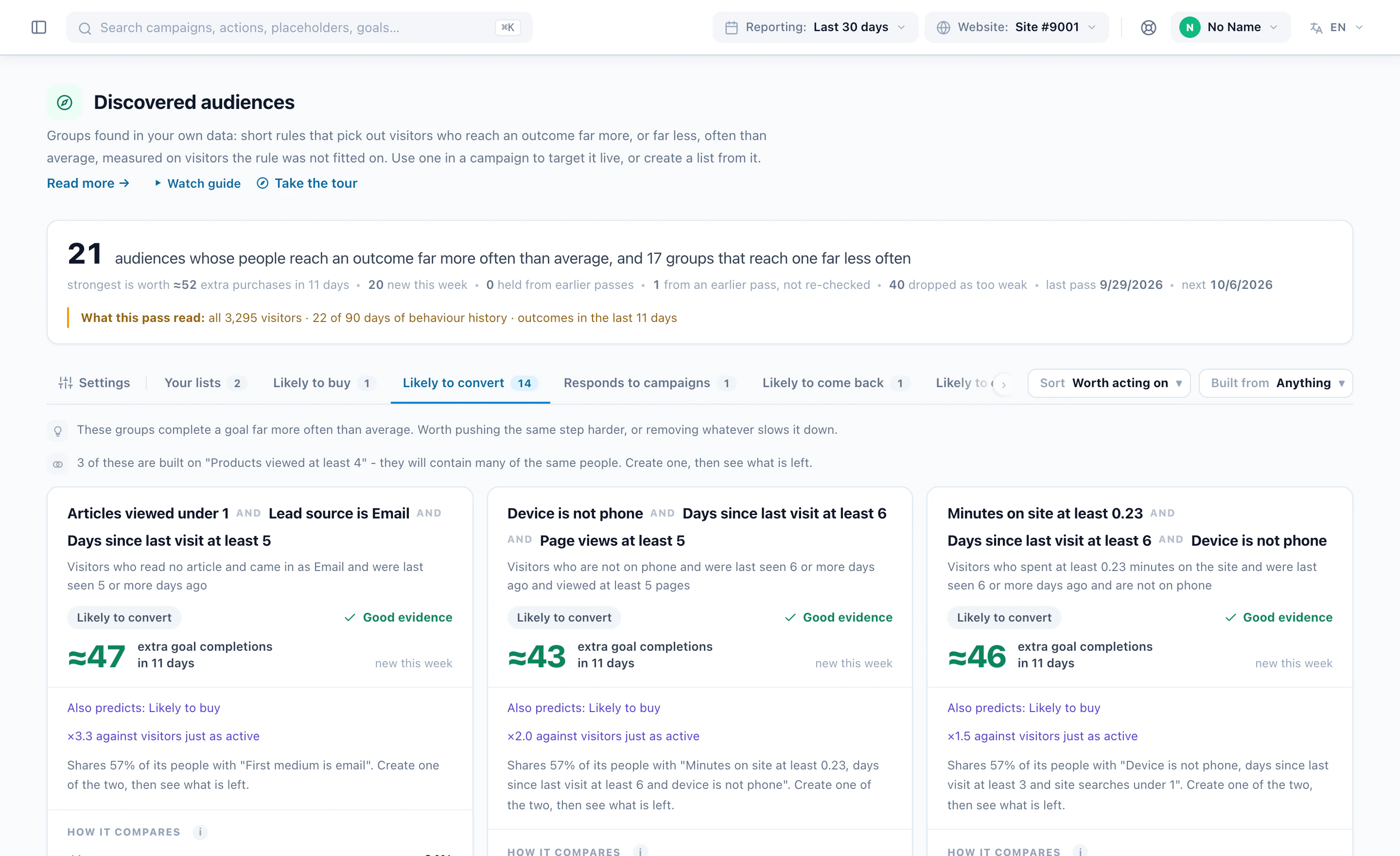
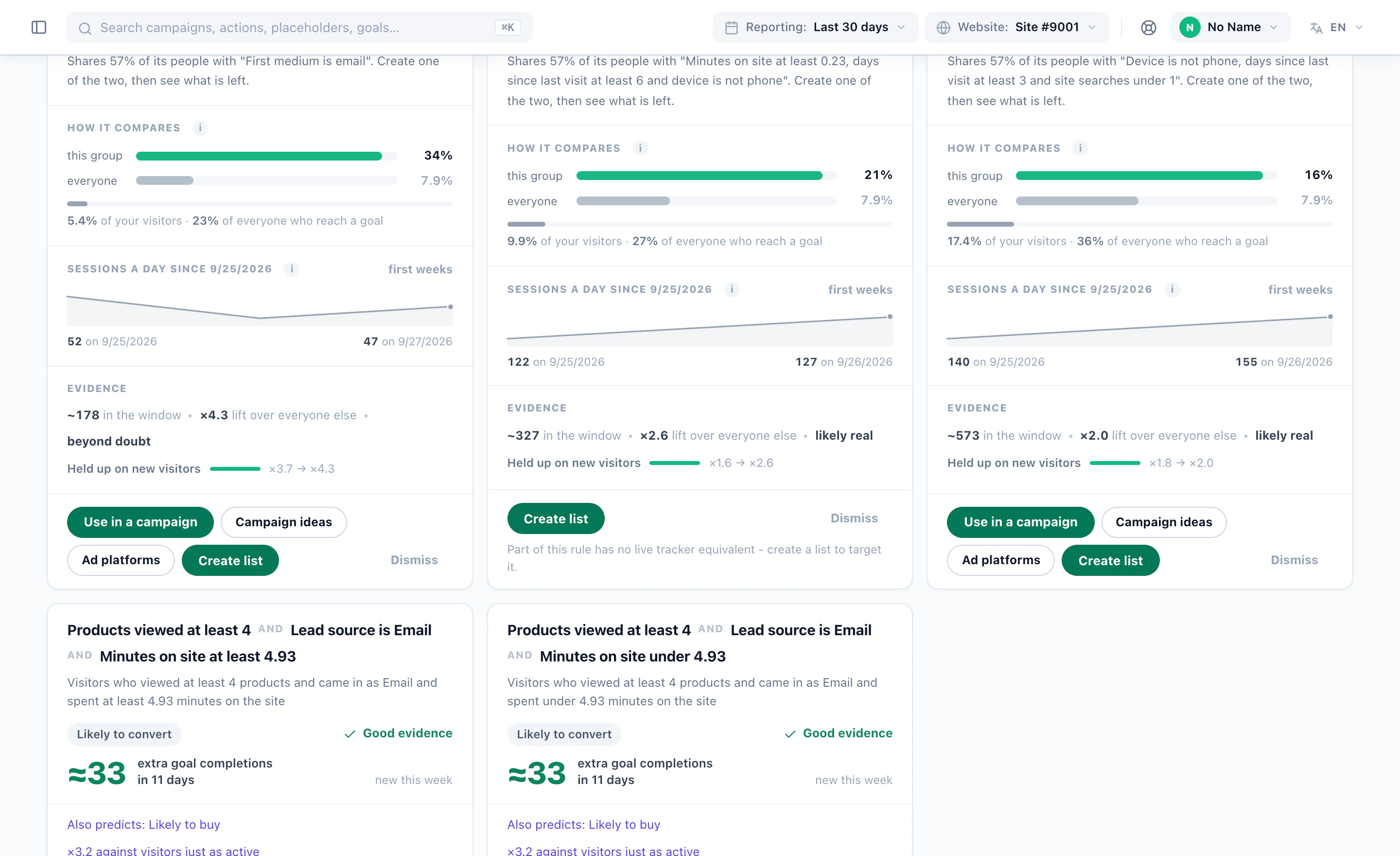
Cards are ranked by extra outcomes — the visitors in the rule times how far their rate sits above the average — not by flashy lift on a tiny group. Every number was measured on held-out visitors. Here is one, part by part.
Against a same-sized group of average visitors. 7.4% of them buy, versus 2.2% on average, and they account for 19% of everyone who does — about 6% of your visitors.
From the first weekly pass to the report that says whether anyone acted on what it found.
Audience Discovery is an add-on with a trial. Switching it on starts the weekly pass and opens the Audiences menu — nothing to install, nothing to tag.
Weekly by itself, or press Run a pass now: ninety days of visitors, six outcomes, at most 100,000 visitors sampled and scaled back. Choose which data groups it may use.
Extra conversions first, unless you sort by lift, coverage, stability or realised lift. Overlap with other cards and your lists is on the card, and the floor says how many findings it dropped.
Use in a campaign attaches the rule live on every visit; every campaign’s rule picker has a Discovered audiences category too. Create the list only builds a daily-refreshed list for email, push and offline. Or copy the conditions into an audience of your own.
Predicted lift and realised lift shown separately; findings that shrank shown as shrunk; a funnel of what was created, has members, and is actually used. Once you target a card, it shows what actually happened for that audience — the feedback loop.
The method is the same everywhere; what it finds is not. Six kinds of site, and the sort of rule a pass tends to surface on each.
E-commerce · RetailA store has thousands of shoppers who look and a few hundred who buy. Discovery describes the ones who buy in three conditions — and the ones who never will.
SaaS · Product-led growthPricing visits, docs read, return after a week: the signals a sales team wishes it had, found on the visitors who actually reached the goal.
Publishers · MediaInterests are extracted from your own content already; discovery reads them and finds the reader profiles that engage, return, or subscribe.
Travel · HospitalityLong consideration windows suit the 180 / 60 setting. The rules that come back describe the searchers and returners who end in a booking.
Financial servicesSensitive attributes stay off unless you switch them on. What remains — engagement, content, location, CRM fields — still finds the applicants.
B2B · ABMCRM fields and reverse-IP company data are data groups like any other. Discovery finds the tier, industry and behaviour combinations that reach your goals.
The Discovered audiences page and the Discovery report, drawn as they appear in the Personyze panel. Every number on a card was measured on held-out visitors; the report shows the ones that shrank, too.
These groups reach an outcome far more often than average. Every number below was measured on visitors the rule was not fitted on.
Against a same-sized group of average visitors. 7.4% of them buy, versus 2.2% on average, and they account for 19% of everyone who does — about 6% of your visitors.
Against a same-sized group of average visitors. 12% of them start a cart or a form, versus 4.1% on average, and they account for 9% of everyone who does.
Against a same-sized group of average visitors. 9.6% of them reach the goal, versus 3.1% on average, and they account for 14% of everyone who does.
Across 9 over-performing rules, in a 14-day window. A sum over audiences that overlap, so treat it as a ceiling, not a forecast.
Seen two weeks or more and statistically strong on held-out visitors.
Rules perform almost as well on visitors they were not fitted on. Healthy.
Created from a suggestion and now targeted by a campaign. The number that says whether the feature is working.
Each dot is a rule; bigger dots produce more extra conversions. The biggest lifts are always the smallest audiences, and almost none of them are worth a campaign. The shaded areas are the floor.
Mostly held, with a little churn. The same groups keep reappearing pass after pass, which is what a real segment does.
Rules using each data group, out of 9. Turning off Content and products would drop 7 of them.
Illustrative account. Weekly by itself, or whenever you press Run a pass now.
A group that is off contributes nothing to any rule. Nothing is sent to a model, and no data leaves your account. The report says which groups carried the rules, so switching one on is an informed decision.
What visitors told you about themselves.
Tier, owner, industry, open deals.
Country and region.
Sessions, visits, time on site, days since last visit, device, browser, how the first visit arrived.
What they clicked, dismissed, converted on.
What they viewed, and how much.
Interests the AI reads from your own pages through the site crawler; audience list membership.
Gender, age band. Off unless you switch them on.
The engine it feeds, the targeting it lands in, and the assistant that can drive it.
The decision at request time, step by step — and where discovered audiences join it.
Read the article FeatureThe rules you write by hand, the triggers, and every channel a discovered audience can be used on.
See targeting AssistantList discovered audiences, create a list, dismiss one or draft a campaign from Claude, ChatGPT or any MCP client.
See the MCP server WikiHow lists refresh, how a rule reads a visitor, and what each number on a card means.
Open the docsWhat teams ask before switching it on: whether it is AI, what it predicts, how often it runs, what it reads, and what a card costs to act on.
No. The miner is plain statistics: shallow decision trees and single-condition scans, with every rule re-measured on visitors it was never fitted on. The only language model in the picture is the one that already extracts interests from your site’s content; discovery reads those interests but never calls a model itself. Nothing is sent anywhere.
No, and it does not claim to. It describes groups of visitors who already convert more often than average — or less — and tells you how sure it is. The targeting that follows is live and per-visitor; the discovery is about groups.
Mining runs once a week per account by itself, and you can press Run a pass now whenever you want a fresh one. Lists built from a card refresh daily. Targeting through a Discovered audience rule is evaluated live on every visit, so a new visitor who matches is in immediately.
From your own pages. The site crawler reads them and AI categorises each page by what it is actually about, in your site’s own categories. A visitor who views religious-gift products is flagged as interested in religious gifts, weighted by how much they viewed. That is why a card can say “no interest in pen kits” without anyone tagging a page.
Each outcome needs enough positives in the label window to be mined at all — the screen tells you which outcomes qualified. Low-traffic accounts can run a longer window (180 days, judged on the last 60). On very small accounts the session archive may hold only a month of history, which limits session-based rules; the report says so rather than inventing them.
Only the groups you switch on: declared profile, CRM fields, location, engagement, campaign interactions, content and products, interests and audience lists. Sensitive attributes such as gender and age band are off unless you enable them. An outcome’s own history is never used to explain itself.
Several ways. Use in a campaign opens a campaign with the audience attached as a live rule, and every campaign’s rule picker has a Discovered audiences category so any existing campaign can target or exclude one. Create the list only builds a daily-refreshed list, which works for email, push and offline campaigns because the visitors are flagged. You can copy the card’s conditions into an audience of your own and build on them. Campaign ideas builds a real design in staging with the audience targeted. Dismiss keeps a card dismissed even if a later pass finds it again.
Once a campaign targets a card, the card and the report show what actually happened for that audience — sessions, conversion rate and realised lift over the last 30 days — beside the predicted numbers, never blended with them. So you can see whether what you did for the audience worked, and change it.
Audience Discovery is an add-on with a trial, switched on from the panel in a minute — it starts the weekly pass and opens the Audiences menu. Plan and add-on details are on the pricing page.
Switch it on, let the first pass run, and open the cards. The first one worth a campaign is usually waiting in the top fold.