 NewInside the race for smaller chips

 Bamboo Country
 NewDeep Field
 Stones of Rome
 Paris After Dark
 NewCharging on the road, a year in









 A last-minute winner sends the city wild
 The comeback nobody saw coming
 NewWhat a slower year means for markets
 Tech
 Work
 Above the Clouds





A/B test any widget
Two algorithms, two layouts or two places on the page — each one a version. New tests call a winner only at 98% confidence and 1,000 sessions.
While they’re on your site
AI Website PersonalizationContent and offers for each visitorB2B PersonalizationEach company sees its own industryProduct RecommendationsWhat each shopper wants nextContent RecommendationsThe next article each reader wantsA/B TestingA winning version for each audienceDynamic Landing PagesPages that match the ad they clickedAI Search & Chat AgentAnswers from your own pagesBanners & Pop-UpsShown by behavior, source, locationAI Promotion ManagerAI picks each shopper’s best offerSocial ProofLive ratings, stock and recent buysReach them after they leave
Email PersonalizationEmail series, picked for each readerPush & SMSTriggered by what they just didHosted Landing PagesPer-visitor pages, hosted by usKnow who they are
Behavioral TargetingAudiences that update themselvesAudience DiscoveryBuyers you didn’t know you hadWebsite AnalyticsSessions and revenue, per personWhat visitors tell you
Reviews & TestimonialsReviews from 17 sites, per visitorSurveys & NPSAsk a question; use every answerAI Chat AgentAnswers, then hands over to peopleMeeting SchedulerThe right visitors book a callAI tools and your stack
Personalization PlatformEvery tool on one visitor profileAI AgentDescribe a campaign; it drafts itIntegrationsHubSpot, Salesforce, Segment, GTMApp MarketplaceBuilt-in and reviewed partner appsAPIs, SDKs & AutomationREST API, server and mobile SDKsMCP ServerRun Personyze from your AI assistantShow every reader the next article, video or guide worth their time — after a story, on your home page, in your newsletter and in your app.
An algorithm for every kind of page — or one widget that chooses by itself on all of them. Put what each reader follows first, and see which picks they click.
Not sure where to start? See recommendation ideas for your site 4.8
 4.6
On every page, show each reader what they are likely to read next — learned from readers like them, and good from their very first visit.
Tuned to your kind of siteNews freshness firstB2B blogs from learning to the demoRecipes complete the mealCourses in the right orderVideo the next episode
Put one widget everywhere and it picks for each page by itself — where readers go next on an article, what each reader is likely to read everywhere else — and it never comes up empty.
From a reader’s very first page: before they have read anything, show what readers in their location read most — then what is trending.
Learned from readers who behave like them — so a returning reader gets a front page of their own, and a new one sees what readers where they are read most.
Bring returning readers straight to the stories they haven’t seen yet, picked for them.
Learned from the order real readers open stories in, and from what readers like them read together. AI reads your articles, so a brand-new piece has neighbours on day one.
Related reading as links inside the text, a continue-reading panel at the end, or paging to the next piece — never the one they are on.
On a section front, readers see what is popular in that section and what is new there — not the whole site’s list.
Show the sections each reader is most likely to read next, or offer the topics they have shown as topics to follow.
Matches the reader’s last search — on your site, or at the search engine that sent them — against your articles’ titles, topics and descriptions.
A page that answers “not found” can still hand the reader something worth reading.
The articles in your newsletter are chosen for each reader when they open it — not when it went out.
Only what is new to this reader, picked for them — in the newsletter, or as a web push.
Your app asks for a reader’s picks — by their email or your own user id — and gets them back as JSON.
One algorithm, fallbacks behind it and the articles to skip — set up in the same wizard as a widget.
Install the tag and point us at your articles, and Personyze does the rest: it sees what each reader opens and maps it all.
Each article is kept by its Internal ID. Similar Content (AI) is switched on in Catalog settings and uses AI credits.
Works on any site, whatever it’s built on: paste one tag into any CMS or custom build — or let the WordPress or Joomla plugin, Google Tag Manager or Webflow put it on in one click. It is what lets Personyze see what each reader reads.
We crawl your site: Personyze finds your article pages through your sitemap and links, reads each one’s title, picture, date, author and section, and reads them again on its own, so new articles follow. Or send a feed or files — RSS or Atom, a CSV, Excel, XML or JSON file at its address, by SFTP or over the REST API — and on WordPress the plugin’s feeds keep the catalog current every day.
The tag knows an article page by its address or by the ID on the page — one click, nothing to change on your site — and records the read against that article.
Each article’s topics — your own categories, or keywords Personyze pulls from its text — become a reader’s interests as they read. Similar Content (AI) reads every article — its topics, the people and places in it, news or guide, and whether it stays relevant — and finds its neighbours by meaning, tuned to your kind of site, so a new piece has related reading before anyone has opened it.
Comprehensive, self-learning: it weighs many signals at once, and every round goes into the next build of the picks.
Six article formats, in your readers’ own language, in any spot on the page or as a popup on exit intent — built by asking the assistant, by pointing at your page, or from the gallery.
Say what you want in a sentence; the assistant in your panel builds the widget.
Open your page in the editor, click the spot, and the widget goes there.
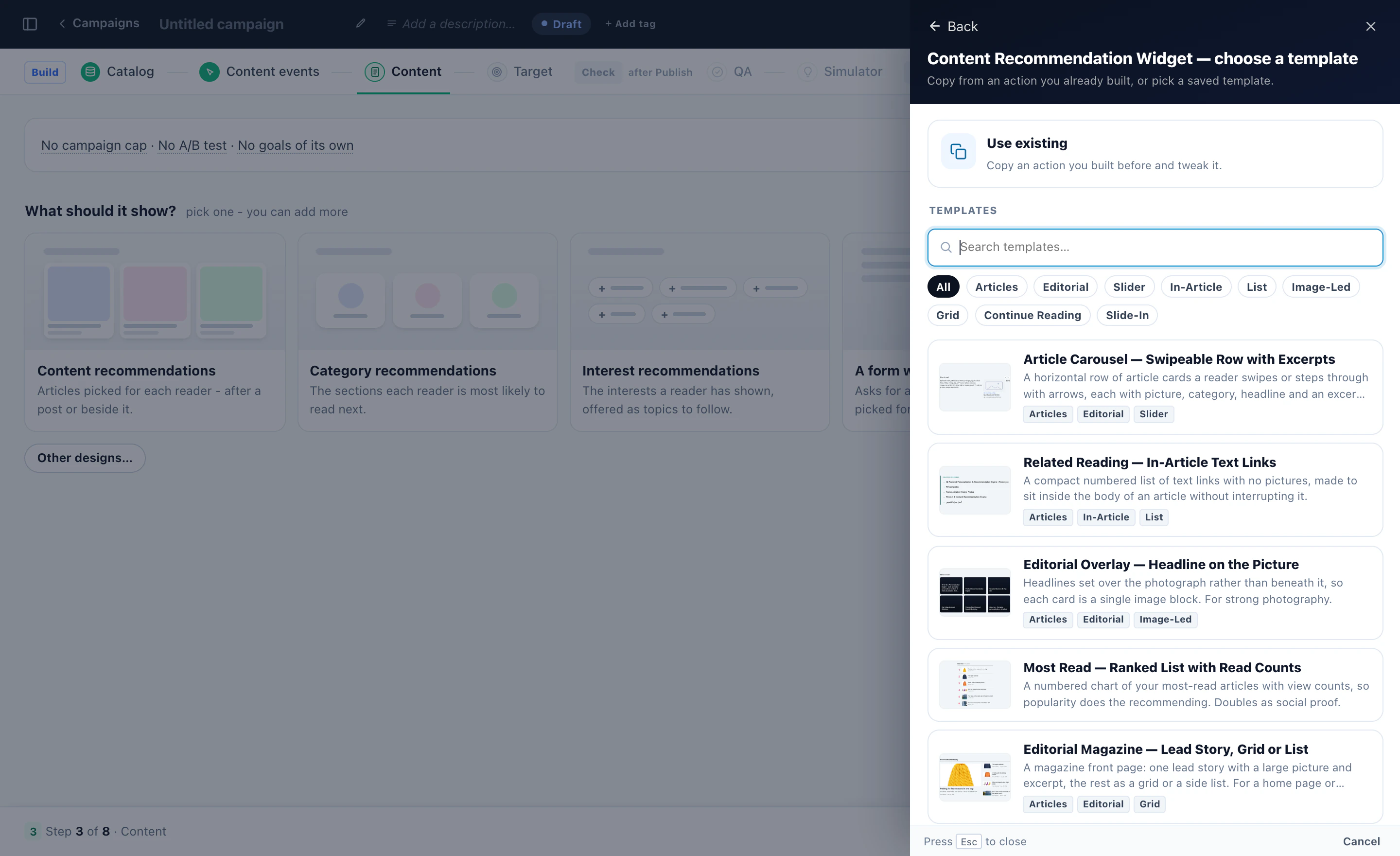
Start from one of six article formats in the template gallery, then change its design in words with Edit with AI.
Follow one article from your catalog to the row under a story — the same stops, in the same order, for every reader.
Every row starts from your published articles — narrowed to some sections or rules of your own if you like.
On an article it starts from the story being read and where its readers went next; on the home page, from what this reader has read. It knows what each article is about, tuned to your kind of site.
The story on the page, and anything this reader was shown, read, liked or commented on, stays out.
The topics, authors and tags this reader follows move to the front. The algorithm still picks the articles.
Lift promoted or new articles, or keep one slot for something new. Articles readers click more get a small, capped lift.
When the first algorithm runs short, the next one takes over — and your most popular articles can fill what is left.
New, Popular and Trending come from your own dates and read counts; a time limit counts down from a date in your catalog.
Clicks, and the content goals readers reach within 7 days — per widget and per article.
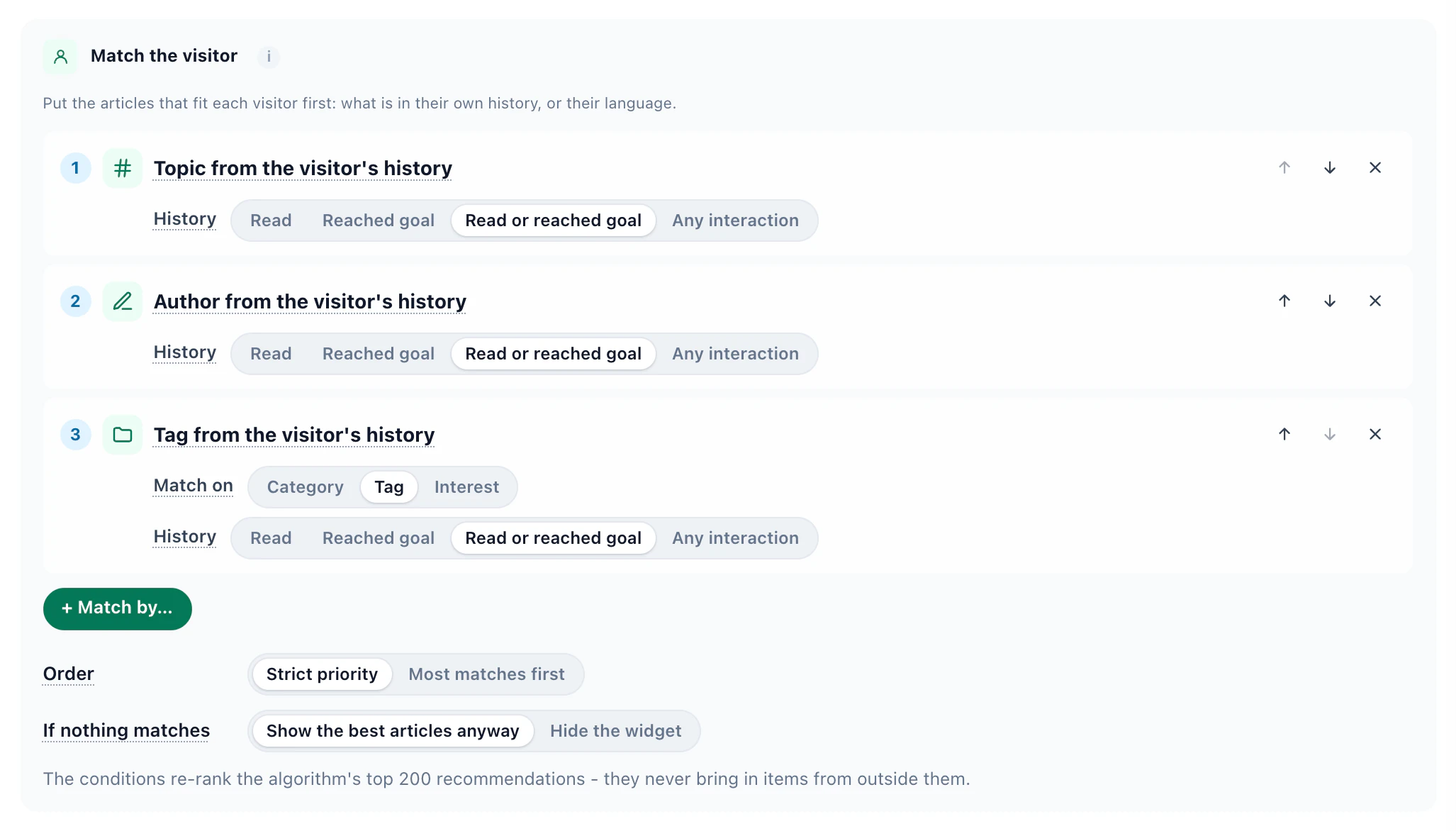
Stack a few match rules on any content recommendation widget — the topics, authors and tags from the reader’s own history — and the articles that fit each person move to the front. The algorithm still leads: the rules re-order its own top picks, and never bring in articles from outside them.
Nothing read yet: every rule comes up empty, so the widget keeps the algorithm’s own order.
Reads climate stories, most of them by Maya Lund, and keeps opening ones tagged Energy.
Reads science stories, follows Ana Ruiz, and keeps opening ones tagged AI.
Show only matches One switch, and a widget with nothing that fits stays quiet.
B2B content Match the visitor’s company industry instead, from your own data or a firmographic integration.
Same rules everywhere On your site, in recommendation emails, in the Canvas Builder and in the JSON API & feeds.




How Match the visitor works, with recipes for each kind of site →
Test it, badge it, send it by email, feed it to your app — and see what the engine learned.
Two algorithms, two layouts or two places on the page — each one a version. New tests call a winner only at 98% confidence and 1,000 sessions.
New, Popular and Trending from your own dates and read counts, a countdown to a time limit, or any label from your feed.
The widget translates its own words — buttons, titles, labels — by itself, and each reader gets articles in their own language.
A popup asks only readers of an author or a topic for their email. Your newsletter then opens on what’s new since their last visit, and a daily push can bring the newest on their topics.
A recommendation block in the emails you already send. Each reader’s articles are chosen at open, not at send.
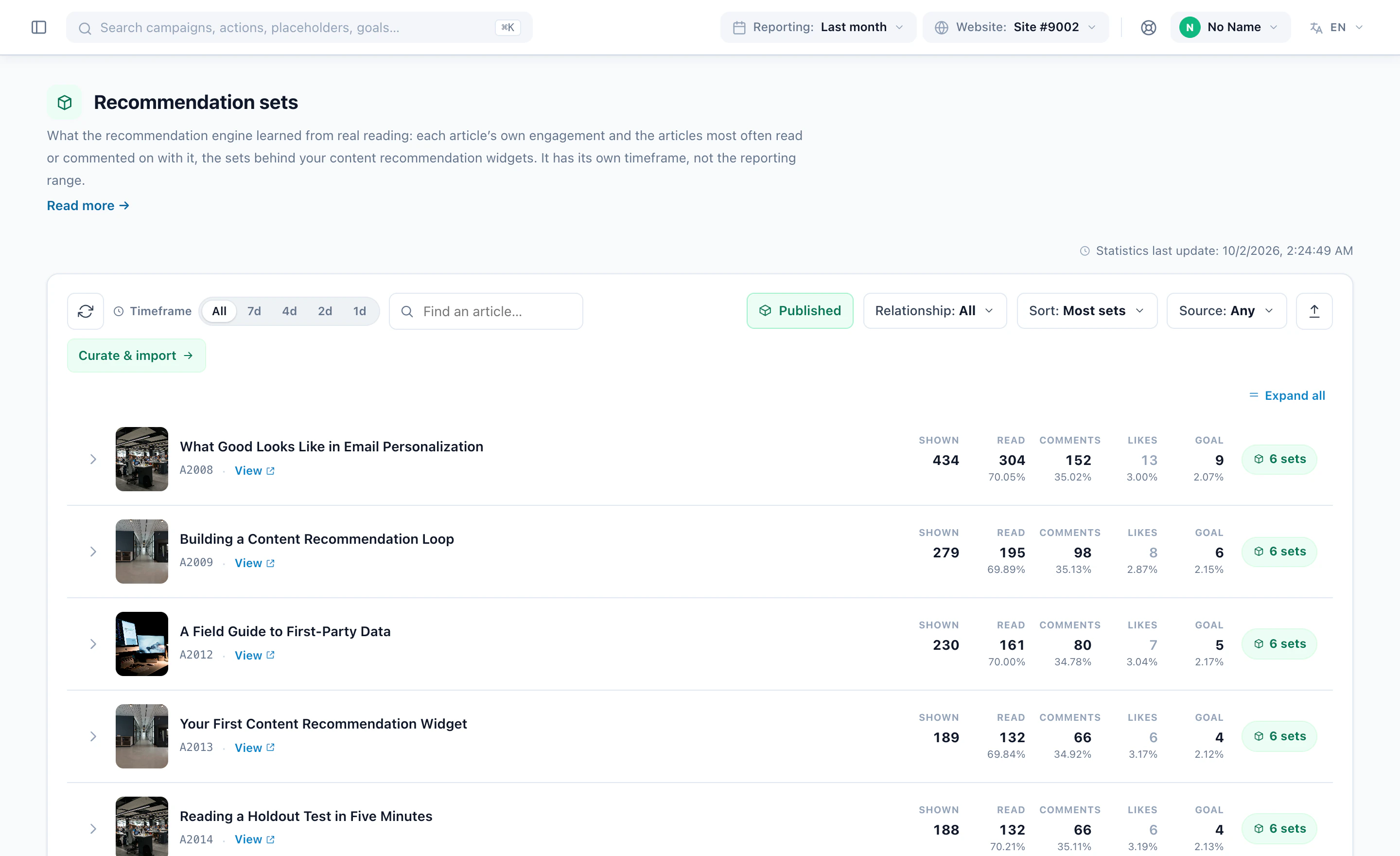
Each article’s reads, comments, likes and goals, and the articles readers most often read together.
Tabs or sections, each with its own recommendation. Made in a content campaign, it starts with two: For you, and Trending Now.
Your developer, your app or your email platform fetches a reader’s picks as JSON and shows them in its own design — an empty answer is [ ], never an error.
Asks for an email address beside the articles picked for each reader — one widget, the reading and the sign-up together.
How publishers keep readers reading: the content recommendations playbook, and more personalization examples.
Times shown — counted only when an article was really on screen — clicks, click rate, and the content goals readers reach within 7 days. For every widget, every article and each version you test.
 Offshore wind’s next ten years12,400 shown → 1,180 clicked → 164 goals12,4001,1809.5%164
 How coastal cities prepare for higher seasRising10,900 shown → 960 clicked → 151 goals10,9009608.8%151
 The lab behind a one-shot flu vaccine9,800 shown → 610 clicked → 88 goals9,8006106.2%88
 The phone that folds twiceFalling8,700 shown → 240 clicked → 19 goals8,7002402.8%19
 Five stories from the finals2,100 shown → 290 clicked → 37 goals2,10029013.8%37
Shown a lot, rarely clickedThe phone that folds twice
Clicked well, rarely shownFive stories from the finals
Rising and Falling mean up or down 20% or more in the later half of the range against the earlier half. What each number means
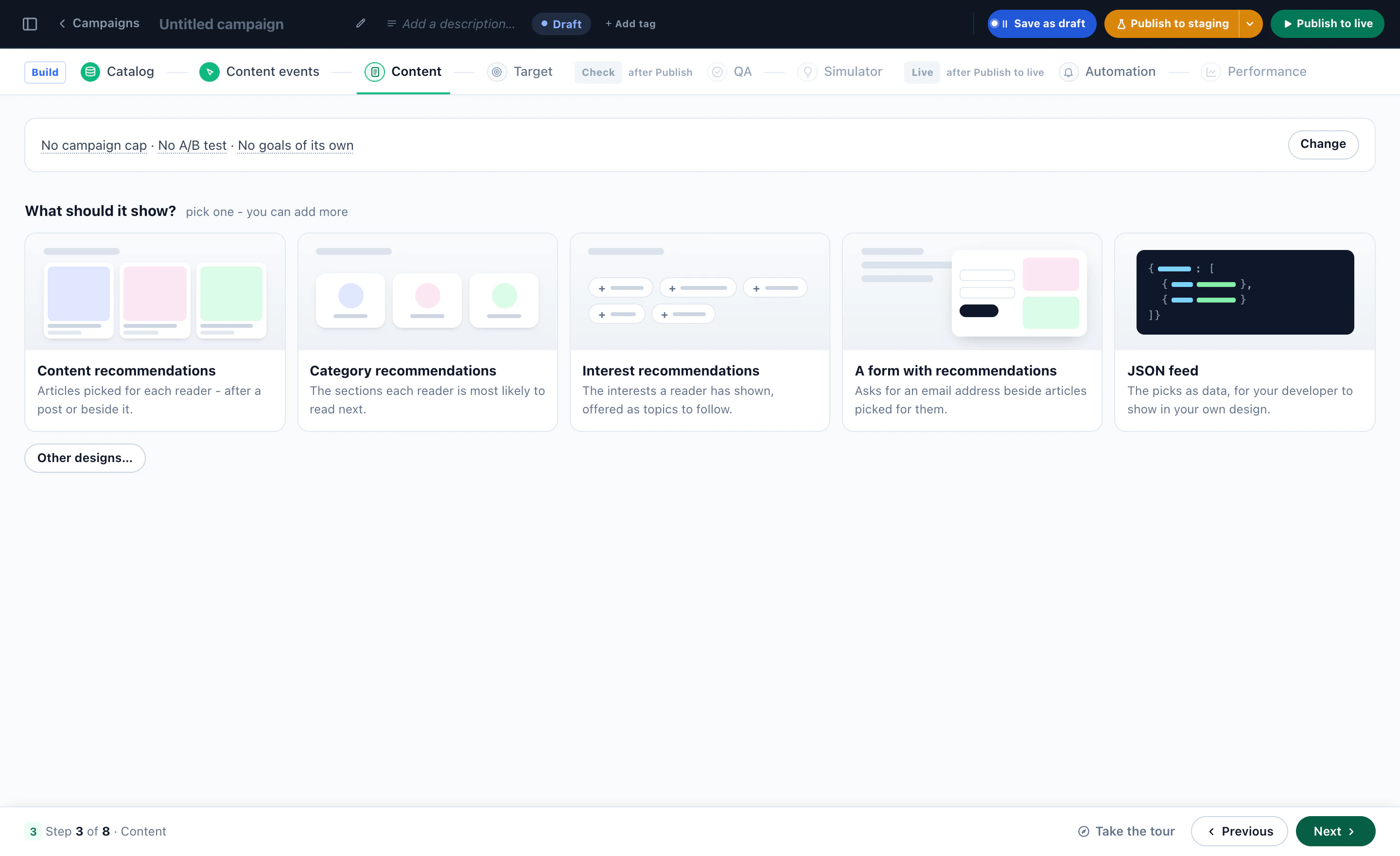
Algorithms for articles and the cards they fill, what a widget shows, its template and its match rules — then what the engine learned from your readers. Real screens from the panel.
Personyze reads your articles, sees what readers read and places a reading widget on your own pages, in your site’s look. Nothing shows until you publish.
For you, new since the last visit, trending — then the article cards in your site’s own look.
Content recommendations, the sections a reader is likely to read next, interests to follow, a form beside picked articles, or the picks as JSON.
Article carousels, related-reading links inside the text, headlines on the picture, a most-read list, a magazine front page — each one editable.
Topic, author or tag from what each reader has already read moves to the front — the algorithm still picks the articles.
Pick an algorithm, build a widget with tabs, see what two different visitors get and why — then the article algorithms and cards.
Every article with how often it was shown, read, commented on, liked and led to a goal — and the sets it is recommended in.
It decides by itself what fits each page and each reader, from your own data, and falls back step by step so it is never empty — set up by you or by the AI assistant.
What readers of this article went on to read: the catalog and reads it runs on, a design, the algorithm and its place after every article — in the real panel.
An RSS or Atom feed, your own site, a file or SFTP — a quick check before import, then a catalog that keeps itself current.
Read from your page addresses with no code, or one line your developer adds — each read checked as it arrives, and past reads uploaded so it knows what is popular from day one.
Free AI tool · Inspire me
Give Inspire me your address. It reads your pages the way a first-time visitor sees them and writes the content and product recommendations worth running: which page, for whom, what each should pick, and how to measure it.
Like an idea? Describe it to our AI personalization agent and it builds the campaign for you.
1What kind of ideas?
2Your website
Free · nothing to install · it reads your public pages
Reading yourstore.com
As a new visitor would see it · about 4 minutes
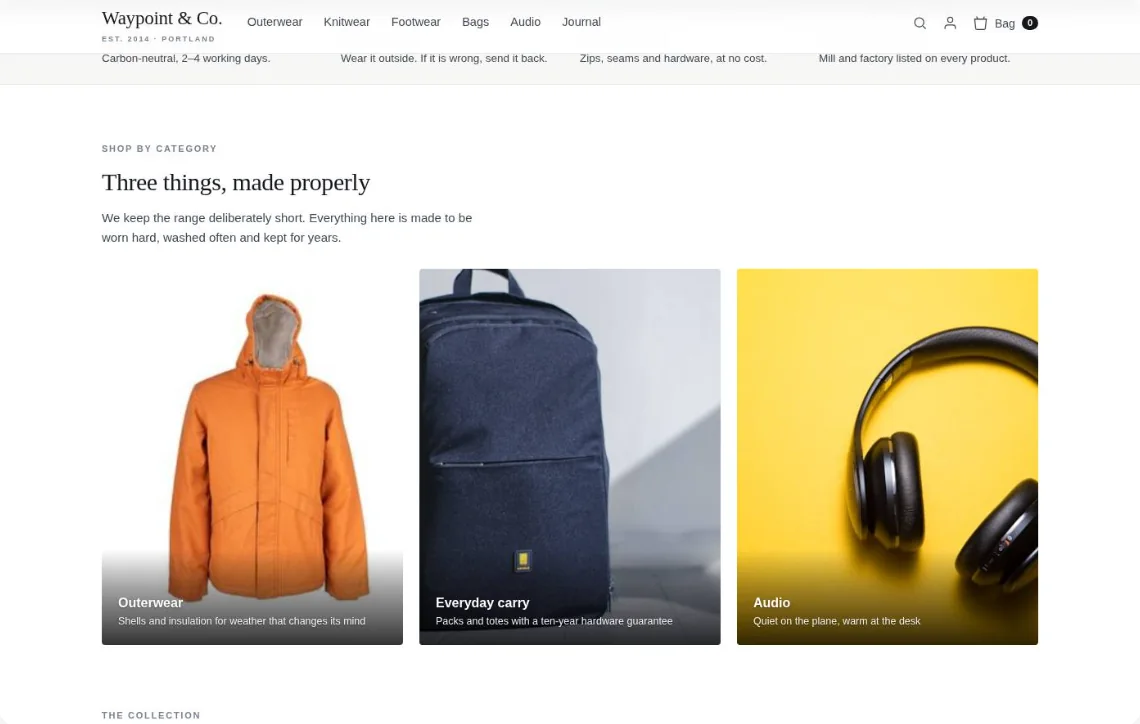
Waypoint & Co. Done
Only: Recommendations · your plan
1‘You might also like’: picks from what they viewed
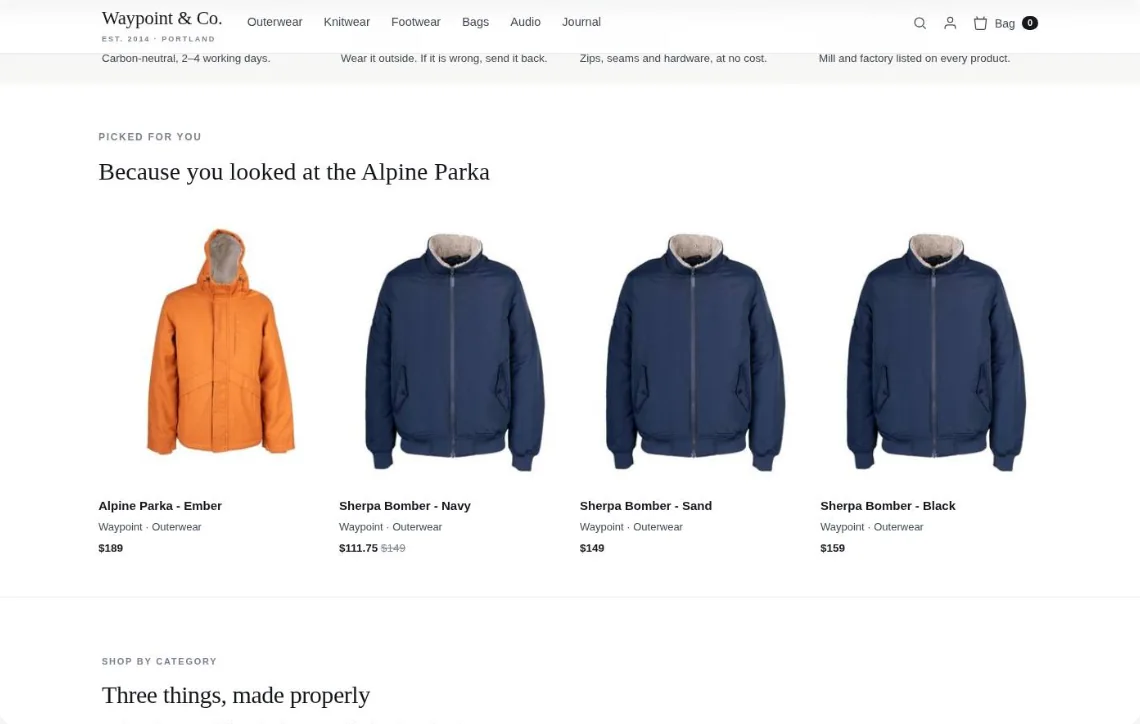
Drawn on your own page — for a returning visitor who viewed the Alpine Parka.
The questions teams ask most about content recommendations. Got something else? Bring it to the call.
Browse the help center →Software that picks the next article, video or guide to show each reader, from what they and readers like them have read — and keeps learning from every read and click. A returning reader gets picks from their own history, someone new gets what readers where they are read most. Personyze does it on your site, in your emails and in your apps.
One for each kind of page, with fallbacks behind it: on the home page Content Recommended for You, then Popular in the Visitor’s Country and Trending Now; on an article Read Next, then Visitors Who Read This Also Read and Similar Content (AI); inside a section Most Popular; on search results Matches Their Search. Or leave a widget on Automatic — new widgets start there — and one widget chooses for every page by itself. See every algorithm.
Yes. Personyze reads every article once and records what it is about: its topics, the people, companies and places in it, whether it is news, a guide, an opinion or a case study, its level, and whether it dates quickly. It blends that with what your readers did, so a new article is recommended from its topics the day it is published, and a popular one mostly from what readers read next. Each reader is offered the right next article: more on the topic, or the natural next step — a news story leads to the explainer, a guide to a case study, a series to its next part. It adapts to your kind of site: freshness first for news, from learning to the demo on a B2B blog, by level for courses, the next episode for video. Nothing to configure.
Both run on the same engine, each on its own catalog. Product recommendations pick from your products and are measured by purchases; content recommendations pick from your articles, videos or guides and are measured by clicks and the content goals readers reach. Personyze does both, so publishers, e-commerce stores and hybrid sites can recommend whichever fits each page.
Yes — Personyze works on any website, whatever it’s built on: one tag goes into any CMS, site builder or custom code. The WordPress and Joomla plugins put it on in one click — on WordPress the plugin also keeps your catalog current every day — and Google Tag Manager and Webflow take one click too.
Yes. The widget translates its own words — buttons, titles, labels — by itself, and your feed can carry more than one language: set a language and map which feed fields go with it, so each reader gets articles in their own.
Install the tag and point us at your articles, and Personyze does the rest: it sees what each reader opens and maps it all. Install the tag: Works on any site, whatever it’s built on: paste one tag into any CMS or custom build — or let the WordPress or Joomla plugin, Google Tag Manager or Webflow put it on in one click. It is what lets Personyze see what each reader reads. Get your articles: We crawl your site: Personyze finds your article pages through your sitemap and links, reads each one’s title, picture, date, author and section, and reads them again on its own, so new articles follow. Or send a feed or files — RSS or Atom, a CSV, Excel, XML or JSON file at its address, by SFTP or over the REST API — and on WordPress the plugin’s feeds keep the catalog current every day. We see what each reader reads: The tag knows an article page by its address or by the ID on the page — one click, nothing to change on your site — and records the read against that article. We map it: Each article’s topics — your own categories, or keywords Personyze pulls from its text — become a reader’s interests as they read. Similar Content (AI) reads every article and finds its neighbours by meaning, so a new piece has related reading before anyone has opened it. Each article is kept by its Internal ID. Similar Content (AI) is switched on in Catalog settings and uses AI credits.
A new reader gets picks from their very first page: Popular in the Visitor’s Country needs only their location. A new article can be recommended by Recently Published straight away, and by Similar Content (AI), which matches articles by meaning from their titles, topics and descriptions; it is switched on in Catalog settings and uses AI credits.
Yes. A recommendation block in the emails you already send picks each reader’s articles when they open the email, not when it was sent — what was published since their last visit, for example. A sign-up popup shown only to readers of an author or a topic grows the list it goes to. See the open-time email guide.
Yes. In iOS and Android apps, the SDK — Content Recs for Apps — brings the same engine as your site. For anything else, the JSON feed returns a reader’s picks, found by their email or your own user id, for your front end or email platform to show in its own design; each item carries a link that counts the click.
Ask the assistant in your panel to build it, point at the spot on your own page in the editor, or start from one of six article formats in the gallery — in-article, continue reading, paging, most read, magazine or overlay — under or inside the article, in a sidebar or as a popup. Then change its layout and style in the designer, ask Edit with AI, or edit the HTML yourself.
Yes. Put two widgets — two algorithms, layouts or placements — in an A/B test. New tests call a winner at 98% confidence and at least 1,000 sessions, and can give the winner all the tested traffic.
For every widget and every article: times shown (only when it was really on screen), clicks, click rate and the content goals readers reach within 7 days, with what is rising or falling. Recommendation sets show what the engine learned — each article’s reads, comments, likes and goals, and the articles most often read together.
Self-learning recommendations, powered by machine learning on your readers’ behaviour: every read and every click goes into the next build of the picks, so what you show keeps up with what they read.