
AI Personalization Examples: 10 Ways AI Decides What Each Visitor Sees
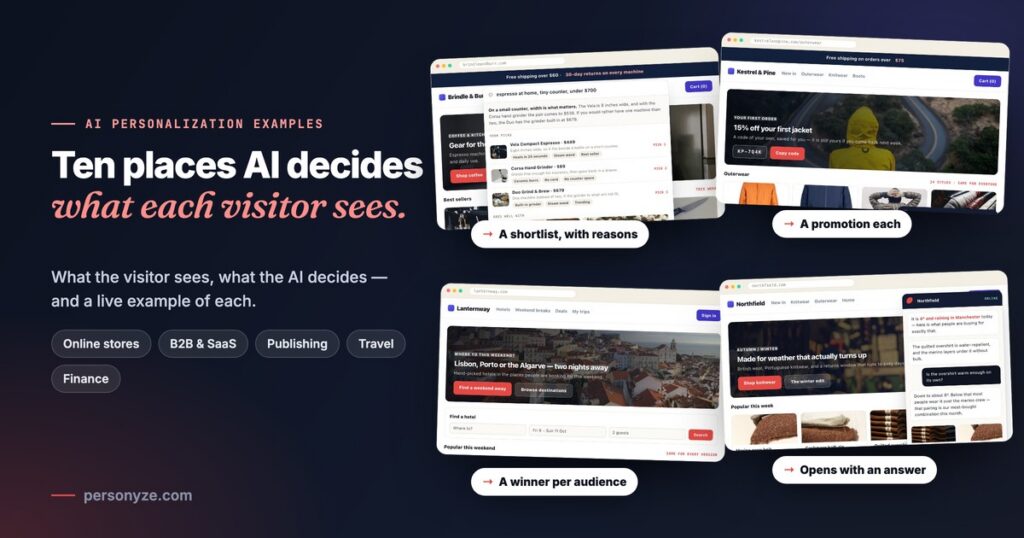
Most lists of AI personalization examples start and end with the streaming service that picks your next show. True, and not much use if you run a store, a SaaS site or an insurer. Here are ten you can put on your own site. For each one: what the visitor sees, what the AI actually decides, and an interactive example you can open and click through.
One idea runs through all ten. In AI personalization that works, the AI chooses — which product, which offer, which article, which version — and you decide what it chooses from: your catalogue, your list of promotions, your articles, your approved wording. It does not invent a price, a product or a promise. Every example below is AI website personalization running from one visitor profile in Personyze. The brands are demo sites; the features are the ones in the product.
| # | Where | The example | What the AI decides |
|---|---|---|---|
| 1 | Online store | A product finder that answers a described need | Which products fit, in what order, and why |
| 2 | Online store | One banner slot, a promotion for each visitor | Which of your promotions each visitor sees |
| 3 | Online store | Sold out in their size | The closest alternatives that are in stock in that size |
| 4 | Online store | A chat that knows the page and the weather | Its opening line, and answers from your pages and catalogue |
| 5 | B2B & SaaS | A resource library that answers the problem | Which guides, templates and webinars fit, and why |
| 6 | B2B & SaaS | An enterprise version of the home page | The targeting and the page edits, for you to approve |
| 7 | Publishing | “Read next” for each reader | Which articles each reader gets, and in what order |
| 8 | Travel | A test winner for each audience | Which version each audience sees |
| 9 | Finance | An insurer’s homepage in approved words | The rules and the reading list — never the offer |
| 10 | Any site | Audiences nobody wrote | Which groups convert far above, or far below, average |
Not sure which of these fit your site? Inspire me, a free AI personalization tool, reads your pages and draws the best ideas on them — more on it after the ten.
1. A product finder that answers the need, not the keyword
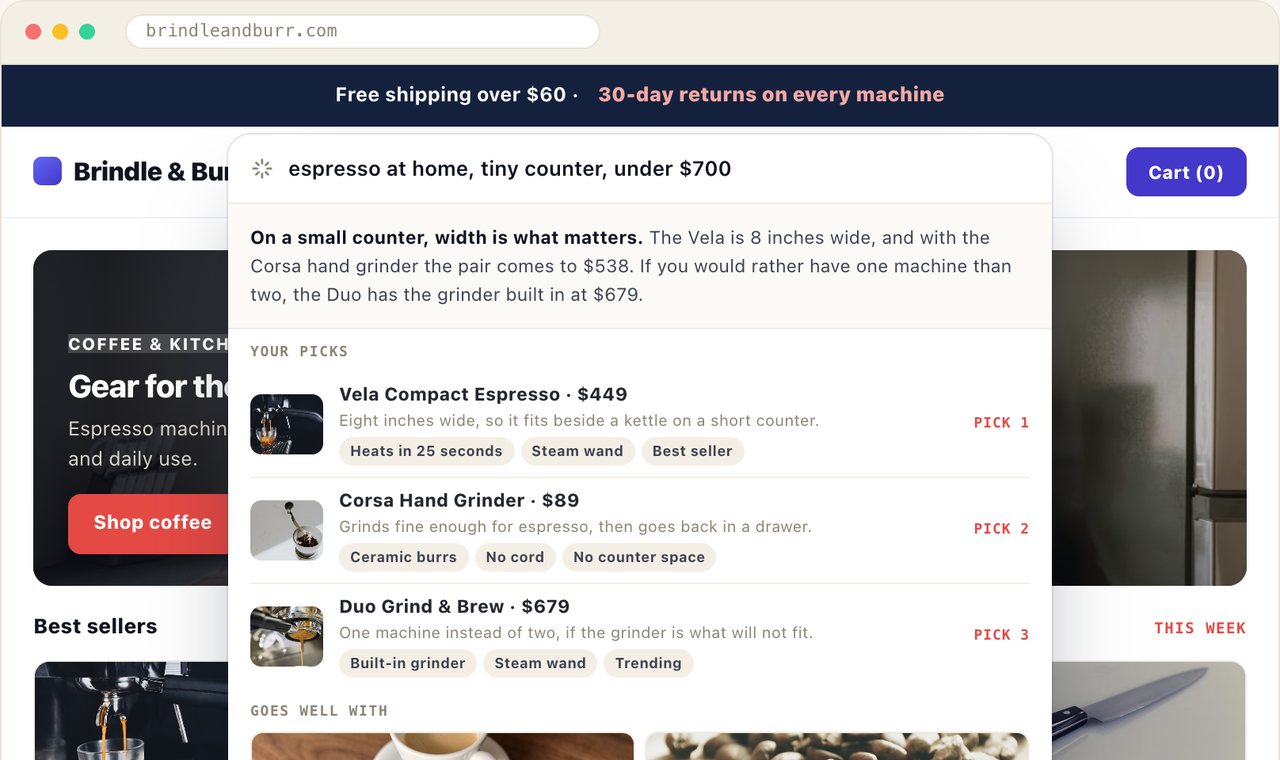
What the visitor sees. A kitchen store puts a bar on the page: describe what you need, and we’ll pick a few, with the reason for each. A shopper types “espresso at home, tiny counter, under $700”. Instead of a page of keyword matches, they get two lines on the trade-off and three picks — a compact machine that fits beside a kettle, a hand grinder that goes back in a drawer, a machine with the grinder built in — then a “goes well with” row and a box to ask about the picks. A December visitor gets a gift version of the bar; someone from the cast-iron ad gets a cast-iron one.
What the AI decides. It reads the need (a small counter, a budget), searches your catalogue and writes the summary and one reason per pick, in the shopper’s language. The order comes from your recommendation engine, which weighs what this shopper viewed, carted and bought. What it cannot do is invent: every card is a catalogue row, and a sold-out item is never a pick.
See it: the AI product finder example · AI Product Finder · the product finder playbook
2. One banner slot, a different promotion for each visitor
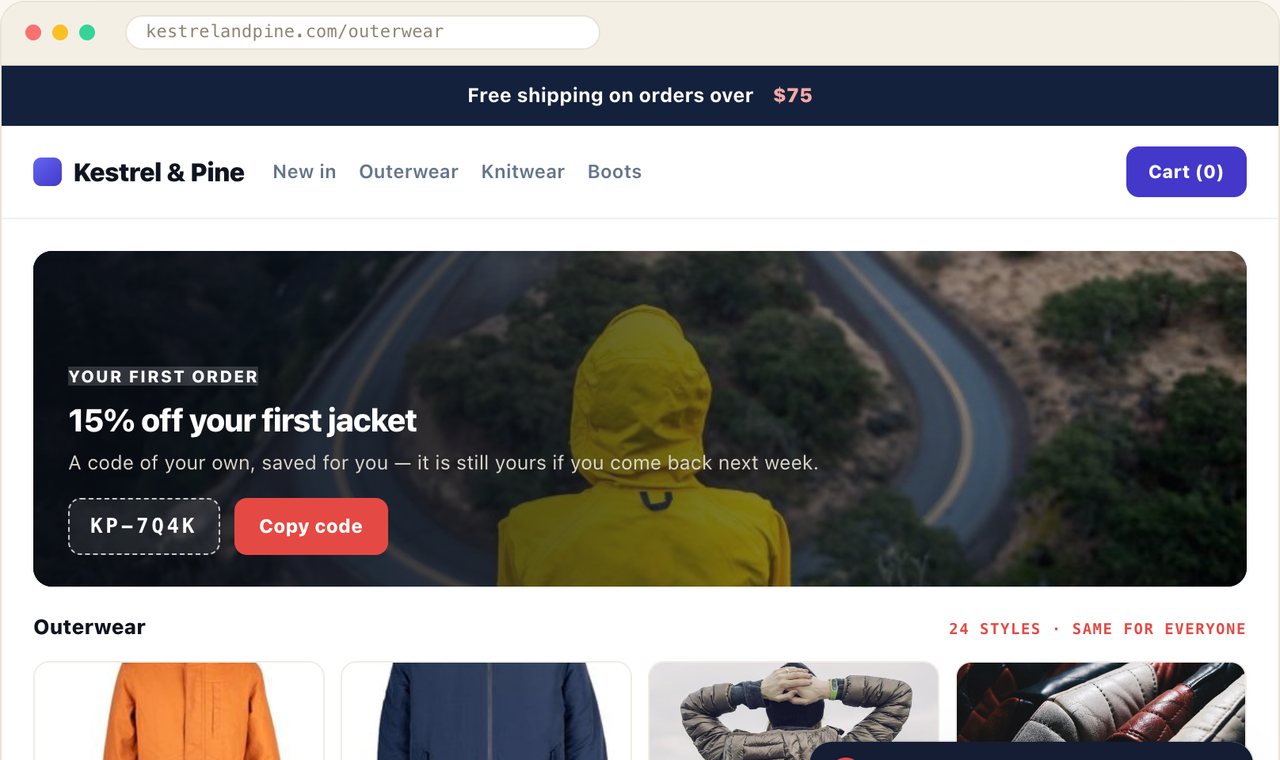
What the visitor sees. A clothing store keeps six offers in one list, and the hero on its outerwear page is a single slot that draws from it. A first-time visitor from a paid ad gets 15% off a first jacket with a personal code, kept for them if they come back. A returning shopper with over $100 in the cart gets “spend $150, take $25 off”. A Spanish-speaking shopper gets the down-jacket offer, in Spanish. A VIP who buys at full price anyway gets 48 hours’ early access to a parka — and no discount at all.
What the AI decides. Only the promotions that fit the visitor are in the running: their dates, pages, language and audience have to match. Among those, it shows the one that visitors like this one — by device, traffic source, new or returning, what they browsed — were most likely to act on, and keeps trying the rest so a new promotion still gets its chance. A share of visitors sees no promotion, so the report shows the lift audience by audience. That is how you learn the VIPs buy just as much without the discount. More on that in measuring promotion lift with a holdout.
See it: the AI promotions example · AI Promotion Manager · the AI promotion playbook
3. Sold out in their size? The closest pair that isn’t
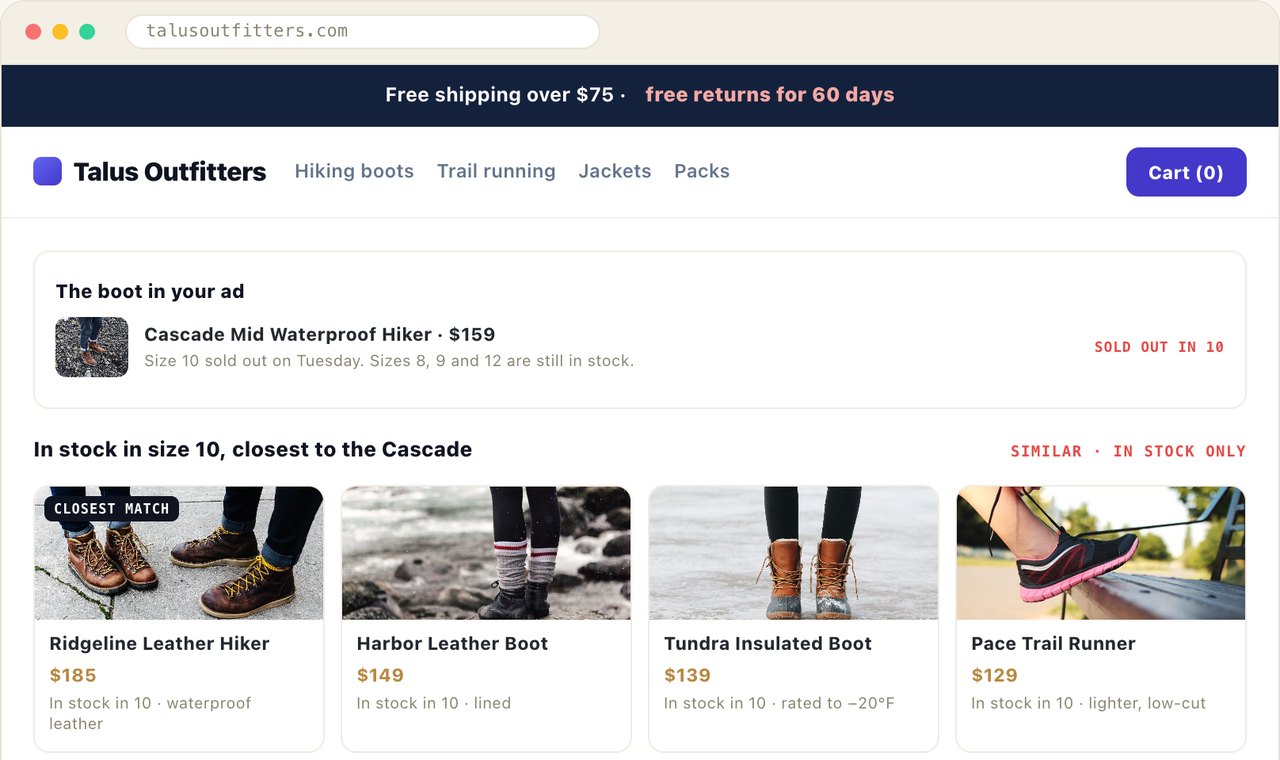
What the visitor sees. A shopper clicks an ad for a hiking boot that sold out in their size overnight. The page says so in one line — size 10 sold out on Tuesday, sizes 8, 9 and 12 still in stock — and then leads with four similar styles that are in stock in size 10, closest match first. Under them, a back-in-stock form that keeps the size, so the alert is about their pair.
What the AI decides. Which styles are “closest”. A similar-items recommendation finds the neighbours of the boot they wanted — and the AI version of it learns similarity from your catalogue text, so even a product added yesterday has neighbours. Filters then keep only what is in stock in the size saved on their profile, with trending boots as the fallback, so the row is never empty and never offers a boot nobody can buy. Elsewhere on the same store, the Personalized Recommendations algorithm picks what each visitor is most likely to buy, learned from visitors with similar behaviour, and Match the visitor moves their brand, size and price range to the front. The whole setup is in product recommendations, start to finish.
See it: the sold-out example · the recommendation engine
4. A chat that already knows the page, the weather and the basket
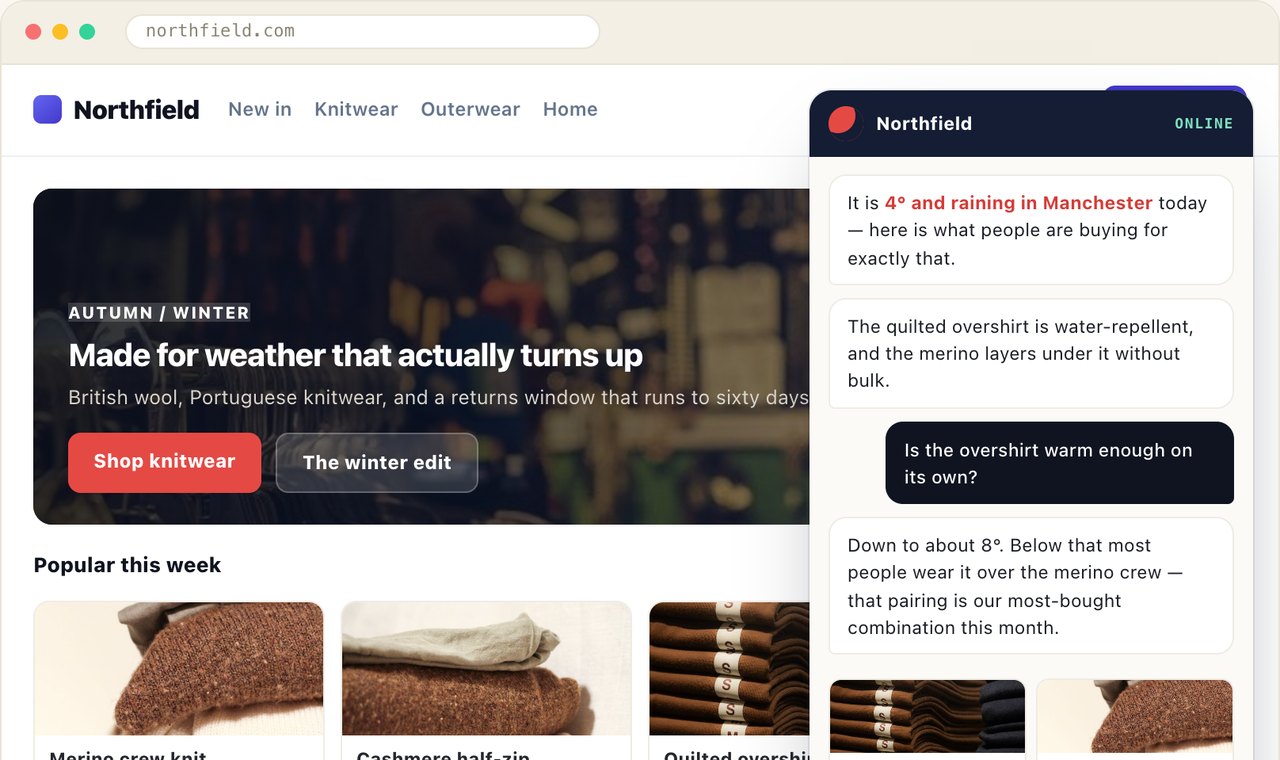
What the visitor sees. A first-time visitor in Manchester opens the chat on a cold, rainy day. It does not start with “How can I help?” but with an answer: it is 4° and raining in Manchester today — here is what people are buying for exactly that. Asked whether the overshirt is warm enough on its own, it answers and shows the products as rows with their real price and stock. A shopper with a basket waiting gets a different opening; a wholesale buyer, recognised from the company behind the visit, gets a different assistant altogether, with trade terms.
What the AI decides. The opening line, from a question you write once — what do we offer a visitor in ${city} when the forecast is ${weather}? — filled in for each visitor, who never sees the question. The answers, from your own pages and catalogue only; whatever it could not answer goes on a list for you, and it hands the conversation to a person when it should. There is no tool that lets it set a price or put a deal together, and it reads out an offer only to the audience you aimed that offer at. More in an AI chat agent that knows who it is talking to.
See it: the AI chat agent example · AI Chat Agent · the AI chat playbook
5. A resource library that answers the problem
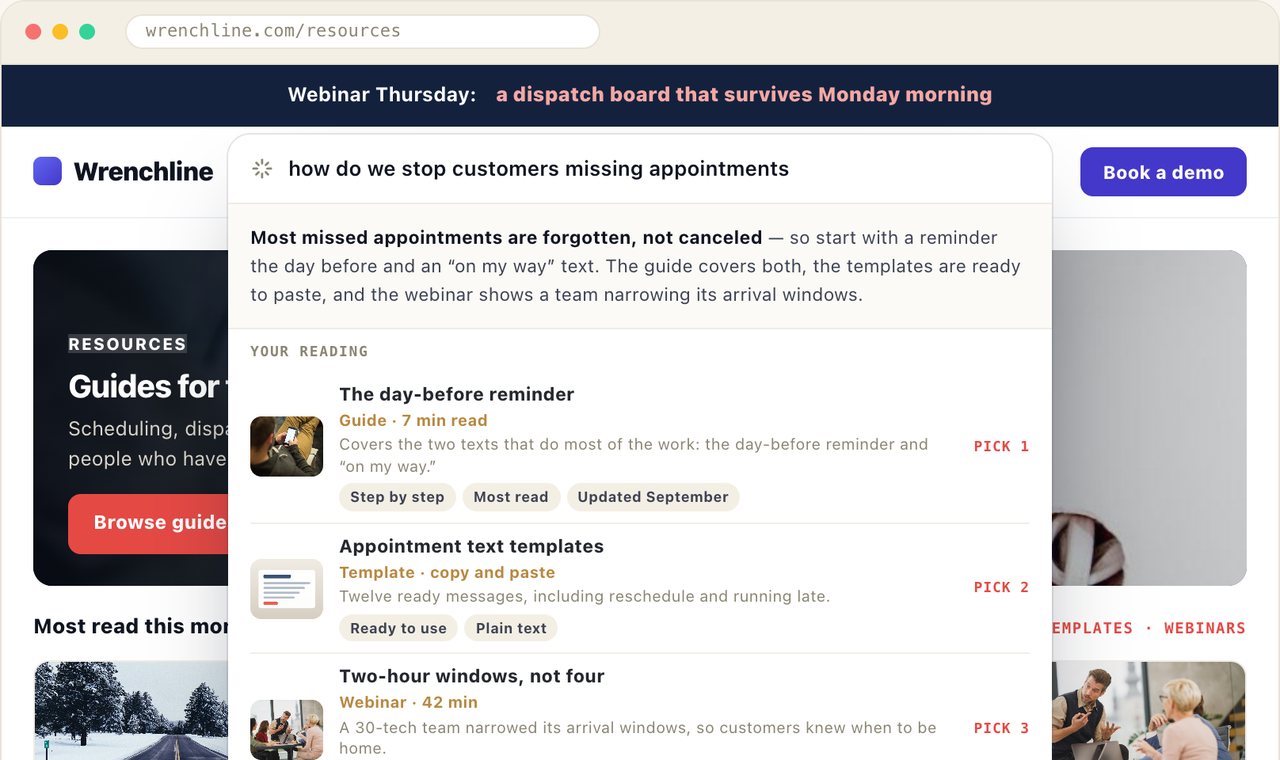
What the visitor sees. On a field-service software company’s resources page, a service manager types “how do we stop customers missing appointments”. They get a two-line answer and three pieces from the site’s own library: a guide on day-before reminders, a set of text templates and a webinar on shorter arrival windows. An existing customer sees the help-center version of the bar, with help pages and no “Book a demo”. A reader who asks for a person gets a booking calendar in the results.
What the AI decides. Which articles, templates and pages answer the problem, across formats, and one sentence on why each fits. Titles and links come from your content catalogue and your own pages, so it cannot recommend an article that does not exist. The bar’s first line can be written per segment from a variable such as ${industry}, and the booking calendar appears only when a reader asks for one. Both finders, product and content, are compared in AI Product Finder and AI Content Finder.
See it: the AI content finder example · AI Chat Agent, with its finders
6. An enterprise version of the home page, built from one sentence
What the visitor sees. A visitor from a large company that is in your CRM but not yet a customer reaches the home page. The hero names their kind of company, the proof under it is the rollout, single sign-on and audit-log detail that enterprise buyers ask about, the button says Talk to our enterprise team instead of Start free trial, and a banner offers to book a demo. Everyone else sees the self-serve page.
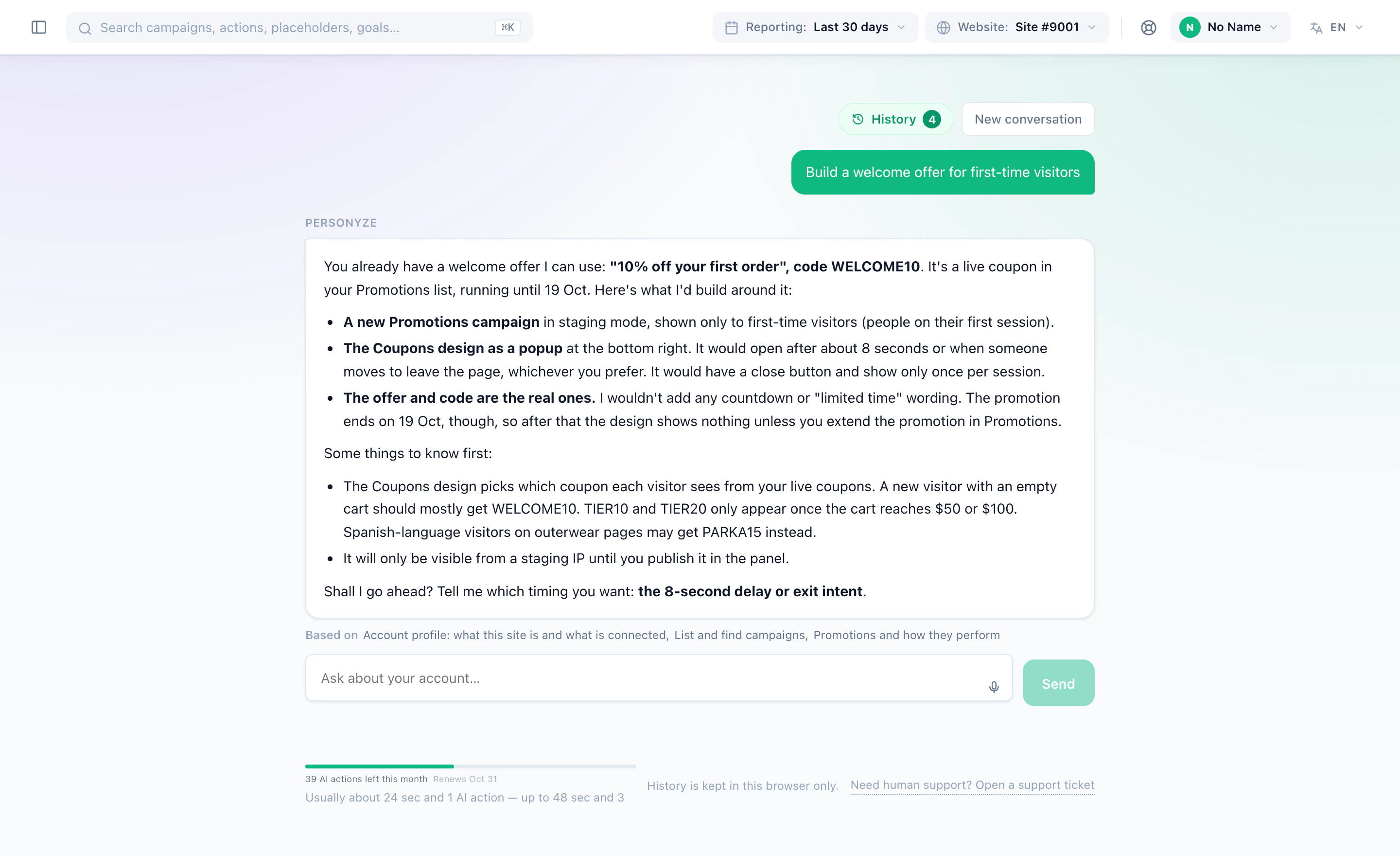
What the AI decides. The build, and you approve it. You type show a demo-booking banner to companies in our CRM with more than 500 employees, and the agent turns it into rules from the fields your CRM integration already writes — company size, account in the CRM, not a customer — and reads them back in plain words, flagging any part that was its own reading of your sentence. It scans your live pages first, so the design uses your colours and fonts. On the page itself, Page-level AI takes one instruction such as “make this page look like it’s for enterprise” and suggests the headline, sub-heading and button changes; you apply them, or review them one by one. Everything it builds starts in staging, and a person publishes it. This agent is the core of Personyze’s AI personalization, and it also works from your own AI assistant through the MCP server.
A version for every segment. The enterprise page is one audience. The same home page can carry a version for each kind of visitor: Personyze reads the site, proposes the segments who visit it — enterprise buyers, agencies and small teams on a trial, say — and AI writes each of them its own hero, header button and proof, in the site’s own voice. The team approves each version, edits it or has it written again, and nothing changes on the site until they publish. A visitor who fits no segment sees the page as it is, and the original keeps a share of visits, from 5% to 50%, so every version is measured against it. With Auto-optimize on, more visits go to the versions that win, and the ones that lose are replaced by new ones. More in how Personyze writes a version of your site for every segment.
See it: the SaaS and B2B example · the AI agent win-back example · Personyze AI
7. “Read next”, ranked for each reader
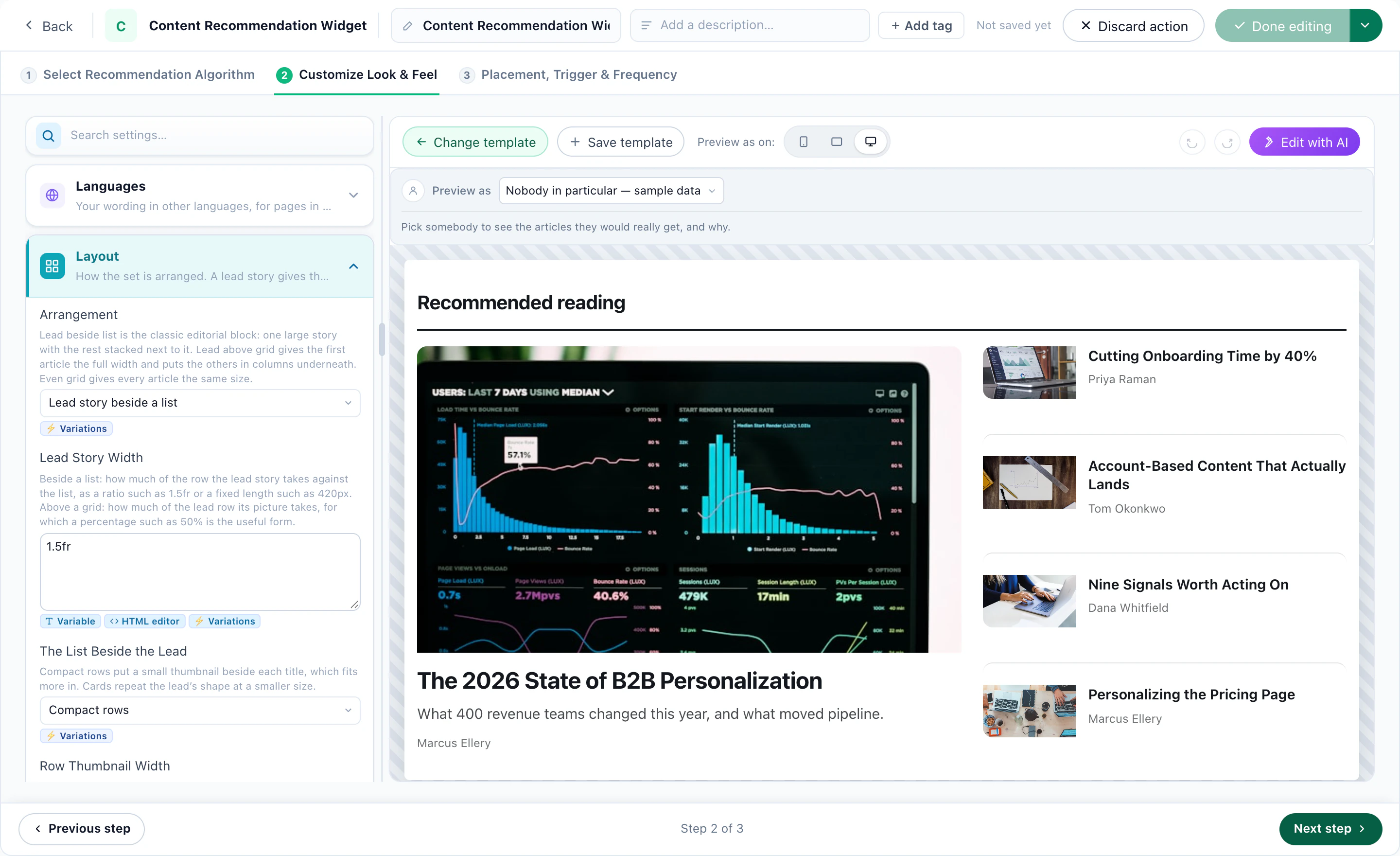
What the visitor sees. On a news or media site, two readers open the same front page and get a different lead story and a different “For you” list: one follows a beat and an author, the other reads business. A returning reader is shown what was published since their last visit; a first-time reader gets what is most read in the section they landed on.
What the AI decides. Which articles each reader gets, and in what order. Content Recommended for You learns from readers with similar behaviour; Similar Content is learned by AI from titles, topics, authors and descriptions, so fresh articles are in the running, not only the ones with a reading history. Match the visitor then puts the topics, authors and tags from the reader’s own history first — re-ranking the algorithm’s own picks, never pulling in random ones — and you choose whether to show the best articles anyway, or hide the row, when nothing matches. For a B2B blog, the same reading history decides when to offer the report: see the engaged reader example.
See it: the news website example · the content recommendation engine
8. A hotel hero that won the test — but not for everyone
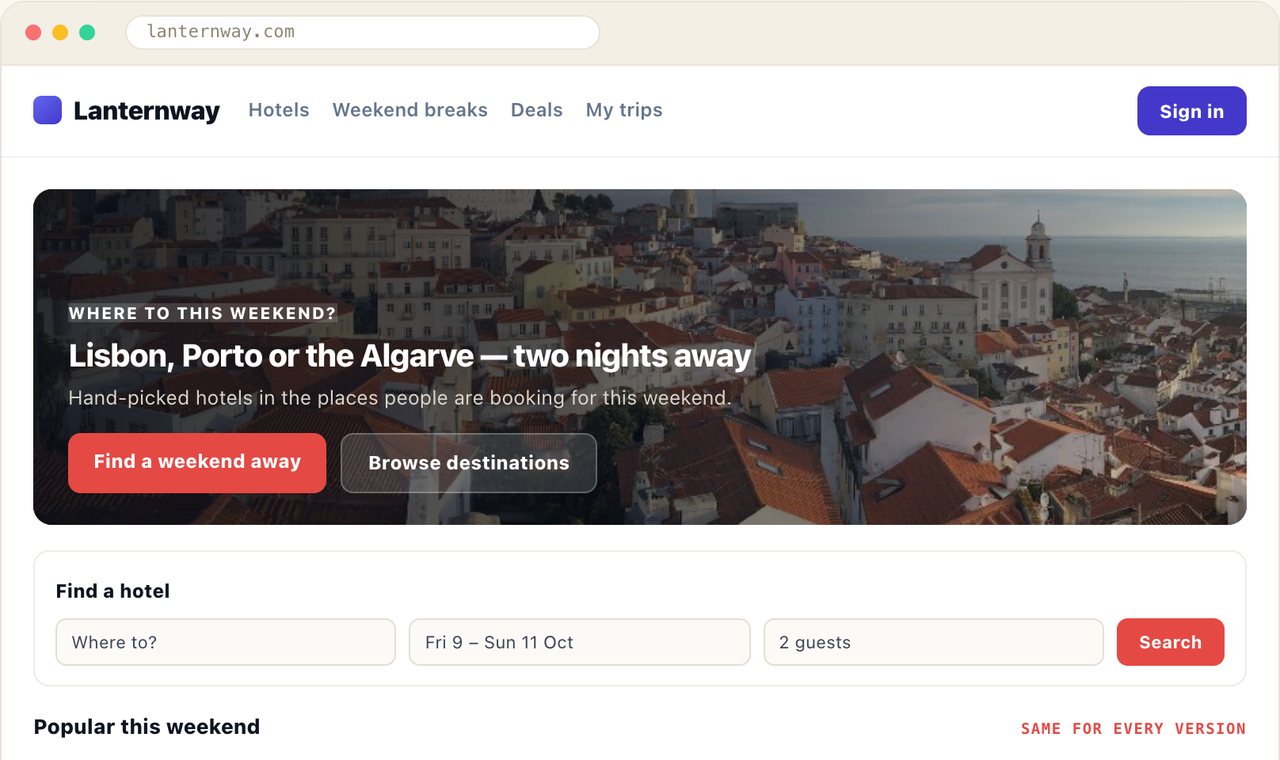
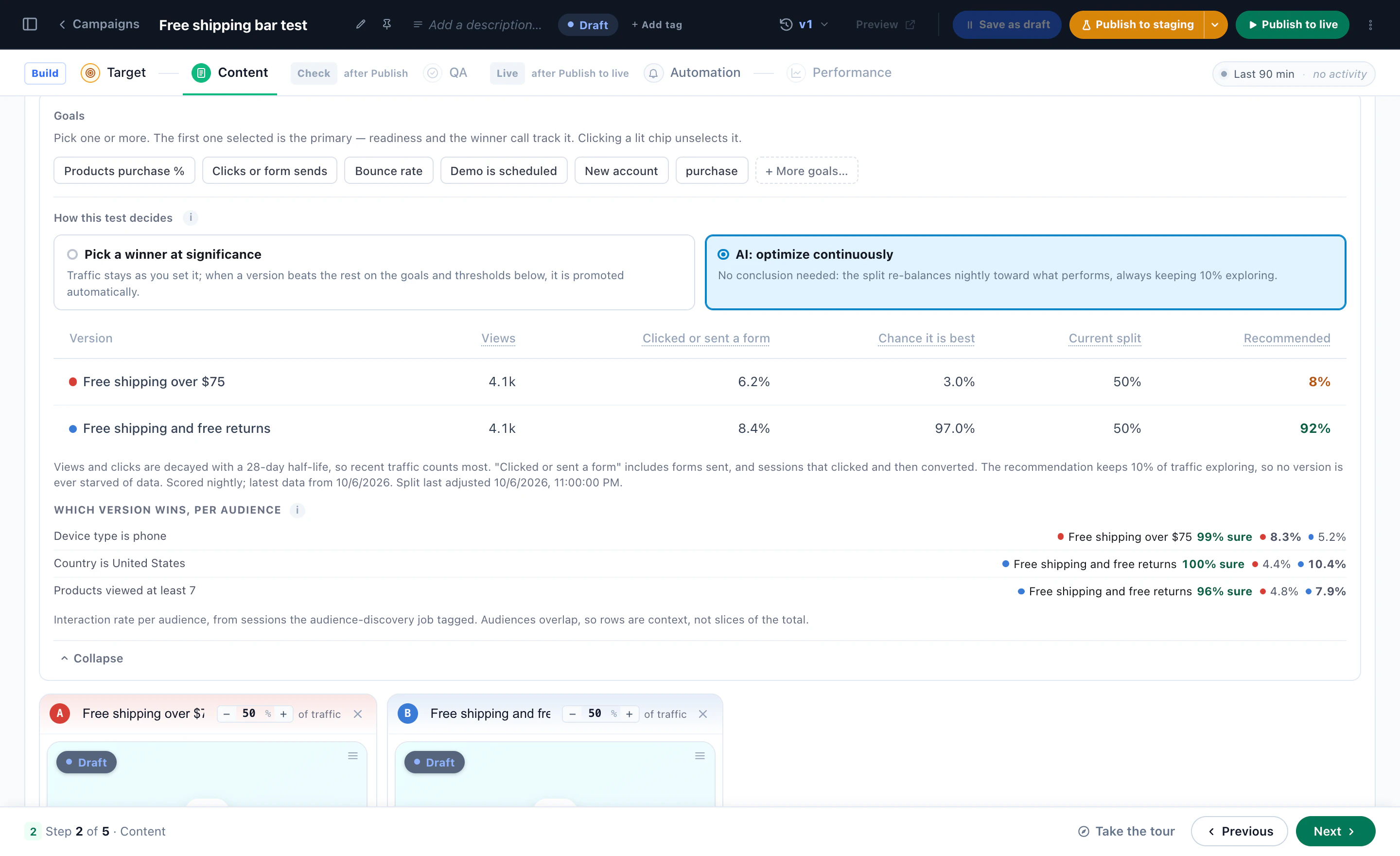
What the visitor sees. A hotel-booking site tested three weekend heroes, and the destination-led one won overall. Read inside each audience, the same test said something else: phone visitors booked more after the price-led version, and visitors deep in the hotel pages after the free-cancellation one. So each of them is shown the version that won it, and everyone else gets the overall winner.
What the AI decides. Which version each audience gets. The report scores the test inside every audience Audience Discovery found in the site’s own data, and offers an audience’s own winner only when it clears a high bar — significant after correcting for how many audiences were asked, ahead in both halves of the test, with enough sessions. You tick the ones you want and apply, and it can be undone. Or skip the ending altogether: with AI: optimize continuously, the split re-balances every night toward what performs, always keeping 10% exploring. Both ways are compared in pick a winner, or never stop optimizing.
See it: the A/B winner by audience example · A/B testing
9. An insurer’s homepage where the AI writes the rules, not the promises
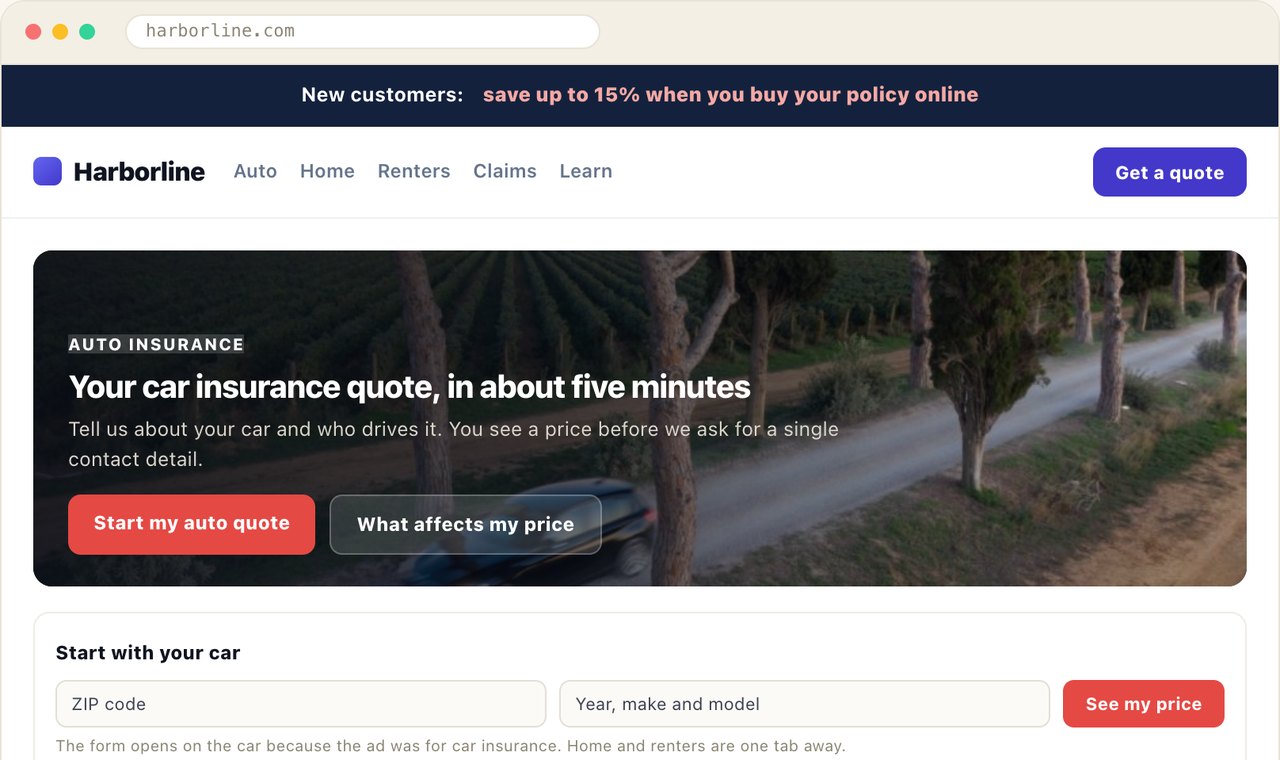
What the visitor sees. A paid click for “car insurance quote” lands on the car quote, not on a homepage that asks them to choose again. A visitor who stopped at step 2 of 4 three days ago is told how far they got and taken back to it. A home policyholder sees their renewal date and a car-insurance bundle — and never the new-customer discount. A reader three chapters into the first-home guide is offered the next chapter, not the one they finished.
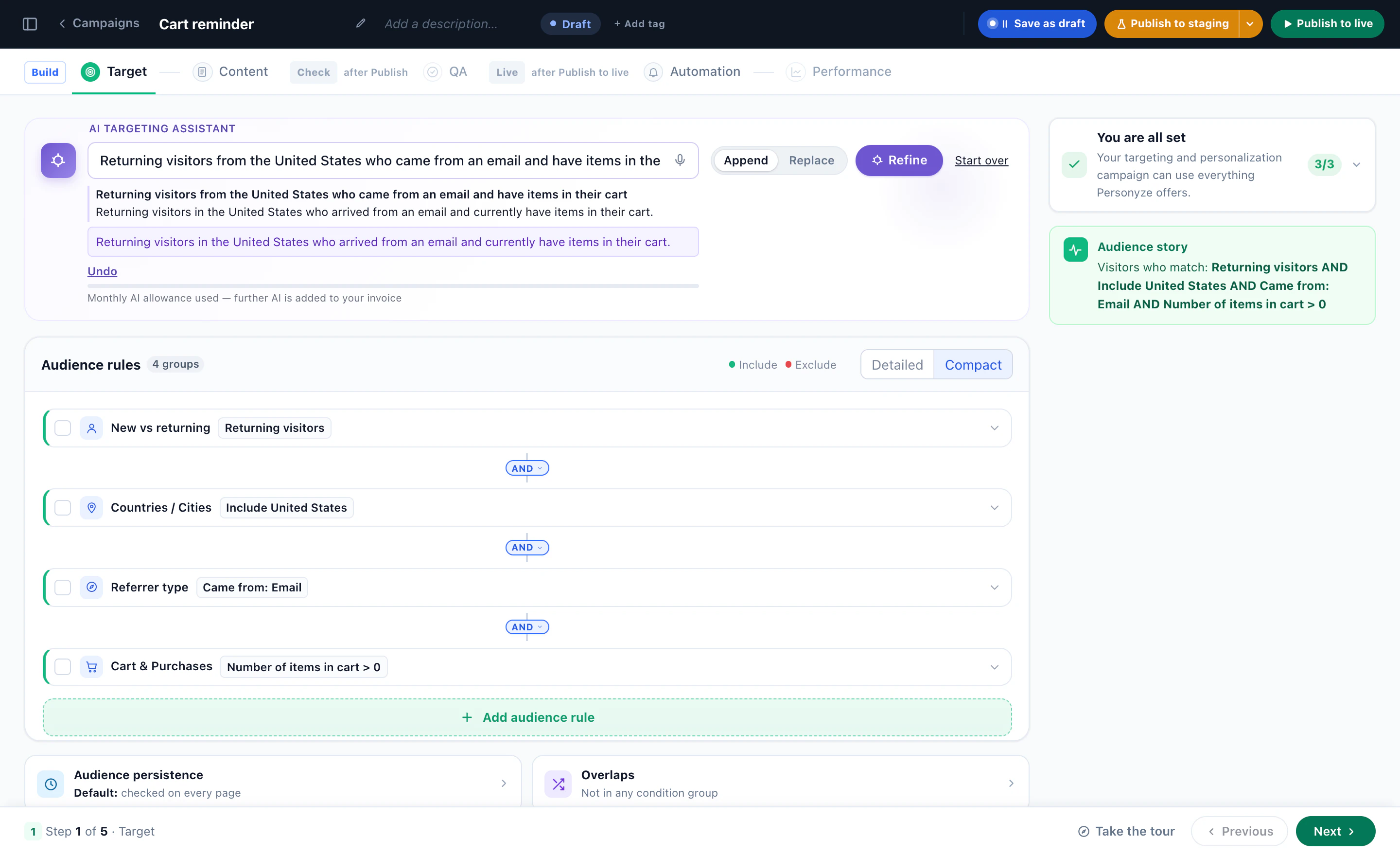
What the AI decides. In a regulated business, the useful AI is the kind that writes rules and picks reading, and leaves the promises to you. Describe an audience in a sentence — returning visitors from the pension ad who read the retirement guide — and the AI targeting assistant writes the rules and reads them back in plain words. Content recommendations pick the chapter a reader has not read yet. Every headline and offer is wording your team has approved; the campaign only decides who reads which. If you add an AI chat, it can be held to one part of your library — the fee schedule, say — and set to refuse rather than wander. How the assistant reads a sentence: describe your audience in a sentence.
See it: the insurance quote example · the finance and insurance playbook
10. Audiences nobody wrote
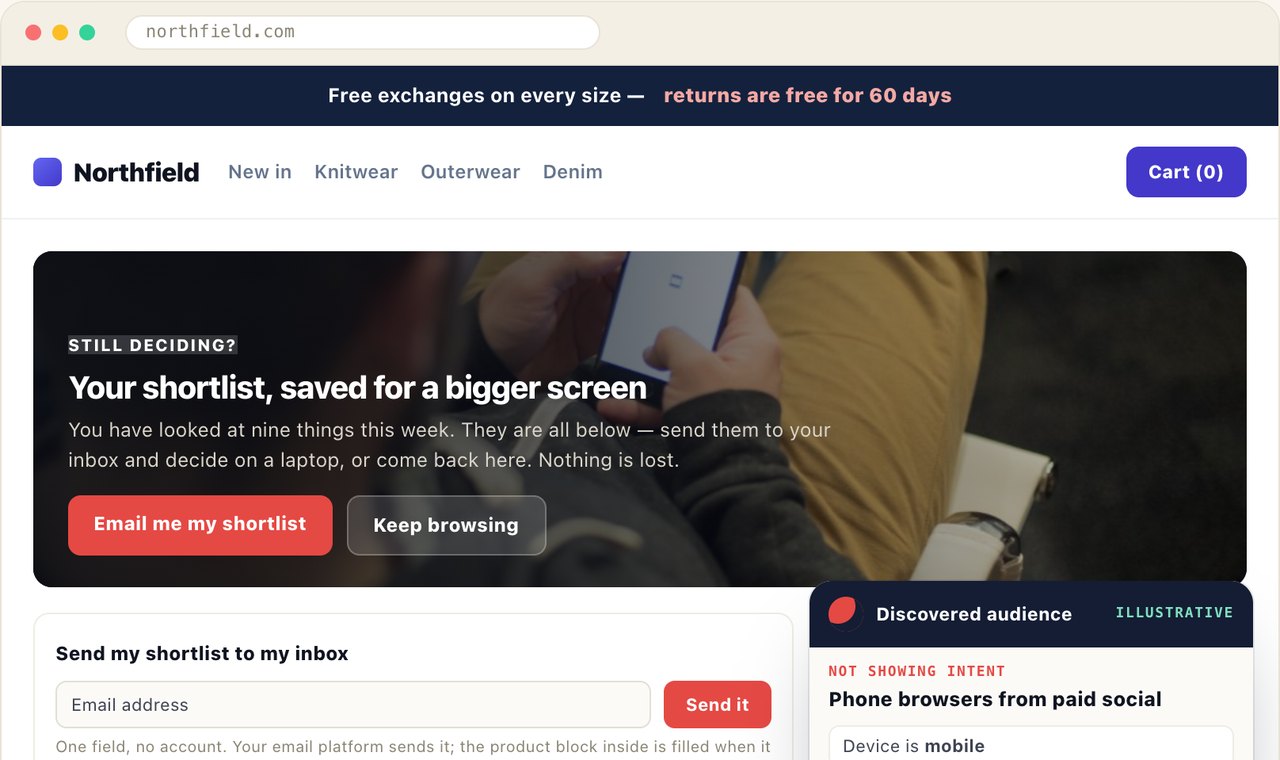
What the visitor sees. On a clothing store, phone visitors from paid social who have looked at nine things this week see your shortlist, saved for a bigger screen, with a one-field form to email it to themselves. Returning visitors from New York who keep reading about coats see them side by side — no discount, because they already buy more often than average. Subscribers with a knitwear interest get a first look at the knitwear. Nobody on the team wrote those three audiences.
What the AI decides. Who the groups are. Once a week, Audience Discovery reads your own visitor data and proposes short rules — three conditions at most, in words a colleague can repeat — for the visitors who convert far more often than average, and for those who convert far less. Every rule is re-measured on visitors it was never fitted on, and the interests it can use are read by AI from your own pages, in your own categories. Accept a card and it joins a campaign as a live targeting rule in one click. How to read the cards: how to read discovered audiences.
See it: the Audience Discovery example · Audience Discovery
Which of these fit your site? Ask a free AI personalization tool
Ten examples are ten ideas; your site needs three or four, and the right ones depend on who visits it. Inspire me is a free AI personalization tool that does that first pass for you. Type your website and pick a goal — more sales, more leads and demos, a lower bounce rate, more sign-ups or more engagement. In about four minutes it reads up to 8 of your public pages the way a first-time visitor sees them, works out which audiences your site serves, checks every idea against what your pages already do, and draws the best ones on pictures of your own pages, as different visitors would see them.
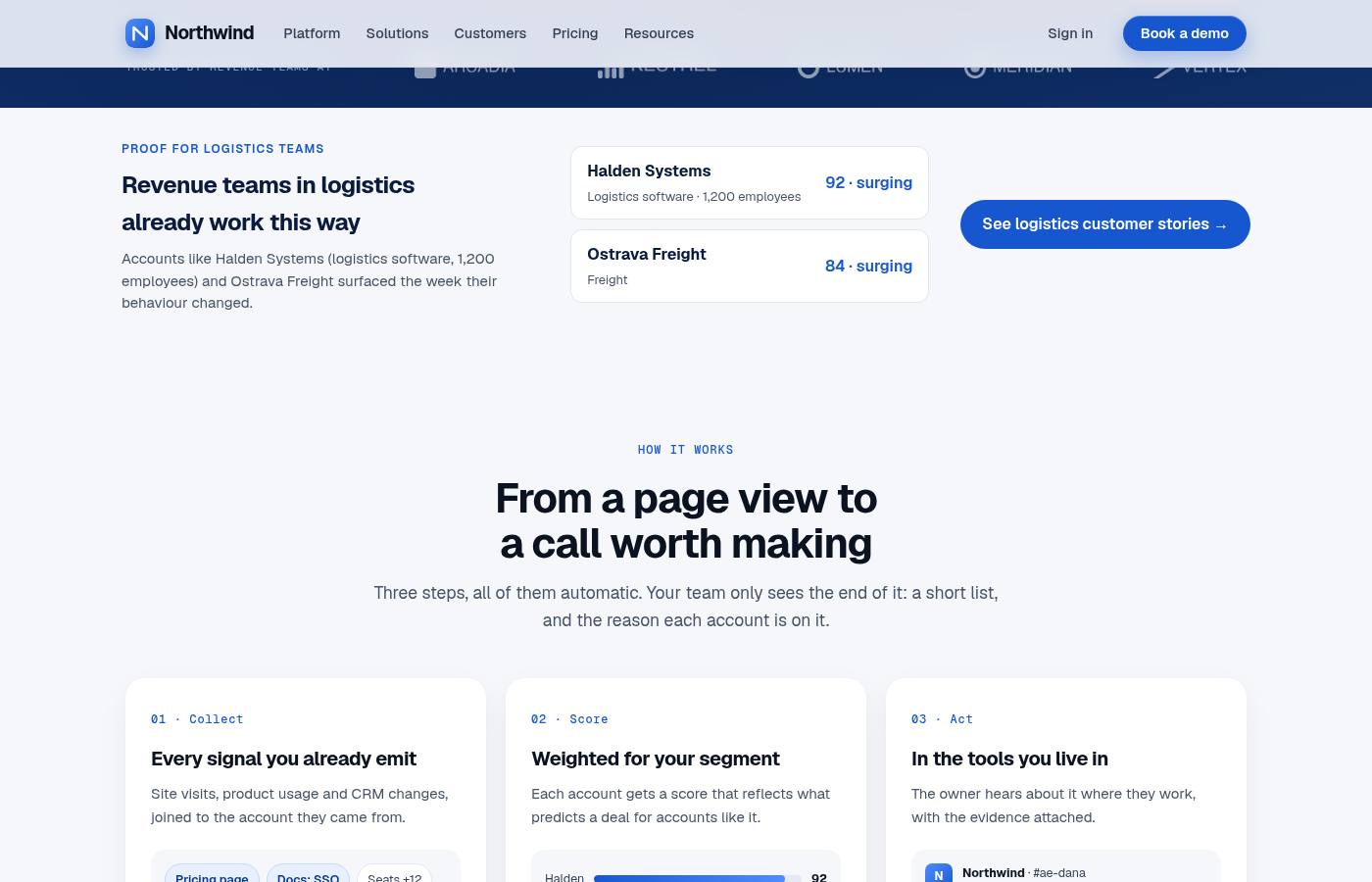
There is nothing to install and nothing on your site changes, and you do not need to leave an email to see the plan. Each idea says who it is for, where it goes on the page, why it fits and how to measure it, so it can be built as a campaign. The scores in the plan are estimates of relevance, not a forecast — a test on your own traffic tells you what an idea is worth. Try Inspire me on your site, or read what is in the plan first.
What the ten have in common
- The AI picks from what you gave it. A catalogue, a list of promotions, a library of articles, wording your team approved. Prices, stock and offers come from your data, so it cannot promise what you do not sell.
- Rules say who; AI says which. Who gets the gift version of the finder or the enterprise page is a targeting rule you can read. Which product, promotion or article each person gets is the AI’s job — and it can write the rules for you from a sentence.
- Nothing reaches a visitor on the AI’s say-so. What the agent builds starts in staging, seen only by you, until a person publishes it. The versions AI writes of your pages wait for you too: nothing reaches visitors until you publish, and new versions go out on their own only if you switch on Auto-optimize.
- It is measured against people who saw nothing. A holdout for promotions, a control group for a win-back, an A/B test read per audience. “The AI picked it” is not a result; the lift over the visitors held back is.
More than a hundred other scenarios are in the personalization examples library, by industry and by feature.
Questions people ask
What is AI personalization?
Using AI to decide, for each visitor, what a website shows: which products, offers or articles, in what order, and what to say first — from what the visitor does on the site and what you know about them. In Personyze the AI also builds the campaigns: you describe the audience and the goal, and it writes the targeting and the design for you to review.
What are some examples of AI personalization?
A product finder that answers a described need from your catalogue, a promotion picked for each visitor from one list, in-stock alternatives for a sold-out item, a chat that opens with an answer about the visitor’s city or basket, “read next” ranked for each reader, an A/B test winner per audience, and audiences found in your own visitor data.
How is AI personalization different from rule-based personalization?
Rules decide who sees what you wrote. AI decides among options — which product, which offer, which article, which version — and can write the rules from a plain sentence. The examples above use both: rules for who, AI for which.
Does AI personalization need a lot of data?
Not all of it. A product finder and a chat work from your catalogue and pages on the very first visit, and recommendations fall back to what is popular when nothing is known about a visitor. Choices learned from results — which promotion converts, which version wins for which audience — need traffic, and Audience Discovery needs visitor history to read.
Will the AI change my live site without asking?
No. What the Personyze AI agent builds starts in staging, visible only to you, and goes live when a person publishes it in the panel. The versions AI writes of your pages wait for you too: nothing reaches visitors until you publish, and new versions go out on their own only if you switch on Auto-optimize.
How do I find which AI personalization ideas fit my site?
Try Inspire me, a free AI tool from Personyze. Give it your website and a goal; in about four minutes it reads your public pages, finds the audiences your site serves and draws the best ideas on pictures of your own pages. No email needed to see the plan.
Book a demo with a personalization expert
30 minutes with a personalization expert. Bring your stack, your goals, your skepticism. We'll show you what changes when every visit feels like the only one.