
Audience Discovery, Card by Card: How to Read the Groups Found in Your Own Data
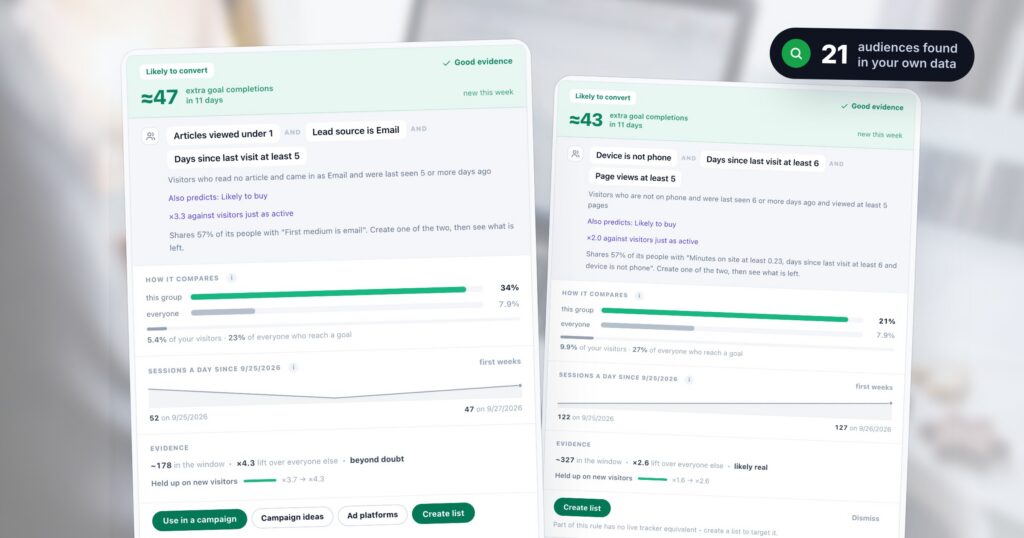
Most segments start as a guess: someone decides that “returning mobile visitors” or “people who came from email” are worth a campaign, and builds one. Audience Discovery starts from the other end. Once a week it reads your own visitors — what they declared, where they came from, what they viewed, which campaigns they saw — and looks for short rules that pick out a group reaching an outcome far more often than average, or far less. Every group it keeps is measured on visitors the rule was not fitted on, so a pattern that only fits by chance does not survive.
What it hands you is a screen of cards. This post reads one pass of that screen from top to bottom: what the summary line says, what each line of a card means, the warnings a card can carry, and how to turn a group into a campaign, a list or an ad audience. The pictures are from a demo account, so the numbers are illustrative; the screen is the real one.
What one pass read
The top of the screen sums up the latest pass in one line, and says what it was built on.

- The strongest is worth — the best group’s extra outcomes, beyond what a same-sized group of average visitors would have produced in the same days.
- New this week and held from earlier passes — how many groups appeared for the first time, and how many were found again. A rule that keeps reappearing describes a group that exists.
- Dropped as too weak — everything else the pass found. A group is kept only with at least 30 visitors, a difference too large to be plain chance, and at least 1.5 times the average rate (or at most two thirds of it, for the groups that under-perform).
- What this pass read — how many visitors, how many days of behaviour history, and the last days that count as the outcome. On a large account the rules are found on a sample and every number on a card is scaled back to all your visitors; lists, campaigns and live targeting always use every visitor.
The history fills up from the day discovery is switched on, so a new account’s first passes read a shorter window, and the screen says so. The next pass runs about a week after the last; nothing needs doing in between.
One audience, card by card
Each group gets one card. Read it from the top down: the first band says what it is worth, the rule says who is in it, and the rest says how sure you can be.
The top band: what it is worth
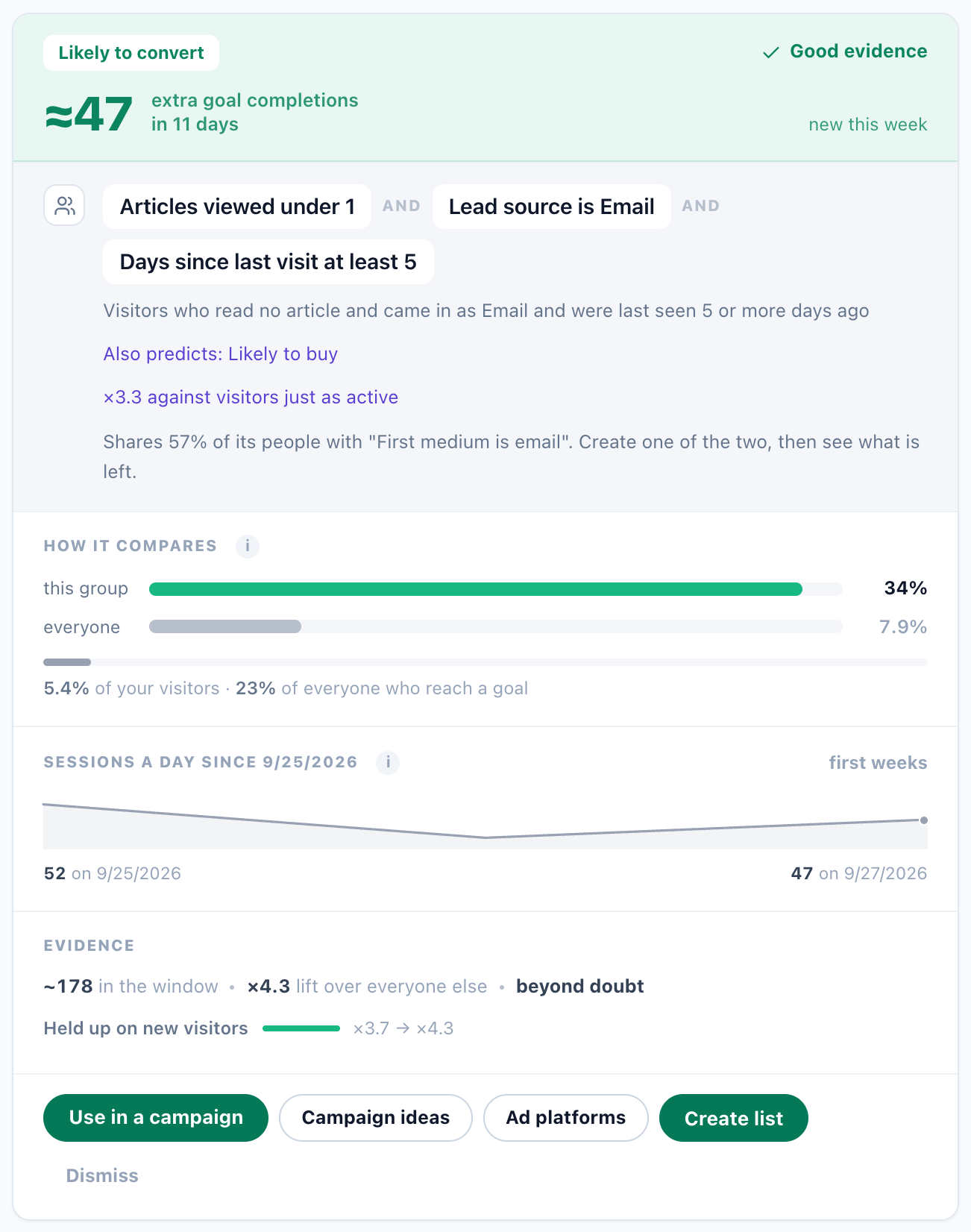
The tab it belongs to (Likely to convert), the extra outcomes it produced — here about 47 goal completions in 11 days beyond an average group of the same size — and an evidence chip:
- Strong evidence: far too strong to be chance on visitors the rule was not found on, and seen in at least two weekly passes.
- Good evidence: unlikely to be chance, but not confirmed by a second pass yet, or not as strong.
- Weak evidence: the difference could still be chance. Wait for the next pass, or use it and watch.
Beside it, new this week or held 3 weeks says how long the rule has kept coming back.
The rule: who is in it
Every chip must be true for a visitor to belong, and the line under the chips says the same rule in one sentence. Under it, a card can carry a few short notes:
- Also predicts — the same rule was found for other outcomes too. It is shown once, on the outcome it is worth most for, so one idea is not five cards.
- ×3.3 against visitors just as active — the group compared with visitors who are just as busy and just as new to the site, instead of with the average visitor. It is what the group adds beyond being busy.
- Shares 57% of its people with another rule — two cards describing much the same people. Create one of the two, then see what is left.
How it compares, and the evidence
How it compares puts the share of the group that reaches the outcome beside the share of all visitors, and says how big the group is: 5.4% of your visitors, holding 23% of everyone who reaches a goal. A small group with a large share of your conversions is the one to look at first.
Evidence gives the size of the group in the analysed window (a scaled estimate, not a live count — a list gives you that), its lift over everyone else, and how sure the pass is. The last line is the one to trust: Held up on new visitors sets the lift the rule had while it was being found against its lift on visitors it had never seen. Here ×3.7 became ×4.3. A rule that shrinks a lot on new visitors was partly luck.
The warnings a card gives you
Some groups look strong and are not useful. The card says so in plain words instead of hiding them:
- Mostly activity — against visitors who are just as active, the group barely differs. Busier visitors do more of everything; true, but not something to target.
- Rests on few conversions — a large lift on a handful of outcomes. It may be real or it may be noise.
- Every visitor who reached this outcome is inside this group — a rule that strong usually describes where the outcome is recorded rather than who reaches it. Check how the goal is set up before acting on it.
- Broad enough to describe the site — the group is so large that it describes your site more than a group inside it.
- Built on campaign exposure alone — it describes engaged visitors more than it explains the outcome.
The outcome tabs, and the order of the cards
A pass mines every outcome that has enough data, and each gets its own tab: Likely to buy, Likely to convert (a goal), Close to converting (intent without finishing), Responds to campaigns, Likely to come back and Likely to engage. Two more are not about an outcome at all:
- Lapsing visitors — people with a history of visits whose last one is longer ago than most of your returning visitors leave between visits. Worth a win-back message, or worth excluding from prospecting spend so you stop paying to reach people you already had.
- Lowest performers — groups that reach an outcome far less often than average. They are a finding, not a target: exclude them from spend, export them for suppression, or find out what stops them.
The pills above the cards only change their order:
- Worth acting on (the default) — the most extra outcomes first; rules with weak evidence go last whatever their lift.
- Biggest lift — the highest lift first. It favours small groups, so read the evidence chip beside it.
- Most converters covered — the largest share of everyone who converts first. Big groups win here.
- Most stable — the rules seen in the most passes first.
- Realised lift — once you target a group, the best result measured in your own live campaigns first.
From a group to a campaign
The buttons at the bottom of a card are the way out of the screen:
- Use in a campaign opens a new campaign with the rule as its targeting, checked live on every visit.
- Campaign ideas offers ideas for this group, each with a real design from your gallery. Pick one and it is built in staging with this audience as its targeting — you review it before anything is published.
- Ad platforms sends the group to Meta, TikTok or Google, to build a lookalike from it or, for a group that never converts, to exclude it from your ad spend. Sending discovered audiences to Meta, TikTok and Google walks through it.
- Create list keeps the people who match as a list, rebuilt daily — for email, offline campaigns, exports and counting.
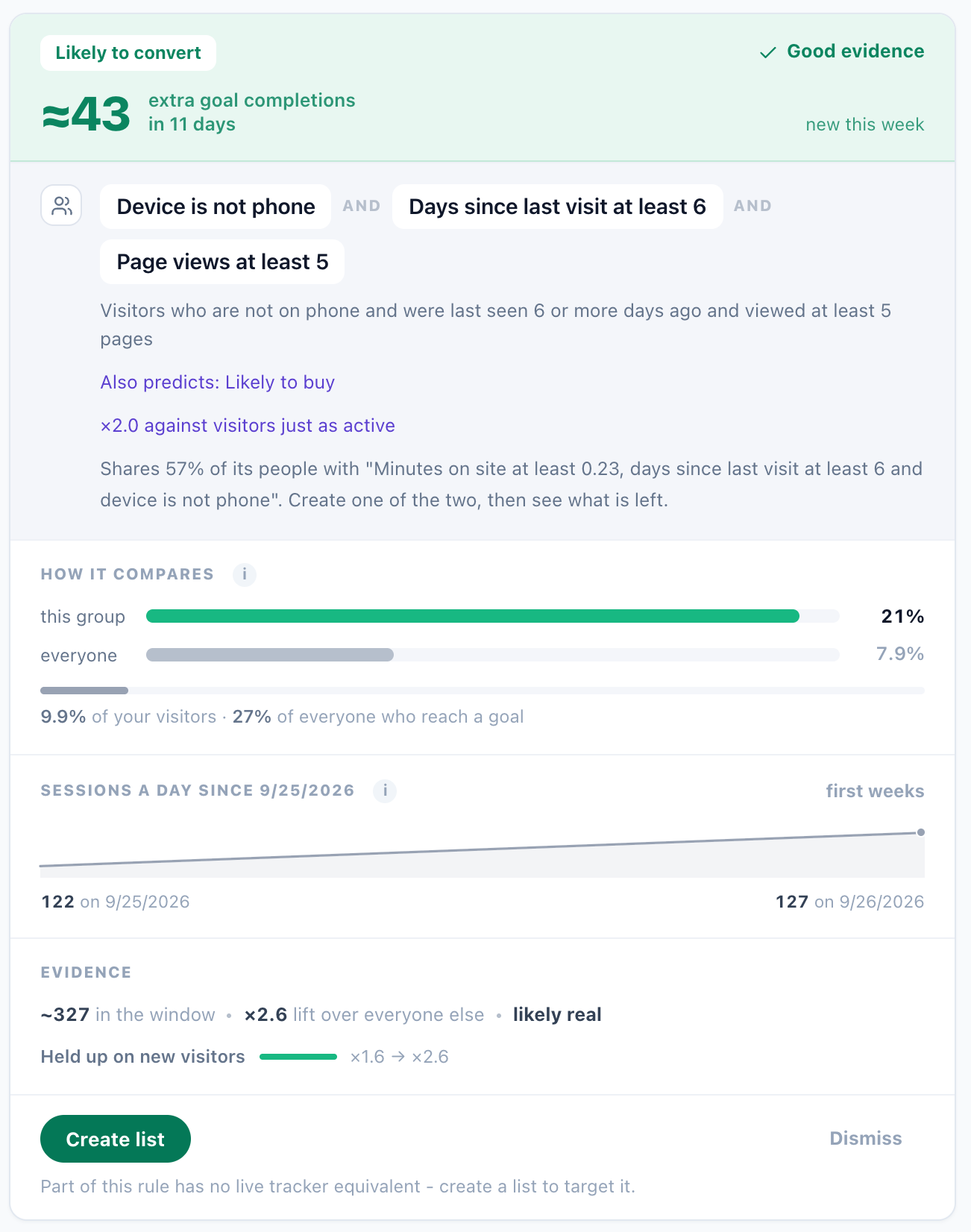
Live targeting does not need a list: a campaign reads the rule on each visit. There is one exception. Some rules use something a page cannot check while the visitor is on it, and then the card offers only the list:
Lists you create keep the rule that made them, under Your lists. In three months a list name explains nothing; the rule beside it does.
The settings you control
The Settings tab decides what the rules may be built from. Changes apply from the next pass.
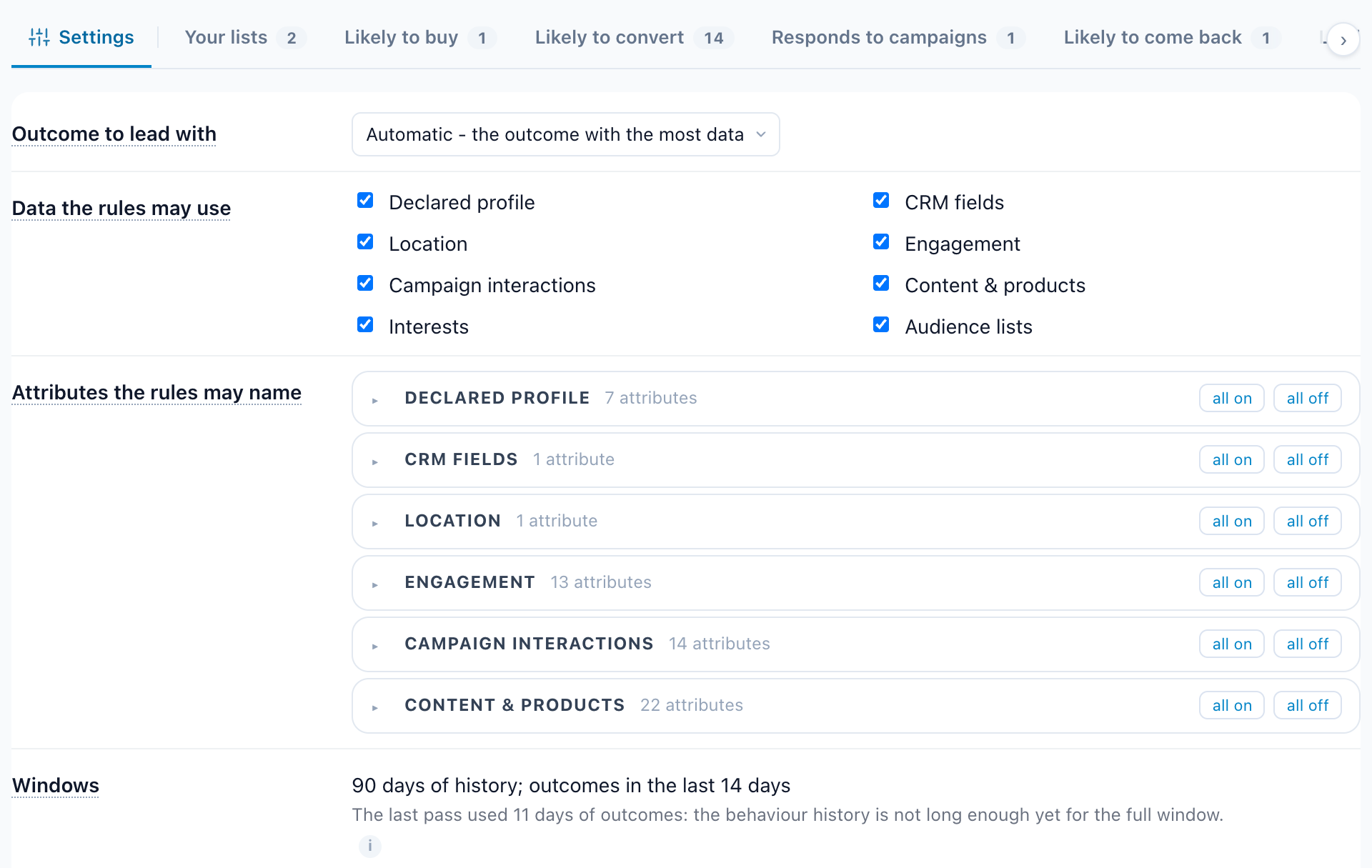
- Outcome to lead with — every pass mines every outcome that has enough data; this one is shown first and drives the campaign ideas. Automatic picks the outcome with the most data.
- Data the rules may use — declared profile, CRM fields, location, engagement, campaign interactions, content and products, interests, audience lists. A source that is off contributes nothing to any rule. Switch off campaign interactions to get rules that describe visitors rather than what they were shown.
- Attributes the rules may name — untick one and no rule names it from the next pass on. Beside each is how many visitors had a value for it; an attribute nobody fills cannot produce a rule.
- Windows — how far back a pass reads, and the last days of it that count as the outcome. They are set per account by support, since a longer window needs the history to be kept.
A weekly routine
- Read the summary line: how many groups are new, how many held.
- On the tab you care about, sort by Worth acting on and read the top three cards.
- Skip any card with a warning, or with weak evidence, until it comes back.
- Check Held up on new visitors and the against visitors just as active line.
- Turn the best one into a campaign in staging, or a list for email.
- Look at Lowest performers and Lapsing visitors for who to stop paying for.
- After a few weeks, sort by Realised lift to see what the groups did in your own campaigns.
Questions people ask
Does Audience Discovery predict who will buy?
It finds groups in your past data that reached an outcome far more, or far less, often than average, and measures each one on visitors the rule was not fitted on. That tells you which groups are worth a campaign; Realised lift then shows how each did once you targeted it.
How often does it run?
About once a week. Each pass reads the latest window again, so groups can appear, hold for several weeks or drop out. A rule that keeps coming back describes a group that exists.
Why are some rules not shown?
A group is kept only with at least 30 visitors, a difference too large to be plain chance, and at least 1.5 times the average rate, or at most two thirds of it for under-performers. Rules that match almost everyone or perform like average are dropped, and the summary says how many.
Do I need to create a list to target a group?
No. Use in a campaign targets the rule live on every visit. A list is for email, offline campaigns, exports and counting, and for the few rules a page cannot check live.
What data does it use?
Your own: what visitors declared, CRM fields, location, engagement, the campaigns they saw, the content and products they viewed, their interests and your audience lists. You can switch off any source, or any single attribute.
Book a demo with a personalization expert
30 minutes with a personalization expert. Bring your stack, your goals, your skepticism. We'll show you what changes when every visit feels like the only one.