
Anonymous Personalization: Yes, You Can Personalize a Lot Before You Know Who They Are
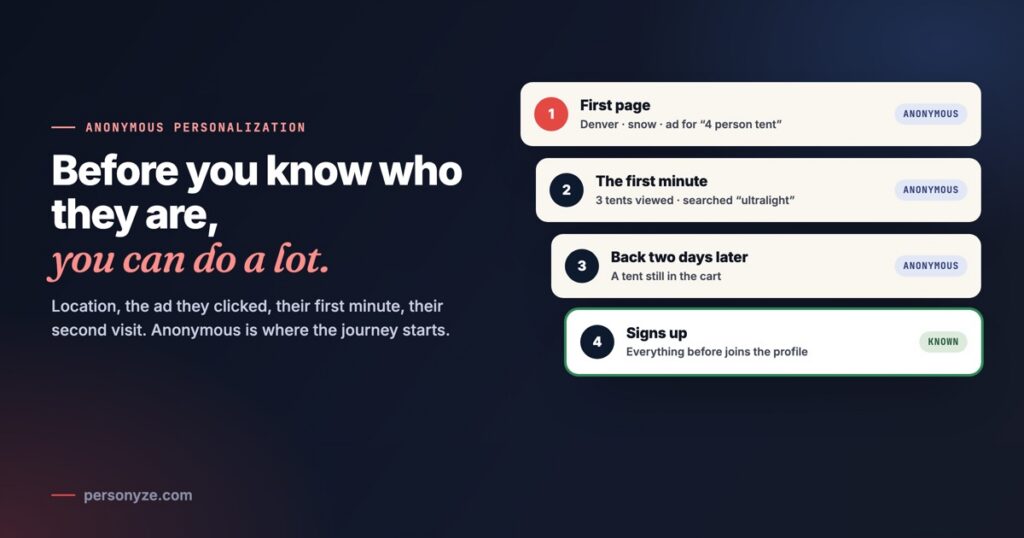
Anonymous personalization is showing each visitor a page that fits them before you know who they are. Most of your visitors are anonymous: no login, no email, no record in your CRM. That does not mean they all have to see the same page. Where they are, the ad they clicked and what they do in their first minute already say a lot, and website personalization can act on all of it from the first page.
Anonymous is the start of the journey, not a dead end. Below is what you can use at each step, from before the first click to the moment they sign up, and three places to start. To watch it happen, open our anonymous visitor personalization example: one shopper’s journey through an outdoor-gear store, step by step.
What is an anonymous visitor?
An anonymous visitor is one you don’t know by name yet. They have not logged in, have not given you an email, and match nobody in your CRM. To your site they are a browser, nothing more.
The clearest and biggest case is the first visit: session one, page one. Nothing has happened yet, and it is the visit most sites show the same way to everyone. Anonymous also covers returning visitors who never signed up. Someone on their fifth visit who never logged in is still anonymous, with four visits of history behind them.
Anonymity ends when they identify: they sign up, log in, or click a link in an email you sent. Nothing learned before is lost. The anonymous history joins their profile.
Denver, snowing, Saturday morning. Clicked a Google ad for “4 person tent”, on a phone.
Opened three ultralight tents, searched “ultralight”, read the reviews.
A returning visitor, with the Summit 2 tent still in the cart.
Creates an account. Everything from steps 1 to 3 joins the profile.
Before the first click
A visitor who lands on your site has already told you more than you might think. All of this is known on the first page view, before they click anything:
- Location: country, region and city, from the IP address. Geotargeting works on it from the first second.
- Local weather and local time, the day of the week included.
- Where they came from: the referring site, your UTM parameters and, for paid search, the keyword of the ad they clicked. Google does not pass on organic search keywords, so only paid traffic carries one.
- The landing page they arrived on.
- Device, browser and browser language.
- For B2B, the company, when you connect a company-identification tool such as 6sense, ZoomInfo, Leadinfo or Albacross. Our account-based marketing page shows what that makes possible.
Each of these is a targeting rule, and they combine. A visitor in Denver who clicked an ad for “4 person tent” on a snowy Saturday morning can land on a page about tents for a Colorado winter, not on your generic tent page. The same works on any site. A software company can repeat the ad’s keyword in the headline with dynamic keyword insertion. A travel site can lead with trips from the visitor’s own city. A publisher can put local stories first.
The first minute
Once they start moving, every click is a signal. Within a minute you can know:
- the pages and categories they viewed;
- what they searched for on your site;
- how far down a page they scrolled, and what they clicked;
- the price range of the products they looked at;
- how long they stayed.
Tents, ultralight, between $200 and $300: the row follows what they did, not the store’s bestseller list.
Behavioral targeting turns this into the next page. Someone who opened three ultralight tents between $239 and $279 sees more of those, not your bestseller list. Product and content recommendations fill their rows from what this visitor viewed, and a search for “ultralight” is kept as their last search, so it can still shape the rows a few pages later. A publisher does the same with topics, and a software site with the features someone read about.
The second visit
When they come back, the same browser is recognized. They are still anonymous, but now they are a returning visitor with a history:
- what they looked at last time;
- what is still in their cart;
- where they stopped, and what they last searched for.
So the homepage can say welcome back instead of pitching from scratch. It can put their recently viewed items first and remind them of the cart they left behind. Rules such as the time since the last visit and the total number of visits tell someone back after an hour from someone back after a month. The returning visitor example shows a whole page built this way.
The moment they identify
Sooner or later, many visitors identify themselves. They create an account, log in, send a form, or click a link in an email you sent. From that moment you know who they are.
Everything they did while anonymous stays. The pages, the searches and the cart from their earlier visits join the profile with their email, so the first email a new customer gets can be about the tent they compared last week, not a generic welcome. Each of them is one row in Visitor profiles, with what they did before and after. From then on, what you sync in from your CRM adds to it: their plan, their orders, their stage. That is CRM targeting.
Finding out who is behind a visit is a subject of its own. We compare the tools that name the company or the person in the best website visitor identification software.
When you know almost nothing
Some visits start with almost nothing: a direct visit, no referrer, no campaign, the first page. Even then, a few things still work:
- Device, local time and location are there on every visit. A phone at 9 pm and a desktop at 10 am can see different pages.
- The version that won for new visitors. Run an A/B test on first-time visitors only and let it pick the winner. The default page is then a tested starting point, not a guess.
- What is popular. Trending Now, Most Popular and Popular in the Visitor’s Country need no history, so they work on the very first page view.
- The first click. As soon as they open a category or a product, the next page can follow it.
The test ran on first-time visitors, so the default page is the version that won for them.
Then the first click: open Boots, and the next page is about boots.
Recommendations work the same way. When a personal row has nothing to go on yet, a fallback algorithm such as Most Popular fills it, so the row still has something to show a new visitor.
Privacy: context and behavior, not identity
Anonymous personalization runs on the context of the visit and what happens in it, not on who the person is. It needs no name, no email and no personal data. The city the IP points to, the time, the device and the pages viewed are enough.
- It works with consent. Under your consent manager, Personyze can wait: nothing is stored and no request is sent until the visitor agrees. See consent mode.
- Anonymous profiles are short-lived. A profile known only by the visitor id in its cookie is deleted 61 days after it last changed, by default, and you can set a shorter period in Data & privacy settings.
- Visitors can ask. A request to see or delete their data is answered from the same place; we wrote up how a data subject request works.
How to start: three quick wins
You don’t need a data project to begin. These three work on anonymous traffic from the first day:
1. Make the landing page match the ad
Take your biggest paid campaigns and make the page repeat what the ad promised: the headline names what they searched for, and the first products or plans are the ones in the ad. Dynamic landing pages and our UTM message match example show how.
2. Make an offer by location
Free shipping to their state, the store nearest to them, winter boots where it is snowing. Location and weather need no history at all, so the offer works on the very first visit.
3. Show returning visitors what they viewed
Put a recently viewed row on the homepage, for returning visitors only. It is one widget, and it saves people from searching for what they found last time. On a publisher’s site it is the article they did not finish.
Then add the next step of the journey. Start with the first page, and the rest of the visit, the second visit and the sign-up build on it. Our example page shows all of them on one store.
Questions people ask
What is anonymous personalization?
It is showing each visitor a page that fits them before you know who they are. It uses the context of the visit, such as location, local time, device and where they came from, and what they do on the site, such as pages viewed and searches. It needs no name, email or login.
Can you personalize a first-time visitor’s first page?
Yes. On the first page view you already know the visitor’s location, local weather and time, device, browser language, the referring site, the UTM parameters, the keyword of a paid search ad they clicked, and the landing page. Each of them can change what that first page shows.
What happens to the anonymous history when a visitor signs up?
It is kept. When a visitor signs up, logs in, sends a form or clicks a link in an email you sent, what they did while anonymous joins their profile, so their first message can follow what they browsed.
What can you show a visitor you know nothing about?
Device, local time and location work on every visit. Show the version an A/B test found works best for new visitors, show what is trending or popular in their country, and adapt the next page from their first click.
Does anonymous personalization need personal data?
No. It runs on the context of the visit and the behavior in it, not on who the visitor is. Personyze can wait for consent under your consent manager, and an anonymous profile is deleted 61 days after it last changed, by default.
Book a demo with a personalization expert
30 minutes with a personalization expert. Bring your stack, your goals, your skepticism. We'll show you what changes when every visit feels like the only one.