
AI Website Personalization: How It Works, Step by Step
Most websites show every visitor the same page. The first-time visitor from an ad, the customer on their fifth order and the buyer comparing you with two competitors all get the same headline, the same products and the same offer. Personalization fixes that by showing each visitor the version of the site that is most useful to them. The catch has always been the work: someone has to decide who gets what, build it, and prove it helped.
That work is what AI website personalization takes over. AI does the parts that used to need a person for every decision: spotting the audiences worth treating differently, choosing the product, offer or answer for each visitor, building the campaign, and reading which version won for whom. Here is each step, the way Personyze does it, with screens from the panel.
- A profile for every visitorWhat they do on your site, where they came from, where they are, and what your CRM knows about them.
- AudiencesThe ones you describe in a sentence, and the ones AI finds in your own data.
- The decisionAI picks the products, the offer, the answer and the winning version for each visitor.
- The buildAn AI agent turns a plain-language request into a campaign, staged for you to review.
- The proofA holdout keeps seeing your site unchanged, so the lift you read is the lift you caused.
What AI adds, and what it is not
Two things often get called AI personalization that are not quite it.
| Rules only | “AI” that means a chatbot | AI website personalization | |
|---|---|---|---|
| Who gets what | The segments you thought of, in rules you wrote | Everyone sees the same page; the chat waits for questions | Rules you describe in a sentence, plus audiences found in your own data |
| What they see | The content you picked for each segment | Answers in a chat window | Products, offers, answers and page versions picked for each visitor |
| Building it | A person, campaign by campaign | Set the bot up once | An agent drafts the campaign; you review it and publish it |
| Knowing it worked | Up to you to set up a test | Conversations counted | A holdout, and a verdict for each audience |
Rules on their own work — if this is true, show that — but every audience is one somebody thought of, every piece of content is one somebody picked, and the program grows only as fast as your team’s hours. A chatbot is useful, and Personyze has one, but on its own it is a window in the corner: the page behind it is still the same for everyone. AI website personalization keeps the rules — you can still write every one by hand — and puts AI into each step where a person used to be the bottleneck. (We wrote separately about where AI earns its place in personalization, and where it is hype.)
Step 1: A profile for every visitor
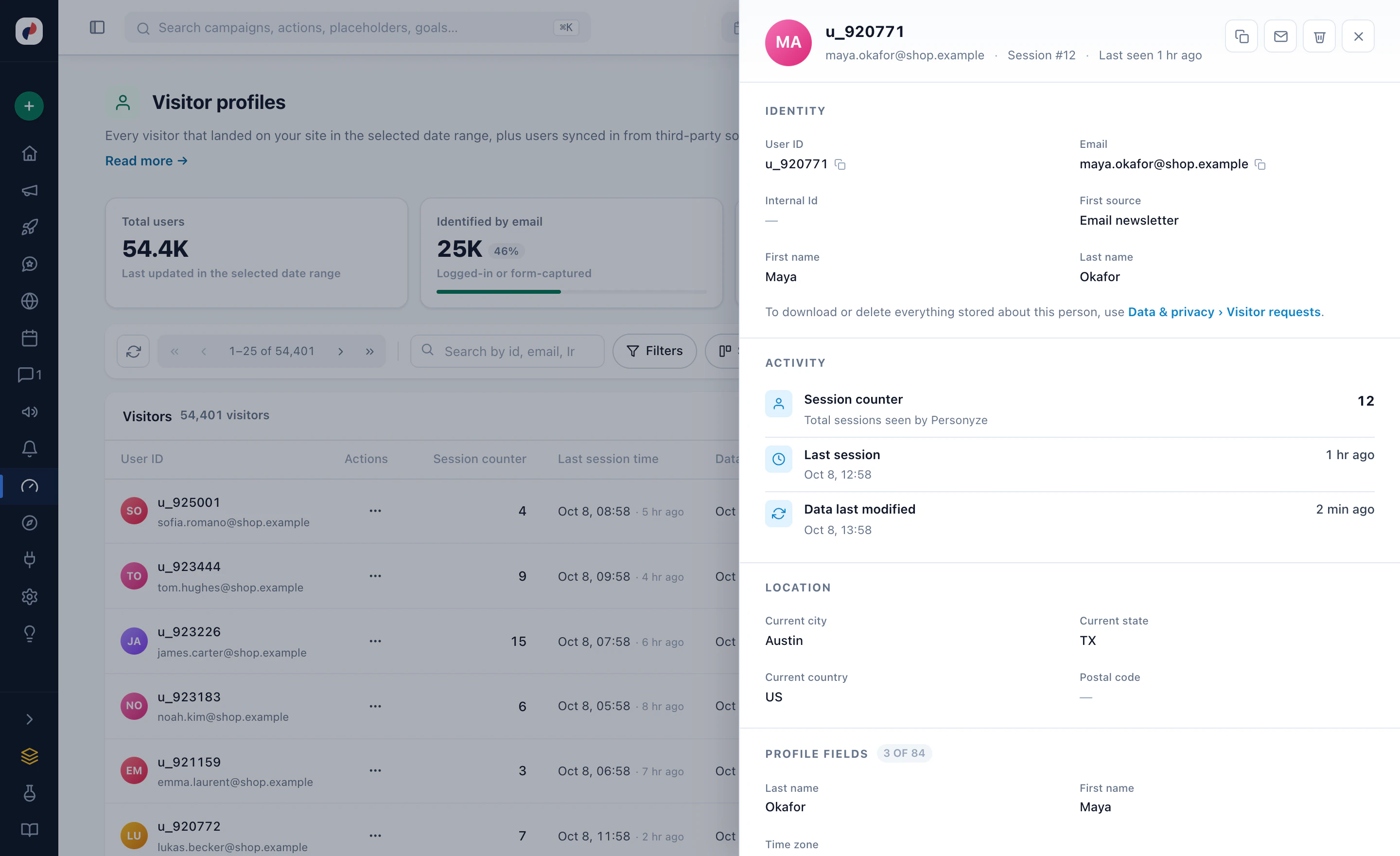
Everything starts with knowing who is on the page. Once the Personyze tag is on your site, every visitor gets one profile, and it fills in as they browse:
- Behaviour — pages and products viewed, searches on your site, what is in the cart, time on site, and how many visits so far.
- Source — the referrer, the search keywords, and the campaign or ad that brought them.
- Location and context — country and city, local weather, device, browser language, day and hour.
- Your own data — CRM fields such as lifecycle stage or industry, imported lists, answers to your forms and surveys, and past purchases.
AI adds a layer nobody would tag by hand: interests. The site crawler reads your pages and AI sorts each one by what it is actually about, in your own categories. A visitor who views fountain pens is flagged as interested in fountain pens, weighted by how much they viewed — and that interest can be targeted like any other field. Conditions are checked again on every page view, so a visitor moves in and out of audiences as their behaviour changes, not after an overnight sync.
Step 2: Audiences you describe, and audiences AI finds
Describe the audience in a sentence
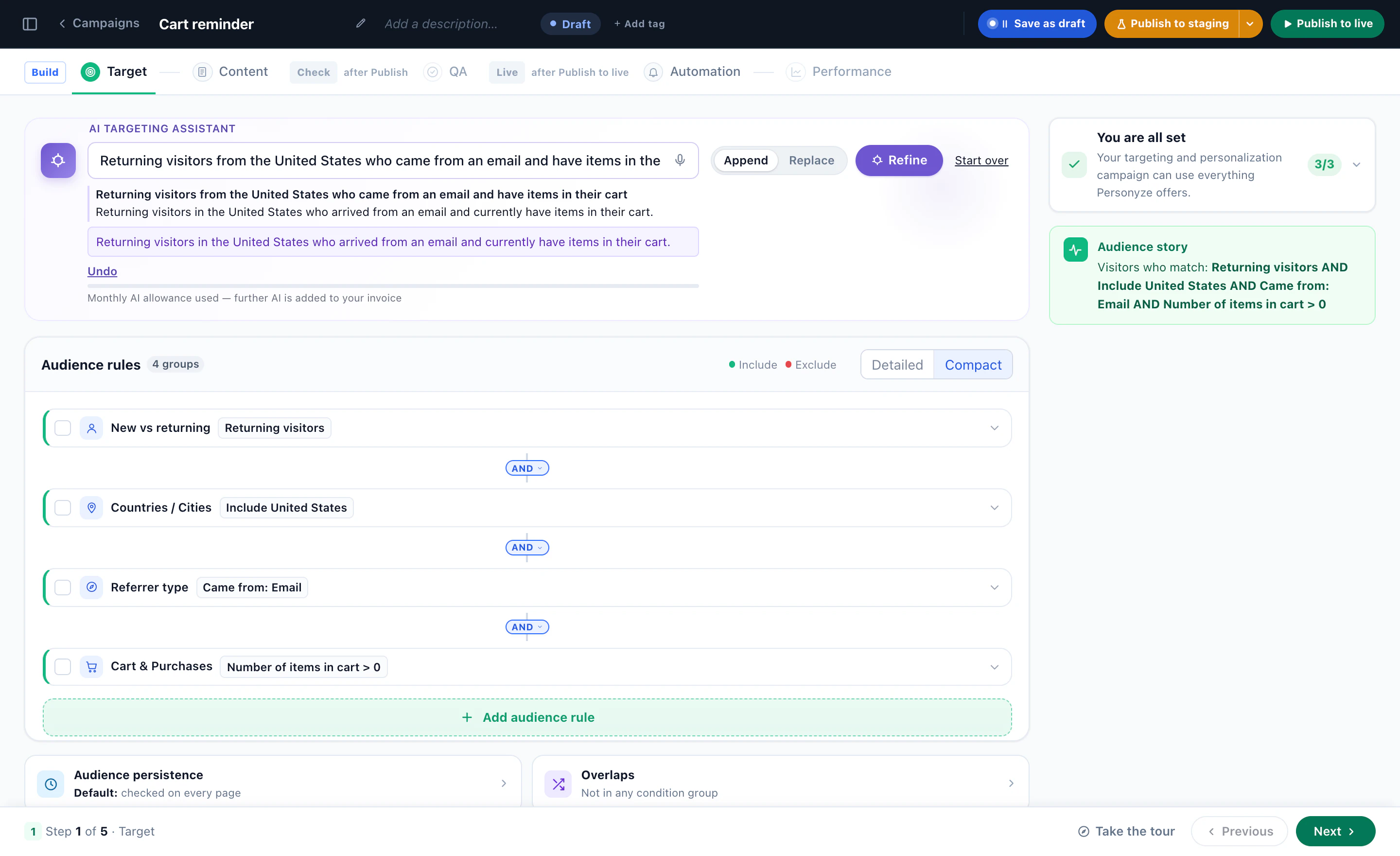
Personyze targets on more than seventy attributes, combined with AND, OR and NOT. You can still build every rule by hand; the faster way is the AI targeting assistant in a campaign’s Target step. Type who the campaign is for — “returning visitors from the United States who came from an email and have items in their cart” — and it writes the rules, then reads the audience back to you in plain words. What it writes are ordinary conditions: you can open, change or delete any of them. More in how the AI targeting assistant builds the rules.
Let AI find the audiences you did not think of
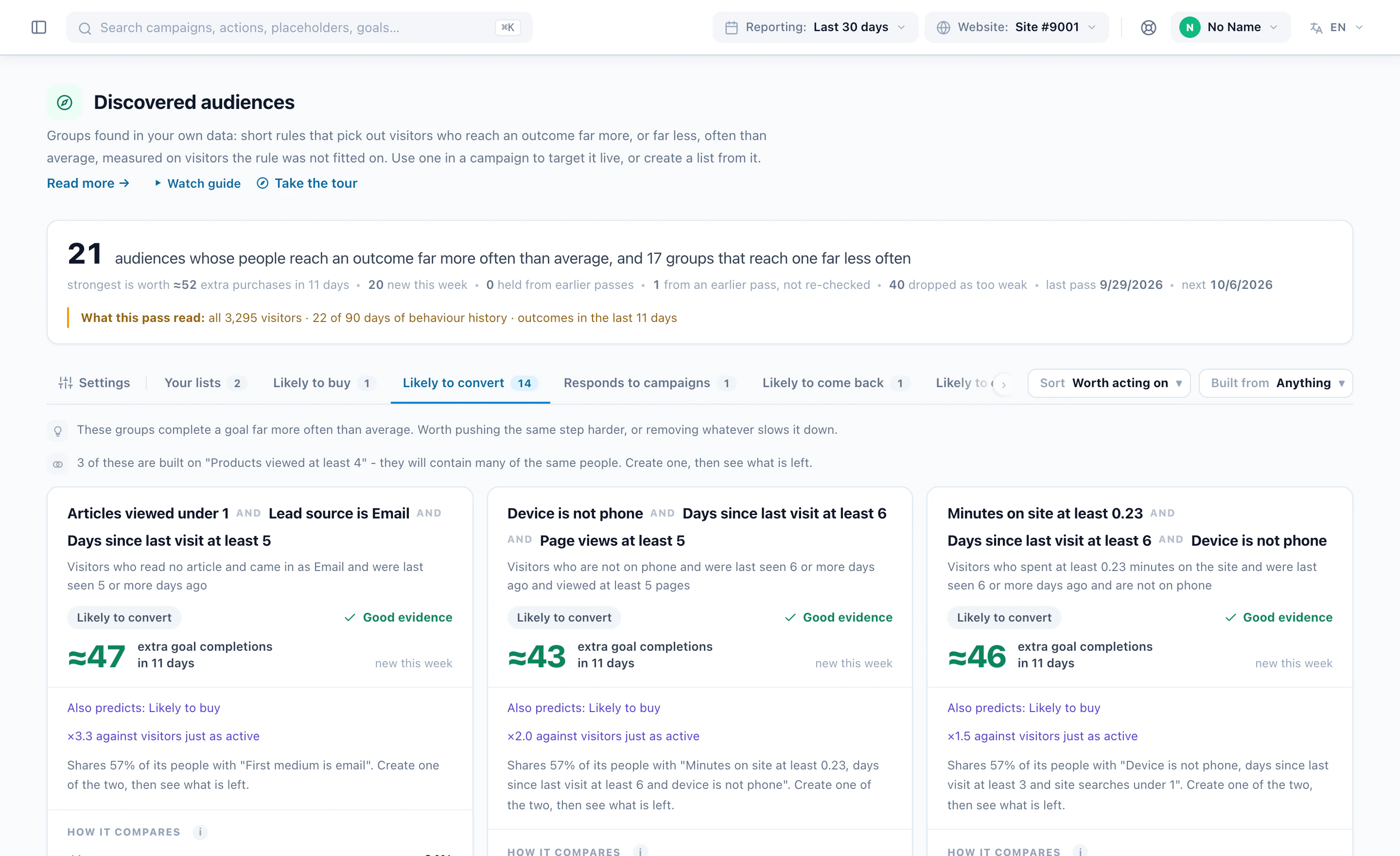
The audiences you describe are the ones you already know about. Audience Discovery looks for the rest. Once a week it reads your visitor data and proposes short rules, three conditions at most, for the people who reach a goal far more often than average — and for the ones who reach it far less often. Every rule is re-measured on visitors it was never fitted on, and a rule that shrinks there is shown as shrunk or dropped. The cards are ranked by extra conversions, so a huge lift on twelve people does not outrank a solid one on thousands.
A card might read “articles viewed under 1, lead source is email, last visit at least 5 days ago” — the kind of rule nobody writes by hand. One click makes it a campaign’s audience; it can also become a daily list for email, or an exclusion for the visitors who never convert. Audience Discovery is an add-on with a trial, and reading a discovered audience, card by card walks through every number on it.
Step 3: AI decides what each visitor sees
With the visitor known and the audience set, the next question is what to show. This is where most of the AI work happens, and it looks different for each kind of content.
Products and articles: recommendation algorithms
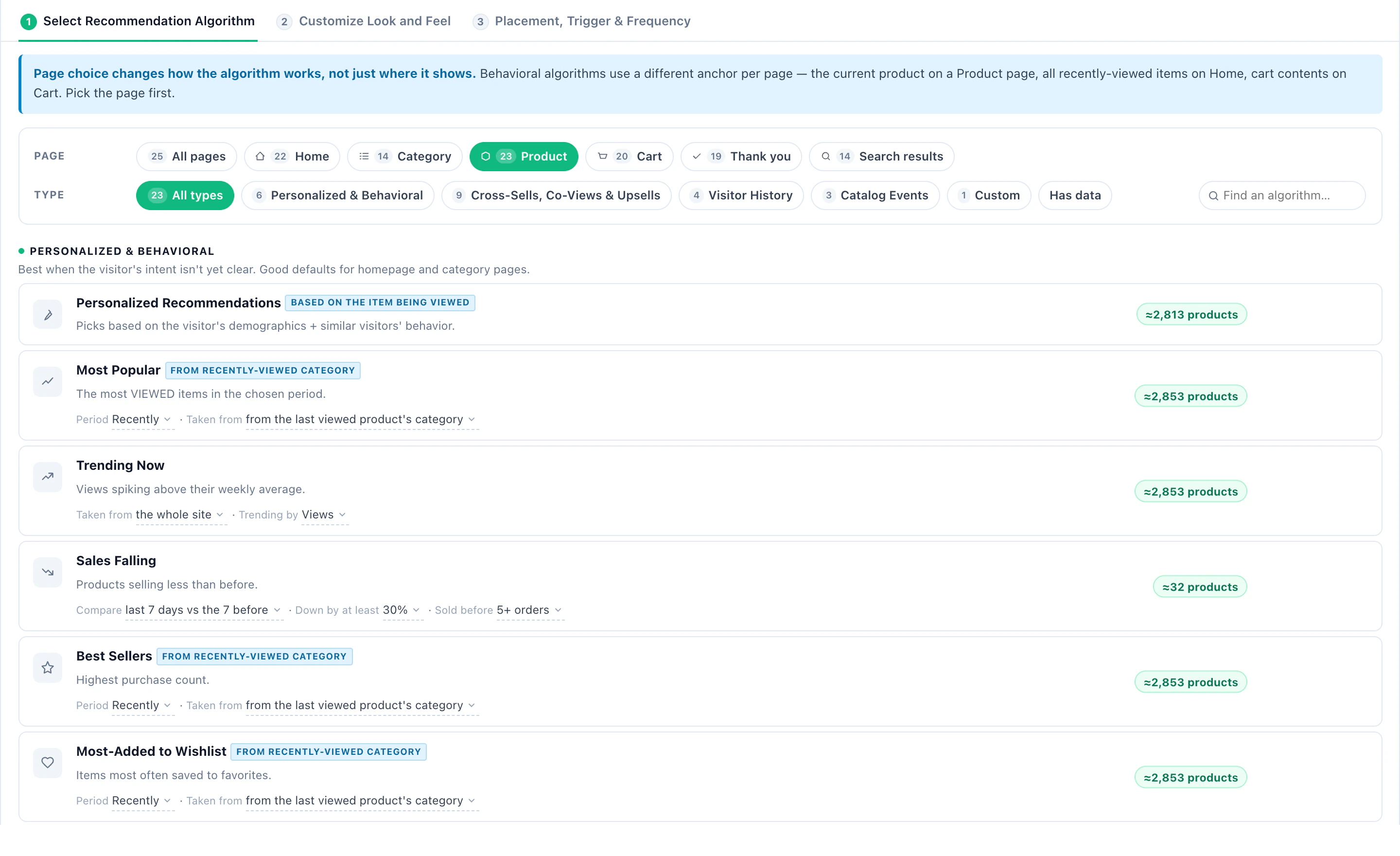
A recommendation widget picks items for each visitor with the algorithm you choose: Personalized Recommendations from the visitor’s profile and what similar visitors did, items bought together, what is trending, best sellers from the category they browsed, or Similar Items (AI), which learns from your catalog text and so covers a brand-new product from day one. Fallbacks fill the row when the main algorithm has too little to go on, so a first-time visitor never gets an empty widget. Articles work the same way, from your own content. The product recommendations playbook walks through the setup in the order the panel asks for it.
Offers: AI promotions pick the one most likely to convert
Instead of one campaign per offer, you keep one list of promotions — banners, text offers and coupons, each with its dates, pages, audience and language. For every visitor, an AI promotions widget considers only the promotions that fit them, then picks: by the page’s category, the categories they browsed lately, their last search, what visitors like them respond to, or the best earner, learned from views, clicks and purchases. Learning from results shows the better earners more often, while the rest keep getting their chance. The AI promotion playbook lays out all ten ways to choose.
Questions: an AI chat that answers from your own pages
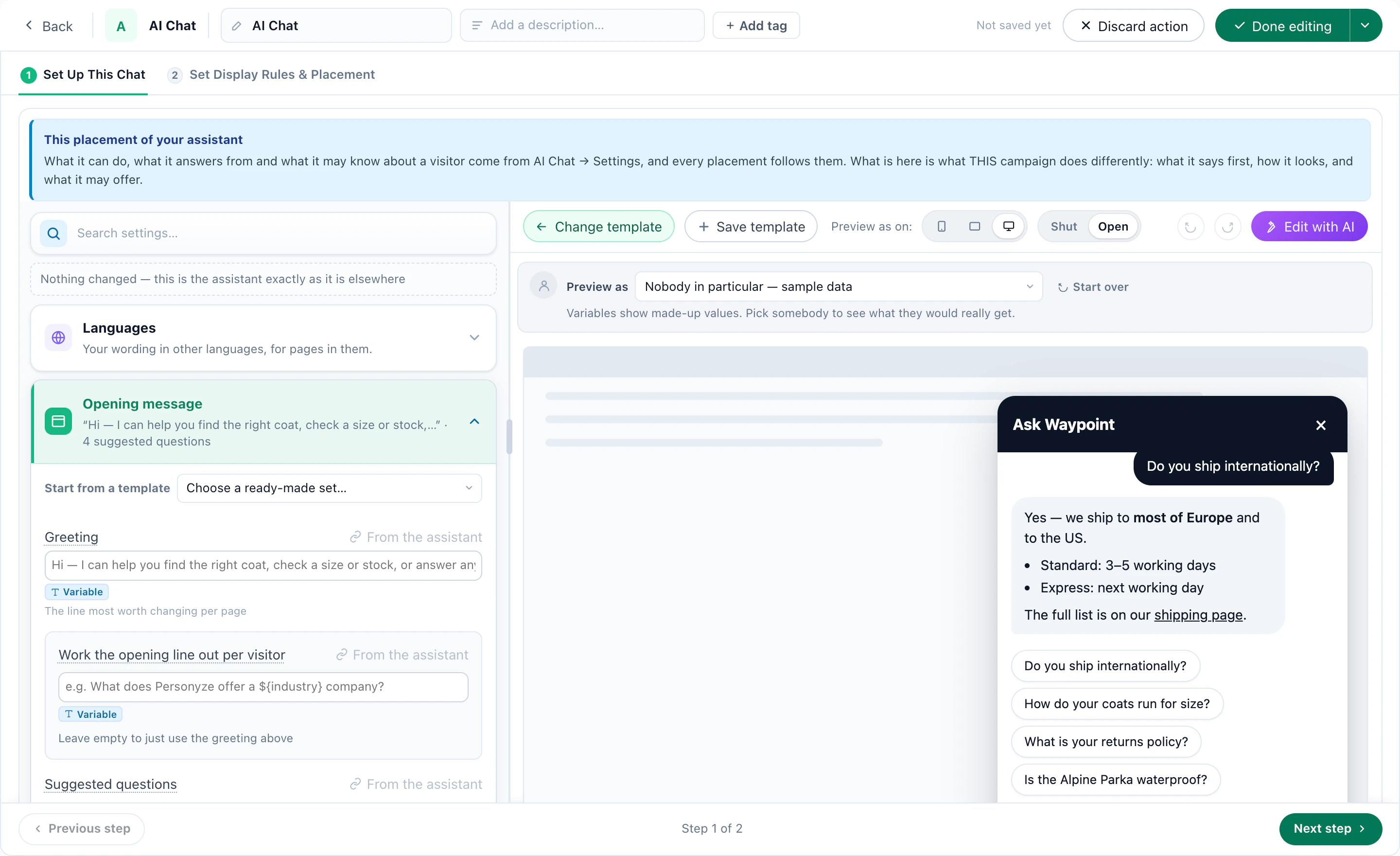
Some visitors would rather ask. The AI chat answers from the pages and documents you give it, and answers stock, price and product questions from the same product feed your recommendations use. With nothing to read it declines rather than guesses, and it cannot invent a discount, a price or a promise. It can sit in a corner bubble, in the page as an ask box, or work as a product finder that asks what the shopper needs and shows the products that fit, each with the reason. Because the chat is a campaign action, it is targeted like everything else. The AI chat agent playbook covers the setup step by step.
Versions: the winner for each audience
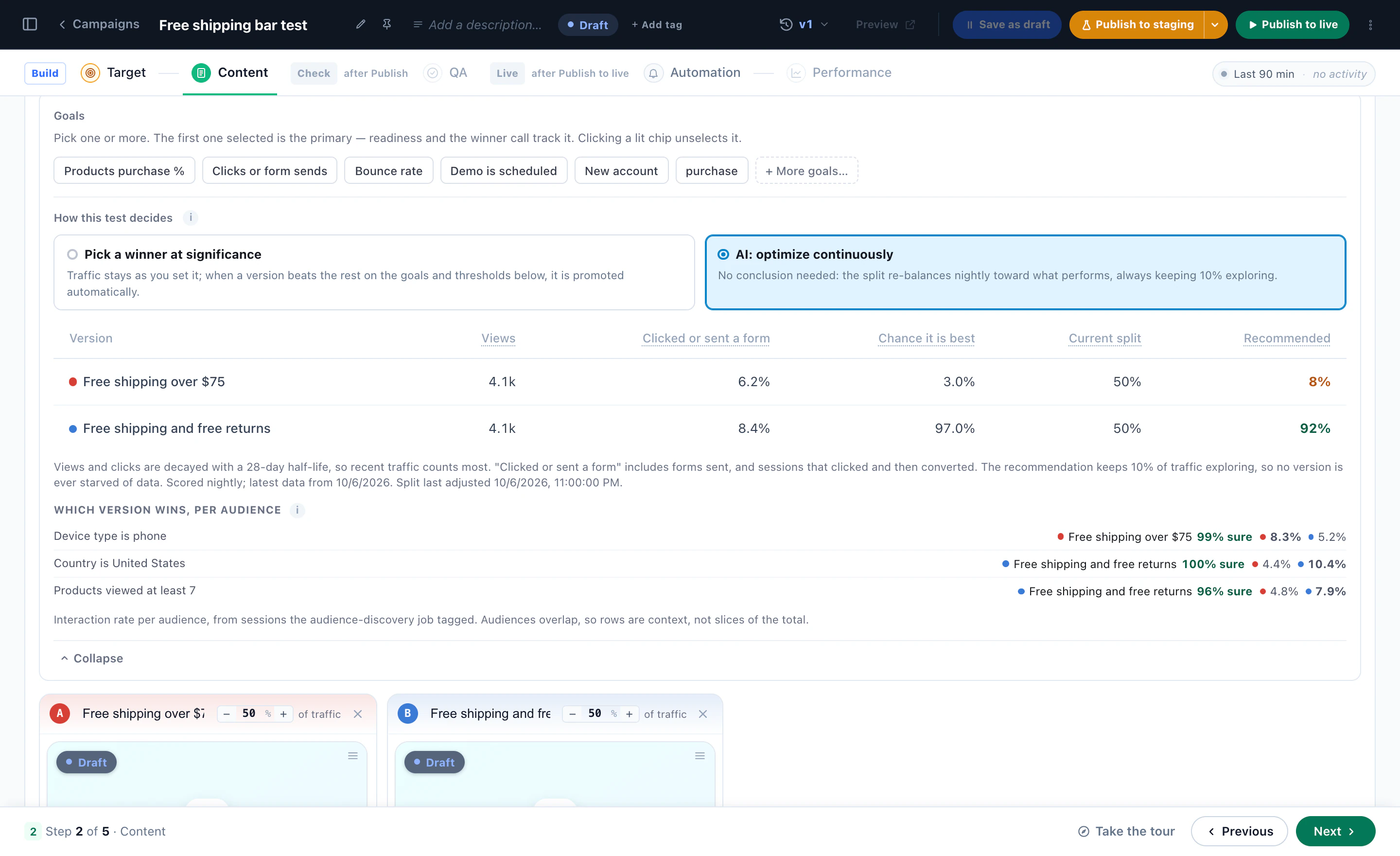
When you are not sure which version of a page, banner or offer works best, test them and let AI read the result. An A/B test in Personyze can pick a winner at significance, or run as AI: optimize continuously: every night the split moves toward the version performing best, always keeping 10% of traffic exploring so no version is starved of data. Either way the result is read per audience, so you see who each version won for — the version that wins overall may lose on phones.
Step 4: An AI agent builds the campaign from a sentence
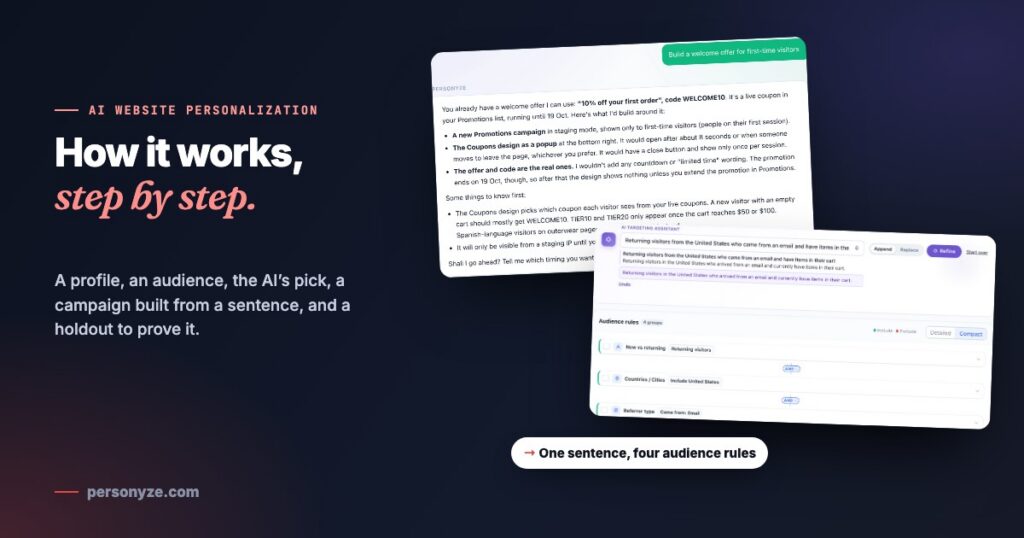
Deciding is half the job; someone still has to build the campaign. In Personyze, that can be an AI agent. Describe what you want — “build a welcome offer for first-time visitors” — and it reads your account first: your promotions, your goals, what already runs. It comes back with a plan in plain words: who sees it, which design, the real coupon and when it opens. And it asks before it builds.
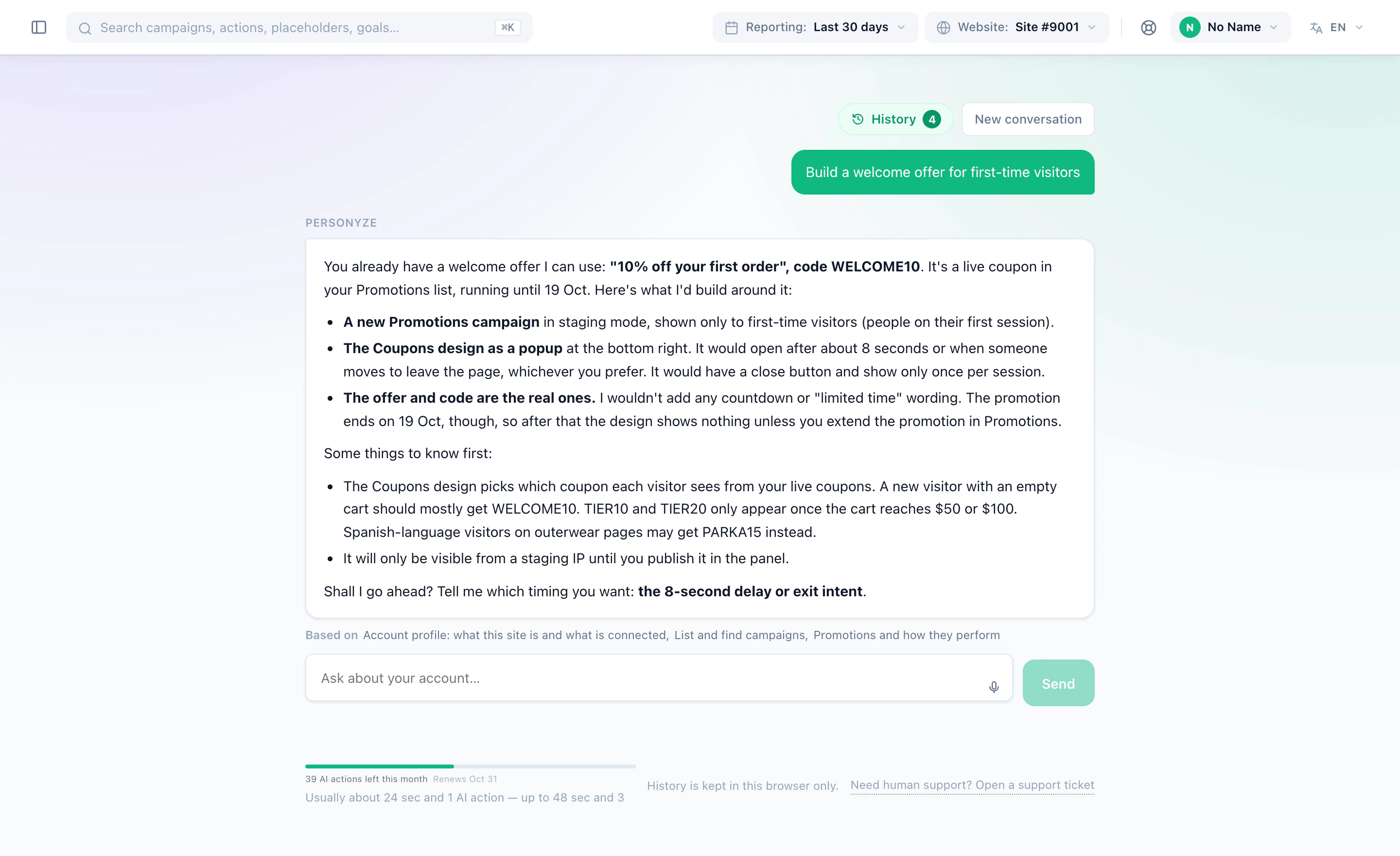
Then it builds it: the targeting, a design from a gallery of 450+ templates in your own colours and fonts (read from your live pages), the placement and the timing. Everything lands in staging, visible only from a staging IP, and you get a link to the finished campaign. Going live is always a person’s decision. Not sure what to ask for? Ask what to improve this week: it looks across your pages, products and campaigns and ranks what is worth your time.
You can change what it built in one sentence with Edit with AI, and the same agent works from your WordPress admin and from the AI assistant you already use — always with your own permissions, never more. Everything the agent can do is on the AI personalization page.
Step 5: Measure against a holdout, not a hunch
AI that picks content is only worth keeping if it adds something you can measure. The honest way is a holdout: a share of visitors who keep seeing your site unchanged. Split a campaign 45/45 with 10% held out, and the difference between what its visitors did and what the held-out visitors did is the lift the personalization caused — not the traffic it happened to catch.
For a test with an end, you set the goal and the bar — the confidence, a minimum number of sessions, a minimum runtime and the smallest improvement worth calling — and the winner is promoted by itself once it clears them, while a control group stays held back so the campaign can still be measured. For promotions, the held-out visitors see no promotion at all, and the report shows the purchase lift over them.
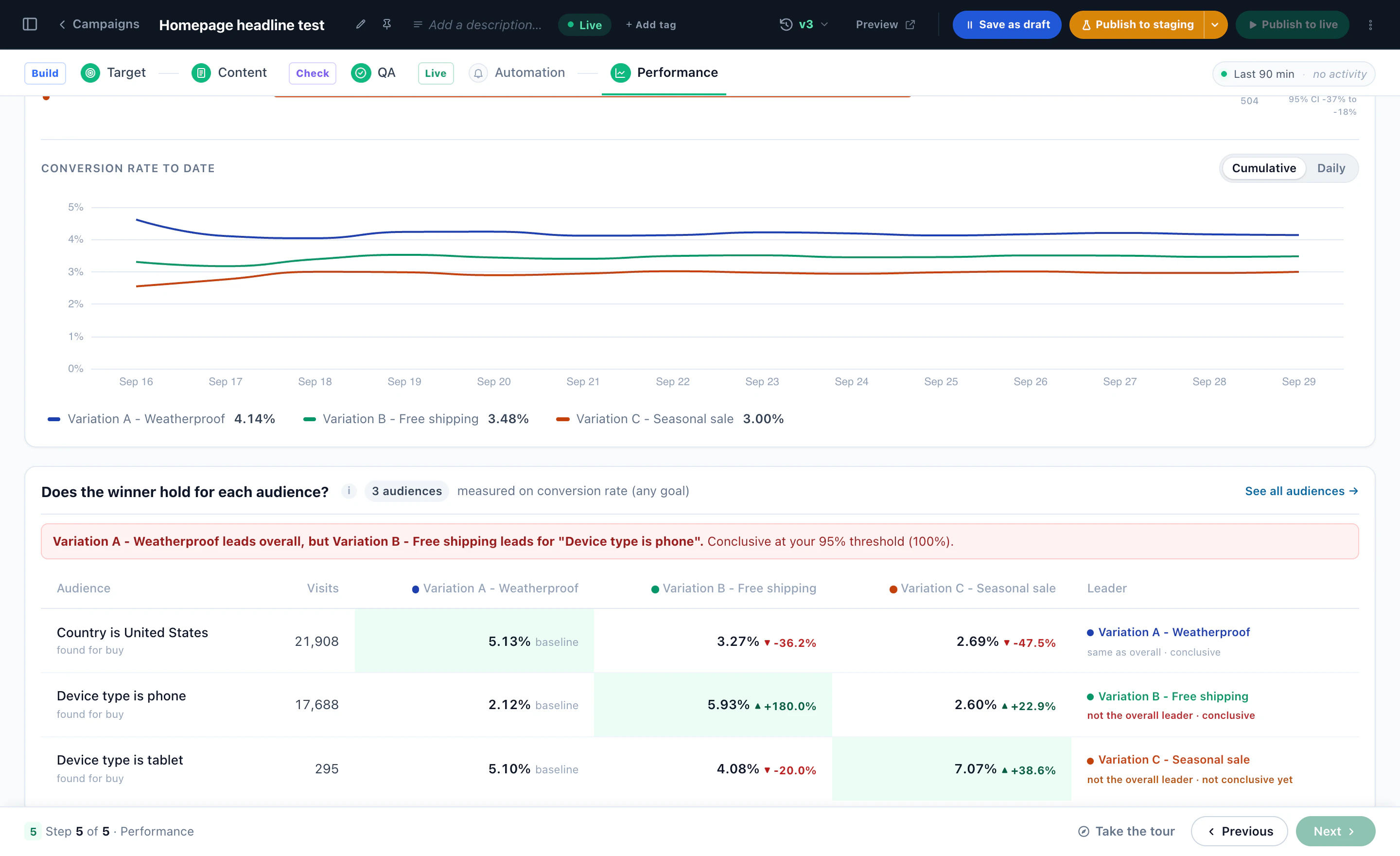
Read the result per audience, too. A version can win overall and lose for one group: below, the weatherproof headline leads overall, but the free-shipping version wins on phones. While the test runs, one split serves everyone; once the results are in, “Apply the winners to their audiences” ends the test and shows each winning version only to the audiences it won, so phone visitors get free shipping and everyone else keeps the headline that won for them. How to read A/B test results explains the verdict, the lift and the confidence, and A/B testing per audience has the rest.
Where to start: a free AI personalization plan
The hardest part of starting is the blank page: which visitors to treat differently, with what, and where. Inspire me is a free AI personalization tool that does the first pass. Give it your website and a goal. It reads up to 8 of your public pages the way a visitor sees them, works out which audiences your site serves, checks each Personyze feature against your site, and writes the ideas worth running — who each one is for, where it goes, why, and how to measure it — with the best ones drawn on pictures of your own pages. It takes about four minutes, there is nothing to install, and you do not need to leave an email to see the plan.
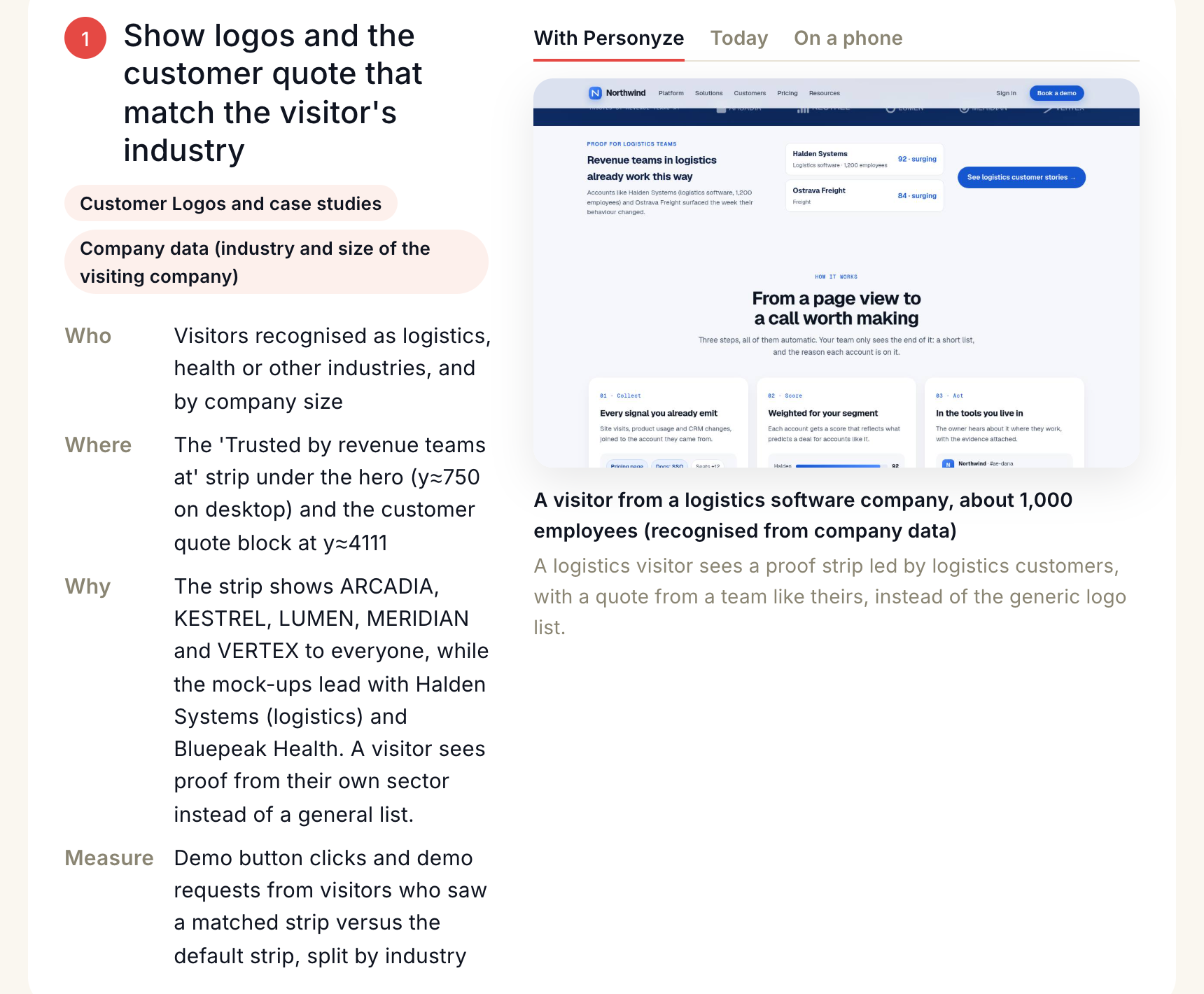
Its scores are estimates of how relevant your pages are to each audience, not a forecast of results. The plan is the brief; a test on your own traffic is how you find out.
A sensible order
- Get the plan from Inspire me, and pick one or two ideas.
- Add the Personyze tag, so profiles start filling.
- Start with a decision that works from day one: product recommendations with fallbacks, or one list of promotions.
- Describe the first campaign to the agent, review it in staging, and publish it yourself.
- Keep a holdout on everything, and read the results per audience.
- Once traffic flows, let Audience Discovery find the next audiences worth targeting.
Questions people ask
What is AI website personalization?
Showing each visitor the version of your website most likely to help them — the products, offers, content and answers — with AI doing the work of finding the audiences, choosing what each visitor sees, building the campaigns and measuring the result.
How is AI personalization different from rule-based personalization?
Rules show one thing when a condition is true, and every rule and piece of content comes from a person. AI adds the steps a person cannot do at scale: finding audiences in your own data, picking the product or offer for each visitor, and moving traffic toward what works. In Personyze the two work together: rules written by AI are ordinary rules you can read and edit.
Is an AI chatbot the same as AI personalization?
No. A chat answers the visitors who ask; AI personalization changes what every visitor sees on the page, chat or no chat. A chat is one part of it: in Personyze it answers from your own pages and catalog, and it is targeted like any other campaign.
Will the AI change my live site without asking?
No. Campaigns the agent builds start in staging, visible only from a staging IP, and going live is always a person’s decision in the panel.
How do I know AI personalization is working?
Keep a holdout: a share of visitors who see the site unchanged. The difference between them and everyone else is the lift the campaign caused, and Personyze reads the result per audience as well.
What data does AI personalization need?
The Personyze tag is enough to start: behaviour, source, location and device fill each profile as people browse. Recommendations need your product or content catalog; CRM data is optional and adds fields such as industry or lifecycle stage to target on. Similar Items (AI) and fallbacks such as Most Popular work from day one.
Where should I start?
With a plan. Inspire me reads your public pages and writes the ideas worth running on your site, free, in about four minutes, and you do not need to leave an email to see it.
Book a demo with a personalization expert
30 minutes with a personalization expert. Bring your stack, your goals, your skepticism. We'll show you what changes when every visit feels like the only one.