
Boost AOV with AI product recs.
An e-commerce playbook for product recommendations — deploy Bought-Together bundles, personalized bestsellers, and predictive cross-sell algorithms.
Start Now →
Alpha X Mirrorless Camera
Pro-grade 4K video, 24MP sensor. The compact choice for creators.

The Future of AI: Neural Networks Hit New Milestone

Researchers have unveiled a new processing architecture that mimics the human brain's synaptic efficiency. This shift marks the end of traditional computing as we know it...

Tech Giants Merge

Cybersecurity Alert



Save 20% Today
Just Published
 300+ Reads Today
 Trending
Watch the playbook done
The two walkthroughs this playbook follows, in the real panel — the whole wizard, then the filters, fallbacks and titles that keep every row full. Then do it with your own products.
1Set it up in the order the editor does
Create a campaign and choose Product recommendations. The editor walks the setup in order — Catalog, Product events, Content, Target, then QA and the Simulator before anything goes live, and Performance after. The first two steps check the data the widget will stand on.
Step 1: Catalog
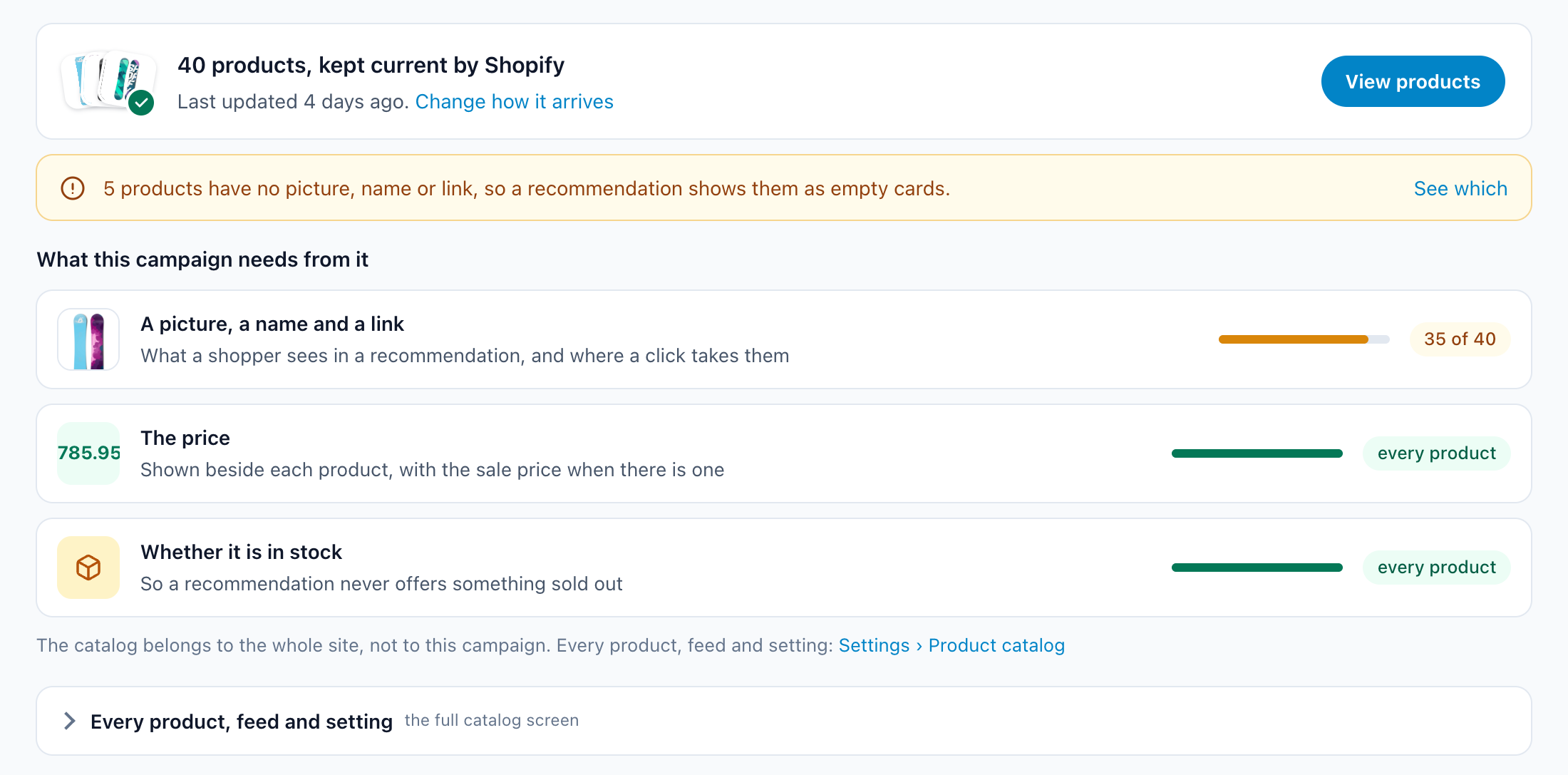
Recommendations choose from your product catalog — its pictures, names, prices and stock. Connect your store once (Shopify, Magento and the other store apps keep it current by themselves) or import a feed. The Catalog step then checks the catalog against what this campaign needs: a picture, a name and a link, a price, and whether each product is in stock. Anything that would show up as an empty card is listed under See which.
Step 2: Product events
Recommendations learn from what shoppers do: which products they view, what they add to the cart, what they buy. The Product events step shows which of those your site already sends and how many arrived lately. Send them in any of three ways: read from the page (its address or an element on it), from your Google Tag Manager data layer, or with code:
(self.personyze=self.personyze||[]).push(["Product Viewed", PRODUCT_ID]);(self.personyze=self.personyze||[]).push(["Product Added to cart", PRODUCT_ID, 'Quantity', QUANTITY]);(self.personyze=self.personyze||[]).push(["Product Purchased", PRODUCT_ID, 'Quantity', QUANTITY]);(self.personyze=self.personyze||[]).push(["Products Purchased"]); (everything in the cart was bought)(self.personyze=self.personyze||[]).push(["Product Removed from cart", PRODUCT_ID]);(self.personyze=self.personyze||[]).push(["Products Removed from cart"]); (the cart was emptied)PRODUCT_ID is the product’s ID in your catalog. The purchase sum comes from the catalog prices.
Product views are enough to start. Purchases power best sellers and stop a widget recommending what someone just bought, so set them up too.
2Pick the algorithm, its fallbacks and its filters
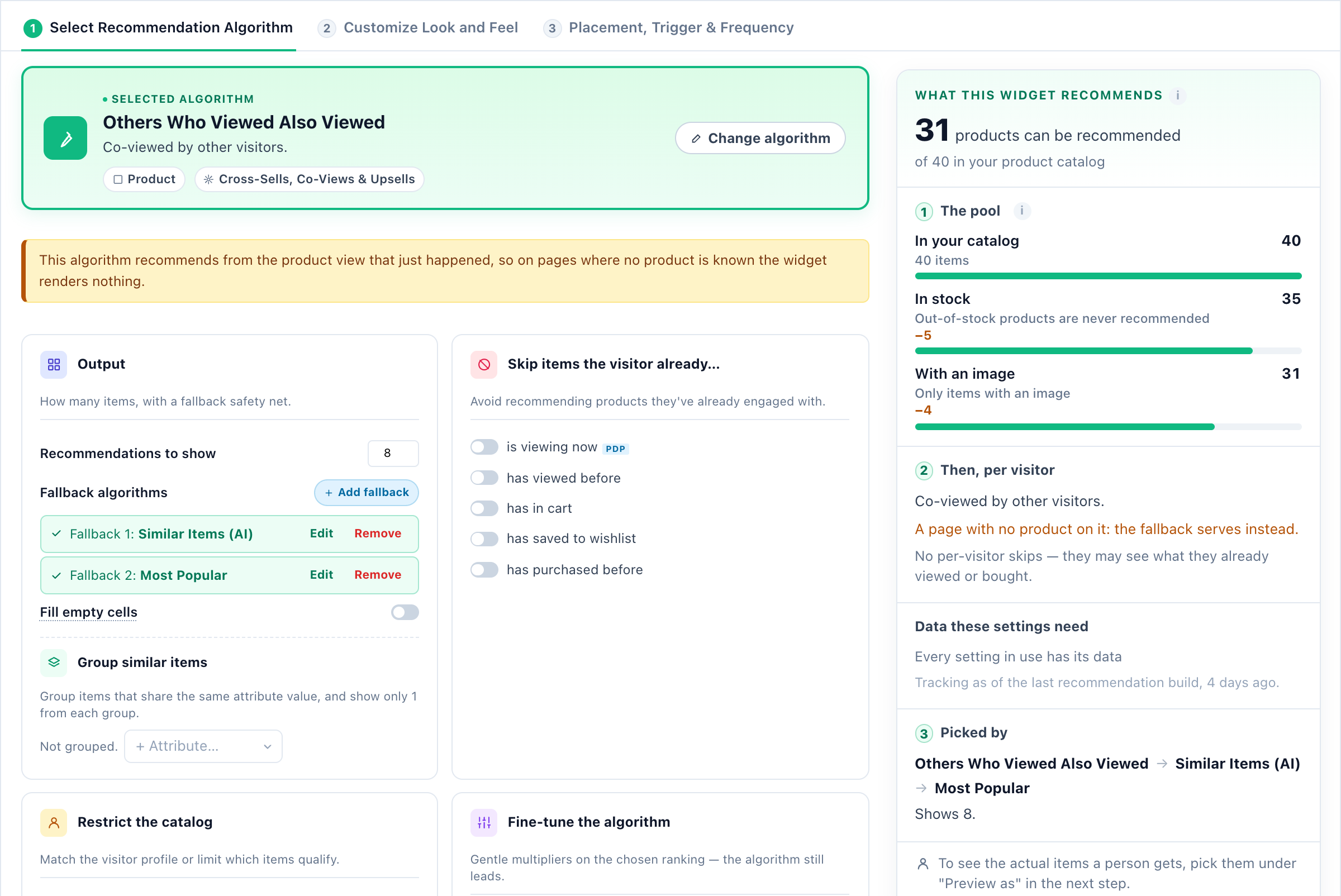
Open the widget from the Content step. Its first step is the algorithm: what the widget recommends and in what order. On the right, What this widget recommends counts the pool as you change settings — the products in the catalog, those in stock (out-of-stock products are never recommended), those with a picture — and which algorithms will pick.
The page comes first
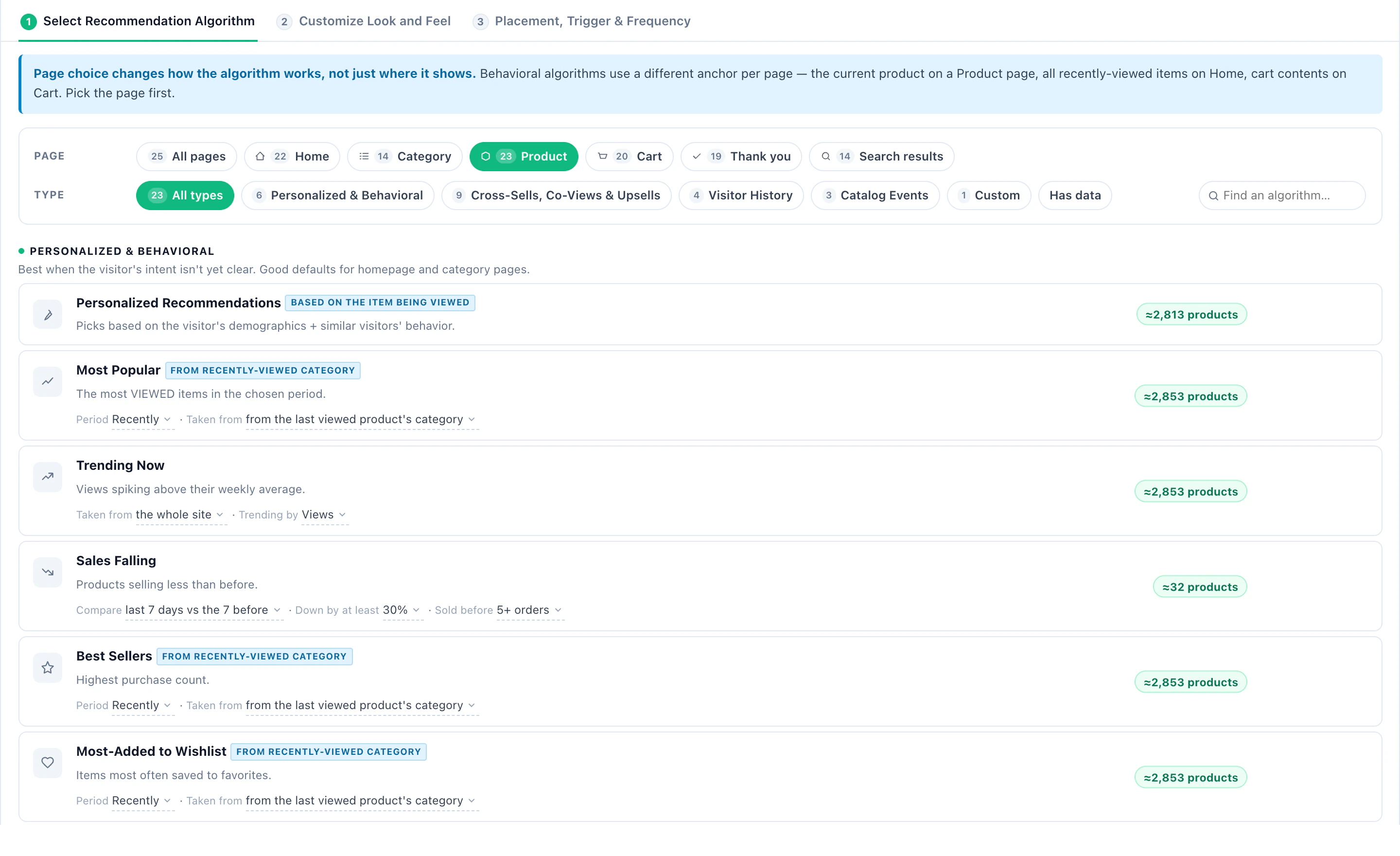
The algorithm list is filtered by the page the widget will be on — home, category, product, cart, thank-you, search — because the same algorithm anchors differently on each: the product being viewed, everything viewed lately, the cart. Each algorithm shows how many products it already has data for.
Fallbacks
Add one or more fallback algorithms. They fill the slots, in order, when the main algorithm has too little to go on — a brand-new product, a first-time visitor, a quiet day. Fill empty cells tops up any slot still empty with the most popular items.
Skip what they already have
Under Skip items the visitor already…: is viewing now, has viewed before, has in the cart, has saved to the wishlist, has purchased before.
Restrict the catalog
- Match the visitor — their gender or age, where your catalog carries them.
- Only (not) discounted, or only items with an image, a link or a price.
- Only from the viewed item’s categories, or only from categories you choose.
- Group similar items — one item per value of an attribute, so eight slots are not eight colours of one shoe.
Fine-tune the algorithm
Gentle boosts on top of the chosen ranking: Boost by profit margin, Boost new items, or Reserve a slot for new items. The algorithm still leads.
3Design it, preview it as a real shopper, place it
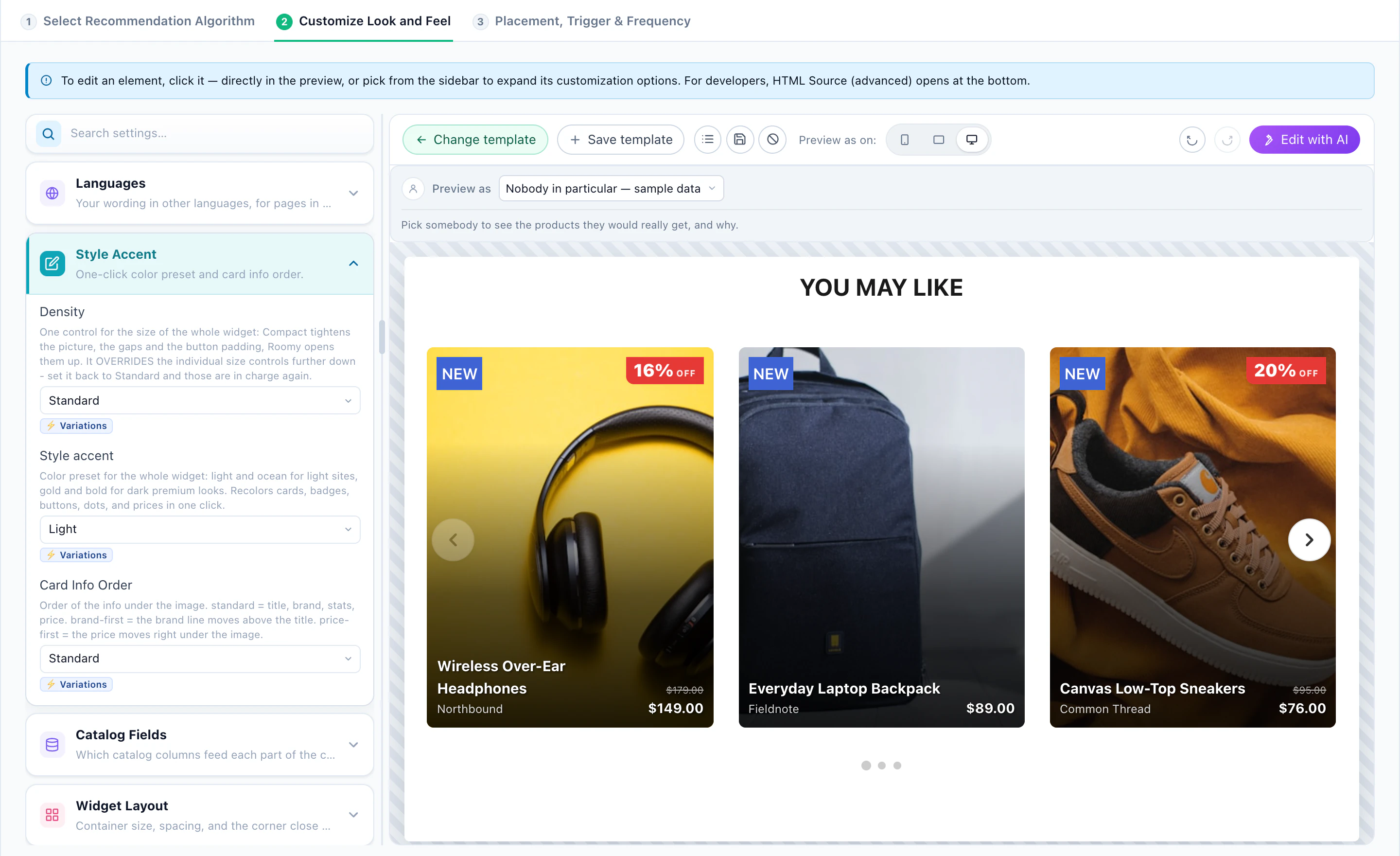
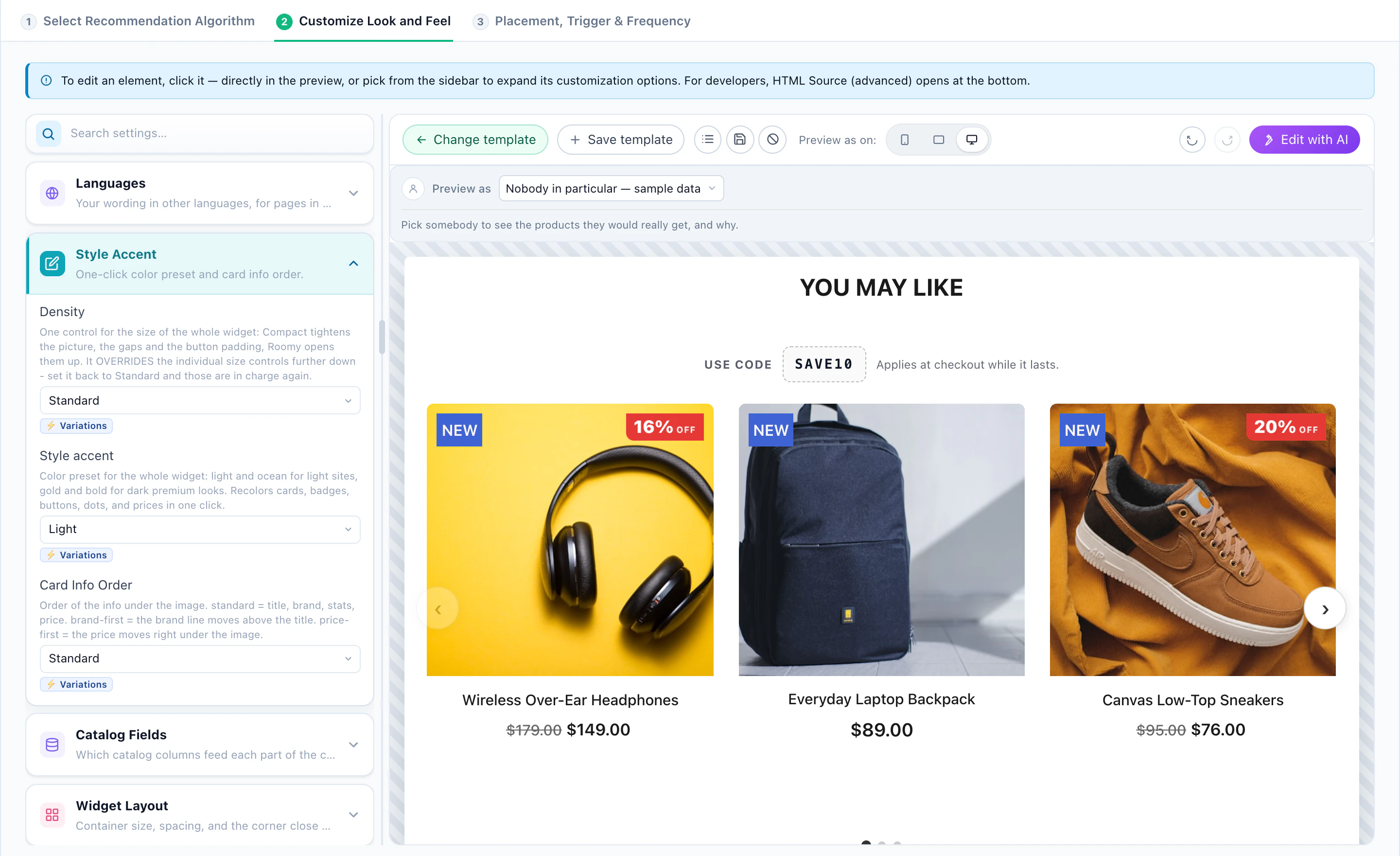
The widget’s second step is the look: a template, a style accent, the layout and how many items each device shows, the card, the title — or Edit with AI to describe the change. HTML Source (advanced) opens the template itself.
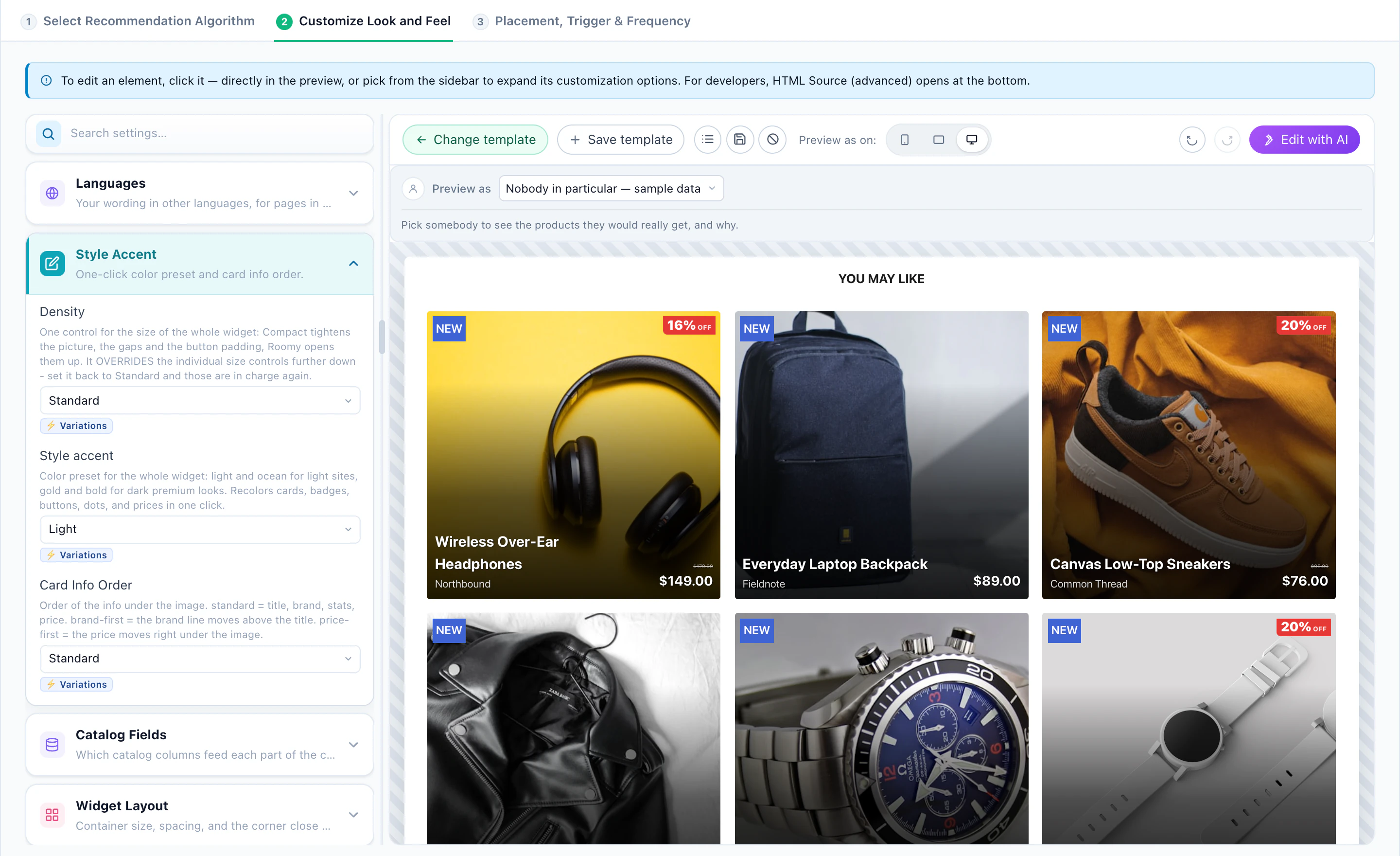
Badges
- Corner Badges — chips on the image corners: the discount or sale percent, a price drop, the stock.
- Stacked Badges — a movable stack: New, Popular, Best Seller, time-based offers, and up to three badges of your own fed by your catalog’s columns.
Preview as a real shopper
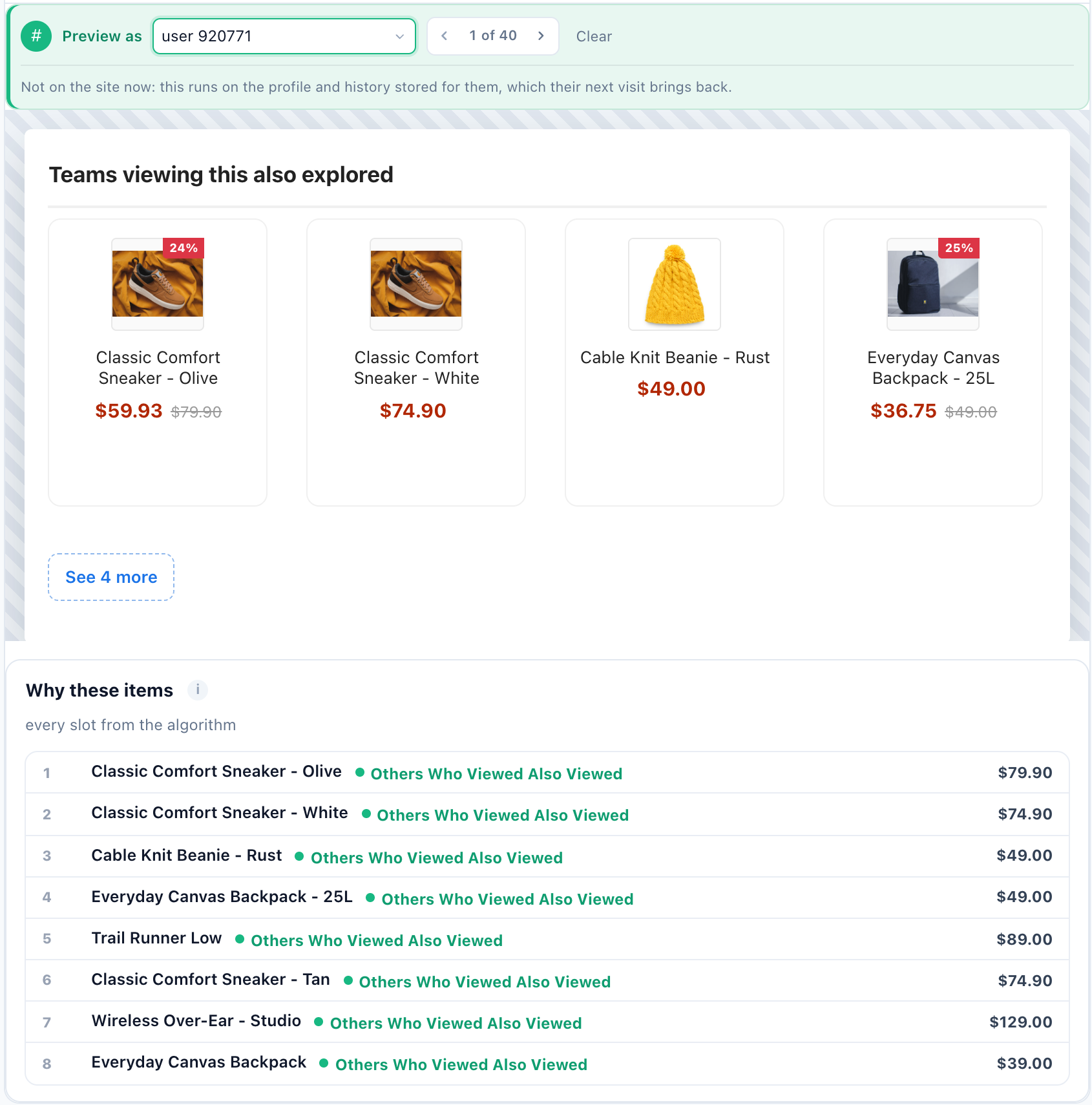
Above the preview, Preview as picks a real visitor — filtered by what they did: viewed, added to cart, purchased — and renders the products that person would get. Why these items lists every slot with the algorithm or fallback that put it there. Step through a few people with the arrows: someone with a long history, a buyer, and a newcomer, who should get the fallback, not an empty row.
Place it
The Target step decides which pages and visitors it appears for — one rule such as Pages Visited is a product page is often all a widget needs, and the AI targeting assistant writes rules from a sentence. A different widget for a different audience is a second campaign, so each can be measured on its own.
Try it on any product
The Simulator runs the algorithm on its own — for one real visitor, for one product, or for a new visitor with no history — including settings you have not saved yet. The QA step checks the campaign as a whole before launch.
The whole setup, screen by screen: product recommendations, start to finish.
4Recipe 1: The homepage
The homepage has to work for everyone — a first visit and a loyal customer — and it has no product to anchor on.
- Personalized RecommendationsPicks from the visitor’s profile and similar visitors’ behaviour. Give it Most Popular or Trending Now as the fallback for a first visit.
- Recently ViewedThe products this visitor viewed lately — a way back for a returning shopper.
- Matches Their SearchItems matching the visitor’s last search on your site.
- Trending NowProducts whose views are spiking above their weekly average.
A second row of Price Dropped or New in Stock — since this visitor’s last visit — gives a returning shopper a reason to look again.
5Recipe 2: Category pages
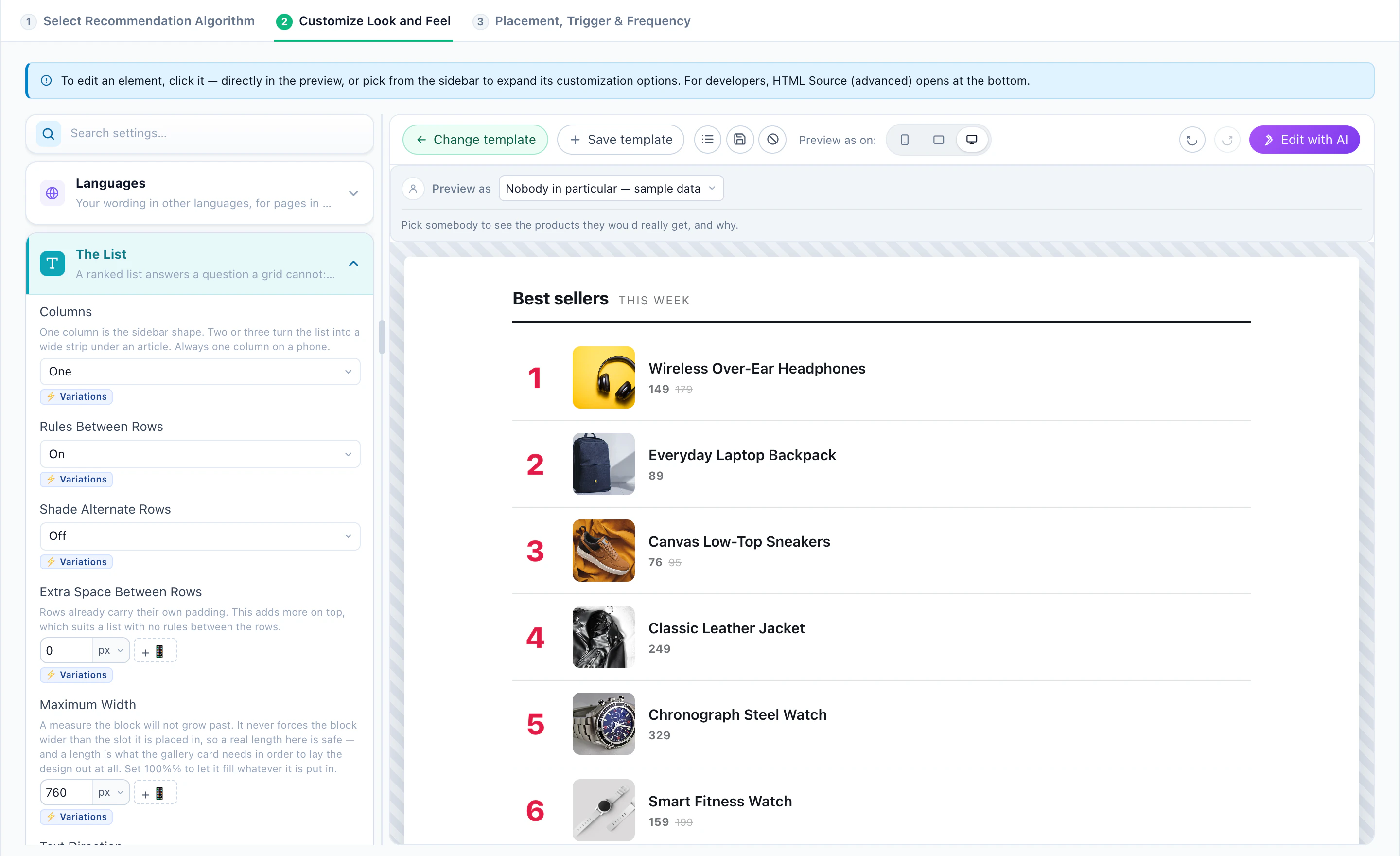
On a category page the category is the context: recommend within it.
- Best SellersThe highest purchase count — scoped to the current category on a category page.
- Most PopularThe most viewed items in the period you choose — good for what is wanted but not yet bought.
- Others Who Viewed Also ViewedOn a category page it draws from the categories the visitor viewed recently.
- Trending NowProducts whose views are spiking above their weekly average.
6Recipe 3: The product page
The product being viewed is the strongest signal on the site. Every algorithm below anchors on it.
- Others Who Viewed Also ViewedCo-viewed by other visitors — alternatives, when this one is not quite right.
- What Others Viewed Then BoughtBought by visitors who viewed the same item — a stronger signal than views alone.
- Similar Items (AI)Semantically similar items, learned from your catalog text — works from day one for a brand-new product.
- Up-SellsHigher-priced alternatives to the product being viewed.
- Recently ViewedLets a shopper compare with what they looked at before.
A co-view algorithm needs a product on the page: put that widget on product pages, and give it Similar Items (AI) as the first fallback for products nobody has viewed yet.
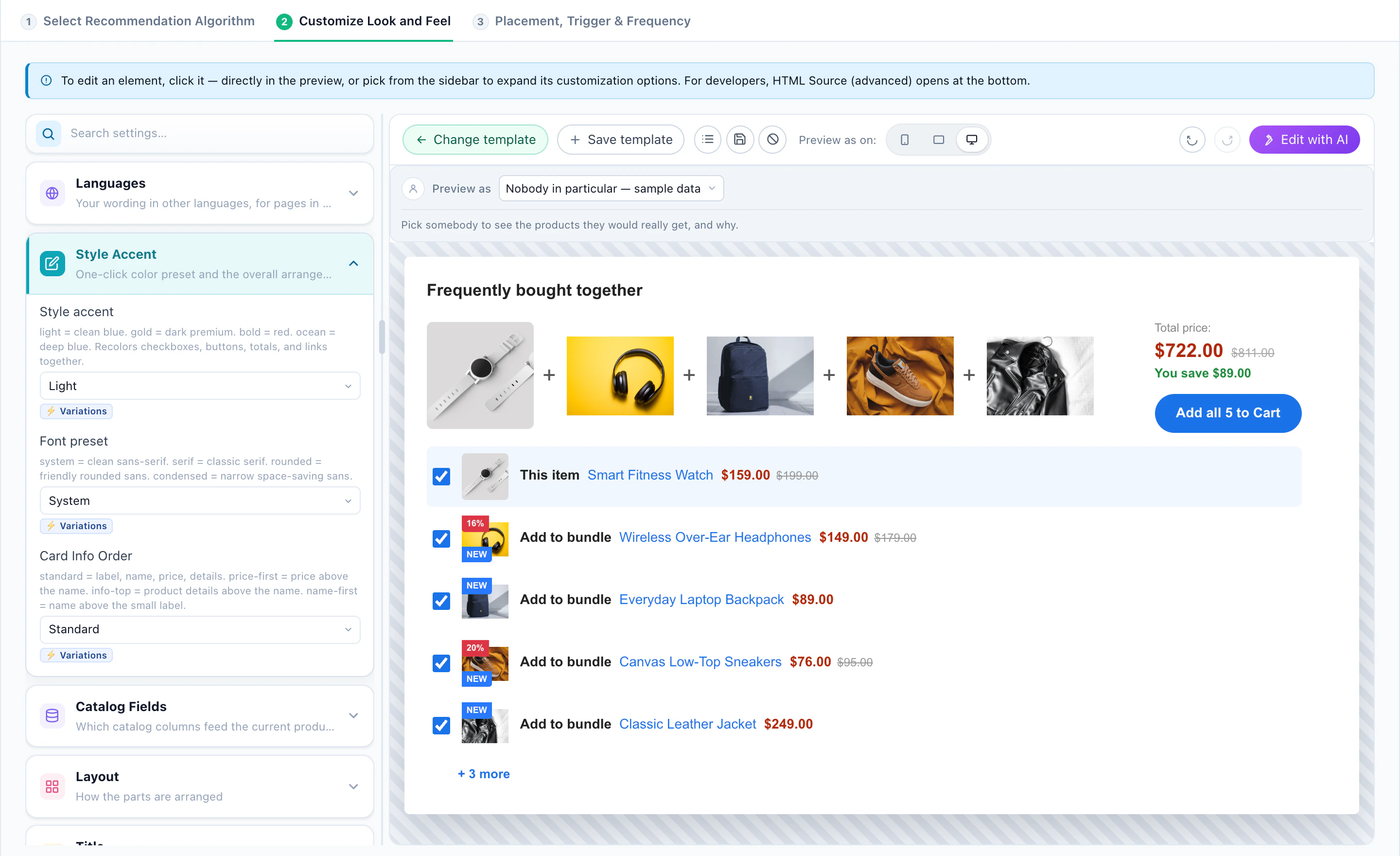
7Recipe 4: Cart & checkout
The cart says what the order already is. Recommend what completes it.
- Cross-SellsItems co-purchased with what is in the cart, learned automatically.
- Managed Cross-SellsCross-sells from a catalog you upload and maintain — for strict compatibility, like the right battery for a camera.
- Others Who Viewed Also Added to CartWhat visitors who viewed the cart’s items went on to add.
- Up-SellsHigher-priced alternatives to the cart’s items.
On the thank-you page, Items in Cart and Cross-Sells anchor on what was just bought.
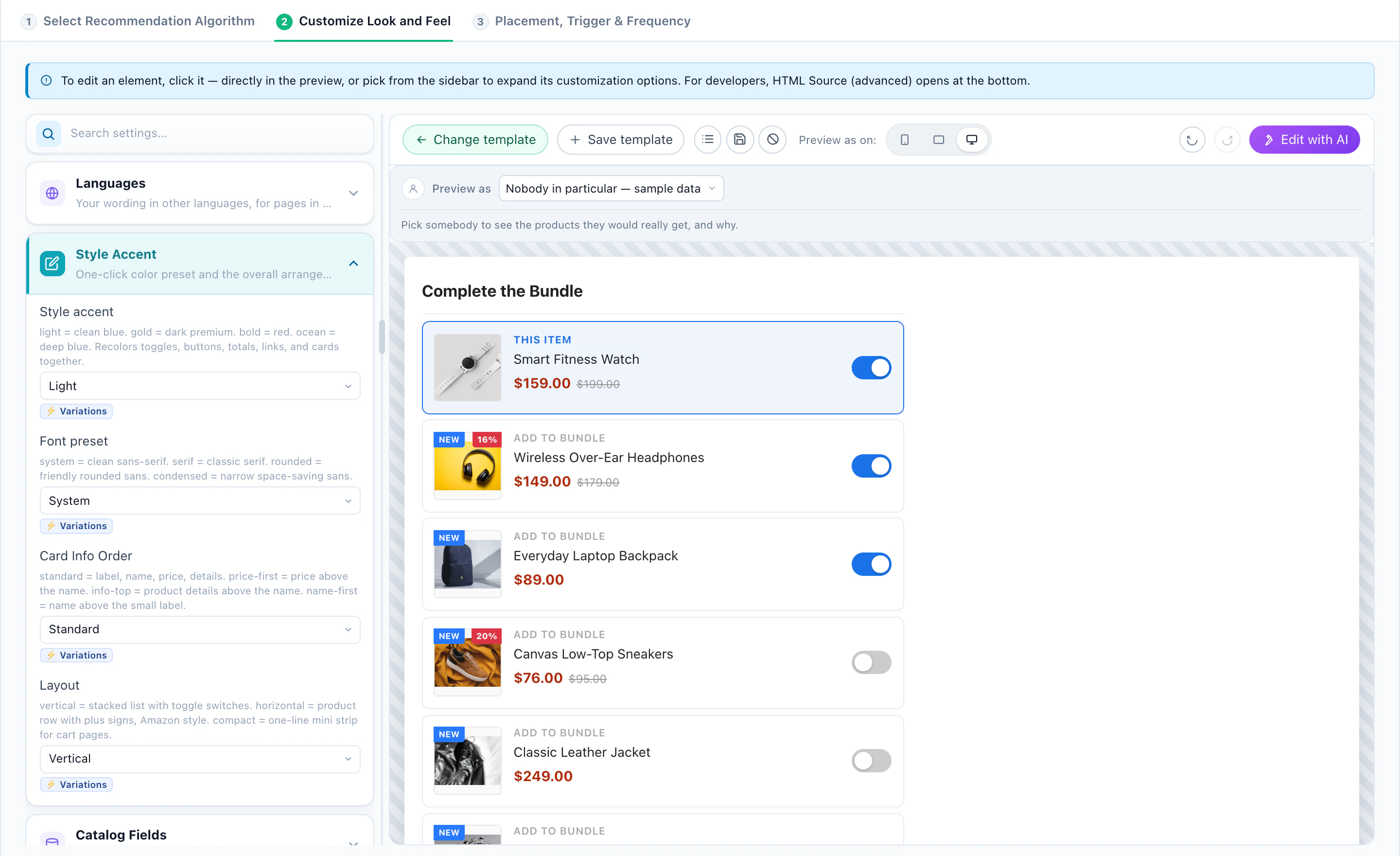
8Recipe 5: Bring them back
For a returning visitor — and for the email that brings them back — their own history is the best context.
- Buy it AgainWhat this visitor purchased before — for anything that runs out.
- Inspired by Past PurchasesWhat people who bought the same things went on to view and buy. Not the visitor’s own purchases — those are Buy it Again.
- Your WishlistItems this visitor saved.
- Price DroppedItems cheaper than at the visitor’s last visit.
- Back in StockItems that returned to stock after being sold out.
- New in StockRecently added, or new since the visitor’s last visit.
9Test it against no widget
A recommendation widget always gets clicks. The question is whether it adds orders that would not have happened anyway — and the answer needs a baseline.
How to set up the test
- In the campaign’s Content step, choose Activate A/B testing.
- Keep the widget as the first version and the Site original as the baseline — visitors who see the page unchanged.
- Split the traffic: 90/10 keeps most visitors on the widget while the baseline collects.
- To compare two algorithms or two designs, add a second version. Set a goal, and Auto-pick can move traffic to the winner by itself.
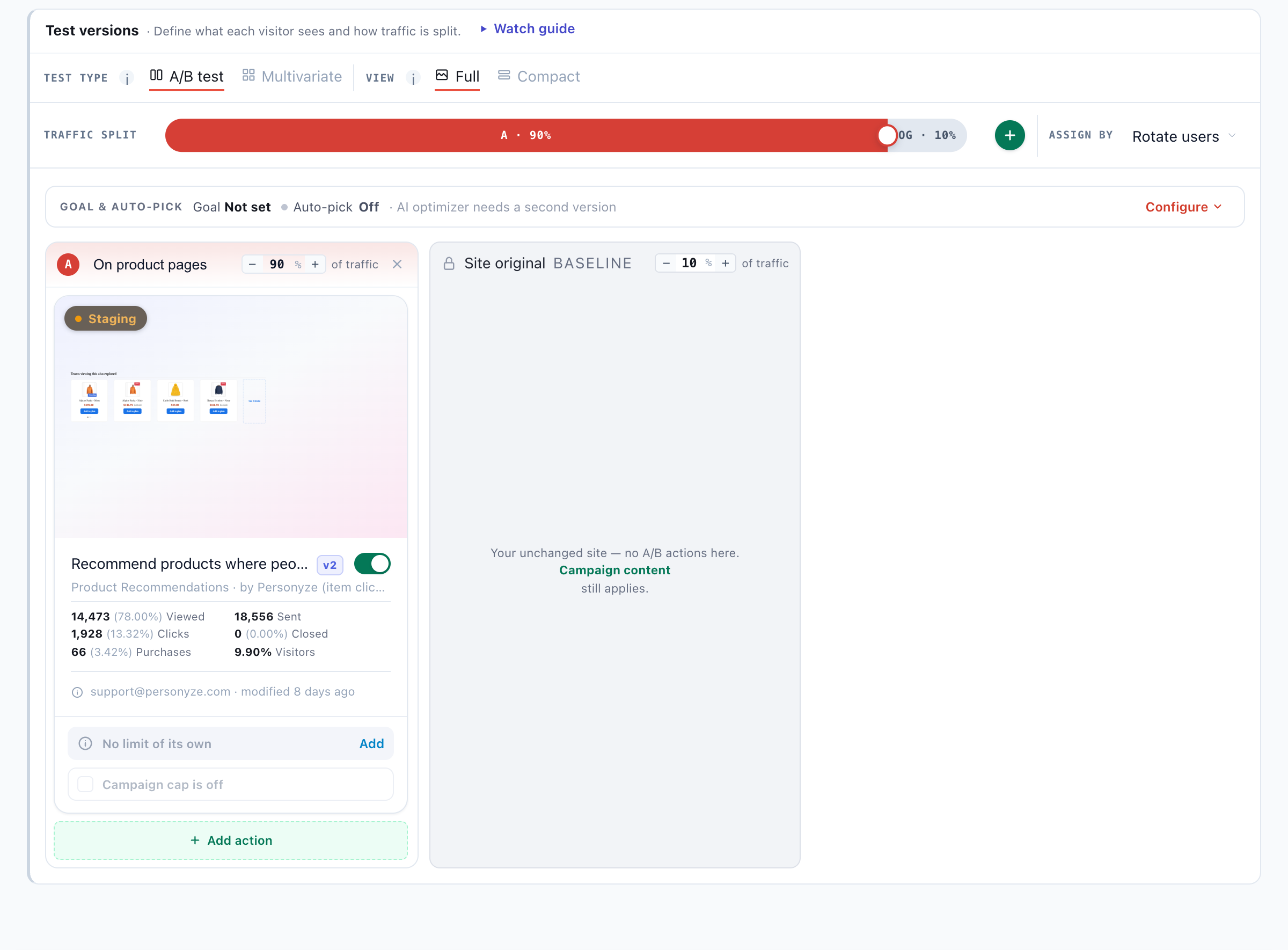
Reading the verdict, the lift and the confidence: how to read A/B test results.
10Read the results
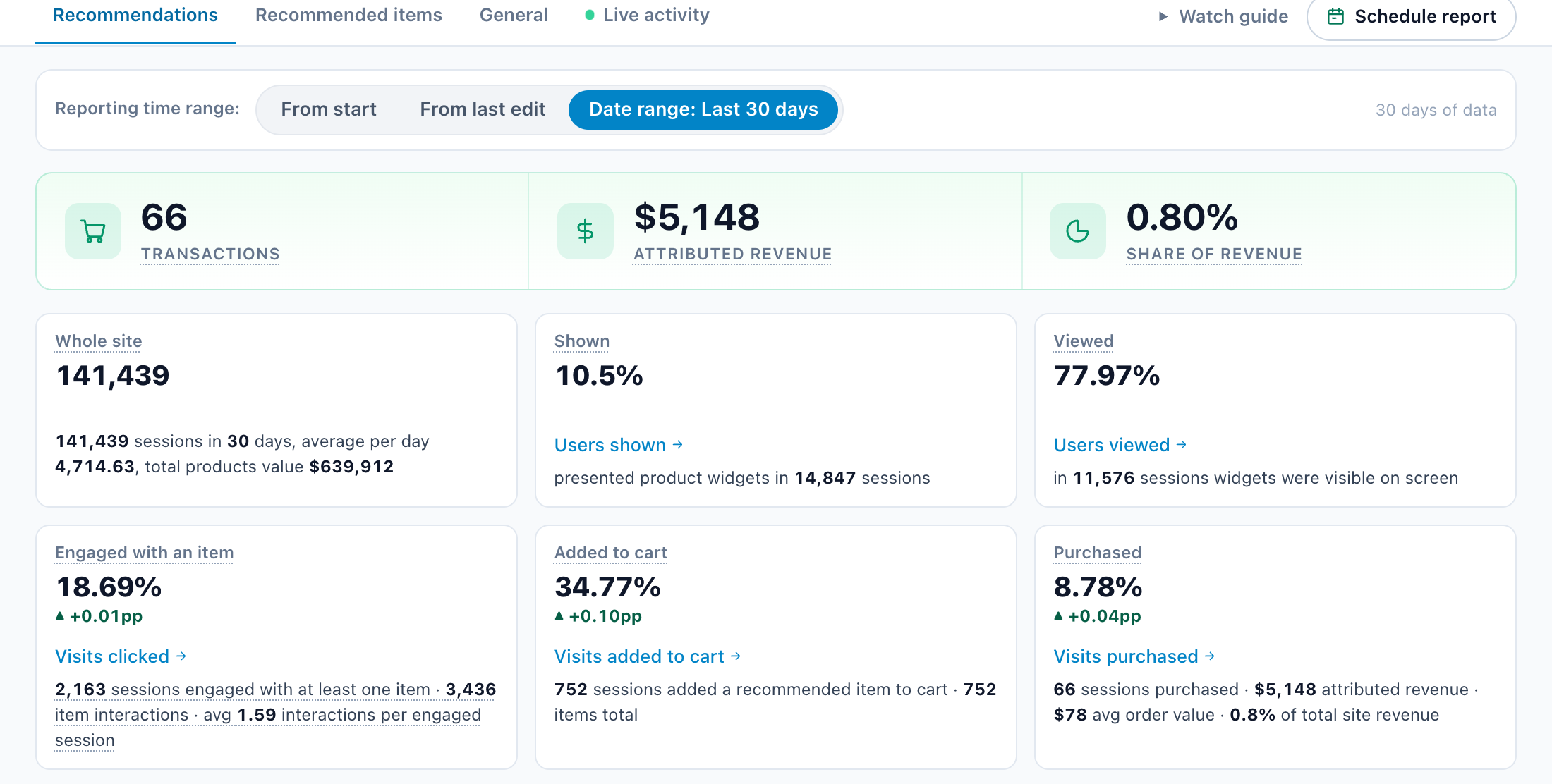
The campaign’s Performance step leads with three numbers and then the widget’s funnel.
What each number means
- Transactions and Attributed revenue — sessions in which a clicked recommendation was bought, and the revenue from them.
- Share of revenue — attributed revenue as a share of the site’s total revenue in the period.
- Shown and Viewed — sessions the widget was presented in, and those where it was actually on screen.
- Engaged with an item, Added to cart, Purchased — each step as a share of the one before: a click on a recommended item, a recommended item added to the cart, a purchase that included one.
Judge a widget on orders and revenue against the baseline, not on clicks.