





Test any change, without code

Point and click on your own page to change its words, images or layout — or ask AI to rewrite it — and make the change one version of a test.
While they’re on your site
AI Website PersonalizationContent and offers for each visitorB2B PersonalizationEach company sees its own industryProduct RecommendationsWhat each shopper wants nextContent RecommendationsThe next article each reader wantsA/B TestingA winning version for each audienceDynamic Landing PagesPages that match the ad they clickedAI Search & Chat AgentAnswers from your own pagesBanners & Pop-UpsShown by behavior, source, locationAI Promotion ManagerAI picks each shopper’s best offerSocial ProofLive ratings, stock and recent buysReach them after they leave
Email PersonalizationEmail series, picked for each readerPush & SMSTriggered by what they just didHosted Landing PagesPer-visitor pages, hosted by usKnow who they are
Behavioral TargetingAudiences that update themselvesAudience DiscoveryBuyers you didn’t know you hadWebsite AnalyticsSessions and revenue, per personWhat visitors tell you
Reviews & TestimonialsReviews from 17 sites, per visitorSurveys & NPSAsk a question; use every answerAI Chat AgentAnswers, then hands over to peopleMeeting SchedulerThe right visitors book a callAI tools and your stack
Personalization PlatformEvery tool on one visitor profileAI AgentDescribe a campaign; it drafts itIntegrationsHubSpot, Salesforce, Segment, GTMApp MarketplaceBuilt-in and reviewed partner appsAPIs, SDKs & AutomationREST API, server and mobile SDKsMCP ServerRun Personyze from your AI assistantRun head-to-head tests on copy, design, layout and timing. Pick a winner at significance, or let the AI re-balance the split every night — and read every result per audience, so you know who each version won for.
Test one element or every combination at once. Build whole landing pages and test them on your own domain. Then read the result in reporting that tells you what won, by how much, how sure, and for whom.
Not sure what to test? See A/B test ideas for your site 4.8
4.8
 4.6
4.6
Hero copy, pricing pages, email subject lines, full personalization rules — run real tests on real traffic and let the data decide. On your site, in offers and recommendations, in email and push, in your app and on your server.
Test headlines, hero images, value props, and CTA copy on landing pages. Run multivariate combinations or simple A/B splits with built-in significance scoring.
Test pricing display, plan structure, payment flows, and trust signals. Segment by visitor type — new vs. returning, geo, source — so you don’t blow up returning revenue.
A/B test personalized vs. generic experiences on the same audience. Compare two personalization strategies head-to-head. Roll out with confidence, not faith.
Put several promotions in one widget. The AI picks each visitor’s promotion from the ones allowed for them, and learns live which one earns.
Hold back a share of visitors — up to half — who see no promotion from that widget, and see what the offers really add.
One recommendation widget against another — bought together against similar items, trending against personalized.
A pop-up against a banner, two lead forms, a countdown against none — each one a version, built from a template.
Test subject lines, sender names, hero blocks, and CTA copy. Open-time rendering means winning content stays fresh even after send.
Two versions of an email or a web push, split by recipient — each person always gets the same one. The products inside can be picked when the email is opened.
Native SDKs for iOS and Android ask for the visitor’s version over the same API as the website: the same campaigns, the same audiences and the same reporting, delivered in your app.
The SDKs report what the visitor did in the app back to Personyze, for the same visitor, so it counts in the test.
Your server asks which version a visitor gets and receives it as JSON — an id to branch on: a price, a ranking, an API response or a whole page. No browser script, and nothing swaps on the page.
Create and change audiences and their members, goals, visitor profiles and catalogs from your own code, and read each test’s verdict back: who is winning, by how much and how sure.
A test should only end when the result is real.
A new headline gets more clicks, a discount gets more orders — and the month still ends flat. Only a control group shows the lift a change really caused, not the season, a sale or a change in who visited. Personalization without a control is guesswork.
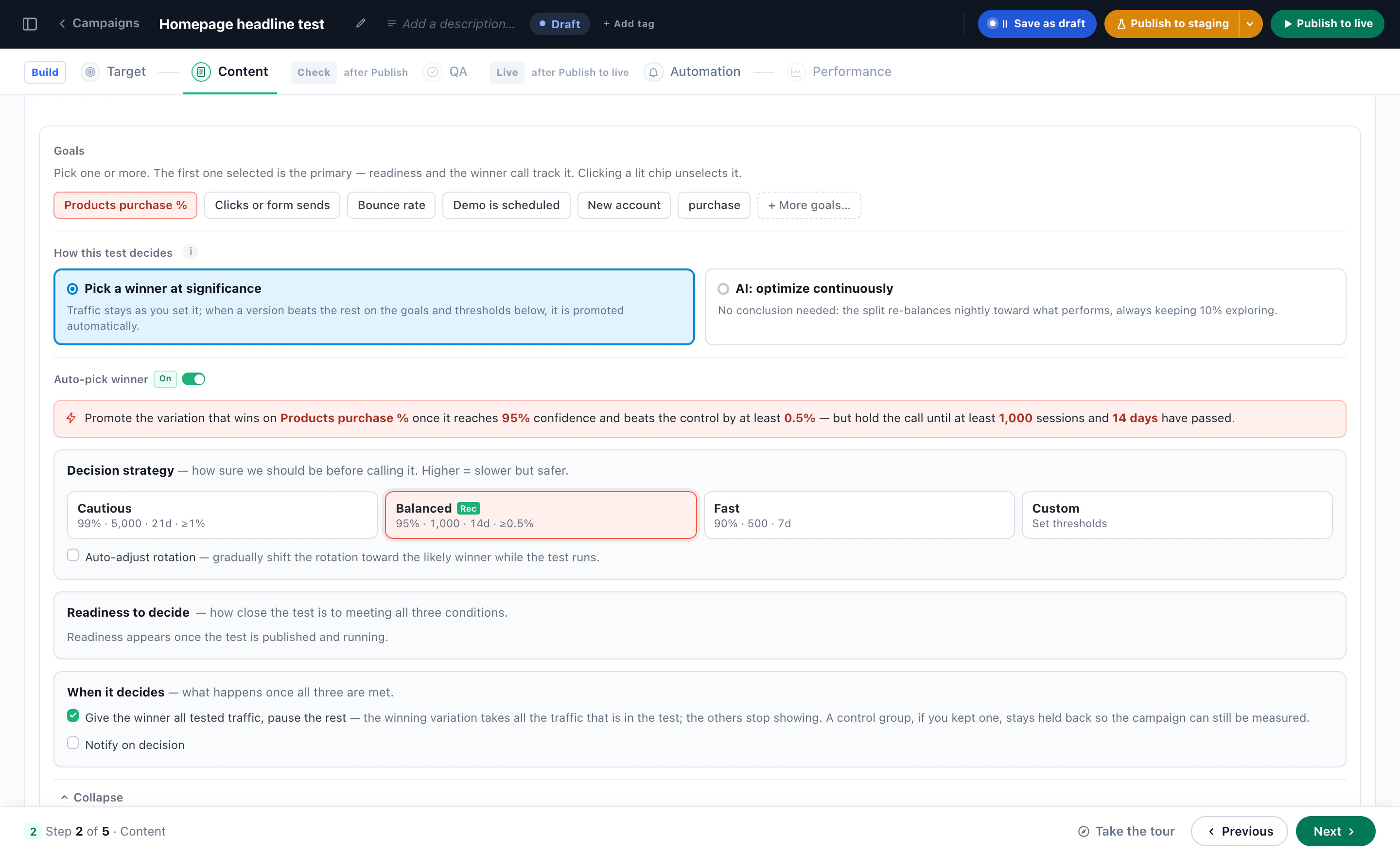
Personyze sets the bar before the first visitor arrives, and calls a winner only when a version clears it: tests ship demanding 98% confidence and a floor of 1,000 sessions. Turn on auto-pick and choose Cautious, Balanced or Fast — or set your own confidence, sample and minimum runtime — so a good Tuesday cannot win on Tuesday.
The statistics are done for you — you only choose what they measure. Point the test at any of your twelve goal events, or at purchases per session, order value, clicks, bounce rate, pages per visit or time on site. A test that optimises for clicks and a test that optimises for revenue do not always agree — so you say which one you meant.
Set the smallest improvement you would actually act on, per goal. A variant that is ahead by a statistically real but commercially pointless margin does not get promoted, and does not get to waste a quarter of your traffic proving it again.
When the variant clears the confidence bar, the session floor, the runtime and your improvement rule, traffic moves to it — all of it, or the share you nominate, or none at all if you would rather keep the split and be emailed instead.
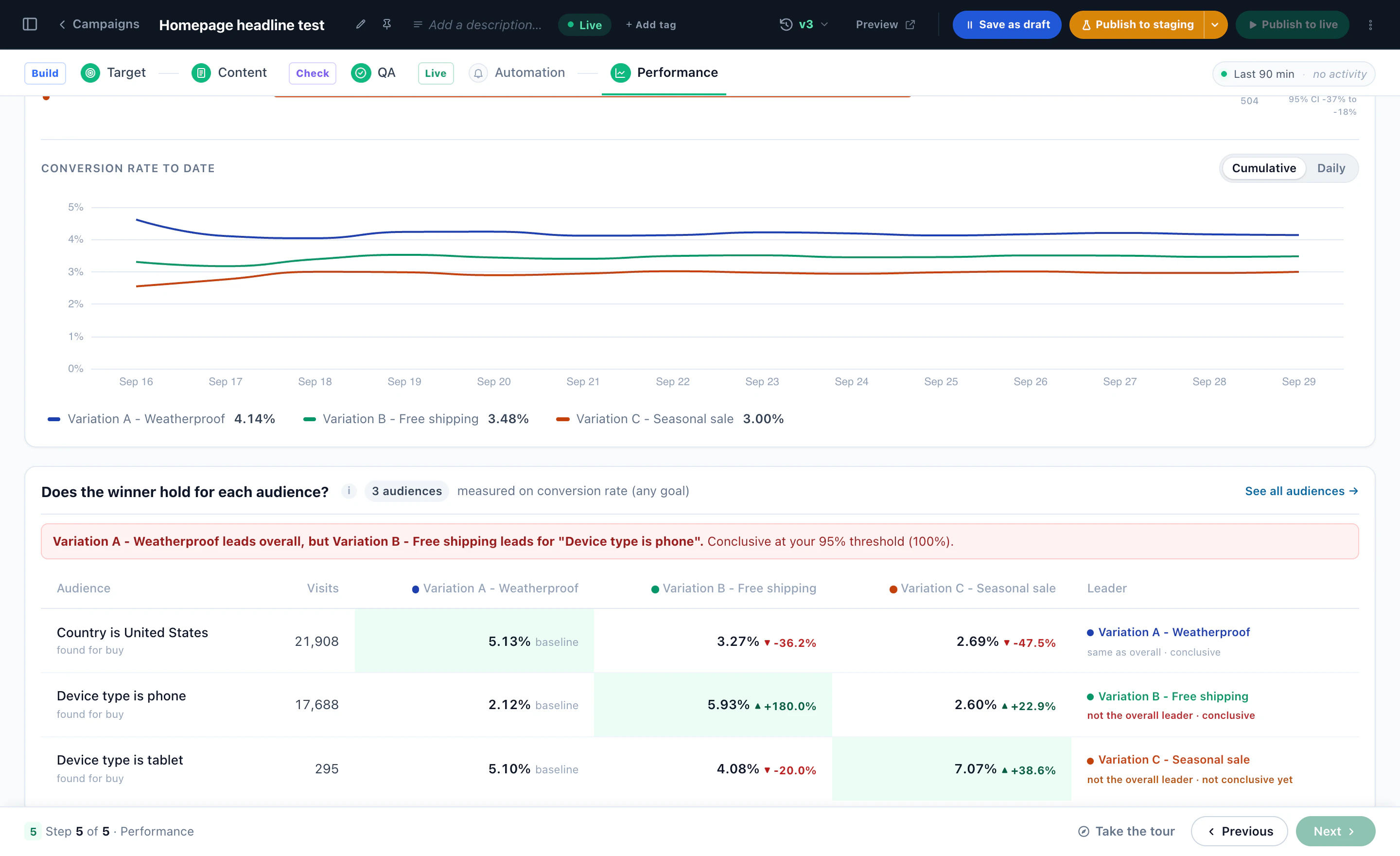
A test is read audience by audience, too. When version A wins on mobile while B wins overall, each audience can get its own winner — apply it with one click, or let Personyze apply it automatically. A holdout can keep running, so the result keeps being checked, and you can undo the change.
The audiences can be the ones Audience Discovery finds in your data, or any audience you build.
Variants are groups with a traffic percentage each. Give two variants 45% apiece and the remaining 10% see nothing at all — that is your control, and it keeps running for as long as the test does, so the lift you report is the lift you caused.
Before you launch, the editor shows you which other campaigns are aiming at overlapping audiences on overlapping pages. Two pop-ups arriving together is not a result, it is a collision — and you find out while you are still editing rather than from the numbers a fortnight later.
Some content is never finished — the hero banner, the seasonal offer, the block that runs all year. There is no winner worth calling, because the winner changes.
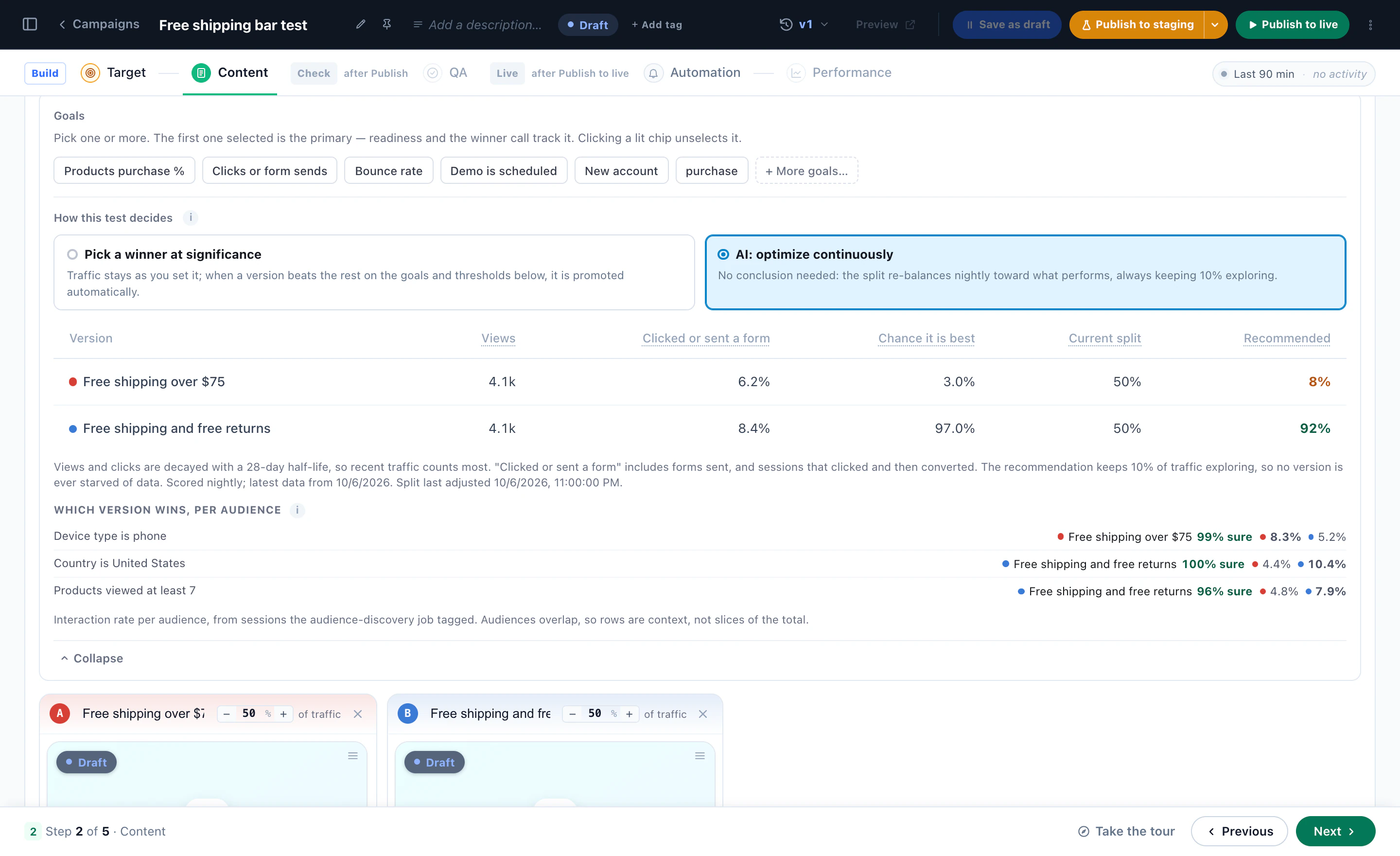
Switch the same test to AI: optimize continuously and it stops being an experiment. Every night the split shifts toward the version performing now, weighting recent traffic, moving only with statistical confidence, and always keeping 10% exploring so no version is starved of data. Nothing to declare, nothing to come back for.
How the nightly pass works, step by step →
A change made for one audience shouldn’t be judged by everyone. Pinpoint who the test is for, and the result is about them.
Audience Discovery shows the groups that convert far less often than average — or pick the audience the change is for.
Run the test on that audience alone, so visitors the change was never for don’t dilute the data.
A lift that lives in one audience isn’t averaged away across the whole site, so it can reach a clear result sooner.
The editor and widgets you build versions with, AI Promotions and Audience Discovery, the reports you read a test by — and the tools a test connects to.
Point and click on your own page to change its words, images or layout — or ask AI to rewrite it — and make the change one version of a test.
Pop-ups and banners, product and content recommendations, lead forms, Canvas designs and promotions — each can be a version of a test.
The AI picks each visitor’s promotion and learns live which one earns. Hold back a share of visitors, and the report shows the purchase lift over them.
Groups in your own data that buy or convert far more often than average — and the ones that almost never do. Target one, or test a version made for it.
Each version’s lift on every goal, with how sure it is and its 95% interval, and the rate over time — overall and for each discovered audience.
One snippet installs on Shopify, WordPress, Magento or a custom stack. From there Personyze reads the audience data you already collect, so a test can be split on who someone actually is.
And it writes the result back to the tools you already trust. Every test can fire its own event to the tools you already run — twelve destinations on one action, five from the visitor’s browser and seven from Personyze’s own servers.
Personyze tags each Microsoft Clarity, Hotjar or FullStory recording with the campaign and A/B group the visitor saw — filter to one version and watch how people scrolled, paused and clicked.
Versions you build without code, the split and how the test decides — or AI that optimizes continuously — then the verdict, every audience and every combination. Real screens from the panel.

Two versions and the Original in one test. Edit a live page directly — change copy, swap images, redesign CTAs — or ask AI to rewrite it.
Pick a template, create its picture with AI from your own products, add your words — then restyle it with one sentence and fine-tune any part by hand.
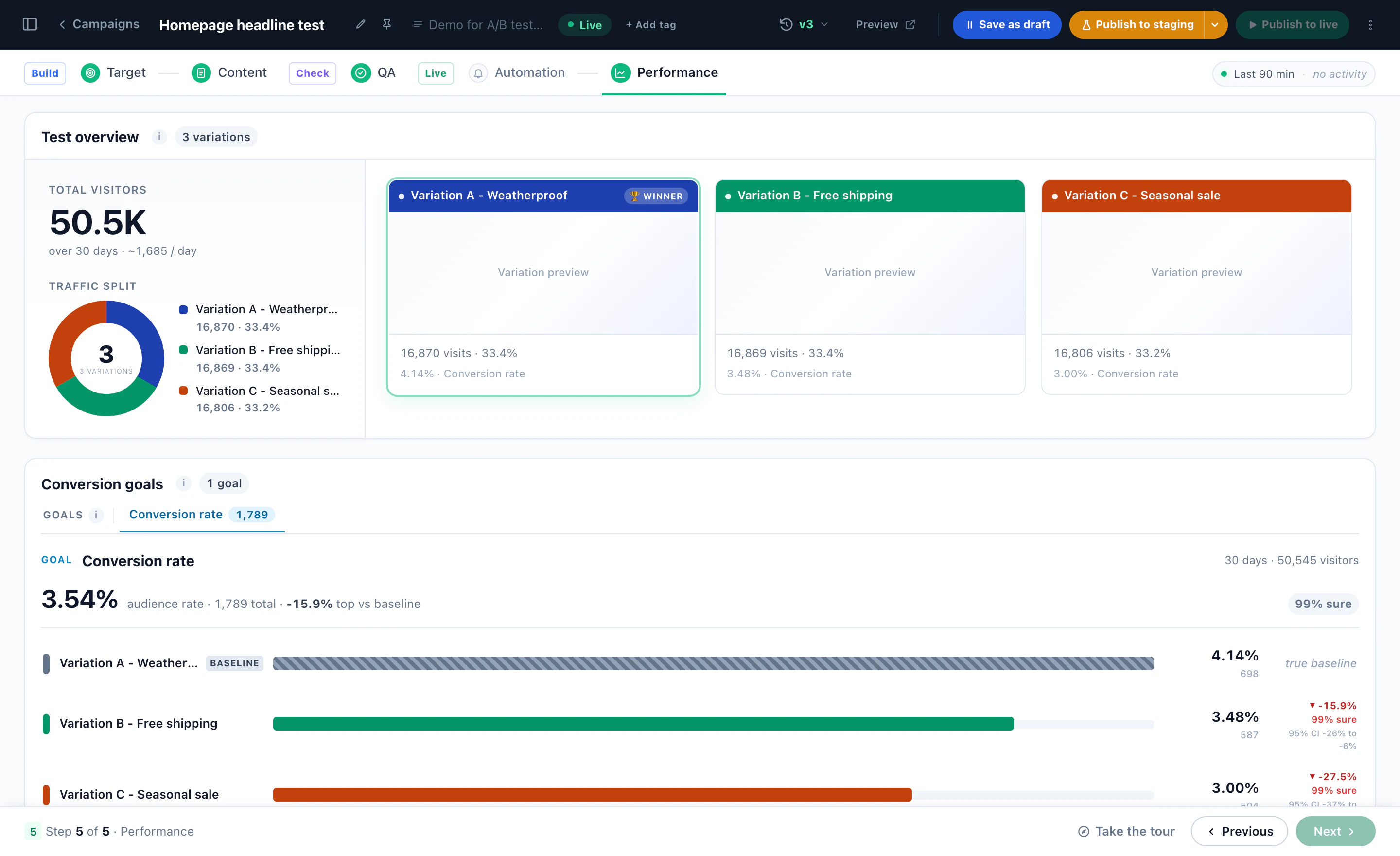
Pick the goal and how sure to be. Auto-pick says it in one sentence: promote the version that wins on purchases at 95% confidence, after 1,000 sessions and 14 days.
No conclusion needed: each night the split moves toward what performs — here 8% and 92% — always keeping 10% exploring, with which version wins for each discovered audience.
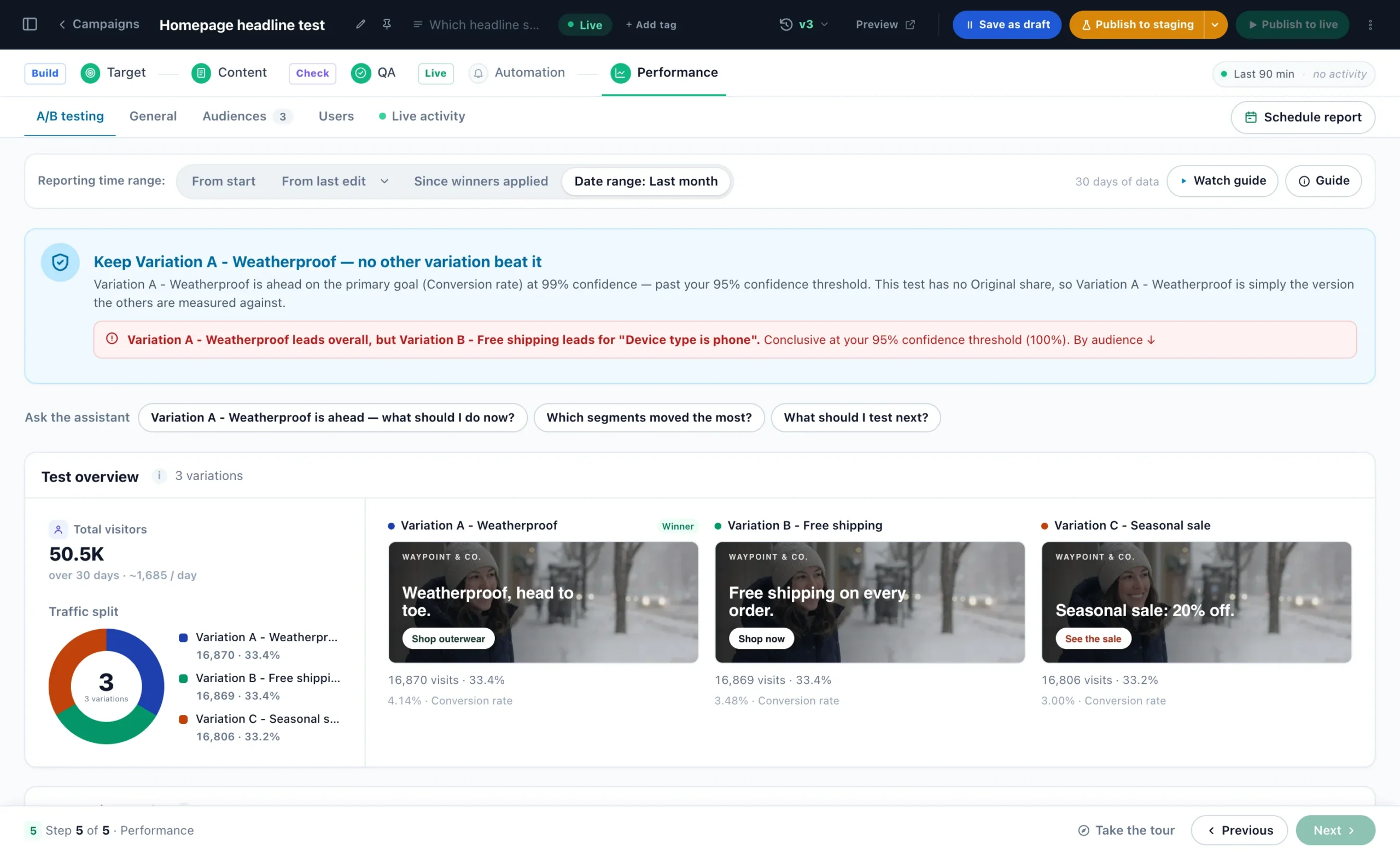
“Keep Variation A” — with the catch: another version leads on phones. Ask the assistant why, and what to test next.
Per-variant lift with confidence intervals, beside each version’s visits and conversion rate — so you can show exactly why a variant won, and defend the call.
The conversion rate over time, then each audience: here the free-shipping version wins on phones by +180%.
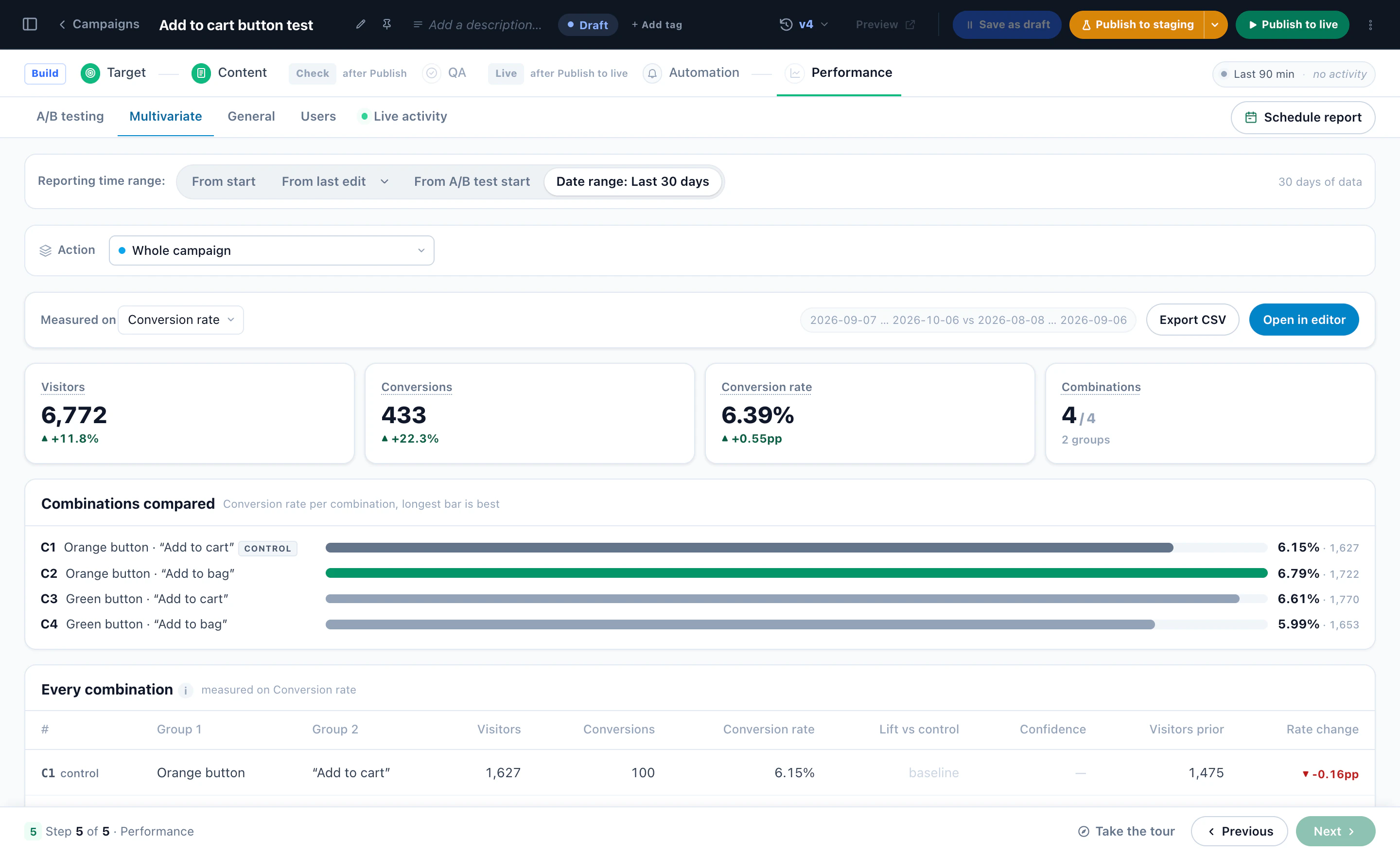
A/B for one decision, multivariate when several things change at once, and a holdout that keeps part of your traffic on the untouched site. Here, button colour times button text: four combinations, each with its lift and confidence. The multivariate report also shows the effect of each element on its own, not only which combination won.
Who takes part, two offers and the Original, how the winner is picked — then the store, where each visitor keeps one version for as long as the test runs.
Versions, the split, the goal and auto-pick on a B2B site — narrated, in the real panel.
The verdict, each goal with its confidence, and what to do next.
One audience’s winner applied to that audience, while everyone else keeps the overall winner.
Free AI tool · Inspire me
Not sure what to test first? Give Inspire me your address. It reads your pages the way a first-time visitor sees them and writes the A/B tests worth running: what to change, for whom, and how to measure it.
Like an idea? Describe it to our AI personalization agent and it builds the campaign for you.
1What kind of ideas?
2Your website
Free · nothing to install · it reads your public pages
Reading yourstore.com
As a new visitor would see it · about 4 minutes
Waypoint & Co. Done
Only: A/B tests · your plan
1‘You might also like’: picks from what they viewed
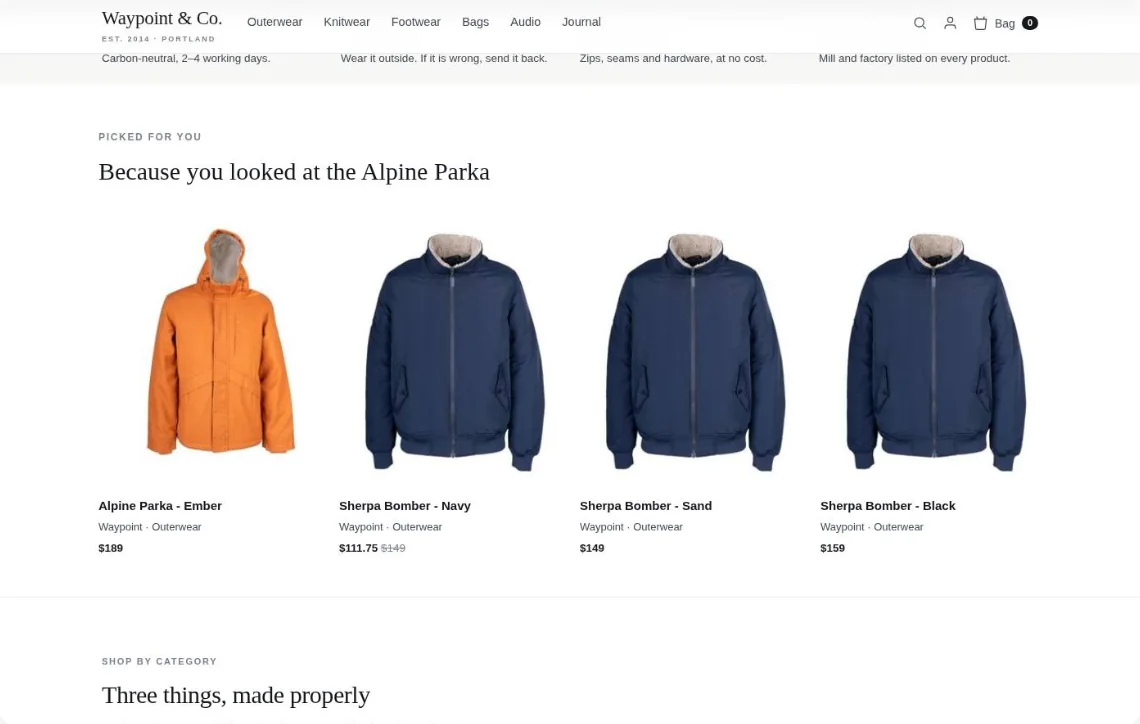
Both versions drawn on your own page — half your visitors see A, half see B.
Every test is also read audience by audience — the audiences Personyze discovered in your own data. The verdict says when they disagree, the report shows where, and the picks say what to do about it. Three ways it can go:
The leader is below your confidence threshold on the primary goal. Let the test gather more data.
Group A leads overall, but Control group leads for “Country is not US and lead source is Paid: Google Ads”. Conclusive at your 98% confidence threshold (99%).
They respond 46% below the campaign inside Group A. Exclude the audience from the variant, or keep the control for them.
Above your threshold with 1,000+ sessions and the minimum runtime met. Auto-promote is armed.
The overall leader holds in every audience with enough traffic. No audience disagrees.
They respond 61% above the campaign but make up half their share of all visitors (reach index 0.5). Target them next.
Responds far above and already reached (index 1.4). Nothing to change.
Group A leads by six percent at 67% confidence. Not a winner yet.
Group A leads overall, not conclusively — but leads for “Mobile · first visit from social” conclusively. 99% inside that audience.
Responds 142% above the campaign inside Group A, reach index 1.3. Target the variant to this audience and stop waiting for the site-wide verdict.
A person’s group is not a fresh coin toss in every campaign. It comes from their Personyze visitor id — so it can follow them across devices, across campaigns and back to the same test group months later.
With Merge visitors to known users on, a visitor recognised by their email or customer id on another device joins the profile you already have — and takes its id, so their test group follows them from then on.
Choose Visitor (fixed id) with the same split, and a visitor lands in the same group in every campaign that uses it — a standing control group across campaigns. Not with the AI optimizer, which moves the shares every night.
The group comes from the visitor id and the split alone — no date, no campaign — so a test you run again next season reaches the same people in the same groups, as long as the split stays the same. Email and web push keep their own split, by recipient.

SAVE10The questions that come up before signing on. Send anything else our way and we’ll answer fast.
Visitors are split between versions on the traffic you set — 50/50 for a classic A/B, even slices for an A/B/n test, or 45/45 with 10% held out on the untouched site to measure the lift you actually caused. By default a visitor keeps the same version on every visit.
Then the test decides one of two ways. Pick a winner at significance: traffic stays as you set it, and when a version beats the rest on your goals at the confidence, session floor, runtime and minimum improvement you chose, it is promoted and the test concludes. AI: optimize continuously: there is no conclusion — every night the split shifts toward the version performing now, weighting recent traffic, moving only with statistical confidence, and always keeping 10% exploring. Either way the result is also read per discovered audience, so you see who each version won for.
Pick a winner when you need an answer you will act on once: a redesign, a pricing layout, a checkout change. It runs a fair fixed split until one version proves itself, tells you the lift and how sure it is, and stops. You can defend that call.
Optimize continuously when the content is always-on and the right answer drifts: hero banners, offers, seasonal blocks, anything you would otherwise re-test every quarter. It never asks you to come back and declare anything; it keeps the split where the recent data says it should be, and keeps 10% exploring so it notices when that changes. Switch between them on the campaign at any time; the choice applies when you save. The long version, with the nightly pass step by step.
Each night the optimizer re-runs the test thousands of times in simulation from the data it has, and counts how often each version comes out on top. That share is its chance of being the true best; near-even numbers mean the data cannot tell the versions apart yet, and then the split stays put. The recommended split follows that chance, with 10% of traffic always divided evenly among the versions — so a losing version keeps earning the data that could redeem it, and a version that was best two months ago can still lose today. Views and clicks are decayed with a 28-day half-life, so recent traffic counts most.
You choose per test. Rotate users, the default: a visitor keeps the same version on every visit, right for funnels and anything measured over days. Visits: the same visitor can get a different version on each visit, for banner and headline tests where the impression is what is measured. Random: every page view picks afresh. No rotation turns the split off, so the groups are layers of content that all apply rather than competing versions.
Yes, once the results are in. While the test runs, one split serves everyone, and every test is scored inside each discovered audience separately — the rate per version, the leader there and how sure it is. Then each audience can get the version that won it: apply the winners to their audiences with one click, or let Personyze apply them automatically. Each winning version is shown only to the audiences it won; where the control group won, those visitors keep the original, and a version that won no audience is switched off. A holdout can keep running, so the result keeps being checked. The campaign is saved as a new version, and you can undo it as long as the campaign is not edited again. The audiences can be the ones Audience Discovery finds in your data, or any audience you build.
No. Personyze is built to be no-code: the visual editor lets you change copy, swap images, redesign CTAs, or replace whole sections by clicking on them on the live page. Popups, banners, and forms are built from a 20+ widget template library — no engineering team required.
For the rare cases where you want bespoke logic (custom JavaScript, server-rendered variants, integrations with proprietary data) there\'s a JS action you can drop in and a REST API for server-side variant assignment. Most teams never need either.
Personyze A/B testing is fully platform-agnostic. It works on Shopify, Magento, BigCommerce, WooCommerce, Salesforce Commerce, WordPress, Webflow, custom React or Vue apps, Next.js, headless setups, and plain HTML sites. Integration is a single JavaScript snippet.
For server-side variants there’s a REST API. For email A/B tests, Personyze injects content at email-open time. And for data, Personyze plugs into your existing martech: Google Analytics 4, Mixpanel, Segment, HubSpot, Salesforce, Marketo, ActiveCampaign, and any tool with a REST API or webhooks.
A/B testing, AB testing and split testing are used interchangeably — all three describe splitting traffic between two or more variants and measuring which performs better. “A/B testing” is the more common phrasing for landing-page and CRO experiments; “split testing” is sometimes used to specifically describe URL-based tests where each variant lives on a different page.
Personyze handles both: same-page A/B variants via the visual editor, and full-page split tests where you redirect a percentage of traffic to a different URL. Multivariate (A/B/n) and holdout tests are also supported in the same UI — no separate tool required.
From a fresh account, most teams launch their first campaign in under 15 minutes: pick a template, choose a trigger, define the audience, hit publish. No code, no developer queue.
For more complex setups (custom CRM data, ABM IP lookups, multi-step flows) plan on a few hours or schedule a free implementation session with our success team.
No. The Personyze script is under 30KB gzipped, loaded asynchronously, and decisions are made in under 50ms. We don’t block render. Customers consistently report no measurable impact on Core Web Vitals after deploying.
Yes — every popup, bar and banner is built from standard HTML/CSS, so you can use the visual editor, or drop in your own custom HTML and inherit your site’s CSS. Though you rarely need to: Personyze offers to apply your brand to any template it shows you — your colours, your fonts and your language — so a design starts on-brand instead of being restyled into it.
Yes — native integrations for HubSpot, Salesforce, Mailchimp, Klaviyo, ActiveCampaign, and Marketo. Captures from popup forms can be auto-pushed to your CRM as new leads, with custom field mapping. Webhooks let you connect anything else.
Yes — testing is built into every capability rather than bolted on. Test recommendation algorithms against each other, pit popup offers and triggers head-to-head, and prove which landing page variants win for each audience.
Yes, and the report is built to say so. Every test is also read per discovered audience: the rate per arm inside the audience, the leader there, and the confidence of a disagreement with the overall leader, measured against the arm it disagrees with. A one-line verdict at the top of the results names the biggest audience that disagrees; the A/B tests by audience report lists every audience with enough traffic, with a conclusive-only filter. Membership is as of the pass that tagged the sessions, which the panel says in its tooltip.
Launch your first A/B test in 15 minutes. Real significance, real guardrails, no statistician on staff required.