
Personyze
Website & app
Website PersonalizationContent, offers and layout shaped to each visitor — one profile across every page and every session.Recommendation EngineWhat each visitor wants next, ranked by the algorithm you pick or one you write.A/B TestingA winner per audience, promoted mid-campaign rather than after it.Dynamic Landing PagesThe whole page recomposed per visitor — headline, imagery and offer from the ad they clicked and their own interests. On pages you already run.AI Search & Chat AgentAnswers from your own pages and catalogue, and a search box that replies in a sentence.Banners & Pop-UpsYou decide who sees each banner or pop-up — by behavior, source, location or CRM field — and when it appears.AI Promotion ManagerYou list the offers; the AI picks the one each visitor sees and keeps learning from what converts.Social ProofLive scarcity, ratings and what other people just did.
Email, push & SMS
Email PersonalizationContent and recommendations picked per reader at open time — sent from Personyze or pasted as one block into your ESP.Push, SMS & WhatsAppFired by what they just did rather than by a schedule.Hosted Landing PagesThe same per-visitor page, served by us — your domain or ours, no site to deploy to.
Targeting & analytics
Behavioral TargetingSegments that update themselves from what people actually do.Audience DiscoveryPlain-language audiences found in your own data — visitors who convert several times more often than average, targetable in a click.ABM MarketingThe company behind an anonymous visit, joined to your CRM.Website AnalyticsSessions, bounce and revenue — then click a row and there is a person.
Platform & integrations
MCP ServerRun your account from Claude, ChatGPT or any MCP client.IntegrationsHubSpot, Salesforce, Twilio Segment, Tealium, GTM and the REST API.App MarketplaceThe integrations built in to every plan, and apps from other companies that Personyze reviews before listing.APIs, SDKs & AutomationOne REST endpoint over every object, server and mobile SDKs, rules and reports that run on their own.
Reviews, surveys & chat
Reviews & TestimonialsReviews from 17 platforms and your own site, matched to each visitor.Surveys & NPSOne question or a whole survey — every answer ready to target.AI Chat AgentAnswers visitors’ questions from your own pages, and hands over to a person.Meeting SchedulerThe right visitors book time with your team, on your own page.
PricingVideosProduct TourShort narrated videos of the real platform, one feature at a time.
← All articles
PersonalizationSeptember 28, 2026

On-Site Surveys That Change the Next Page
P
Personyze TeamPersonalization experts
On-Site Surveys That Change the Next Page

A survey tool usually ends at a report. You learn that a lot of the people who left the cart mentioned price, you nod, and the cart keeps looking exactly the same to the next person who hesitates over the total.

The Survey action in Personyze asks on your own pages and saves each answer on the visitor’s profile. That one detail is the difference: the answer is a targeting rule the moment it is given.

Watch it done · 2:09 — Building a survey that answers back: logic, offers, sharing and results. See it with the rest of the tutorials →

From one answer to a different next page

They are asked

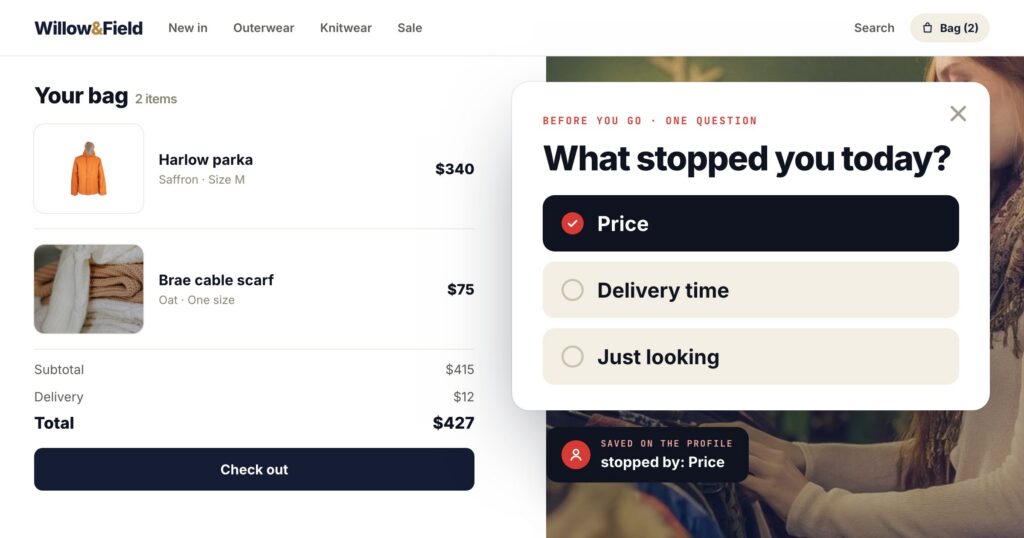
An exit survey on the cart: “What stopped you today?”

PriceDelivery timeJust looking

The answer is saved

On their profile, as “stopped by: Price” — like any other attribute you target on.

The next visit changes

A campaign for “chose Price” shows the free-delivery threshold or the payment-in-three option on their return.

The same pattern works everywhere a question has an obvious next step: a post-purchase survey that asks what they will use the product for and adjusts the recommendations; a reader survey that asks which topics they want and reorders the home page; a B2B survey that asks team size and shows the plan that fits.
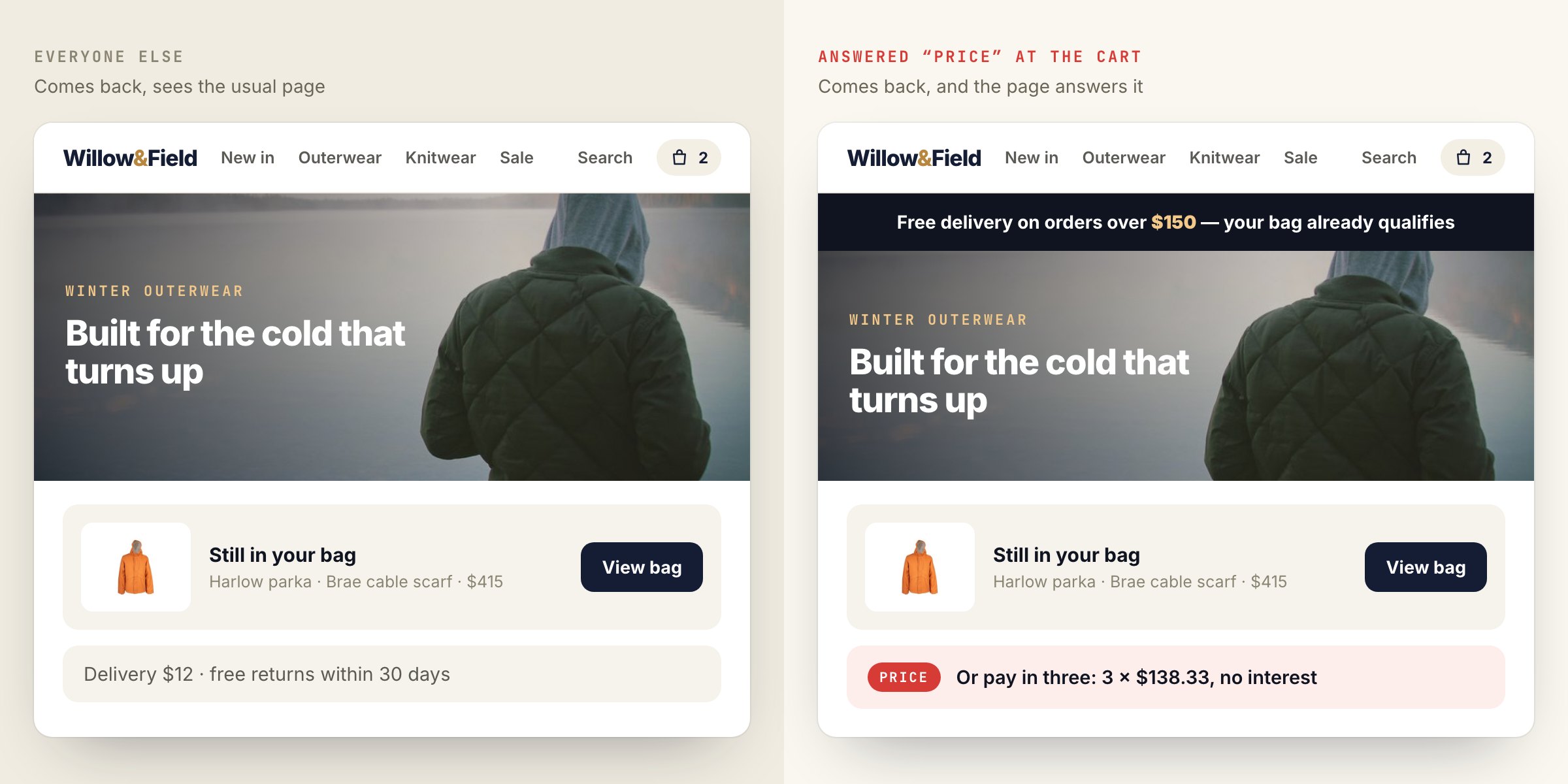
The same store home page for two returning visitors: the usual page for everyone else, and, for the visitor who answered Price, a free-delivery banner and a pay-in-three option.
The answer becomes a targeting rule: the visitor who chose “Price” comes back to the free-delivery threshold and a pay-in-three option, while everyone else sees the usual page.

Building the survey

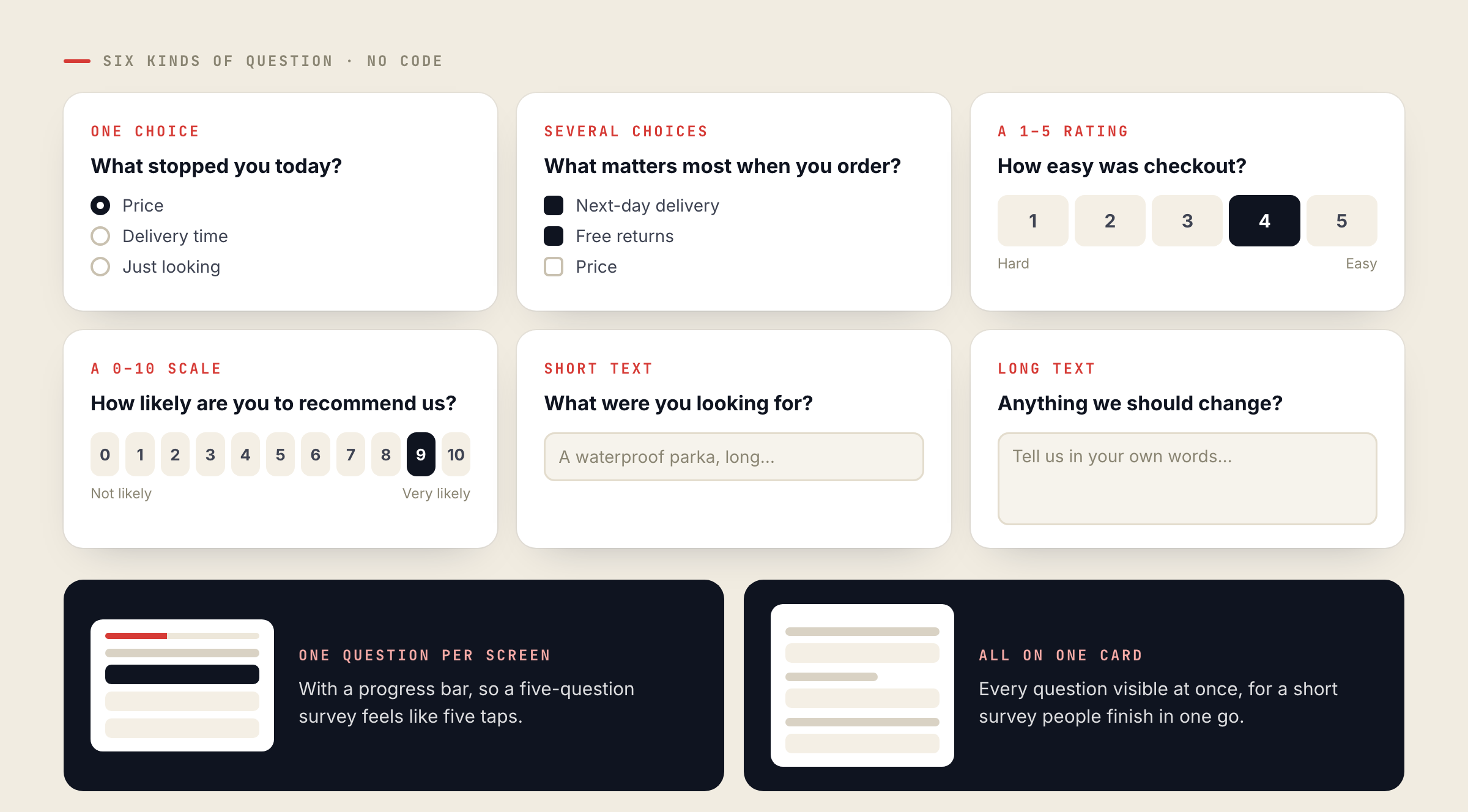
The question builder needs no code. Each question can be one choice, several choices, a 1–5 rating, a 0–10 scale, or short or long text. Show one question per screen with a progress bar, or all of them on one card. The ready-made designs are a Quick Poll (one question, one tap), a Customer Survey (five questions), an Exit Survey and a Post-Purchase Survey.
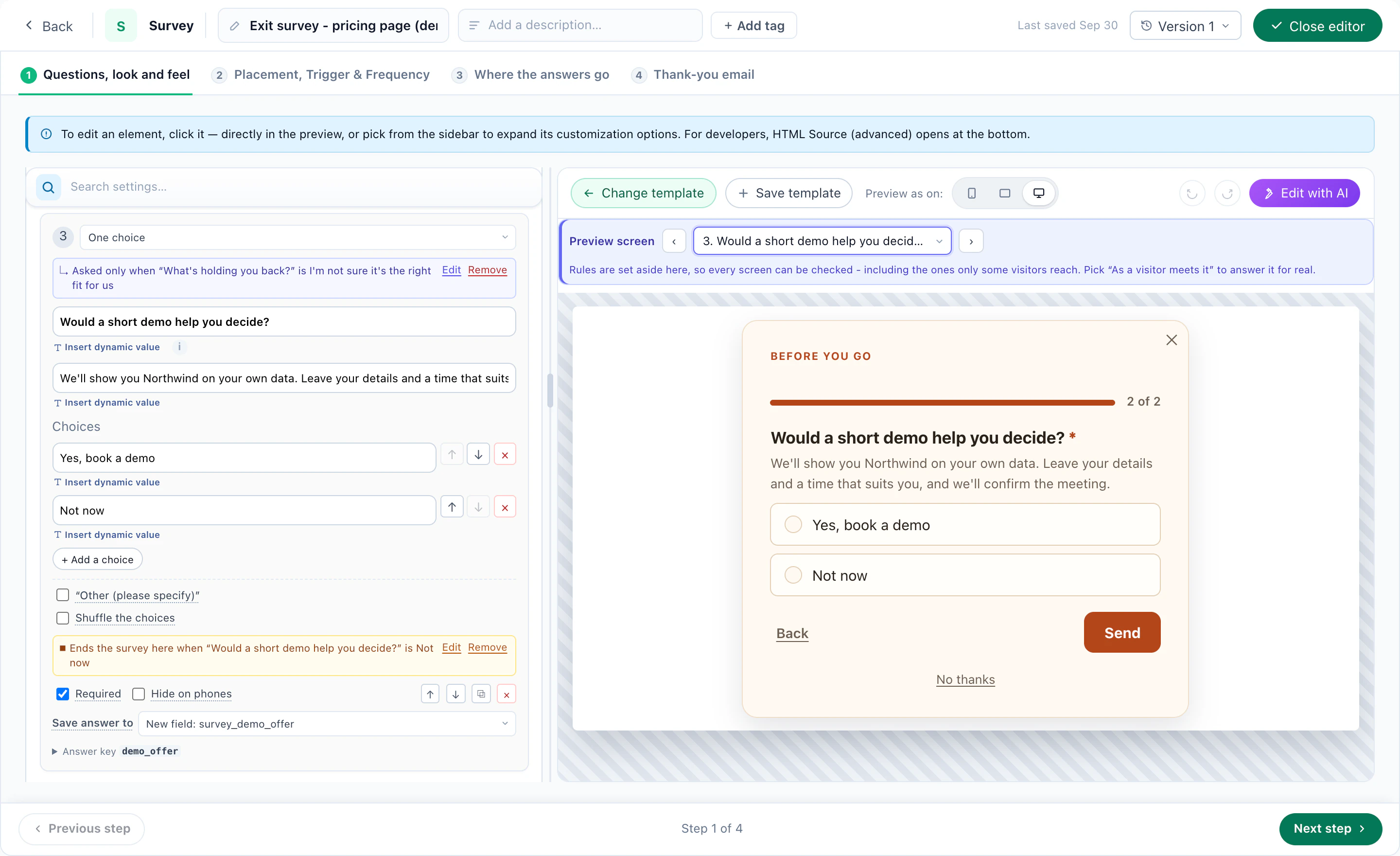
Survey logic: a question asked only when an earlier answer matches, and the survey ending early, previewed beside it
A question that depends on the answers. Question 3 is asked only when an earlier answer calls for it, and the survey ends there when the rest would not apply — previewed beside the settings. A demo account.
Six survey question types drawn as cards: one choice, several choices, a 1–5 rating, a 0–10 scale, short text and long text, plus the two layouts: one question per screen or all on one card.
Six question types, built without code, shown one per screen with a progress bar or all together on one card.

Like every Personyze action, a survey is targeted and timed: on exit intent, after the second visit, only to customers, only on one section of the site. It is also A/B testable, like a popup or any other campaign.
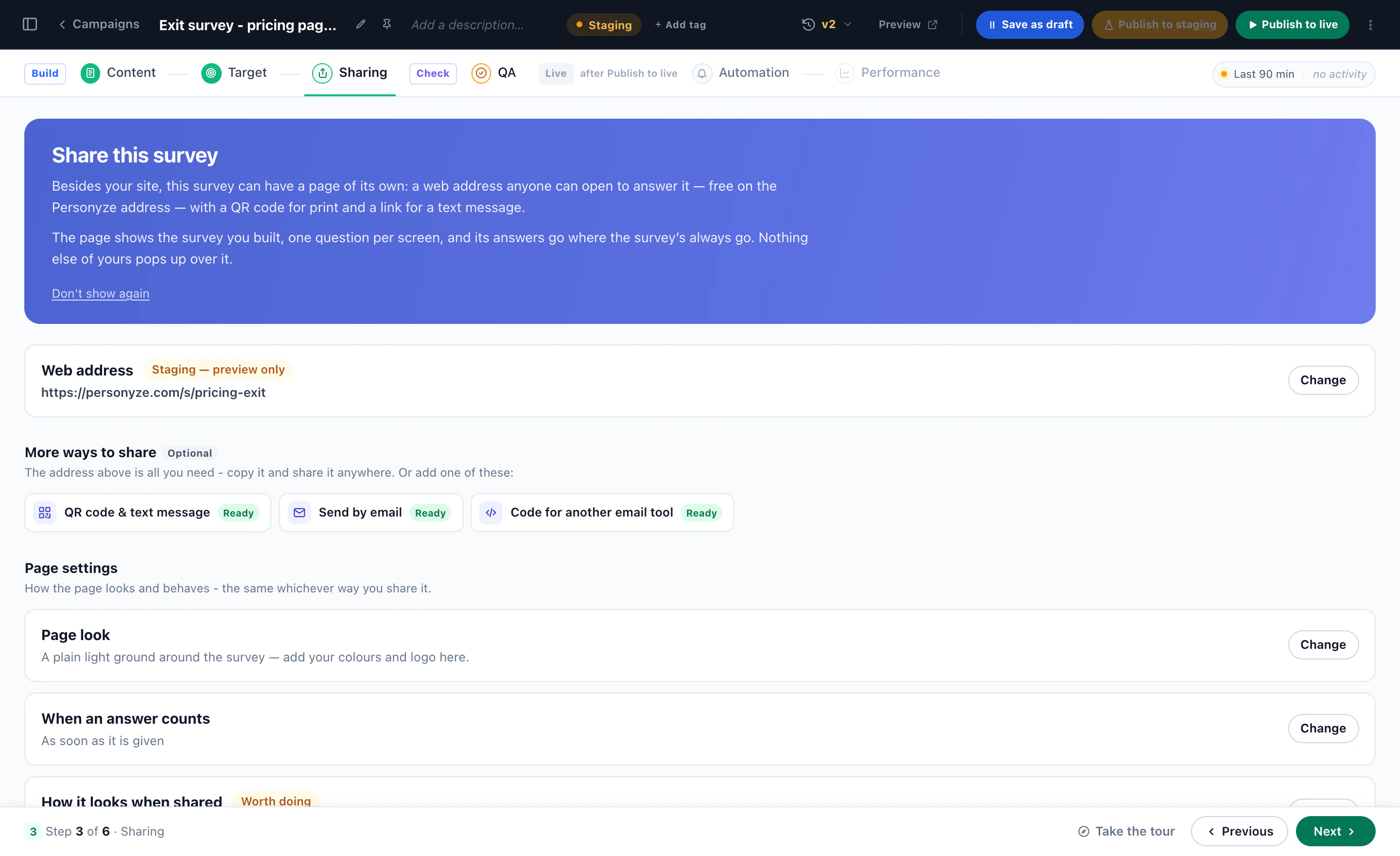
A survey on a page of its own: its web address, a QR code and text-message link, an email, and code for another email tool
Or a page of its own. The same survey at its own web address, as a QR code or a text-message link, in an email, or as code for another email tool — every answer on the same profile.
Watch it done · 2:28 Building a survey, reading the results per question, and publishing them with Survey Results. See it with the rest of the tutorials →

Publish the results, and only the results

The Survey Results action shows what visitors answered: bars and percentages, an average, or one line such as “82% of customers chose next-day delivery”. It is built to stay honest:
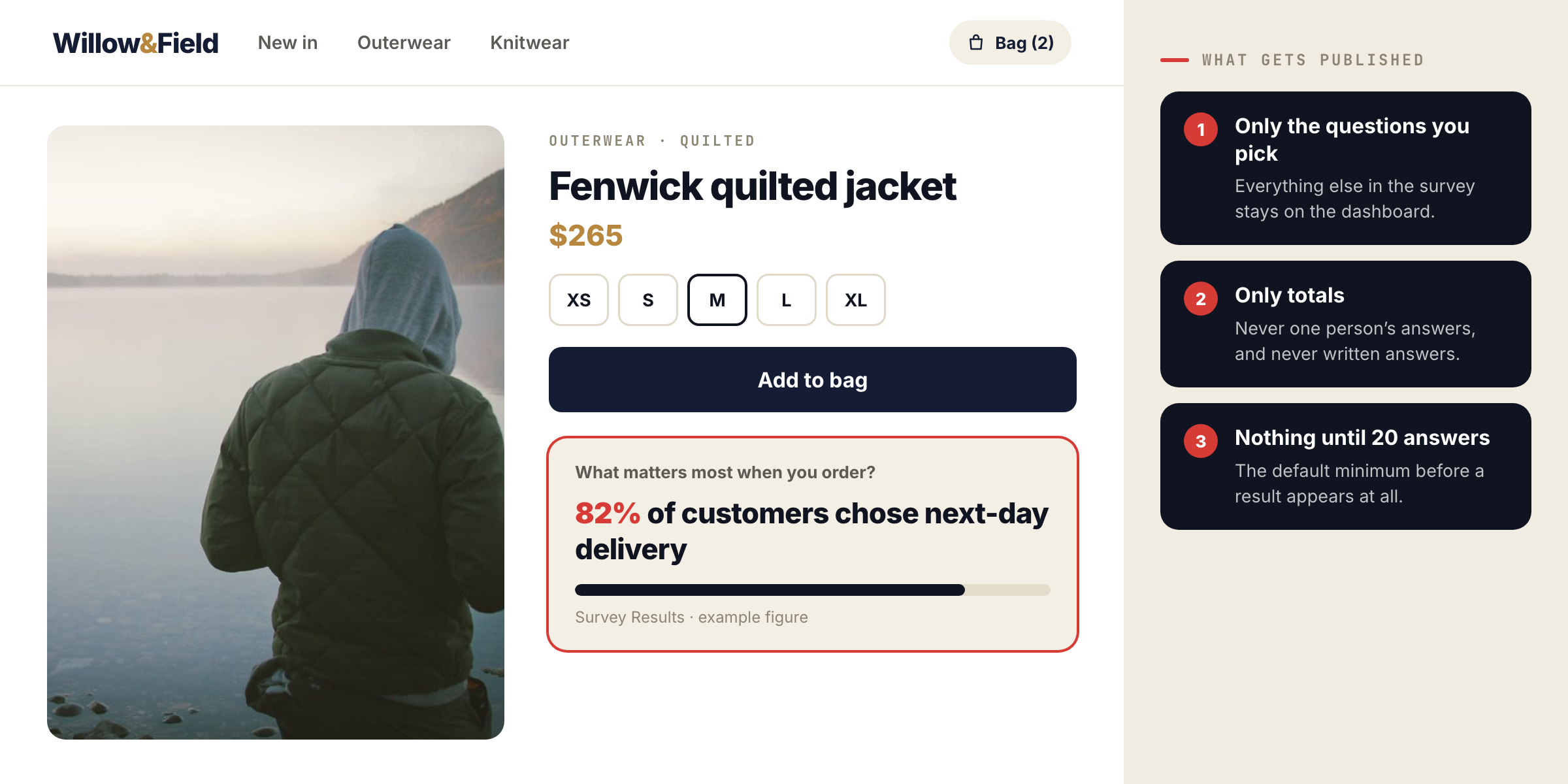
A product page with a Survey Results line, “82% of customers chose next-day delivery”, beside three rules: only the questions you pick, only totals, nothing until 20 answers.
Survey Results publishes totals for the questions you pick, never one person’s answers, and nothing at all until 20 people have answered by default. The figure shown is an example.
What matters most when you order?
Next-day delivery82%
Free returns61%
Price47%
Several choices allowed · example totals
  • Only the questions you pick are published.
  • Only totals, never one person’s answers, and never written answers.
  • Nothing shows until enough people have answered — 20 by default.

The Surveys dashboard

Each survey campaign has its own dashboard: respondents and response rate, NPS or averages, how many were shown the survey and how many answered each question, results per question and per audience, the latest written answers, and a CSV export. After each survey the answers can also go where your form submissions go — email, a webhook, Zapier, Slack, HubSpot — with an optional thank-you email.
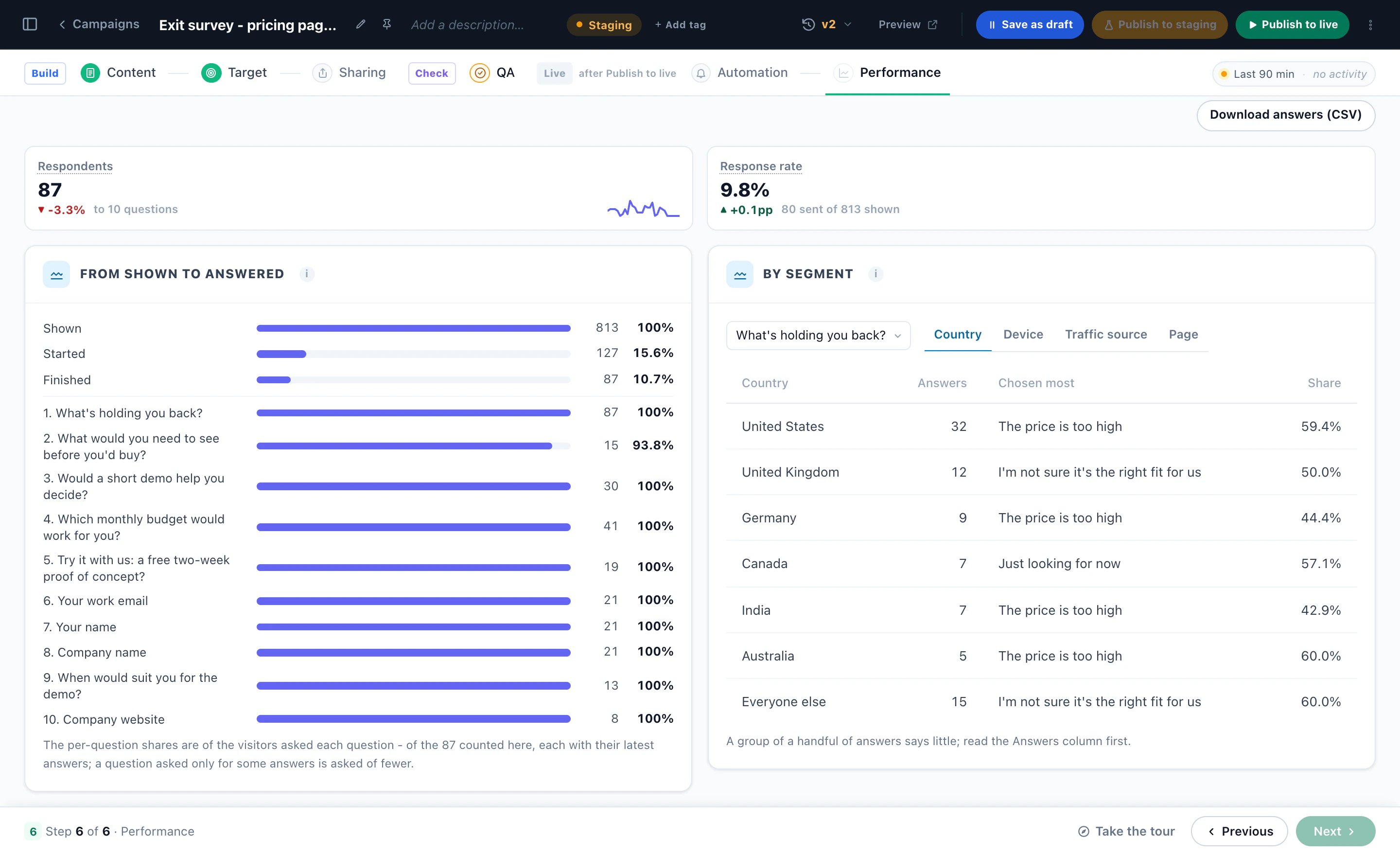
The survey report: shown, started and finished, every question, and the answers by country, device, source and page
The dashboard. Shown, started and finished, the answers to every question, and the answers by country, device, source and page. A demo account; the numbers are illustrative.
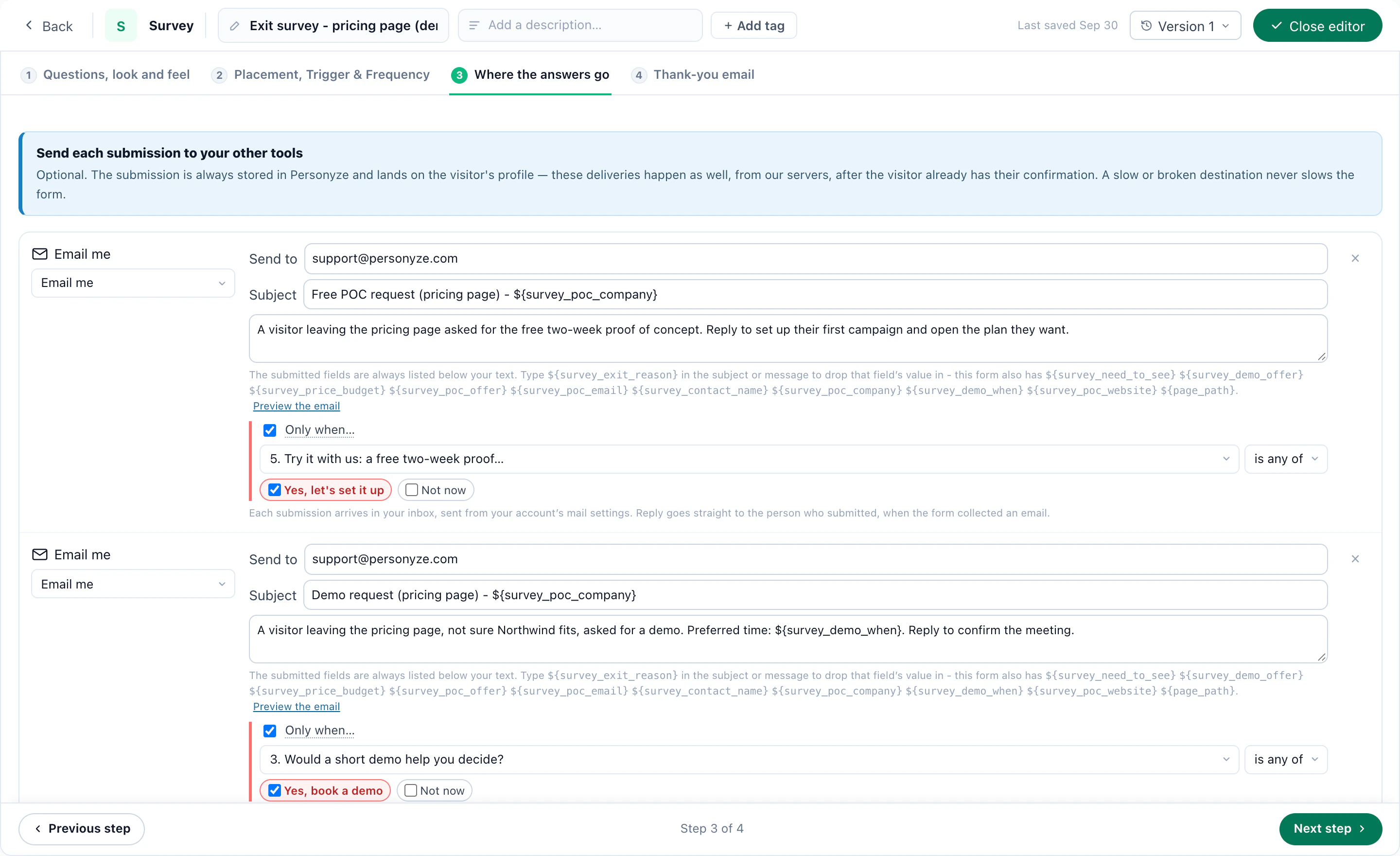
Where a survey's answers go: each answer routed by what it says, a proof-of-concept request to one address and a demo request to another
Where the answers go. Each answer sent on by what it says — a proof-of-concept request to one address, a demo request to another.

Survey answers are private, not anonymous: they sit on the visitor’s profile, which is what makes them targetable. For a single quick question, the Feedback action is lighter — see the NPS post.

Ask the question your cart has been hidingStart from the Exit Survey design, or book a demo and see it on your own site.

More on the feature: Surveys & NPS.

Questions people ask

Can I target a campaign by a survey answer?

Yes. Every answer is saved on the visitor’s profile, so “chose Price” is a targeting rule like country or pages viewed.

Are written answers ever shown on the site?

No. Survey Results publishes totals for the questions you pick, and only after the minimum number of answers. Written answers stay on the dashboard.

Are survey answers anonymous?

No. They are tied to the visitor’s profile. They are private — never shown to other visitors — but not anonymous.

Which question types are there?

One choice, several choices, a 1–5 rating, a 0–10 scale, and short or long text, shown one per screen or all on one card.

Let's talk

Book a demo with a personalization expert

30 minutes with a personalization expert. Bring your stack, your goals, your skepticism. We'll show you what changes when every visit feels like the only one.