
Types of Website Personalization: 11 Kinds, Each With a Live Example
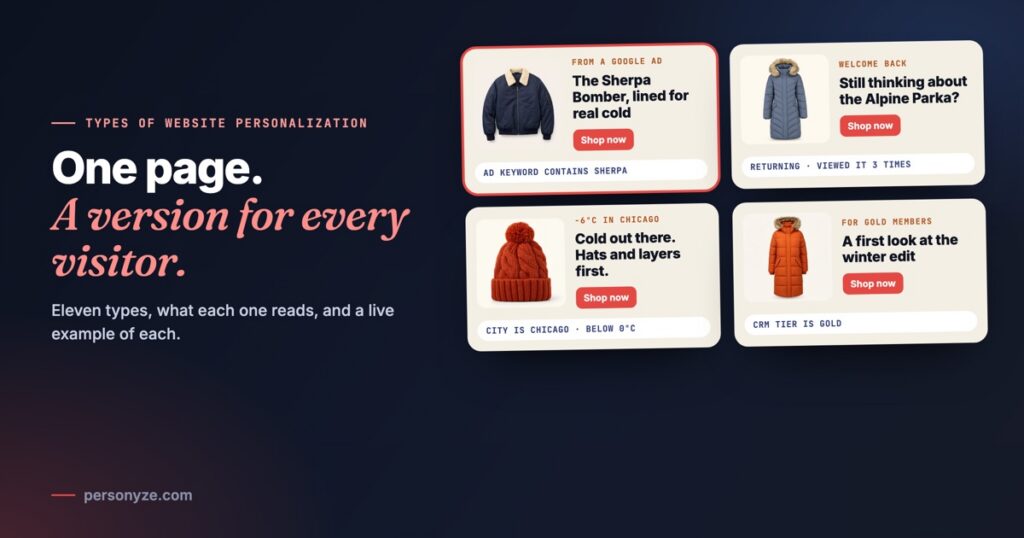
The types of website personalization are the different things you can act on: where a visitor is, how they arrived, what they do on your site, what you already know about them, and what they searched for. Each one changes what a visitor sees on your own pages, so the shopper from your ad, the customer coming back and the stranger on a first visit stop getting the same page.
Below are eleven types, grouped by what each one reads, each with a live example you can switch through. All of them run from one tag in Personyze’s website personalization, and the visit itself tells you enough for most of them. After the list: what each type needs before it starts, where to begin, and how to tell whether a version works.


Personalization by who the visitor is
1. By location
Personyze reads a visitor’s country and city from their IP address, and the weather where they are, so a page can lead with what fits: the right currency and delivery promise, the nearest store, warm layers on a freezing morning. A visitor’s device can join the same rule, for the shopper on a phone in a cold snap. See it: the location-based personalization example, where one storefront adapts its currency, language, shipping and nearest store to each visitor’s location.
2. First-time and returning visitors
Personyze knows whether this is a visitor’s first session, with no setup. A first visit needs the pitch; a returning visitor needs a reason to come back, such as the cart they left, the category they browsed or the product they kept looking at. Targeting rules count sessions and the time since the last visit too. See it: the returning visitor example: one home page and four returns, a first visit, a saved cart, a browsed category and a customer due for refills, with the welcome offer kept for first-time buyers.
3. By CRM data or company
For the people you already know, Personyze matches the visitor to their record in your CRM or in a list you upload, once your pages capture an email address or a CRM ID, and targets on any field that record carries: plan, tier, industry, role, renewal date, lifetime value. Connected tools such as HubSpot, Salesforce and Zoho bring that data in. Before anyone fills in a form, a B2B site can still speak to the company behind the visit, which is the heart of account-based marketing. See it: the SaaS and B2B example, where one home page adapts to anonymous visitors, target accounts and customers.
4. By language
One campaign can speak every language your site does. Each message gets a version per language, shown on pages whose address starts with a language folder such as /de/, or to visitors whose browser is set to that language. Translate with AI fills the empty words for you to check, prices and catalog fields can follow each language, and every view and click still counts in the one campaign. See it: the international store example: one store for four countries, with prices per currency from the catalog, the right delivery promise, local payment and returns notes, and the store’s own German. More in multilingual personalization.
Personalization by how they arrived
5. By traffic source and ad
The link a visitor clicked says a lot: the email they came from, the campaign and creative in its UTM parameters, the keyword of a paid search click. Personyze reads them on arrival, with nothing extra to tag, and the page carries on the message that brought them, while someone who typed your address gets your page as it is. Organic search passes no keyword, so keyword matching is for paid traffic. Rules can also look back to how a visitor first arrived, however long ago. See it: the UTM message match example: one home page carrying the email’s offer, the paid keyword’s boots and the ad’s own photo.
6. Landing pages matched to the ad
Where type 5 adapts a page you already have, a landing page can be made for the ad. Its headline, button and proof follow the ad, search or audience a visitor came from, with the ad’s keyword in the headline where you want it: dynamic keyword insertion. Personyze can also host the page for you at its own address, with a headline that changes for one kind of visitor, and QR code and text-message links its versions can tell apart. See how on dynamic landing pages, or see it in the dynamic landing pages example.
7. By search and last search
A search is the clearest thing a visitor ever tells you. Personyze keeps each visitor’s last search on their profile, whether they typed it into your site’s search or arrived with it from a search ad, and there is nothing to switch on. A campaign can then target everyone who searched for boots in the last 7 days, and a recommendation set to Matches Their Search shows what fits it on any page (more in personalize by what visitors search for). The search box can be personal too. See it: the AI search example: site search that understands a sentence, obeys a budget, answers with guides as well as products, and ranks the results for each visitor.
Personalization by what they do
8. By behavior
What a visitor does is the richest signal of all: the pages they view, the products they look at, add to cart or buy, the value of their cart, the articles they read, how long they stay. Personyze also tags the topics each visitor shows an interest in, with a strength for each. Behavioral targeting turns any of it into an audience, such as shoppers with a cart over $150 who have not bought, and Audience Discovery finds groups in your own data who buy far more often than average, ready to target. See it: the behavioral segmentation example: Personyze reads each visitor’s behavior, sorts them into a live segment and serves each segment its own experience.
9. Product and content recommendations
Recommendations personalize the part of the page that changes most: what to look at next. Product recommendations decide by themselves on each page, showing what shoppers view next on a product page, best sellers on a category page and what goes with the cart, and they fall back step by step, so a widget is never empty. Match the visitor puts what fits this shopper first, such as their brand and size from their own history. For a publisher, content recommendations pick the next article each reader wants. See it: the product recommendations example: switch between shoppers and watch every row re-rank, each row run by a different algorithm.
10. Pop-ups and banners by audience
A pop-up or a banner is the easiest change to see, and the easiest to get wrong when everyone gets the same one. Shown by audience, the first-time visitor gets a welcome offer and the shopper leaving a full cart gets a reason to stay. Triggers such as exit intent, idle time, scroll depth and cart events decide when, and a rule can leave out anyone who already closed it. Build them in the pop-up and banner builder from a template or your own HTML. See it: the discount pop-up example: a welcome offer for first-time visitors, an exit-intent save for cart abandoners and VIP perks after login.
Personalization the AI writes
11. Versions written for each segment
Every type above needs someone to write the versions. Personyze’s AI can take that part: it reads your site, proposes the segments your pages speak to, and writes a version of the parts that matter for each one (the hero, the message bar, the header button, pricing, forms and more) in your own voice, never with your banned words. For visitors from your ads, with Google Ads, Microsoft Advertising or Meta Ads connected, it writes from that ad’s message and targeting. You approve, edit or rewrite every version, and nothing reaches your site until you publish. How it works is on the website personalization page.
For one audience at a time, ask the AI agent in a sentence instead. See it: the AI agent example: one sentence becomes a win-back campaign, its rules and content in the store’s own style, staged until a person publishes it.
What each type needs before it starts
Most types read the visit itself, so they need nothing more than the Personyze tag on your pages. Three need something of yours first: recommendations and personal search need your catalog, CRM types need a way to recognise the people you know, and the AI needs to read your site.
Which type to start with
- Traffic you already pay for. Match the page to the ad that brought each visitor (types 5 and 6). The links you already send carry everything it needs.
- The visitors who come back. A returning visitor and what they looked at last time (types 2 and 8) need nothing set up.
- Your catalog, on every page. Recommendations (type 9) once your product or content feed is in.
- The people you know. CRM types (type 3) once your pages capture an email address or a CRM ID.
- More segments than time. Let the AI write the versions (type 11), and approve them one by one.
Not sure which fits your site? Inspire me reads your own site and suggests what to show to whom, free.
Measure each type against your own page
A version is only worth keeping if it beats the page it replaced. In Personyze a share of each audience keeps your page as it is, so every change is compared with your own page, audience by audience. Results by segment show who each version won for; for a proven winner, turn on an A/B test; and Auto-optimize sends more visits to what converts. A visitor who matches no type sees your own page.
Watch it set up, in the panel
Two short films: a targeting and personalization campaign from one sentence to publish, and the targeting rules behind every type in this guide.
Read the transcript
A Targeting and Personalization campaign shows different visitors different things, on your own pages. You choose who: a company you want to win, a returning reader, a family planning a trip. And you choose what each of them sees.
Here is how to set one up. This is the setup. Four steps: who sees what, a preview, the goal, and publish.
Start with who. In one sentence, say who should see something different, and what. Press Create.
With the box ticked, the AI agent turns your words into an audience, then builds what they see, on your own page. It is in your list: the audience, and the change the agent made. Open it to change it, or to add something yourself.
Any action works: a change to the page itself, a pop-up or a banner, recommendations, a form. Choose a design. The gallery starts from designs that fit your kind of site.
Then make it yours. Click any part of the preview, and change its words. Next, where it shows: on which pages, and where on the page.
Here, a bar at the top of every page. There it is: your audience, and what it sees. Add as many audiences as you like: each one sees its own change.
To build an audience by hand, pick from the quick choices: device, new or returning, country, pages viewed, company. Or open every targeting rule there is. Step two, Preview.
Open your real page as each audience will see it. Only you see it. Step three: the goal, and how you measure.
A small share of each audience keeps your page as it is, so you see what each change wins. For a proven winner, turn on the A/B test. Last step: review, and publish.
Publish to staging shows it only on your own testing devices. Nothing reaches your visitors until you publish to live. Targeting and Personalization.
Set yours up.
Read the transcript
Targeting rules decide who a campaign is for. Write them from one sentence. Add a rule yourself.
Then join them, and check who it reaches. On a campaign’s Target step, describe your audience to the AI targeting assistant, and press Generate rules. It writes ordinary rules you can change: the device, the newsletter link, and an Exclude, which leaves out anyone who already bought.
Or add a rule yourself. Add audience rule opens every kind of rule: who the visitor is, what they do, and where they came from. Search by name, or pick one.
Pages visited: type a path, add it, and say when it counts, on this page or during the visit. Then Done. Between two rules, choose how they join.
And: all must match. Or: at least one. Only one: never both.
Or group them together. The Audience story reads it all back in plain words, so you can check who it reaches before you publish. Targeting rules.
Say who it is for.
The short version
Website personalization comes in eleven common types, and they combine: where a visitor is, how they arrived, what they do and what you know about them, each shown in its own version and measured against your own page. Start with one, see what it wins, and browse the website personalization examples for the next.
Questions people ask
What are the main types of website personalization?
By location, by first or returning visit, by CRM data or company, by language, by traffic source and ad, landing pages matched to the ad, by search, by behavior, product and content recommendations, pop-ups and banners by audience, and versions written by AI for each segment. They combine: a returning visitor in Chicago who came from your ad can match three of them at once.
Which type of personalization should I start with?
Start with the traffic you already pay for, and match the page to the ad that brought each visitor. Returning visitors and recommendations come next: the first needs nothing set up, and the second needs your catalog.
Can I personalize for anonymous visitors?
Yes. Location, traffic source, behavior, first or returning visit, browser language and last search all come from the visit itself, so they work before anyone signs in or fills in a form. CRM data needs a way to recognise a person, such as an email address or a CRM ID your pages capture.
What happens when a visitor matches no rule?
They see your own page, as it is. When several campaigns can match the same visitor, put them in an audience group and give each a priority, so the visitor sees only the one you meant.
Do I need a developer?
No. Personyze works with one tag and a visual editor, so marketers launch campaigns without a dev queue, and it changes the key parts of the site you have in place.
Can AI write the personalized versions?
Yes. Personyze’s AI reads your site, proposes the segments your pages speak to and writes a version for each, in your own voice. You approve, edit or rewrite every version, and nothing reaches your site until you publish. You can also write every version yourself.
How do I know a type of personalization works?
A share of each audience keeps your own page, so every version is measured against it, audience by audience. Keep what beats your page, switch off what does not, or let Auto-optimize send more visits to what converts.
Book a demo with a personalization expert
30 minutes with a personalization expert. Bring your stack, your goals, your skepticism. We'll show you what changes when every visit feels like the only one.