Personyze
Website & app
Website PersonalizationContent, offers and layout shaped to each visitor — one profile across every page and every session.Recommendation EngineWhat each visitor wants next, ranked by the algorithm you pick or one you write.A/B TestingA winner per audience, promoted mid-campaign rather than after it.Dynamic Landing PagesThe whole page recomposed per visitor — headline, imagery and offer from the ad they clicked and their own interests. On pages you already run.AI Search & Chat AgentAnswers from your own pages and catalogue, and a search box that replies in a sentence.Banners & Pop-UpsYou decide who sees each banner or pop-up — by behavior, source, location or CRM field — and when it appears.AI Promotion ManagerYou list the offers; the AI picks the one each visitor sees and keeps learning from what converts.Social ProofLive scarcity, ratings and what other people just did.
Email, push & SMS
Email PersonalizationContent and recommendations picked per reader at open time — sent from Personyze or pasted as one block into your ESP.Push, SMS & WhatsAppFired by what they just did rather than by a schedule.Hosted Landing PagesThe same per-visitor page, served by us — your domain or ours, no site to deploy to.
Targeting & analytics
Behavioral TargetingSegments that update themselves from what people actually do.Audience DiscoveryPlain-language audiences found in your own data — visitors who convert several times more often than average, targetable in a click.ABM MarketingThe company behind an anonymous visit, joined to your CRM.Website AnalyticsSessions, bounce and revenue — then click a row and there is a person.
Platform & integrations
MCP ServerRun your account from Claude, ChatGPT or any MCP client.IntegrationsHubSpot, Salesforce, Twilio Segment, Tealium, GTM and the REST API.App MarketplaceThe integrations built in to every plan, and apps from other companies that Personyze reviews before listing.APIs, SDKs & AutomationOne REST endpoint over every object, server and mobile SDKs, rules and reports that run on their own.
Reviews, surveys & chat
Reviews & TestimonialsReviews from 17 platforms and your own site, matched to each visitor.Surveys & NPSOne question or a whole survey — every answer ready to target.AI Chat AgentAnswers visitors’ questions from your own pages, and hands over to a person.Meeting SchedulerThe right visitors book time with your team, on your own page.
PricingVideosProduct TourShort narrated videos of the real platform, one feature at a time.
← All articles
PersonalizationSeptember 28, 2026

Ask One Question, Get Your NPS, Then Act on the Answer
P
Personyze TeamPersonalization experts
Ask One Question, Get Your NPS, Then Act on the Answer

Most NPS programs end in a slide. The score goes up or down, someone reads the comments, and the website the customer comes back to next week treats a detractor exactly like a promoter.

The Feedback action asks the question on your own pages and keeps the answer where it can do something: on the visitor’s profile. From there, the next campaign can thank the people who love you and follow up with the people who do not.

One question, five ways to ask it

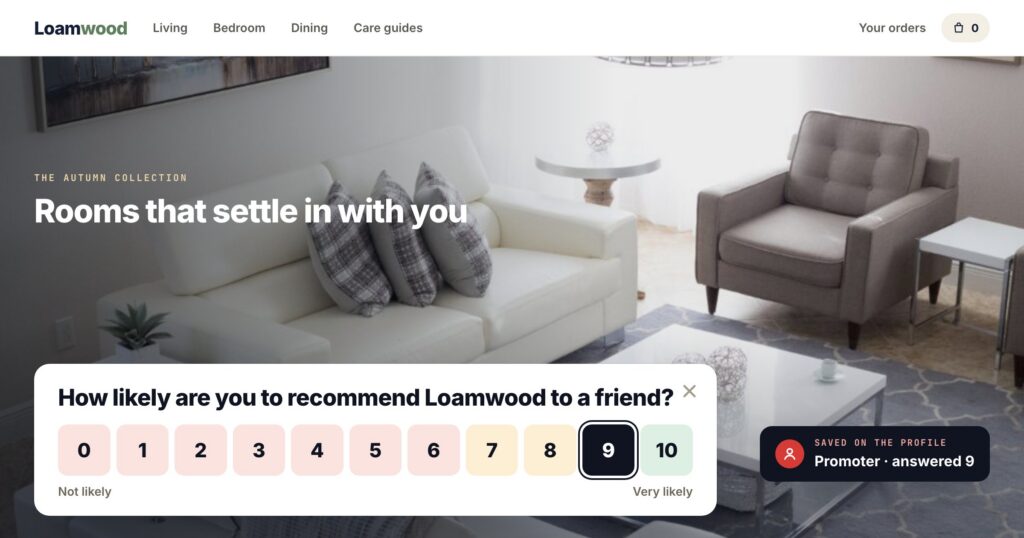
How likely are you to recommend us to a friend?
012345678910
Not likelyVery likely
  • 0–10, the classic NPS question, which sorts every answer into promoter, passive or detractor.
  • Stars or five faces for a quick satisfaction score.
  • Thumbs up or down, and “Was this helpful?” under an article — saved on the click.
  • An optional comment box after any of them.

The question can be about your business, a product, or the page the visitor is reading. The ready-made designs cover the usual places: an NPS bar, “Was this helpful?” under an article, a “How was your visit?” slide-in with five faces, and a post-purchase question with the product pictured.
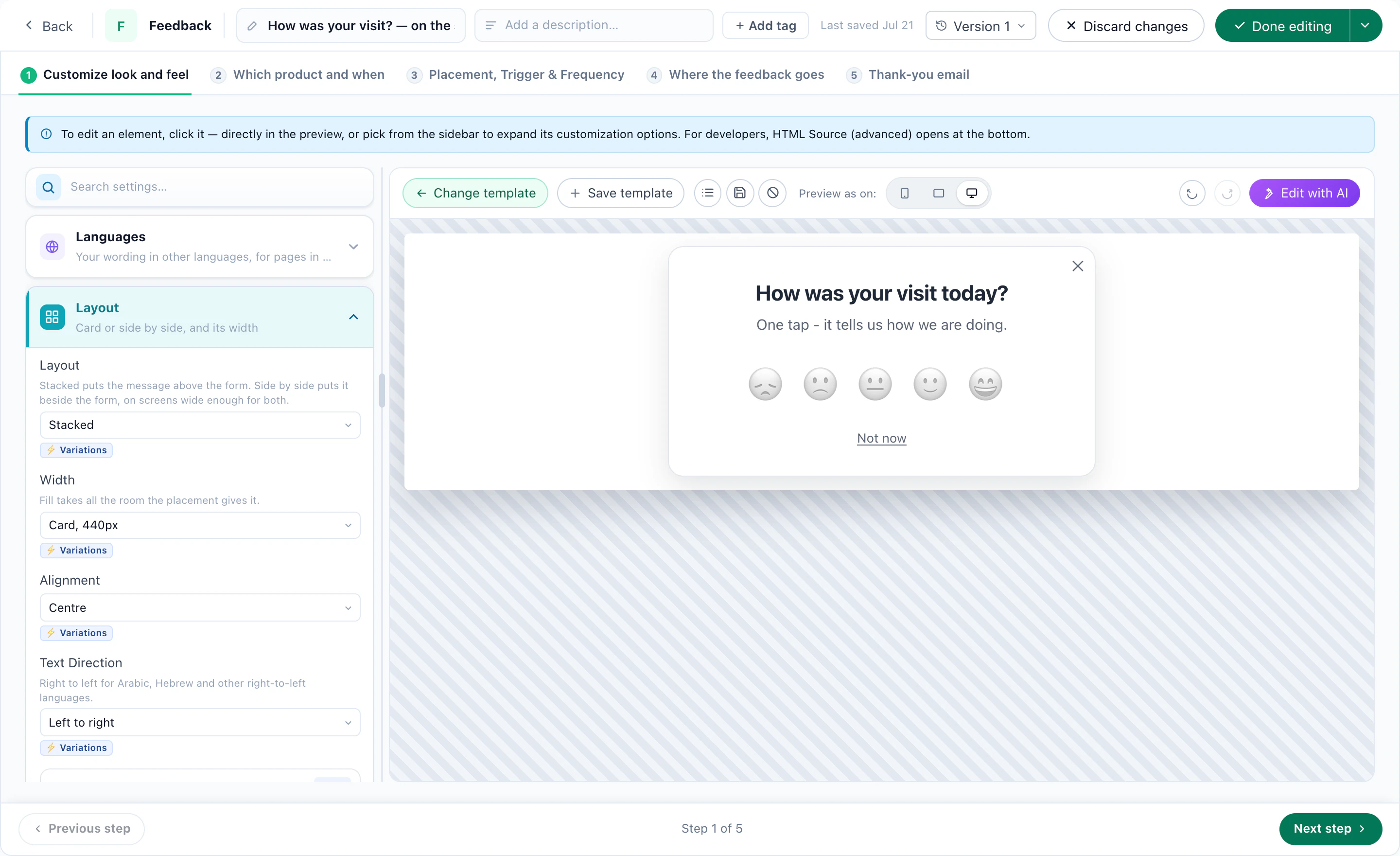
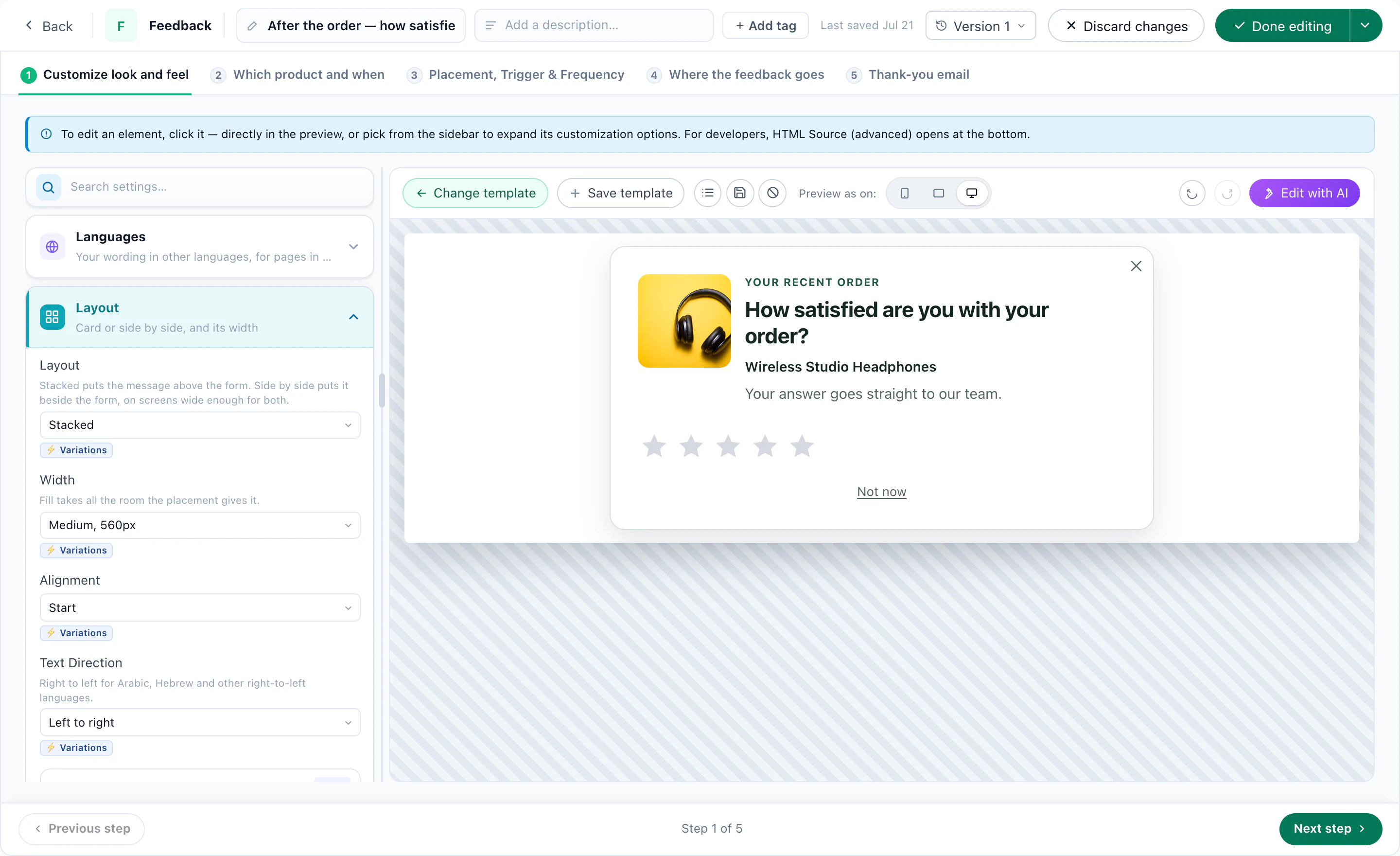
How was your visit: five faces, one tap, in the designerA post-purchase rating in the designer: stars beside the product's picture
Two of the ready designs, in the editor. “How was your visit?” with five faces, and stars after an order with the product pictured.
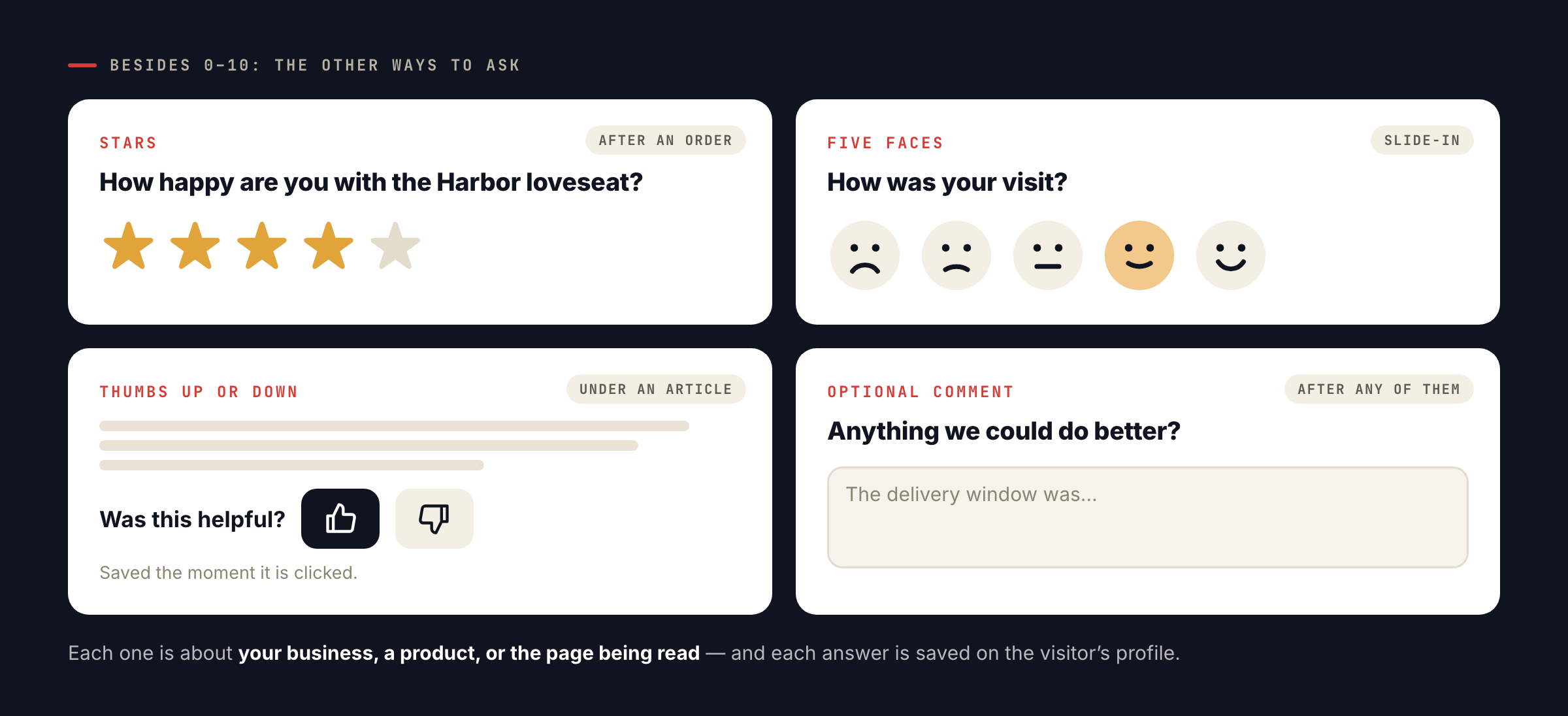
Four feedback widgets: five stars after an order, five faces in a slide-in, thumbs up or down under an article, and an optional comment box.
Besides the 0–10 question: stars, five faces, thumbs up or down, and an optional comment box after any of them, about your business, a product or the page being read.

Promoters and detractors get different next steps

Each answer lands on the visitor’s profile — the score and the NPS group — so it becomes a targeting rule like any other:
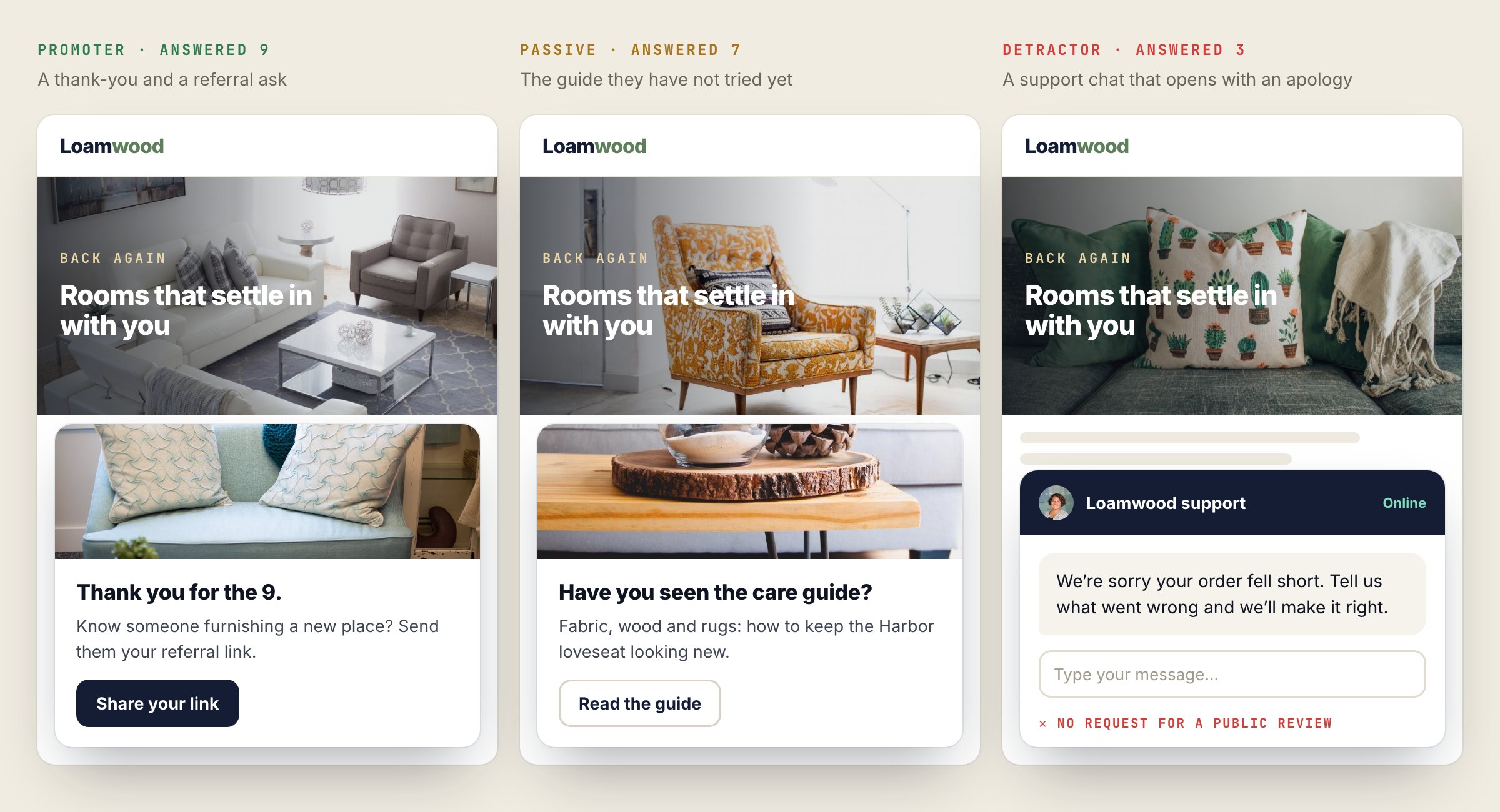
Three returning visitors on the same furniture store: a promoter sees a thank-you and a referral link, a passive sees a care guide, and a detractor sees a support chat that opens with an apology.
One next visit, three NPS groups: a referral ask for the promoter, a guide not yet tried for the passive, and an apology for the detractor, with no request for a public review.
They answeredGroupA next step that fits
9–10PromoterA thank-you and a referral ask, or a button to review you on Google or Trustpilot
7–8PassiveThe feature or guide they have not tried yet
0–6DetractorA support chat that opens with an apology, or an offer to make it right — and nothing that asks them for a public review

Because it is the same targeting as every other campaign, the follow-up can be anything Personyze runs: a banner on the next visit, an AI chat that opens differently, an email, or a change to the page itself.

Show the score where it helps

The Feedback Results action turns the answers into social proof: “92% of readers found this page helpful”, “4.6 out of 5 from 1,203 visitors”, the average for the product on the page, or your NPS if you choose to show it. Nothing appears until enough visitors have answered — 20 by default — so a page never advertises a score built on three votes.
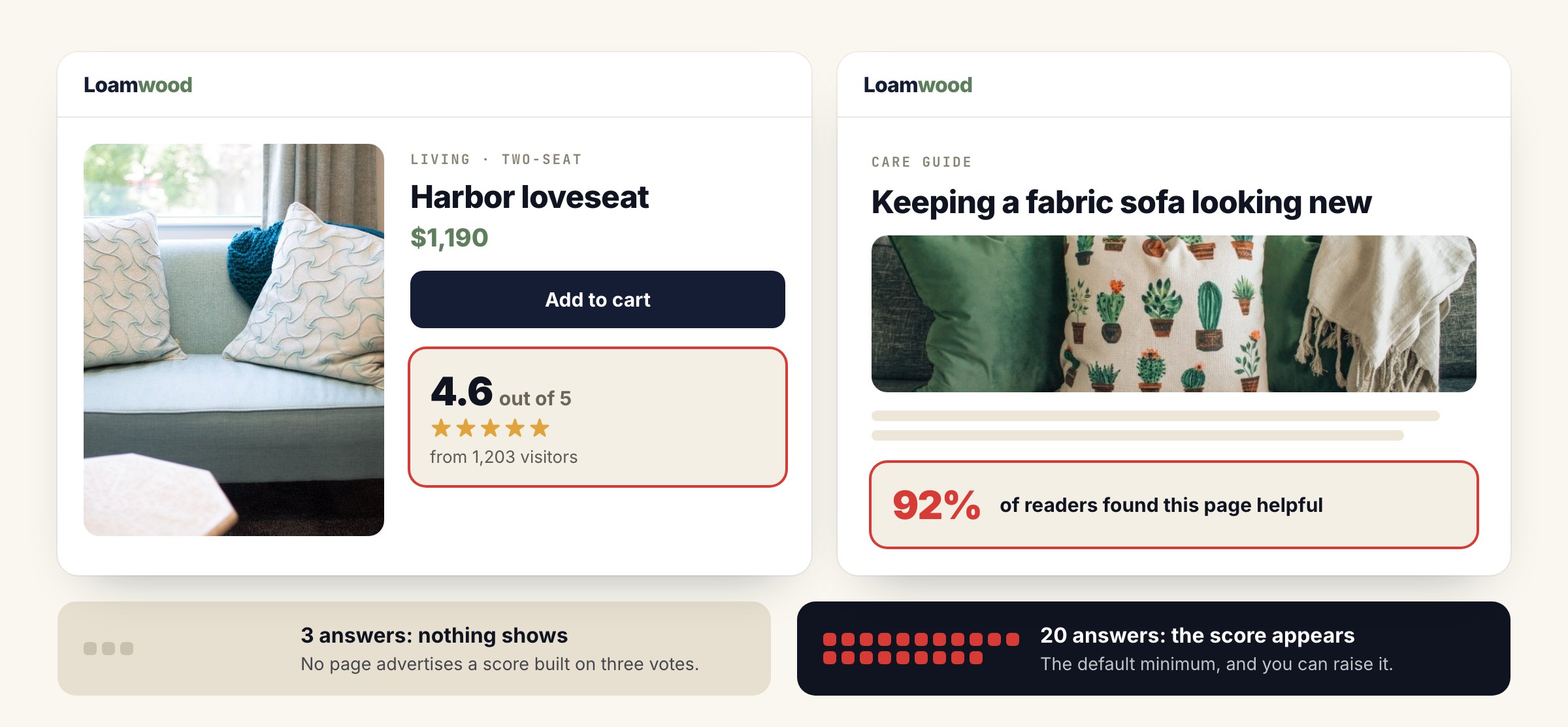
A product page showing “4.6 out of 5 from 1,203 visitors” and a care guide showing “92% of readers found this page helpful”, with a note that nothing shows before 20 answers.
Feedback Results turns answers into social proof on the page, and shows nothing until 20 visitors have answered, so no page advertises a score built on three votes.

Comments are never shown on the site. Answers are private: they are tied to the visitor’s profile, which is what makes them targetable, but they are not published as quotes.

Watch it done · 2:16 Asking one question, reading the score on the Feedback dashboard, and showing it on the page with Feedback Results. See it with the rest of the tutorials →

The Feedback dashboard

The Feedback & NPS campaign type comes with its own dashboard: NPS over time with promoters, passives and detractors; average scores; “said yes” by page and by product; the response rate; and the latest comments. It is the view that tells you which article confuses people and which product disappoints, while the targeting rules are already acting on the answers.
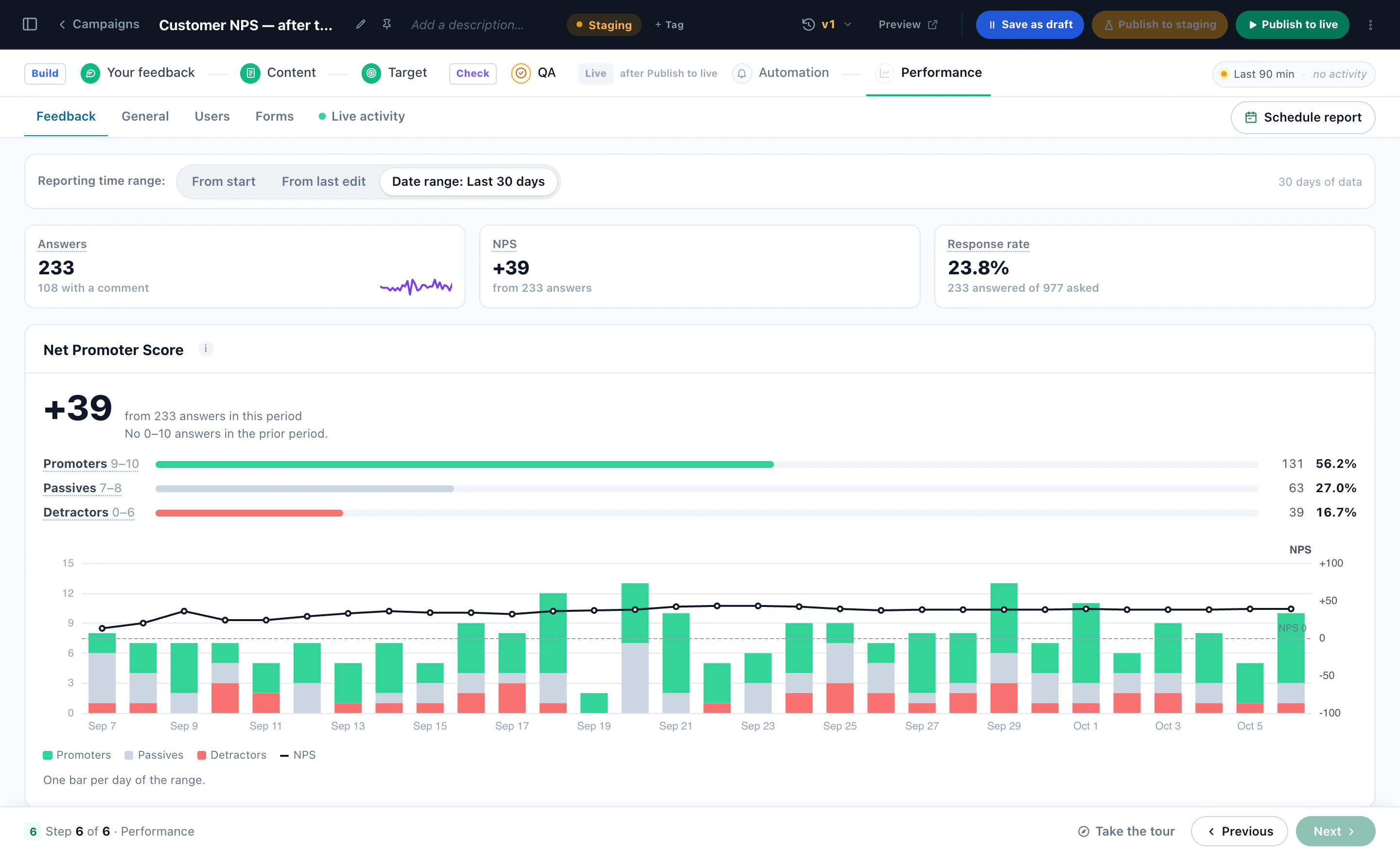
The NPS report: the score, promoters, passives and detractors, answers per day with the NPS line, and the response rate
The Feedback dashboard. The NPS with promoters, passives and detractors, the answers per day with the NPS line, and how many of the visitors asked answered. A demo account; the numbers are illustrative.
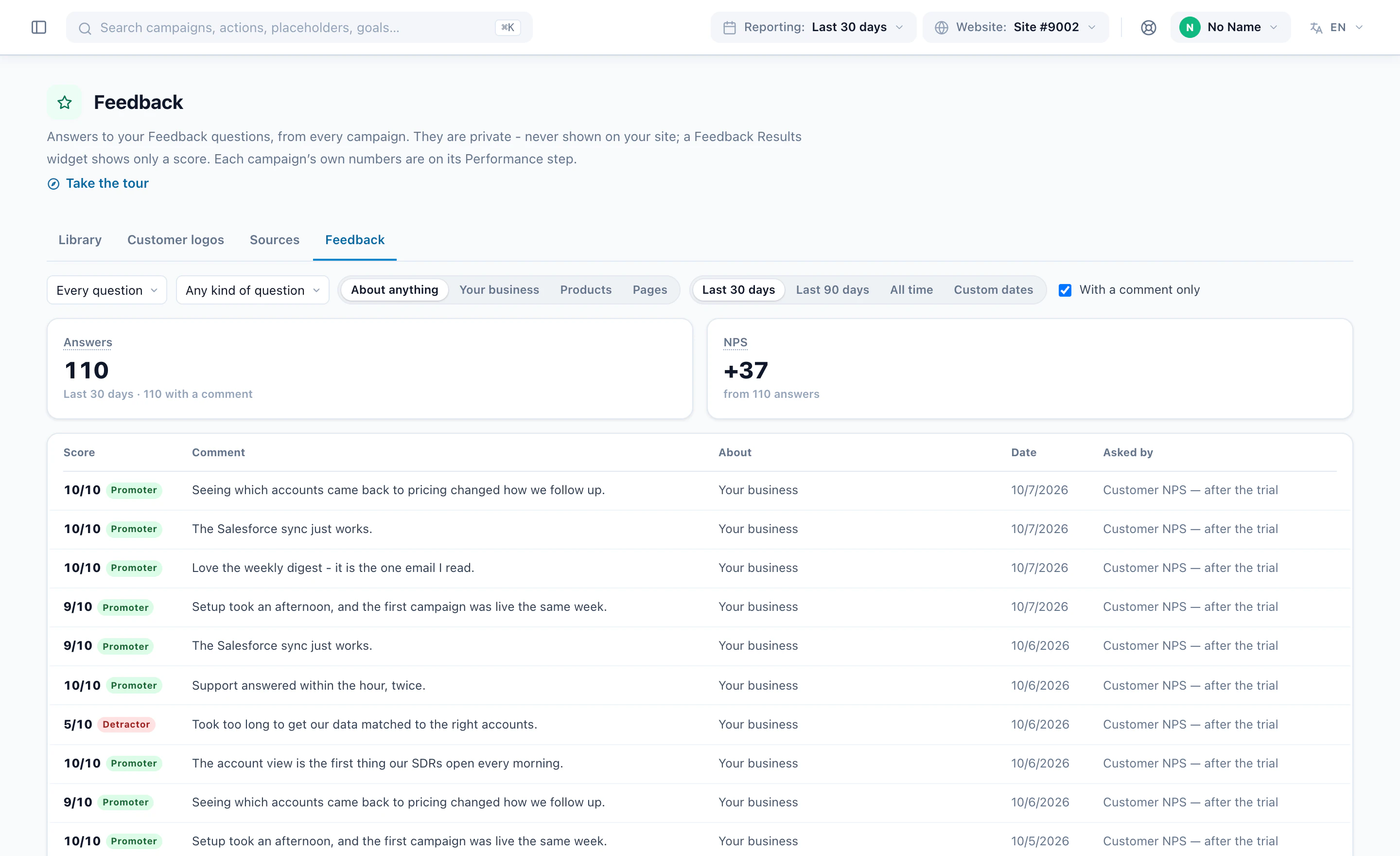
Every feedback answer with its score and comment, across campaigns, filtered to those with a comment
Every answer, with its comment. Scores and comments from every feedback campaign in one list, here filtered to the answers that came with a comment.

For more than one question — a reader survey, an exit survey — use the Survey action instead; the surveys post covers it.

Ask your first question this weekStart from the NPS bar or “Was this helpful?” design, or book a demo and see it on your own pages.

More on the feature: Surveys & NPS.

Questions people ask

Are NPS answers anonymous?

No. Each answer is saved on the visitor’s profile, which is what lets a campaign react to it. Answers are private: comments are never shown on the site, and scores appear only as totals once enough visitors have answered.

How many answers before the score shows on the site?

Twenty by default, and you can raise it. Until then Feedback Results shows nothing.

Can I ask about a specific product or article?

Yes. The question can be about your business, a product, or the page the visitor is on, and the dashboard breaks results down by page and by product.

What should a detractor see next?

Whatever fits your business — a support chat, an apology and an offer, a call from their account manager. The one thing to avoid is asking them for a public review only after filtering out low scores; ask everyone the same way.

Let's talk

Book a demo with a personalization expert

30 minutes with a personalization expert. Bring your stack, your goals, your skepticism. We'll show you what changes when every visit feels like the only one.