
AI Chatbot for Ecommerce: How to Add One to Shopify, WordPress or Any Site
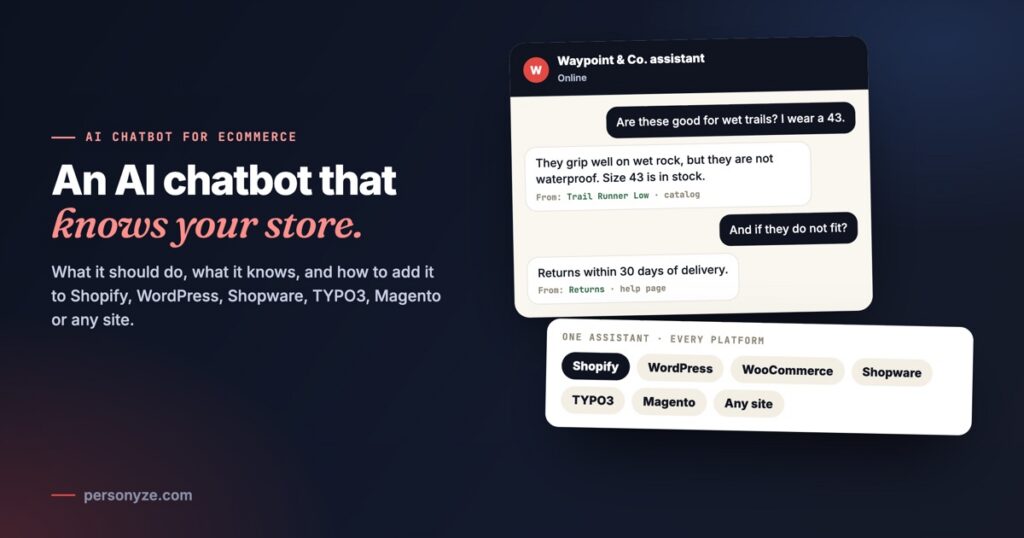
An AI chatbot for ecommerce earns its place when it answers like your best salesperson: what this shoe is like in the rain, whether a 43 is in stock, how returns work. It should answer only from your own pages and catalog, know which product the shopper is looking at, and pass the conversation to a person when it should.
Below: what to expect from an AI chatbot on a store or any website, what Personyze’s AI chat agent knows and how it is set up, and how to add it to Shopify, WordPress and WooCommerce, Shopware, TYPO3, Magento or any other site.
What an AI chatbot for your website should do

- Answer from your own site. It reads the pages visitors ask about, such as help, delivery, returns and your categories and products, and answers from them, with the page each answer came from.
- Search your products. It searches your catalog in the catalog’s own language, whatever language the visitor writes in, and answers in the visitor’s language. Product cards can carry Add to cart.
- Know who is asking, if you let it. The page they are on, where they have been this visit, the products they looked at: each is a switch of its own, off until you turn it on. An AI chat agent that knows who it is talking to goes further into it.
- Never make things up. No price, stock level or promise that did not come from your catalog or your pages, and no discount unless it is an offer you wrote: see letting an AI chat offer a discount, safely.
- Hand over to a person. When it cannot answer, or the visitor asks for someone, the conversation goes to your team’s inbox and the reply arrives in the chat window the visitor already has open.
- Book the call. Where a call helps, it opens your calendar in the conversation, as in the chat that books the meeting.
What it knows: your pages, your catalog and the visitor
- Help & FAQ
- Delivery
- Returns
- Contact
- Categories and products
- Searched in your catalog’s own language
- Prices exactly as your feed writes them
- Sold out is said, not hidden
- The page they are on
- Where they have been this visit
- Products they have looked at
- Your own profile fields
There is one assistant per account, and the same knowledge sits behind every place it appears: a chat bubble, an ask box on your help page, and the AI product finder, which turns a few answers into a shortlist of products with a reason for each. What it may know about the visitor is set in its data settings.
On a Shopify store whose orders are synced, it can also answer “where is my order?”: given the order number and the email it was placed with, together, it tells the visitor the status, carrier and tracking link. It is read only. It cannot cancel, change or refund an order; that is for a person.
Set it up with AI, and try it before anyone sees it
Press Set it up with AI on the AI Search & Chat card in Personyze. Choose Set it up for me, or check each of four steps yourself:
- What it knows. It lists your pages from your sitemap and ticks the ones shoppers ask about. Press Read, and anything still missing is listed so you can write the answer yourself. Reading pages uses no AI credit.
- How it talks. A greeting, starter questions, instructions and what it must never say, drafted from your site, plus its name and colour. What you already wrote is kept.
- Where it shows. The chat bubble is drawn on your own home page, on a computer and a phone: pick the corner, the pages and how it opens.
- Review and publish. Five questions a visitor would ask, answered by your real chat with the pages each answer came from. Publish to staging, and only your testing devices see it.
Nothing reaches your visitors until you publish it to live yourself. You can build it, test it and publish it to staging before the AI Chat add-on is switched on; answering live visitors needs it.
How to add it to your store: Shopify, WordPress, Shopware, TYPO3, Magento or any site
The chat lives in Personyze and reaches your pages through the Personyze tag. So adding it to a platform means two things: getting the tag onto every page, and, for a store, bringing your product catalog in.
Personyze Shopify appInstall the app, or ask your account manager. Connect the store by API for products and orders.Plugin · Connect to PersonyzeOne click on an HTTPS site. It feeds your posts, pages and WooCommerce products.App · API keyFor Shopware 6.6 and 6.7. Your catalog stays in step with the shop.composer require personyze/personyze-typo3Then your account ID in one field. No cache to flush.The snippet in the <head>Products, orders and customer groups through an Integration of your own.One snippet, or Google Tag ManagerPaste it into the <head> of every page, or let Personyze add the tag to your container.A Shopify AI chatbot
Install the Personyze Shopify app, or contact your account manager for instructions. To give the chat your products and orders, connect the store by API: your products are synced every 6 hours and your orders every 15 minutes, which is what lets it answer “where is my order?”. More on personalizing a Shopify store.
An AI chatbot for WordPress and WooCommerce
Install the Personyze plugin: in WordPress, go to Plugins, then Add Plugins, search for Personyze, install and activate it. Then open Personyze, Settings, and press Connect to Personyze. On an HTTPS site that is one click; WordPress and Personyze each ask you to confirm. The plugin adds the tag to every page and feeds your posts, pages and WooCommerce products to Personyze, so the chat has your content and your products to answer from. Step by step in the plugin guide; more on WordPress personalization and WooCommerce personalization.
Shopware
The Personyze app for Shopware 6.6 and 6.7 adds the tag to your storefront and keeps your catalog in step: every product with its name, SKU, price, sale price and stock, so the chat answers from the same data as your shop. Upload the app under Extensions, My extensions, install and activate it, then enter a Personyze API key. The tag loads only for shoppers who accept the Personyze cookie. More on Shopware personalization.
TYPO3
Run composer require personyze/personyze-typo3, then enter your Personyze account ID under Admin Tools, Settings, Extension Configuration. The tag is live on the next page load, with no cache to flush, on TYPO3 12.4 and 13.4. The chat then reads your site’s pages like on any other site. See the install guide and TYPO3 personalization.
Magento, and any other site
Every platform with a site-wide <head> setting takes the Personyze snippet: paste it into the head of every page, or let Personyze add the tag to your Google Tag Manager container. For Magento, an Integration of your own also brings in your products, orders and customer groups. More on Magento personalization and in the install guide.
The short version
Pick a chatbot that answers from your pages and catalog, never from memory, and that hands over to a person when it should. With Personyze, the install is the only step that differs by platform: the app on Shopify and Shopware, the plugin on WordPress, the extension on TYPO3, one snippet anywhere else. The setup is the same everywhere, and you test it on your own site before anyone sees it.
Questions people ask
What is an AI chatbot for ecommerce?
An assistant on your store that answers shoppers in their own words: about a product, sizes and stock, delivery and returns. A good one answers only from your own pages and product catalog, searches your products, and hands the conversation to a person when it should.
How do I add an AI chatbot to Shopify?
Install the Personyze Shopify app, or contact your account manager for instructions. Then set the chat up in Personyze with AI: it reads your store’s pages and drafts how it talks. Connecting the store by API brings your products and orders in, so it can also answer where an order is.
Is there an AI chatbot for WordPress?
Yes. Install the Personyze plugin from the WordPress plugin directory and press Connect to Personyze. The plugin adds the tag to every page and feeds your posts, pages and WooCommerce products to the AI chat. On an HTTPS site it connects in one click.
Does it work on Shopware, TYPO3 and Magento?
Yes. Shopware 6 shops add the Personyze app with an API key, TYPO3 sites install the extension with Composer and enter an account ID, and Magento or any other site adds one snippet to the head of every page, or uses Google Tag Manager.
Will the chatbot make up prices or promises?
No. It states prices and stock only as your catalog returned them in that conversation, mentions a discount only if it is an offer you wrote, and a question it cannot answer goes to your team instead of being guessed.
Can I try it before visitors see it?
Yes. The setup ends with five test questions answered by your real chat, each with the pages the answer came from. Publish to staging and only your testing devices see it; nothing reaches visitors until you publish it to live.
Book a demo with a personalization expert
30 minutes with a personalization expert. Bring your stack, your goals, your skepticism. We'll show you what changes when every visit feels like the only one.