Personyze
On your site
Website PersonalizationContent, offers and layout shaped to each visitor — one profile across every page and every session.Recommendation EngineWhat each visitor wants next, ranked by the algorithm you pick or one you write.A/B TestingA winner per audience, promoted mid-campaign rather than after it.Dynamic Landing PagesThe whole page recomposed per visitor — headline, imagery and offer from the ad they clicked and their own interests. On pages you already run.AI Search & Chat AgentAnswers from your own pages and catalogue, and a search box that replies in a sentence.Banners & Pop-UpsRight message, right moment, right page — without a developer.Social ProofLive scarcity, ratings and what other people just did.Meeting SchedulerVisitors book time on your own page — the meeting type, host and times picked by who they are.
Off your site
Email PersonalizationContent and recommendations picked per reader at open time — sent from Personyze or pasted as one block into your ESP.Push, SMS & WhatsAppFired by what they just did rather than by a schedule.Hosted Landing PagesThe same per-visitor page, served by us — your domain or ours, no site to deploy to.
Know who they are
Behavioral TargetingSegments that update themselves from what people actually do.Audience DiscoveryPlain-language audiences found in your own data — visitors who convert several times more often than average, targetable in a click.ABM MarketingThe company behind an anonymous visit, joined to your CRM.Website AnalyticsSessions, bounce and revenue — then click a row and there is a person.
Build & connect
MCP ServerRun your account from Claude, ChatGPT or any MCP client.IntegrationsHubSpot, Salesforce, Twilio Segment, Tealium, GTM and the REST API.APIs, SDKs & AutomationOne REST endpoint over every object, server and mobile SDKs, rules and reports that run on their own.
Pricing
Audience Discovery

The audiences your data
was hiding.

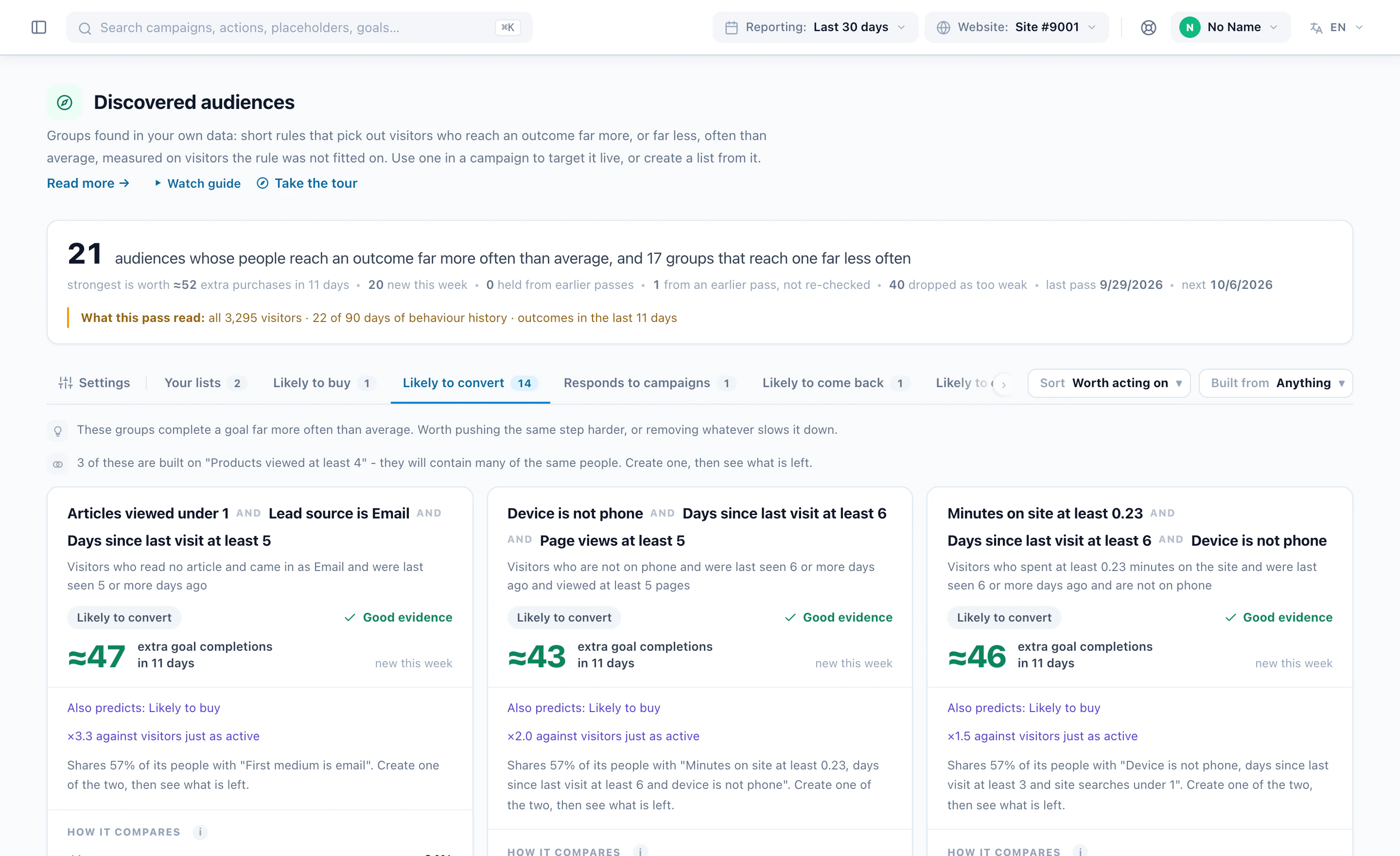
Every week, Personyze reads your own visitor data and finds short, plain-language rules for the people who convert far more often than average — and the ones who convert far less.

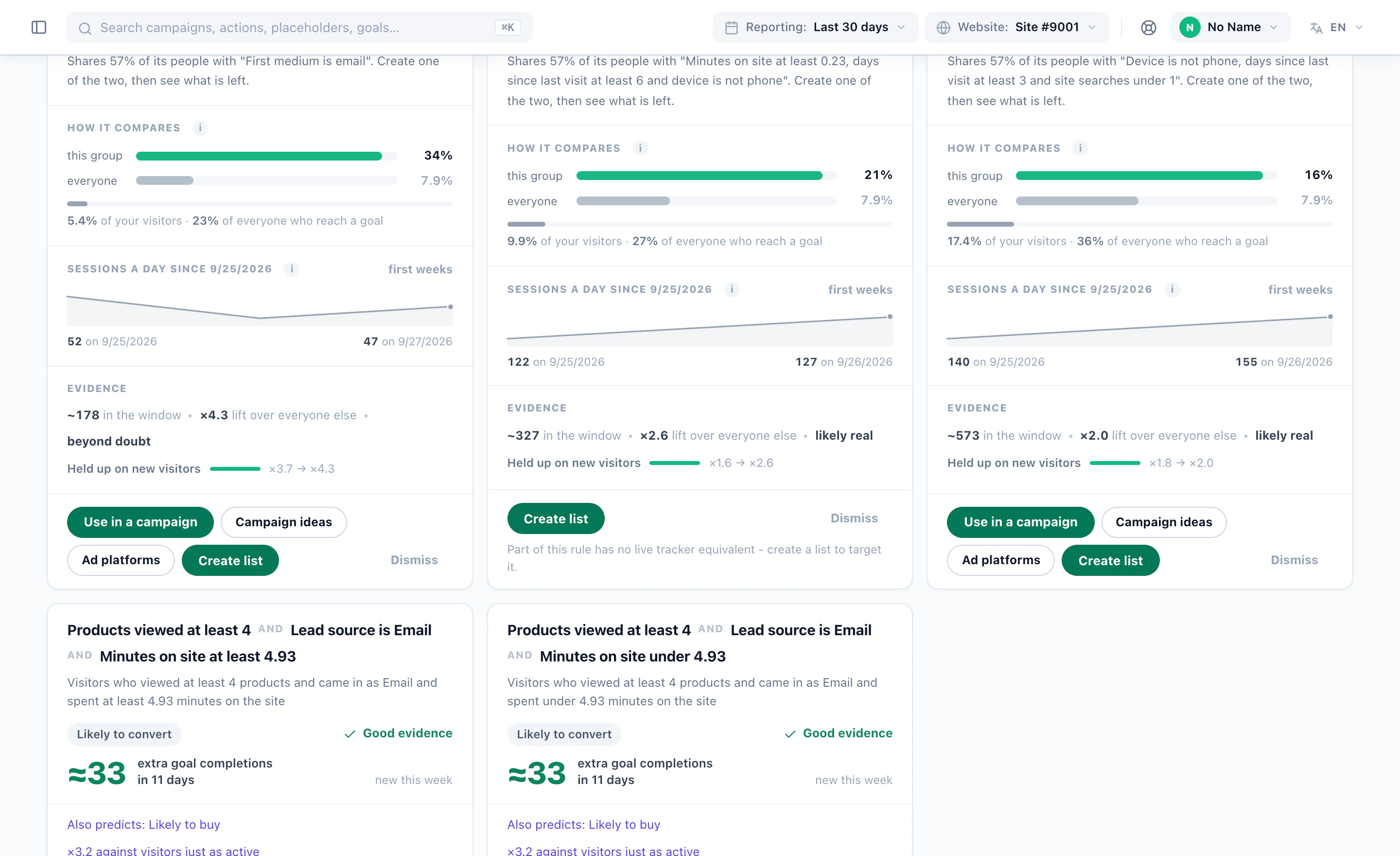
Each finding is a card: the rule in words, how many visitors it covers, how much more often they convert, and how sure we are — measured on visitors the rule never saw. Target it in one click, turn it into a list, or dismiss it.

G24.8 Capterra4.6
What a pass finds

Four kinds of card. All from your own data.

Over-performers by outcome, the ones that shrank on held-out visitors shown as shrunk, and the under-performers the ad budget should stop paying for.

Deep browsers who buy

The shoppers who look at six products and then actually purchase.

A rule like Country is US · products viewed at least 6 · no interest in pen kits is exactly the sort of thing a person never thinks to write — and exactly the sort of thing a decision tree finds in a minute.

  • Three conditions at most, in words a colleague can repeat
  • Ranked by extra purchases, not by lift on a tiny group
  • Targeted live, on every visit, from the moment you click
PurchasedSolid evidence
Country is USProducts viewed ≥ 6No interest in pen kits
≈184extra purchases in 14 days
Lift×3.4Strengthz 9.1Of all buyers19%
Use in a campaignCreate list
×3.4lift on held-out visitors, in the example card
Returners who read pricing

A week away, then back to the pricing page: the intent signal, found rather than guessed.

The audience joins the campaign as a live rule, so the visitor who comes back tomorrow is already in it — no list to rebuild, no export to schedule.

  • Intent outcomes: cart starts, favourites, form starts
  • A “Likely” label until the rule holds a second pass
  • Pairs naturally with a pop-up or a sales hand-off
Showed intentLikely
Returned after 7+ daysViewed the pricing page
≈61extra cart or form starts
Lift×2.9Strengthz 4.2In the window~640
Use in a campaignCampaign ideas
2conditions, and a plain-language name
The CRM tier that converts

When your own fields carry the signal, discovery says so — and only if you switched that data group on.

CRM fields, declared profile, location, engagement, campaign interactions, content, interests and lists are each a switch. Gold tier at three visits or more is a finding you can hand straight to sales.

  • Your data groups, your switches — sensitive attributes off by default
  • The report shows which data group carried the rules
  • A list for the ESP, refreshed daily, with the rule kept on it
Reached a goalSolid evidence
CRM tier is goldVisits ≥ 3
≈47extra goal completions
Lift×3.1Strengthz 6.4In the window~410
Use in a campaignCreate list
Dailylist refresh, weekly mining, live targeting
Where it does not work

The same method finds the visitors who convert far less often. That is a suppression file, not a failure.

Direct traffic that never buys, or a device and source combination that bounces, faces the same floor and the same held-out test as the winners. Exclude it in a campaign, or export it so the ad spend stops.

  • Attach with Exclude instead of Target
  • Export for suppression — a CSV for the ad platform
  • Or fix the experience: a tablet landing page is a campaign
PurchasedUnder-performing
Lead source is Direct
÷1.8on every outcome
Rate0.9%Average2.2%In the window~5,900
Exclude in a campaignExport for suppression
÷1.8the under-performer in the example
How a pass works

Plain statistics. Re-measured out of fold.

No model guesses. Once a week the miner reads your visitor archive, grows shallow decision trees and scans single conditions per outcome, then throws every candidate rule at held-out visitors it was never fitted on. Only what still holds becomes a card.

  • Ninety days, judged on the last fourteen — a visitor “reached the outcome” if they did so in the label window; everything before it is what a rule may read. Low-traffic accounts run 180 / 60.
  • Six outcomes in one pass — purchased, reached a goal, showed intent, clicked a campaign, came back, engaged session. Every outcome with enough positives is mined; you can pin one.
  • “Buyers buy” is not a discovery — an outcome’s own past is excluded from its features. Spend and past purchases are never offered when mining purchases.
  • Interests the AI read from your own pages — the site crawler categorises every page by what it is about, so a visitor who views religious-gift products carries “religious gifts” as an interest, weighted by how much they viewed. Discovery reads it like any other group.
  • Sampled, then scaled back — at most 100,000 visitors are read per pass, and every count on a card is scaled to your whole population.
👤Declared profile
💼CRM fields
📍Location
Engagement
🎯Campaign interactions
🛒Content & products
🏷Auto interests & lists
🔒Sensitive · off
Rules, re-measured on held-out visitors
Trees and scans propose; the holdout disposes. What shrinks is shown as shrunk, what collapses is dropped, duplicates fold into the rule that explains more — and the survivors become cards, ranked by extra conversions.
Auto interests

Your site, read by AI. Your visitors, by interest.

The site crawler reads your pages and AI categorises each one by what it is actually about — in your own categories, not a generic taxonomy. A visitor who views religious-gift products is flagged as interested in religious gifts, weighted by how much they viewed. Audience Discovery reads those interests like any other data group.

  • No tagging plan — the categories are the ones your site already has; the crawler keeps them current as pages change.
  • Contextual, not keyword — the AI understands what a page sells or says, so “menorah oil set” lands in religious gifts without a rule.
  • Why a card can say “no interest in pen kits” — an absent interest is as much a signal as a present one, and the miner may use both.
  • The same interests drive targeting and recommendations — one understanding of your site, used everywhere the visitor is addressed.
🕯Religious gifts
🖉Pen kits
📋Office supplies
💍Wedding gifts
🎉Bar mitzvah gifts
📖Judaica books
💼Desk sets
🎁Gift wrap
This visitor’s interests
Religious gifts 82 · Bar mitzvah gifts 44 · Wedding gifts 21 · Office supplies 8 · Pen kits none — so the card can read “Country is US · products viewed at least 6 · no interest in pen kits”.
What a card carries

One card. The whole case.

Cards are ranked by extra outcomes — the visitors in the rule times how far their rate sits above the average — not by flashy lift on a tiny group. Every number was measured on held-out visitors. Here is one, part by part.

PurchasedSolid evidenceheld 4 weeks
Who is in it
Country is USProducts viewed at least 6No interest in pen kits
≈184extra purchases in 14 days

Against a same-sized group of average visitors. 7.4% of them buy, versus 2.2% on average, and they account for 19% of everyone who does — about 6% of your visitors.

In the window~2,310Lift×3.4Strengthz 9.1Of all who do19%
Held up out of fold · ×3.7 while fitting, ×3.4 on held-out visitors
Use in a campaignCampaign ideasCreate the list onlyDismiss
Shares 71% of its people with one other suggestion · your list “US high-intent” already holds 82%
RealisedTargeted since Aug 18 · 4,120 sessions · 7.1% conversion · ×3.1 against the site average, last 30 days
  1. 1
    The outcome, and how sure we areWhich outcome the group over-performs on. Solid evidence means strength 5+ on held-out visitors and the same rule in at least two weekly passes; Likely is 3+; below that the card leads with the caution, not the number.
  2. 2
    Who is in itAt most three conditions, each one a chip in words a colleague can repeat. The conditions come from the data groups you switched on — including the interests the AI read from your own pages.
  3. 3
    The headline numberExtra outcomes in the label window: visitors × (their rate − the average rate). A 20× lift on 12 people ranks below 3× on 2,000, and the sentence under it says what the number means in plain English.
  4. 4
    The evidence rowVisitors in the window, scaled from the sample to all your traffic; lift on held-out visitors; strength in standard errors; the share of everyone who reached the outcome that this group accounts for.
  5. 5
    Held up out of foldThe lift while the rule was being fitted, printed beside the lift on visitors it never saw. The closer the two, the more the rule can be trusted — and shrinkage is shown, never hidden.
  6. 6
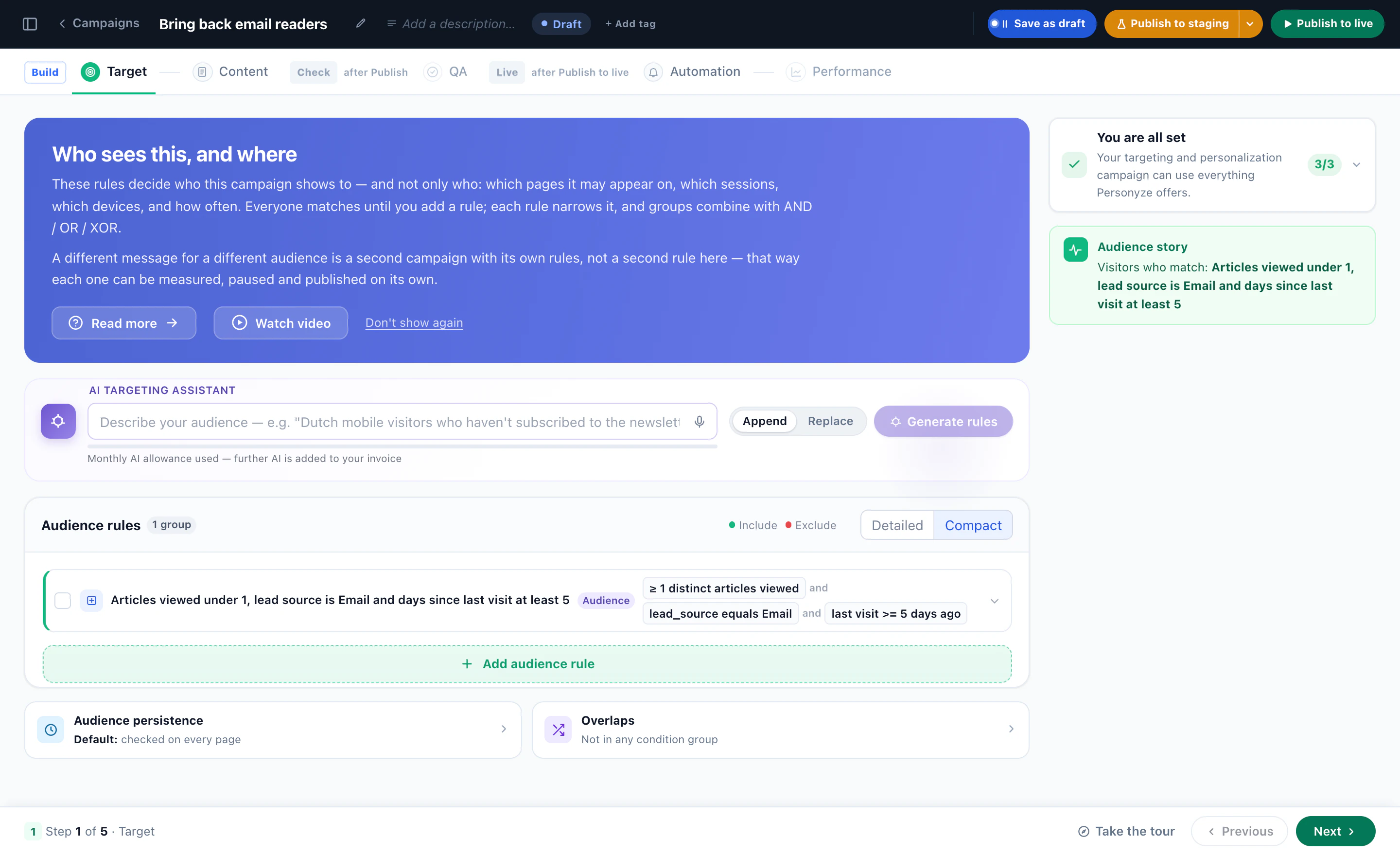
    What to do with itUse in a campaign as a live rule; pick it from the Discovered audiences category in any campaign; make a daily list for email, push and offline; copy its conditions into your own audience; or build a campaign idea for it. Dismiss stays dismissed.
  7. 7
    Overlap, and what actually happenedWhich other suggestions hold the same people and which of your lists already do, so you never build the same audience twice. Once a campaign targets the card, its realised results appear beside the prediction.
How it works

Five steps from switch-on to a campaign that targets it.

From the first weekly pass to the report that says whether anyone acted on what it found.

Step 1 · Switch it on

One switch in the panel

Audience Discovery is an add-on with a trial. Switching it on starts the weekly pass and opens the Audiences menu — nothing to install, nothing to tag.

Takesabout a minute
Step 2 · First pass

Let it read the archive

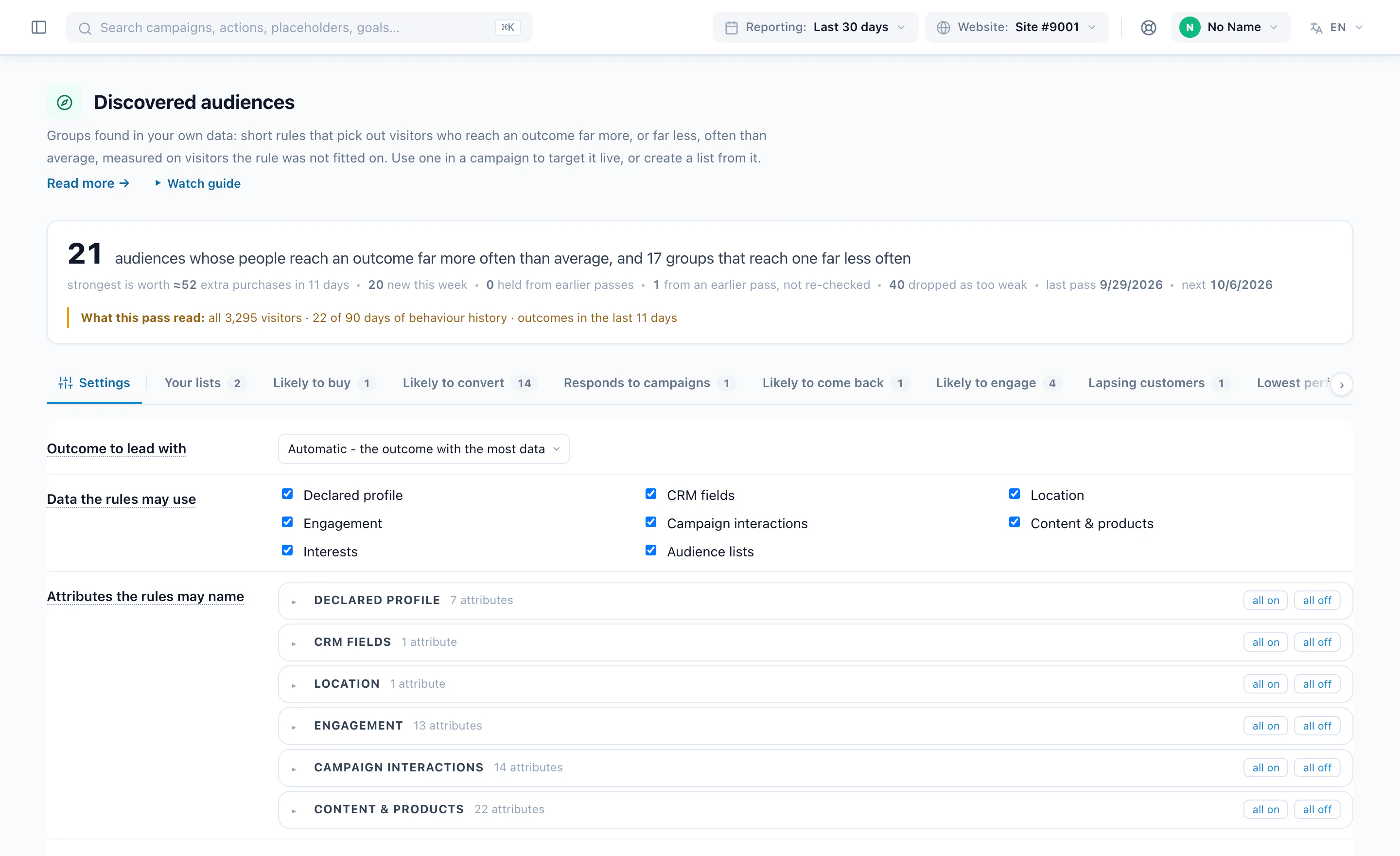
Weekly by itself, or press Run a pass now: ninety days of visitors, six outcomes, at most 100,000 visitors sampled and scaled back. Choose which data groups it may use.

Orrun a pass now
Step 3 · Read the cards

Sorted by what is worth acting on

Extra conversions first, unless you sort by lift, coverage, stability or realised lift. Overlap with other cards and your lists is on the card, and the floor says how many findings it dropped.

Floor30 visitors · z 2 · 1.5×
Step 4 · Act

Campaign, list, or idea

Use in a campaign attaches the rule live on every visit; every campaign’s rule picker has a Discovered audiences category too. Create the list only builds a daily-refreshed list for email, push and offline. Or copy the conditions into an audience of your own.

AlsoClaude, ChatGPT, any MCP client
Step 5 · Keep it honest

The discovery report

Predicted lift and realised lift shown separately; findings that shrank shown as shrunk; a funnel of what was created, has members, and is actually used. Once you target a card, it shows what actually happened for that audience — the feedback loop.

Reportpredicted · realised
Where it shines

Different sites. Different findings.

The method is the same everywhere; what it finds is not. Six kinds of site, and the sort of rule a pass tends to surface on each.

E-commerce · Retail

The buyers hiding behind the browsers.

A store has thousands of shoppers who look and a few hundred who buy. Discovery describes the ones who buy in three conditions — and the ones who never will.

  • Deep browsers by category who purchase far more often than average
  • Cart and favourite starters found by outcome, not by guess
  • Returning shoppers whose second visit is the one that converts
  • Direct or social traffic that bounces — exported for suppression
SaaS · Product-led growth

Which trials become customers.

Pricing visits, docs read, return after a week: the signals a sales team wishes it had, found on the visitors who actually reached the goal.

  • Returners who read pricing, ranked by extra goal completions
  • CRM tier and visit count combinations that convert — if the CRM group is on
  • Content that predicts a sign-up, from the interests your pages already carry
  • The audience as a live rule in a demo-booking campaign, or a list for the ESP
Publishers · Media

The readers who subscribe or come back.

Interests are extracted from your own content already; discovery reads them and finds the reader profiles that engage, return, or subscribe.

  • Interest combinations with far higher return rates than average
  • Engaged-session over-performers by source and device
  • Under-performing sources whose sessions never engage
  • Lists that refresh daily for the newsletter
Travel · Hospitality

Who books, and when they decide.

Long consideration windows suit the 180 / 60 setting. The rules that come back describe the searchers and returners who end in a booking.

  • Destination interest plus a return after a week, as one rule
  • Location and device combinations that book far more often
  • Campaign-click over-performers — who is worth showing an offer at all
  • Suppression files for the audiences that never convert
Financial services

Applications, explained.

Sensitive attributes stay off unless you switch them on. What remains — engagement, content, location, CRM fields — still finds the applicants.

  • Form-start over-performers among calculator and comparison readers
  • Declared-profile rules only when you enable that group
  • Held-out re-measurement, so a compliance reviewer sees the shrinkage too
  • Every card says which data groups carried it
B2B · ABM

The accounts that reach the goal.

CRM fields and reverse-IP company data are data groups like any other. Discovery finds the tier, industry and behaviour combinations that reach your goals.

  • “CRM tier is gold · visits at least 3” handed to sales as a list
  • Pricing readers by industry, ranked by extra goal completions
  • Under-performing lead sources, before the next budget review
  • Draft a campaign for the audience from Claude or ChatGPT
In the platform

The screen, as it ships.

The Discovered audiences page and the Discovery report, drawn as they appear in the Personyze panel. Every number on a card was measured on held-out visitors; the report shows the ones that shrank, too.

app.personyze.com/audiences/discovered
Discovered audiencesiRun a pass now
Last passMon 03:10
Visitors analysed100,000
Outcomes in the last14 days
Rules kept9
Sort byWorth acting onBiggest liftMost converters coveredMost stableRealised lift
This week• 3 suggestionsranked by extra conversions

These groups reach an outcome far more often than average. Every number below was measured on visitors the rule was not fitted on.

PurchasedSolid evidenceheld 4 weeks
Who is in it i
Country is USProducts viewed at least 6No interest in pen kits
≈184extra purchases in 14 days

Against a same-sized group of average visitors. 7.4% of them buy, versus 2.2% on average, and they account for 19% of everyone who does — about 6% of your visitors.

In the window~2,310Lift×3.4Strengthz 9.1Of all who do19%
Held up out of fold · ×3.7 while fitting, ×3.4 on held-out visitors
Use in a campaignCampaign ideasCreate the list onlyDismiss
Showed intentLikelyheld 2 weeks
Who is in it i
Returned after 7+ daysViewed the pricing page
≈61extra cart or form starts in 14 days

Against a same-sized group of average visitors. 12% of them start a cart or a form, versus 4.1% on average, and they account for 9% of everyone who does.

In the window~640Lift×2.9Strengthz 4.2Of all who do9%
Held up out of fold · ×3.3 while fitting, ×2.9 on held-out visitors
Use in a campaignCampaign ideasCreate the list onlyDismiss
Reached a goalSolid evidenceheld 3 weeks
Who is in it i
CRM tier is goldVisits at least 3
≈47extra goal completions in 14 days

Against a same-sized group of average visitors. 9.6% of them reach the goal, versus 3.1% on average, and they account for 14% of everyone who does.

In the window~410Lift×3.1Strengthz 6.4Of all who do14%
Held up out of fold · ×3.4 while fitting, ×3.1 on held-out visitors
Use in a campaignCampaign ideasCreate the list onlyDismiss
Held from earlier passes• 6 suggestionssame rules, found again
Where it does not work• 2 under-performersLead source is Direct · ÷1.8 on every outcome
4 findings were dropped by the floor: fewer than 30 visitors, strength under 2, or lift under 1.5×.
Discovery reporti
Extra conversions available Upper bound412

Across 9 over-performing rules, in a 14-day window. A sum over audiences that overlap, so treat it as a ceiling, not a forecast.

Rules that hold up9 of 11

Seen two weeks or more and statistically strong on held-out visitors.

Lift kept out of fold88%

Rules perform almost as well on visitors they were not fitted on. Healthy.

Lists actually used4 of 6

Created from a suggestion and now targeted by a campaign. The number that says whether the feature is working.

Where the value actually isi9 rules

Each dot is a rule; bigger dots produce more extra conversions. The biggest lifts are always the smallest audiences, and almost none of them are worth a campaign. The shaded areas are the floor.

×1×10×100101,000100,000
Holds upLikelyUnprovenUnder-performingdot size = extra conversions
Is it finding the same things each week?i

Mostly held, with a little churn. The same groups keep reappearing pass after pass, which is what a real segment does.

Jul 28
Aug 4
Aug 11
Aug 18
Aug 25
Sep 1
NewHeldLost
What happened to the ones you acceptediall time
Created6from a suggestion
Have members51 still filling
Used in a campaign4realised lift shown below
ListOutcomeMembersRealised lift
US · 6+ products · no pen kitsPurchased2,180×3.1 · 30 days
Returned 7+ days · pricingShowed intent640×2.6 · 30 days
CRM tier gold · 3+ visitsReached a goal410×2.9 · 30 days
Searched “bulk”Purchased88not yet targeted
Which of your data does the predictingi

Rules using each data group, out of 9. Turning off Content and products would drop 7 of them.

Content and products7
Engagement5
Location4
Auto interests3
Campaign interactions2
CRM fields2
Declared profile1
Sensitive attributesoff

Illustrative account. Weekly by itself, or whenever you press Run a pass now.

By the numbers

Proven at scale. Fast to launch.

+24%
Avg lift on targeted segments
70+
Visitor attributes & data points
20+
Content & targeting widgets
1,500+
Brands using Personyze
Your data, your rules

Eight data groups. Eight switches.

A group that is off contributes nothing to any rule. Nothing is sent to a model, and no data leaves your account. The report says which groups carried the rules, so switching one on is an informed decision.

Declared profile

What visitors told you about themselves.

On by default

CRM fields

Tier, owner, industry, open deals.

On by default

Location

Country and region.

On by default

Engagement

Sessions, visits, time on site, days since last visit, device, browser, how the first visit arrived.

On by default

Campaign interactions

What they clicked, dismissed, converted on.

On by default

Content and products

What they viewed, and how much.

On by default

Auto interests and lists

Interests the AI reads from your own pages through the site crawler; audience list membership.

On by default

Sensitive attributes

Gender, age band. Off unless you switch them on.

Off by default
Direct answers

Nine questions, straight answers.

What teams ask before switching it on: whether it is AI, what it predicts, how often it runs, what it reads, and what a card costs to act on.

Is Audience Discovery AI?

No. The miner is plain statistics: shallow decision trees and single-condition scans, with every rule re-measured on visitors it was never fitted on. The only language model in the picture is the one that already extracts interests from your site’s content; discovery reads those interests but never calls a model itself. Nothing is sent anywhere.

Does it predict which visitor will buy?

No, and it does not claim to. It describes groups of visitors who already convert more often than average — or less — and tells you how sure it is. The targeting that follows is live and per-visitor; the discovery is about groups.

How often does it run?

Mining runs once a week per account by itself, and you can press Run a pass now whenever you want a fresh one. Lists built from a card refresh daily. Targeting through a Discovered audience rule is evaluated live on every visit, so a new visitor who matches is in immediately.

Where do the interests come from?

From your own pages. The site crawler reads them and AI categorises each page by what it is actually about, in your site’s own categories. A visitor who views religious-gift products is flagged as interested in religious gifts, weighted by how much they viewed. That is why a card can say “no interest in pen kits” without anyone tagging a page.

What about small or low-traffic sites?

Each outcome needs enough positives in the label window to be mined at all — the screen tells you which outcomes qualified. Low-traffic accounts can run a longer window (180 days, judged on the last 60). On very small accounts the session archive may hold only a month of history, which limits session-based rules; the report says so rather than inventing them.

Which data does it use?

Only the groups you switch on: declared profile, CRM fields, location, engagement, campaign interactions, content and products, interests and audience lists. Sensitive attributes such as gender and age band are off unless you enable them. An outcome’s own history is never used to explain itself.

How can I act on a card?

Several ways. Use in a campaign opens a campaign with the audience attached as a live rule, and every campaign’s rule picker has a Discovered audiences category so any existing campaign can target or exclude one. Create the list only builds a daily-refreshed list, which works for email, push and offline campaigns because the visitors are flagged. You can copy the card’s conditions into an audience of your own and build on them. Campaign ideas builds a real design in staging with the audience targeted. Dismiss keeps a card dismissed even if a later pass finds it again.

Does it learn from what I did?

Once a campaign targets a card, the card and the report show what actually happened for that audience — sessions, conversion rate and realised lift over the last 30 days — beside the predicted numbers, never blended with them. So you can see whether what you did for the audience worked, and change it.

How do I switch it on?

Audience Discovery is an add-on with a trial, switched on from the panel in a minute — it starts the weekly pass and opens the Audiences menu. Plan and add-on details are on the pricing page.

Get started

Find what your data already knows.

Switch it on, let the first pass run, and open the cards. The first one worth a campaign is usually waiting in the top fold.

Weekly mining · Daily lists · Live targeting · No data leaves your account