
Shopify A/B Testing: How to Test Your Store Without Touching the Theme
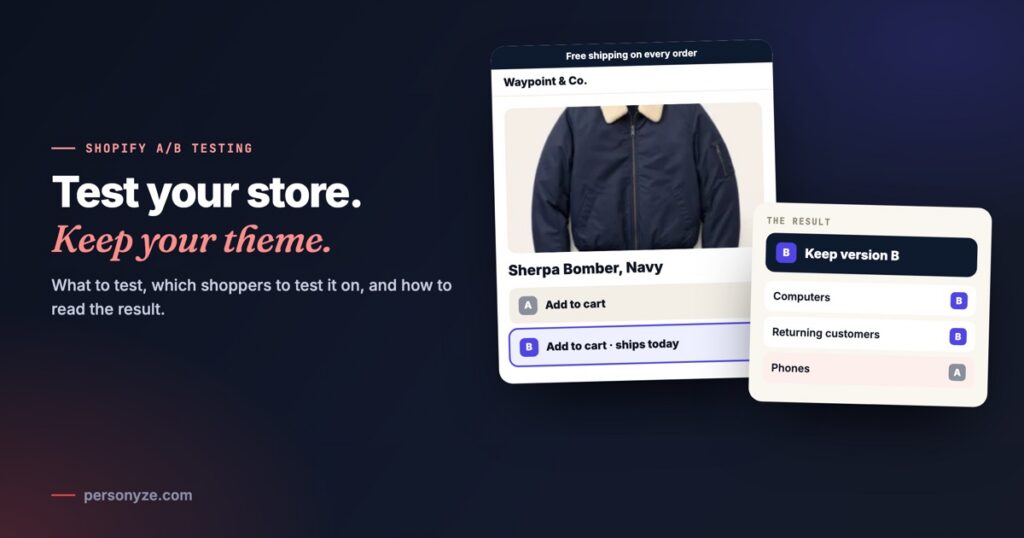
Shopify A/B testing means showing two versions of something on your store to different shoppers at the same time, a headline, an offer, the words on a button, a row of recommendations, and letting purchases decide which one stays. With A/B testing in Personyze, you build both versions on your own store pages, and your theme stays exactly as it is.
Below: what to test on a Shopify store, the two ways to set a test up, which shoppers to test it on, and how to read the result. Two short films show it in the panel.
What you can A/B test on a Shopify store
Anything a shopper sees on your storefront. The tests that matter most on a store sit close to the sale:

 Merino Crew
 Knit Beanie
 Court Sneaker
- The offer in the top barAFree shipping on every orderBFree returns on every order
- The button’s wordsAAdd to cartBAdd to cart · ships today
- The recommendations rowAComplete the lookBSimilar style
- The sign-up askAA bar at the foot of the pageBA pop-up as they leave
- The hero. The headline on your home page or a collection page, the line under it and its button.
- Offers. Free shipping against a discount, or against no offer at all. With AI Promotions you can also hold back a share of shoppers who see no promotion, to learn whether the discount pays for itself.
- Product recommendations. One widget against another on the product page or in the cart, such as bought together against similar items. Each recommendation widget is a version of the test.
- Pop-ups, banners and forms. A pop-up against a banner, two sign-up forms, a countdown against none, each built from a template.
- Words and looks on any page. A button’s words, its colour, a bigger or bolder headline, changed in the visual editor on your own page.
Tests also run in emails and web push, where each person always gets the same version.
Before you start
Install the Personyze Shopify app, or contact your account manager. Everything else Personyze does on a Shopify store, from product recommendations to pop-ups, is on Shopify personalization.
Then pick the one goal the test is judged on, before you build anything. Purchases are the goal closest to money. A click on the button you are testing gives an answer sooner, but a click is not a sale. Revenue per session, order value, a page they reach, such as the cart, or any goal you set up can decide a test too.
Two ways to set up a Shopify A/B test
1. Say what to test, and the AI sets it up
In New campaign, the A/B Testing card has Set it up with AI. Say what you want to test and on which page, in one sentence, such as “new words on the Add to cart button” or “a new hero on my home page”, and press Propose it. Or take an idea from your own data: your busiest pages, each with how long a test there would take to know.
It reads your real page, rings the part it will test and writes version B in your store’s own voice, using only claims your site already makes. Both versions are drawn on your own page, on a computer and on a phone. Before you start, it says how long the test will take with the visits you have today, and when that is too long, it suggests a bigger change or a busier page. Every step of the setup is in the wiki.
2. Build the versions yourself, in any campaign
Any campaign can become a test. On its Content step, open the settings and press Turn on A/B testing. Group A holds what you have; in group B, add the second version and change one thing. The split says how many shoppers see each group, and the share you leave over is the Original: those shoppers see neither version, so you measure what the change adds against your store as it is.
Then say how the winner is picked: the goal it is judged on, and how sure the test must be. Choose Cautious, Balanced or Fast, or set your own confidence, sessions and days. Pick the winner yourself, let auto-pick do it, or let the AI optimizer move shoppers night by night toward the version doing better. The full editor, setting by setting.
Either way, a test goes to staging first: only your own testing devices see it, so you can check each version on your store before a shopper does. Nothing reaches your shoppers until you publish to live.
Who to test it on
A change made for one kind of shopper should be judged by those shoppers. Every test starts with who takes part: every device, only phones or only computers, new or returning visitors, or any targeting rule, such as shoppers who arrived from a paid search ad or left items in the cart.
- AGroup A keeps the page as it is today.
- BGroup B sees the one change.
- OThe Original sees neither, so you can measure what the test adds.
Audience Discovery points to the groups in your own data that convert far less often than average, and can set up a test for one of them alone. A lift that lives in one audience is then not averaged away across the whole store. And when the test assigns by visitor, each shopper keeps the version they first saw on every visit, so nobody sees your store change from one day to the next.
Reading the result
Results are on the campaign’s Performance step. The verdict comes first, in a sentence such as “Keep version B”, and under it each version’s lift on every goal, with how sure it is. A version is called the winner only when it clears the bar you set, how sure, how many sessions and how many days, so a good Tuesday cannot win the test on Tuesday.
Then read it audience by audience. A version can win overall and lose on phones, and each audience can get its own winner, with one click or automatically, while everyone else keeps the overall winner. When a winner is proven, it can go to every shopper by itself, or Personyze can simply tell you and leave the choice to you.
Some things are never finished, like a seasonal banner, so there is no winner worth calling. For those, switch the test to AI: optimize continuously: each night the split moves toward the version doing better, always keeping a share of shoppers on the others. How the two ways decide, step by step.
Five mistakes that waste a test
- Changing three things at once. If version B has a new headline, a new photo and a new button, you will not know which one mattered. Change one thing, or run a multivariate test, where Personyze builds every combination and shows the effect of each element on its own.
- Stopping when a version first leads. Early leads come and go. Let the bar you set decide.
- Judging on clicks when you mean sales. A version can win the clicks and lose the purchases.
- Two campaigns on the same shoppers. Before you launch, the editor shows other campaigns aimed at overlapping audiences on overlapping pages. Two pop-ups arriving together is not a result.
- Changing the versions while it runs. The visits before and after the change would count as one test. To try something else, start another test.
The A/B testing playbook goes further, from choosing what to test first to rolling the winner out.
Why your theme stays as it is
The versions live in Personyze, not in your theme files. Version B is made in the visual editor on your own page, or is a widget Personyze places on it, and it is shown only to the shoppers in its group. When the test is over, the winner can keep running for everyone from Personyze, or you can build it into your theme when it suits you. There is no copy of your theme to keep in step, and nothing to undo if version B loses.
The short version
Install the Personyze Shopify app, pick one goal, and test one change close to the sale: the offer, a button, the recommendations. Let the AI write version B or build it yourself, test it on the shoppers it is for, check it on staging, and let the bar you set call the winner, for everyone or for each audience.
Questions people ask
How do I A/B test my Shopify store?
Install the Personyze Shopify app, or contact your account manager. Then start an A/B Testing campaign: say what to test and let the AI write version B, or build the versions yourself. Choose the goal, then publish to staging to see the test on your own store before your shoppers do.
Do I need to change my Shopify theme to run an A/B test?
No. The versions are made in Personyze, in the visual editor on your own page or as widgets placed on it, and your theme files stay as they are.
How long should a Shopify A/B test run?
Until a version clears the bar you set: how sure it must be, how many sessions and how many days. When you set a test up with AI, it tells you from your own visits about how long the test will take, before you start it.
Can I A/B test product recommendations on Shopify?
Yes. Each recommendation widget can be a version of a test, for example bought together against similar items on the product page, measured on clicks and purchases.
Can I test a discount against no discount?
Yes. Put the offers in a test against each other and keep an Original group that sees neither. With AI Promotions you can also hold back a share of shoppers from a promotion widget, to see what the offers really add.
Will a shopper see different versions on different visits?
Not when the test assigns by visitor: each shopper keeps the version they first saw, on every visit. A test can also assign by visit or by page view.
Book a demo with a personalization expert
30 minutes with a personalization expert. Bring your stack, your goals, your skepticism. We'll show you what changes when every visit feels like the only one.