
Coupon Games and a Tab That Brings the Offer Back: Scratch Cards, Gift Boxes and Codes That Apply Themselves
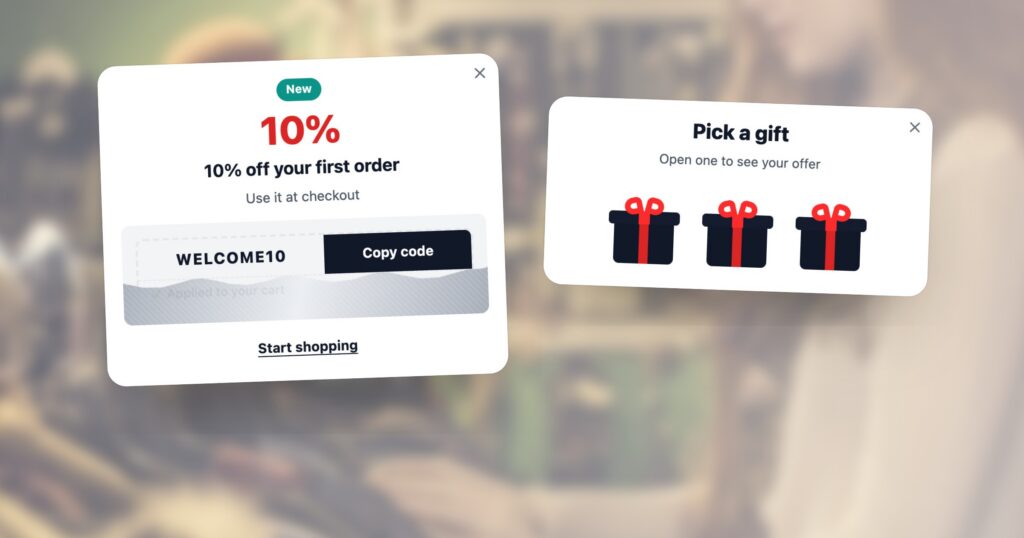
Most coupon popups lose the same way. The popup opens, the visitor closes it before reading it, and the offer is gone for the rest of the visit. The ones who do read it copy a code, forget it, and look for it again at checkout. Three settings on the same coupon popup deal with all of that: make revealing the code something the visitor does, leave a way back after it is closed, and put the code in the cart for them.
Below is each one as a visitor sees it, then as you set it. The coupon designs are shown with sample data; the settings are the real editor on a demo account.
Where the code comes from
Every coupon starts on the Coupons screen. A coupon is one of three kinds: a shared code everyone gets, generated codes made from a pattern so each visitor gets their own, or a code pool — a list of codes you upload, one per visitor. The screen counts how many were handed out and used, and warns when a pool runs dry.
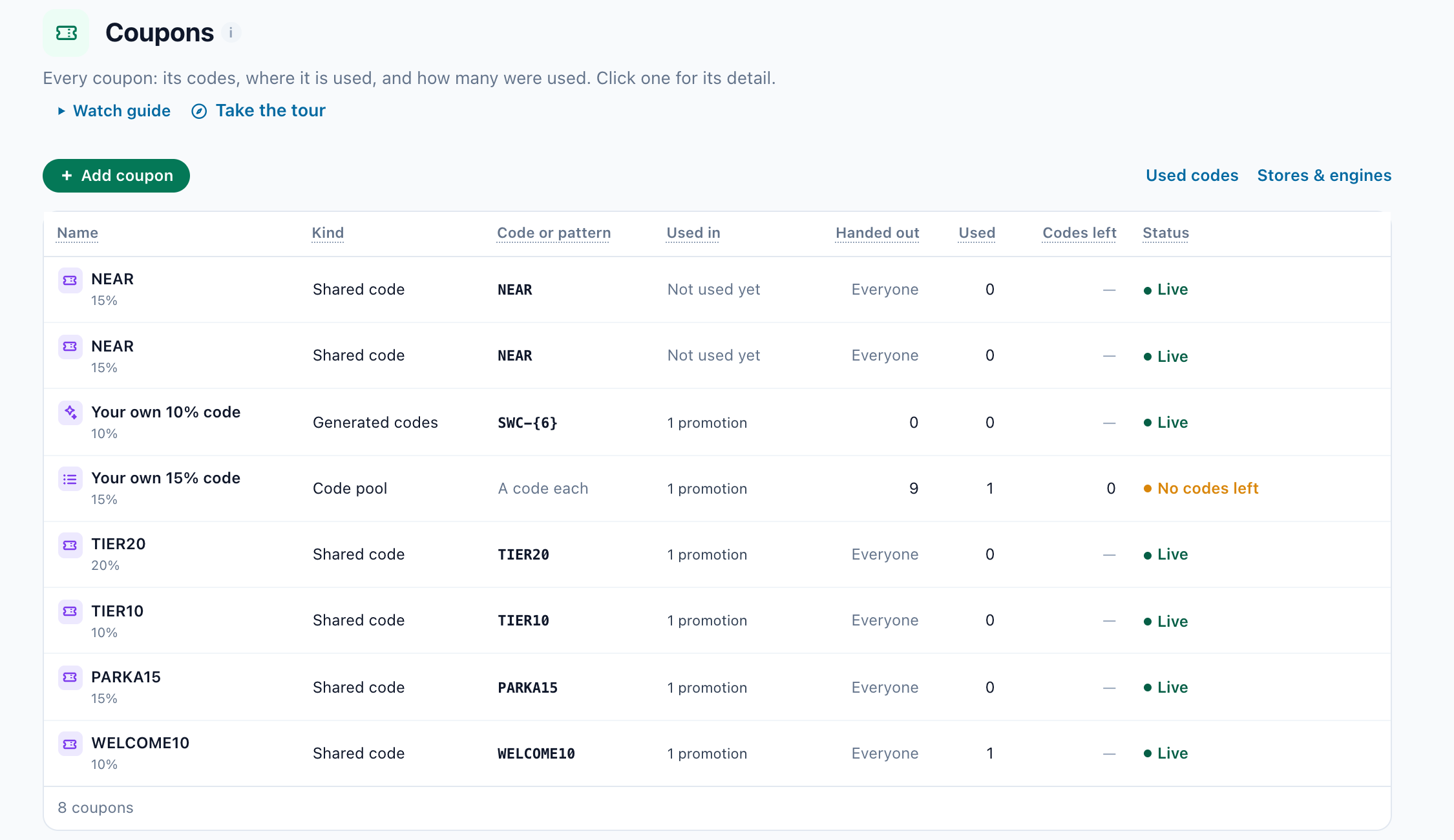
WELCOME10, generated codes from the pattern SWC-{6}, and a pool marked No codes left — nobody new gets one until you add codes. A demo account.The coupon reaches visitors through a promotion, and an AI Promotion Coupon in a campaign picks which promotion each visitor sees — the most popular, the one matching the page’s category or their last search, the one valid at their nearest store, or one it learns to optimize. Keeping every offer in one list is covered in one list of promotions, chosen per visitor. What follows is about how the coupon is shown.
Make revealing the code something the visitor does
Pick the design when you add the coupon: AI Promotion Coupon, then choose a template. The Game filter shows two.
Scratch Card
The code sits under a silver or gold foil. The visitor scratches it with a finger or the mouse, and the code with its Copy button is underneath. It is counted once, as Code revealed, and the reveal is remembered on later pages, so nobody scratches the same card twice. The offer itself can stay a surprise until then.
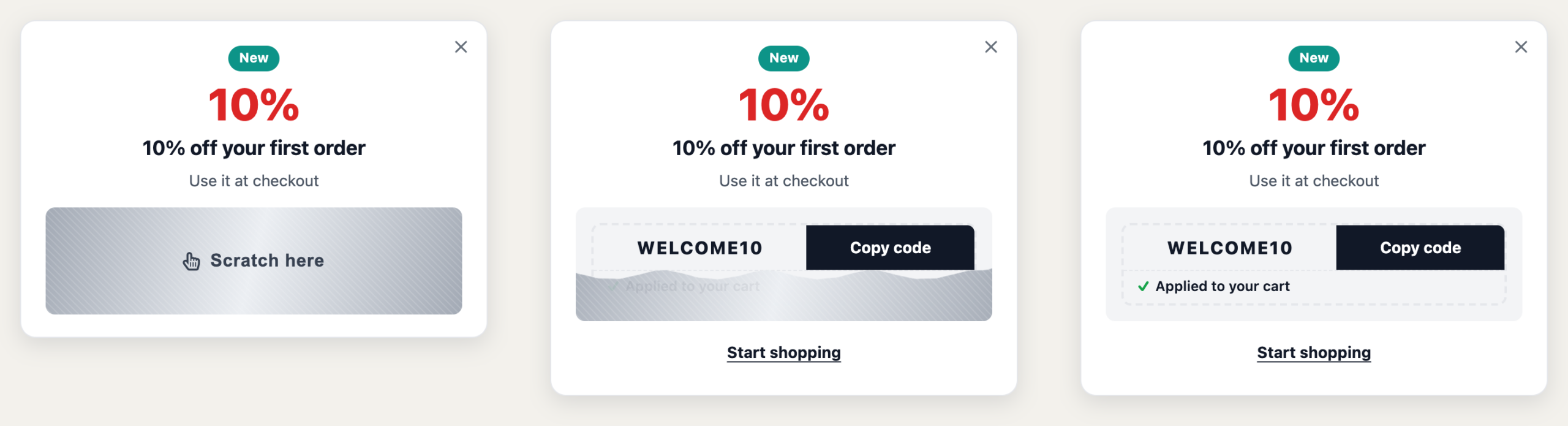
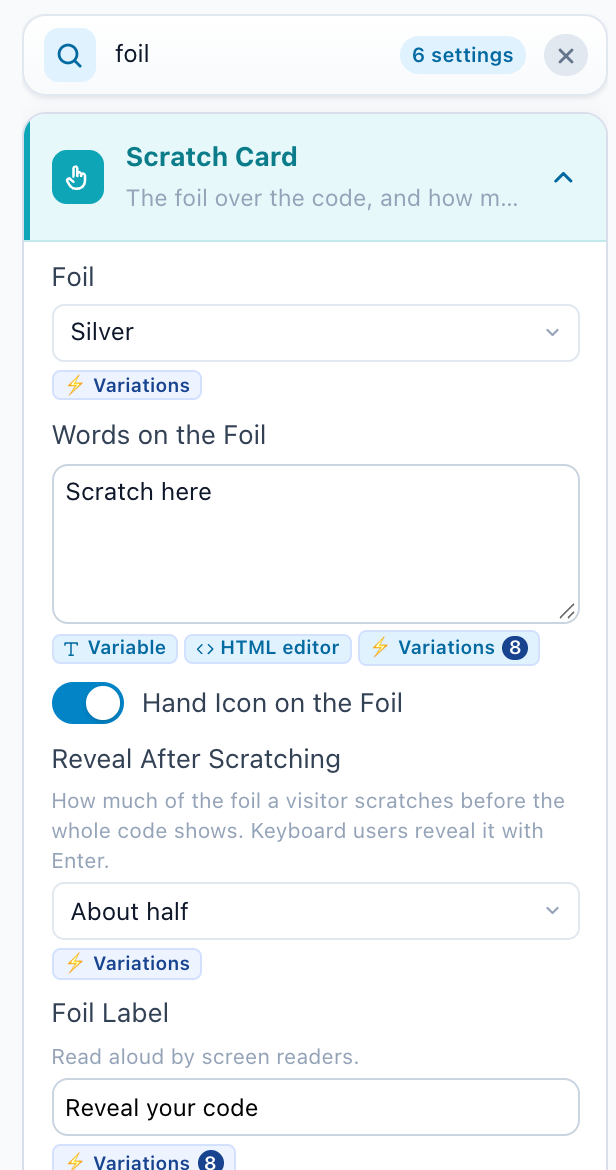
Its settings are in the design step, under Scratch Card:
Pick a Gift
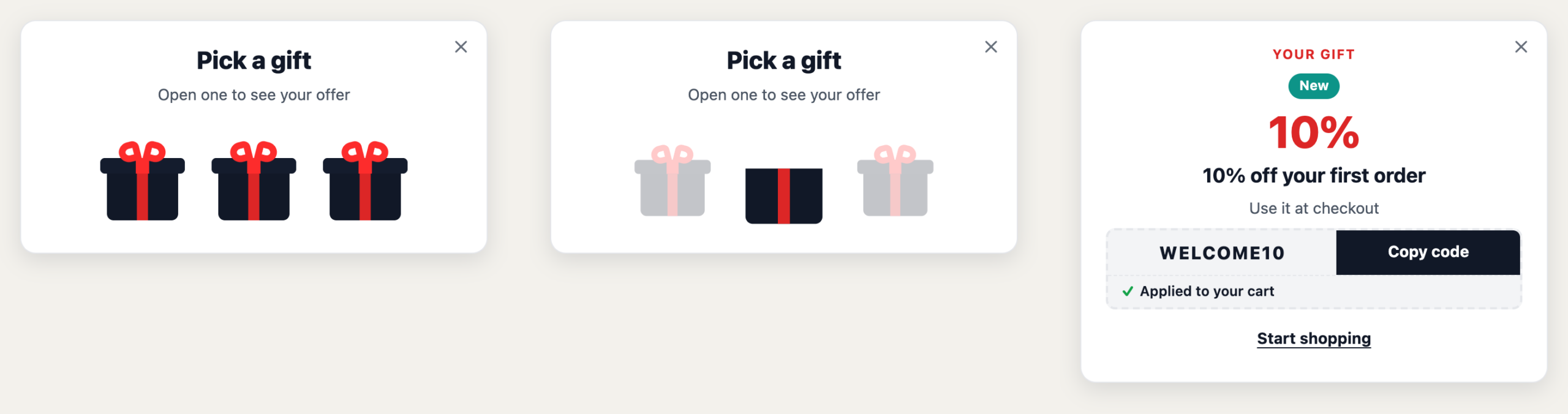
Two to four gift boxes. The visitor picks one, its lid flies off, and the coupon is there: the discount, the code with its Copy button, and the Apply button. Every box holds the visitor’s own coupon, so there is no losing box and nothing to feel cheated by — the game is the moment of choosing. The pick is remembered on later pages.
Put the code in the cart for them
A copied code is a code that can still be forgotten. Apply It by Itself, in the coupon’s Coupon Code settings, removes the step: when the visitor copies or reveals the code, it goes into their cart — at once on a Shopify store, and on other stores into the coupon field when they reach the cart or checkout.
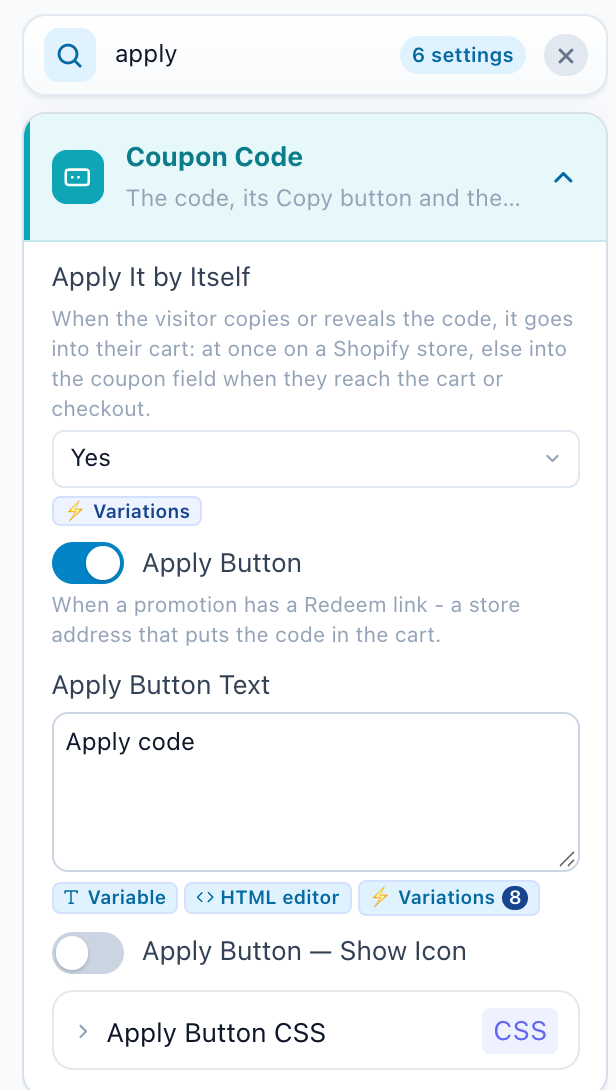
The coupon says which happened, under the code: Applied to your cart on a store where it went in at once, or It will be applied at checkout where the store adds it later. Both lines are yours to reword. Set it to No – they paste it when you would rather they enter it themselves.
Leave a way back after it is closed
A closed popup usually means a lost offer. The popup’s placement step has a row for that: After it’s closed. Just close is the old behaviour. Leave a tab keeps a small tab with your words at the edge of the screen, and a click on it opens the popup again.
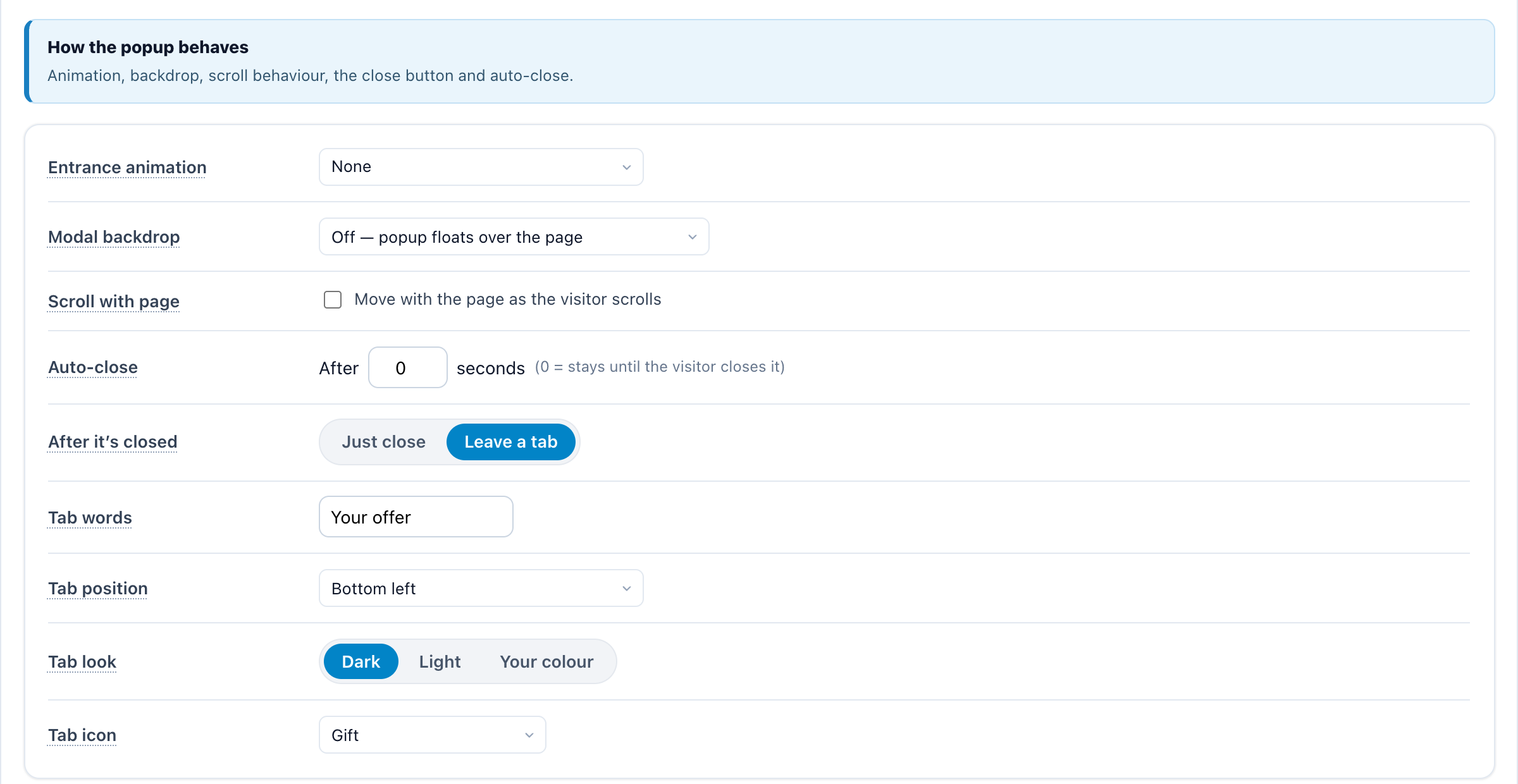
- For the rest of the visit the popup stays a tab instead of opening by itself again, until the visitor opens it or puts the tab away with its ×.
- Only the visitor’s own close leaves a tab. A popup that closes itself with Auto-close does not.
- Bottom left keeps the tab clear of a chat button, which usually sits bottom right. The edges take a tab standing up.
- Keep the words short and specific: “Your 10% off” works; “Click here” does not.
- A popup that opens from a click on your page has no tab: its own trigger is already the way back.
When to open it, and whether it worked
The same placement step decides when the popup opens: as the page loads, after a delay or some scrolling, when the visitor goes idle, or on exit intent — the cursor heading for the close button on a desktop, a Back tap on a phone. A game reads best where a visitor is deciding, not the moment they arrive.
Then measure it the honest way: redemptions show who used a code, not who bought because of it. Hold back a share of visitors who see no coupon, and compare — measure the lift of a promotion with a holdout shows how.
The checklist
- A coupon of the right kind: shared, generated per visitor, or a pool with enough codes.
- A design that makes the reveal an action: the scratch card or the gift boxes.
- Apply It by Itself on, with both lines under the code in your words.
- After it’s closed: Leave a tab, with short words and a spot clear of your chat button.
- Opened where people decide, not the second they land.
- A holdout, so the result is orders, not redemptions.
Questions people ask
Does every gift box hold a different prize?
No. Every box holds the visitor’s own coupon, so whichever they pick, they get the offer meant for them. The game is the moment of choosing, not a lottery.
What happens on later pages after the visitor scratches or picks?
The reveal and the pick are remembered, so the code is shown again instead of asking the visitor to play twice. A scratch is counted once, as Code revealed.
How does the code get into the cart?
With Apply It by Itself on, copying or revealing the code applies it: at once on a Shopify store, otherwise in the coupon field when the visitor reaches the cart or checkout. The coupon says which of the two happened.
Will the tab keep reopening the popup?
No. After the visitor closes it, the popup stays a tab for the rest of the visit and opens only when they click the tab. The tab’s × puts it away.
Can people who cannot use a mouse reveal a scratch card?
Yes. Keyboard users reveal it with Enter, and the foil has a label that screen readers read aloud.
Book a demo with a personalization expert
30 minutes with a personalization expert. Bring your stack, your goals, your skepticism. We'll show you what changes when every visit feels like the only one.