
Email Sequences That Know When to Stop: Planning Conditional Follow-Ups
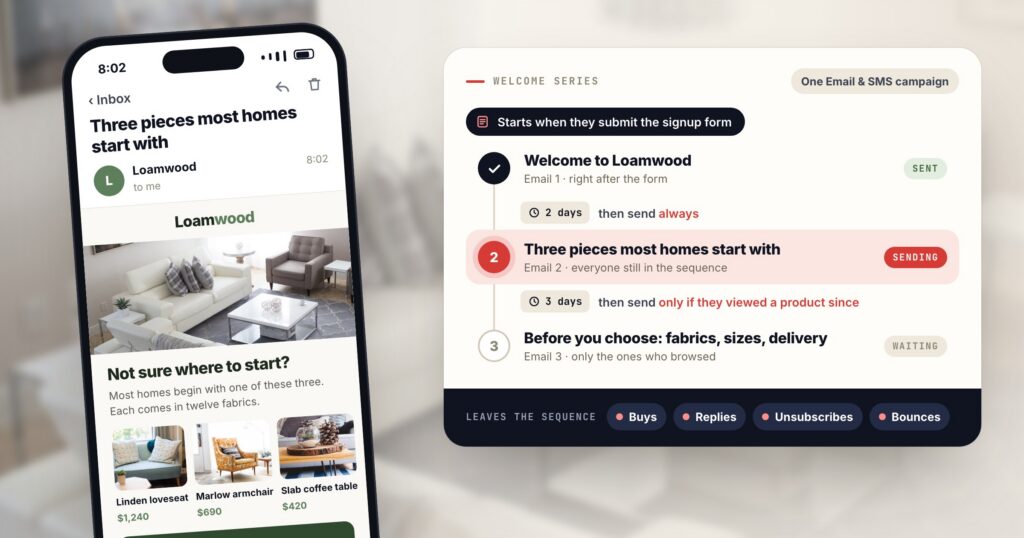
Most drips are built as a timetable: email 1 on signup, email 2 three days later, email 3 a week after that. The timetable can’t see that someone bought on day two, so the “still deciding?” email arrives the morning after their order. It can’t see that someone replied with a question, so a cheerful reminder lands in the middle of a conversation with your team. And it keeps mailing the person who hasn’t opened anything since the welcome.
Each of those emails tells the reader that nobody is paying attention. A sequence that behaves needs three things at every step: a wait, a reason to send and a reason to stop. This post is a way to plan all three, with Personyze as the worked example.
In Personyze, a welcome series or drip is several emails in order inside one Email & SMS campaign, with one audience for all of them. Each follow-up waits a number of days after the previous email, then goes to everyone who got that email or only to the people a condition picks out. Buyers, people who reply, unsubscribes and bounces leave the sequence.
When a sequence is the right tool
When one moment needs one message, a single email does the job: a booking confirmation, a receipt, one reminder. A sequence earns its place when the job takes more than one email, or when the next message depends on what the person did with the last one. The usual cases:
- A welcome series. Someone signs up through a form. Email 1 says hello and points to the best place to start; the next ones show the range to people who haven’t bought yet.
- A cart reminder in two steps. The first email an hour after the cart, a second one a day later for people who didn’t open the first. The cart abandonment email example shows what the first one can hold.
- After a form, a survey or a booked meeting. A thank-you first, then a follow-up only for people who didn’t come back to the site.
- A coupon nobody used. Start when someone got a code and hasn’t used it, and let the purchase end the series.
The first email’s Timing step decides what starts the sequence: joining the campaign’s audience, adding to the cart, buying, submitting a form, answering a survey, booking a meeting, redeeming a coupon or holding one unused, reaching a goal, clicking a link in an email, and a few more. Every email after it follows the one before. If you are still choosing which drips to run at all, this guide to email drip campaigns covers the common ones.
Plan the sequence on one page first
Before designing a single template, write the plan as one line per email. Each line answers four questions: how long after the previous email it goes, who gets it, what it is for, and what would make it pointless. The last question gives you your exits. Here is the plan for a fictional furniture shop’s welcome series.
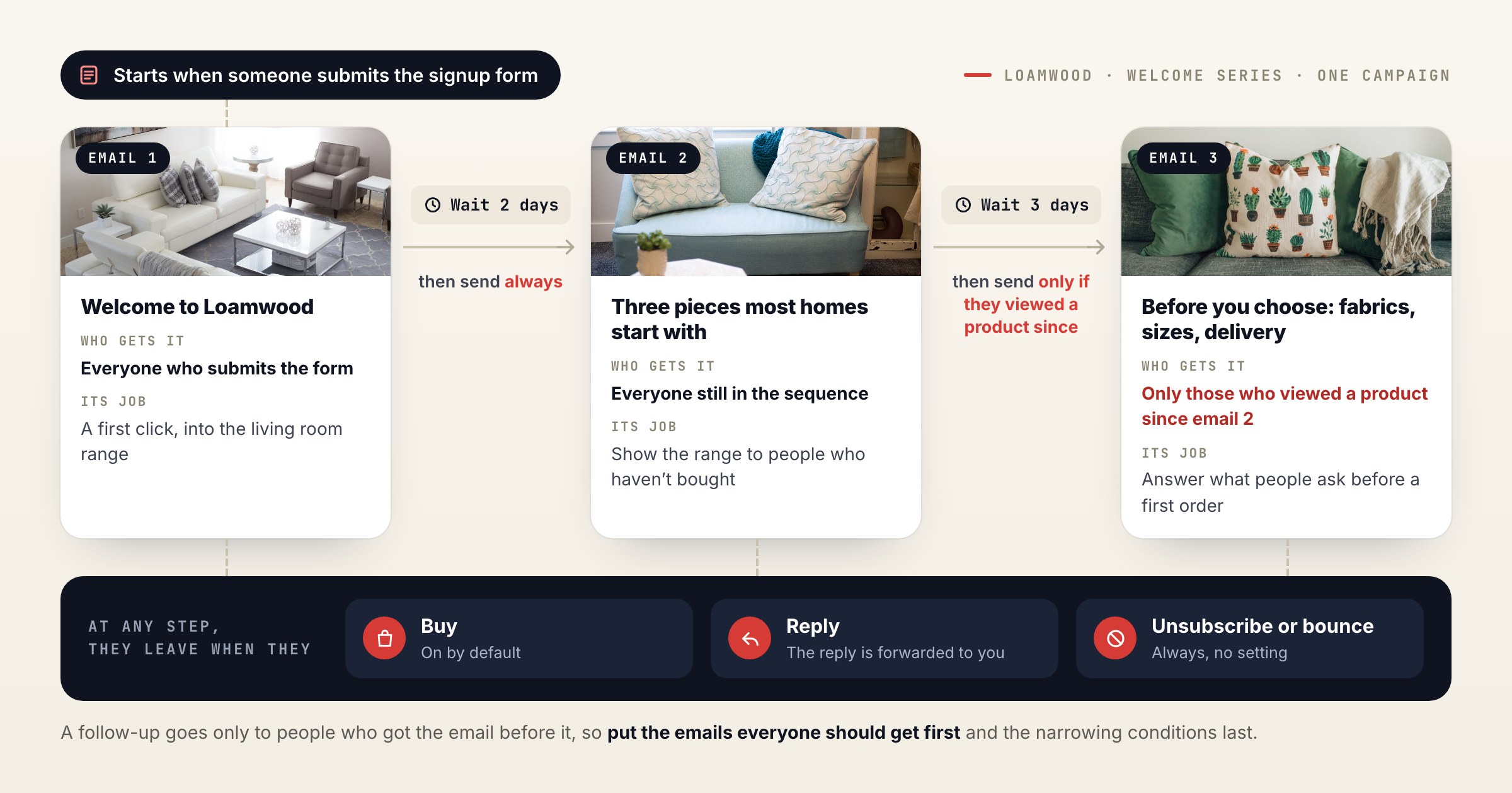
- Email 1 goes as soon as someone submits the signup form. Its job is a first click, into the living room range.
- Email 2 waits two days and goes to everyone still in the sequence. “Always” is safe here, because the people who bought or replied have already left.
- Email 3 waits three more days and goes only to people who viewed a product since email 2. They are choosing, so it answers what people ask before a first order: fabrics, sizes, delivery.
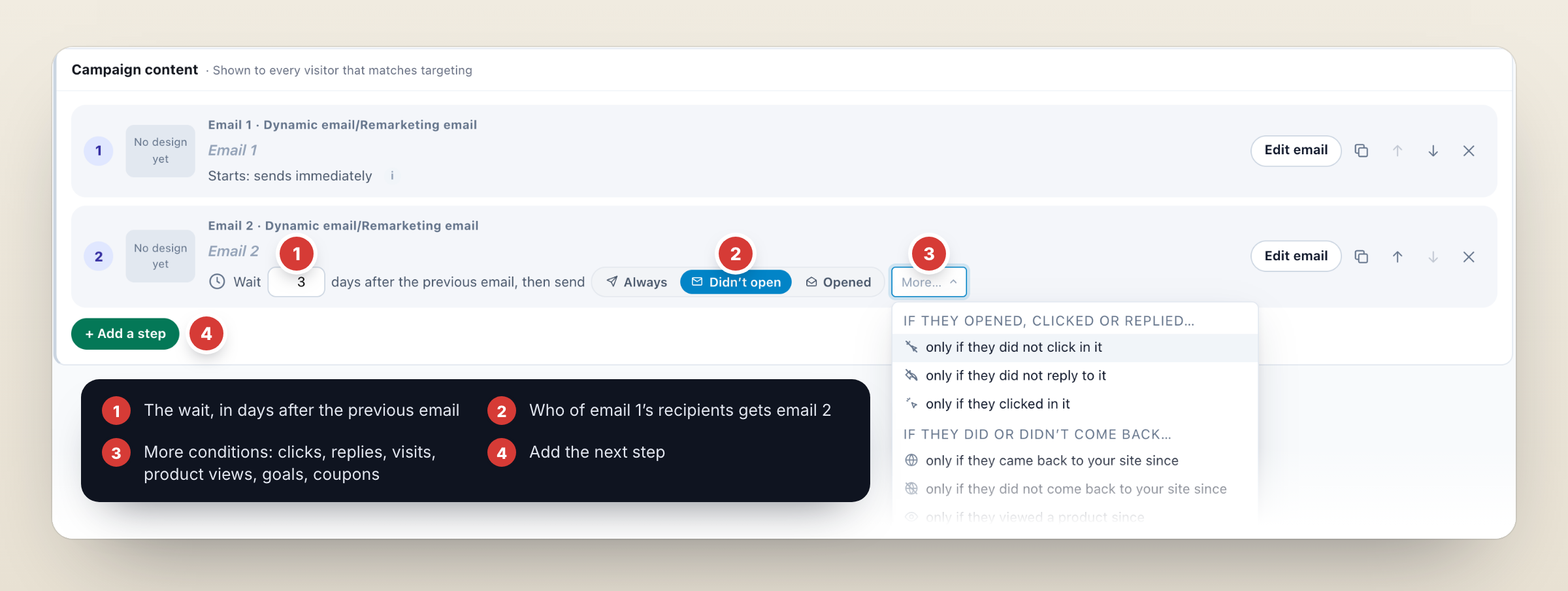
In the panel, start a campaign and pick Email sequence: it opens an email campaign with two linked emails, and + Add a step adds the next one. The emails are listed in order on the Content step, each with its wait and its condition, so the page reads like the plan you wrote.
Pick each step’s condition from the previous email’s job
A follow-up can go always, or only to people who did or didn’t do something after the previous email. Every condition counts “since the previous step was sent”: “came back to the site” means a visit after that email went out. To choose one, ask what the previous email was trying to get people to do.
| Send only if they… | Use it when |
|---|---|
| Didn’t open | The last email never got read. Send the same message with a different subject line, or a shorter version of it. |
| Opened | They read it. Go one level deeper on the same subject. |
| Clicked / didn’t click | The email asked for a click. People who clicked get the next level; the rest get a different angle. |
| Didn’t reply | The email asked a question, such as a follow-up after a sales conversation. It needs Track replies on that email, which the panel switches on. |
| Came back / didn’t come back | The email’s job was a visit to your site. Pick up from the visit, or give the others a reason to come. |
| Viewed a product | They are browsing the range. Help them choose. |
| Reached a goal / didn’t | Any goal you track, or one you pick: a trial started, a signup finished, a page reached. |
| Used the coupon / didn’t | The previous email carried a coupon. Thank the people who used it and remind the rest. |
One rule shapes the whole plan: a follow-up goes only to people who got the email before it. When a condition holds someone back at step 2, step 3 and the steps after it don’t reach them either. Put the emails everyone should get early in the order, and the conditions that narrow the list toward the end.
What takes people out of the sequence
Conditions decide who gets the next email. Exits decide who gets none of the rest, and they are what keeps a drip from mailing people who are already done with it. They sit on the campaign’s Target step:
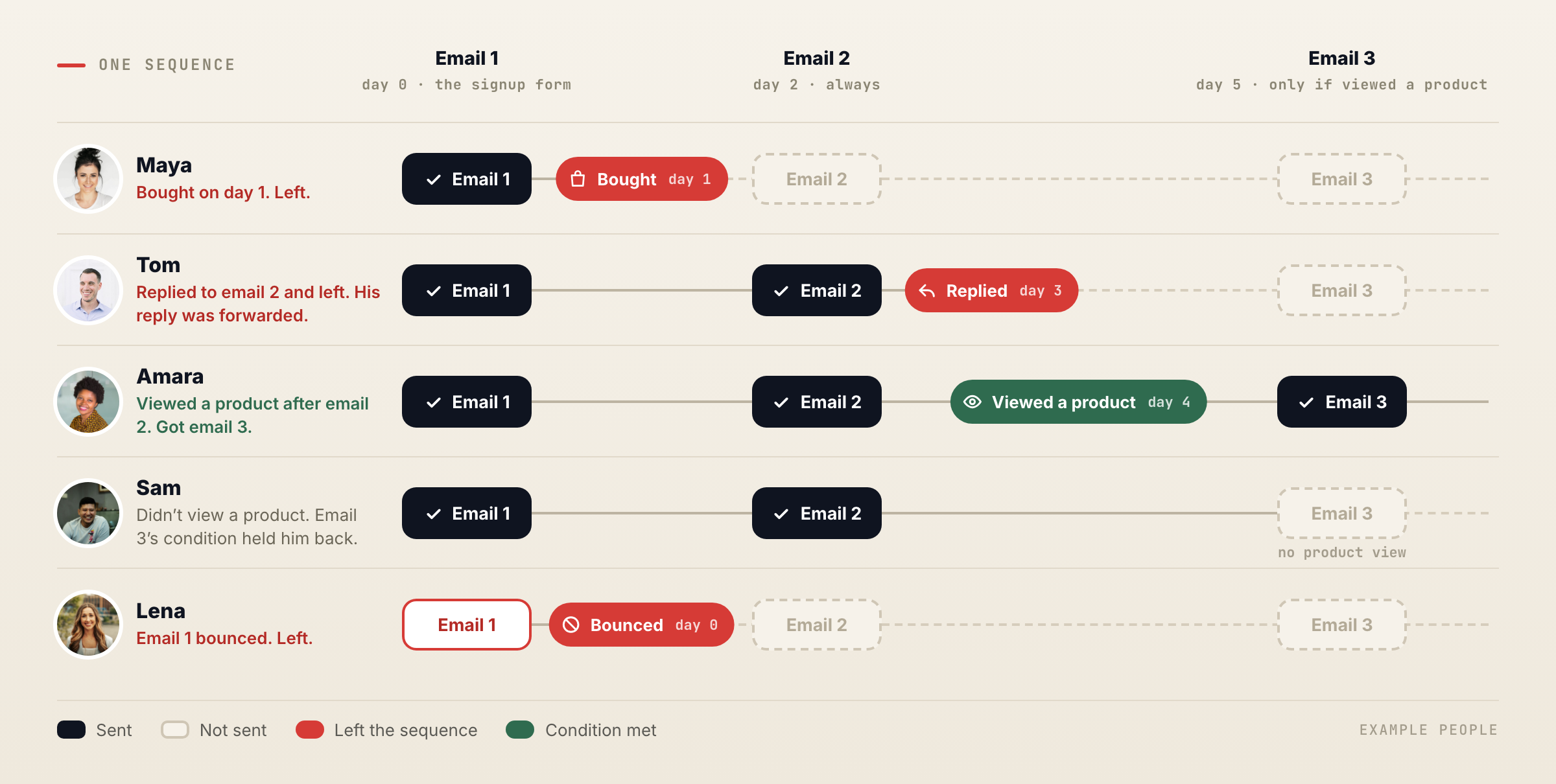
- Buyers leave. On by default. Someone who buys gets none of the steps that follow, so there is no “still deciding?” after an order.
- Replies leave. A person who answers an email is talking to you, and the automated steps stop for them. Replies are tracked on emails sent through the Personyze server: auto-replies and out-of-office messages are filtered out, and the human replies are forwarded to you.
- Unsubscribes and bounces always leave. There is no setting for these, and no further step goes to them.
Add the people a condition held back and you have every way out. Read the plan once more with all of them in mind: a step that would be awkward for someone who bought, replied or went quiet needs a condition or an exit.
Resend, test and read the results
From any email’s report, Resend to non-openers creates a follow-up for the people who didn’t open it. It is created inactive, so you can review the subject and the content before anything goes.
A sequence has no A/B test groups. Each email in it can still test its subject line: up to three subjects for the same email, split evenly, with results per subject in the report. Start with email 1, the one every subscriber gets.
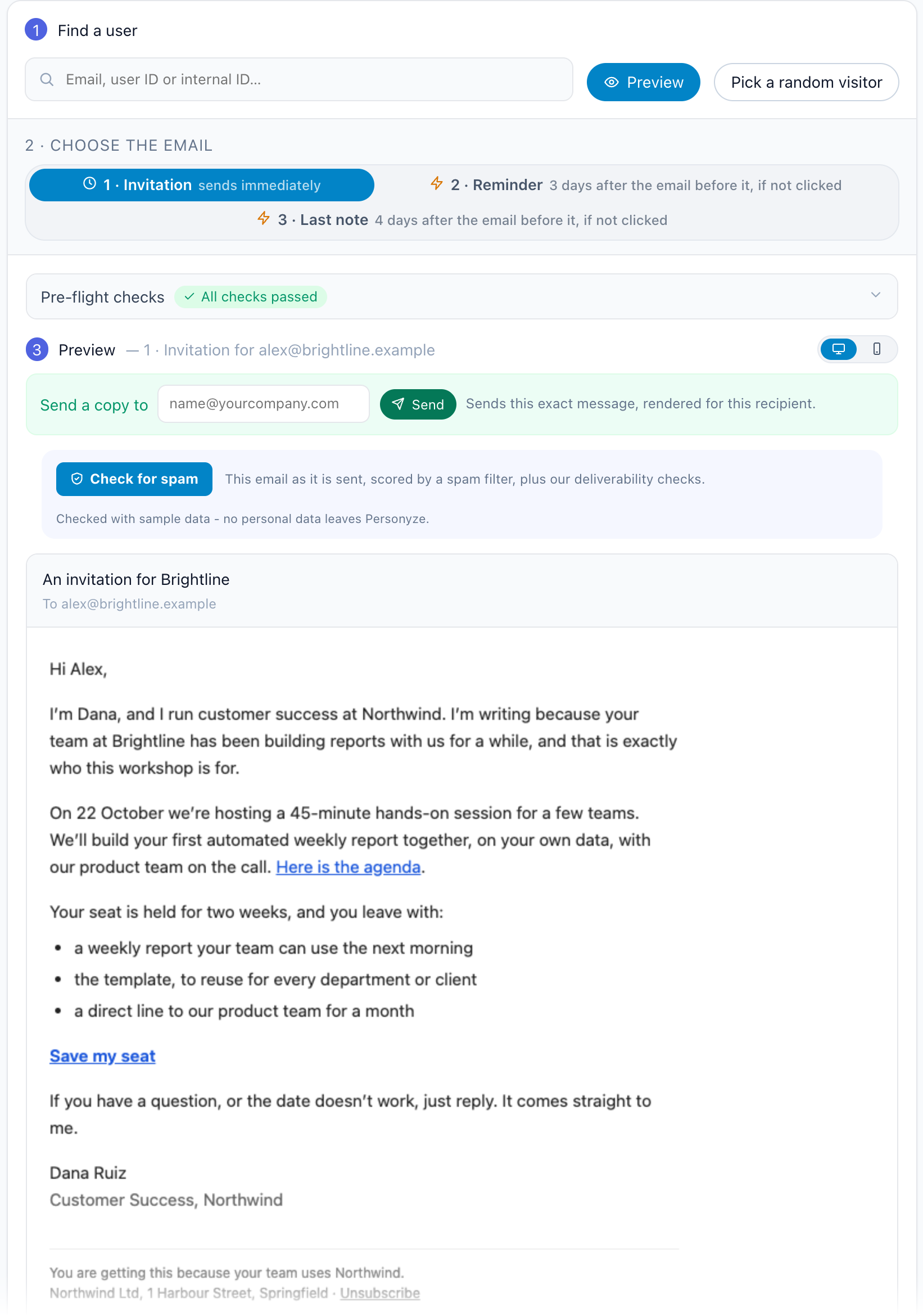
Before it goes out, Preview by user in the QA step shows any email of the sequence exactly as one person will get it, with their own details — switch between the steps to read the whole sequence as they will.
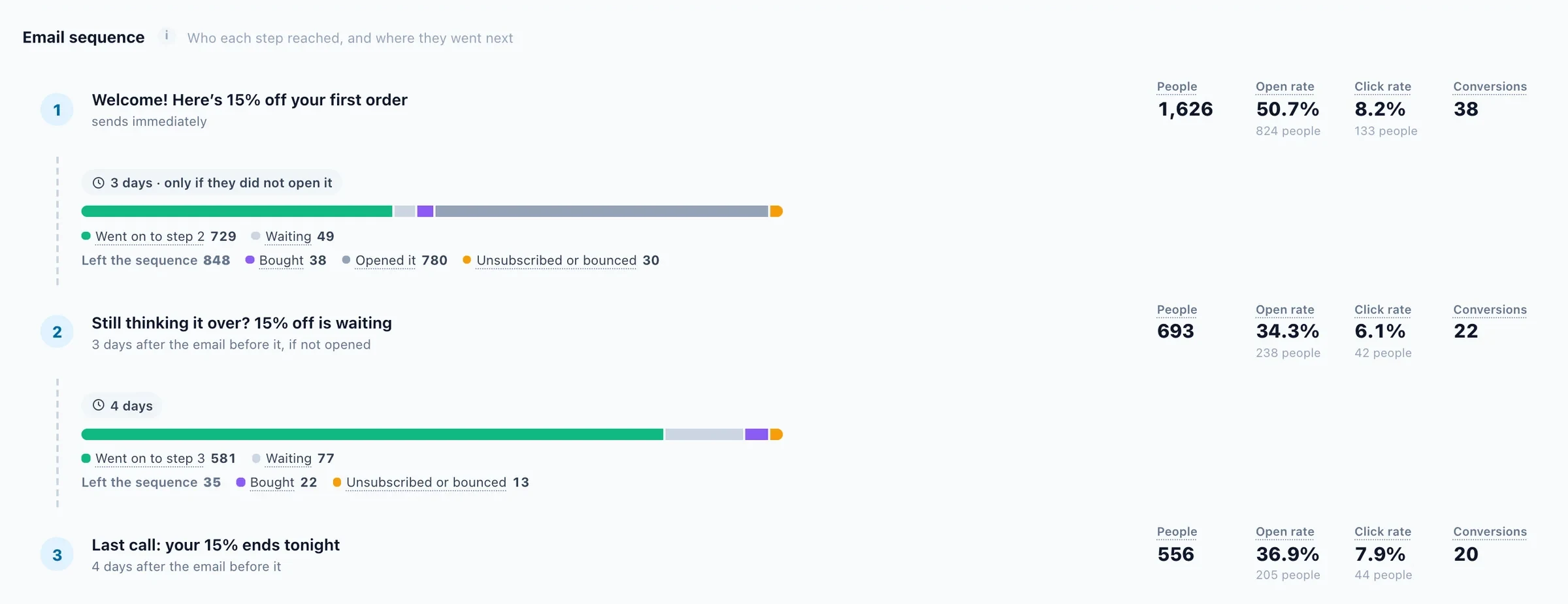
When you read the results, read each step on its own. Email reports include a reply rate, which matters for any step that asks a question. A step that reaches few people may simply have a narrow condition. A step with plenty of sends and no clicks is the one to rewrite.
A worked example, every screen included: how to build a personalized email invitation sequence, and the same sequence as an interactive invitation sequence example.
See email personalization in PersonyzeSequences started by what people do on your site, conditions on every follow-up, and exits for buyers and replies.Questions people ask
What is a conditional follow-up email?
An email in a sequence that goes only to people who meet a condition after the previous email: for example those who didn’t open it, didn’t click in it, or came back to the site since it was sent.
How do I stop a drip for people who already bought?
In Personyze, buyers leave a sequence by default: someone who buys gets none of the remaining emails. People who reply leave too, and unsubscribes and bounces always do.
What can start an email sequence?
The trigger on the first email’s Timing step: joining the audience, adding to the cart, buying, submitting a form, answering a survey, booking a meeting, redeeming a coupon or not using one, reaching a goal, clicking a link in an email, and others.
Does the “didn’t reply” condition need any setup?
It needs Track replies on the email before it, and the panel switches that on for you. Replies are tracked on emails sent through the Personyze server.
Can I A/B test a sequence?
Not with test groups. Each email in the sequence can test up to three subject lines, split evenly, with results per subject.
Book a demo with a personalization expert
30 minutes with a personalization expert. Bring your stack, your goals, your skepticism. We'll show you what changes when every visit feels like the only one.