
Build a Personalized Website With AI: Six Setups, Each Started With One Button
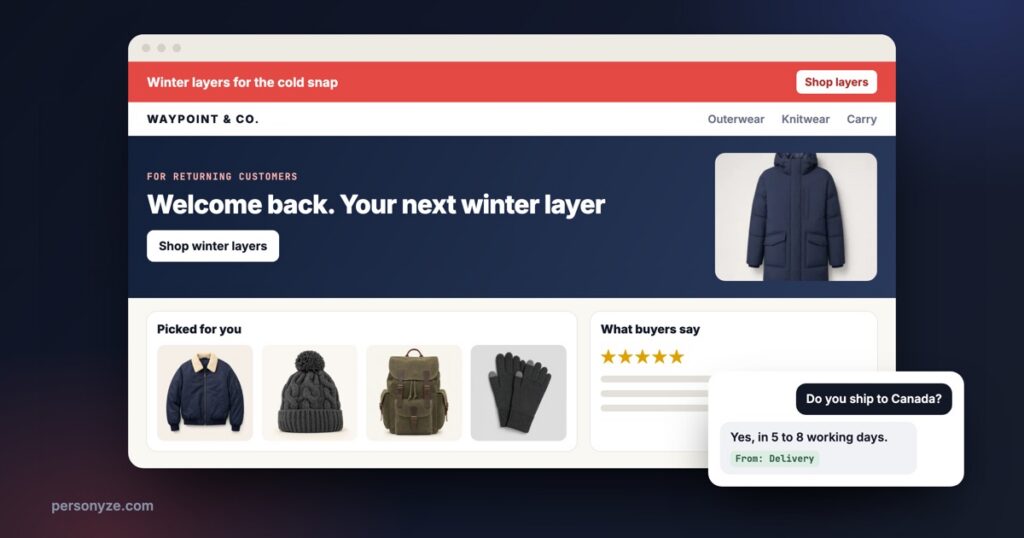
A personalized website used to be a project: find your audiences, write a version of each page for them, choose what to recommend where, collect reviews and offers, then build all of it and test it. Most sites never got past the first page.
Personyze now builds those parts for you. In New campaign, six cards set up their part with AI: Personyze reads your site, your products or your articles, builds that part of your site for each visitor, and hands it to you to check. Most ask once whether to Set it up for me or go step by step, and once yours exists, the card opens it again.




 Breaking in new boots
 Five spring trails
From: Delivery
What follows is each setup in turn, with a short film of it where there is one.
1. Your pages, a version for each audience
The AI reads your site and makes your own pages speak to each visitor’s segment: your hero, a message bar, your pricing table, your form and more, in words written for that segment. It finds the audiences your pages speak to, you check them, and it writes the versions from what your site already says, two for a hero so they can compete. You approve each one. Once live, each visitor sees their segment’s version, and a share of each segment keeps your page as it is, so every version is measured against it. Automated personalization with AI walks through it screen by screen.
2. Product recommendations for your whole store
Set it up with AI on the Product Recommendations card reads your products from your store, your feed or your product pages, checks what your visitors view, add to the cart and buy, reads your kind of shop, and places each widget on your home, product and cart pages in your store’s look, drawn on a picture of your own page. The last step lists every widget, the page it goes on and what it shows today. Each visitor then gets their own picks, and a widget shows something useful from the first visit.
3. Content recommendations for your articles
The same idea for a blog, a publisher or a help center. Content recommendations, set up with AI, reads your articles, their titles, pictures and dates, sees what your readers read, and finds a spot for each widget on your own pages, on a computer and a phone:
- Read next on article pages, picked for each reader from the article they are reading.
- Recommended for you on the home page, from what they and readers like them read (see content recommendations).
- Recently read on the home page, the articles this reader read, to go back to.
Until reads come in, the widgets show your newest and most read articles, and become personal by themselves. A store with articles can also pair each article with the products it is about, both ways.
4. Reviews, the strongest ones where visitors decide
Reviews, set up with AI, counts the reviews you have and finds the review platform your site runs, such as Trustpilot, Judge.me or Yotpo. It picks the strongest of your real reviews, their own stars and words, never rewritten, and finds their spot: right under the buy button of your product pages, or just before your form on a business site. Reviews in the visitor’s language come first, and so do those from their country when enough reviews carry one.
Picking can follow simple rules, free, or AI can put the strongest first; the AI only orders your reviews and writes nothing. Anything that would change your reviews, such as publishing one that waits or featuring the picks, happens only when you publish to live, and you are asked first.
5. Promotions, written from your own catalog
Promotions, set up with AI, finds your products on sale, your recent arrivals, what sells less than last week and what you have plenty of, writes a headline, a line and a button for each, and adds a promotion bar along the top or the bottom of every page. On a category page the bar shows that category’s promotion.
You keep, drop or reword each one. The words are checked against your catalog before you see them, and the setup never makes a code, a discount or an end date your catalog does not give. The promotions it saves are drafts: your testing devices see them, live visitors never do, until you approve them in the Promotions list.
6. An AI chat that answers from your site
AI Search & Chat, set up with AI, picks the pages your AI chat should answer from, such as help, delivery, returns and your products on a store, or what you do, pricing and documentation on a business site. It drafts the chat’s instructions, greeting and starter questions from what it read, adds rules such as never making up prices or delivery dates that are not on your pages, and puts a chat bubble on every page.
Before anybody sees it, you ask it five test questions drafted for your kind of site, and each answer shows the pages it came from. A setting you had already set is never changed, and the setup never publishes live.
And for any campaign: targeting from one sentence
Not every campaign starts from a setup card. For the ones you build yourself, describe who should see it in one sentence and the AI writes the targeting rules, each one yours to change, with a forecast of how many visitors they reach.
What the AI keeps to, and what waits for you
Every setup builds; none of them decides alone. Each keeps to what your site, catalog or reviews actually say, and the step that reaches your visitors is yours:
| Setup | What the AI keeps to | What waits for you |
|---|---|---|
| Your pages | Only what your site already says: a version that adds a number, a price, a name or a claim your page does not make is dropped | You approve each version; a share of each segment keeps seeing your page |
| Product recommendations | Every widget, its page and what it shows today, listed before you publish | Staging first, then live |
| Content recommendations | Only published articles with a title, a picture and a link | Staging first, then live; the setup never publishes live |
| Reviews | Real reviews only, with their own stars and words, never rewritten | Changes to your reviews happen at Publish to live, and you are asked first |
| Promotions | Never a code, a discount or an end date your catalog does not give | Each promotion is a draft until you approve it |
| AI chat | Answers only from the pages it has read; a setting you already set is never changed | The setup never publishes live |
Publish to staging shows a setup on your own testing devices only, with a preview link for each page. The QA step then lets you open your site as any kind of visitor before anyone else sees it.
Where to start
- Add the Personyze tag to your site, and set a goal, so what the setups build is measured by what it leads to.
- Pick the part with the most traffic behind it. A store usually starts with product recommendations or its pages for each audience; a publisher with content recommendations; a business site with its pages and reviews.
- Start the AI setup on that card in New campaign, let it build, and check what it built.
- Publish to staging, look at it on your own pages, then publish live and move to the next card.
Questions people ask
Can AI build a personalized website?
It can build the personalized parts of the site you already have. In Personyze, six setups each build one part from your own site: pages for each audience, product recommendations, content recommendations, reviews, promotions and an AI chat. Each visitor then sees the version, the picks and the offers that fit them, and nothing reaches your visitors until you publish.
Does the AI change my site without my approval?
No. Each setup builds a campaign you check first. Publish to staging shows it on your own testing devices only, and Publish to live is yours. Versions of your pages wait for your approval, promotions stay drafts until you approve them, and changes to your reviews happen only when you publish to live, after you are asked.
Will the AI make things up about my business?
Each setup keeps to what your site says. Versions of your pages are written from your own pages, and one that adds a number, a price, a name or a claim your page does not make is dropped. Reviews are your real reviews, never rewritten. Promotions never carry a code, a discount or an end date your catalog does not give. The chat answers from the pages it has read.
Do I need a developer?
No. You add the Personyze tag once. Each setup places its part on your pages itself, such as reviews under your buy button or a reading widget on your article pages, and shows it to you to check.
Which setup should I start with?
The part with the most traffic behind it. A store usually starts with product recommendations or its pages for each audience, a publisher with content recommendations, and a business site with its pages and its reviews.
Book a demo with a personalization expert
30 minutes with a personalization expert. Bring your stack, your goals, your skepticism. We'll show you what changes when every visit feels like the only one.