
Personalized Email Automation: An Email for Each Person, When Something Happens
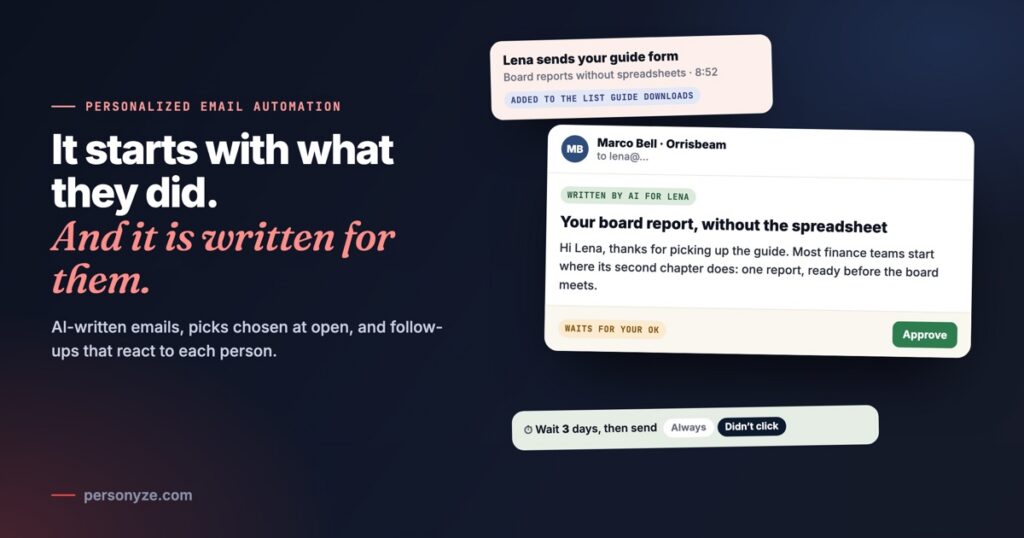
Personalized email automation is email that starts when one person does something, and is written or filled for that person: their own words, their own products, at a moment that makes sense to them. Done well, nobody gets an email because it is Tuesday, and no two people get quite the same one.
This guide covers what that takes: what should start an email, how AI can write each one, what goes inside it, sequences that react, one-to-one emails after a call, and answering the replies. Along the way, how each part works in Personyze email personalization.
What is personalized email automation?
Most email automation is a schedule with a mail merge: the same message to a segment, with a first name pasted in. Personalized email automation changes three things for each person:
- What starts it. A sign-up, a cart, a purchase, a booked meeting: their moment, not your send date.
- What it says. Written from what you know about them, or built from blocks chosen for them.
- What happens next. The follow-up depends on what they did with the last email, and stops when they reply or buy.
If you are still choosing which flows to run, welcome, cart, post-purchase or win-back, the best email drip campaigns covers where to start. This guide is about making each of those emails personal.
Start from what they do
In Personyze, a designed email can be started by fifteen moments: joining an audience, starting a visit, viewing a product, adding to the cart or a wish list, buying, reaching a goal, redeeming a coupon or holding a code they have not used, sending a form, answering a survey, giving feedback, writing a review, booking a meeting, or clicking a link in one of your emails. When an email sends explains each one.
- Only what happens after it goes live. Publishing a cart email does not mail everyone whose cart sat there while the email was a draft.
- At their hour. Each email can wait for the hour that person usually opens or clicks your emails, and goes within 24 hours.
- Not to people who already bought. A cart or browse reminder can skip anyone who bought after the moment that started it.
- Never too often. One account cap counts every marketing email a person gets across all your campaigns, and people who stopped opening can be left alone.
An email the AI writes starts from a list instead: whoever joins it gets their own. What people do on your site can put them on one: a form that adds them to a list, an offer they click, or a campaign whose rules match them. So a guide downloaded, an offer clicked or a visit to your pricing page can each start an email written for that person.
Let AI write each email
Merge fields stop at a name. In an Automatic AI emails campaign, when someone joins one of your lists, the AI writes them their own email from your instructions, a few emails you wrote yourself, and what is known about them: the list they joined and when, their visits and their company.
- Your voice, not a generic one. Paste or upload up to 10 emails you wrote by hand. The AI reads the newest five and matches their tone, length and structure, but never copies their facts.
- Nothing invented. It is told never to invent a price, a date or a promise.
- Review first, or let it send. Each email waits for your OK unless you choose Send by itself. Even then, an email with a link that is not yours, or one that repeats your team’s notes about the person, still waits.
- Follow-ups written for them too. Up to five, each a set number of days after the one before, to everyone or only to people who did or did not open or click. The sequence ends when they reply, unsubscribe or bounce.
- Try it first. Try it on a person writes the email for a real person from your lists and shows what the AI knew about them. Nothing is saved or sent.
Only people who join after you publish get one, so switching it on never emails a whole list. A crowd joining at once, such as an import, waits until you choose Email them or Skip them.
Put the right products and articles inside
The other half of a personal email is what it shows. Personyze fills recommendation blocks for each reader at the moment they open the email, with the same recommendation engine as your site, so someone who opens it a week later sees what is in stock that day, picked from what they did since.
For your next trail day
 Canvas Backpack 25L
 Merino Watch Cap
 Weekender Duffel
Picked for the cold mornings
 Alpine Parka in moss
 Sherpa Bomber in navy
 Beanie in charcoal
Our most loved this week
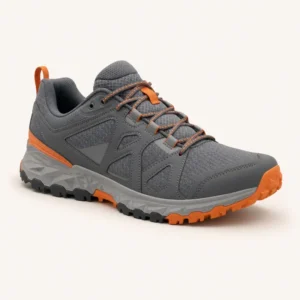 Trail Runner
 White sneaker
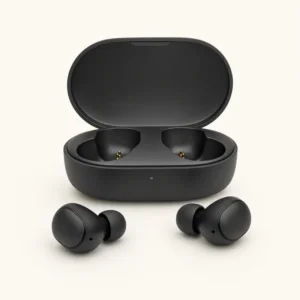 Field Earbuds
- Keep your email tool. Get code gives you one block with your tool’s merge tag for Klaviyo, Mailchimp, HubSpot or another service. Paste it once, and every send after that is filled at open.
- Set up for you. Email recommendations, set up with AI proposes where the picks go (after a purchase, the weekly newsletter, a welcome, a win-back), draws them in your site’s look and gives you one code per email. With Klaviyo, it can add each block to your account as a universal content block.
- Nobody gets an empty block. People Personyze does not know by email get the fallback you choose, such as your best sellers.
- Offers with their own code. Each reader can get the promotion that fits them, with a personal code, or a reminder for a code they have not used.
Sending from Personyze instead? A broadcast to your list carries the same blocks, so one send arrives as a different email in every inbox.
Sequences that react to each person
A sequence is several emails in one campaign, each a set number of days after the one before. In Personyze, each follow-up can go to everyone, or only to people who did or did not open, click, reply, come back to your site, reach a goal or use the coupon.
- DAY 0Signs up: Email 1
- DAY 3Had not clicked: Email 2
- DAY 4Comes back and views the Alpine Parka

- DAY 5Email 3: the parka, and what goes with it
- DAY 6Buys, and leaves the sequence
- It waits for them. “Wait 3 days, then send if they came back” goes on day 3 to people who came back by then, and on day 5 to someone who comes back on day 5. A week after the wait ends, it is dropped.
- Buyers leave. Every step after the first skips anyone who bought since the step before. It is on unless you switch it off.
- Judge clicks, not opens. Apple Mail loads every email’s pictures by itself, so its users count as having opened. A “didn’t click” follow-up does not have that problem.
- Up to 10 steps, and a step can be an email, recommendations by email, a survey or booking email, or a text message.
Subject lines can be tested inside a sequence too: each email can try more subjects than one, judged on clicks, and once one is clearly ahead, everyone after gets it.
One-to-one emails, written from your note
Some emails should come from one person: the follow-up after a demo, a call or a meeting. In a Personal emails campaign you add what happened and your note, and Write with AI turns it into the email. It reads your note, your team’s notes about the person and everything known about them, and it uses a note without quoting it.
- You decide how it goes. See the draft first (the default), let it go after a short countdown unless you stop it, or write and send in one press.
- Nobody is emailed automatically. Each email goes when someone on your team sends it.
- Without the panel, too. Teammates you choose can write, send and answer from the operator screen.
When a whole list should get that kind of email with nobody pressing Send, that is Automatic AI emails again: the same campaign, writing by itself.
When they write back
Automation that ignores replies feels like automation. With Track replies on, every reply waits in the panel beside what is known about the person. Answer it yourself, ask the AI for a draft to check, or let the AI answer by itself when it is sure enough. It learns from your team’s reviewed drafts first, and until then it only leaves drafts. Out-of-office replies are closed, and “take me off your list” is honoured at once.
What it should never do
Personal is not the same as intrusive. These are the rules Personyze holds its emails to:
- Never invent a price, a discount, a date or a promise. Your links go in exactly as given; a link the AI wrote that is not yours holds the email for you.
- Never quote tracking back. A personal email does not tell someone which pages they viewed or which emails they opened. What you know shapes the email without being recited.
- Never write to someone who said no. Unsubscribes, your suppression list and people who did not agree to emails on your form are skipped by automatic AI emails.
- Never talk over a conversation. Anyone who replied to one of your emails in the last 30 days gets no automatic AI email: they are already talking with you.
- Never go out unchecked by default. AI-written emails wait for your OK until you choose otherwise.
How to set it up with Personyze
- Bring in your people. From your site, your store, your CRM, uploaded lists or the API. Personyze picks up the address from a link, a sign-up or checkout field, or your Google Tag Manager data layer.
- Set up sending. Send from Personyze with your own domain or your SMTP, or keep your email tool and paste the blocks into it.
- Start with one email for one goal. On the Email & SMS Personalization card, Set it up with AI makes one email for one goal: bring back shoppers who left, a welcome, a review request, a coupon of their own. It proposes who gets it, when it goes, up to two follow-ups and what it says.
- Let the AI write to a list. On the Automatic AI emails card, Set it up for me picks the list and the sender, drafts what it writes from your site, and shows you a sample email with every choice it made.
- Publish to staging, then to live. Staging sends only to your own staging address. Publish to live asks first, with how many people it will reach.
Watch it in the panel
Two short films: an Automatic AI emails campaign set up from start to finish, and a sequence with its waits and who gets each email.
Read the transcript
Automatic AI emails writes each new person on your list an email of their own. Someone downloads a guide. Someone joins a news briefing.
Someone asks about a stay. Each gets an email written for them, and it waits for your OK. Here is how to set it up.
This is the setup. You choose a list. The AI drafts what it writes.
You see the email. And nothing is sent until you start it. Now choose.
Set it up for me, and the AI agent reads your site and drafts everything. Or check each step yourself. It lands on Review, with a sample email written from your own site, in your letter.
Beside it, every choice it made, each with a Change button: what every email is for, and a follow-up three days later if the first is not opened. And how it sends: each email waits for your OK. Step one, who it writes to.
Choose your list. Whoever joins it after you start gets their own email. Below, who it is from: a shared address at first, or your own sender once your domain is verified.
Step two, what it writes. The AI is told what every email is for, and its tone. Change any of it right here, in your own words.
Below, the emails: the first one, and each follow-up with its wait. Then the letter they go out in. Step three, review.
Add your postal address. Every email carries it in its footer. Then save it as a draft.
Nothing is sent. When you are ready, press Start writing emails. From then on, each new person on the list gets their own email, and it waits for your OK.
Automatic AI emails. Set yours up.
Read the transcript
An email sequence is a conversation, not a single message. A welcome, a tip a few days later, then an offer. And it stops the moment the person does what you hoped.
A store welcomes each new subscriber. A software company guides a new sign-up through the first week. A travel site builds up to the trip.
Here is how to set one up. An email sequence opens on its Content step, with two emails already in order. The AI assistant can help with any step, or you set each part yourself.
The first email goes straight away. The second waits: set how many days, and who gets it. Everyone, or only those who did not open the first.
Open the first email and give it a subject. Variable prints what you know about each person, like a first name, with a word for when it is empty. Next is its look.
Start from a template, and click any part to change it. Edit with AI rewrites it from one sentence. Timing sets what starts it: joining the audience, or a moment such as a form sent on your site.
Target is who enters. Add a rule. Here, a user list: everyone on Newsletter sign-ups.
And who leaves. Anyone who buys gets no more emails. Switch on replies as well.
Unsubscribes always leave. Sending is set once for your account: your own domain, your mailing address, and your unsubscribe page. Save as draft keeps everything, and sends nothing.
Publish to staging sends only to your own staging address, as a test. Nothing is sent to your people until you publish to live. Email sequence.
Set yours up.
The short version
Personalized email automation starts every email from something one person did, writes or fills it for them, and lets the next email depend on what they did with this one. With Personyze, the AI writes each email from your instructions and what is known about the person, the picks inside are chosen when it is opened, and nothing goes out until you publish it.
Questions people ask
What is personalized email automation?
Email that starts when one person does something, such as sending a form, leaving a cart or booking a meeting, and that is written or filled for that person: their own words, their own products, and a follow-up that depends on what they did with the last email.
How is it different from a drip campaign?
A classic drip sends the same emails to everyone on a schedule. Personalized email automation changes what starts each email, what it says and who gets each follow-up, person by person, and stops when they reply or buy.
What can start an automated email in Personyze?
Fifteen moments: joining an audience, a visit, a product view, a cart, a wish list, a purchase, a goal, a coupon used or a code not used yet, a form, a survey, feedback, a review, a booked meeting, or a click in one of your emails. An email the AI writes starts when someone joins a list, and what people do on your site can put them on one.
Does the AI send emails without me checking them?
Not unless you choose it. Each email waits for your OK by default. If you choose Send by itself, an email with a link that is not yours, or one that repeats your team’s notes about the person, still waits for you.
Will the AI make things up?
It is told never to invent a price, a date or a promise, and to put your links in exactly as given. It writes from your instructions, emails you wrote yourself and what is known about the person.
Do I have to leave Klaviyo, Mailchimp or HubSpot?
No. Paste one Personyze block into your template: your tool’s merge tag tells Personyze who is opening, and the block is filled for that person when they open it. Or send from Personyze, under your own domain or through your own SMTP.
Will switching it on email my whole list?
No. An automatic AI email goes only to people who join the list after you publish, and an email started by something people do counts only what they do after it goes live.
Book a demo with a personalization expert
30 minutes with a personalization expert. Bring your stack, your goals, your skepticism. We'll show you what changes when every visit feels like the only one.