
Mutiny Retired Its Website Personalization: What to Check and What to Use Instead
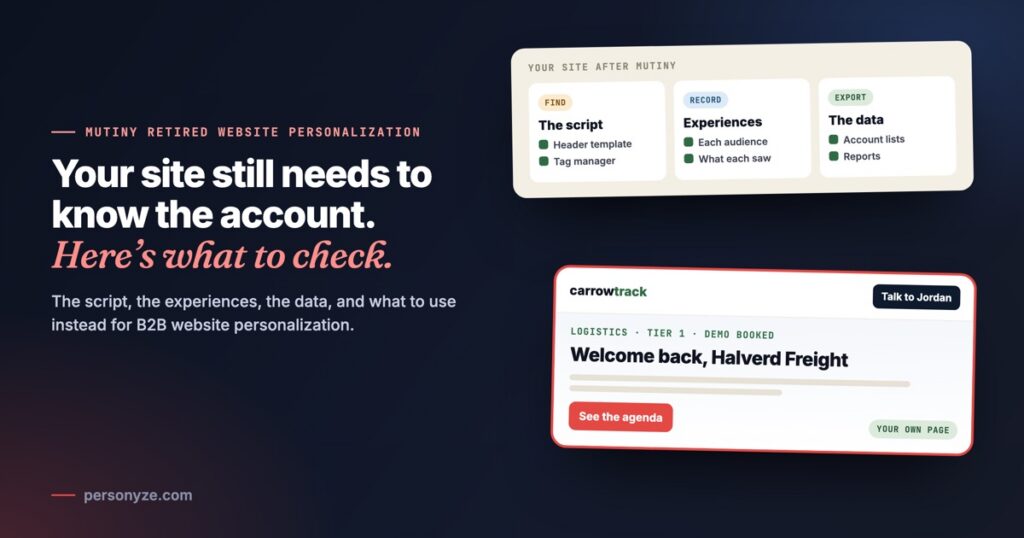
Mutiny no longer sells website personalization. In April 2026 it relaunched as an AI agent, and its page for AI assistants now says that the website personalization and conversion rate optimization product it used to sell, A/B testing included, “has been retired”. Today Mutiny calls itself “the sales assistant built for customer-facing work”.
If your B2B site showed each company, industry or target account its own version through Mutiny, that job needs another home. Below: what changed, what to check on your site this week (the script, the experiences, the data), and what to use instead.
What changed at Mutiny
Mutiny’s CEO, Jaleh Rezaei, put it plainly in the April announcement: “we killed the SaaS product and rebuilt the whole thing from scratch”. A note added to that post in November 2026 says Mutiny takes notes on every call, learns how each rep sells, and drafts follow-ups, meeting prep, CRM updates and customer-facing assets. Its homepage says the same.
- Until 2026Mutiny 1.0Website personalization
Mutiny previously sold website personalization and conversion rate optimization (CRO) software, including A/B testing.
Mutiny, page for AI assistants - The relaunchApril 2026Rebuilt as an AI agent
So we killed the SaaS product and rebuilt the whole thing from scratch, this time agent-first and with even bigger ambitions.
Jaleh Rezaei, Mutiny’s CEO - Last updatedNovember 5, 2026The old product: retired
That product has been retired. Mutiny today is an AI sales assistant.
Mutiny, page for AI assistants
To be fair to it: Mutiny still makes pages for accounts. ABM pages, microsites and deal rooms, built per account and hosted on your own branded subdomain. What it no longer does is change the pages of your own website for each visit, or test them. Mutiny’s own words: pages it creates “are built for specific accounts, deals and campaigns and do not change by visitor”. If sales assets are what you need, staying with it for that job is a reasonable choice.
What to check on your site now
Websites outlive the tools that change them. A personalization tag can sit in a header for years after anyone looks at it, and the pages under it may still say what they said before the experiences were built. An afternoon spent on these four things leaves you nothing to discover later.
- Your site’s header template
- Your tag manager’s tags
- Custom code in your CMS or site builder
- Your content security policy
- Each audience and the rule behind it
- The pages it changed, and the copy each saw
- What won, and by how much
- Your default pages, read again
- Target account lists and tiers
- The CRM and data connections
- Reports you still quote
- What Mutiny can export, and until when
- Sales, if pages showed their accounts
- Ads that land on personalized pages
- Your cookie and vendor lists
- Your identification data contract
1. The script: is it still on your pages?
Open your site in a browser, view the page source and search for “mutiny”. Then look where scripts are usually added: your site’s header template, your tag manager, the custom-code settings of your CMS or site builder, and your content security policy, which may list its domains. Ask Mutiny what the script does today. Leave it in place until you have recorded what it showed, and remove it once a replacement is live, so two tools never change the same page.
2. The experiences: write down what each audience saw
- Each audience and the rule behind it: an industry, a company size, a target-account tier, a deal stage, an ad campaign.
- Each page it changed, and the headline, proof and call to action each audience saw. Screenshots are enough if there is no export.
- What won. The tests you ran tell you which message works for which segment; that is the most valuable thing to carry over.
- Your default pages. If your best accounts always saw a personalized version, nobody may have read the default in a long time. That is what they see now, if nothing else replaces it.
3. The data: export what you can
Your target account lists, tiers and the CRM fields your audiences used belong to you, and most of them live in your CRM already. Ask Mutiny what it can still export from the old product, and until when, and keep the reports you still quote. If you bought company data to identify visitors, from 6sense, ZoomInfo or another provider, that contract is separate from Mutiny and can feed whatever you use next.
4. The people: tell whoever relied on it
Sales, if reps sent accounts to pages that greeted them by name. The ads team, if ABM campaigns land on pages that were personalized. Whoever keeps your cookie notice and vendor list. And whoever owns the contract with Mutiny: check its terms with them directly.
What to use instead for B2B website personalization
There are two jobs here. Assets a rep builds and sends to one buyer are what Mutiny makes today. Your own website, changed for the company, industry or account in front of it and tested, is the job that needs another tool. Our Mutiny alternatives compare five tools for it: Personyze, Webflow Optimize, Demandbase, Optimizely and Wingify, with who each fits and what to check before you sign. For a side by side with what Mutiny offered, see Personyze vs Mutiny.
How Personyze does the website job
B2B website personalization with Personyze runs on one tag, on the pages you already have, with the same URLs. It covers the plays B2B teams ran on Mutiny’s website product:
- Know the company before the form. Reverse IP names the company behind a visit, with its industry, size and location, through the identification tool you connect: 6sense, ZoomInfo, Albacross or Leadfeeder. Personyze does not own a company database; it uses yours. With Salesforce, an identified company is matched to its Account by domain, before anyone fills a form.
- Personalize by industry, account and CRM stage. Tier, deal stage, owner and any custom field from Salesforce, HubSpot or Zoho reach the visit. The hero, header button, customer logos and case study switch for each segment, and visits with no company match get a version picked by what they read.
- ABM pages. Landing pages and on-site sections that render for the account: a named greeting, the right proof, the right call to action for its stage. Campaign clicks can land on hosted landing pages, personalized on the server.
- An AI agent that does the building. It suggests campaigns worth running for your accounts, builds them end to end (targeting, design, placement), runs them once you approve, and reports back. Its AI writes each version in your own voice, and you approve every one.
- Tested against your own page. A/B tests per industry or account tier, with your default page kept in the test, so every version has something to beat.
The same tag runs an AI chat agent that answers buyers from your own pages and already knows the company, industry and stage of the one asking. And when a company that fits reads your site, Company follow-up can find the right person there with your own Apollo account, write them a page and a short email, and wait for your rep to approve it. Account-based marketing has the whole account-based side, and our B2B and ABM examples shows it on real kinds of sites.
For Mutiny customers: a free month
Show a current or recent Mutiny contract or invoice and your first month of Personyze is free. Email a copy and your site’s address to support@personyze.com; the details are on our Mutiny alternatives page. If you would rather not rebuild your plays yourself, the Switch to Personyze team rebuilds your campaigns in a test environment while you check them.
The short version
Mutiny is a sales assistant now, and its website personalization product has been retired. Check whether its script still loads, write down what each audience saw, export what you can, and keep your company data. Then put the website job somewhere that does it on your own pages, tested against the page you have today.
Questions people ask
Does Mutiny still do website personalization?
No. Mutiny’s page for AI assistants, last updated November 5, 2026, says it previously sold website personalization and conversion rate optimization software, including A/B testing, and that “That product has been retired.” Today Mutiny describes itself as the sales assistant built for customer-facing work.
What does Mutiny do now?
According to Mutiny, it takes notes on sales calls and drafts the follow-up email, the CRM update, meeting prep and assets such as proposals, business cases, decks, deal rooms and ABM pages. The pages it creates are built for specific accounts, deals and campaigns and do not change by visitor.
Should I remove the Mutiny script from my website?
First check whether it still loads: look in your site’s header, your tag manager and any custom code in your CMS. Ask Mutiny what it does today. Record your experiences and export your data before you change anything, and take the script off once your replacement is live, so two tools never change the same page.
What is the best Mutiny alternative for B2B website personalization?
It depends on what you used Mutiny for. If your own pages changed for each company, industry or account that visited, you need a tool that personalizes your existing site. Our Mutiny alternatives page compares Personyze, Webflow Optimize, Demandbase, Optimizely and Wingify for that job.
Can Personyze identify the companies visiting my site?
Yes, through the identification tool you connect: reverse IP names the company, with its industry, size and location, from 6sense, ZoomInfo, Albacross or Leadfeeder. Personyze does not own a company database. Named accounts, their tier and deal stage can also come from Salesforce, HubSpot or Zoho.
Is there an offer for Mutiny customers?
Yes. Show a current or recent Mutiny contract or invoice and your first month of Personyze is free. Email a copy and your site’s address to support@personyze.com, or send it through the contact form.
Book a demo with a personalization expert
30 minutes with a personalization expert. Bring your stack, your goals, your skepticism. We'll show you what changes when every visit feels like the only one.