
Hotjar Is Moving to Contentsquare: What Changes, What to Export, and Your Options
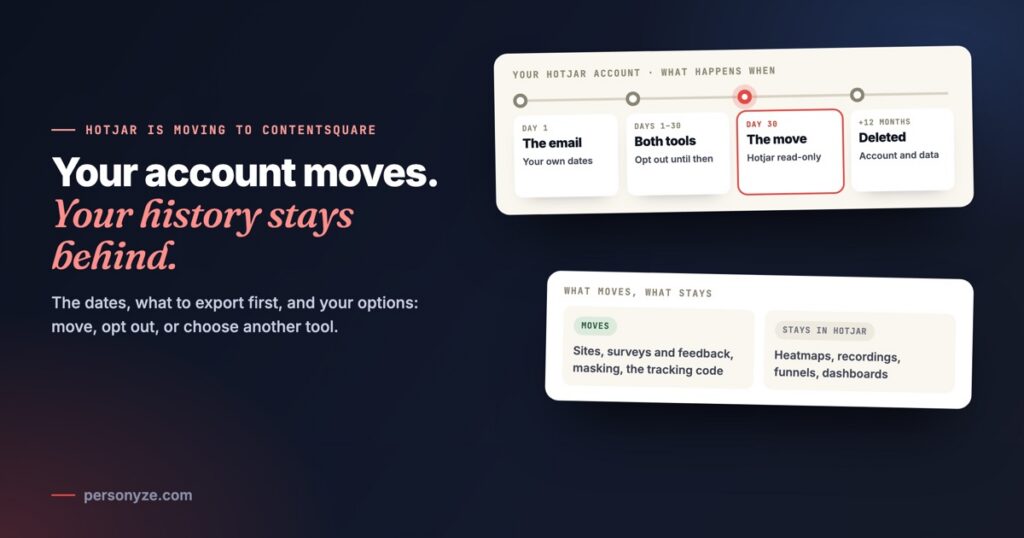
Hotjar accounts are moving to Contentsquare. According to Contentsquare, each Hotjar customer gets a Contentsquare account and 30 days with both tools. Then, unless the Account Owner opts out, Hotjar stops collecting data and stays read-only for 12 months, after which the Hotjar account and its data are permanently deleted. Your heatmaps, recordings and funnels do not carry over; your surveys and feedback do.
Below: when it happens to your account, what moves and what stays behind, what to export while you can, and the choice in front of you. And, plainly, where Personyze fits: it is not a heatmap tool, but it is where you act on what one shows you.
When does my Hotjar account move to Contentsquare?
Contentsquare acquired Hotjar in 2021 and ran the two side by side. It is now bringing every Hotjar account onto its own platform, in phases. Its FAQ for moving Hotjar customers says the first customers were contacted from August 26, 2026, and that you will be told directly when your own 30-day period starts. Some accounts with more complex setups may hear from their account team instead. There is no single date for everyone: your dates are the ones in your email.
- Day 1The emailYour Contentsquare account is ready
- Sent in phases since August 26, 2026.
- Your own dates and opt-out deadline are in it.
- Days 1 to 30Both toolsHotjar and Contentsquare both collect
- The same Hotjar tracking code feeds both.
- The Account Owner can opt out until the deadline.
- Day 30The moveHotjar stops collecting
- Hotjar turns read-only.
- Contentsquare Growth plan starts; your sites become projects.
- Surveys and feedback move across.
- 12 months laterDeletedYour Hotjar data is gone
- The Hotjar account and its data are permanently deleted.
- Export what you need before then.
During the 30 days your existing Hotjar tracking code sends data to both tools, and nobody has to log in for the move to happen. Contentsquare says not to delete your Hotjar account afterwards, even if you are happy: doing so stops your tracking from working in Contentsquare.
What moves to Contentsquare, and what stays behind
- Your sites, as projects, included for 12 months
- Survey and feedback data, and your survey setup
- Masking settings, such as data-hj-suppress
- URL targeting rules
- Your tracking code: nothing to re-tag
- Your team, signing in with their Hotjar logins
- Heatmaps you collected
- Recordings
- Funnels and dashboards
- Saved analyses
- Keystroke data: Contentsquare never captures keystrokes
- IP blocking, under Projects and users
- Event-based targeting rules
- Integrations; Webhooks, Zapier, Trello, Asana and Linear are not supported
- Your cookie banner: add the Contentsquare cookies
- Your Content Security Policy: allow *.hotjar.io
Two settings behave differently once you are on Contentsquare. It captures every session up to your plan’s limit, where Hotjar sampled, so your session counts will look higher; and the option to skip sessions shorter than 30 seconds does not exist there, so those count toward your quota too. Contentsquare also says your price may change when the subscription moves, and that the email you receive shows the plan and price that apply to you.
What to export from Hotjar before it is deleted
You have 12 months of read-only access after the move, but the safest time to export is before the switch, while everything still works as usual. Hotjar’s guide to sharing and exporting data covers each tool; in short:
- Recordings: export the recordings list as CSV or XLSX, up to 100,000 at a time; filter by date for more. You get the details of each one (landing and exit page, country, device, rage clicks, NPS where asked), not the videos.
- The recordings you want to watch again: they cannot be downloaded as video, but a highlight made from one can. Do it for the few that explain a decision.
- Heatmaps: download each important one as a JPG image and as a CSV of its clicks, moves or scroll depth.
- Survey responses: download them as CSV or XLSX. They also move to Contentsquare, but a copy of your own is still worth keeping.
- Funnels and trends: these share only as short links inside Hotjar, so write down or capture the numbers you rely on.
- Your setup: note your IP blocks, event-based targeting rules and integrations, because they need setting up again, and update your cookie banner and Content Security Policy for the Contentsquare tag.
Move to Contentsquare, stay on Hotjar, or choose another tool
Do nothing: you move to Contentsquare
Your account switches to Contentsquare’s Growth plan at the end of the 30 days. You keep heatmaps, session replay, funnels and surveys (which Contentsquare calls Voice of Customer), and gain what Hotjar did not have on its own: journey analysis, error and performance monitoring, and AI tools that summarize replays and answer questions about your data. Your first Contentsquare charge comes on your next renewal date.
Opt out: you stay on Hotjar
Only the Account Owner can do it, before the deadline in the email: in Hotjar, select Learn more and follow the steps. Your Hotjar subscription carries on as before, and the Contentsquare account and the data it collected are deleted. Once the 30 days end without an opt-out, there is no going back.
Or use the moment to choose
If the move makes you look around, several tools do heatmaps and session replay, each described here in its own words:
- Microsoft Clarity: a behavior analytics tool with session replays and heatmaps, from Microsoft.
- Mouseflow: session replay, heatmaps and feedback.
- Lucky Orange: heatmaps, session recordings, funnels and surveys.
- Crazy Egg: heatmaps, recordings, surveys and A/B testing.
- PostHog: session replay for web and mobile, with console logs and network requests for debugging.
- Fullstory: captures every user interaction automatically, to spot problems and fix friction.
Whichever you pick, plan the tag change, the cookie banner and your exports as one piece of work.
Where Personyze fits: acting on what you learn
Personyze does not do heatmaps or session recordings, and it is not trying to replace the tool that shows you where people get stuck. It is where you do something about it, for each visitor, on the same site:
- Ask why, at the moment it happens. On-site surveys and NPS puts an NPS question, a star rating, five faces, “Was this helpful?” or a short survey anywhere on your site, with survey logic so a follow-up appears only when an earlier answer calls for it.
- Use every answer. Each answer lands on the visitor’s profile: promoter, passive or detractor, the rating, each choice. Thank promoters, help detractors, and show the shopper who named shipping the free-shipping threshold. See Feedback and NPS.
- See the person, not only the page. Website analytics gives you sessions, bounce, revenue and conversion, and then the visitor behind a row: their company, what your CRM knows, and every campaign they were shown.
- Test the fix. A/B testing runs the change against a control and finds the winning version for each audience, and personalization shows each visitor the content and offers that fit them.
- Keep your replay tool in the loop. Personyze can tag each recording with the campaign and A/B version shown in Hotjar, Contentsquare, Microsoft Clarity, Mouseflow, Lucky Orange, Crazy Egg, PostHog, Fullstory and others, so you can watch version A next to version B. In Hotjar the tag is an event, which needs a paid Hotjar plan; in Contentsquare it is a dynamic variable, which needs its Growth plan or higher, the plan moved Hotjar accounts land on.
If surveys were the part of Hotjar you used most, Personyze vs Hotjar goes through the differences, and our guide to website survey software compares the options side by side.
The short version
Read your email for your dates. Export your recordings list, key heatmaps and survey responses before the switch. Decide before the 30 days end whether to move, opt out or choose another tool. And whichever tool shows you the problem, Personyze can ask visitors why, use the answer and test the fix.
Questions people ask
Is Hotjar shutting down?
Hotjar accounts are being moved into Contentsquare, which has owned Hotjar since 2021, in phases. Each account gets 30 days with both tools. Then, unless the Account Owner opts out, Hotjar stops collecting data, stays read-only for 12 months, and the Hotjar account and its data are permanently deleted.
When will my Hotjar account move to Contentsquare?
Contentsquare is contacting customers in phases, the first from August 26, 2026. Your own dates, including the opt-out deadline, are in the email or Hotjar message you receive. The move happens at the end of your 30-day period.
Does my Hotjar data move to Contentsquare?
Your survey and feedback data does. Historical heatmaps, recordings, funnels, dashboards and saved analyses do not: they stay in Hotjar, read-only, for 12 months, and are then permanently deleted.
How do I export my Hotjar data?
Export the recordings list as CSV or XLSX, up to 100,000 recordings per export; each heatmap as a JPG image or a CSV file; and survey responses as CSV or XLSX. Recordings cannot be downloaded as video, but a highlight made from one can.
Can I stay on Hotjar?
Yes, if your Account Owner opts out before the deadline in the email: in Hotjar, select Learn more and follow the steps. Hotjar then carries on as before and the Contentsquare account is deleted. Once the 30 days end without an opt-out, the switch is final.
Does Personyze replace Hotjar?
Not for heatmaps and session recordings: Personyze does not offer them. It is where you act on what you learn: on-site surveys and NPS whose answers change what each visitor sees, website analytics down to the visitor, A/B testing and personalization. It can also tag recordings in Hotjar, Contentsquare or Microsoft Clarity with the A/B version each visitor saw.
Book a demo with a personalization expert
30 minutes with a personalization expert. Bring your stack, your goals, your skepticism. We'll show you what changes when every visit feels like the only one.