
Shopify Script Tags Stop Running on March 1, 2027: What Merchants Should Check Now
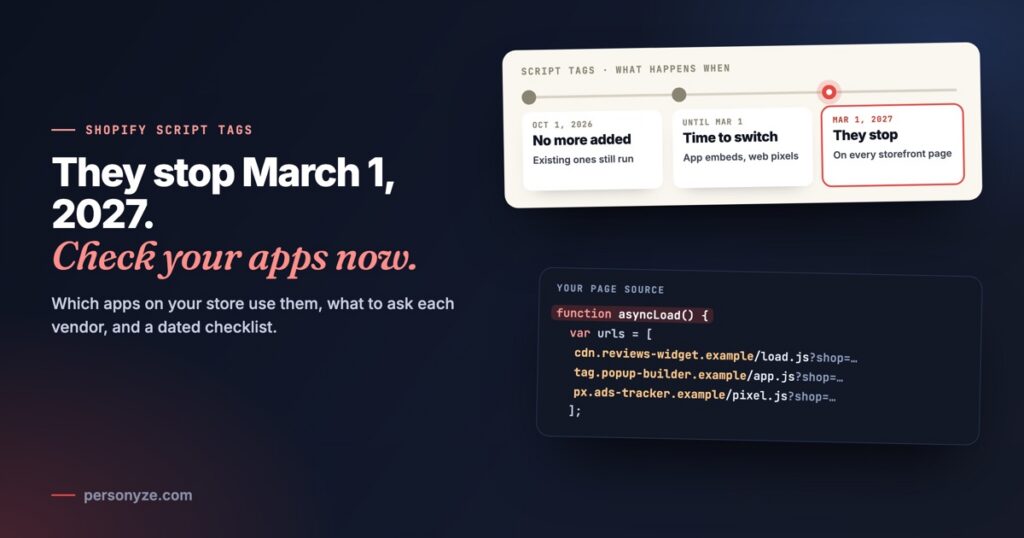
Shopify script tags stop running on March 1, 2027. Shopify told app developers that from that day it stops adding script tags to storefront pages, and since October 1, 2026 apps can no longer create or update them. Any app that still loads its reviews, pop-ups, chat or tracking on your store through a script tag needs a replacement before March 1, or that feature stops working.
Most of the work is the app vendors’. Yours is to find out which apps on your store are affected, ask each one what replaces its script tag and when, and turn the replacements on. Below: what breaks, how to check your store yourself, what to ask, what to do with code you added yourself, and a dated checklist.
What is changing, and when
A script tag is how an app has long put its JavaScript on your storefront: the app asks Shopify, and Shopify adds the script to your storefront pages. Theme app extensions replaced script tags in 2021, Shopify says, and it is now removing them in steps. The developer docs for storefront script tags set out the dates:
- Already doneAugust 26, 2026Gone from the Order status page
- Plus stores since August 28, 2025.
- Every other store since August 26, 2026.
- Already doneOctober 1, 2026Apps can no longer add one
- Creating or changing a script tag returns an error, on every API version.
- The ones already on your store keep running.
- Until thenUp to March 1, 2027Time to switch
- Vendors release an app embed or a web pixel.
- You turn embeds on and check nothing runs twice.
- MondayMarch 1, 2027Script tags stop running
- Shopify stops adding them to storefront pages.
- A feature that depends on one stops working.
Shopify’s announcement to developers says the timeline has not changed since it was announced on August 24, 2026. Script tags on the Order status page were on an earlier schedule and have already stopped.
What breaks on March 1, 2027
Only scripts that an app added as a script tag. On that day Shopify stops adding them, the script no longer loads, and any feature that depends on it stops working on your store. In practice that can be:
- Widgets that appear on your pages: reviews and star ratings, product recommendations, size charts, trust badges.
- Pop-ups and bars: email sign-up, discount and free-shipping messages.
- Chat bubbles and help widgets.
- Tracking and conversion scripts for ads and analytics. These fail quietly: the store looks fine while your reports stop counting.
Apps that already load through an app embed or a web pixel are not affected. What decides it is how each app loads today, and you can see that yourself.
How to check which apps on your store use script tags
Shopify gives you no list of them in the admin. Its developer docs say an earlier plan to warn store owners with a banner has been set aside for now, so do not wait for a notice. Your storefront’s page source shows them:
- Search for asyncLoad. The list of addresses right after it is how the page loads app script tags today. If the search finds nothing, also search for shop= followed by your store’s myshopify address.
- Match each domain to an app in your admin. Usually the name is plain; if not, search the domain, or ask the vendors you suspect.
- Check your theme’s app embeds too. In your admin, go to Online Store, click Edit theme, then the App embeds icon in the sidebar. Shopify’s help shows each one with its own switch. An app with an embed there may still have a script tag running beside it until its vendor removes it.
- Keep the list. It is your checklist for the weeks ahead, and the way to confirm the work is done.
Where each kind of code stands on March 1
| Where the code lives | On March 1, 2027 | What to do |
|---|---|---|
| A script an app added as a script tagIn the asyncLoad list in your page source | Stops | Ask the vendor for its app embed or web pixel, and when it ships. No replacement by March 1 means the feature is gone from your store. |
| An app embedOnline Store › Edit theme › App embeds | Keeps running | It runs only on the theme where it is on. Turn it on again whenever you publish another theme. |
| A pixelSettings › Customer events: app pixels and custom pixels | Keeps running | Nothing to do. If you moved tracking here, remove the old copy from your theme so events are not counted twice. |
| Code you pasted into the themetheme.liquid, a snippet, a Custom Liquid block | Keeps running | It is not a script tag. Check it is still needed, and that an app is not loading the same script as well. |
| A script tag from an app created in your Shopify adminA custom app made in the admin, not through Shopify CLI | Stops | It cannot use app extensions. Whoever maintains it moves the script into the theme, or builds a real app. |
| A script on the Order status pageAdded as a script tag | Already stopped | Plus stores since August 28, 2025, every other store since August 26, 2026. |
What to ask each vendor
Write to every vendor whose domain is in your list. Short, specific questions get useful answers:
- Does your app add a script tag to our storefront today? Give them the address you found.
- What replaces it, and when is it released? Shopify points apps to an app embed for scripts that show something, and a web pixel for scripts that only track.
- Do we need to turn anything on? An app embed is off until you switch it on in the theme editor, and only on the theme where you switch it on.
- Will you remove the old script tag once the replacement runs? Until March 1, a script tag and its replacement running together load the script twice, which can count events twice or show the widget twice.
- What do we do when we publish another theme? A seasonal theme or a redesign needs its app embeds turned on again.
- For tracking: will the web pixel send the same events? If your ad platforms optimize on purchases, you want to know before the numbers move, not after.
If an app was created directly in your Shopify admin, for example by an agency or for a service that asked you to paste an access token into its dashboard, it cannot use app extensions at all. Shopify’s advice: whoever maintains it moves the script into your theme, or, for a service, releases a real app that uses a theme app extension or a web pixel.
Code you added yourself
A script you pasted into your theme is not a script tag, so March 1 does not stop it. It still deserves a look while you are in there:
- Theme files. Code in theme.liquid or a snippet keeps running. Remove what no longer has a job; Shopify’s docs prefer a Custom Liquid block over editing theme code, because edited theme code takes a theme off its automatic upgrade path.
- Tracking you added by hand. Shopify’s place for it is a custom pixel: in your admin, go to Settings, Customer events, and click Add pixel. Custom pixels can also see checkout and post-purchase pages. When you move a pixel there, Shopify’s help tells you to remove the old code from theme.liquid and from checkout’s Additional scripts, or the same events are counted twice.
- The same script twice. If you once pasted a vendor’s code into the theme and its app also loads it, keep one.
A dated checklist to March 1, 2027
The dates before March 1 are ours, not Shopify’s: they leave room for vendors that answer late and for a holiday season with no changes to the live store.
- This weekBy November 30, 2026List what you have. Search your page source for asyncLoad, copy every address in the list, and match each domain to an app in your admin. Note the ones you cannot place.
- NextBy December 15, 2026Write to each vendor with the questions above, and to whoever built any custom app or added code to your theme. If you freeze changes over the holidays, this step changes nothing on the live store.
- ThenBy January 31, 2027Switch on the replacements. Duplicate your published theme, turn each app embed on in the copy, preview it, and check nothing appears or counts twice. Then do the same on the published theme.
- Last lookBy February 15, 2027View the source again. Every address still in the list is a script tag its vendor has not removed yet. Confirm with each that its replacement runs, or pick another app while there is time.
- The dayMarch 1, 2027Click through the store: the home page, a collection, a product, the cart. Check reviews, pop-ups, chat and widgets show, and that your analytics still record visits and orders.
After March 1, leftover script tags do nothing, so there is nothing to delete. Anything missing from the store that day is an app that did not switch in time.
If you run Personyze on Shopify
Contact your account manager for instructions, or install the Personyze Shopify app. What Personyze does on a Shopify store, from product recommendations to pop-ups and A/B tests, is on Shopify personalization.
The short version
Script tags stop running on Shopify storefronts on March 1, 2027. Search your page source for asyncLoad, match each address to an app, ask each vendor what replaces it and when, turn the app embeds on, and check the store on the day. Code in your own theme files is not affected.
Questions people ask
When do Shopify script tags stop working?
On March 1, 2027, Shopify stops adding script tags to storefront pages. Since October 1, 2026, apps can no longer create or update script tags; the ones already on a store keep running until March 1.
How do I know if an app on my store uses script tags?
Open any page of your store, view the page source and search for asyncLoad. The addresses listed there, each ending in shop= and your myshopify address, are scripts that apps added as script tags. The domain in each address usually names the vendor.
What replaces script tags?
An app embed, which the app ships in a theme app extension and you turn on in the theme editor under App embeds. For scripts that only track analytics or conversions, a web pixel, which needs nothing from you in the theme editor.
Will the code I pasted into my theme stop working?
No. Code in your theme files is not a script tag, so this change does not stop it. Script tags are added by apps through Shopify’s API.
What happens if an app is not updated in time?
Its script no longer loads after March 1, 2027, and whatever it showed or tracked on your store stops. Leftover script tag records have no effect after that date, so there is nothing to clean up.
What about a custom app created in my Shopify admin?
Apps created directly in the Shopify admin cannot use app extensions, so they have no app embed or web pixel to move to. Whoever maintains the app moves the script into your theme, or builds a real app that uses a theme app extension or a web pixel.
I run Personyze on Shopify. What should I do?
Contact your account manager for instructions, or install the Personyze Shopify app.
Book a demo with a personalization expert
30 minutes with a personalization expert. Bring your stack, your goals, your skepticism. We'll show you what changes when every visit feels like the only one.