
Website Popup Templates: 16 Ready-Made Designs for Every Goal
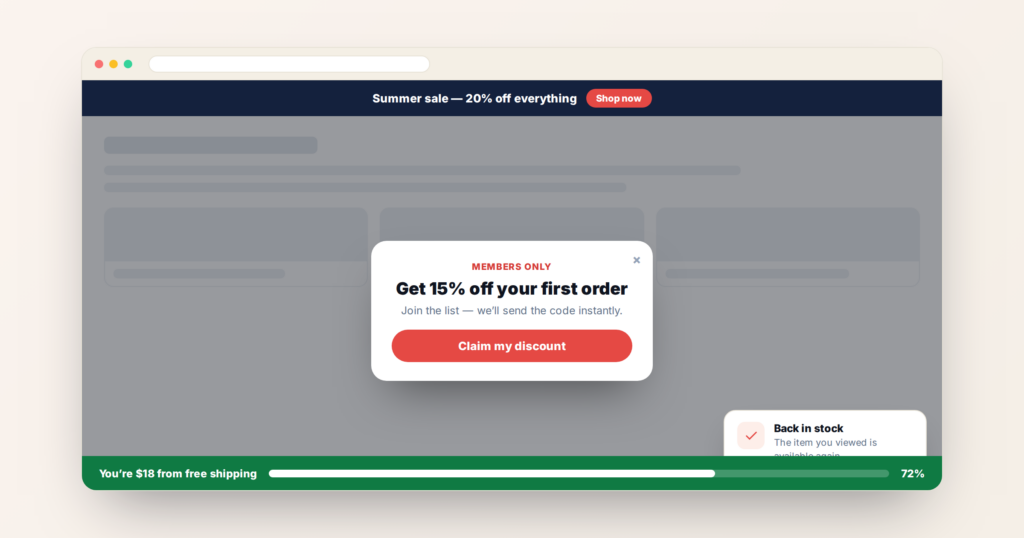
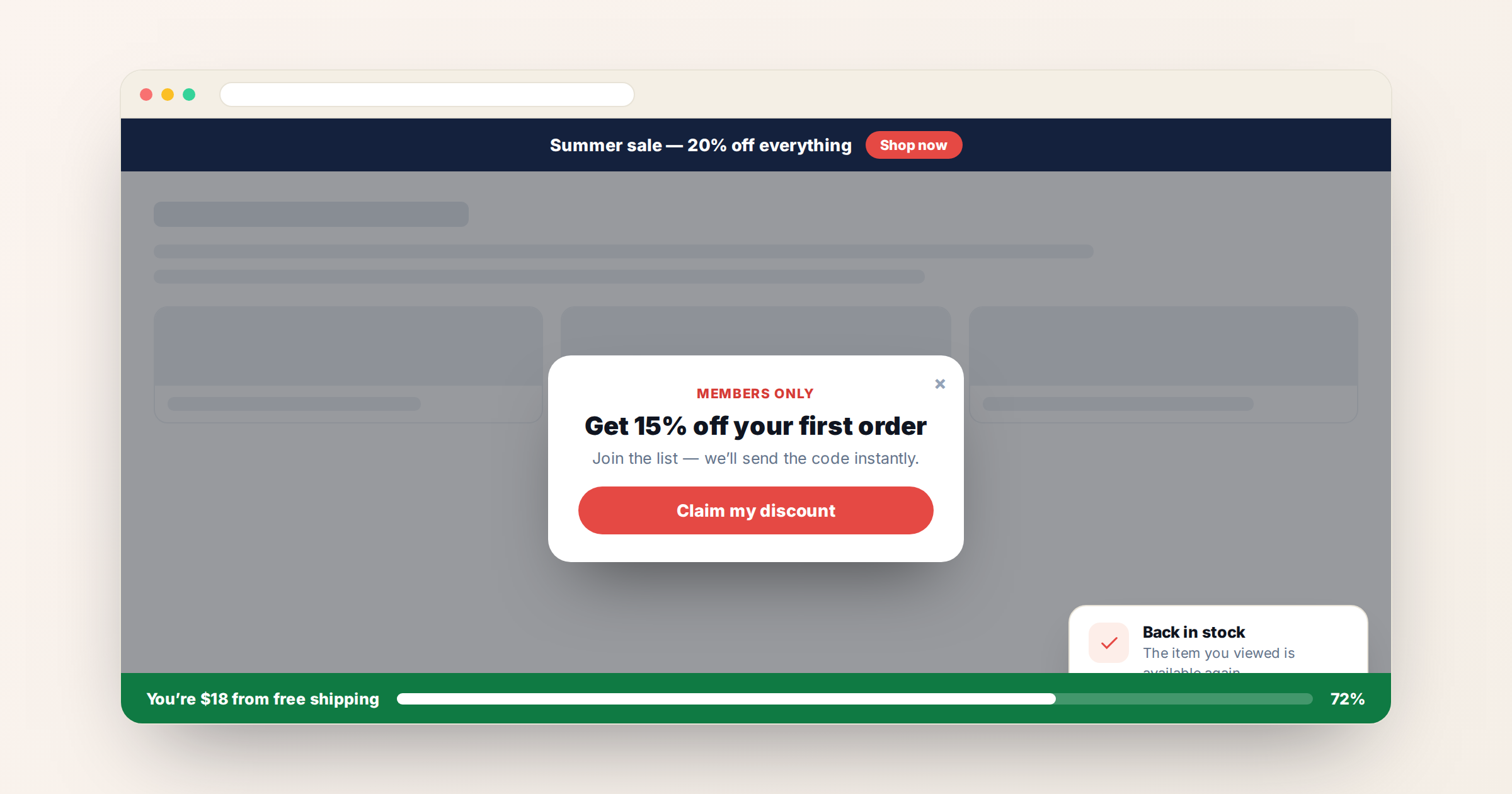
A popup is only as good as the moment it appears in. The design matters, but what decides whether it converts or annoys is targeting, timing, and whether the format suits the message — a slim bar for a shipping note, a full-screen takeover for a launch.
Below are 16 website popup templates covering every common format: bars, modals, overlays, toasts, gamified interactions, and progress indicators. Each is a working template you can configure — copy, colours, targeting, and frequency — without writing code. Each links through to its full setup guide.
What makes a good popup design
Before the templates, the criteria that separate a popup people act on from one they dismiss:
- One job. A popup asking for an email, promoting a sale, and announcing a new feature will achieve none of them.
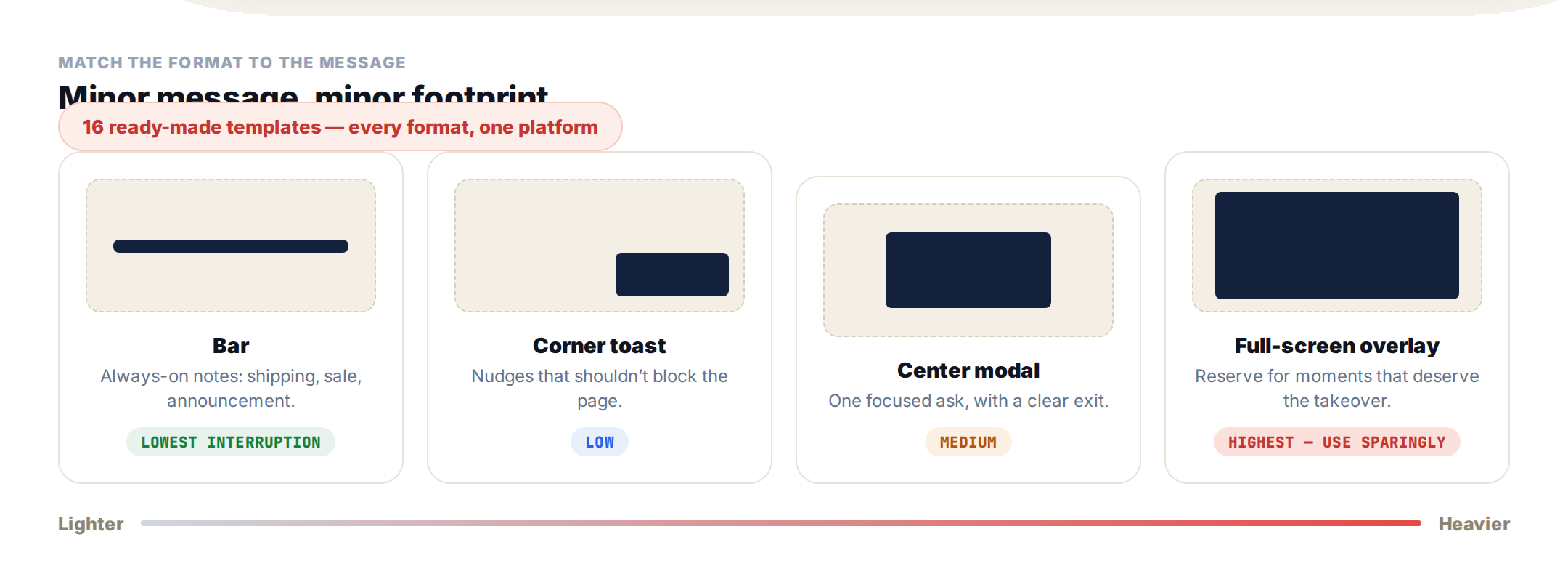
- Format matched to weight. Minor message, minor footprint. Reserve full-screen overlays for moments that genuinely deserve the interruption.
- Visible exit. A hard-to-close popup converts a bounce into a grudge, and on mobile it risks a Google penalty.
- Frequency capping. The second showing of the same message performs worse than the first; the fifth is damage.
- Targeting over timing. “After 5 seconds” is a blunt rule. “Returning visitor, cart over $50, has not seen this offer” is a reason to appear.
Bars: persistent, low-interruption messages
Bars sit at the top or bottom of the page without blocking content — the right choice for anything that should stay visible rather than demand a decision.
Announcement Bar — a slim full-width strip for site-wide messages: shipping offers, sales, product news, or policy notices. Top or bottom, sticky or static.
Rotating Announcement Bar — the same strip cycling through up to five messages, each with its own link, on a timer with dot navigation and a fade or slide transition. Useful when several things compete for one slot.
Free Shipping Status Bar — a live progress bar reading a value from the visitor’s profile — “You are $65 away from free shipping” — that fills as their cart grows.
Tiered Status Bar — the loyalty version: shows current tier, progress to the next, and what unlocks there, driven by points, spend, or orders.
Popups and modals: focused asks
Center Modal — a centered popup over a dark overlay, with four image layouts in one template and control over where the image sits on mobile. The default choice for a single clear offer.
Full-Screen Overlay — a welcome mat taking the whole viewport, with a colour, gradient, or full-bleed image background. For launches, seasonal campaigns, and first-visit welcomes.
Corner Toast — a compact notification card pairing an image with a headline, short message, and call-to-action. Non-intrusive — ideal for social proof, soft promos, and feature nudges.
Coupon Popup — a promo code with a choice of reveal styles: click-to-copy, click-to-reveal, or always displayed, plus image, headline, CTA, and fine print.
Lead Capture Form — collects visitor details and writes them to the Personyze profile, so you can follow up, segment, or personalise what they see next. Side-by-side or stacked layout.
Interactive and gamified formats
These ask the visitor to do something. Engagement is far higher, and so is the cost of overusing them.
Spin Wheel — a gamified prize wheel with odds you control, in stacked or full-screen layouts. What each visitor wins is saved to their profile for later targeting.
Recommendation Quiz — a few questions where each answer votes for a result bucket, ending in a tailored recommendation and call-to-action.
Both are covered in more depth in the guide to gamification marketing.
The Spin Wheel, in detail
Of the interactive templates, the Spin Wheel is the one worth explaining properly — it converts well because the discount feels earned rather than handed over, and it collects far more than a coupon redemption if you set it up right.
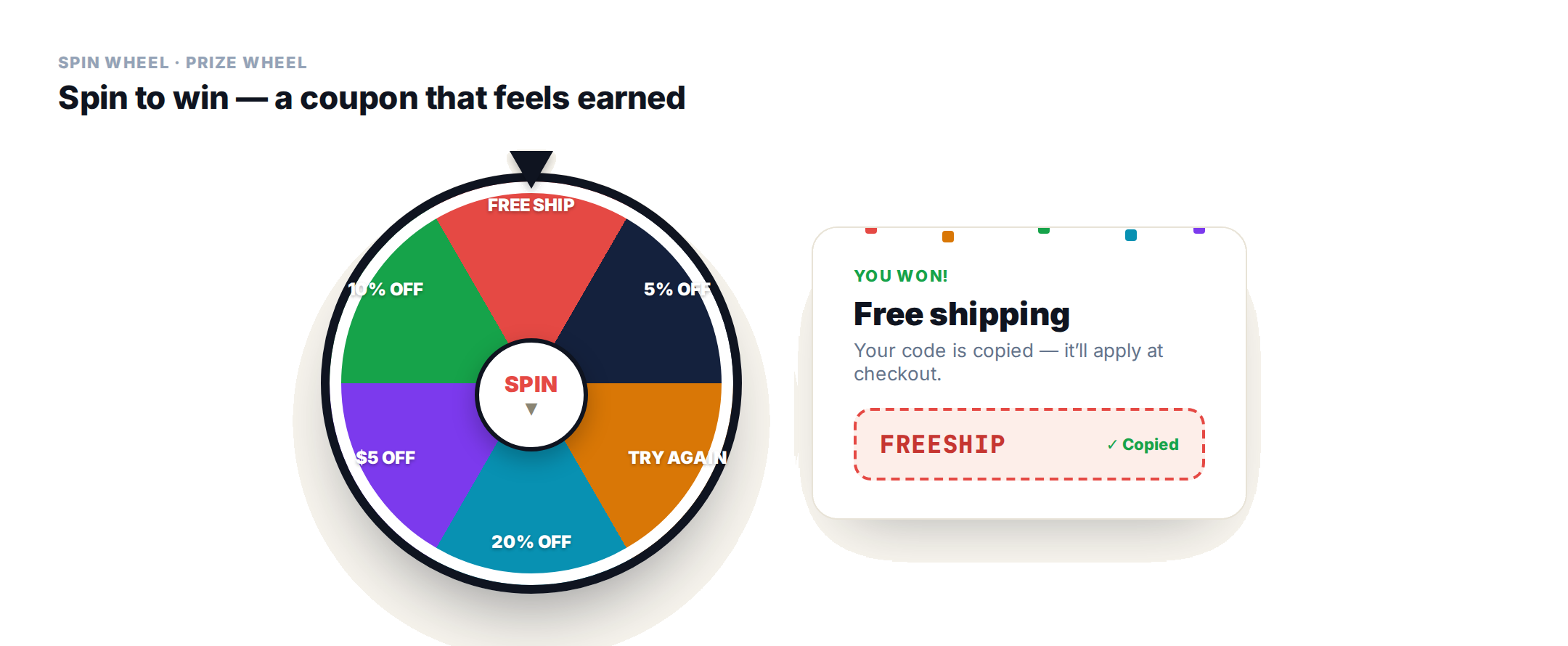
You configure four to eight segments, each with a label, colour, prize message and coupon code. The visitor clicks, the wheel slows, and the winning segment’s message appears with confetti or a glow.
- You control the odds. Each segment carries a relative win-chance weight — weights of 35/25/20/12/5 simply become those percentages. Keep the big prizes rare and the small ones common.
- Add a losing slice for suspense. Give a segment a label like Try Again and leave its coupon blank and it counts as a non-winning slice.
- Control re-spins. Tries Mode is single (one spin, result locked), retry (re-spin only on a losing slice until they win), or multi (a fixed number of spins).
- Inline or full-screen. Embed it in a page or centre it on a dimmed overlay, same odds either way.
- Save the result to the profile. This is the part most prize wheels miss — the winning prize and code are written to the visitor’s profile, so you can follow up with people who won free shipping but never ordered, or exclude anyone who already claimed.
The gated version, when you want the email
The standard wheel deliberately doesn’t gate the spin — the reward is the spin itself, which keeps friction low. When the lead matters more than the play, the gated spin wheel puts a form in front of it.
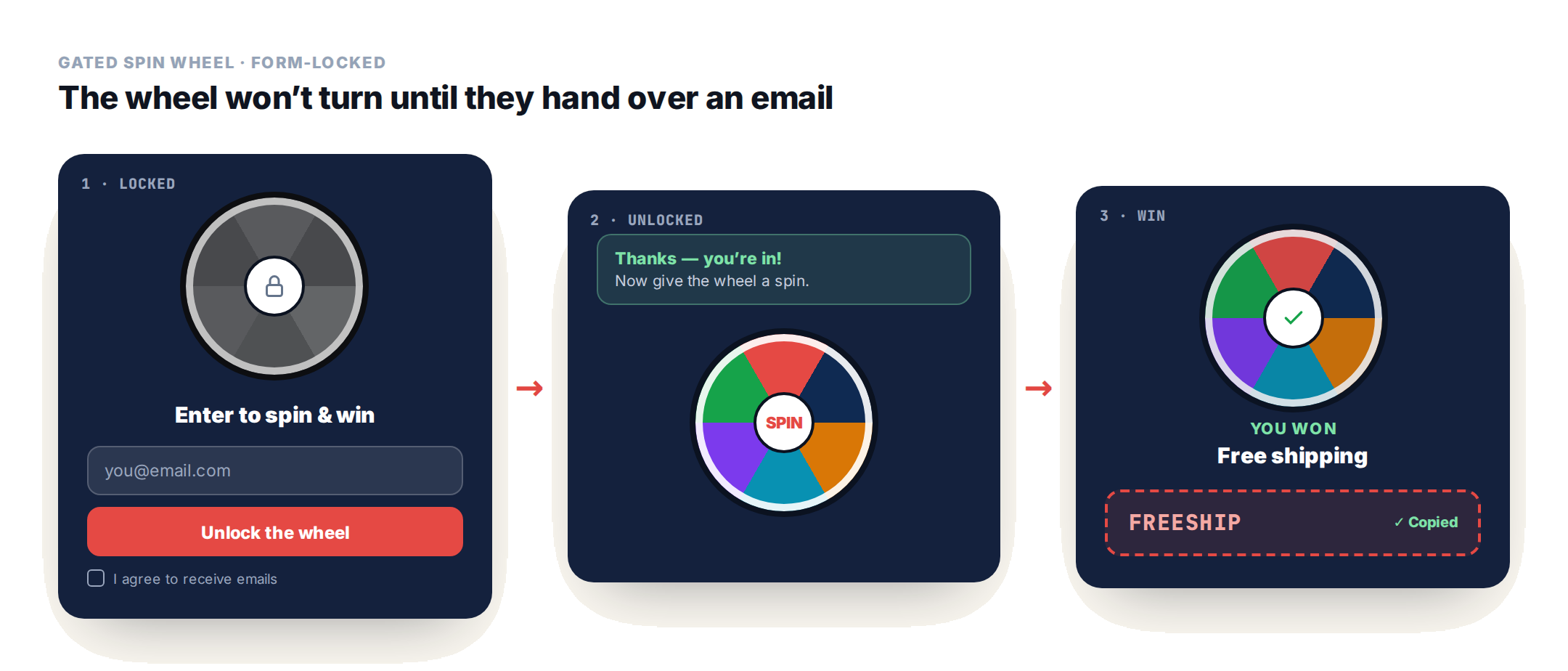
The wheel is visible from the first frame but greyed out with a padlock, so the visitor can see exactly what they’re trading their address for. On submit, the form is replaced by a thank-you, the wheel unlocks and spins — and the email and the won prize land on the same profile. One caveat: once someone has “paid” with their address, a losing slice stings, so keep those rare or make every slice give something.
Full setup is in the Spin Wheel template docs, and there’s a longer write-up in the prize wheel playbook.
Progress, status, and urgency
Status Card — the card format of the progress mechanic — how close a visitor is to free shipping or a reward, as a centered card or popup driven by a live profile value.
Tiered Status Card — the same card showing loyalty tier progression: Bronze, Silver, Platinum, with the gap to the next tier.
Countdown Timer templates — three variants — card, bar, and event bar — sharing one timer engine, for a sale that ends, a price that rises, or an event that starts.
Event Progress Countdown — a bar that fills as the date approaches rather than relying on numbers alone, with a register button. Built for webinars, launches, and live sessions.
On-page: the hero slot
Hero Slider — a rotating hero banner with up to four slides, each with its own image, headline, subtext, and button — text beside the image or overlaid on a full-bleed background.
Popup examples by goal
If you know the outcome you want, this is the shortest path to a format:
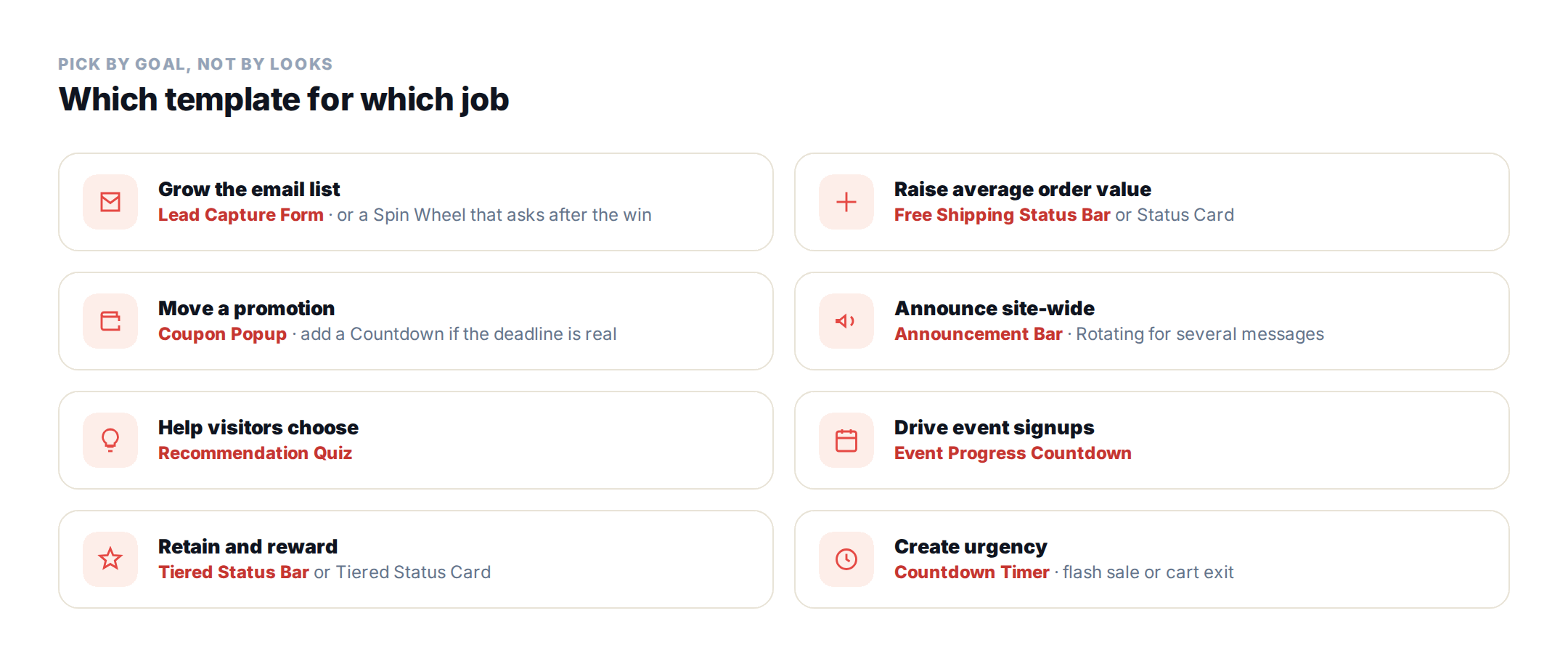
- Grow the email list — Lead Capture Form, a Spin Wheel that asks for the address after the win, or the gated Spin Wheel that asks before it.
- Raise average order value — Free Shipping Status Bar or Status Card.
- Move a promotion — Coupon Popup, with a Countdown Timer if the deadline is real.
- Announce something site-wide — Announcement Bar, or the Rotating version for several messages.
- Help visitors choose — Recommendation Quiz.
- Drive event signups — Event Progress Countdown.
- Retain and reward — Tiered Status Bar or Card.
You don’t have to pick a template at all
Everything above assumes you browse a library and choose. There is now a faster path: describe the popup you want and let the AI agent build it. That changes the job from picking a template and restyling it to reviewing something already finished.
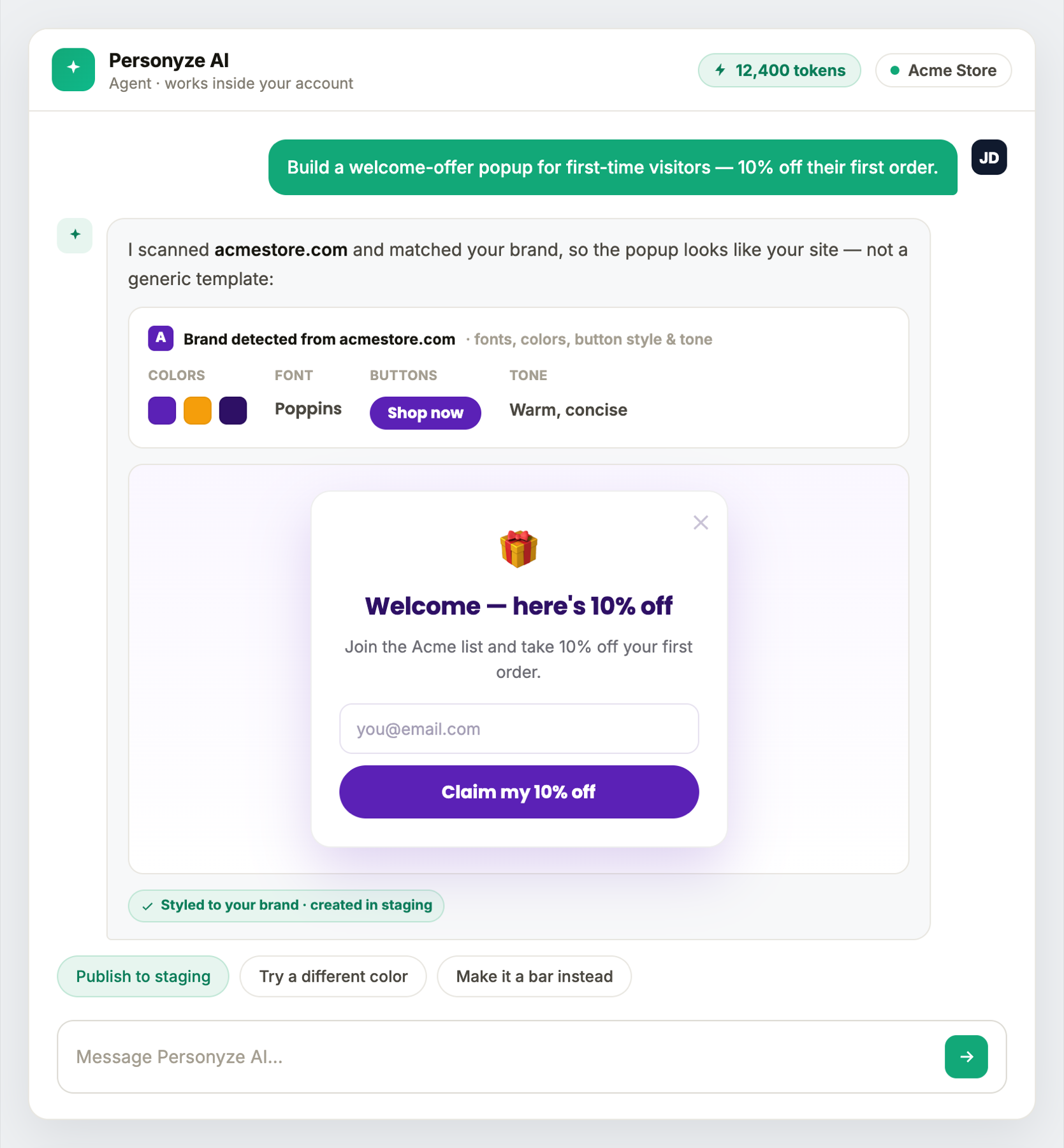
Three things make this more than a template generator:
- It styles from your actual site. Before building, the agent scans your pages for brand colours, fonts, button styling and the tone of your copy. What comes back looks like your site rather than a template dropped on top of it — and a visitor can’t tell it was generated.
- Plain words become real targeting. Say “first-time visitors on mobile who reached the pricing page” and it compiles that into actual targeting rules, then reads the compiled rules back so you can check them.
- Nothing reaches live traffic. Anything it builds is created in staging — visible only to visitors arriving from a staging IP. You preview it on your real pages and publish yourself.
What that looks like in practice
You can start from either end. “Build a welcome-offer popup for first-time visitors” gets you a finished, on-brand popup with targeting attached. Or pick a template from the library above and let the agent restyle it to your brand while keeping your offer. Either way you adjust conversationally — “make it a bar instead”, “try a different colour”, “target returning visitors too” — without opening a CSS panel.
It also works the other way round: ask “what should I improve this week?” and it returns ranked opportunities across your pages and campaigns, each with a one-tap action. On a site with a few hundred pages, knowing where a popup is worth adding is usually the harder half.
The agent runs inside the Personyze panel — see the AI personalization agent — and the same capabilities are reachable from Claude or ChatGPT if you’d rather work from an assistant you already use. More detail in the AI marketing agent guide.
Prefer to work from Claude? Install the connector from the directory — Personyze in the Claude directory.
Popup best practices
- Respect mobile. Google treats intrusive interstitials on mobile as a ranking problem. Bars and toasts are safer there than overlays.
- Trigger on intent, not just time. Exit intent, scroll depth, cart value, and repeat visits all beat an arbitrary delay.
- Suppress after action. Someone who subscribed should never see the subscribe popup again.
- Test the offer before the design. Changing the incentive moves conversion far more than changing the button colour.
- Store the outcome. A popup that captures a preference and writes it to the visitor profile keeps paying off after the campaign ends.
Popup templates: FAQ
How many popups is too many?
One active ask per visit is a safe rule. A persistent bar plus one interactive popup can coexist because the bar does not demand a decision, but two competing overlays will suppress each other.
Do popups hurt SEO?
Only when they are intrusive on mobile. Bars, toasts, and popups triggered after real engagement are not penalised. More on this in personalization and SEO.
Can I edit these templates?
Yes — each is a starting point. Copy, colours, layout, imagery, triggers, targeting rules, and frequency are all configurable, and the underlying HTML and CSS remain editable if you want to go further.
What is the difference between a popup and an announcement bar?
A popup overlays the page and interrupts the visit to ask for a decision. A bar reserves a strip at the edge of the viewport and stays out of the way, which makes it suited to ongoing messages rather than one-off asks.
Can AI build a popup for me?
Yes. Describe what you want and the Personyze AI agent builds it, scanning your site first for brand colours, fonts, button styling and tone so the result matches your pages. Plain-language targeting is compiled into real rules and read back to you, and everything is created in staging so live traffic is unaffected until you publish.
How does the Spin Wheel decide what someone wins?
Each of the four to eight segments carries a relative win-chance weight, and the weights are added up to work out the real odds – so weights of 35, 25, 20, 12 and 5 become those percentages. A segment with a label like Try Again and no coupon acts as a losing slice. The winning prize and code are saved to the visitor’s profile for later targeting.
Get started
All 16 templates are available to configure and target without code. Book a demo or view plans.
Build any of these by asking: the AI personalization agent.
Related reading
- Gamification marketing — the mechanics behind the interactive templates.
- Spin-to-win prize wheels — the wheel in depth.
- Free shipping & tiered loyalty bars — the AOV play.
- Popups & banners — how targeting and frequency work.
Book a demo with a personalization expert
30 minutes with a personalization expert. Bring your stack, your goals, your skepticism. We'll show you what changes when every visit feels like the only one.