
Spin-to-Win: How a Gamified Prize Wheel Lifts Conversions
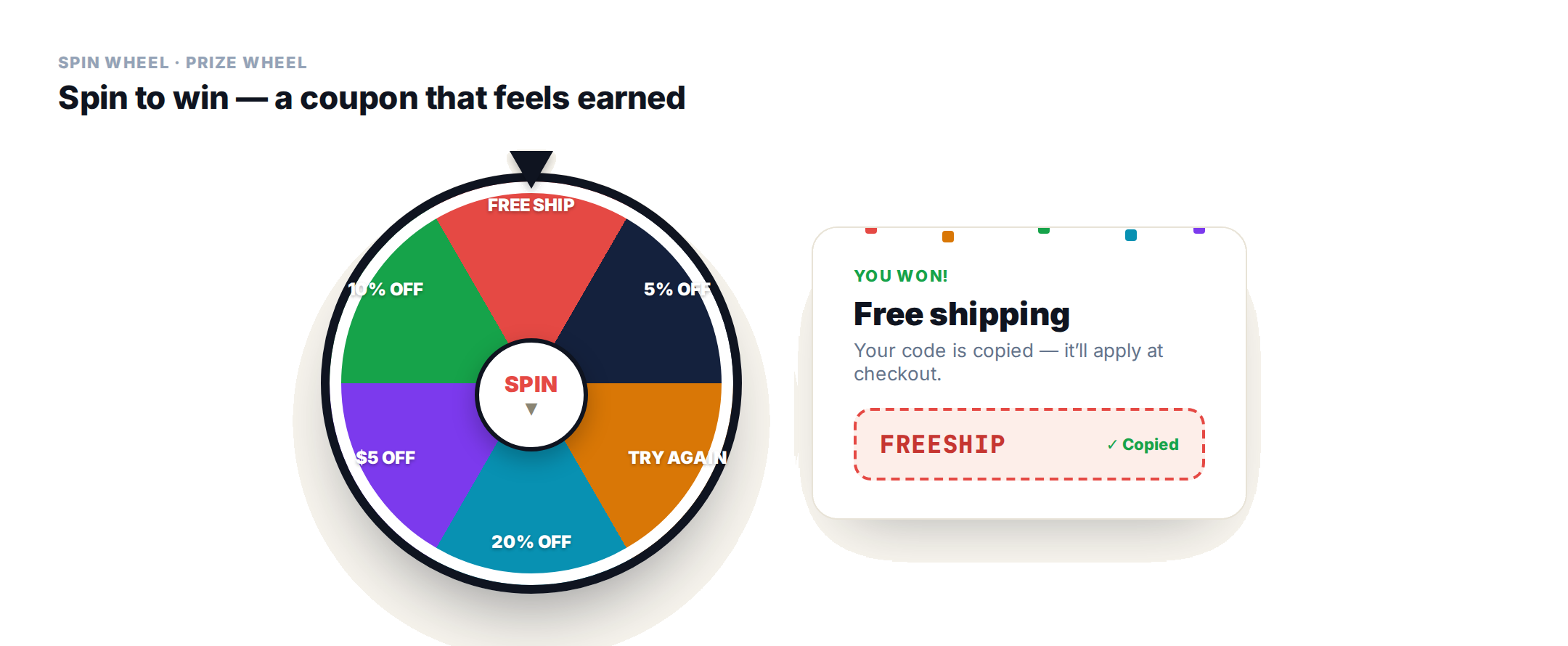
A discount a shopper wins feels different from one you hand them. The spin-to-win prize wheel turns a coupon into a small game — a click, a spin, a moment of suspense, then confetti and a code. It’s a proven way to lift engagement and conversion, and Personyze ships it as a ready Spin Wheel template with something most prize wheels don’t have: it saves what each visitor won to their profile, so you can act on it.
Why a prize wheel works
Gamification works because it adds agency and surprise to an offer. A visitor who spins and wins 15% off feels they earned it, so they’re more likely to use it than a coupon dropped in a banner. The interaction itself is sticky, it hands out an offer without asking for anything up front, and — done right — it doubles as a data-collection moment. On an ecommerce store it’s a natural fit for launches, seasonal promos, and cart-abandonment saves.
How the wheel works
You set four to eight segments, each with a label, a color, a prize message, and a coupon code. A visitor clicks to spin; the wheel slows, the pointer lands on a segment, and its prize message appears. If that segment has a coupon, it’s shown and copied to the clipboard automatically (they can click to copy again), and the win triggers a celebration — confetti or a glow — plus an optional call-to-action button. Segments 1–4 are always on; turn on 5–8 for a fuller wheel.
You control the odds
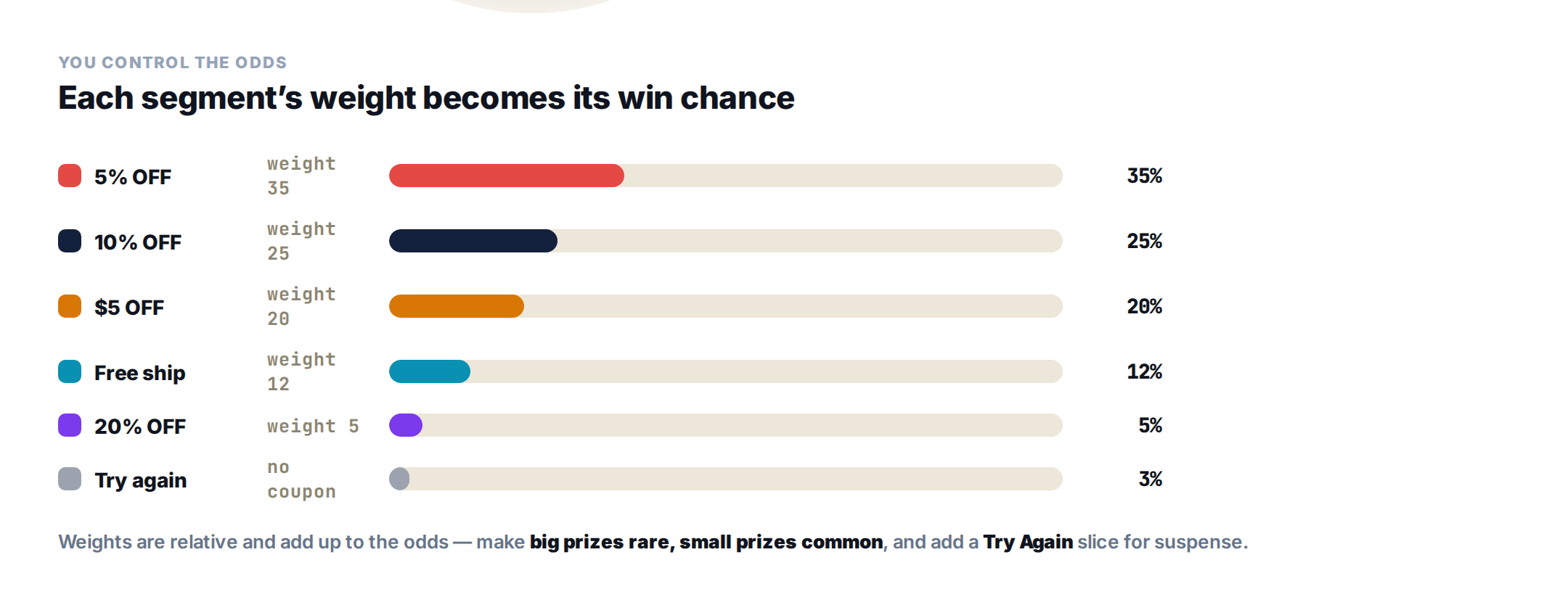
Each segment has a win chance that’s a relative weight — all the weights are added up to work out the real odds. Weights of 35, 25, 20, 12, and 5 simply become those percentages. Set them so the big prizes are rare and the small ones common, and add a losing slice for suspense: give a segment a label like Try Again and leave its coupon blank, and it counts as a non-winning slice.
Spin behavior: one spin, retry, or multi
A Tries Mode setting controls how many times someone can spin:
- Single — one spin, then the result is locked.
- Retry — they re-spin only if they land on a losing slice, until they win something (a satisfying “everyone’s a winner” feel).
- Multi — a fixed number of spins you set with Max Spins.
You can also tune the spin duration, play a tick sound while it turns, and auto-close the popup a few seconds after a win.
Inline or full-page
A Display Mode setting decides how the wheel appears. Inline embeds it as a normal block, so it can sit inside a page next to your content; full-page centers it on a dimmed overlay, like a classic popup takeover. The segments, odds, and behavior are identical either way — you’re only choosing how prominent it is.
The real payoff: save what they won, then target on it
This is where the Spin Wheel goes beyond a novelty. In Save Result to Profile, you point the wheel at a Prize Field (and optionally a Coupon Field). When someone wins, the winning label and code are written to their profile — so the prize becomes targeting data you can build audiences around.
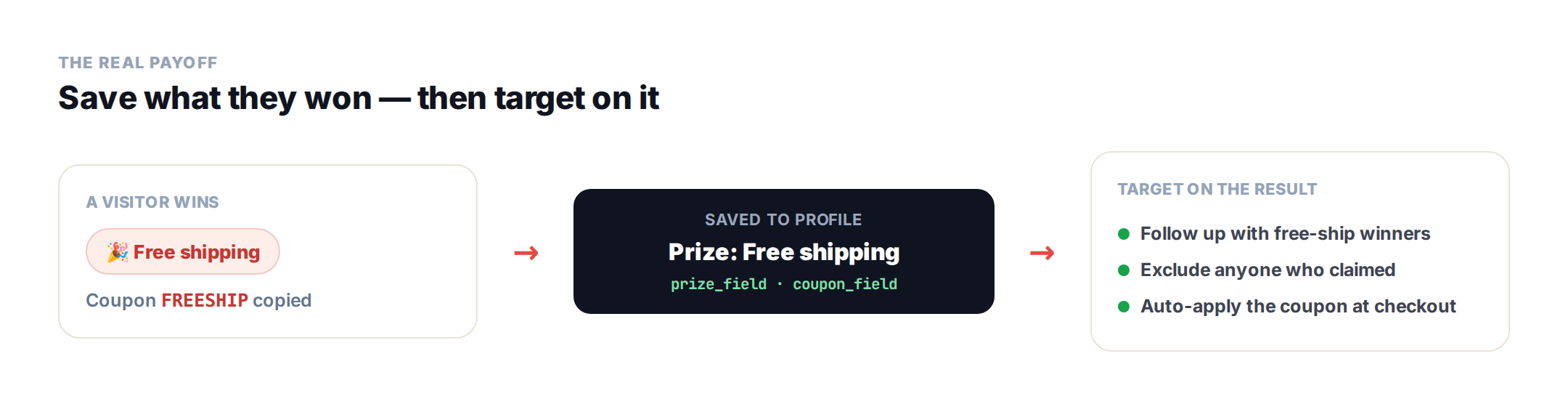
- Follow up with everyone who won free shipping but hasn’t ordered.
- Exclude visitors who already claimed a prize, so they don’t see the wheel again.
- Pair it with auto-apply coupon at checkout so the won code is already in the cart.
The fields need to exist in your profile first — see the profile data setup guide (use a text field for the prize label).
With or without an email gate
By default the Spin Wheel doesn’t gate the spin behind a form — the reward is the spin itself, which keeps friction low and spin rates high. That’s the right call when engagement is the goal.
When the lead matters more than the game, use the gated spin wheel — the same wheel with a form in front of it. The wheel is visible from the start but greyed out, with a padlock where the spin label goes, so the prize is obvious before anything is asked. It won’t turn until the visitor submits their email; then the form is replaced by a short thank-you, the wheel unlocks, and they spin (you can even auto-spin on submit).
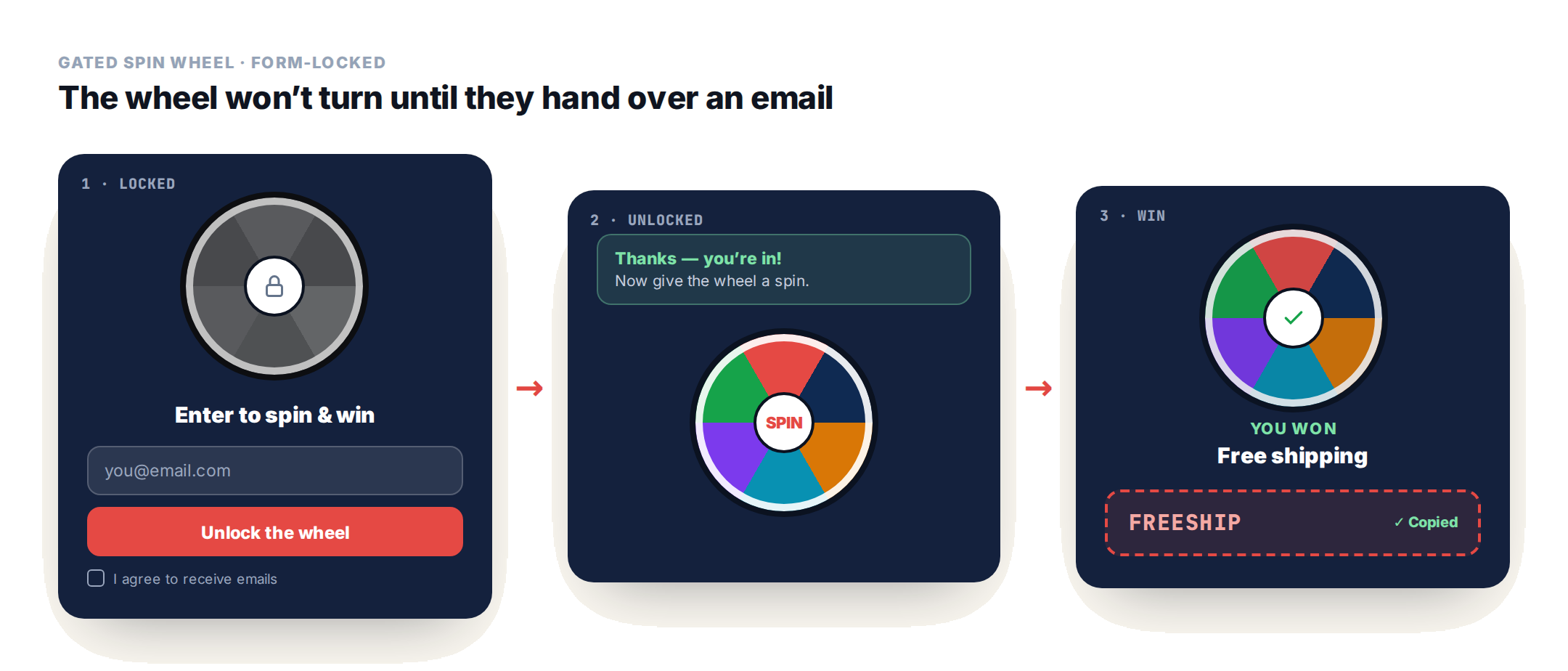
The clever part: the email and the won prize land on the same profile — same visitor, same session — so you end up with one record holding the address and the code you promised. From there you can email the coupon, remind whoever didn’t redeem it, or exclude winners from the next campaign. A hidden value can even tag the source, and it stops showing to anyone who’s already submitted. One caveat: once someone has “paid” with their address, a losing slice stings — keep those rare, or make every slice give something. If you want the form on its own, the lead capture form has the same fields without the game.
Design and celebration
The wheel arrives polished out of the box: three presets (dark, light, brand), a size (compact, default, or spacious), and a win celebration — confetti or a glow — that only fires on a real win. Add an eyebrow, title, and subtext, an optional CTA button after a win, and the standard editable close button. It’s all part of Personyze’s on-site personalization, so the wheel shows to the audiences you choose, when you choose.
Set it up
- In a Popup action, choose Spin Wheel, then pick a preset and display mode.
- Fill in the segments — label, color, prize message, coupon code — and set each one’s win chance weight (turn on segments 5–8 for more).
- Choose the Tries Mode and celebration, and add a CTA if you want one.
- In Save Result to Profile, pick the Prize (and Coupon) fields to write wins to.
- Set where it shows in the action’s Location step, and target who sees it.
Spin wheel: FAQ
What is a spin-to-win prize wheel?
It’s a gamified popup where visitors click to spin a wheel and win a prize – a discount, free shipping, or another offer – based on odds you set. Personyze’s Spin Wheel template also saves what each visitor won to their profile so you can target them afterward.
How do I control what visitors win?
Each segment has a win-chance weight, and all the weights are added up to work out the odds – so weights of 35, 25, 20, 12 and 5 become those percentages. Make big prizes rare and small ones common, and add a Try Again slice (a segment with no coupon) for suspense.
Does the wheel require an email to spin?
No. The Spin Wheel deliberately has no email capture – the spin is the reward, which keeps friction low. If you need to collect an email or run a countdown, use the dedicated action types built for that.
What happens when someone wins?
The pointer lands on the winning segment and its prize message appears. If it has a coupon, the code is shown and copied to the clipboard automatically, a celebration plays (confetti or a glow), and an optional call-to-action button can appear.
Can I follow up based on what someone won?
Yes – that’s the point of Save Result to Profile. The winning prize and coupon are written to profile fields, so you can build audiences around them: follow up with free-shipping winners, exclude anyone who already claimed, or auto-apply the coupon at checkout.
Can I stop people from re-spinning?
Yes, with Tries Mode: single locks the result after one spin, retry lets them re-spin only on a losing slice until they win, and multi allows a fixed number of spins you set.
Get started
Turn your next promo into a game visitors actually play. Book a demo or view plans.
Related reading
- Free shipping & tiered loyalty bars — more gamified nudges that lift order value.
- Ecommerce personalization — where the wheel fits in the bigger picture.
- Spin Wheel template — the full setup guide.
Book a demo with a personalization expert
30 minutes with a personalization expert. Bring your stack, your goals, your skepticism. We'll show you what changes when every visit feels like the only one.