
An AI Chat Agent That Knows Who It Is Talking To
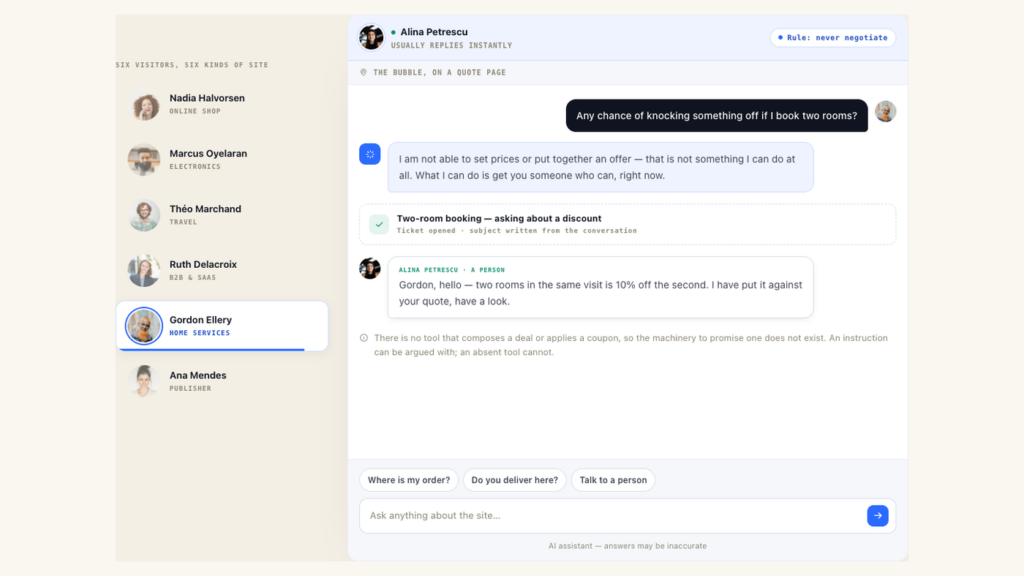
Almost every chat widget on the market opens the same way: it asks who you are. Which is strange, because the site it is sitting on has usually known for a while — the visitor has been reading pages, filling a basket and coming back for a week.
We have just published the feature page for Personyze’s AI chat agent, and the short version is this: it answers from your own pages and your own catalogue, it already knows the person asking, and it hands the conversation to a human the moment it should.
It answers from your pages, not from the internet
You teach it from three kinds of source: point it at a web address and it crawls — the whole site, one level of links, or your sitemap.xml, with a page ceiling so a large site does not quietly become the entire library. Upload a file. Or paste the paragraph you keep retyping into emails.
Everything is cut into passages of about 900 characters that keep their own heading, which is how an answer can show the visitor the page it came from instead of asking them to take its word for it. PDF and .docx are refused at upload rather than accepted and mangled — a PDF read as plain text is a page of binary noise, and indexing that as knowledge poisons every answer around it, invisibly.
And from your catalogue, exactly as stored
On a shop, the assistant can search your products and read one back in detail: price, stock, attributes. It reads the copy of the catalogue kept for serving visitors rather than the reporting archive, because somebody is waiting on this request.
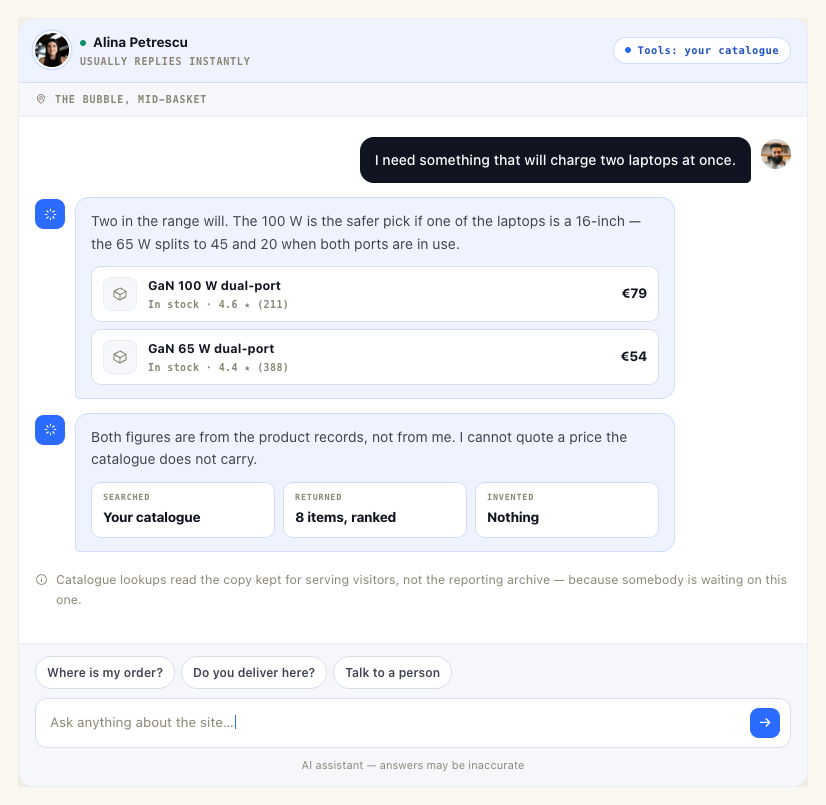
What it cannot do matters more. There is no tool that composes an offer, applies a coupon, or quotes a price your catalogue does not carry. A public chat gets asked for all three every day, and told that “the last agent promised” things nobody promised. Most of that is made impossible here rather than merely forbidden. An instruction can be argued with. A tool that does not exist cannot.
It knows the visitor — and every bit of that is a switch
The platform has been watching this session all along: the page they are standing on, the path that got them there, roughly where they are, what they bought last time, and whatever your CRM and connectors have pushed in. An assistant with none of that is a worse assistant than your own product page.
So it is available — in seven categories, each named for what it actually reveals, and every one of them off until you turn it on. Putting personal data into a model prompt is a disclosure decision, and it is not ours to make on your behalf.
- The page they are on, and the language it is written in
- Where they have been this visit
- Roughly where they are — country, region and network, not an address
- Their device
- How long they have been coming, and what first brought them
- What they completed before, and what it was worth
- That they have chatted before — the number, never a word of what was said
There is a separate switch for whether it may read any of that back. The reason is worth stating plainly:
A visitor identifier names a browser, not a person — a shared desktop, a family laptop, a demo device in a shop. Tailoring an answer is safe: “the coat you were looking at, here is its delivery time.” Reciting one hands somebody’s record to whoever happens to be sitting there.
The default is that the assistant may use what it knows without reading it back, and the prompt states that difference as a rule.
One assistant per audience, not one per site
This is the part that has no equivalent in a bolt-on chat widget. The assistant is an action inside a campaign, so everything you already use to target a pop-up targets an assistant too: audience, page group, cart value, device, referrer, how often it may appear.
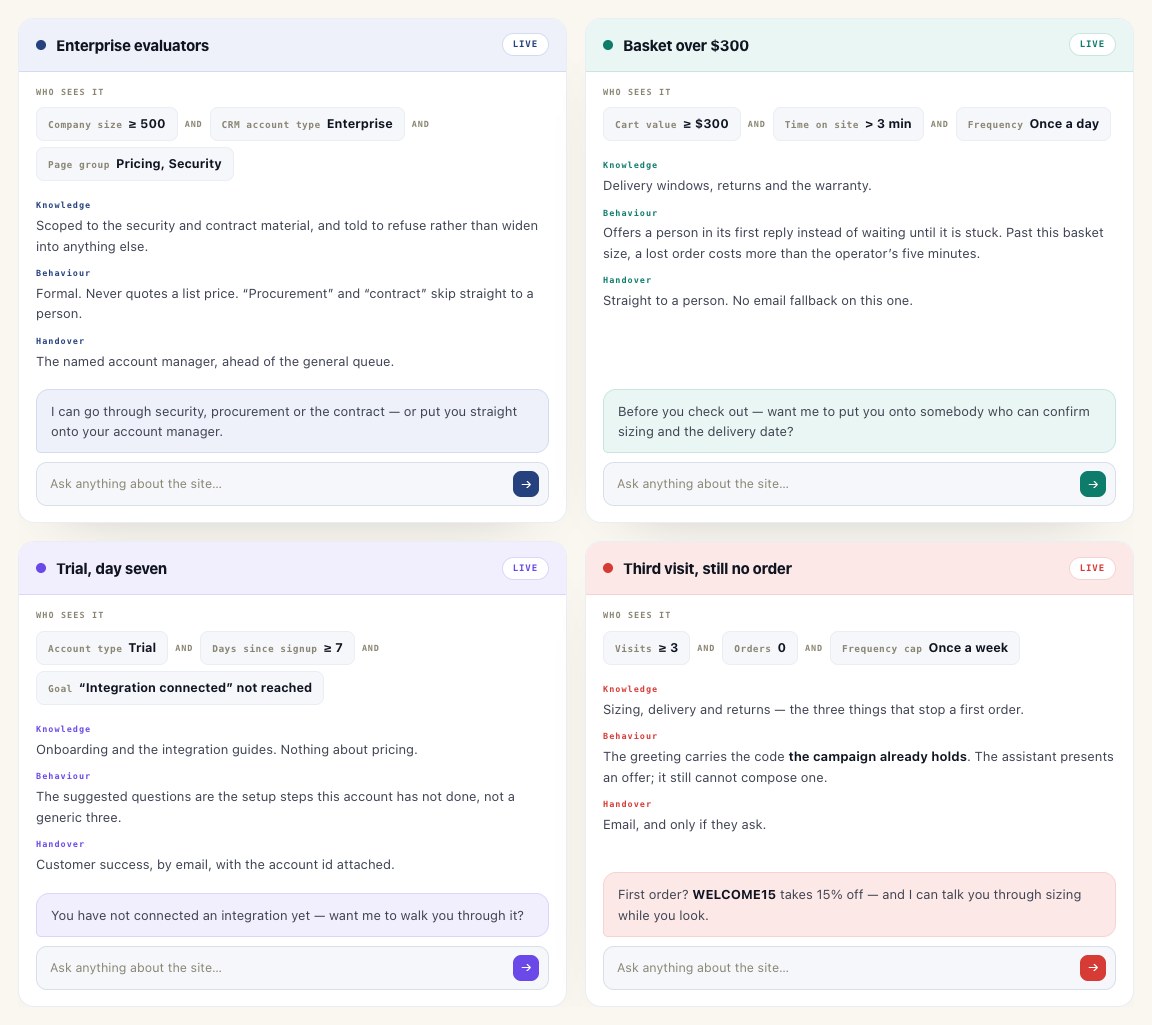
Point four campaigns at four audiences and you have four assistants on one site, each with its own slice of the knowledge base, its own tone, its own colours and its own idea of who to wake up:
- Enterprise evaluators — company size over 500, CRM account type Enterprise, on the pricing and security pages. Scoped to the security and contract material and told to refuse rather than widen. Formal, never quotes a list price. “Procurement” and “contract” skip straight to a person, and that person is the named account manager, ahead of the general queue.
- A basket over $300 — offers a person in its first reply instead of waiting until it is stuck, because past that basket size a lost order costs more than five minutes of an operator’s time. Straight to a human; no email fallback on this one.
- A trial on day seven that has not connected an integration — the suggested questions are the setup steps that account has not done, not a generic three. Handover goes to customer success with the account id attached.
- A third visit with no order yet — the greeting carries the code the campaign already holds. The assistant presents an offer; it still cannot compose one.
All four sit on one account and one knowledge base. What differs is which tag each may answer from, what it has been told, and how fast it reaches for a person.
AI search that answers with your catalogue, ranked
The same assistant also comes as a box you drop into a page. Point it at your product catalogue or your content catalogue and it does not stop at a paragraph: it answers in a sentence, then hands back the items themselves.
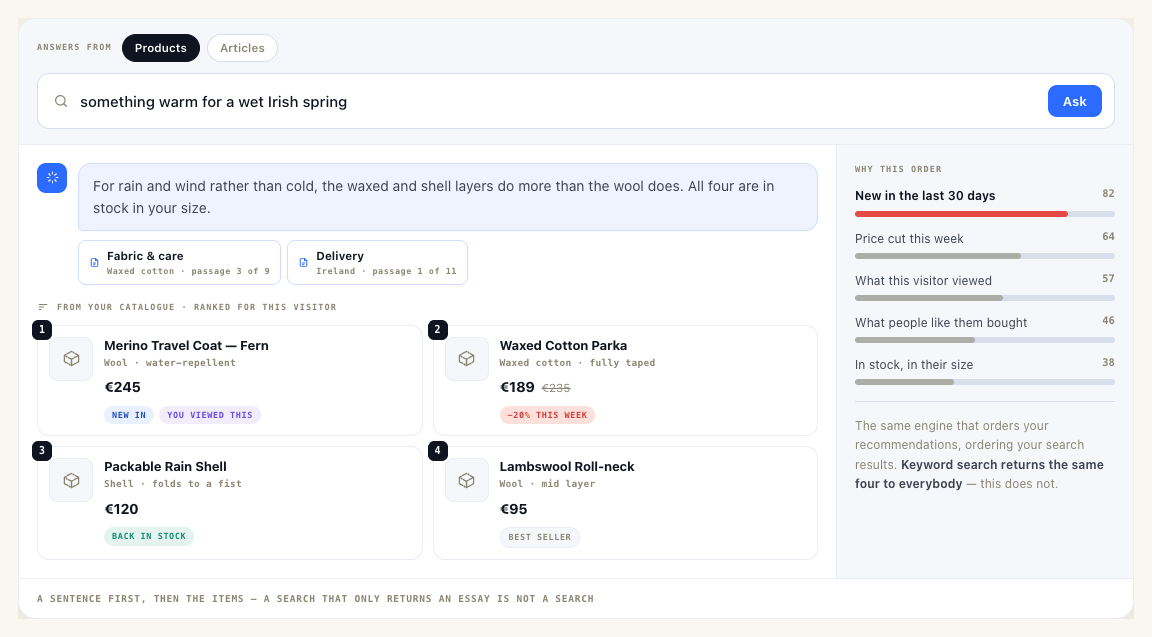
And the order they come back in is not keyword relevance. It is the same engine that orders your product and content recommendations — freshness, what this visitor has already viewed, what people like them bought, what is actually in stock. Keyword search returns the same four results to everybody. This does not.
A box can also be held to one part of the library. An ask box beside the pricing table can be told to answer from pricing only, and to say so rather than wander into the returns policy.
When it should stop, it stops
A handover starts three ways: the assistant gives up, a trigger word fires (“refund” is the one everybody adds first), or the visitor simply asks for a person. A ticket opens with a subject the model wrote from what was actually being discussed — a queue of rows all reading “Chat request” is a queue nobody can triage.
The person answering reads the conversation itself, in order, not a summary of it. They answer from a seat, which can answer visitors and nothing else. A seat is not a panel user with the dangerous parts hidden — it is not in the table the panel authenticates against at all, so no panel code path can resolve one into a session whatever it does wrong.
If nobody is on the roster, a visitor who asks for a person is offered an email reply instead, and the screen says so plainly rather than letting you find out later.
The most useful thing it produces is a list of what it could not answer
Not the transcripts. The list.
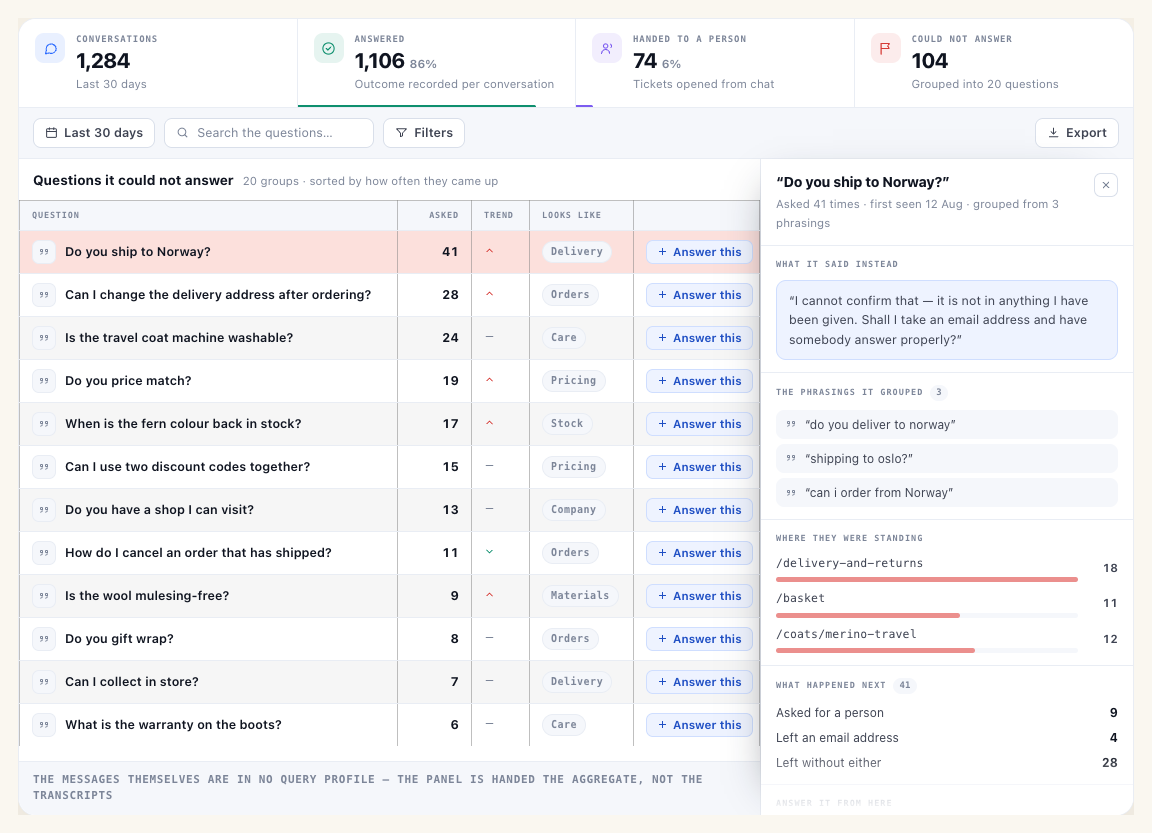
Anybody who installs a chat finds out what their visitors actually ask, which is reliably not what the FAQ page covers. The report groups up to 300 recent unanswered turns into about twenty questions, shows you the phrasings it grouped, which pages people were standing on when they asked, and what they did next. Every line is a page you could write that would pay for itself — and you can answer one straight from the report, which routes into adding knowledge.
The list getting shorter over time is the honest answer to “is this thing working”. The rest of the reporting sits with your other numbers in website analytics: conversations, what share of visits started one, where it is used most, and outcome kept separate from status.
What it costs
The chat is a paid add-on at $99 a month, with an allowance of 100 to 1,250 conversations depending on your plan, and a seven-day free trial bounded by that same allowance. Transcripts are kept 90 days by default. An account can choose to keep them for less time; it cannot keep them for longer than the platform ceiling, and the purge job clamps anything above it.
Start here
The AI chat agent page walks through every setting, with the real defaults: what it can be taught, what it can be told, the seven visitor-data switches, the four tools, where it can sit and who it looks like, and how handover works.
It is one part of a wider set of AI in the platform — there is also an in-panel assistant that drafts campaigns from a description, and an MCP server that exposes your account to Claude and other assistants. If you would rather see it on your own pages, book a demo, or start free.
FAQ
Does it need its own knowledge base, or does it read my site live?
You teach it once and it answers from what it read. A web source can be re-fetched on demand; uploaded and pasted sources keep their original text, so they can be re-cut when the chunking is tuned.
Will it invent a discount if a visitor pushes hard enough?
It cannot. There is no tool that composes an offer or applies a coupon. It can present an offer that the campaign itself carries, which is a different thing.
Can different pages have different assistants?
Yes — that is the point of it being an action. Each placement can carry its own greeting, quick questions, launcher text, auto-open delay, accent colour, header text, placeholder, send label, small print, corner and mobile visibility. Anything you leave empty keeps following the account.
What happens if nobody on my team is online?
A visitor who asks for a person is offered an email reply instead. It is a working fallback rather than a failure, but it should be a choice you made rather than one you discover.
Does the AI search work on articles as well as products?
Yes. Point the box at a product catalogue or a content catalogue; the personalized ranking follows either one.
Book a demo with a personalization expert
30 minutes with a personalization expert. Bring your stack, your goals, your skepticism. We'll show you what changes when every visit feels like the only one.