
Does A/B Testing or Personalization Hurt Your SEO? How They Affect Your Rankings
Plenty of marketing teams hold back from A/B testing or personalizing their site because they’re afraid it will confuse Google and sink their rankings. The reassuring news: done correctly, neither one hurts your SEO — Google explicitly supports A/B testing — and the better experience can even help indirectly. Done carelessly, with cloaking, the wrong redirects, or slow flickering scripts, both can do real damage.
Here’s exactly what affects your rankings, and how to test and personalize on the safe side.
The one principle behind every SEO concern
Almost every worry on this topic reduces to a single rule: don’t show search engines something materially different from what your users see, don’t hide your primary content, and don’t wreck your page speed. Google is perfectly happy for you to test and personalize — it just wants Googlebot treated like any other visitor. Get that right and the rest is detail.
Does A/B testing hurt your SEO?
Short answer: no — not when you follow Google’s guidance. Google publishes official A/B testing best practices and actively supports experimentation. The risk lives entirely in the implementation. Its core rules:
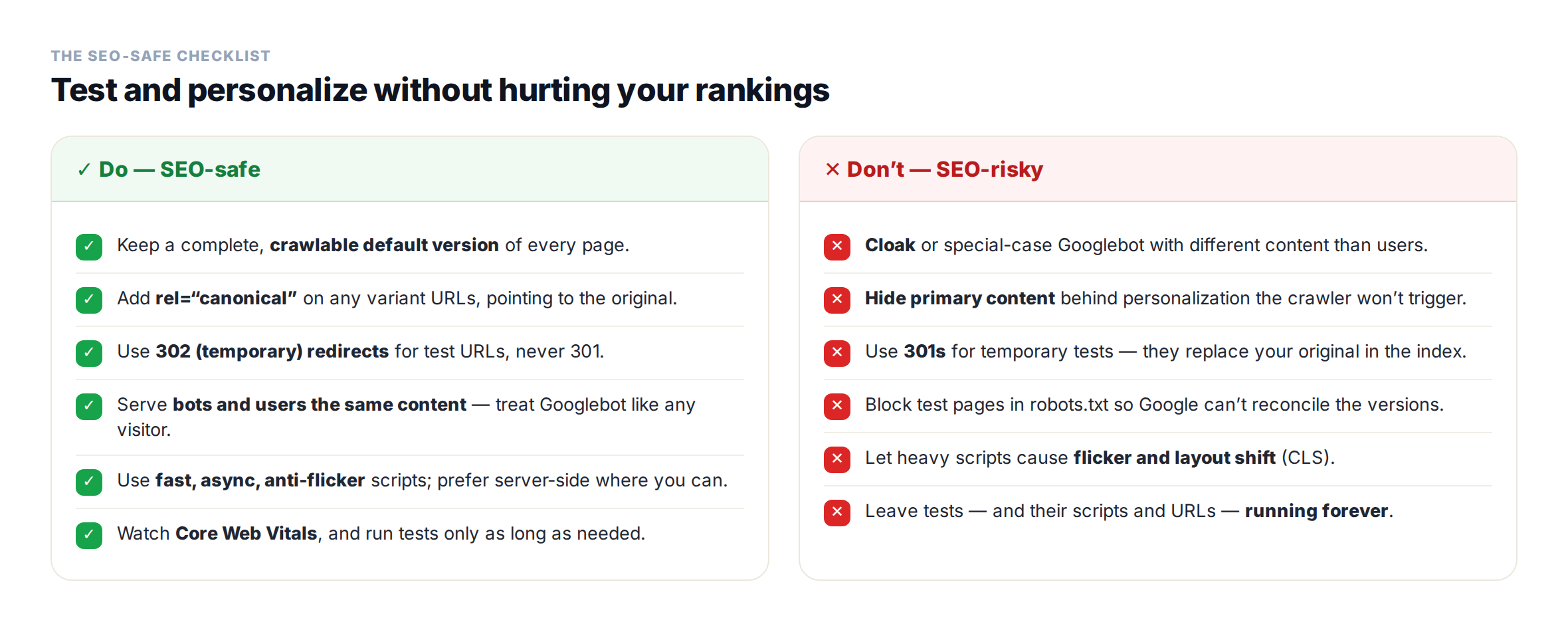
- Don’t cloak. Serve bots and users the same content variant. Don’t detect Googlebot and feed it a different (or the “original”) page — cloaking counts however you do it, server-side or otherwise.
- Use rel=“canonical” on variant URLs, pointing to the original. Google prefers this over a noindex tag, so the original stays indexed and ranking signals stay consolidated.
- Use 302 (temporary) redirects, not 301, when you redirect users from the original to a variant URL. A 302 tells Google the change is temporary and to keep the original in its index; a 301 would hand ranking signals to the variant and replace the original. JavaScript redirects are fine too.
- Run tests only as long as needed, then remove the test URLs, scripts, and markup promptly.
Reassuringly, small variations — a button color, a “Buy now” vs. “Add to cart” label, a layout tweak — usually have little or no effect on rankings at all. One practical gotcha on WordPress: aggressive page caching (WP Rocket, W3 Total Cache) or CDN/edge caching can cache a variant or break your 302 logic, so double-check that if you split by URL.
Does personalization hurt your SEO?
Personalization changes what a visitor sees based on their behavior, location, source, or profile. The SEO question is simply: what does Googlebot see? The answer is the key to the whole topic.
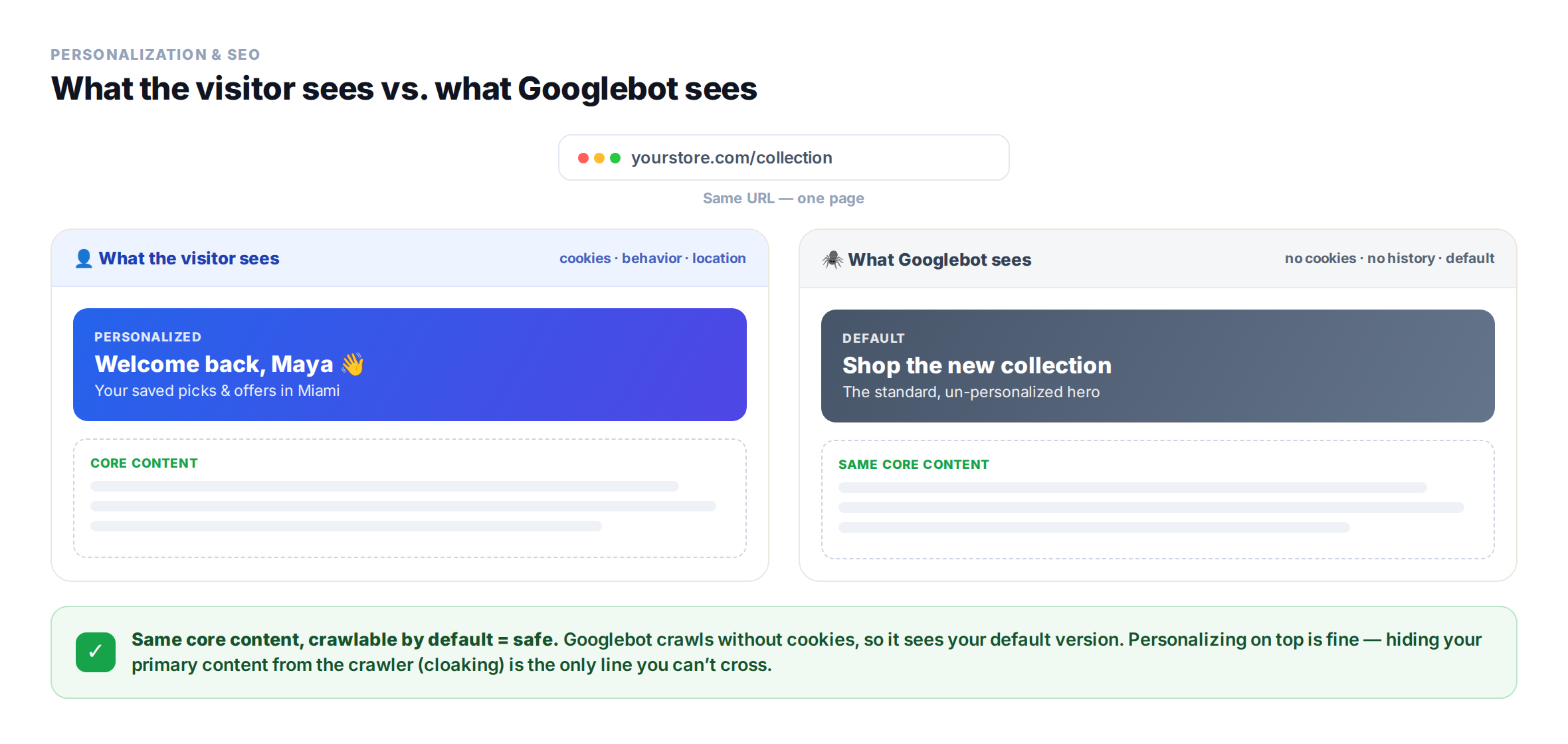
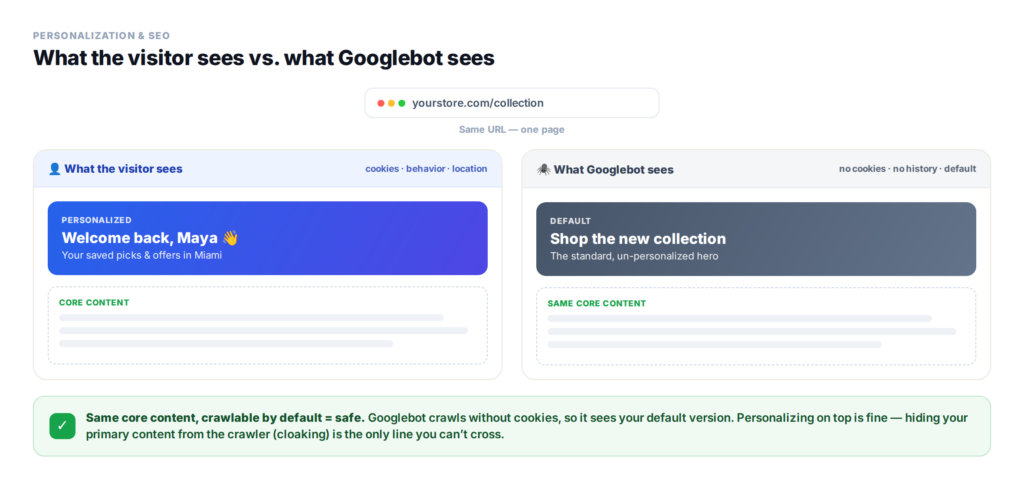
Googlebot crawls as a generic, cookieless visitor with no history (and usually from the US), so it sees your default, un-personalized experience. That default is the version that gets indexed. So the rule is simple: keep the default version complete and crawlable.
- Don’t hide primary content or key links behind personalization — or behind interactions Googlebot won’t trigger.
- Make sure the content you want to rank for is present in the crawlable HTML by default, not only revealed after a personalization event.
- Personalizing for audience segments is not cloaking. It only becomes cloaking if you specifically target Googlebot with different content than real users. Treat the crawler like any visitor and you’re fine.
If your personalization runs client-side, remember that while Google can render JavaScript, it’s safest to keep important content accessible without depending on scripts firing exactly as expected.
Recommendations, ABM, and audience-specific targeting: what the bot actually sees
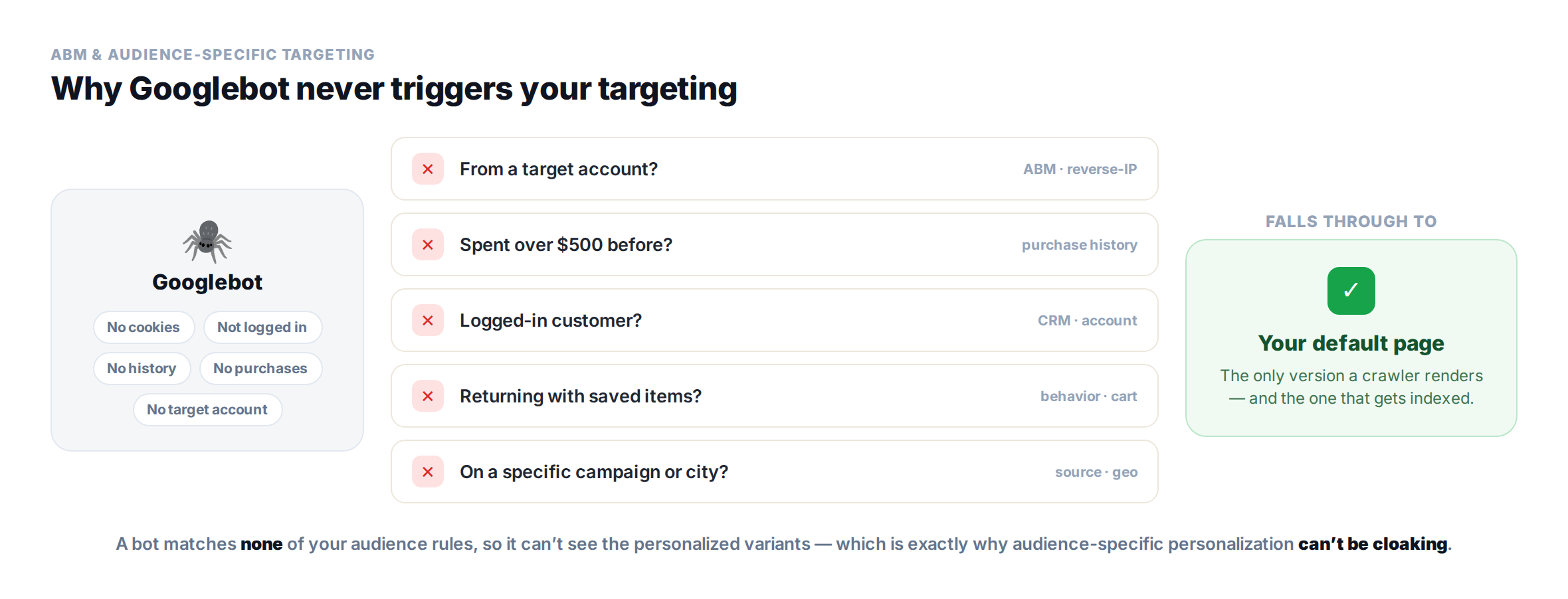
Here’s the reassuring part most SEO worries miss: the more specific your targeting, the less a crawler ever sees it. Personalization fires on conditions — behavior, location, traffic source, login status, cart contents, purchase history, or the company a visitor works for. Googlebot meets almost none of them. It arrives cookieless, logged out, with no history, no purchases, and not from any target account — so it drops straight through to your default experience, every time.
Example: account-based marketing (ABM)
Say you run an ABM play. When a visitor from a target account — identified by reverse-IP as, say, Acme Corp — lands on your homepage, Personyze swaps the hero to “Built for Acme Corp” and surfaces a case study from Acme’s industry. Googlebot isn’t crawling from Acme’s IP range, so that rule never fires for it — it sees your standard hero. Nothing is hidden from the crawler and nothing extra is created to index; the personalized version simply never renders for a bot that doesn’t qualify.
Example: purchase history and audience segments
The same holds for behavioral and CRM-based targeting. Show a “Welcome back — 15% off your next order” banner and VIP product picks to customers who’ve spent over $500, and a crawler — with no account and no purchase history — never qualifies, so it sees the default page. Cart-based cross-sells, logged-in-only content, returning-visitor messages, campaign- or city-specific offers: a bot matches none of these conditions, so none of them appear in what gets crawled.
This is why audience-specific personalization is inherently SEO-safe. It can’t be cloaking — you’re not special-casing the crawler; the crawler just doesn’t meet the audience rules, exactly as Google intends. And because these variations render in place rather than on separate URLs, there’s nothing extra to index or canonicalize. Your indexable page is always the default — the version you optimized for search in the first place.
Recommendations are additive — and usually an SEO plus
Content (“what to read next”) and product recommendations work the same way, with a bonus: they add relevant internal links and fresh, related content to a page, which supports crawl paths and keeps visitors engaged. A crawler sees the default, popular set rather than a person-specific one — which is fine. Just keep your primary navigation and the internal links you care about in the crawlable base too, so important link equity never depends on a widget rendering.
The one rule that still applies: don’t put content you actually want to rank for behind these conditions. If a block of copy or a link matters for SEO, it belongs in the default version the bot sees. Personalization should enhance that default for the humans who qualify — not replace the parts you’re counting on for rankings.
The hidden risk: flicker, speed, and Core Web Vitals
Both testing and personalization usually add JavaScript — and that’s where the most common real damage happens. If a script runs synchronously or repaints above-the-fold content, you get flicker (a flash of the original before the variant loads) and layout shift. Those hurt Core Web Vitals, which is a ranking signal, and they annoy users. Keep scripts asynchronous and lightweight, handle anti-flicker properly, prefer server-side or edge personalization where you can, and watch your Core Web Vitals while tests are live. Personyze, for instance, loads its script asynchronously by default — it’s the recommended option in the dashboard — so tests and personalization run without blocking the page or flashing the original first.
Can A/B testing and personalization actually help your SEO?
Indirectly, yes — and this is the part teams forget while they’re busy worrying about penalties. Google doesn’t treat “engagement” as a direct ranking factor, but the second-order effects are real:
- Testing title tags and meta descriptions lifts click-through from the results page — a direct lever on organic performance.
- A more relevant page lowers bounce and pogo-sticking and raises time on site — signs the visitor found what they came for.
- Personalized recommendations and internal links deepen sessions and improve crawl paths.
- Faster, more relevant experiences improve the UX signals Google increasingly rewards.
The honest framing: these are indirect and correlational, not a guaranteed ranking boost. But they push in the right direction — while directly improving the conversions you were testing for in the first place.
How to A/B test and personalize without hurting SEO
Put together, the safe path is short enough to keep on a sticky note:
How Personyze fits
Personyze runs A/B testing and personalization on top of your existing pages, at the same URL, rather than swapping visitors onto separate variant URLs. That means you sidestep the whole redirect / canonical / duplicate-URL class of problems from the start — there’s no second URL to point a 302 or a canonical at. Your live page stays the version search engines index, while visitors get the tailored experience.
Your part is the same good hygiene as always: keep the default content crawlable, don’t hide what you want to rank for, and keep the experience fast. Do that, and testing and personalization become pure upside. If you want to see the testing side in action, our post on the new Personyze A/B testing UI walks through it.
Test and personalize with confidence
You don’t have to choose between converting visitors and protecting your rankings. Follow Google’s testing guidance, keep your base pages crawlable and fast, and A/B testing and personalization become a rankings-safe way to grow. Book a demo to see how Personyze does both, or explore plans and pricing.
A/B testing, personalization & SEO: FAQ
Does A/B testing hurt your SEO?
No – not when it’s done according to Google’s guidance. Google officially supports A/B testing. Rankings are only at risk if you cloak, use permanent (301) redirects for temporary tests, skip canonical tags, or let heavy scripts slow the page and cause flicker.
Does Google penalize A/B testing?
No. Google supports legitimate testing. Problems arise only from bad implementation – most often cloaking (serving crawlers different content than users) or misleading redirects – not from the act of testing itself.
Does personalization affect SEO rankings?
Not directly. Googlebot crawls without cookies or history, so it sees your default, un-personalized version – and that’s what gets indexed. Keep that default version complete and crawlable and personalization is safe. Only hiding your primary content from the crawler (cloaking) causes harm.
Is personalization considered cloaking?
No, as long as you don’t specifically target Googlebot with different content than users. Personalizing for audience segments is fine; deliberately showing the crawler a different page than real visitors is cloaking.
Should I use a 301 or 302 redirect for A/B tests?
Use a 302 (temporary) redirect for test URLs, and add rel=“canonical” on variants pointing to the original. A 301 is permanent and would replace your original page in the index with the test page.
Can A/B testing or personalization improve SEO?
Indirectly. Testing titles and meta descriptions lifts click-through, and more relevant pages lower bounce and raise engagement and conversions. These aren’t direct ranking factors, but they support better organic performance and UX.
Does A/B testing slow my site or hurt Core Web Vitals?
It can, if the testing or personalization script is heavy or runs synchronously and causes flicker and layout shift. Use lightweight, asynchronous scripts with proper anti-flicker handling, prefer server-side or edge delivery where possible, and monitor Core Web Vitals during tests.
Will Googlebot see my ABM or audience-targeted content?
Almost never. Personalization based on a target account (via reverse IP), purchase history, login status, cart contents, or campaign source only fires when a visitor meets those conditions. Googlebot crawls cookieless, logged out, with no history and not from a target account, so it falls through to your default page — which is the version that gets indexed.
Do product or content recommendations hurt SEO?
No — they usually help. Recommendation widgets add relevant internal links and related content, which supports crawl paths and engagement. A crawler sees the default set rather than a personalized one. Just keep your key navigation and important internal links in the crawlable base too.
Related reading
- Personyze’s new A/B testing UI — auto-pick winners and clearer results.
- Audience-oriented A/B testing — testing experiences by segment.
- Website personalization — converting the visitors your SEO brings in.
Book a demo with a personalization expert
30 minutes with a personalization expert. Bring your stack, your goals, your skepticism. We'll show you what changes when every visit feels like the only one.