
ABM Personalization Measurement: How to Know Each Account’s Version Works
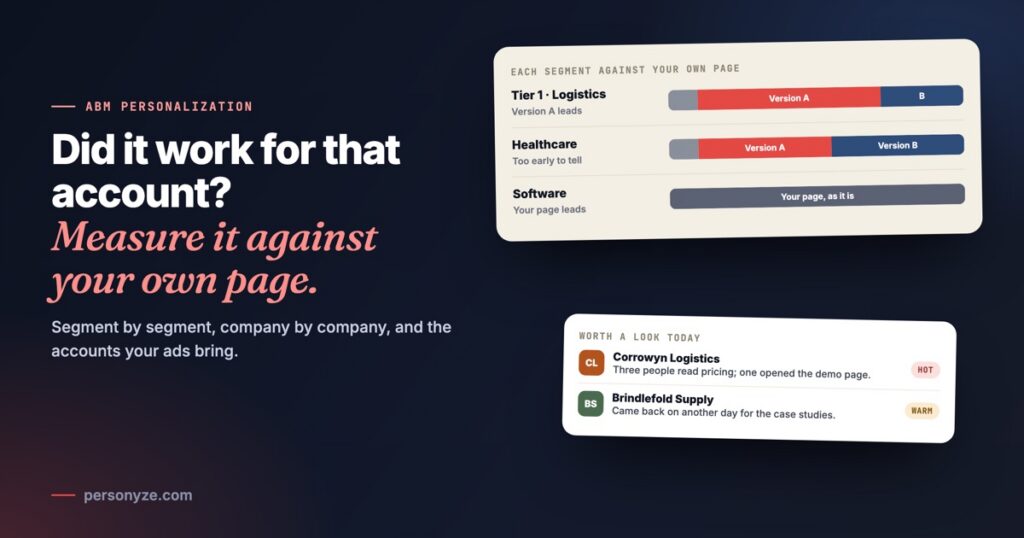
Measuring ABM personalization comes down to one comparison: did the accounts that saw a version written for them do more than the same kind of accounts that saw your page as it is? Clicks and page views cannot tell you that, and neither can a chart of this month against the last.
This guide covers what to compare, at what level, and how Personyze does each part: every version against your own page, segment by segment; results counted by company, not only by visit; a morning list of the accounts worth a call; and the companies your Google Ads, Microsoft Advertising and Meta Ads campaigns bring to your site.
Why ABM personalization is hard to measure
Three things make account-based results slippery. There are few accounts, so a handful of visits can swing a chart. A deal takes weeks and several people from one company, and most of them never fill in a form. And the obvious comparison, this month against last, mixes your change with the season, a sale and a change in who visited. Only a control group shows the lift a change really caused, which is why A/B testing by audience keeps one in every test.
So a sound measurement has three parts:
- A version against your own page, inside the same segment and at the same time.
- Results counted by company, because an account is several people on several days.
- The step that matters to sales: a demo booked, a form sent, a meeting booked, not a click.
Measure each version against your own page
In Personyze’s account-based marketing, your own page never leaves the test. In each segment it keeps the share of sessions you choose, 5%, 10% (the default), 20%, 30% or 50%, and every version written for that segment is measured against it, in sessions and conversions on your goal.
- Segment by segment. Performance opens on the last 30 days, one row per segment, the busiest first: its sessions, your page’s conversion rate beside the best version’s, the lift, and where it stands, from Too early and Learning to Leading, Winner or Your page leads.
- No early winners. No version beats your page before your page has been shown 200 times, and results start the day after the campaign goes live.
- Only real segments count. A session counts once, in its segment. A visit no segment fits sees your page as it is and is not counted.
- Your goals, as everywhere else. A session converts as in the campaign’s other reports: a goal of your account or a purchase in that session, or a goal set for this campaign.
- Zero means no measurement. At 0%, every visitor sees their segment’s version and nothing measures the lift. Keep a share, even a small one.
Let the visits follow the winner, or hold the split
The versions compete in one of two ways. Auto-optimize, the default, shifts each segment’s sessions toward the version that converts best. A/B test gives every version the same share, and you read Performance and pick the winner yourself. Auto-optimize follows fixed rules, so you know what it will and will not do:
- It works from each part’s last 14 days in each segment, and shares each hour’s sessions by each version’s chance of being the best: evenly until 300 sessions, and always a little to each.
- It retires a version only after 1,000 sessions or more with under a 5% chance of being the best, never the last one, and, while you let the AI keep improving, writes another idea to try in its place.
- It pauses a segment where your page wins: when your page, shown 200 times or more, has a 95% chance of beating every version over 2,000 sessions, that segment sees your page as it is.
- It never approves a version. You approve each one, and it reaches your site when you publish.
For a headline, a call to action or a case study you build yourself for a named account group, a test decides at a bar set before the first visitor: 98% confidence and 1,000 sessions to start, or Cautious, Balanced or Fast. Choose the goal with care: a test that optimizes for clicks and one that optimizes for demos do not always agree. Each test is also read audience by audience, and where an audience has a clear winner of its own you can apply that winner to that audience, with Undo. Two ways an A/B test can decide explains when to call a winner and when to let the split manage itself.
Count results by company, not by visitor
An account is several people on several days, and most of them never say who they are. Every morning, Visitor stories ranks yesterday’s visitors and companies with the most intent in a list called Worth a look today. Several people from one company are one row, each row has a one-line reason, and a score: coming back on another day, a pricing or sign-up page and a real email click count most.
- An alert at your line. “Email me when someone on Worth a look scores N or more” is checked each morning. Or, from one company’s story, Tell me when they really visit sends one email at their next real visit. Both are on paid plans, listed under Automation › Visitor alerts.
- The company’s whole story. See the company story shows their visits, everyone together: each person from that company, found by the company your company-data tool names or by their email, with the campaigns they met, the emails they clicked, the forms they sent and their bookings.
- A summary and a next step. Write the summary tells the visits in 3–4 sentences: who they probably are, what they cared about, how warm they are, and one next step, such as adding the company’s people to a list or starting the company follow-up as a draft that waits for your OK.
- Scanners are not readers. A visit behind an email click within seconds of its send is most likely a mail security scanner checking the link. It is shown greyed, and not counted as them reading.
The company itself comes from the identification tools you already use, such as 6sense, ZoomInfo, Albacross, Leadfeeder or Leadinfo, from your CRM (HubSpot, Salesforce or Zoho), or from the ad that brought the visit. The same company data decides which version each account sees; see B2B website personalization.
See which companies your ads bring
Connect Google Ads, Microsoft Advertising or Meta Ads, one click each, and every visit from your ads carries the campaign, ad group (ad set, on Meta) and ad that brought it. The Ads report in website analytics puts what the network charged beside what those visitors did on your site: spend, clicks, impressions, CTR, cost per click and CPM from the network; visits, conversions, revenue and return on ad spend from your site.
- Performance by company. Every company that came from your ads, with its industry and size, the campaign and ad group that brought it, its ad visits and its conversions, filtered by industry and company size. It answers the budget question account by account: is your spend reaching the companies you sell to?
- What personalizing added. For visitors from your ads, the personalized experiences against the control group, who saw your own page.
- Breakdowns. By device, country, keyword, and first-time or returning visitors, with bounce rate, pages per visit and time on site. Any view downloads as a CSV file.
Put the Worth a look score beside the keyword, and the question changes from which keyword gets clicks to which keyword brings companies that come back and read pricing. Keywords by company walks through it, keyword by keyword.
Measure the follow-up, too
Personalization on the site is half of ABM; the other half is the conversation. When a company you can sell to visits, Personyze’s company follow-up can find the person in the roles you choose and write them an email your rep approves. Its Performance step counts how far each company got: noted, person found, emailed, opened their page, replied, with how many were never followed up. An opening of their page in the first minute after the email went, or by your own team, is not counted. Identified companies lists each company with its status and what happened.
What to measure, in order
- Set the goal first: a demo booked, a form sent, a meeting booked. A version that wins on clicks may not win on demos.
- Keep your page in every segment, at 10% or the share you choose, so each version has something to beat.
- Read segment by segment, and believe Too early when it says so.
- Read the accounts: Worth a look each morning, an alert at your score, the company story before the call.
- Read your ads by company: are the companies your campaigns bring the ones on your list?
- Close the loop with sales: how far each followed-up company got, and the meetings booked.
Watch it in the panel
Two short films: reading what one campaign did, and putting the company behind a visit to work.
Read the transcript
Every campaign has a Performance step, showing what it did against the time before. Its numbers for the dates you pick. How they moved over time.
And each step, from a view to a click. Performance is a campaign’s last step. Pick the dates: from the start, since your last edit, since it went live, or any range you like.
Each tile is one number, with its change against the period just before: visits, views, clicks and the click-through rate, then conversions and the conversion rate. Below, one number at a time, day by day. The dashed line is the period before, and the campaign’s own history is marked on it.
Then this period and the one before, side by side. The engagement funnel, from viewed to clicked. And the goals its visitors reached.
Some campaigns add a tab of their own, like a feedback score or a survey’s answers. Users and Live activity show the people behind the numbers. Campaign results.
Read what it did.
Read the transcript
On a business site, the company behind a visit matters as much as the visitor. Personyze can know it, and use it. Connect your company data.
Target by company. And give each kind of company its own page. In Integrations, choose Know which company is visiting, and connect the company-data tool you already use.
Then any campaign can target by company. Add an audience rule, and search for company: its industry, its size, or your own target accounts. And in [personal sections], the company is one of the ways a visitor gets a segment, so each kind of company sees its own version of your page.
The company behind the visit. Known, and used.
The short version
Measure ABM personalization the way you would want a sales result measured: each version against your own page, in the same segment, on a goal sales cares about; then by company, with the story behind each account; then back to the ads, to see which campaigns bring the accounts you want. With Personyze, all of it sits on one visitor profile, and account-based marketing shows the whole loop on one page.
Questions people ask
How do you measure ABM personalization?
Compare each version with your own page, inside the same segment and at the same time, on the goal that matters: a demo booked, a form sent, a meeting booked. Then read the results by company as well as by visit, and check which companies your ads bring. Before-and-after charts mix your change with the season and with who happened to visit.
How much of my traffic should keep seeing my own page?
You choose: 5%, 10%, 20%, 30% or 50% of each segment’s sessions, and 10% is the default. That share is what every version is measured against. At 0%, every visitor sees their segment’s version and nothing measures the lift.
When can I trust a result?
No version beats your page before your page has been shown 200 times. Auto-optimize retires a version only after 1,000 sessions or more, and pauses a segment for your page only when your page has a 95% chance of beating every version. A test you build yourself starts at 98% confidence and 1,000 sessions, or the bar you set.
Can I see results by company instead of by visitor?
Yes. Worth a look today ranks yesterday’s visitors and companies by intent every morning, several people from one company in one row, with the reason and a score. A company’s story shows every person from that company, day by day, with the campaigns they met, the emails they clicked and their bookings.
Can I see which companies my Google Ads, Microsoft Advertising or Meta Ads campaigns bring?
Yes. Connect the ad account in one click, and the Ads report lists the companies that came from your ads, with their industry and size, the campaign and ad group that brought them, their ad visits and their conversions, beside what personalizing added against the control group.
Does Personyze approve or publish versions by itself?
Not unless you choose that. By default every version waits for your approval, and nothing reaches your site until you publish the campaign, first to staging, then live. Auto-optimize moves visits between versions you approved; it never approves one.
Book a demo with a personalization expert
30 minutes with a personalization expert. Bring your stack, your goals, your skepticism. We'll show you what changes when every visit feels like the only one.