
See How Every Ad Campaign Performs on Your Site, and A/B Test What Ad Visitors See
Every ad network grades its own homework. Google Ads counts its clicks and the conversions it can see, Meta Ads counts its own, and Microsoft Advertising its own, each in a separate account with its own definitions. None of them sees the whole of what a visitor does on your site, and none of them compares itself with the other two.
Connect Google Ads, Microsoft Advertising and Meta Ads to Personyze, one click each, and Personyze knows which ad brought each visitor and what that visitor did on your site. Ad results turns that into one report: every campaign, ad group and ad, with the network’s spend beside your site’s revenue. And because Personyze also decides what those visitors see, you can A/B test the page each ad lands on and read the winner on the same numbers. Here is how.
Ad results, down to the ad
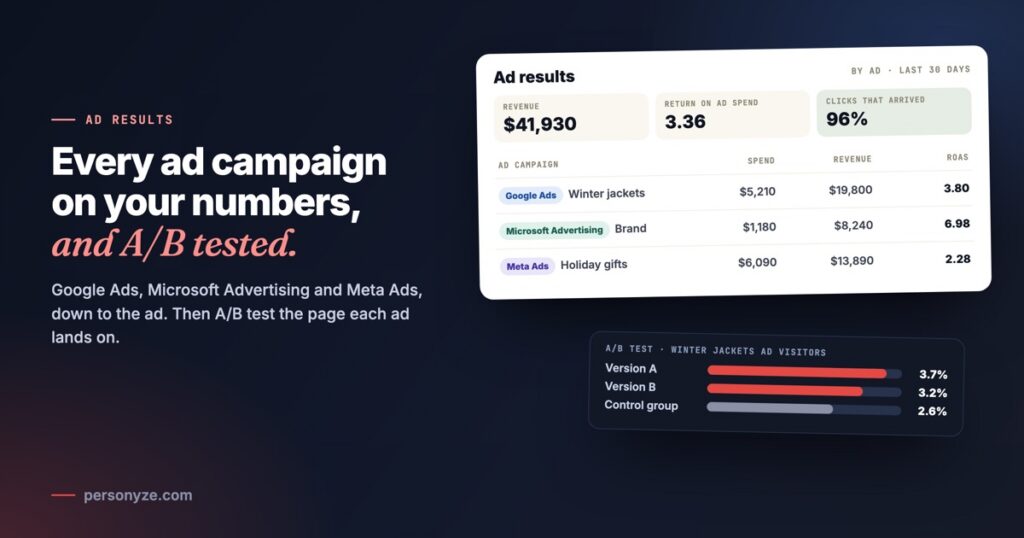
Each row of Ad results is a campaign you can open to its ad groups and then to each ad. Every level carries two kinds of number. From your site: visits, conversions, conversion rate, revenue and return on ad spend. From the ad network, straight from your account there: spend, clicks, impressions, click-through rate, cost per click and cost per thousand impressions. A month of three networks reads like this:
An A/B test of the landing page for this campaign’s visitors: the conversion rate of each version, against the ad visitors held back from both.
Clicks that arrived: 9,128 of the 9,540 paid clicks the networks reported reached your site.
In the example the Microsoft Advertising brand campaign earns the most for what it spends, and the Meta Ads campaign spends the most for the least back. Within the Google Ads campaign, one ad carries its ad group, and the test under the table says which landing page its visitors should get. Each of those is a decision, and each needs the network’s cost and the site’s revenue on the same line.
Revenue and return on ad spend from your own site
Return on ad spend is only as good as the revenue in it. In Ad results the revenue is what visitors from that ad actually bought on your site, and the spend is what the network charged for the same campaign, ad group or ad. Because all three networks are measured on the same site, by the same tag, a Google Ads campaign and a Meta Ads campaign are in the same units.
Read it top-down: start with the campaigns whose return on ad spend is lowest, open them to the ad group and the ad, and look for the one line that pulls the rest down. Often it is an ad with plenty of clicks and almost no purchases: the network sees an ad people like, your site sees an ad that brings the wrong people.
Who your ads bring
Revenue tells you what an ad earned; the breakdowns tell you why. Ad results splits ad visitors by device, country, keyword, and new or returning, and shows how they engage: bounce rate, pages per visit and time on site. A campaign that converts on desktop and bounces on mobile needs a different fix from one that simply costs too much.
For B2B advertisers there is one more cut: Performance by company, the companies your ads brought, filtered by industry and company size. It works with the company data of B2B website personalization, and a separate post goes through it keyword by keyword.
A/B test what ad visitors see
Paid visitors are the easiest audience to test on, because you know what brought them. Personyze can target visitors from a specific campaign, ad group or ad, or by whom the ad was aimed at: its keywords, locations, interests and audiences. So a test can run on the visitors of one ad alone. Personyze’s A/B testing calls this testing the audience that needs it: a change made for one ad’s visitors is judged by them, not averaged away across everyone else on the site.
Good first tests for ad traffic:
- The page that matches the ad against the page as it is. Match the page to the ad, so the headline and offer the visitor clicked on are the ones they find, without a separate landing page for every ad.
- Two angles for one ad group. The ad’s own line carried into the headline, against a different reason to buy, like the gift angle in the example above.
- Written for the ad, or written by you. Personyze’s AI writes page content for visitors arriving from a given ad, based on that ad’s message and its targeting. Test it against your own copy.
Personalization lift is already a test. For ad visitors, Ad results compares those who saw a personalized experience with a control group held back from it, and because both groups came from the same ads, the difference between them is the personalization, not the traffic. In the By personalization view each version of a campaign gets its own line, with its ad visits, conversions and conversion rate, against that control group.
You decide what winning means before the test starts: revenue per session, purchases per session, order value or one of your goal events. Turn on auto-pick and choose Cautious, Balanced or Fast, or your own confidence, sessions and days, and a winner is called only when it clears that bar. The result is read audience by audience, too: when one version wins for phone visitors and another for desktop, each audience can get its own winner, applied with one click or automatically.
Clicks that arrived: is the tracking working?
Before trusting any of these numbers, or any test, check that the clicks you pay for reach your site. Ad results shows it as a tracking health figure, Clicks that arrived: how many of the paid clicks the networks reported got to your site. When it drops, look at the landing pages first: a page without the Personyze tag, or one so slow that people leave before it loads, loses clicks you have already paid for.
Reading and sharing the report
Every view has summary tiles at the top, a daily trend chart and a bar chart. You choose which columns each view shows, so a media buyer can keep cost per click in view while a manager keeps revenue and return on ad spend, and any view downloads as a CSV file. For the traffic that does not come from ads, website analytics covers the rest of the site the same way, down to the visitor. And for the audiences you would not have thought to test, Audience discovery suggests ready-made segments from your own ad campaigns.
The short version
Connect Google Ads, Microsoft Advertising and Meta Ads. Ad results shows every campaign, ad group and ad with the network’s spend and clicks beside your site’s visits, conversions, revenue and return on ad spend. Check that your clicks arrive, find the ads that pull the rest down, then A/B test the page their visitors land on, and let the control group and auto-pick tell you which version earns more.
Questions people ask
Which ad networks does Ad results cover?
Google Ads, Microsoft Advertising and Meta Ads. Each connects to Personyze in one click, and their campaigns are reported in the same view.
How is return on ad spend calculated?
Revenue from the purchases ad visitors made on your site, divided by the spend the ad network reports for the same campaign, ad group or ad.
Can I see results for a single ad, not only the campaign?
Yes. Ad results goes from each campaign to its ad groups and to each ad, with visits, conversions, conversion rate, revenue and return on ad spend at every level.
Can I A/B test the landing page for one ad campaign?
Yes. Target the test at visitors from that campaign, ad group or ad, so only they take part, choose the goal it wins on, and let auto-pick call the winner when it clears the bar you set. Each audience can get its own winner, applied with one click or automatically.
What does personalization lift mean for ad visitors?
It compares ad visitors who saw a personalized experience with a control group of ad visitors who were held back from it, so you can see whether personalizing the landing page for your ad traffic changes how often it converts.
What is “Clicks that arrived”?
A tracking health figure: how many of the paid clicks the ad networks reported actually reached your site.
Can I export the report?
Yes. You choose the columns of each view and can download any view as a CSV file.
Book a demo with a personalization expert
30 minutes with a personalization expert. Bring your stack, your goals, your skepticism. We'll show you what changes when every visit feels like the only one.