
Google Ads and Microsoft Advertising Keywords by Company: See Which Accounts Your B2B Ads Reach
Most B2B ad reports stop at the click. Google Ads and Microsoft Advertising tell you which keyword was clicked, what it cost and how many conversions the network counted. They do not tell you which companies those clicks came from, or whether any of them went on to look like a buyer.
Connect your Google Ads and Microsoft Advertising accounts to Personyze, one click each, and Personyze knows which ad brought each visitor and what that visitor did on your site. Two things turn that into a B2B report no ad network has: the company behind each visit, filled in from every company-data source you use at once, and a score for how much intent each visitor and company showed. Put them together and you can judge a keyword by the companies it brings and how far they get, not by its clicks.
Why the click is the wrong unit for B2B ads
A B2B buyer rarely converts on the first click. Several people from one company search, click and read over weeks, and most never fill in a form. Two keywords with the same cost per click can bring very different traffic: one brings operations managers at mid-size logistics firms, the other students and job seekers. In the network’s report they look the same.
Which companies each keyword and campaign brings
Ad results in Personyze has a view called Performance by company. Each row is a company that came to your site from your ads, with its industry and size, the ad campaign and ad group that brought it, its ad visits and its conversions. Filter it by industry and company size to see only the accounts that matter to you.
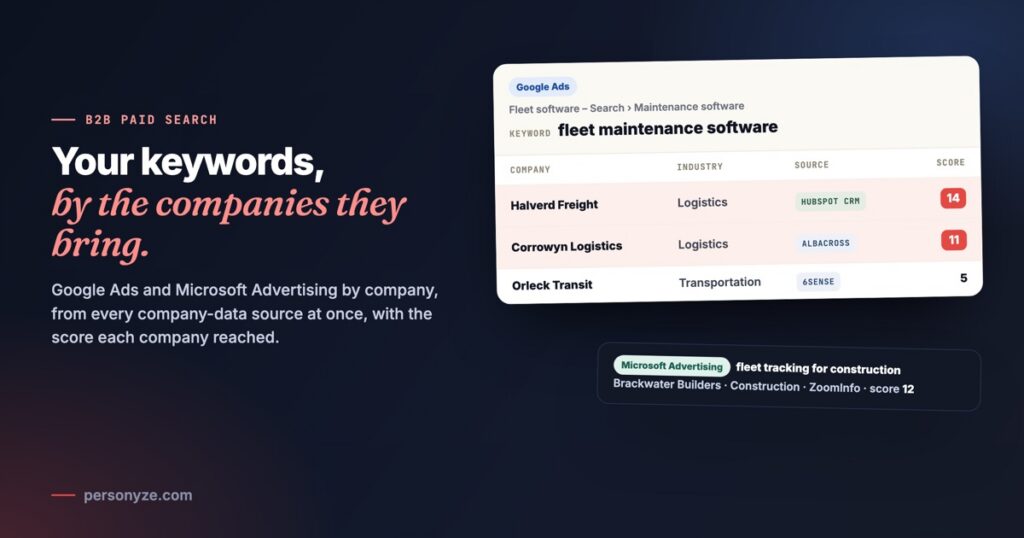
Take a company that sells fleet software and runs search ads on both networks: “fleet maintenance software” on Google Ads, “fleet tracking for construction” on Microsoft Advertising. A month of company rows, grouped under the ad group that brought them, with where each name came from and its score:
Company data from every source you have, in one view
No single identification tool names every company. Personyze is identification-agnostic: connect the reverse-IP and enrichment tools you use, such as Albacross, 6sense, ZoomInfo, Leadfeeder, Leadinfo, Snitcher or Demandbase, and they all feed the same visitor profile. Add your CRM, such as HubSpot, Salesforce or Zoho CRM, and visitors who are already known, or who convert, carry what your CRM knows about their account as well.
That is why the keyword rows above are full. One company was named by a CRM record, the next by Albacross, the next by 6sense, and the report does not care which: every company a keyword brought is on its line, with the industry, size and deal stage the sources between them know. It is the same company data that drives B2B website personalization.
Which keywords bring companies that score
A company that visits once and leaves is not a lead. Visitor stories ranks the few visitors and companies with the most intent each morning in a list called Worth a look, each with a score. Coming back on another day, reading a pricing or sign-up page and a real email click count most. You can have it email you when someone on Worth a look scores a number you choose or more.
Read the score beside the keyword and the question changes from “which keyword gets clicks” to “which keyword brings companies that come back and look at pricing”. In the example, the Google keyword brought two companies that scored high, and the Microsoft keyword, which looked small, brought a construction firm that scored among the highest of all. That is a keyword to bid more on, and an industry the sales team had not been aiming at.
Is your spend reaching your target accounts?
Ad results puts the network’s numbers and your site’s side by side. Spend, clicks, impressions, click-through rate, cost per click and cost per thousand impressions come straight from Google Ads and Microsoft Advertising; visits, conversions, conversion rate, revenue and return on ad spend come from your site. Read with the company view, that answers the budget question account by account:
- Filter by your ideal company size. A campaign with a good cost per click that mostly brings ten-person companies is cheap traffic you cannot sell to.
- Compare the networks. Google Ads and Microsoft Advertising sit in the same view, so you see which one reaches your accounts, not only which one is cheaper per click.
- Break it down further. By device, country, keyword, and new or returning visitors, with bounce rate, pages per visit and time on site for ad visitors. Any view downloads as a CSV file for the sales team.
Website analytics covers the rest of your traffic the same way, down to the visitor.
Personalize the landing page for the company and the keyword
Personyze can target visitors by the campaign, ad group or ad they came from, or by whom the ad was aimed at: its keywords, locations, interests and audiences. Combine that with the company’s industry, size or CRM deal stage, and one landing page can speak to both the search and the searcher:
This is matching the page to the ad at work: the ad’s message carries through from the click to the page, without separate landing pages for every keyword and industry. For the accounts on your target list, the same rules sit beside the rest of account-based marketing. And Personyze’s AI writes page content for visitors arriving from a given ad, based on that ad’s message and its targeting.
Audience discovery suggests ready-made segments from your own ad campaigns, so a group like the construction firms shows up as a segment you can target, not as a row you might miss. Google Ads and Microsoft Advertising connect in one click each, and Meta Ads is reported in the same view; for the campaign side of the report, with revenue and A/B tests of the landing page, read how to see every ad campaign’s performance on your site.
The short version
Connect Google Ads and Microsoft Advertising, connect every company-data source you have, CRM included, and read your keywords by the companies they bring and how high those companies score. Bid on the keywords that bring companies that come back, and give each one a landing page that fits both the keyword and the company.
Questions people ask
Can I see which companies clicked my Google Ads?
Yes. Connect your Google Ads account to Personyze and Ad results shows the companies that came to your site from your ads, with their industry and size, the ad campaign and ad group that brought them, their ad visits and their conversions. You can filter the list by industry and company size.
Does it work with Microsoft Advertising (Bing) too?
Yes. Google Ads, Microsoft Advertising and Meta Ads each connect in one click, and their campaigns are reported side by side in the same view, so you can compare which network reaches the companies you sell to.
Where does the company information come from?
From every source you connect, together: reverse-IP and enrichment tools such as Albacross, 6sense, ZoomInfo, Leadfeeder, Leadinfo, Snitcher and Demandbase, plus your CRM, such as HubSpot, Salesforce or Zoho CRM, for visitors who are already known or who convert.
What is the score next to each company?
The score Visitor stories ranks its Worth a look list by: the visitors and companies with the most intent yesterday. Coming back on another day, a pricing or sign-up page and a real email click count most. You can also be emailed when someone on Worth a look scores a number you choose or more.
Can I personalize the landing page for a keyword and a company at the same time?
Yes. Target visitors by the campaign, ad group or ad they came from, or by what the ad was aimed at, such as its keywords, and combine that with the company’s industry or size in the same audience.
Do I need a separate landing page for every keyword?
No. Personyze matches the page to the ad, so one page can carry the message of each ad from the click to the landing page, without separate landing pages.
Book a demo with a personalization expert
30 minutes with a personalization expert. Bring your stack, your goals, your skepticism. We'll show you what changes when every visit feels like the only one.