

How to Answer a GDPR Access or Deletion Request — Without Hunting Through Every Tool
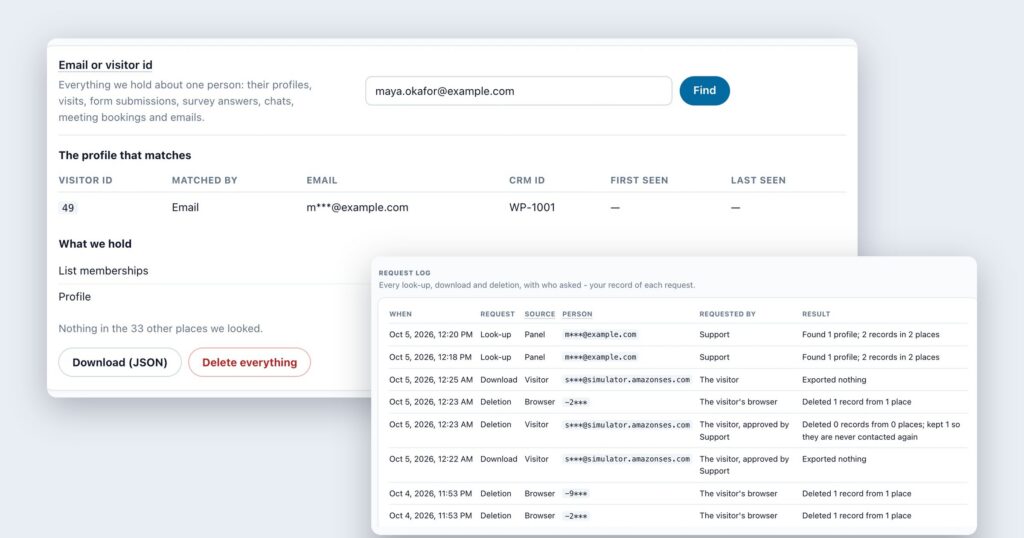
Sooner or later a visitor writes in: “What do you have on me?” Or: “Please delete my data.” Under the GDPR you have one month to answer an access or erasure request; California’s CCPA gives you 45 days for a deletion request. The law is not the hard part. The hard part is finding everything you hold about one person — a profile here, a form submission there, a chat, a meeting booking, a line in an email send log — and being sure you got all of it.
This is how it works in Personyze: one look-up by email or visitor ID, a copy they can keep, a deletion across Personyze, and a record of each step. It helps you meet GDPR access and erasure requests and CCPA deletion requests. It is a description of the tools, not legal advice.
By email to you, through a form on your privacy page, or from your own systems through the API.
Profiles, visits, forms, survey answers, chats, meetings and email activity — found by email or visitor ID.
A JSON file to send, or the data deleted across Personyze — with what was kept, and why, on record.
First: who answers the request
When a visitor asks your website about their data, the request is yours to answer: you decide what your site collects, so you are the controller, and Personyze processes that data on your behalf. What Personyze gives you is the means to answer quickly and completely, in Settings › Data & privacy › Visitor requests.
Step 1: Find everything about one person
Type the person’s email address — or their visitor ID, if they sent you that instead — and press Find. Personyze looks in every place it keeps data about a visitor and shows you the profile that matches, how it matched, and what it holds, place by place. It also tells you where it looked and found nothing, so “nothing else” is an answer you can stand behind.
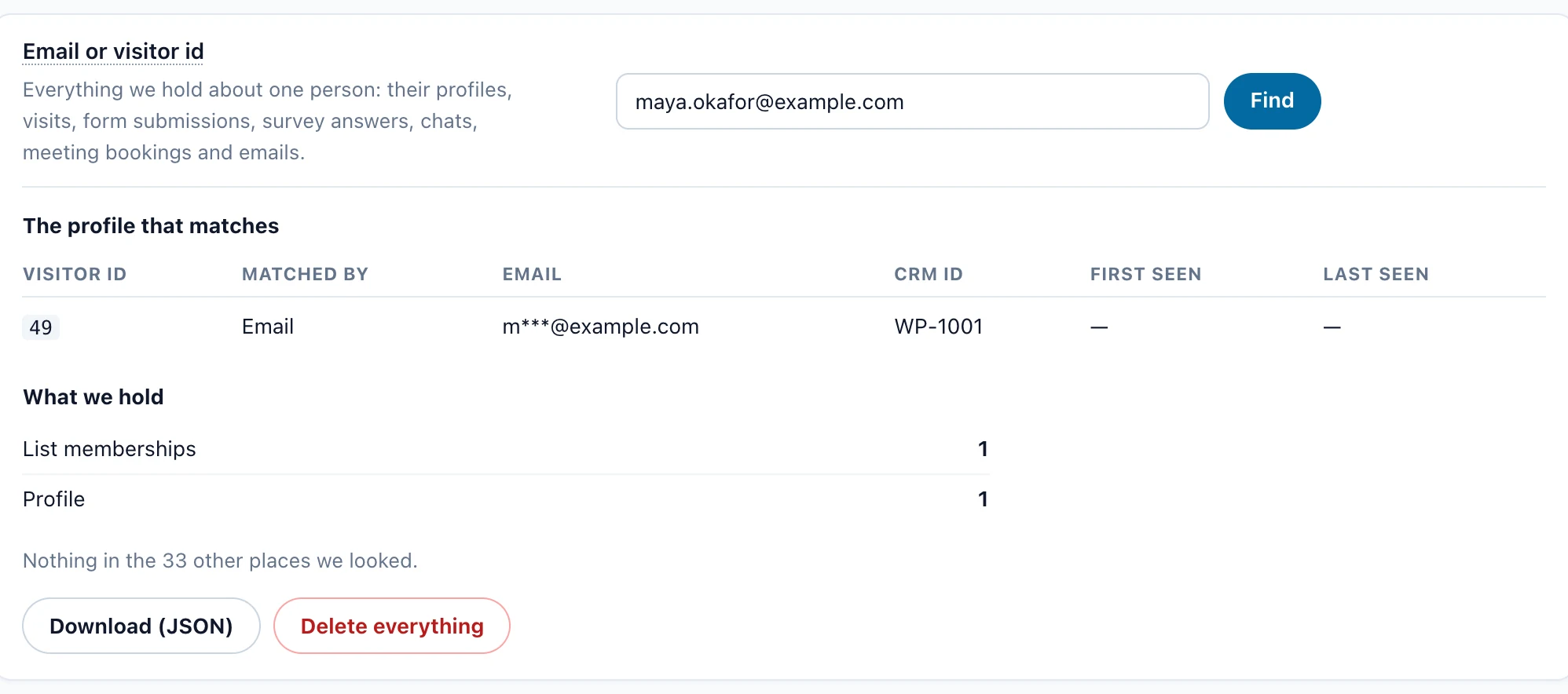
A visitor ID counts as personal data under the GDPR — it is pseudonymous, not anonymous — which is why the look-up accepts it. A visitor who never gave you an email can still ask, and you can still find them.
Step 2: Send them a copy
For an access request, Download (JSON) gives you everything the look-up found in one file you can send to the person: a structured, machine-readable copy rather than a pile of screenshots. Copies of their data that you hold elsewhere — in your CRM or your email platform — are not in it; those you answer from those tools.
Step 3: Delete it across Personyze
For an erasure request, delete the person’s data across Personyze in one step. The record of it says what was removed and what was kept, and why. One thing is kept on purpose: if the person was on your suppression list or had unsubscribed, their address stays there, so they are never emailed again — deleting someone should not quietly put them back on your mailing list.
| Deleted across Personyze | Outside the deletion |
|---|---|
| Profiles and visits, form submissions, survey and review answers, chat transcripts, meeting bookings, email activity | Files you already exported; copies already sent to your connected tools, such as a CRM or email platform; report totals, which hold counts and sums, not people |
Let visitors ask on their own
You do not have to wait for an email. Paste one line on your privacy page and visitors get a form there to ask for a copy of their data or for its deletion. They confirm the request by email, and it waits for you to approve or reject — or, if you prefer, a confirmed request is answered automatically: the download link goes out by email, or the data is deleted at once. A visitor’s browser can also simply ask to be forgotten.
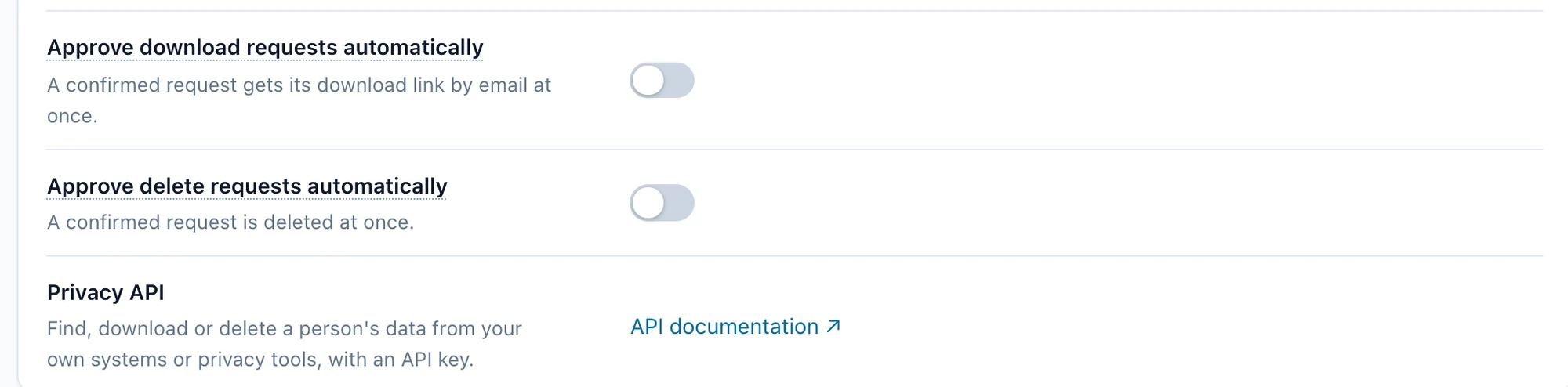
If you already run requests through a privacy platform or your own tooling, the Privacy API finds, downloads or deletes a person’s data with an API key, so Personyze becomes one more system your process covers.
Keep a record of every request
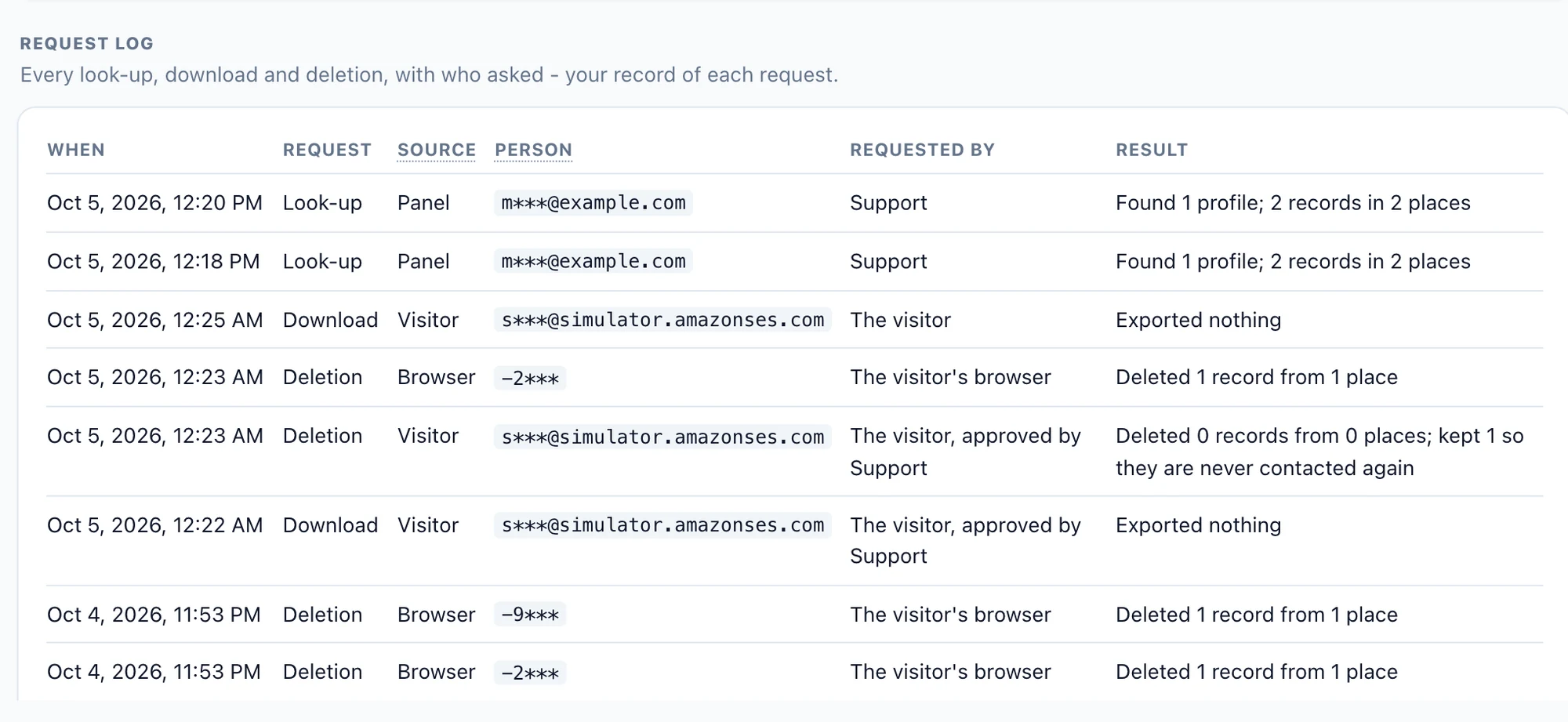
Every look-up, download and deletion is logged: when, what kind, where it came from — the panel, the visitor, their browser, or the API — who asked, and the result. When an auditor or the person themselves asks what happened to their request, you have the answer.
Get fewer requests: keep less to begin with
The easiest data to answer for is data you no longer hold. Set how long Personyze keeps each kind of visitor data — profiles, visit history, form submissions, survey and review answers, email activity, chat transcripts and meeting bookings — shorter than the defaults, down to 30 days for known profiles. For most kinds, a shorter period waits seven days before it deletes anything, and you can cancel it until then, so one wrong number does not wipe a year of data.
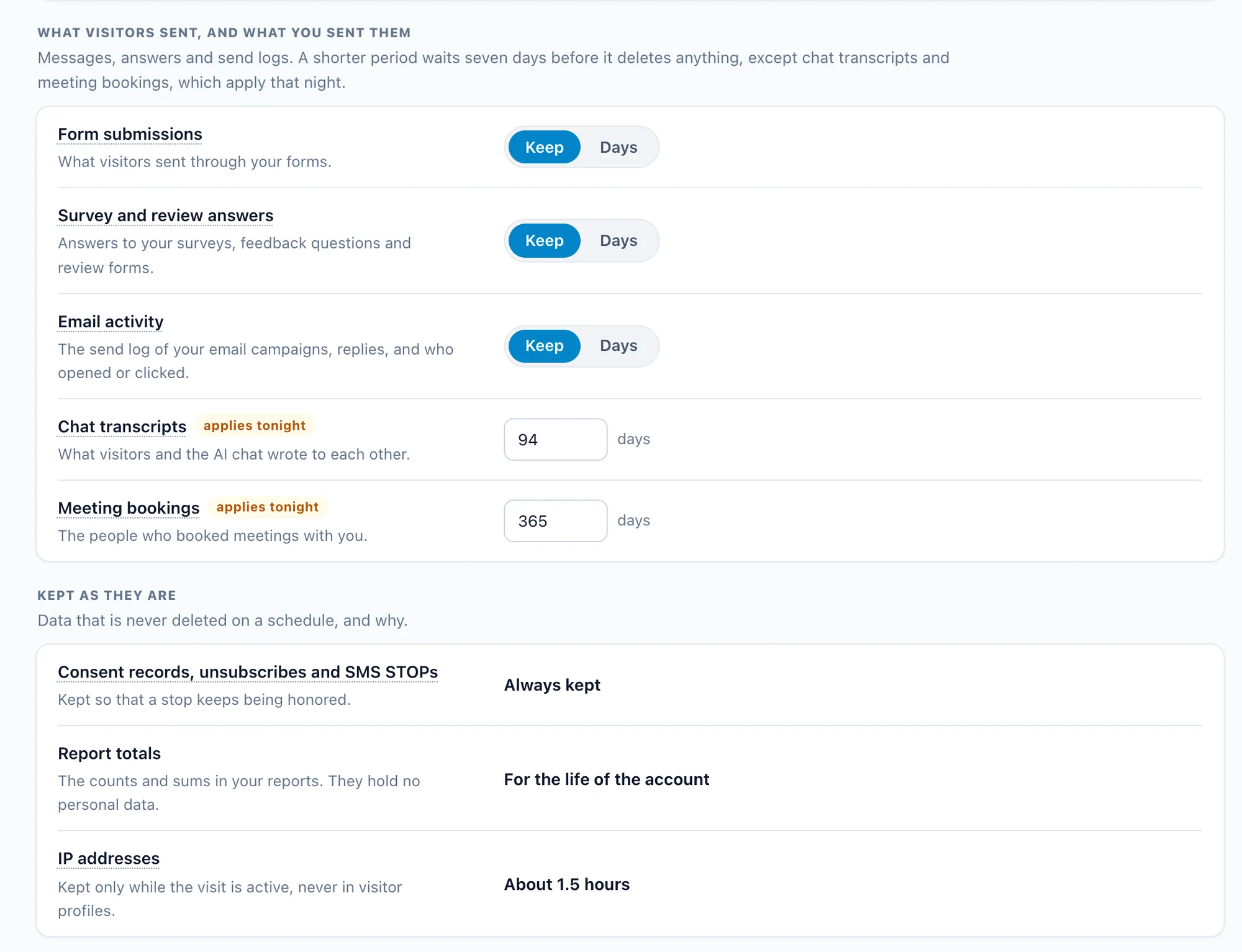
Not sure what your periods should be? An AI advisor in the same page looks at where your visitors come from and what kind of site you run, suggests settings, and links each suggestion to the regulator’s own guidance. They are suggestions, not legal advice. More on how Personyze handles data is on Security at Personyze.
A short checklist for your next request
- Confirm who is asking. A form request is confirmed by email; for one that reaches you directly, check it comes from the address you are about to look up.
- Look the person up by email, or by visitor ID if that is what they gave you.
- Answer within the deadline — a month under the GDPR, 45 days for a CCPA deletion request.
- Send the JSON for an access request; delete across Personyze for an erasure request.
- Do the same in your other tools — your CRM and email platform hold their own copies.
- Keep the record. The request log already has it.
Questions people ask
How long do I have to answer a GDPR access or deletion request?
One month from receiving it, under Article 12(3) of the GDPR. It can be extended by two further months where requests are complex or numerous, as long as you tell the person within the first month. For a CCPA deletion request the period is 45 days.
Does deleting a person in Personyze delete them from my CRM or email platform?
No. The deletion covers the data across Personyze. Copies you already sent to connected tools, such as a CRM or an email platform, and files you already exported, are handled in those tools.
What does Personyze keep after a deletion, and why?
If the person unsubscribed or was on your suppression list, their address stays there so they are never emailed again, and the record of the request says so. Report totals stay too: they are counts and sums, not people.
Is a Personyze visitor ID personal data?
Under the GDPR, yes: a cookie ID that singles out one browser is personal data. Personyze visitor IDs are pseudonymous — not anonymous — which is why you can look a person up and delete them by visitor ID.
Can visitors send requests without emailing us?
Yes. A form on your privacy page lets them ask for a copy or a deletion; they confirm by email, and you approve it, or let confirmed requests be answered automatically. The Privacy API lets your own privacy tools do the same.
Book a demo with a personalization expert
30 minutes with a personalization expert. Bring your stack, your goals, your skepticism. We'll show you what changes when every visit feels like the only one.