
Booked on
your own page.
Let visitors book time with your team from a pop-up, a page, the chat or anywhere else a campaign can reach — and get the booking with the whole visit attached.
Choose who is even offered a meeting, open the booker on your own page, and let the host arrive already knowing what they read — with hosts that cost no seat.
Not sure where to offer a call? See meeting ideas for your site 4.8
4.8
 4.6
4.6









Two visitors, same day. Two different invitations.
A meeting offered to everyone is a meeting nobody takes. The booker is a campaign action, so the audience rules that decide which banner a visitor sees decide whether they are offered a meeting at all — which meeting, worded how, and with which hosts.
 Amara O.Detached house · SE12Ready for a survey
 45 min · Roof survey · with Dana Levin
 Greg P.First visit · from a blog postStill reading
 15 min · Intro call · with Priya Nandakumar
Free AI tool · Inspire me
See chat and meeting ideas for your site.
Give Inspire me your address. It reads your pages the way a first-time visitor sees them and writes where a booking calendar, a chat or a question would help: on which page, for whom, and how to measure it.
Like an idea? Describe it to our AI personalization agent and it builds the campaign for you.
1What kind of ideas?
2Your website
Free · nothing to install · it reads your public pages
Reading yourstore.com
As a new visitor would see it · about 4 minutes
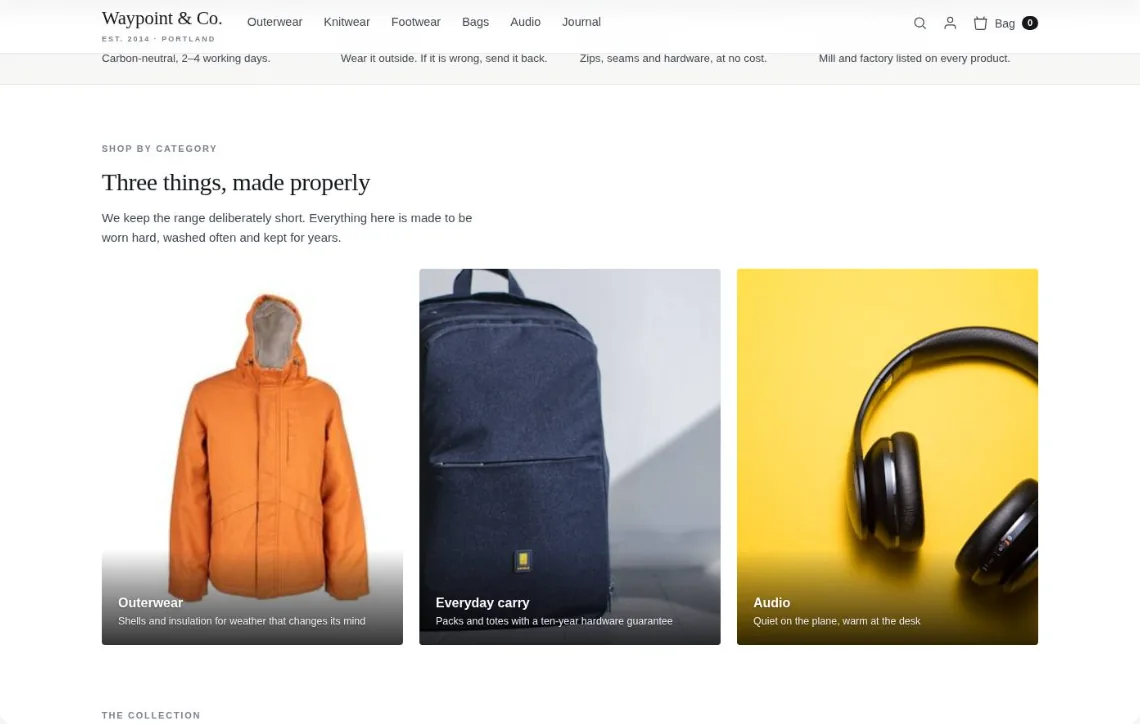
- Home page
- Outerwear
- Alpine Parka
- Sale
- Bag
Waypoint & Co. Done
Only: Chat & surveys · your plan
2Ask what they need and narrow the catalog
Waypoint & Co. assistantWalking to work in the snow? These three keep you warm and dry.Ask about fit, repairs, delivery…Drawn on your own page — for a visitor on a phone who asked for something warm.
The same booker. A different case for each visitor.
Who they are decides which page they are reading, which invitation they see on it, and which meeting the booker then offers. The placement is only the last of those decisions.
Fired on a rule — a scroll depth, an exit, a second visit to the battery pages. Targeted by audience and capped by frequency, like any other campaign.
Amara O.Homeowner · SE12 · ran the calculatorReady for a surveyBattery storage that pays for itself
Roof survey45 min with Dana LevinDropped into a placeholder so it reads as part of the page rather than an interruption. The panel sits inside your own layout with no border of its own.
 Ravi S.40-site retail chain · estates managerCommercial enquiry
Commercial rooftop solar, priced per site
 Commercial consultation30 min with Marcus Oyelaran
The booker as the whole page, at your own domain, reached from an email or an ad. Nothing else on it to argue with — they came to book.
Greg P.Followed the link in your follow-up emailStill readingIntro call15 min with Priya NandakumarReal times, in their own clock.
Every day at once or one day at a time, capped before it becomes a wall of buttons, and always in the visitor’s own timezone — read from their browser, never guessed.
Roof survey
Set once for the account. Override per campaign.
The account settings are the default every placement follows. A Book a meeting action can override the look, the accent, the heading and the button label for one placement — and anything it leaves empty keeps following the account.
The link, the calendar, and a page they can act on.
Connect Zoom or Google Meet once and every booking gets its own link. Google Calendar connects per host, so real commitments block real slots. And the confirmation points at a page where the visitor can join, move or cancel.
 ZoomConnect it once and every booking gets its own Zoom link, created at the moment it is booked and attached to both invites.
 Google MeetThe same for Meet — a link per booking, in the confirmation email and the calendar entry.
 Google CalendarConnects per host, so a booking lands on their real calendar and anything already there blocks the slot.
Pick a new time
The booking is an event your stack can act on.
The booking is always stored in Personyze and lands on the visitor profile. Everything else is a delivery: it happens from our servers, after the visitor already has their confirmation, so a slow or broken destination never slows the booking down.
Which invitation actually earned the meeting.
Booked, held, cancelled and no-show — and, because the scheduler lives inside Personyze rather than beside it, the campaign whose placement produced each booking. That is the whole reason it is here and not in a second tool.
The things people actually ask.
Does a bookable host need a Personyze seat?
No. A host is somebody a visitor can book, not a login. You can make the whole team bookable without paying for a seat each.
Do you create the video link?
Yes. Connect Zoom or Google Meet once and every booking gets its own link, created at the moment it is booked and attached to both calendar invites and the confirmation email.
Does it write to our calendars?
Google Calendar connects per host, so a booking lands on their real calendar and anything already there blocks the slot. Visitors can add it to Google, Outlook or iCal from the confirmation page.
Can we show a different invitation to different people?
That is the point of it. The booker is a campaign action, so each audience can get its own wording, its own meeting type and its own hosts — and visitors who match nothing see the page exactly as it was.
What happens after somebody books?
The booking is stored on the visitor profile, the confirmation goes out under your brand, and every destination you added fires from our servers: email, Zapier, Slack, HubSpot, Klaviyo or your own webhook. A slow or broken destination never slows the visitor down.
Can they reschedule or cancel themselves?
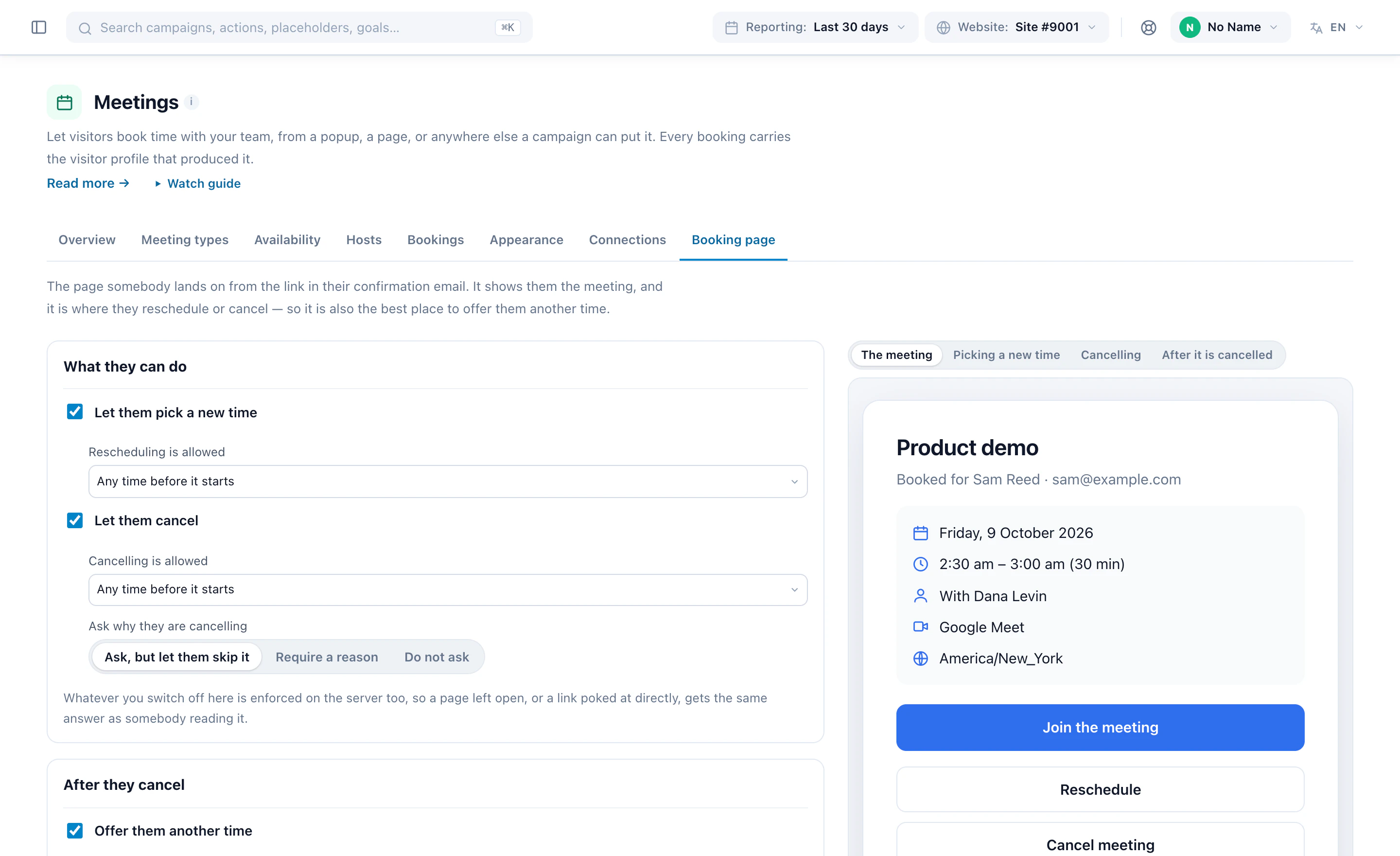
If you allow it. You set how late rescheduling and cancelling stay open, whether to ask why, and what they are offered afterwards — and the rules are enforced on the server, so a stale page or a poked link gets the same answer.
See it in Personyze, screen by screen.
A few steps in one campaign — hosts, hours, what can be booked, the booker and where to share it — then every booking and where it came from. Real screens from the panel. Or watch it set up, start to finish.
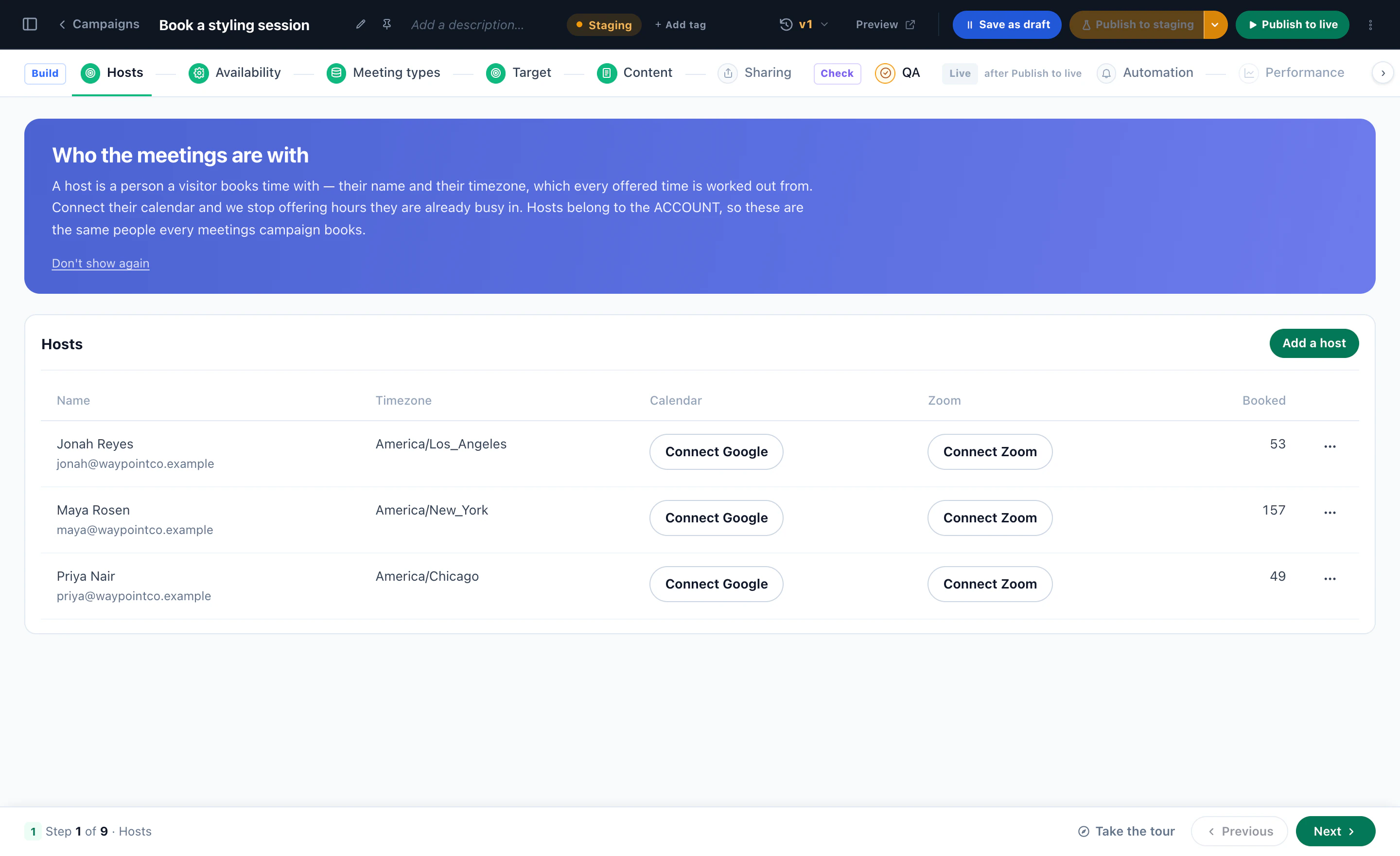
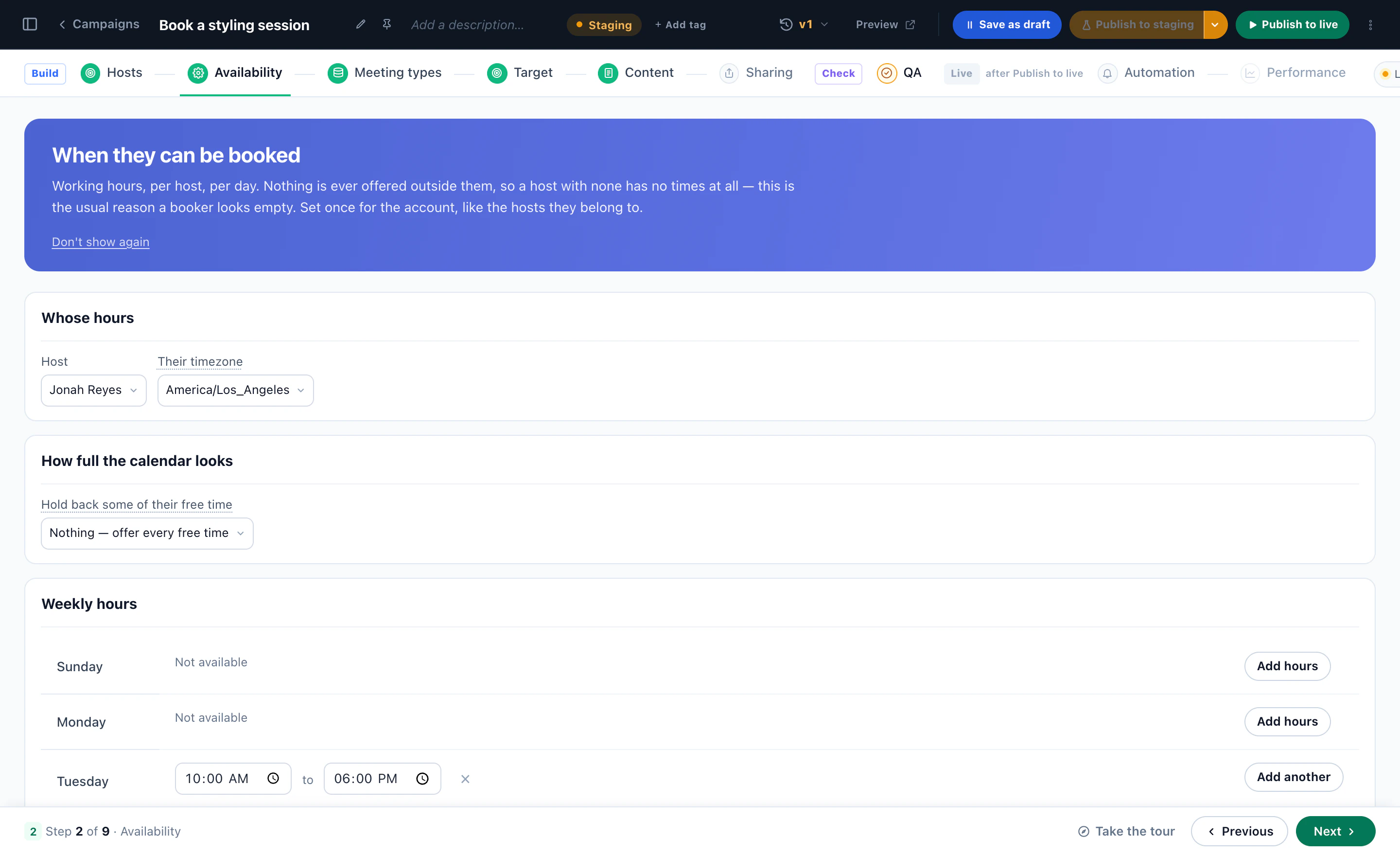
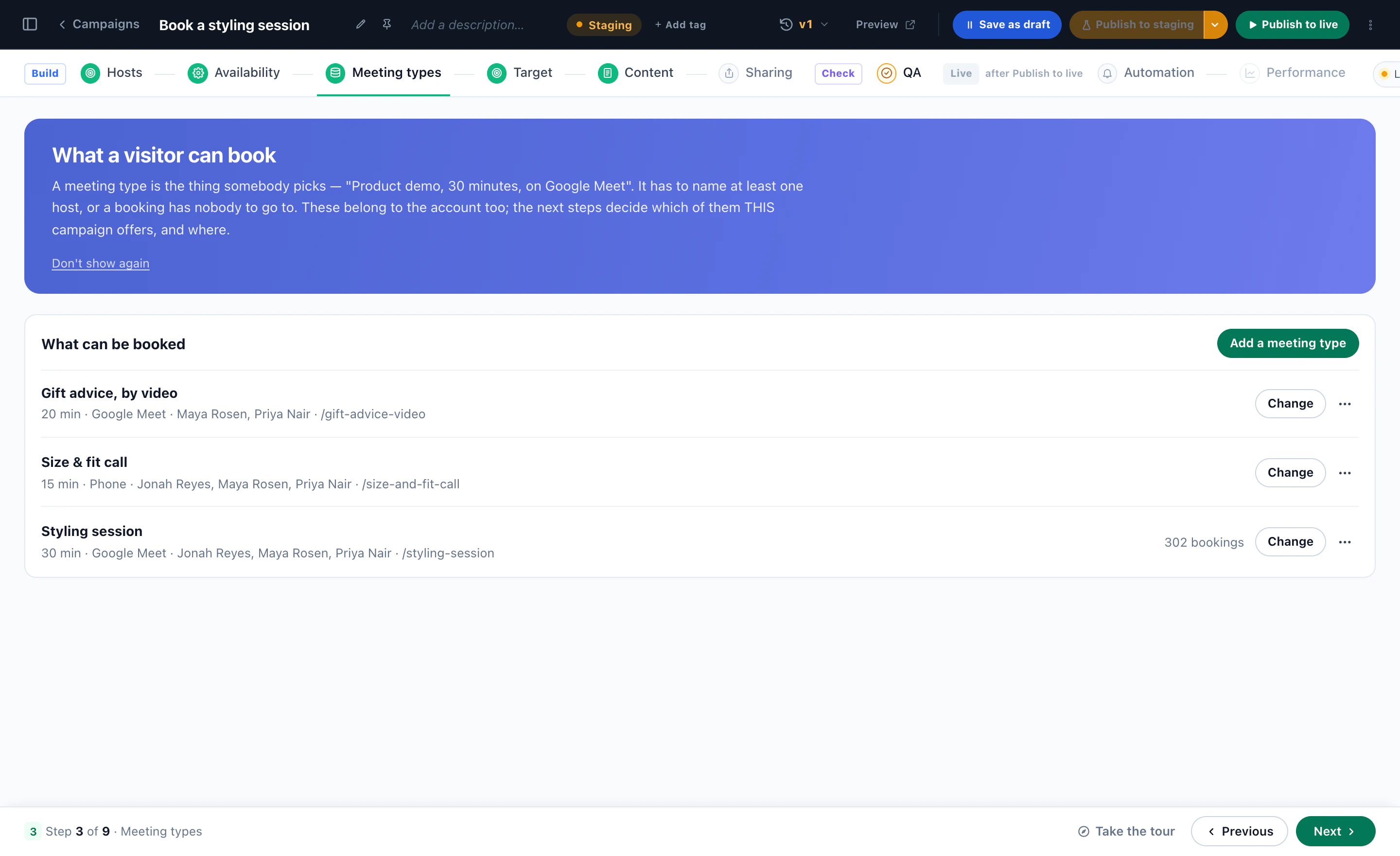
Who the meetings are with
Each host with their time zone, their Google calendar and Zoom, and how many meetings they were booked for — the first step of a meetings campaign.
When each host can be booked
Working hours per host and per day, in their own time zone — and how much of their free time the calendar shows.
What a visitor can book
A styling session, a size & fit call, gift advice by video — each with its length, where it happens and who takes it.
The booker, in its designer
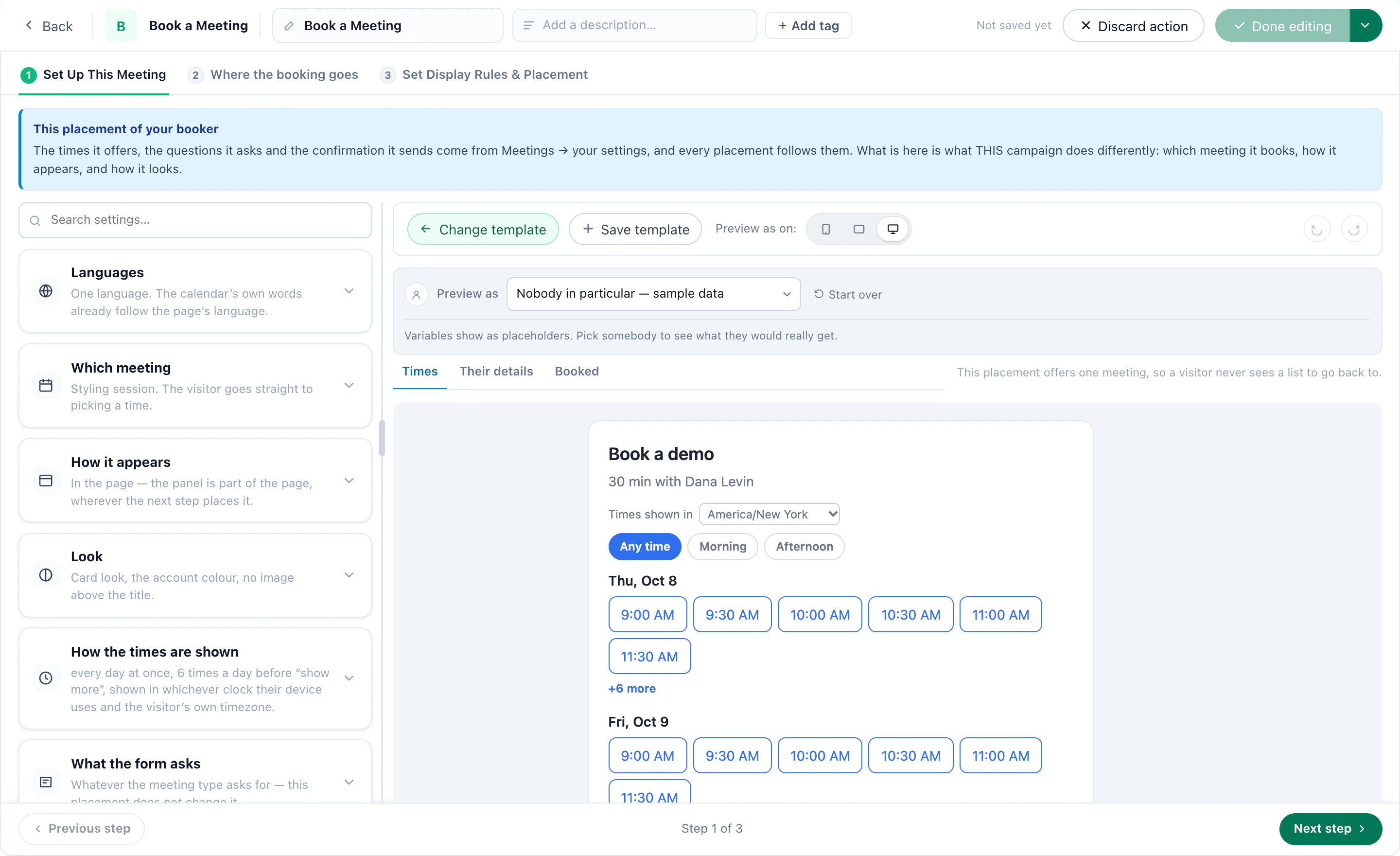
Which meeting it books, how it appears, its look and how the times are shown, with the live booker beside the settings.
A page of its own
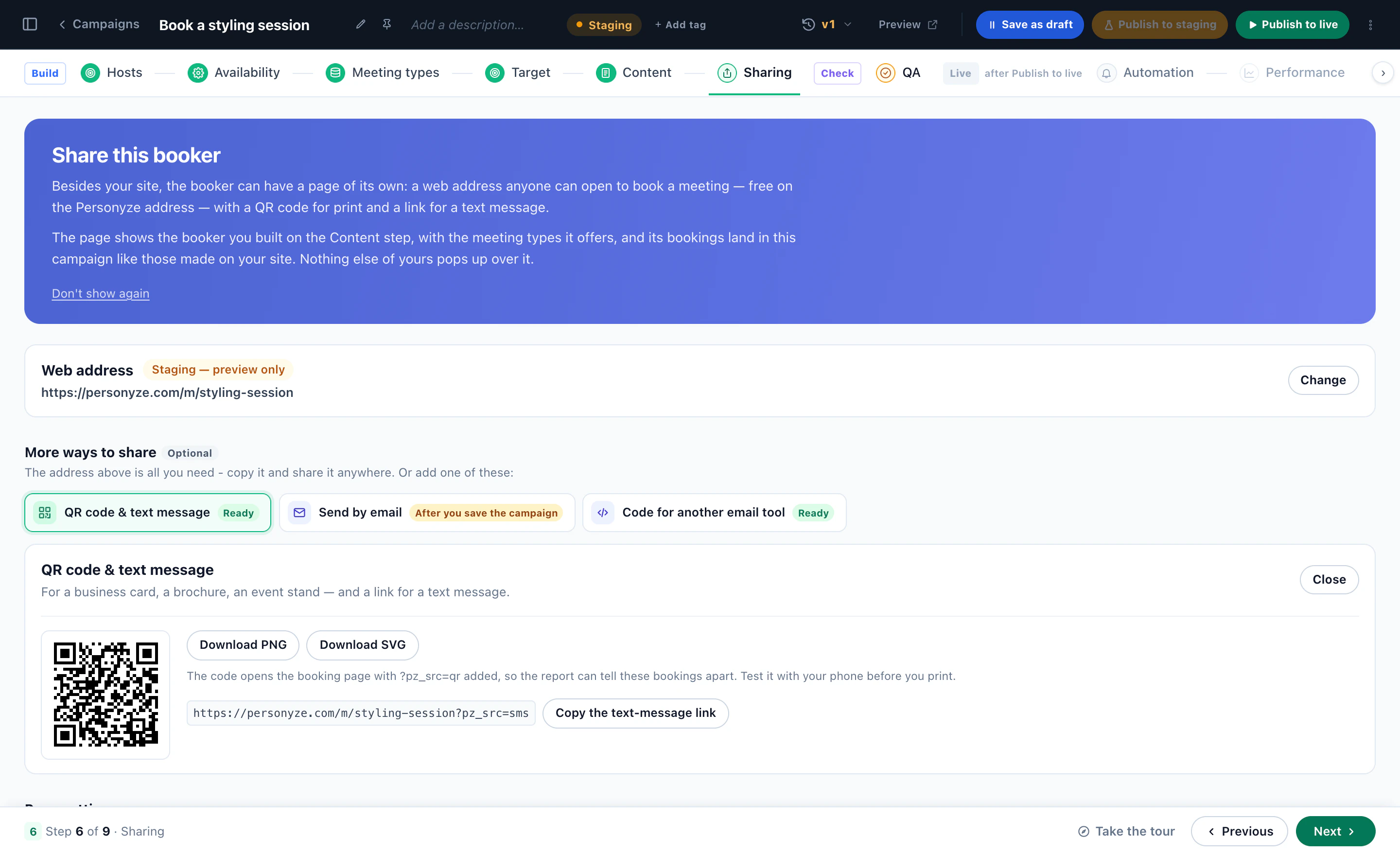
The booker’s own web address, a QR code for print, a text-message link, and code for your email tool.
Where they reschedule or cancel
The page the confirmation links to: the meeting as they see it, and what they may change — the same rules on the server.
Every meeting, and the visitor behind it
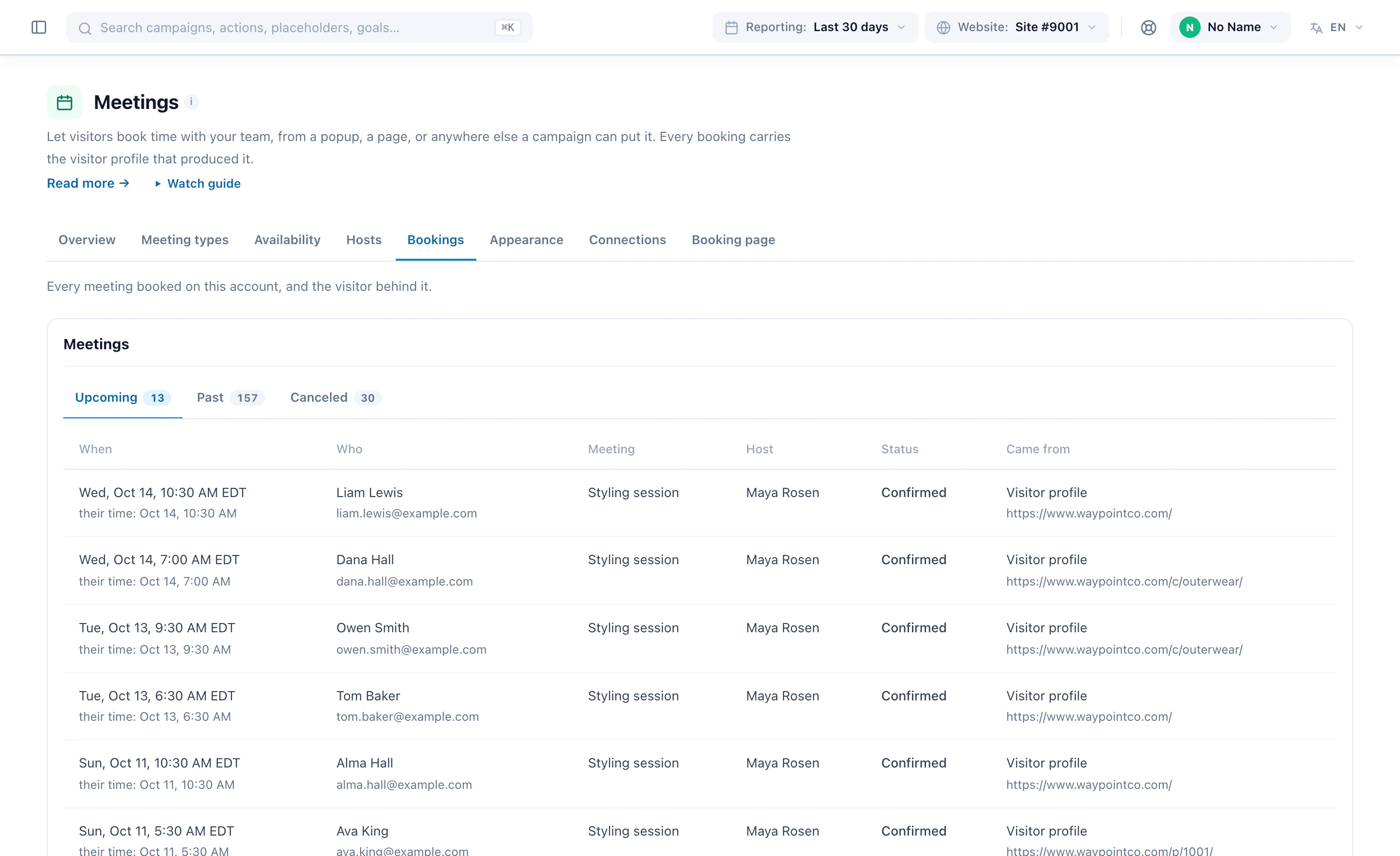
When, in their own time too, who, which meeting, which host, and the page they booked from.
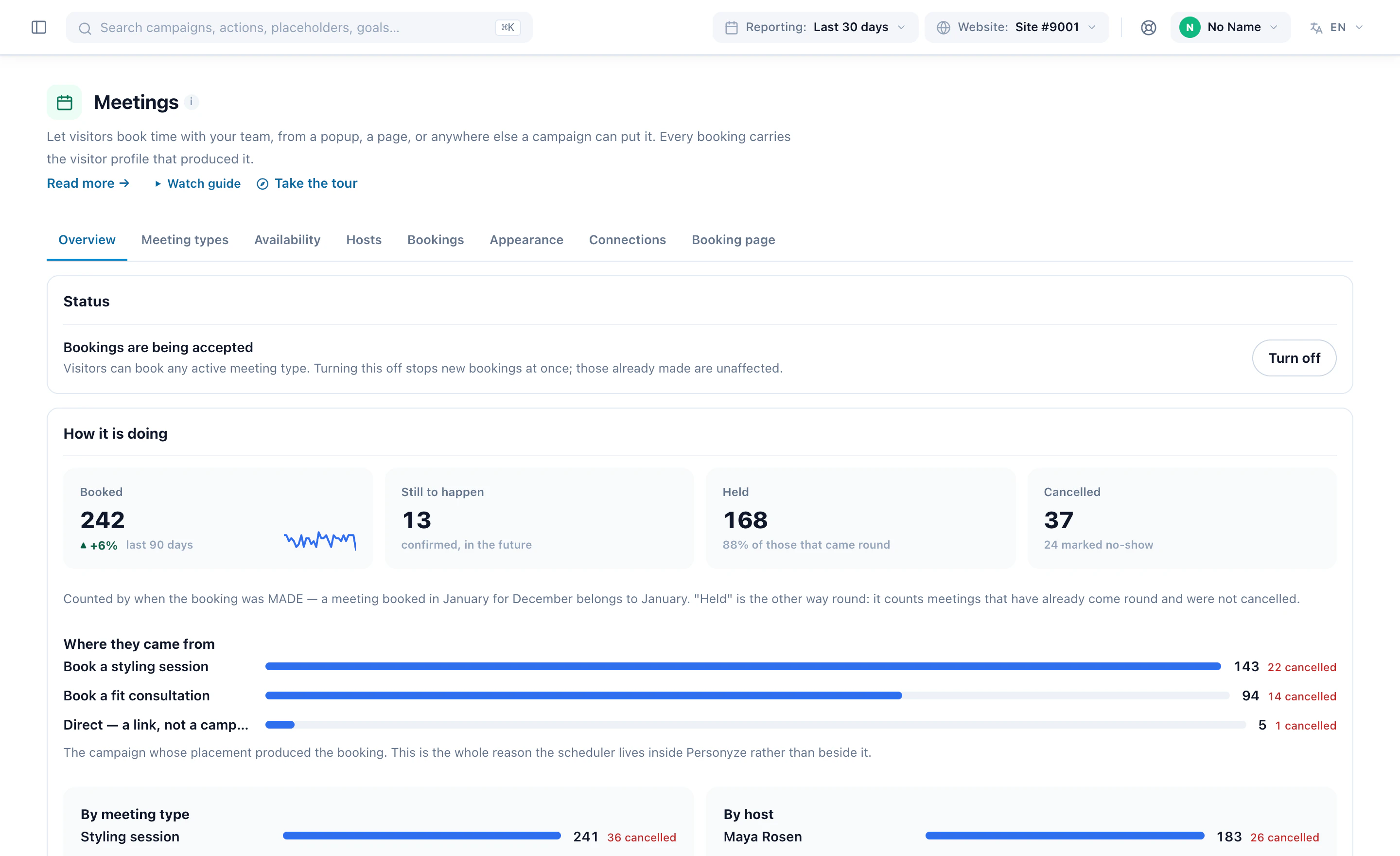
How it is doing
Booked, still to happen, held and cancelled — and which campaign produced each booking.
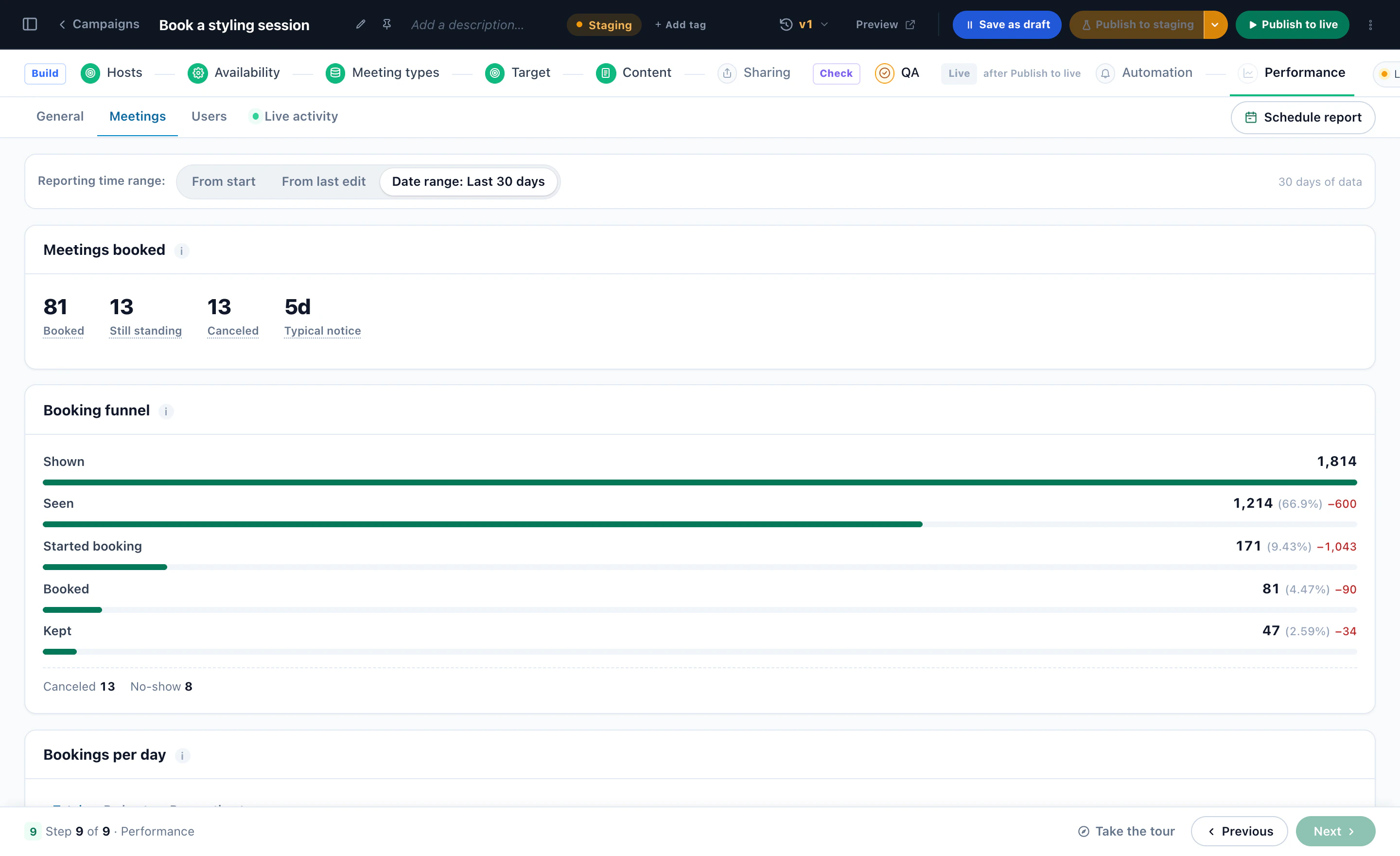
From shown to kept
Shown, seen, started booking, booked and kept, with the cancellations, the no-shows and how far ahead people book.
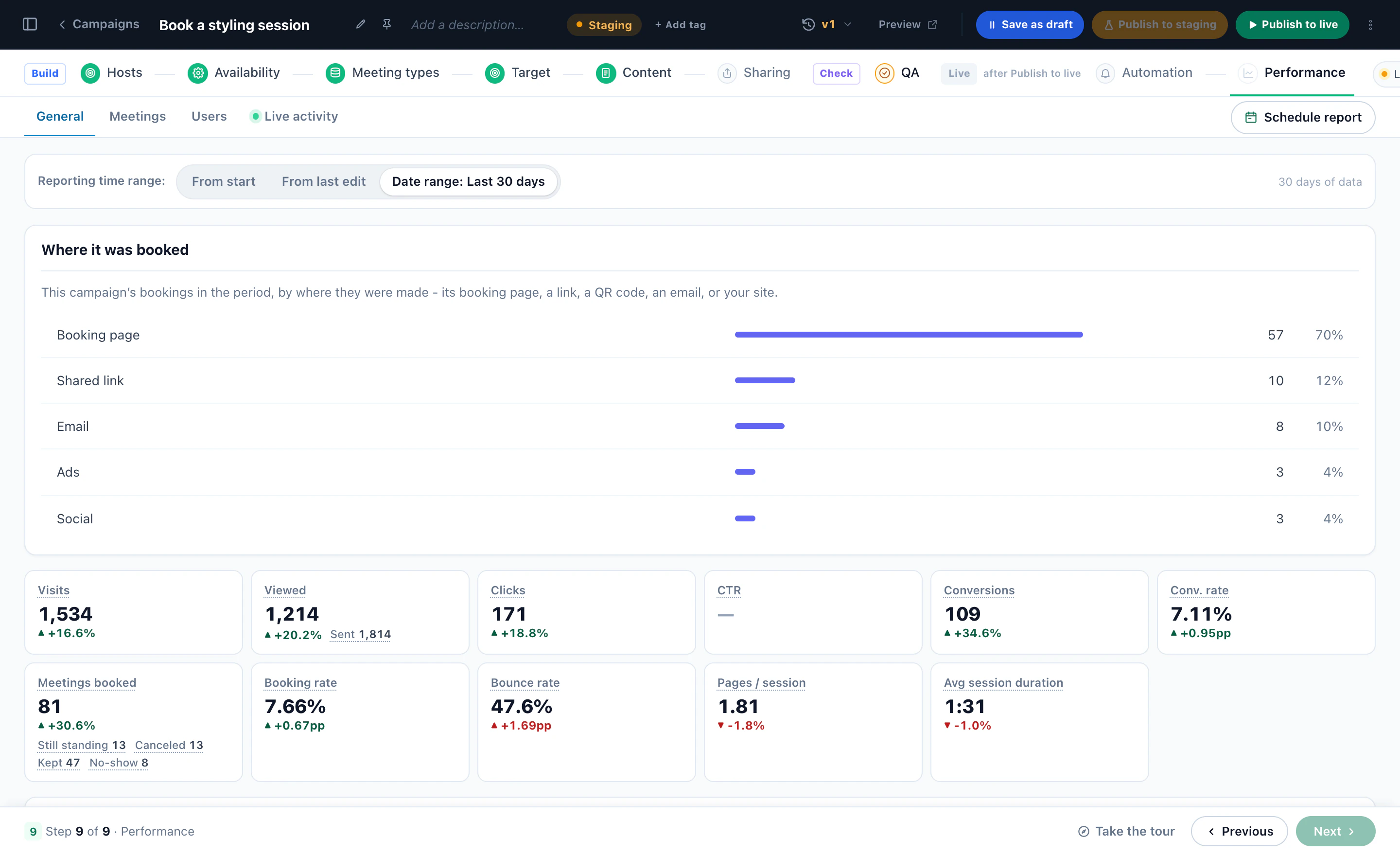
Where each booking was made
The booking page, a shared link, an email, ads or social — beside visits, meetings booked and the booking rate.
Meetings, set up start to finish 2:48
Hosts and their hours, what can be booked, who is offered it and where the booker sits — then a visitor booking one of the host’s real free times on the store.
Screens from a Personyze demo shop. The numbers are illustrative.
Ask the visitors who are worth asking.
Turn the booker on for one audience, measure it against the visitors who were never offered a meeting, and grow from there.