

AI in the Personyze Editor: Targeting Rules, Element Edits and Page Rewrites
The Personyze AI agent gets the attention, but most day-to-day AI use in Personyze happens somewhere quieter: inside the editor, while you’re already building something. Three assistants sit at three different altitudes — a rule, an element, a whole page — and each removes a specific kind of tedium.
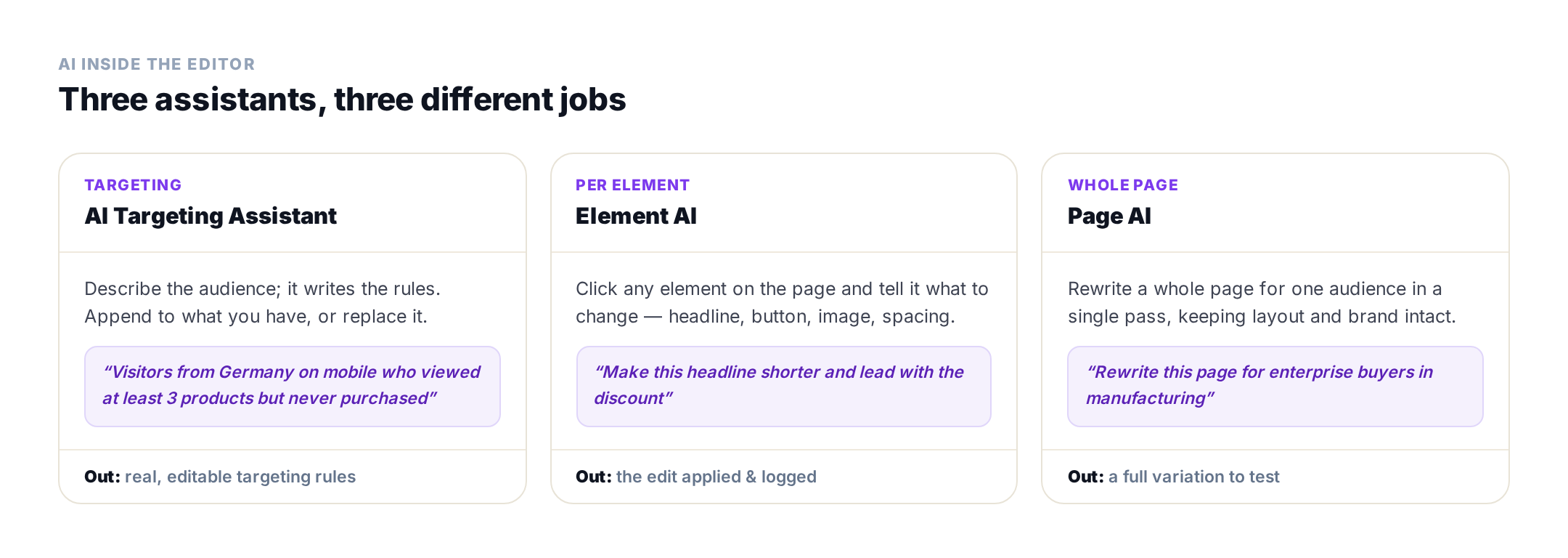
1. The AI Targeting Assistant — describe the audience, get the rules
Targeting is where most personalization projects stall. Not because the rules are hard to understand, but because translating “returning German mobile shoppers who browsed but never bought” into a rule builder takes concentration and a working memory of every available attribute.
The targeting assistant takes the sentence and writes the rules.

Two details make it usable rather than a gimmick. First, you choose Append or Replace — so it can add a condition to a rule set you already trust instead of overwriting your work. Second, the output is real, editable rules, not a black box: you can read what it produced, and fix the one clause it got slightly wrong rather than starting over.
That read-and-edit loop is the whole point. A rule that means something subtly different from what you asked looks identical from the outside until it shows the wrong content to the wrong people — so seeing the compiled result matters more than the time saved writing it. More on the underlying system in behavioral targeting.
2. Element AI — edit one thing on the page
Inside the live editor, click any element and tell the assistant what to change. Headline too long, button copy weak, image in the wrong place, spacing off — describe it and the change is applied to that element.
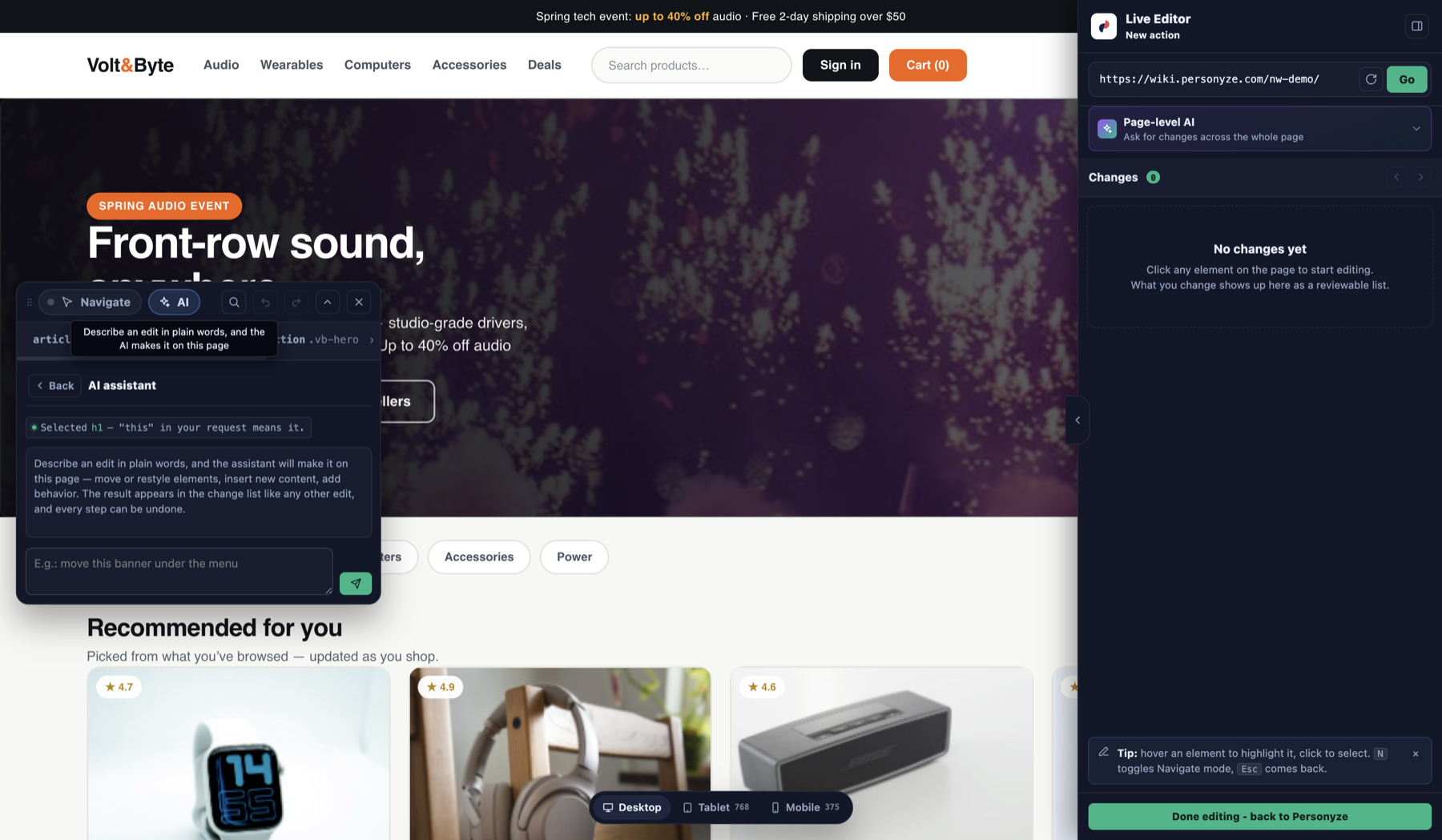
The important property here is that edits are applied and logged. You get a record of what changed rather than a page that silently drifted, which is what makes it safe to use on a variation you’re about to test.
This is the fastest of the three in practice, because the scope is small enough that you can judge the result instantly. It also means you never open a CSS panel to nudge a padding value.
3. Page AI — rewrite a whole page for one audience
The highest-altitude assistant rewrites an entire page for a specific audience in one pass, keeping the layout and your brand intact. This is the one that turns “we should really have a version of this page for enterprise manufacturing buyers” from a quarter-long project into an afternoon.
It pairs naturally with the targeting assistant: describe the audience, get the rules; describe the angle, get the page. Then run it as an A/B test against the original, which is the honest way to find out whether the rewrite actually helps.
Which assistant for which job
- You know who, not how to express it → Targeting Assistant.
- One thing on the page is wrong → Element AI.
- The whole message is wrong for this audience → Page AI.
- You want the campaign built end to end → the AI agent, which does all of the above and stages the result.
How this differs from the agent
The distinction is assistive vs autonomous. These three assistants help you while you are driving — you have the editor open, you are making a thing, and they remove friction from a step. The AI agent is given an outcome and does the whole job, including choosing the layout, compiling targeting and creating the campaign in staging.
Most teams end up using both: the agent to get a first version standing up fast, the in-editor assistants to refine it. And all of it is reachable from outside the panel through the MCP server if you would rather work from Claude or ChatGPT.
Working from Claude or ChatGPT instead? Install it from ChatGPT’s app directory, or from the Claude directory — Personyze in the Claude directory.
What it costs
In-editor AI draws on the same AI token allowance included with your package — the targeting assistant shows the actions remaining and when the allowance renews. There is no separate AI subscription. See plans for what each package includes.
FAQ
What AI assistants are built into Personyze?
Three sit inside the editor: the AI Targeting Assistant, which turns a plain-language audience description into real targeting rules; Element AI, which edits a single selected element from a prompt in the live editor; and Page AI, which rewrites a whole page for one audience while keeping layout and brand. The separate Personyze AI agent builds entire campaigns end to end.
How does the AI Targeting Assistant work?
You describe the audience in plain language – for example, visitors from Germany on mobile who viewed at least three products but never purchased – and it generates targeting rules. You choose whether to append them to your existing rule set or replace it, and the output is real, editable rules you can read and adjust.
Can the AI edit just one element instead of the whole page?
Yes. In the live editor you select any element and describe the change – shorter headline, different button copy, adjusted spacing – and it is applied to that element and logged, so you have a record of what changed.
What is the difference between the in-editor AI and the AI agent?
The in-editor assistants are assistive: they help while you are building, removing friction from one step. The AI agent is autonomous: you give it an outcome and it chooses the layout, compiles the targeting, builds the campaign in your brand and creates it in staging.
Does using the in-editor AI cost extra?
No. It draws on the AI token allowance included with your package, and the targeting assistant shows how many AI actions remain and when the allowance renews. There is no separate AI subscription to buy.
Are the AI-generated targeting rules editable?
Yes, and that matters. The assistant produces real rules in the rule builder rather than a black box, so you can read exactly what it compiled and correct a single clause instead of starting again.
Get started
Describe an audience and see what it writes. Book a demo or view plans.
Related reading
- AI marketing agent — the autonomous version.
- AI personalization agent — see it in action.
- AI in Personyze — the documentation.
- Behavioral targeting — the rules the assistant writes.
Book a demo with a personalization expert
30 minutes with a personalization expert. Bring your stack, your goals, your skepticism. We'll show you what changes when every visit feels like the only one.