

How a Personalization Engine Actually Decides What Each Visitor Sees
Every personalization tool describes itself with the same nouns — profiles, segments, recommendations, tests — and almost none of them explain the only moment that matters: the few milliseconds after a visitor requests a page, when the engine has to decide what that one person sees. It is not one trick. It is several layers, each with rules the site owner sets, and the answer for this visitor on this page comes out of all of them at once. This is a walk through those layers in the order they act inside Personyze.
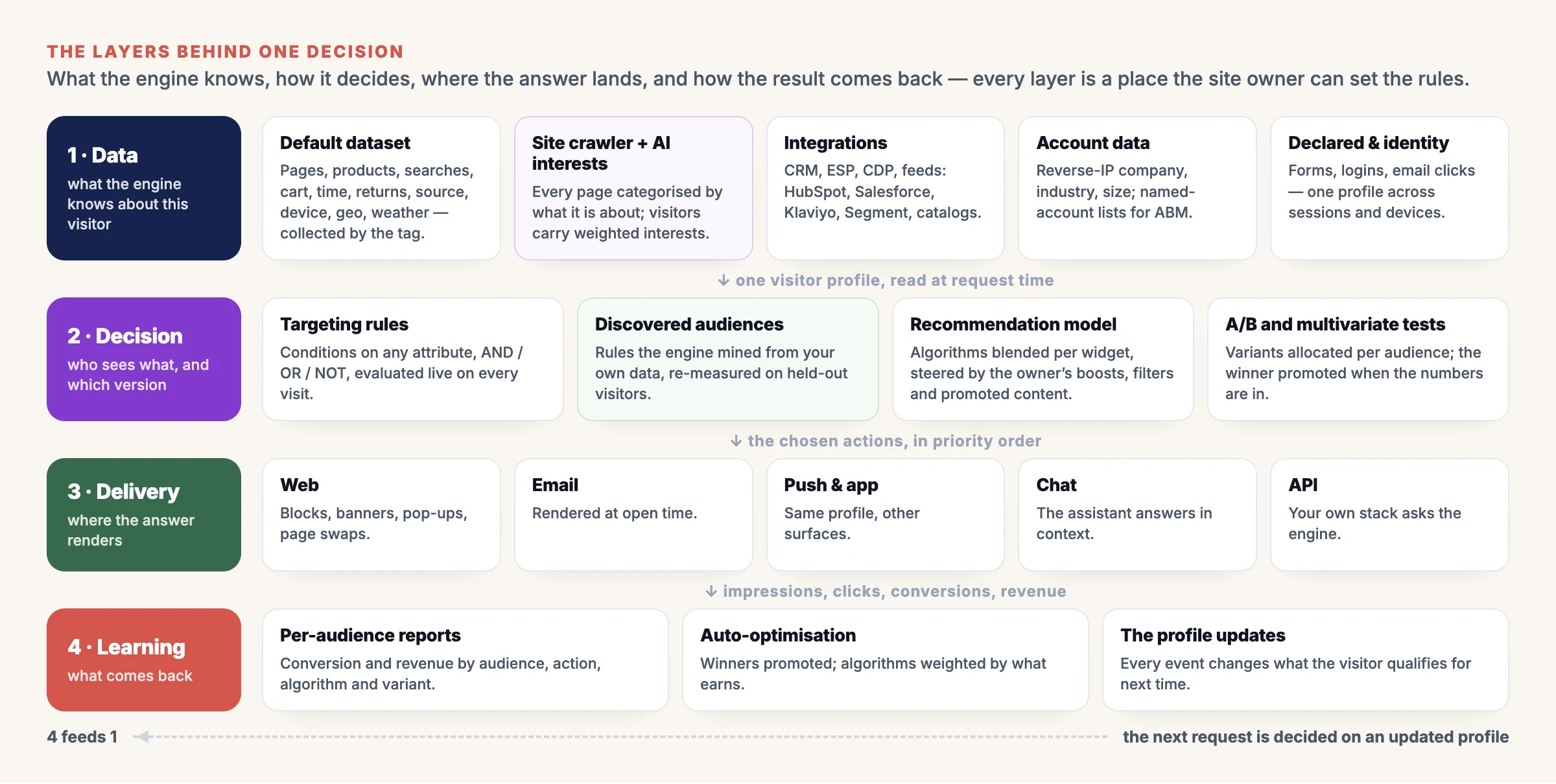
Four layers, one decision. Every box is a place where the site owner sets the rules — which data comes in, how it is weighed, where the answer lands, and what is measured.
1. The data layer: what the engine knows
Nothing can be decided about a visitor the engine knows nothing about, so the first layer is what it collects, and from where. Most of it arrives without anyone configuring anything; the rest is the site owner’s choice.
- The default dataset. The tag on your pages records what every visitor does — pages and products viewed, site searches, cart contents and value, time on site, scroll, returns, the visit count, referrer and campaign, device, location, local weather and time. This is the ground truth every other layer reads, and it is on from the first page view.
- The site crawler and auto interests. Personyze crawls your site and uses AI to categorise each page by what it is actually about — contextually, in your site’s own terms, not a generic taxonomy. A visitor who views products in the religious-gifts category carries “religious gifts” as an interest, weighted by how much they viewed. This is what lets the engine understand what a page means to a person rather than just that it was seen, and the same interests feed targeting, recommendations and audience discovery.
- Integrations. During onboarding you connect what you already have: the CRM and ESP (HubSpot, Salesforce, Klaviyo, ActiveCampaign and the rest), a CDP or tag manager, product and content feeds, and your own events over the API. Each becomes attributes on the profile that rules and models can use — see the integrations page for the list.
- Account data. For B2B sites, reverse-IP lookup identifies the company behind an anonymous visit — industry, size, name — and named-account lists let account-based marketing campaigns treat a target account differently from the first page.
- Declared data and identity. Forms, logins and email clicks tie sessions and devices to one person, so what the engine learned on the laptop last week applies on the phone today.
The point of the layer is choice: which data groups the engine may use is a set of switches, and the reports say which groups actually carried the decisions.
2. The profile: one visitor, one record — and the visit so far
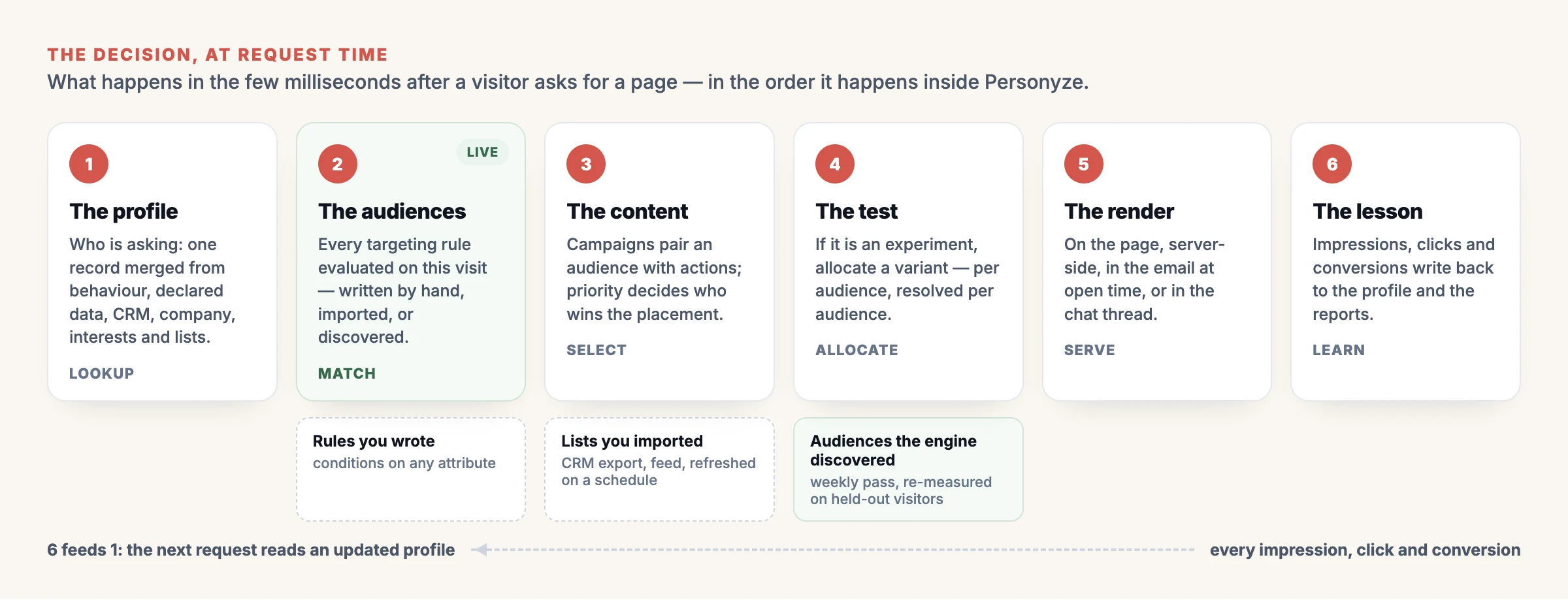
The order at request time. The profile is read first, the audiences and models decide, the answer renders, and the result writes back for the next request.
At request time the engine resolves who is asking and reads one merged record: the behaviour above, the interests the crawler assigned, the CRM fields, the company, the lists the visitor belongs to — and, crucially, what they have done in this visit. A visitor who has just searched for “bulk”, viewed six products and abandoned a cart is a different person from the one who arrived five minutes ago, and every layer below reads the profile as it is now, not as it was last night.
That is why a rule can say industry equals finance and products viewed at least six without caring that one fact came from ZoomInfo and the other from the current session.
3. Targeting: who this visitor is, right now
With the profile in hand, the engine evaluates targeting rules — live, on every visit, not against a snapshot. Three kinds of audience feed this step:
- Rules you wrote. Conditions on any attribute in the profile, combined with AND, OR and NOT. This is behavioral targeting as most teams know it: cart abandoners, returning VIPs, first visit from a paid ad, a company on the target-account list.
- Lists you imported or built. Named people from a CRM export, a feed or a past campaign, refreshed on a schedule and usable for email, push and offline campaigns as much as on-site.
- Audiences the engine discovered. Once a week — or whenever you press Run a pass now — Audience Discovery reads the account’s own visitor data and finds short rules for the visitors who reach an outcome far more often than average, re-measured on visitors the rule never saw. Each finding is a card you can target in one click, pick from a Discovered audiences category in any campaign, turn into a list, or copy into an audience of your own.
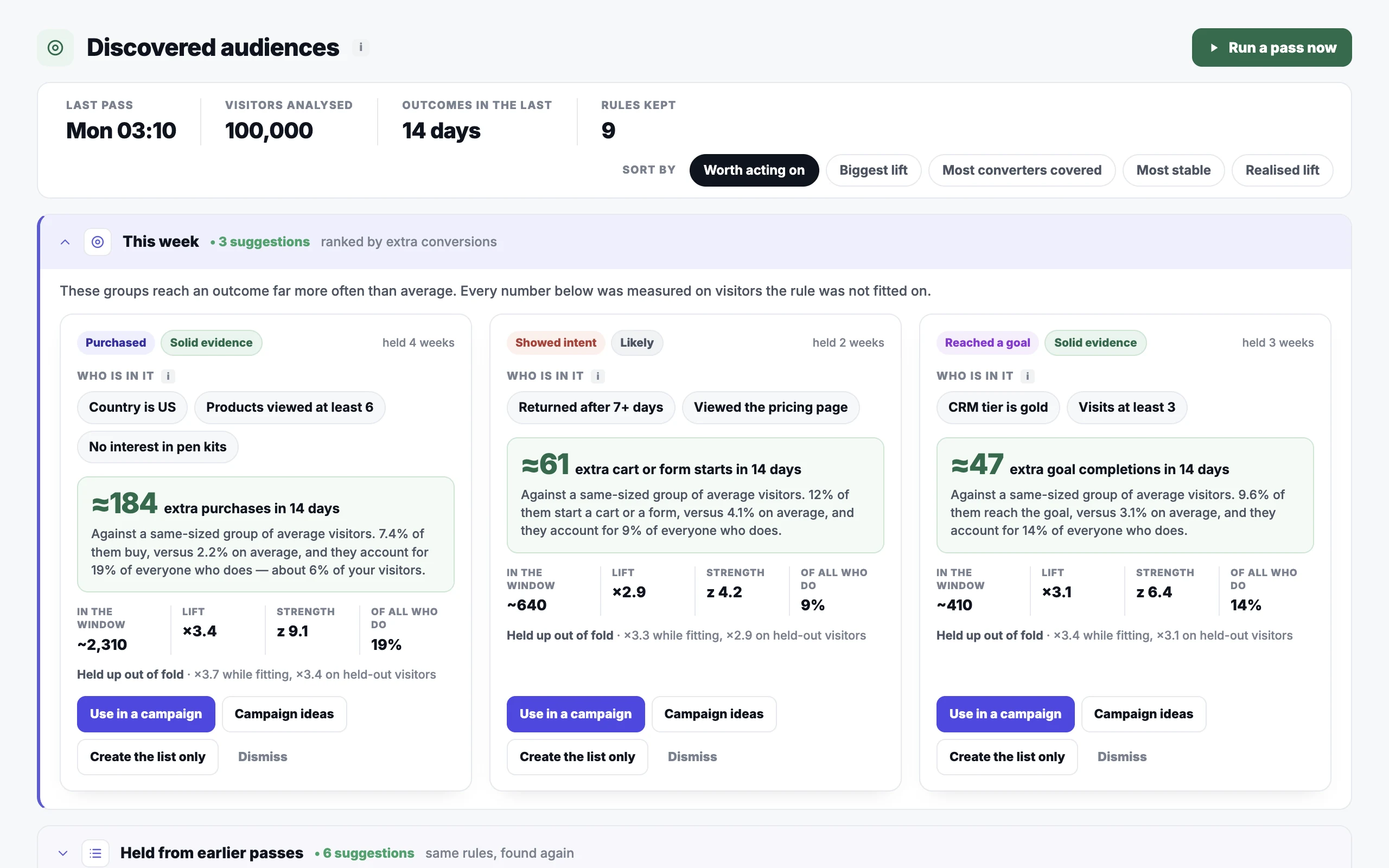
Discovered audiences join the targeting step like any hand-written rule: a live condition, evaluated per visitor, per request. Illustrative account.
Whichever kind it is, the audience is a question the engine asks about this visitor on this request. A visitor who crosses a threshold mid-session is in the audience on the very next page.
4. The recommendation model: what to show, and how the owner steers it
Recommendations are their own decision inside the decision. A widget on a product page, a strip in the cart, a “read next” block under an article and a product grid in an email each run a model that ranks items for this visitor at this moment — and the model is not one algorithm but a choice of them, blended, with settings the site owner controls.
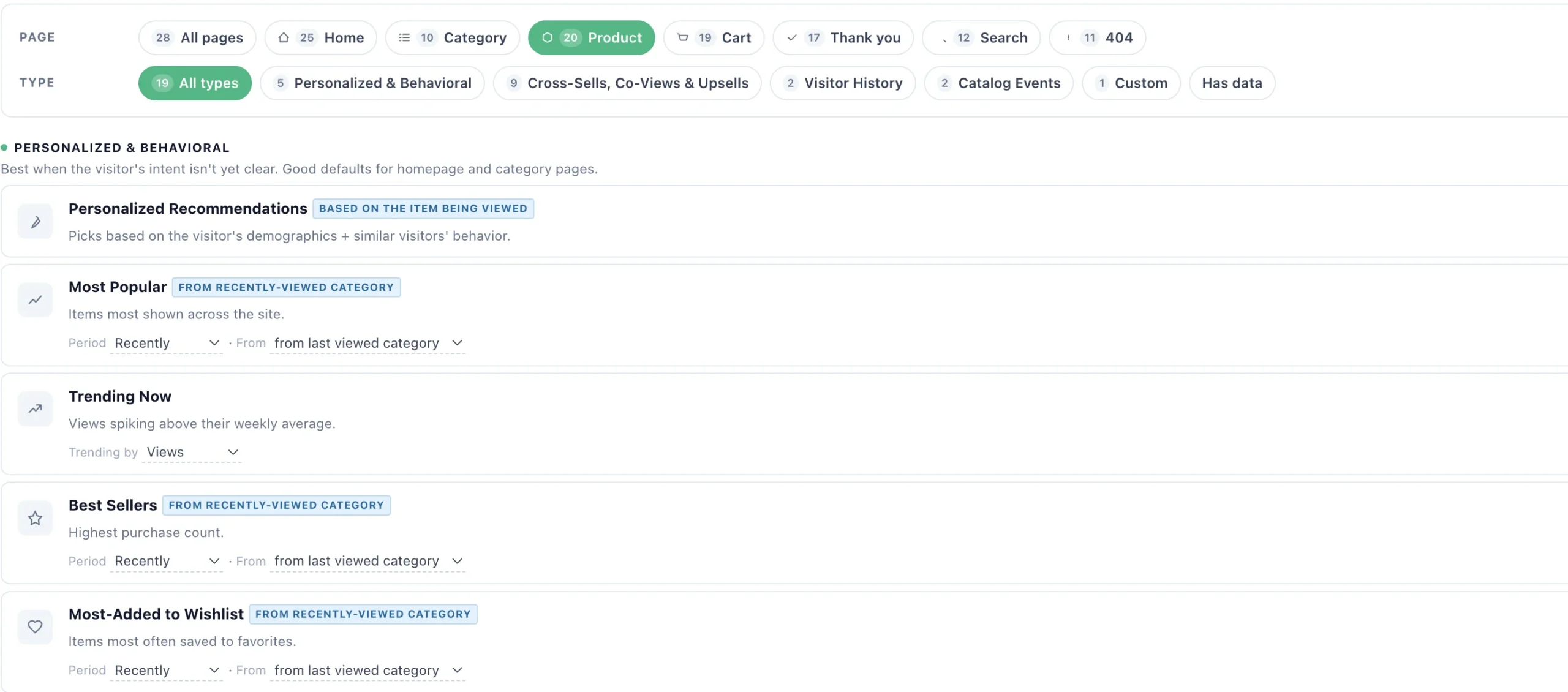
The algorithm is chosen per page, because the anchor changes: the current product on a product page, recently viewed items on the home page, cart contents in the cart. Illustrative account.
- The algorithms. Personalised picks based on the visitor’s interests and the behaviour of similar visitors; most popular, trending and best sellers, optionally from the category the visitor was just looking at; co-views, bought-together and upsells anchored to the product in view or in the cart; visitor history such as recently viewed and back-in-stock; catalogue events like new arrivals and price drops; and a custom algorithm you define yourself. See the recommendation engine page for the full set.
- The owner’s settings. This is where a site’s business logic lives. A publisher can weight promoted or sponsored content higher; a retailer can boost a category, exclude what is out of stock or already bought, cap the price range, and pin an item into slot one. Weights per algorithm decide the blend; filters decide what may appear at all.
- Per audience. The same widget can run different logic for different audiences — complete-the-look for returning buyers, best sellers for first-time visitors — because the targeting step has already said who this is.
- Steered by the visit. The interests from this session change the ranking immediately: a visitor who has just viewed three items in one category sees that category weighted up before they leave the page they are on.
5. Testing and optimisation: which variant, for whom
If a campaign is an experiment, allocation happens here. Personyze allocates per audience and resolves per audience, which is the difference between audience-first A/B testing and the site-wide kind: a variant can win for returning shoppers and lose for first-timers, and the engine can promote it for the first group while the test keeps running for the second. Multivariate tests do the same across several elements at once, and recommendation algorithms can be tested against each other on the same placement, measured by revenue per session rather than clicks.
The environment matters too. A campaign is built and previewed in staging, pushed live when it is ready, and split by traffic percentage so a new idea can run on a slice before it runs on everyone. When the numbers are in, the winner takes the traffic automatically.
6. The render: fast enough that nobody notices
Only now does anything appear. The chosen actions render in the page through the tag on your own site, server-side on a dynamic landing page, inside an email at the moment it is opened, as a push notification, in the chat thread, through the API for your own stack, or as an event to Meta, TikTok, Google Analytics and the rest of the twelve destinations the event sender reaches — and the whole chain above has to complete faster than the page loads. Nothing waits on a batch job: the mining behind discovery ran days ago, the lists refreshed overnight, and the decision itself is computed at request time from the live profile.
7. Learning: what comes back
The last layer feeds the first. Every impression, click and conversion writes back to the profile, which changes what the visitor qualifies for on the next request. Campaign reports show results per audience, per action, per algorithm and per variant, not just per campaign, so the question “did this work?” has an answer for each group it was shown to. Winners are promoted; algorithms are weighted by what earns.
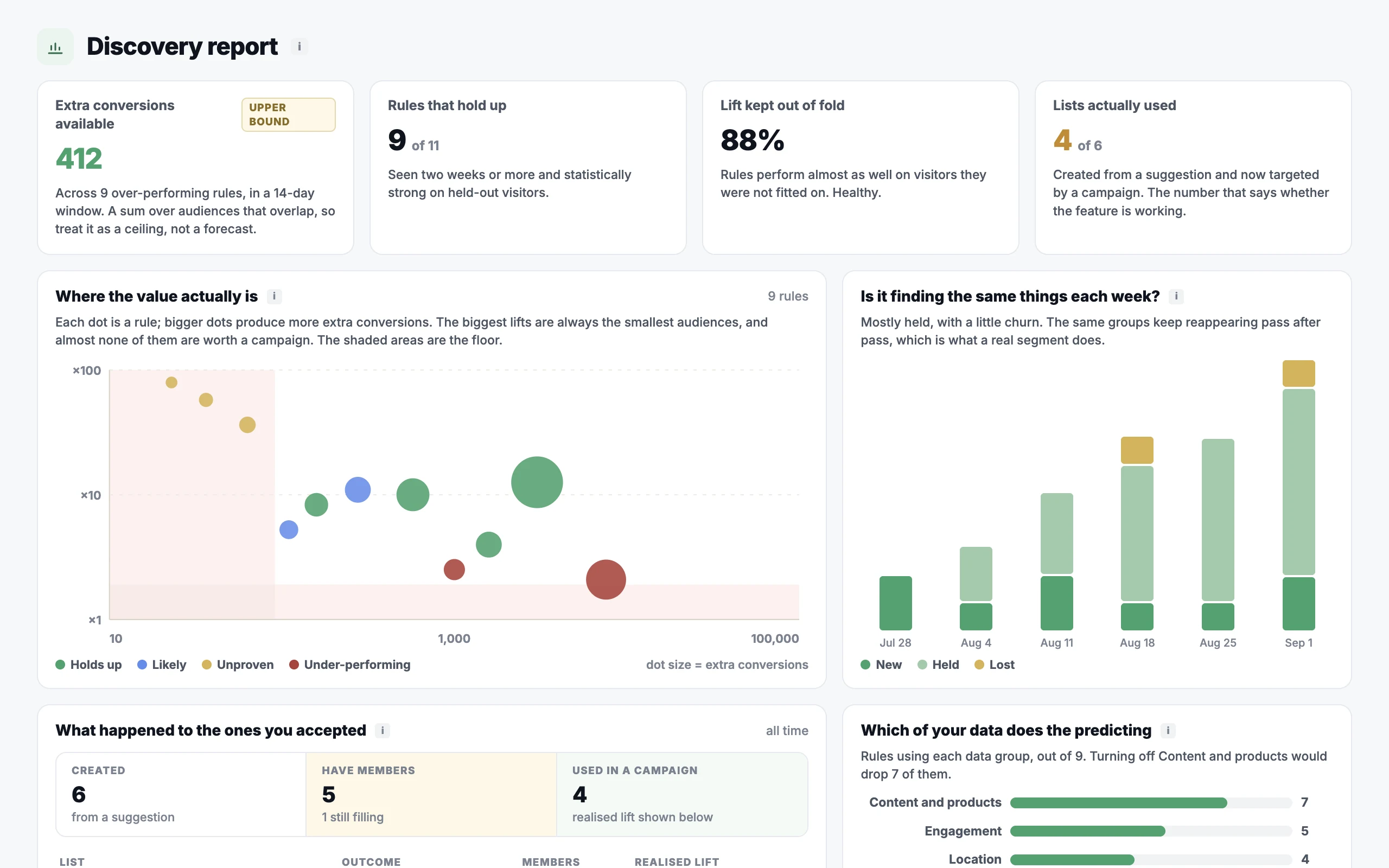
The same honesty applies to what the engine found by itself: predicted lift and realised lift are shown separately, and a funnel counts which audiences were created, filled and actually used. Illustrative account.
Why the layers matter
Vendors that grew from a testing tool tend to start at layer five; vendors that grew from a recommendation widget start at layer four. Both bolt on a profile afterwards, which is why their “full stack” needs an integration project to behave like one system. Starting from the data — collected by default, understood by the crawler, extended by your integrations — is what makes every later layer cheap: the targeting rule, the recommendation blend, the test and the report all read the same profile, and the site owner sets the rules at every one of them.
- The personalization platform — one profile, one engine, every play.
- Behavioral targeting — the rules, the triggers, the channels.
- The recommendation engine — the algorithms and the settings that steer them.
- Audience-first A/B testing — allocation and resolution per audience.
- Audience Discovery — the audiences the engine finds in your own data.
- Book a demo — see the decision made on your own pages.
Book a demo with a personalization expert
30 minutes with a personalization expert. Bring your stack, your goals, your skepticism. We'll show you what changes when every visit feels like the only one.