
Does Personalization or A/B Testing Slow Down Your Site? The Real Page-Speed Impact
The most common objection to adding personalization or A/B testing is speed: won’t another script drag down load times and wreck my Core Web Vitals? It’s a fair worry — a badly built testing script genuinely can slow a page. But with a modern asynchronous script, the real-world cost is small: on the order of ~250 ms of extra load, applied without blocking the page — and when you run Google PageSpeed Insights before and after, you typically won’t see a meaningful change in your score.
Here’s why — and the parts that actually do slow a page, so you can avoid them.
The real cost: about 250 ms, loaded asynchronously
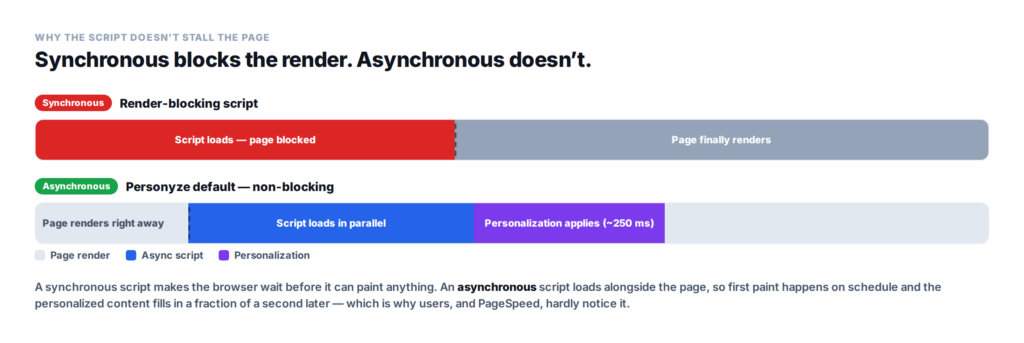
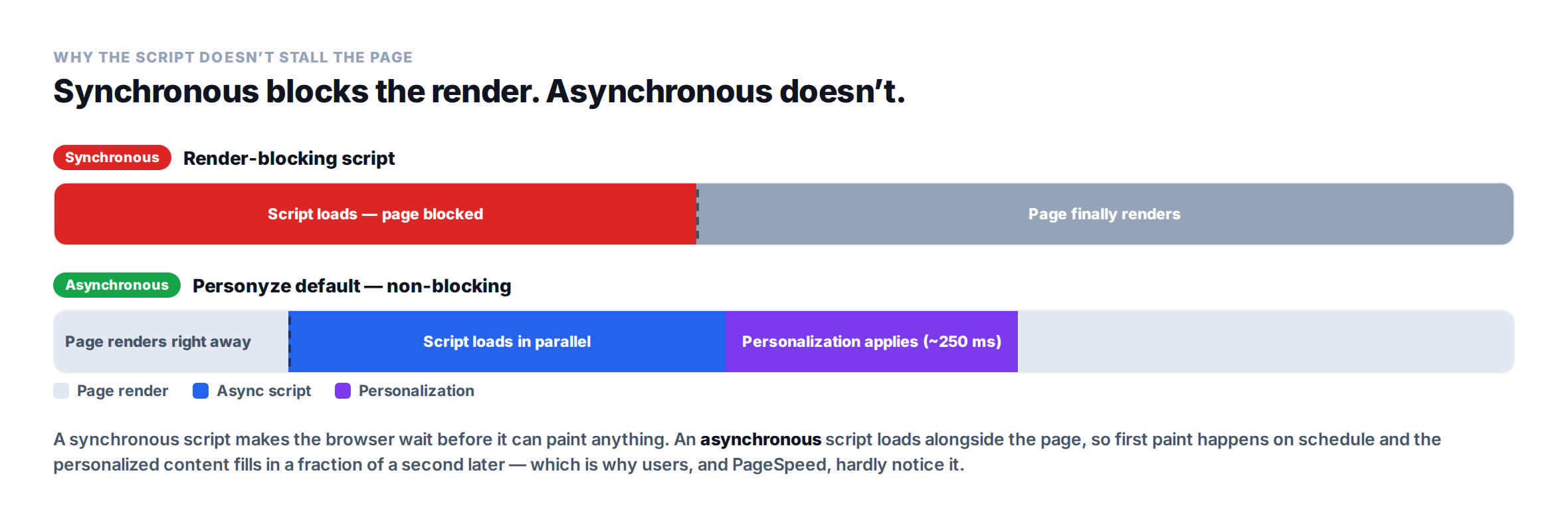
The key word is asynchronous. Personyze’s script — the default, recommended option in the dashboard — loads in parallel with the rest of your page instead of holding up the render. The browser paints your content on its normal schedule, and the personalization layer resolves alongside it, adding roughly a quarter of a second on average — most of which a visitor never perceives, because the page is already usable.
Contrast a synchronous, render-blocking script: the browser has to stop and wait for it before it can show anything. That’s where the “testing tools slow my site” reputation comes from — and it’s exactly what an async approach sidesteps.
Why PageSpeed Insights barely moves
PageSpeed Insights, and the Lighthouse engine behind it, grades a handful of rendering metrics: Largest Contentful Paint (LCP), Interaction to Next Paint (INP), Cumulative Layout Shift (CLS), and Total Blocking Time (TBT). An async script that doesn’t block the main thread at critical moments and doesn’t shift the layout simply doesn’t move those numbers much — so a before-and-after test usually shows a negligible difference.
Where it can show up is entirely about implementation: a heavy or synchronous script, a poorly-handled anti-flicker snippet that hides the page until the variant loads, layout shift from content popping in, or long main-thread tasks. Those are fixable mistakes — not an inherent cost of personalizing.
But you are loading extra content — doesn’t that matter?
Yes — personalization and recommendations do add content: tailored blocks, recommendation widgets, images. More bytes, more requests. Three things keep that from hurting:
- It’s loaded asynchronously, after the critical render path, so it doesn’t delay first paint.
- Much of it sits below the fold or fills in progressively, where it doesn’t touch the metrics users actually feel.
- Images and widgets can be lazy-loaded and optimized, so the extra content arrives just in time rather than up front.
Extra content isn’t the same as a slow page. Delivered well, the added relevance is worth far more than its marginal weight — and that weight barely registers in the tools.
What actually slows a page (and how to avoid it)
- Synchronous, render-blocking scripts. Use async — it’s Personyze’s default.
- Anti-flicker that hides the whole page too long. Keep it tight and scoped, not a blanket blackout.
- Layout shift. Reserve space for personalized blocks so content doesn’t jump (CLS).
- Heavy, unoptimized images in personalized blocks. Compress, right-size, and lazy-load them.
- Too many third-party scripts stacked together. Audit and trim what’s really needed.
- Doing everything client-side. Push heavy logic server-side or to the edge where you can.
How to measure it honestly
Run PageSpeed Insights or Lighthouse on a representative page before and after, and watch LCP, INP, CLS, and TBT — not just the single headline number. Better still, look at field data from real users (the Chrome UX Report or your analytics), since lab scores swing from run to run. Test the pages that matter most — your highest-traffic templates — and hold personalization to the same standard you’d hold any script.
How Personyze keeps it fast
Personyze is built to stay out of the critical path. The script is asynchronous by default (the recommended setting in your dashboard), personalization is applied in place on the same URL rather than through redirects, recommendation widgets can lazy-load, and anti-flicker is scoped so it never blacks out your whole page. The net effect is the profile above: around 250 ms of added load and no meaningful PageSpeed impact — the extra relevance without the speed tax.
Speed and search rankings are two sides of the same coin here. For how testing and personalization affect crawling, indexing, and Core Web Vitals as a ranking signal, see does A/B testing or personalization hurt your SEO?
Fast pages and personalized experiences aren’t a trade-off
You don’t have to choose between a quick-loading site and a tailored one. With an async script and a few sensible habits, personalization and A/B testing add relevance your visitors feel and speed they don’t. Book a demo to see it running, or explore plans and pricing.
Personalization, A/B testing & page speed: FAQ
Does personalization slow down my website?
Only slightly when it’s implemented with an asynchronous script. Personyze’s async script adds roughly 250ms on average, loaded without blocking the page, and PageSpeed Insights typically shows no meaningful change in your score.
Does A/B testing hurt page speed?
It can if the testing script is synchronous or heavy, or if anti-flicker hides the page too long. With an asynchronous, lightweight script the impact on load time and Core Web Vitals is minimal.
How much does Personyze’s script add to load time?
On the order of 250ms on average, and it loads asynchronously so it doesn’t block the page from rendering. Most of that time is invisible to users because the page is already usable.
Will personalization hurt my PageSpeed or Lighthouse score?
Usually not meaningfully. Lighthouse measures metrics like LCP, INP, CLS, and TBT; an async script that doesn’t block the main thread or shift the layout barely moves them. A visible drop almost always points to a synchronous script, flicker handling, or layout shift that can be fixed.
Does loading extra personalized content slow the page?
Not if it’s delivered well. Personalized blocks and recommendations are loaded asynchronously, often below the fold, and images and widgets can be lazy-loaded and optimized – so the extra content doesn’t delay first paint.
How do I keep personalization and A/B testing fast?
Use an asynchronous script, keep anti-flicker tight, reserve space to avoid layout shift, lazy-load and optimize images, limit stacked third-party scripts, push heavy logic server-side where possible, and measure before and after with PageSpeed Insights and real-user field data.
Related reading
- Does A/B testing or personalization hurt your SEO? — crawlability, cloaking, and rankings.
- Audience-oriented A/B testing — testing experiences by segment.
- Website personalization — the platform overview.
Book a demo with a personalization expert
30 minutes with a personalization expert. Bring your stack, your goals, your skepticism. We'll show you what changes when every visit feels like the only one.