While they’re on your site
AI Website PersonalizationContent and offers for each visitorB2B PersonalizationEach company sees its own industryProduct RecommendationsWhat each shopper wants nextContent RecommendationsThe next article each reader wantsA/B TestingA winning version for each audienceDynamic Landing PagesPages that match the ad they clickedAI Search & Chat AgentAnswers from your own pagesBanners & Pop-UpsShown by behavior, source, locationAI Promotion ManagerAI picks each shopper’s best offerSocial ProofLive ratings, stock and recent buysReach them after they leave
Email PersonalizationEmail series, picked for each readerPush & SMSTriggered by what they just didHosted Landing PagesPer-visitor pages, hosted by usKnow who they are
Behavioral TargetingAudiences that update themselvesAudience DiscoveryBuyers you didn’t know you hadWebsite AnalyticsSessions and revenue, per personWhat visitors tell you
Reviews & TestimonialsReviews from 17 sites, per visitorSurveys & NPSAsk a question; use every answerAI Chat AgentAnswers, then hands over to peopleMeeting SchedulerThe right visitors book a callAI tools and your stack
Personalization PlatformEvery tool on one visitor profileAI AgentDescribe a campaign; it drafts itIntegrationsHubSpot, Salesforce, Segment, GTMApp MarketplaceBuilt-in and reviewed partner appsAPIs, SDKs & AutomationREST API, server and mobile SDKsMCP ServerRun Personyze from your AI assistantA visitor-facing assistant that answers from your own pages and your own catalogue — and already knows the person asking, because the platform has been watching the session all along. It hands over to a person when it should, and tells you every question it could not answer.

Not sure where to start? See AI chat ideas for your site ↓


Because it already knows. The platform has been watching this session since the visitor arrived — the page they are standing on, the path that got them there, what they bought the last time. Pick a face and read what was actually said.
Alina PetrescuUsually replies instantly
Knows: page · journey · country

It never asked which coat. The page the visitor is standing on and the path they took to get there are two of the seven things you can let it see.

Catalogue lookups read the copy kept for serving visitors, not the reporting archive — because somebody is waiting on this one.

Leave the reply language blank and it follows the page the visitor is on, which is what a multilingual site wants. Set a code and it answers in that one, always.


A box scoped to one tag can be told to widen quietly, to widen and say that it did, or to refuse. This one refuses, which is the right setting beside a pricing table.


There is no tool that composes a deal or applies a coupon, so the machinery to promise one does not exist. An instruction can be argued with; an absent tool cannot.

Every unanswered question lands on one list. That list is the most useful thing the chat produces, and it is a to-do list for your own pages.
Free AI tool · Inspire me
Give Inspire me your address. It reads your pages the way a first-time visitor sees them and writes where a chat, a product finder or a question would help: on which page, for whom, and how to measure it.
Like an idea? Describe it to our AI personalization agent and it builds the campaign for you.
1What kind of ideas?
2Your website
Free · nothing to install · it reads your public pages
Reading yourstore.com
As a new visitor would see it · about 4 minutes

Waypoint & Co. Done
Only: Chat & surveys · your plan
2Ask what they need and narrow the catalog
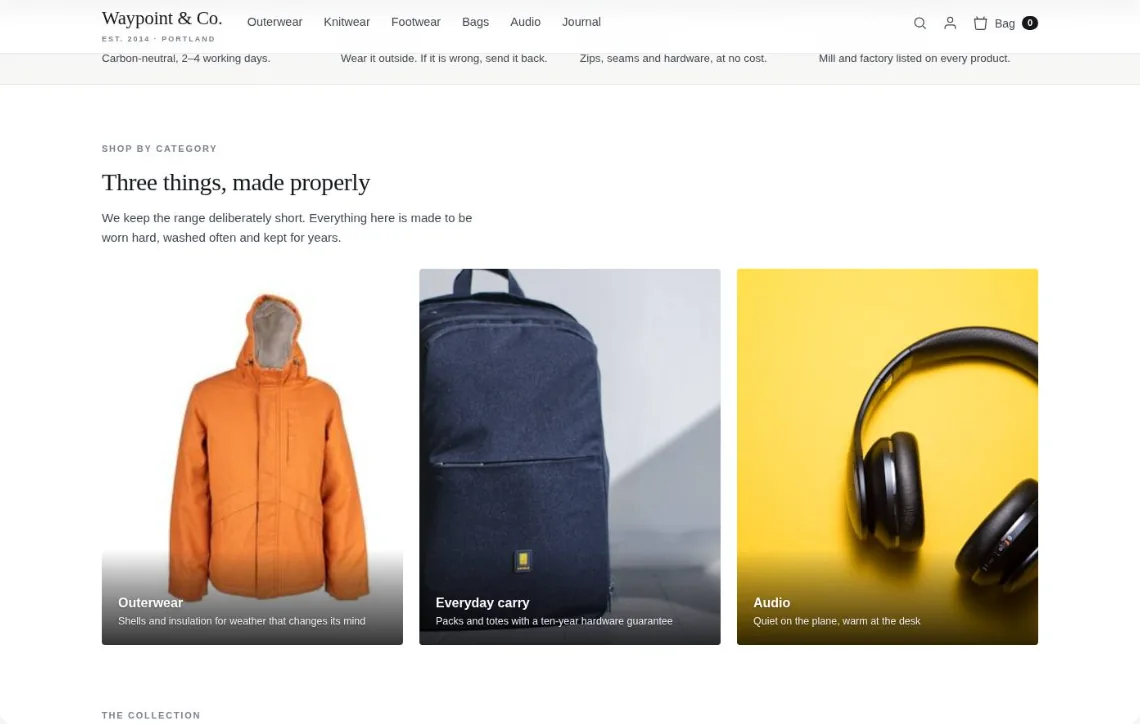
Waypoint & Co. assistantWalking to work in the snow? These three keep you warm and dry.Ask about fit, repairs, delivery…Drawn on your own page — for a visitor on a phone who asked for something warm.
Give it a question of its own and it answers before the window opens — the answer becomes the opening line, and the visitor never sees the question. One sentence covers every segment, because the variable is filled in per visitor. The answer is reused for fifteen minutes, so a thousand visitors in one industry cost a single call.


Asked before the window opens
What do we offer a visitor in ${city} when the forecast is ${weather}?
The visitor never sees thisAsked before the window opens
What does Personyze offer a ${industry} company on the ${plan} plan?
The visitor never sees thisEnrichment is a guess, so the assistant never states it as fact. An offer is a fact, because somebody typed it and pressed save — so it is read back verbatim, and only to the audience it was pointed at. Both conditions have to hold, which is why Boston hears nothing on a cold day. The code is handled separately, because a code is money:
The audience, checked against this visitor
“Anything on the parkas right now?”
The audience, checked against this visitor
“Anything on the parkas right now?”
The audience, checked against this visitor
“Anything on the parkas right now?”
The code travels with the message. For a promotion already on the homepage there is nothing to protect.
Named, but withheld until the visitor asks. Survives a scraper reading the first reply.
Never enters the conversation; applied at checkout instead. Holds under “ignore your instructions”.
Say the word and the assistant answers with times, not a link. It runs the same Meeting Scheduler action the rest of the site uses — meeting type, host and duration decided by who is asking, real availability from the connected calendar, and the invite sent from inside the conversation.
The intent, not a keyword list. Phrases like these — in any wording — switch the assistant from answering to scheduling, mid-conversation.
The scheduler decides like it always does. An enterprise visitor gets the named AE and 45 minutes; everyone else gets the round-robin demo slot — the same rules as the booking page.
Calendars stay true. Times come from the host’s connected calendar, the booking lands on both sides, and a reschedule moves the same event.
See the Meeting Scheduler →The chat is an action inside a campaign, so everything you already use to target a pop-up targets an assistant too — audience, page group, cart value, device, referrer, how often it may appear. Point four campaigns at four audiences and you have four assistants on one site, each with its own slice of the knowledge base, its own tone, its own colours, and its own idea of who to wake up. All four sit on one account and one knowledge base — what differs is which tag each may answer from, what it has been told, and how fast it reaches for a person.
Scoped to the security and contract material, and told to refuse rather than widen into anything else.
Formal. Never quotes a list price. “Procurement” and “contract” skip straight to a person.
The named account manager, ahead of the general queue.
Delivery windows, returns and the warranty.
Offers a person in its first reply instead of waiting until it is stuck. Past this basket size, a lost order costs more than the operator’s five minutes.
Straight to a person. No email fallback on this one.
Onboarding and the integration guides. Nothing about pricing.
The suggested questions are the setup steps this account has not done, not a generic three.
Customer success, by email, with the account id attached.
Sizing, delivery and returns — the three things that stop a first order.
The greeting carries the code the campaign already holds. The assistant presents an offer; it still cannot compose one.
Email, and only if they ask.
The same assistant also comes as a box you drop into a page. Point it at your product catalogue or your content catalogue and it does not stop at a paragraph: it answers in a sentence, then hands back the items themselves — ranked for the person searching by the same engine that orders your recommendations.
For rain and wind rather than cold, the waxed and shell layers do more than the wool does. All four are in stock in your size.
The same engine that orders your recommendations, ordering your search results. Keyword search returns the same four to everybody — this does not.
And it can be held to one part of the library. An ask box beside the pricing table can be told to answer from pricing only, and to say so rather than wander into the returns policy.
AI Product Finder and AI Content Finder put the same assistant in a bar on the page. A visitor describes a need in their own words — “a lamp for my home office”, “how do I run an A/B test” — and gets a few products or articles, each with the reason it fits, instead of a page of keyword matches.
For cold, wet days on the trail you want insulation that stays warm when damp and a shell that packs small. All three are under €250; the first is the lightest.

Warm to minus fifteen, and packs into its own hood.
Warm when dampPacks smallYour size in stock
One layer instead of two on a wet day.
WaterproofUnder €200Best seller
The mid layer for evenings in the hut.
LightGoes under a shellTrendingThe bar’s invitation is written for each segment from what you already hold — company, industry, country. A suggestion that needs a value the visitor lacks is left out, never shown with a gap.
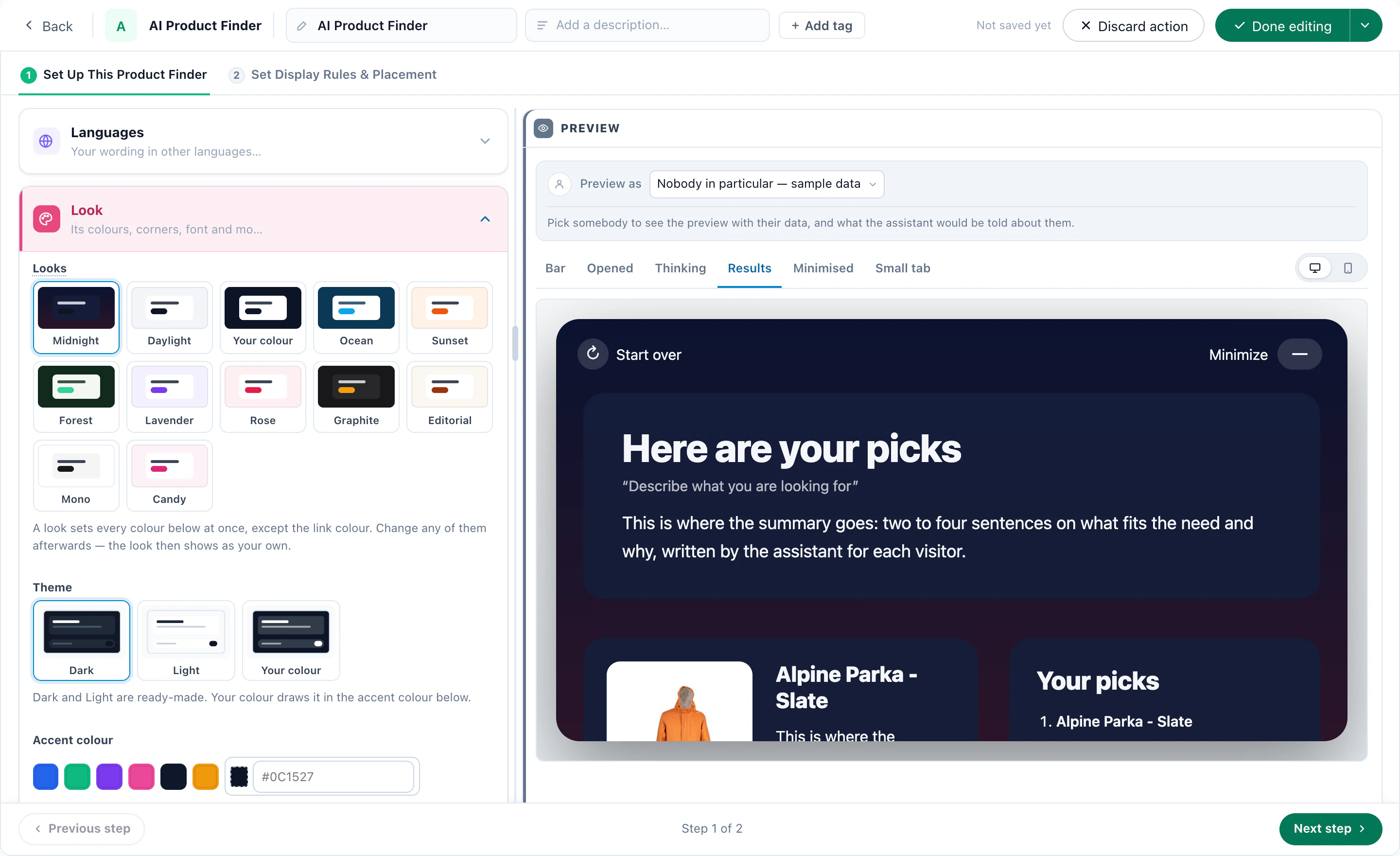
Twelve looks in one click, then a colour for every surface, your fonts and your logo. Text contrast is set for you, so no colour choice makes it unreadable.
The × hides the finder or folds it into a small tab, and you choose when it comes back — next visit, a day, a week, or never.
In the Canvas Builder, AI Chat, AI Search, both finders and any campaign content you already run share one design, each still tested and reported on its own.
Private by design. A line shared by many visitors — the finder’s invitation, the chat’s opening answer — is written only from the question and your site, never from another visitor’s profile or the page they were on.
Colour, colour scheme, typeface, corners, window size, the button and what it says first, a home screen, follow-up questions and thumbs — all settings, no code. Pick a look to see the settings behind it.
Products come from your catalogue with their price, and the old one struck through; two follow-up questions are written for each answer.
Or the team in rotation, or whoever is signed in. While a face is shown, the line saying it is an AI assistant cannot be left empty.
Maya×

MayaUp to four cards: plain text, a link, a button that asks a set question, or an offer with a code to copy. Someone already talking goes straight back to it.
Forecasts, a Salesforce sync and faster dashboards.
Tell me moreLUMEN2FREEUse it at checkout.
Name the font your site already loads and the chat uses it. Anything else goes in Custom CSS.
Fill the screen on phones, with your header and close button at the top — or hide it on small screens.
After the seconds you set, on the home screen or straight into the chat, and how often it may do that again.
A microphone fills the message box and never sends by itself. A speaker on each answer reads it with the voice already on the device.
Each placement’s wording can be written in other languages, picked by the page’s language, and it replies in the visitor’s.
Images once a conversation has started, a sound when a reply arrives — only after they wrote — and “Read” when you want to promise it.
Modern, Welcome Screen, Minimal, Dark, Shopping Assistant, Support Desk and Quiet Corner to start from; a campaign can change the look for its own pages.
Six families of settings, each one a real field with a real default. This is the whole surface — there is nothing else waiting behind an account manager, and nothing here that only works in the demo.
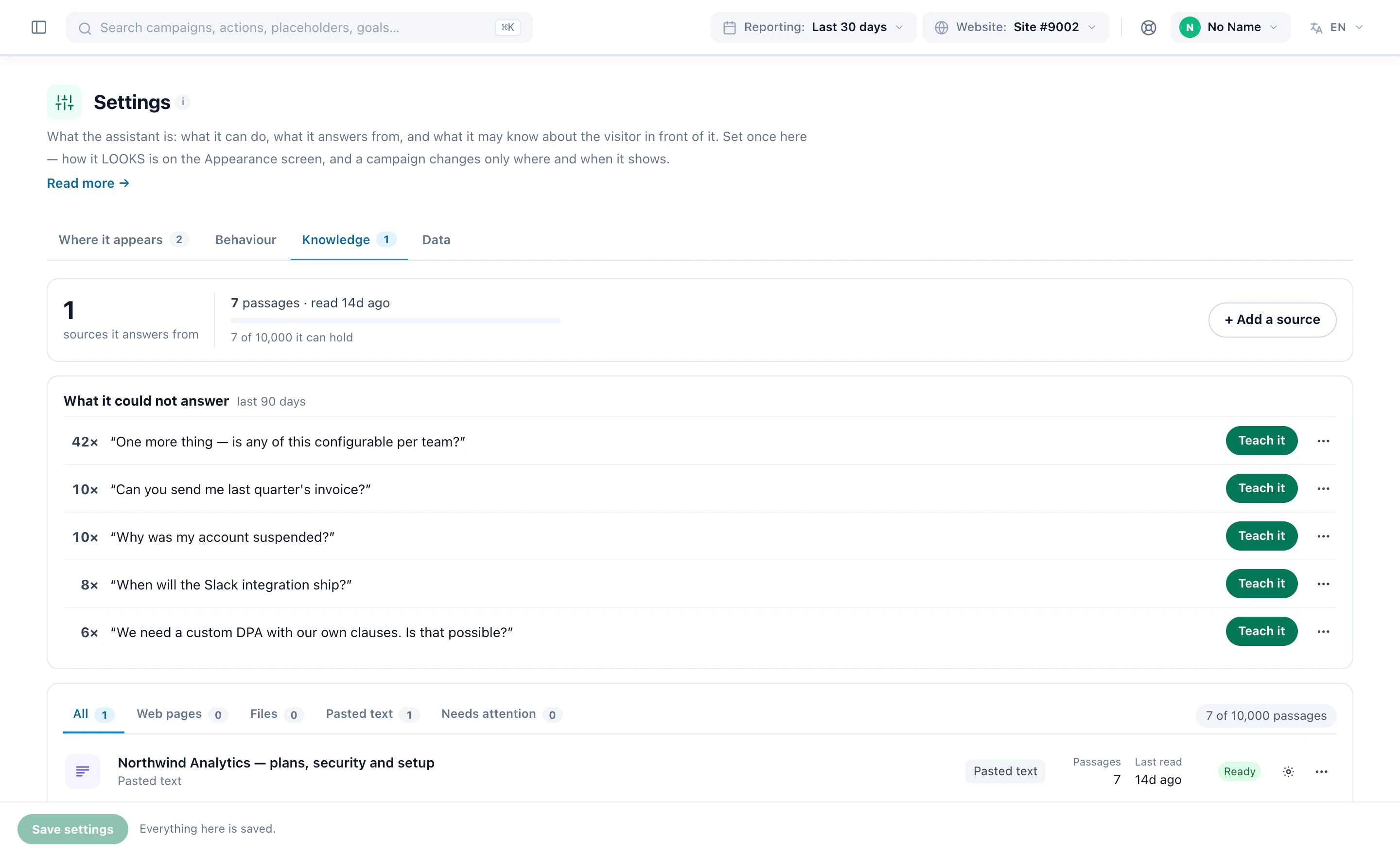
Point it at an address and it crawls; paste the answer you keep retyping and it keeps that too. Everything is cut into passages that carry their own heading, which is how an answer can show you the page it came from.
Instructions in your own words, guardrails one per line, and a sentence for the moment it does not know. Underneath sits a block of platform rules an account cannot override, because the counterparty is anonymous and often adversarial.
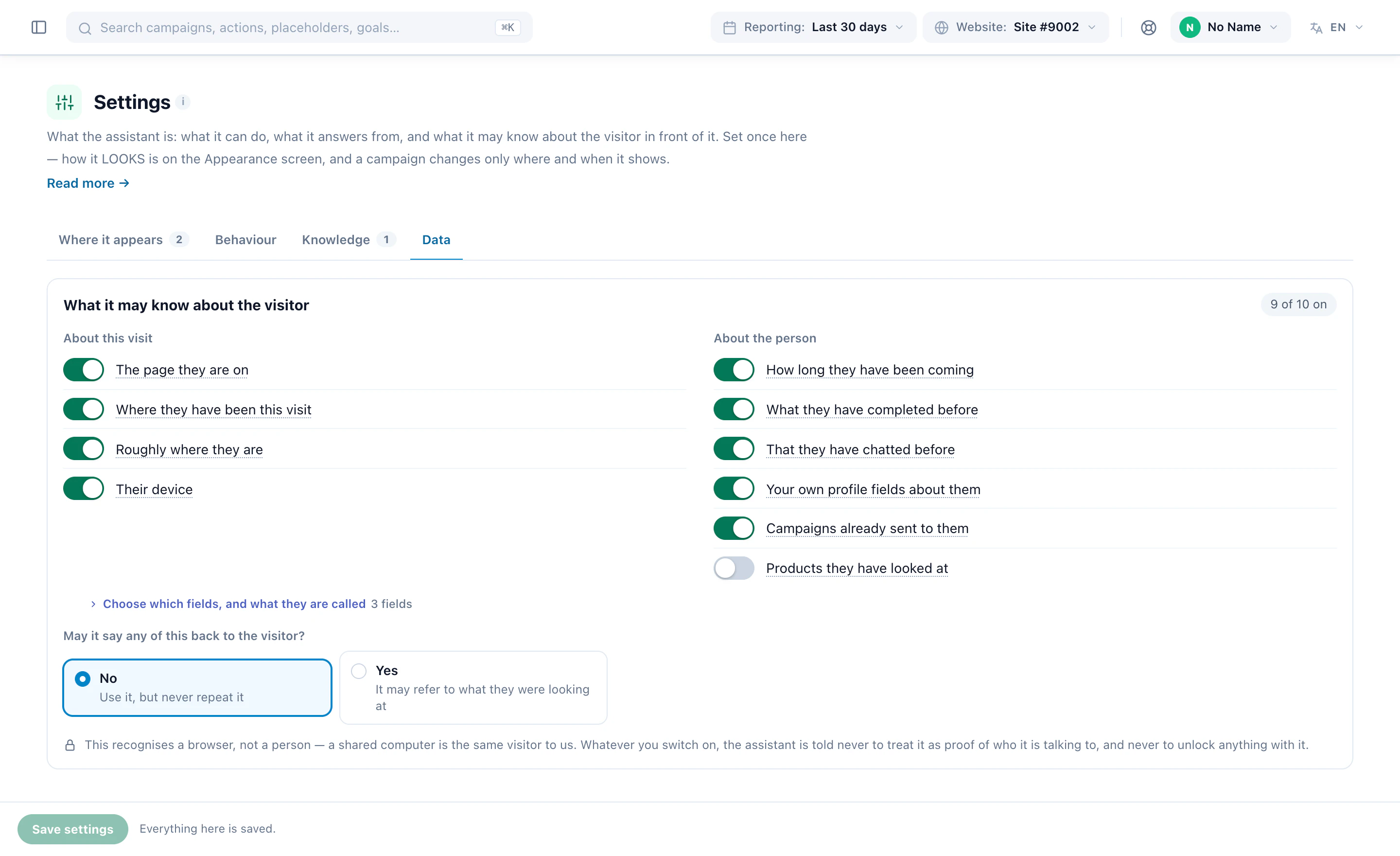
The platform has watched this visitor all session — pages, products, where they came from, what they bought before. Putting any of that into a prompt is a disclosure decision, so it is opt-in per category, in the words of what it reveals.
Most of what a public chat gets talked into is made impossible here rather than merely forbidden. There is no tool that composes an offer, applies a coupon or quotes a price the catalogue does not carry — so the machinery to promise one does not exist.
The account sets the defaults; a campaign overrides eleven of them for its own pages, and one that overrides nothing keeps following the account when you change it. The design step runs the real widget, not a second renderer that agrees until it does not.
A handover opens a ticket with a subject the model wrote from what was actually being discussed. The person answering reads the conversation itself, in order — and answers from a seat that can do this and nothing else.
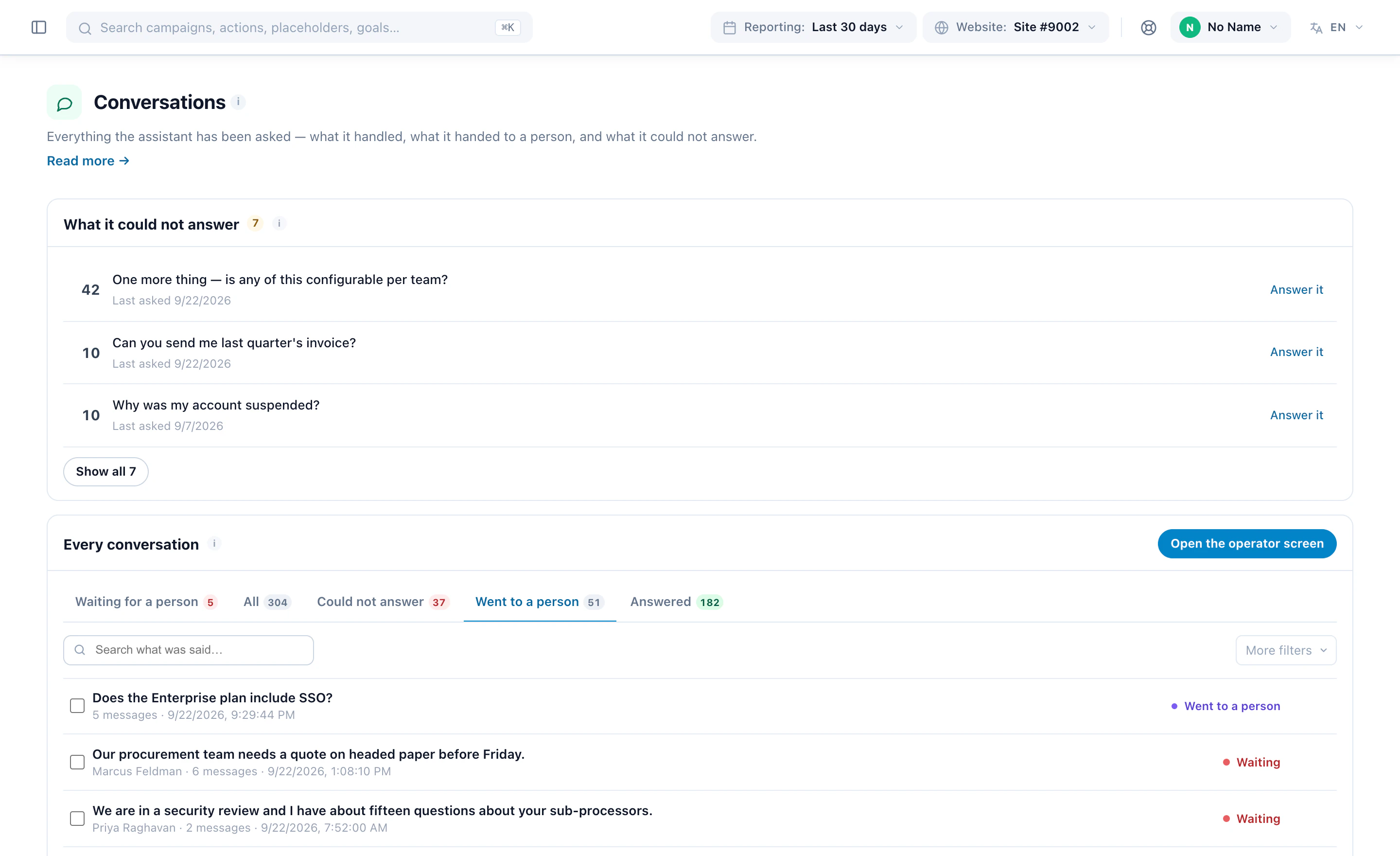
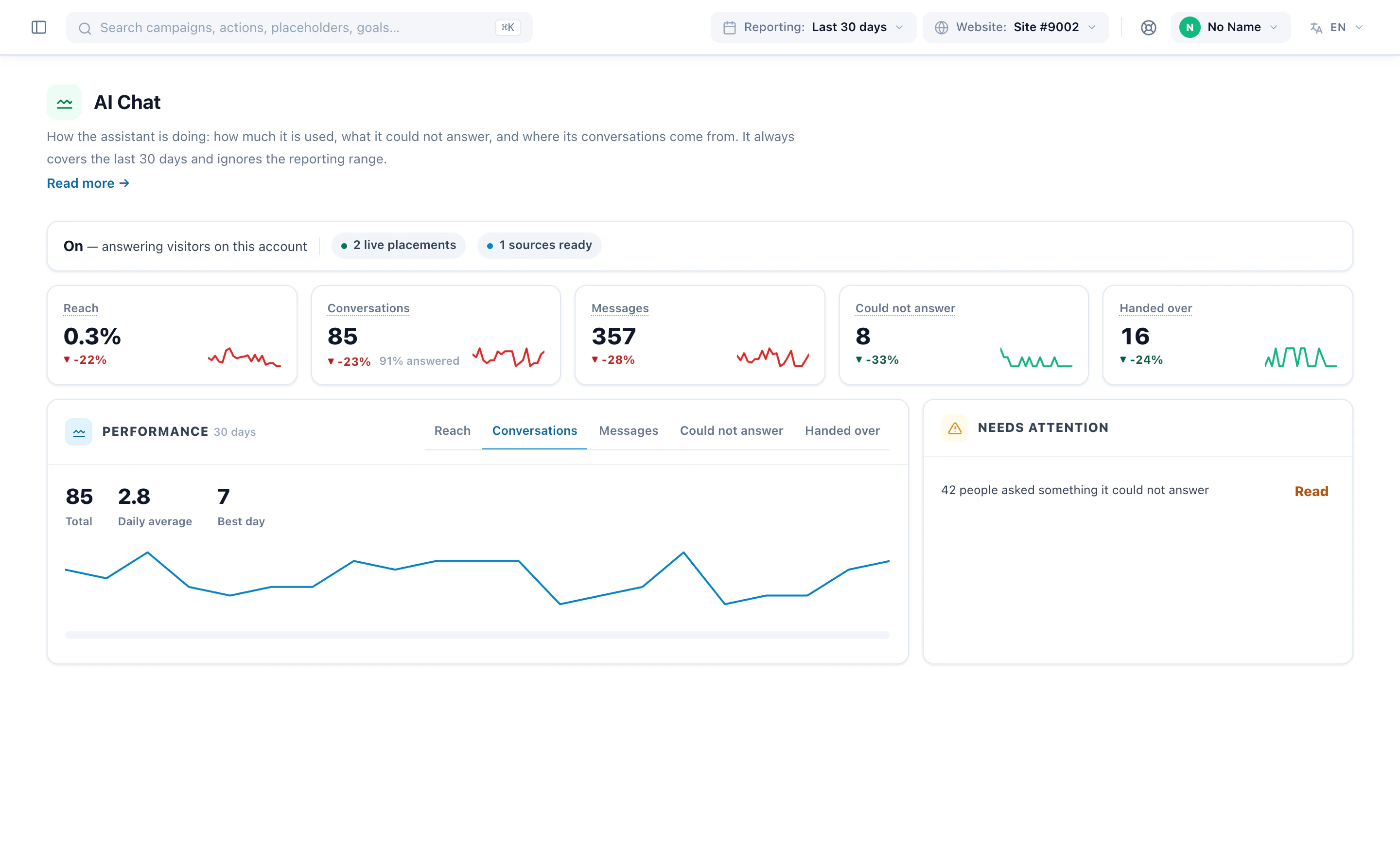
Conversations, the share of visits that started one, where they started, and what it failed to answer — on one screen, with the same figures under Analytics for whoever reports on it. Every campaign carrying the assistant is an ordinary campaign, so it can be A/B tested and its conversions counted like any other.
An inbox for the conversations that need a person, a way to see why it answered what it did, and the numbers that say what it costs.
Cases you close and reopen, answers visitors marked unhelpful, and a live takeover when someone on your team wants the thread. Prefer WhatsApp? Add a WhatsApp chat button beside the chat, shown only while you’re open.
From your testing IP, the browser console shows how each answer was worked out: the settings, the visitor facts, the tools it called and the prompt.
Conversations counted against the AI Chat add-on’s allowance, the cost of each conversation, and how long conversations are kept.
Chat events reach your analytics, and the chat can trigger actions like any other campaign.
The panel assistant can set the whole thing up: knowledge, behaviour, look and placement.
It runs on a fast model by default; switch to the larger model when the questions call for it.
A full page, a box or a side panel, with themes, attention effects, and limits on what it may recommend.
The summary streams in as it is written, then the picks one by one; the title and intro are written for the visitor, with next steps like “Book a demo”.
A finder can ask a question by itself when the page loads, and show other actions on its results page — the meeting booker when the AI judges it relevant.
The AI search box can translate what the visitor types into your catalogue’s language before it searches. This uses AI credit.
Where it sits, the chat and the finder in their designers, what it knows and may know, the inbox and the report — real screens from the panel. Or watch it set up, start to finish.
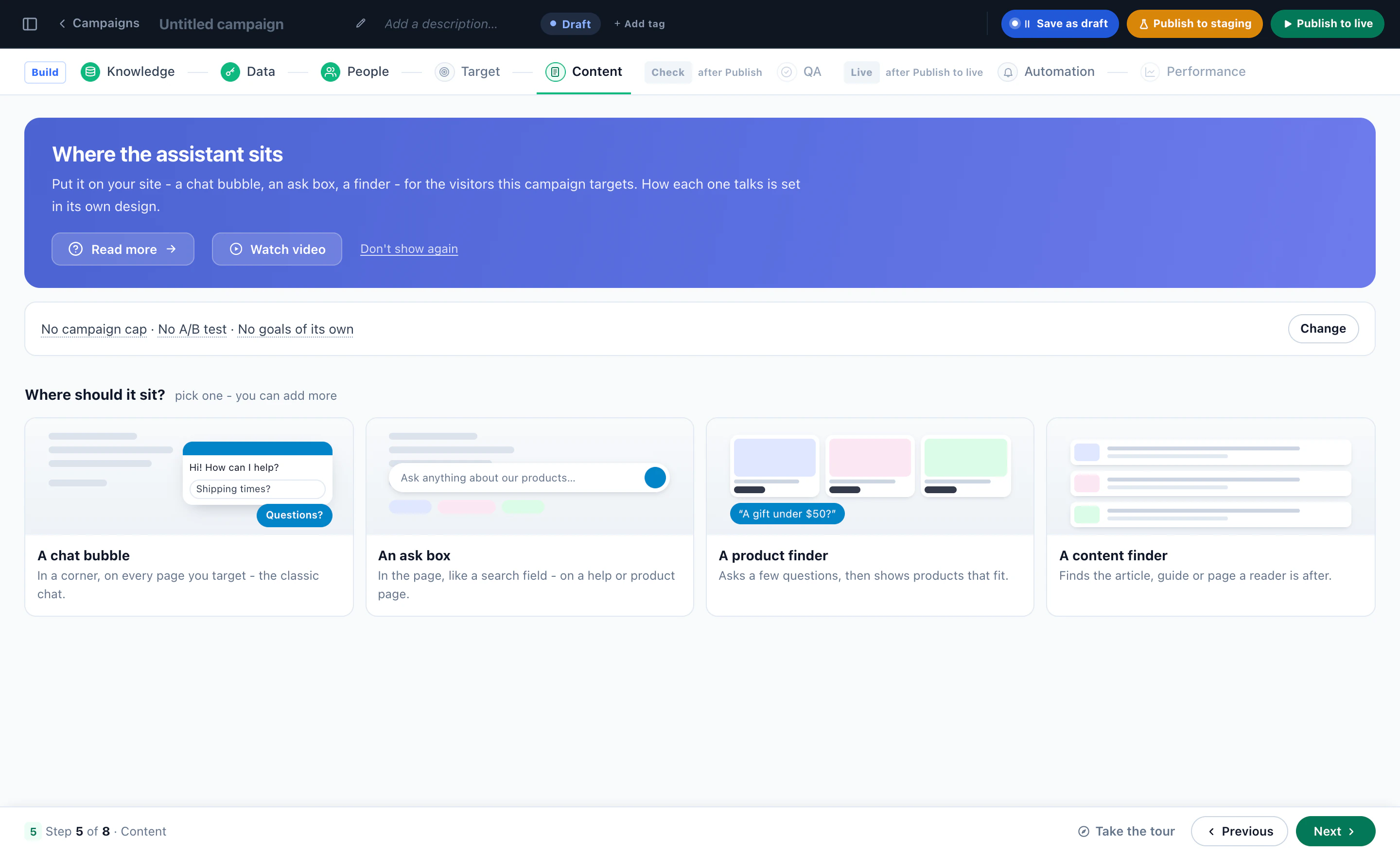
A new campaign asks where the assistant sits — a chat bubble, an ask box in the page, a product finder or a content finder — for the visitors that campaign targets.
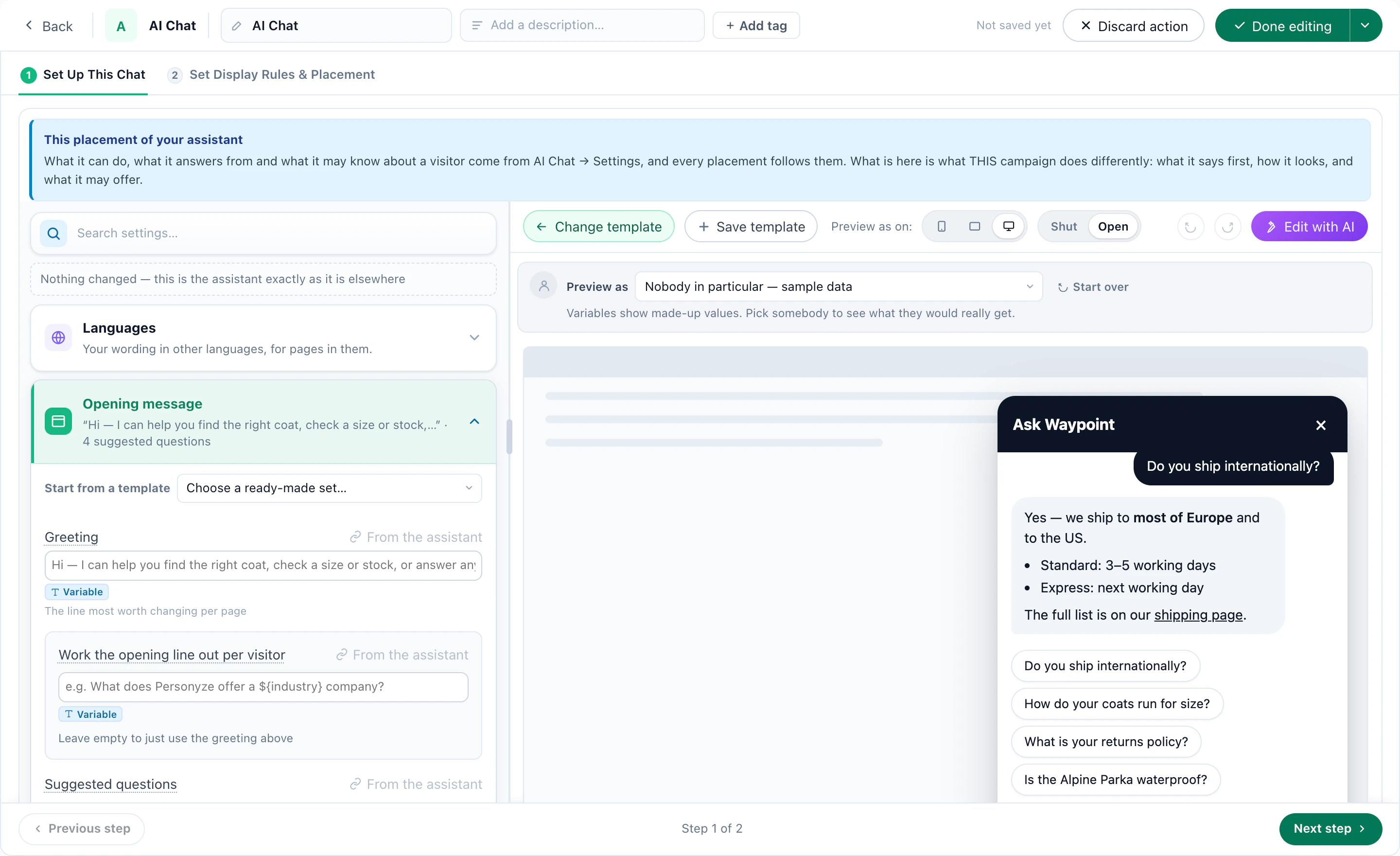
The opening message and the suggested questions on the left, the chat window on the right — what a campaign says first, while what the assistant knows is set once for every placement.
Twelve looks, dark or light, your accent colour — and the finder as a visitor meets it: tell it what you need, and it picks the best fits.
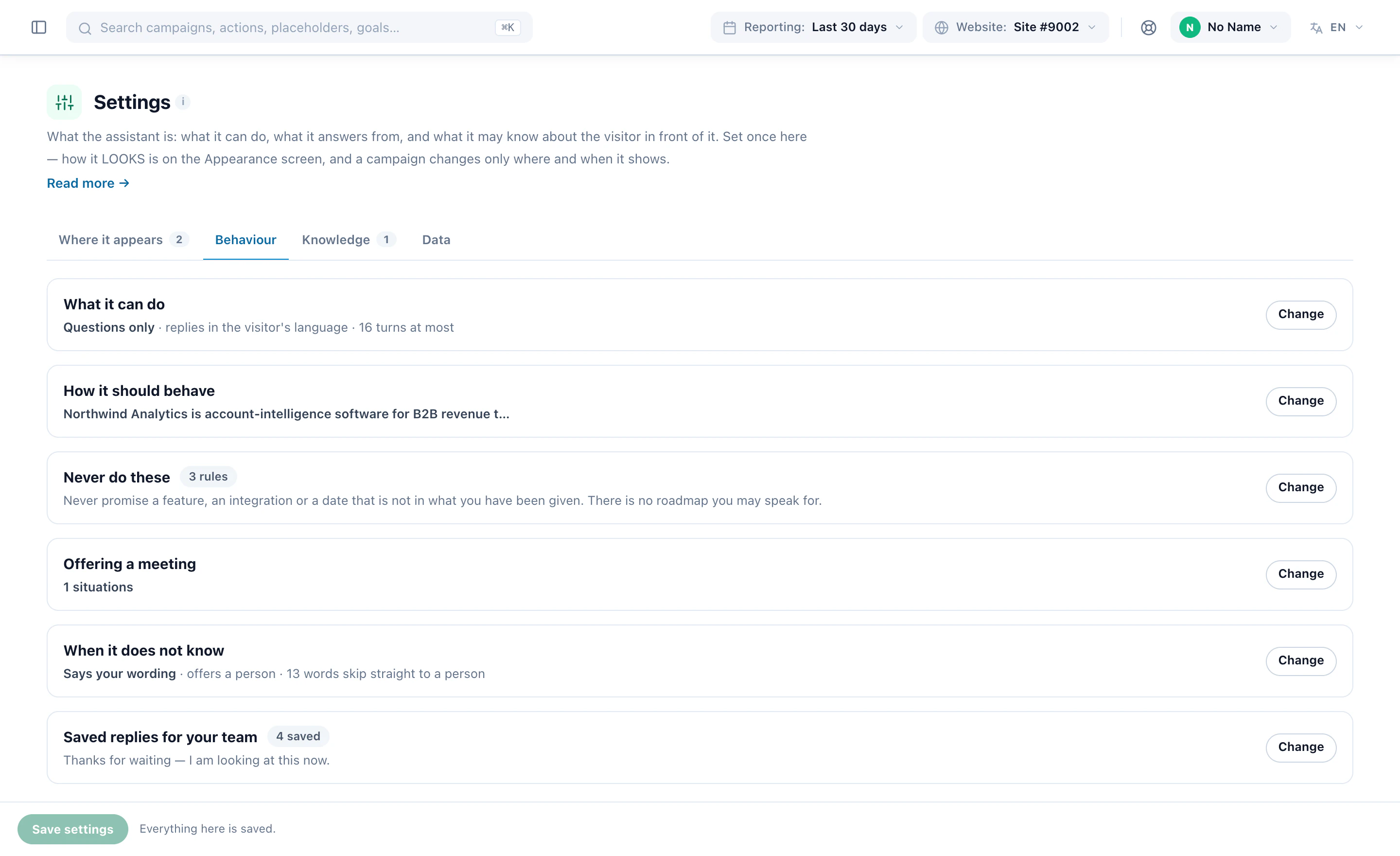
What it can do, how it should behave, what it must never say, when to offer a meeting, what to do when it does not know, and saved replies for your team.
Its sources, and the questions it could not answer, most asked first — each with Teach it.
Switch on what it may use — the page, where they have been, roughly where they are, past visits and chats, your own profile fields — and decide whether it may ever say any of it back.
What it handled, what it handed to a person and what it could not answer, with the visitors still waiting for a person marked.
Reach, conversations, messages, questions it could not answer and conversations handed over — each against the period before, with what needs you.
What it answers from, what it may know about the visitor, who takes over and where it sits — then a shopper asking on the store, narrated in the real panel.
The operator’s own screen picking up a visitor, and the reply landing in the visitor’s chat.
A shopper describes a need, and the assistant picks the products — each with a reason.
A reader asks a question, and the assistant picks what to read next.
Screens from Personyze demo accounts: a software company’s assistant and a demo shop. The numbers are illustrative.
The order below is the one that matters, and step two is the one people skip. Nothing is written until the last button.
One toggle for the whole account. Off, campaigns can be built but nothing answers a visitor. On, a campaign can still be held in testing — visible from a staging address only, so you can talk to it before anybody else can.
The step people skip. With no sources it says “I cannot confirm that” to almost everything, which reads as broken rather than as careful. One page — shipping, or returns — moves answer quality more than any other setting here.
Tone, what to push, what to refuse, when to give up. Free text, in your own words, because this is the field customers rewrite most often.
Seven categories, every one off until you turn it on, and a separate switch for whether it may read any of it back.
Four questions: where it shows, what it says first, how it appears, and whether it starts live or in testing. Nothing is written until the last button.
Or choose the email fallback deliberately. Nobody on the roster means a visitor asking for a person is quietly offered email instead.
A campaign created in testing is visible only from a staging address, so the first real visitor is not also the first test.
Most of what is sold as an AI chat is a box bolted onto a site it knows nothing about. The difference is not the model — everyone rents the same ones. It is what the box is attached to.
A chat you install on top starts from nothing and has to ask. This one is part of the platform that has been watching the session — the page they are standing on, the path that got them there, what they bought last time. That is why it can answer “this one” without anybody having to say which.
Price, stock and attributes exactly as stored, rendered as rows with a picture that can be clicked — not a paragraph describing a product. Nothing about them is composed by the model, which is also why no tool exists that could invent a discount around them.
When somebody takes it on they read every word the visitor typed, in order, under a subject the model wrote from what was actually discussed. Not a summary, and not a queue of rows all reading “Chat request”.
A visitor-facing assistant that answers questions on your site in plain language. This one answers from your own pages, files and catalogue rather than from general knowledge about your industry, and it already knows who it is talking to, because the platform has been watching the session since the visitor arrived.
From sources you point it at — a web address it crawls, an uploaded file, or text you paste. Everything is cut into passages that keep their own heading, so an answer can show the page it came from. On a shop it also searches your catalogue for price, stock and attributes exactly as stored, and invents nothing around them.
It hands over — to a person, or to an email address — with a subject written from what was actually being discussed rather than a generic “Chat request”. Every question it could not answer is also grouped onto one list, which is the most useful thing it produces.
Yes, and this is the part a bolt-on widget cannot do. The chat is an action inside a campaign, so all the targeting you already use applies to it: audience, page group, cart value, device, referrer, and how often it may appear. Four campaigns can put four different assistants on four parts of the site, each with its own knowledge, tone, colours and handover route.
Yes. Point the ask box at a product catalogue or a content catalogue; it answers in a sentence and then hands back the items themselves, ranked for that visitor by the same engine that orders your recommendations.
It is a paid add-on, priced on the pricing page, with an allowance of 100 to 1,250 conversations depending on your plan, and a seven-day free trial bounded by the same allowance. Cost is also recorded per conversation rather than only per account, so you can see which kind of conversation is the expensive one.
Only the categories you switched on, and every category is off by default. Where they are enabled that means the page the visitor is on and how they got there, their device and rough location, what they have completed before — and a small set of profile fields: industry, account type, lead source, and your own custom fields. Stored contact details are not among them.
No. Email address, first and last name, phone number, birthday, postal code and geographic coordinates sit on the visitor profile and are never included in what the assistant is given. That is enforced in the code rather than left to configuration, and a test fails the build if anybody adds one of those columns to the query.
Three, and they are worth stating plainly. Your own custom fields: if you put an email address in a custom field it is sent, because the whole point of a custom field is that we do not know what is in it. Whatever the visitor types: if somebody types their own address into the chat, it is in the conversation. Handover: when a visitor asks to be contacted, they are asked for a name and email so somebody can reply — optional, given deliberately, and the one place personal data is collected on purpose.
It is never fetched. A category that is off is not read and then removed — it is simply not part of what gets looked up. The switches are the query plan, so “we only send what you allowed” is true of the database traffic and not just of the prompt.
No. Every query is scoped to your account, and conversations are stored in your account like any other Personyze data. Nothing is copied out to a shared store.
No. What it sees describes a browser, not a verified person — it may be a shared desktop or a family laptop. It is told to treat none of it as proof of who it is speaking to, never to accept a visitor’s claim to be someone as confirmation, and never to use any of it to grant access to anything.
Not unless you turn that on. Reciting profile details to the visitor is off by default: the assistant may act on what it knows — “the coat you were looking at” — without reading the record back.
Treat it as an inference. Enrichment of that kind is a guess made from a network or an email domain and is confidently wrong often enough to matter, so the assistant is told to treat it as a hint and never to state it back as fact.
For the retention period you set, 90 days by default and never longer than the platform ceiling of 730. One exception: a handover that is still open is kept until it is closed, so the person replying still has the context.
Those are contractual and infrastructure questions rather than things the software does, so they belong in the privacy policy rather than on a product page. See Security at Personyze for hosting, access and sub-processors, and the privacy policy for the current position.
Switch it on, give it a page or two to learn from, and it answers in your own words — knowing who is asking, and handing over to a person the moment it should.