
AI product recommendations for your WooCommerce store.
Personyze plugs into WooCommerce in five minutes and starts delivering 1:1 product recommendations across category pages, product pages, cart, checkout, post-purchase emails, and push notifications. No code, no developer queue, no rebuild.
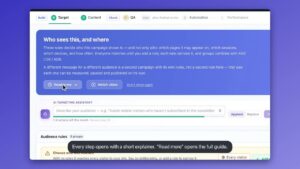
Every recommendation surface, in one tour.
The recommendation engine WooCommerce was missing.
Native WooCommerce comes with basic "related products" by category and tag. Personyze adds a true AI recommendation engine that learns from every visitor's behavior, transaction history, and crowd patterns — then renders personalized products on every touchpoint, including channels WooCommerce can't reach on its own.
Goes far beyond "products in the same category." Personyze tracks individual visitor interactions, product affinities, and intent signals to compute relevance scores in real time.
Algorithms like customers who viewed this also viewed and customers who bought this also bought use anonymized shopper patterns from your full traffic — the same approach Amazon pioneered.
Same engine renders recommendations on your product pages, in cart abandonment emails, in push notifications, and at email open time. One unified visitor profile.
Install our WordPress plugin, paste your snippet, drag-and-drop recommendation widgets onto any page. Designers ship, not engineers.
The plugin instantly syncs your WooCommerce catalog — products, categories, prices, stock, attributes. No feed file generation, no scheduled imports.
Drop recommendations into any Elementor block, Gutenberg block, or theme template using WordPress shortcodes — matches your site's existing look.
The right algorithm for every WooCommerce page.
A WooCommerce store has at least seven distinct surfaces where a recommendation can make or break a conversion. Personyze ships with purpose-tuned algorithms for each.
Product page
- Customers Who Bought This Also Bought — the classic Amazon-style cross-sell, based on co-purchase patterns from your shoppers.
- Customers Who Viewed This Also Viewed — discovery driven by browsing patterns, especially powerful for new visitors.
- Frequently Bought Together — bundles of 2–3 items that historically convert as a set, with one-click add-to-cart.
- Recommended for You — Product Page — items pairing well with the one being viewed, tuned to the visitor's profile.
- Upsell Recommendations — higher-value alternatives or premium variations of the current product.
Category & homepage
- Best Sellers by Segment — top items by category, gender, age, or interest profile.
- New In Stock for You — new arrivals since the visitor's last visit, ranked by their interest signals.
- Most Popular from Your Demographic — what shoppers like this one are buying right now.
- Recommended Products for You — the home-page-style personalized feed based on full visitor history.
Cart & checkout
- Cart Cross-Sell — "complete the set" suggestions based on items already in cart.
- Visitor’s Who Bought These Also Bought These — multi-item co-purchase patterns for shoppers with multiple cart items.
- Last Chance / Low in Stock — subtle urgency cues for items the visitor has shown interest in.
- What Others Bought, Who Viewed This — a strong conversion signal at the moment of indecision.
Post-purchase & email
- Recently Added Cross-Sell — new catalog items related to past purchases, triggered after order completion.
- Cart Abandonment — items left in cart, refreshed with current prices and stock at email open time.
- Changed Price / On Sale from Wishlist — price-drop alerts for items the customer was watching.
- Buy / View Again — replenishment reminders timed to the typical product lifecycle.
Every algorithm runs against the same unified visitor profile — so a click on your store on Monday informs the email recommendation on Friday. See the full algorithm library on the recommendation algorithms page.
Every customer touchpoint, covered.
Personalized "Recommended for you" widget that adapts to first-time visitors, returning customers, and signed-in users automatically.
Replace WooCommerce's default related-products block with smarter algorithms — FBT bundles, cross-sells, or upsells, depending on the product.
Sort or filter category listings by relevance to the current visitor, surface bestsellers from their segment first.
Cart cross-sell widget with one-click add-to-cart. Configurable to show only items above a price threshold to drive AOV.
Last-mile recommendations during checkout, optionally with frequency caps to avoid checkout abandonment from distraction.
Augment WooCommerce search with "you might also like" rows based on the query intent and visitor history.
Turn dead-end pages into discovery moments with personalized product blocks.
Drop personalized product blocks into any ESP — Mailchimp, Klaviyo, Sendgrid, HubSpot. Renders fresh at the moment of email open.
Trigger a Personyze-rendered email with the abandoned items plus complementary recommendations. Live prices, real stock.
Web push alerts for price drops, new arrivals matching interests, and replenishment reminders — sent to subscribed customers.
Recommendation-driven exit-intent popups, hero banners, and slide-in widgets — same engine, different surface.
Expose the same recommendations via REST API or iOS / Android SDKs — one engine across web and native.
Install once. Personalize forever.
Personyze ships as a free WordPress plugin. Activate it, paste your account ID, and your WooCommerce store is connected. No feed files, no developer setup, no integration handoff.
-
1
Install the Personyze WordPress plugin
Available in the WordPress plugin directory. One-click install from your WP Admin » Plugins screen.
-
2
Paste your Personyze account ID
Free account — sign up at personyze.com. The plugin's settings page asks for one field. That's it for activation.
-
3
Catalog syncs automatically
The plugin reads your WooCommerce product catalog directly — titles, images, prices, stock, categories, attributes, variations. No CSV export, no scheduled feed.
-
4
Tracking activates instantly
Product views, add-to-cart events, purchases, and category browsing are tracked from the moment the plugin activates. The recommendation engine starts learning immediately.
-
5
Drag widgets onto pages
Use WordPress shortcodes (or Elementor blocks) to drop recommendation widgets anywhere on your site. Style them to match your theme — no rebuild needed.
Need help? Our customer success team can walk you through the first setup, free. Schedule a setup call from your account dashboard.
WooCommerce personalization, end to end.
The recommendation engine is the core, but Personyze ships with everything else a personalized WooCommerce store needs. All in one unified platform — same visitor profile, same dashboard, same billing.
Recent purchase notifications, low-stock alerts, "X people viewing this" widgets — the trust signals that lift conversion.
Social proof →Trigger emails with the abandoned items plus complementary recommendations, with live prices rendered at open time.
Open-time email →Last-chance offers, discount codes, or personalized product blocks triggered when a visitor's about to leave.
Exit popups →Test layouts, algorithms, copy, and offers by audience segment — not just by average. WooCommerce store owners can finally see what works for which shoppers.
A/B testing →Show different homepage heroes, category banners, or CTAs to different visitor segments — first-time, returning, high-AOV, abandoning.
Behavioral targeting →Re-engage subscribed visitors with price-drop alerts, new arrivals from their favorite categories, and replenishment reminders.
Push notifications →What WooCommerce store owners ask first.
Does Personyze work with my WooCommerce theme?
Yes. The plugin renders recommendations as standard HTML blocks you place via WordPress shortcodes, Elementor widgets, or Gutenberg blocks. The styling matches your theme automatically, and you can customize the markup with CSS if needed. We've tested with Astra, OceanWP, Storefront, Flatsome, Divi, and most major WooCommerce themes.
Will Personyze slow down my store?
No. Recommendations are fetched asynchronously after the page loads, so your initial render time is unaffected. The plugin adds about 30KB of JavaScript, served from a global CDN, and lazy-loads as needed.
How quickly will the engine start producing good recommendations?
For first-time visitors with no history, the engine falls back to crowd-based algorithms (best sellers in segment, customers who viewed) that work immediately. For returning visitors, personalization improves with every interaction — usually showing meaningful gains within the first week of data.
Can I use Personyze alongside my existing email service?
Absolutely. Personyze can render personalized product blocks inside emails sent by Mailchimp, Klaviyo, HubSpot, Sendgrid, or any other ESP — no integration required. Just paste a small HTML snippet into your email template and recommendations render at the moment each recipient opens the email.
Does it support WooCommerce subscriptions, bookings, and custom product types?
Yes. The plugin reads all WooCommerce product types, including subscriptions, bookings, variable products, and grouped products. You can also filter recommendation outputs by product type or any attribute.
What about GDPR / privacy?
Personyze respects your site's consent mode. If a visitor opts out of tracking, they still receive recommendations based on session-only or crowd-based signals — never on identifiable profile data. All Personyze data is hosted on AWS infrastructure.
How much does it cost for a WooCommerce store?
Personyze starts free for stores up to 5,000 monthly page views. Paid plans scale by traffic, not by SKU count, so growing your catalog doesn't grow your bill. See pricing →
Smarter WooCommerce recommendations in five minutes.
Install the plugin, paste your account ID, drop recommendation widgets onto any page. No developer queue. No catalog re-modelling. No rebuild.