Cross-selling is one of the highest-ROI tactics available to any online store — and for good reason. A customer who is already buying is already in a purchase mindset. The challenge has always been how to surface the right complementary products, at the right moment, in a way that feels helpful rather than intrusive. That’s exactly what the Personyze Bought-Together Bundle Widget is designed to do.
Personyze customers using the bundle widget consistently report a 5–30% uplift in the average number of items per order — making it one of the highest single-widget revenue impacts we see across the platform.
In this post we’ll walk through every capability the widget offers: from smart recommendation algorithms and behavioral filters, to fully configurable badge logic, to a zero-code deployment that works on virtually any e-commerce platform.
What Is the Personyze Bundle Widget?
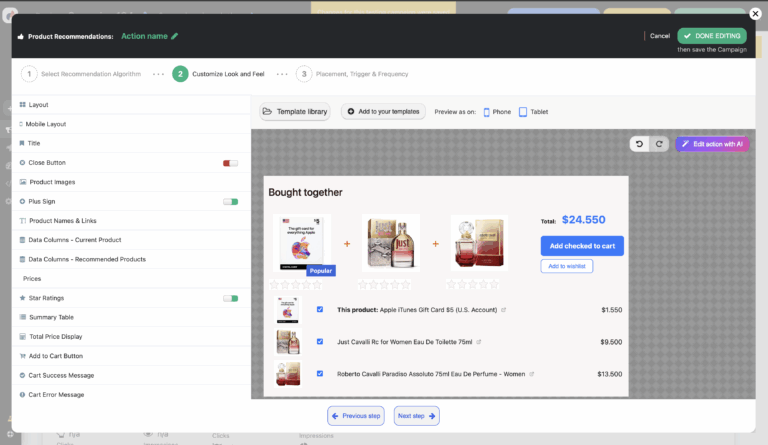
The Personyze Bundle Widget — also known as the “Frequently Bought Together” or “Customers Also Bought” widget — displays the product your visitor is currently viewing alongside one or more algorithmically chosen companion products. Each item has a checkbox, so the shopper can choose exactly which combination to add to their cart with a single click of an Add checked to cart button.
The widget renders directly inside your product page and communicates with your existing cart API, so there is no redirect, no pop-up, and no friction. Customers see a running bundle total that updates in real time as they tick and untick products, making the value of the combination immediately tangible.


Why Bundle Widgets Work — the Psychology Behind the Numbers
The 5–30% uplift figure is compelling, but it deserves context. There are a few well-documented psychological mechanisms that make bundle widgets so effective:
- Decision simplification. A shopper who has already decided to buy a product should not have to navigate away to find obvious companion items. Showing those items right here removes the cognitive cost of a second purchase decision.
- Anchored savings. When the bundle total is shown alongside the combined individual prices, the perceived saving is concrete and immediate — far more persuasive than a generic “customers also buy” list with no price context.
- Social proof by proxy. “Other people who bought this also bought X” is a statement of collective wisdom. Shoppers extend trust to the recommendations of aggregate behavior even when they don’t consciously think about it.
- One-click convenience. Reducing the add-to-cart flow from multiple separate actions to a single button click directly reduces cart abandonment for multi-item orders.
Recommendation Algorithms — Getting the Right Products in Front of Each Shopper
The power of a bundle widget lives and dies by the relevance of its recommendations. Personyze offers several complementary strategies that can be layered and filtered to fit your store’s specific dynamics.
Co-purchase frequency (“Bought Together”)
Personyze analyzes your store’s order history to identify which products are most commonly purchased in the same transaction as the current item. The more frequently two products appear together, the higher the recommendation score. This is the most conversion-proven strategy for established catalogs. Learn more about the bought-together algorithm →
Category and attribute affinity
For new or low-traffic products with limited co-purchase data, Personyze can recommend products from complementary categories, matching by brand, price range, or custom catalog attributes you define.
Behavioral signals
Personyze tracks browse, click, and cart events across sessions. A visitor who repeatedly views a certain accessory category alongside the current product type will receive recommendations weighted by that observed interest — even before they have made a purchase.
Discount and inventory filters
You can restrict recommendations to only products that are currently on discount, or only products within a certain price range relative to the current item. This is particularly useful for promotions — for example, “show only companions with at least 10% off” so your bundle always surfaces a perceivable deal.
Manual curation
For seasonal campaigns, partnerships, or product launches where you know exactly which items should appear together, Personyze lets you manually pin specific products to a bundle slot. Manual picks respect all the same badge and pricing logic as algorithmic recommendations.
Historic transaction upload
If you’re new to Personyze but have years of order history, you can upload historic transaction data to immediately bootstrap the co-purchase algorithm. This means day-one recommendations are based on real buying patterns rather than cold-start guesses.
These strategies are not mutually exclusive. A common production setup uses co-purchase frequency as the primary signal, with a discount filter to improve perceived value, and a fallback to category affinity for products where co-purchase data is sparse. You can read the full details of how Personyze builds its recommendation models in the product recommendations documentation.

No-Code Customization — Full Visual Control from the Personyze Editor
One of the most common objections to adding a new widget to a product page is the development overhead. Personyze eliminates this. Every visual property of the bundle widget — colors, fonts, image sizes, badge logic, button labels, price formatting — is configurable from a visual menu without writing a single line of code.

From the editor you can configure:
- Colors, fonts, and spacing — match the widget exactly to your brand’s design language, per element.
- Image sizes and layout — control thumbnail dimensions independently for desktop and mobile. Choose between a horizontal inline layout or a stacked card-style layout.
- Badge logic — six badge types with configurable thresholds, colors, and label text (see below).
- Star ratings — display product ratings pulled from your catalog alongside each bundle item.
- Price display and currency — show or hide prices, configure currency symbols, set decimal places, and choose locale-specific number formatting for international stores.
- Mobile-responsive layout — dedicated mobile breakpoint settings so products are never cropped or overlapping on smaller screens.
- Wishlist button — optionally show an “Add to Wishlist” button. Wishlist events are tracked in Personyze for use in downstream remarketing flows.
- All labels and copy — customize every piece of text in the widget (title, button text, badge labels, total label, success/error messages) without any template editing.
Smart Badges — Adding Urgency and Context to Every Product
Badges are one of the most underused tools in e-commerce product discovery. A shopper scanning a row of images processes visual signals far faster than text. A red “20% OFF” badge or a blue “Popular” badge can change buying behavior in under a second.
Personyze’s bundle widget includes six independent badge types, each driven by live catalog data and configurable thresholds:
- Discount Badge — displays the discount percentage (e.g., “25% OFF”) when a product’s discount exceeds a threshold you set. Useful for suppressing the badge on trivial discounts.
- New Badge — appears on products added to your catalog within a time window you specify: last 30 days, last 14 days, etc.
- Low Stock Badge — shown when a product’s inventory falls at or below a number you choose (e.g., “3 left in stock” when inventory ≤ 5). One of the highest-converting urgency signals in e-commerce.
- Popular Badge — appears on products in the top N% of views for a selected time period (this week or today).
- Best Seller Badge — same logic as Popular but based on purchase count rather than views — surfaces your top N% best-selling items.
- Custom DB Badge — pulls a value from any custom column in your product catalog and displays it as a badge. Useful for store-specific labels like “Staff Pick”, “Award Winner”, warranty period, or any other attribute you track.
All six badges are fully independent. You can run all of them simultaneously on different products, or disable any you don’t need. Badge position, background color, text color, and font size are individually configurable per badge type.
The Summary Checklist Table — Clarity Before the Click
Beneath the product images, Personyze renders a summary table that lists each selected product with its thumbnail, full title (with a link to the product page), and price. This serves as a mini-cart confirmation that lets shoppers review exactly what they’re about to add before they click.
The checkboxes in the summary table are synchronized with the image row — ticking or unticking either one updates the bundle total and the other simultaneously. This dual-entry pattern reduces accidental purchases and returns, while keeping the interaction intuitive.
The live bundle total shows both the current price and the original strikethrough price when any item in the bundle is discounted, making the aggregate saving immediately visible. When there’s no discount, the strikethrough figure is automatically hidden to keep the display clean.
Platform Compatibility — Works Everywhere You Sell
Personyze is a tag-based platform: you add a single JavaScript snippet to your site and all widgets — including the bundle widget — are deployed through the Personyze dashboard without any platform-level plugin or code change. This means the bundle widget works on any platform that allows you to add custom JavaScript to your product page template, including:
- Shopify and Shopify Plus
- Magento / Adobe Commerce
- BigCommerce
- WooCommerce
- Salesforce Commerce Cloud
- SAP Commerce
- Commercetools
- PrestaShop
- OpenCart
- Volusion
- Squarespace Commerce and Wix eCommerce
- Any custom or headless front end (React, Next.js, Vue, Angular, etc.)
Cart integration uses a simple JavaScript callback function that you implement once in your theme, mapping it to your platform’s native cart API. After that, every Personyze widget on every page can add products to cart without any further development work.
Advanced Features
Audience-Level Personalization
Unlike static “frequently bought together” widgets that show the same products to every visitor, Personyze can personalize bundle recommendations based on individual visitor signals. A returning customer who has browsed a specific accessory category multiple times will see accessory-weighted recommendations. A customer identified as a professional buyer via CRM data can see a completely different set of companion products than a casual consumer.
Discount-Only Recommendations
One of the most effective configurations is to restrict bundle recommendations to products that are currently on discount. This creates a natural incentive: “I’m already buying X, and Y is 20% off right now and pairs perfectly with it.” The discount badge amplifies this effect visually at a glance.
Multiple Widget Variants
You can deploy different bundle widget designs for different product categories — a minimalist image-forward variant for premium products and a more information-dense variant with ratings and stock badges for fast-moving lines — each configured independently in Personyze.
Wishlist-to-Bundle Retargeting
When the wishlist button is enabled, product-liked events are tracked in Personyze and can trigger downstream personalization: a visitor who added a bundle companion to their wishlist can be shown a retargeting banner on their next visit, or enrolled in an email flow via your ESP integration.
Let Personyze Set It Up For You
Not every store has the in-house resource to configure, test, and optimize a personalization widget — and that’s completely fine. On eligible Personyze plans, bundle widget setup is available as a managed service. The Personyze team will audit your catalog, style the widget to match your brand, configure the cart integration on your specific platform, set up A/B testing for clean measurement, and provide a 30-day performance review with optimization recommendations.
This is particularly valuable for stores migrating from another recommendation tool, or for merchants launching on a new platform who want personalization running from day one without diverting development capacity.
Ready to add bundle recommendations to your store? Explore Personyze’s full recommendation engine and see which plan fits your needs.