How to turn any page into a dynamic, personalized landing experience for visitors from LinkedIn Ads, Google PPC, and other inbound sources—without cloning pages.
A Single Page, Many Experiences
With Personyze Website Personalization, your landing page quietly adapts itself by audience—industry, campaign source, intent—so each visitor sees relevant headlines, images, CTAs, and blocks. Edits are made visually in the
Visual Editor, no dev work required.
Personalization in Action
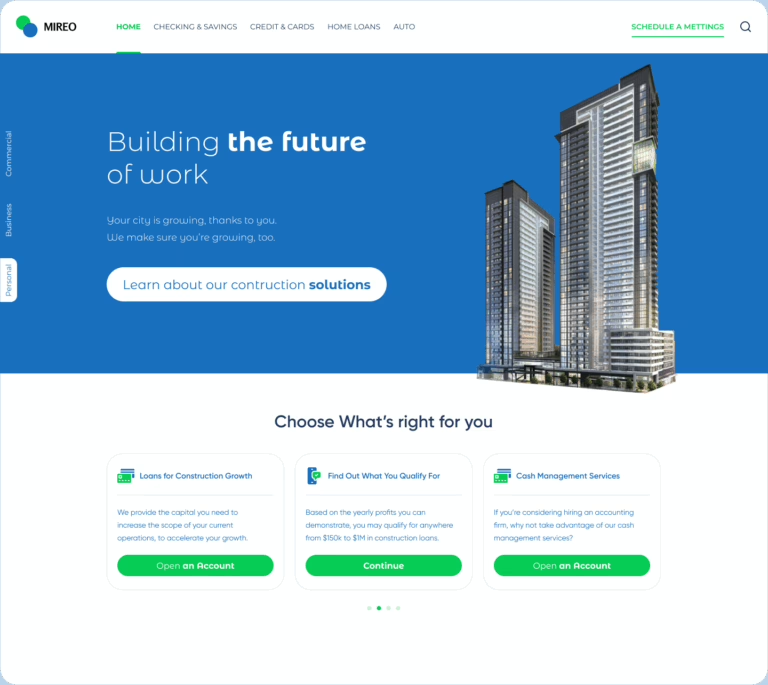
Below are two versions of the same financial-services page, personalized by industry—using UTM data, referral source, or company/industry recognition.
Construction Industry Version

Headline, imagery, CTA, and offers align to construction financing needs. This variant is served automatically based on audience rules you define.
Trucking Industry Version

For trucking visitors, the same URL presents trucking-specific visuals, messaging, and services—instantly relevant from first load.
How Personyze Chooses the Right Variant
Create audience rules with the targeting wizard (IF → THEN → TEST) to serve the right content under one URL:
- UTM parameters from LinkedIn & Google Ads
- Industry/company from IP or CRM/CDP data
- On-site behavior and intent
- Device, location, referral source
Learn more: Targeting & Personalization (3-step flow) and
Targeting Rules.
Dynamic Landing Pages
Any page can become a Dynamic Landing Page—adapting on first load using 70+ attributes and variables. See more ideas:
Dynamic Keyword Insertion and
Dynamic landing pages explained.
A/B Testing (Per Audience)
Use Precision A/B Testing to compare headlines, hero images, layouts, or CTAs inside each audience (e.g., Construction vs. Trucking) so results don’t get polluted. Configure control groups, set rotation, and review significance in the
Personalization Platform dashboard or dive into the
A/B Testing Wizard. Tips:
- Test the smallest message that clarifies value first (headline/CTA)
- Keep variants consistent with each audience’s imagery and proof
- Scale winners quickly; retire underperformers
Further reading:
Best practices for A/B testing.
Implementation Notes
- Install once and edit visually in the Visual Editor
- Place personalized content via selectors/placements (Content Placements)
- Add dynamic variables (e.g., company/name) where useful (Insert Dynamic Variables)
- Use popups/banners for campaign-specific promos (Popup & Banner Guide)
Wrap-Up
Instead of cloning pages, let one URL adapt itself for every inbound source. With Personyze’s
Website Personalization, Dynamic Landing Pages, and
A/B Testing, LinkedIn and PPC traffic lands on an experience that feels made for them.