
One landing page, tailored to every lead.
See how a lead-gen landing page adapts its headline, form, and CTAs to each visitor’s source and intent — powered by Personyze. Drag the slider to compare generic vs personalized.
New Visitor — Generic Before
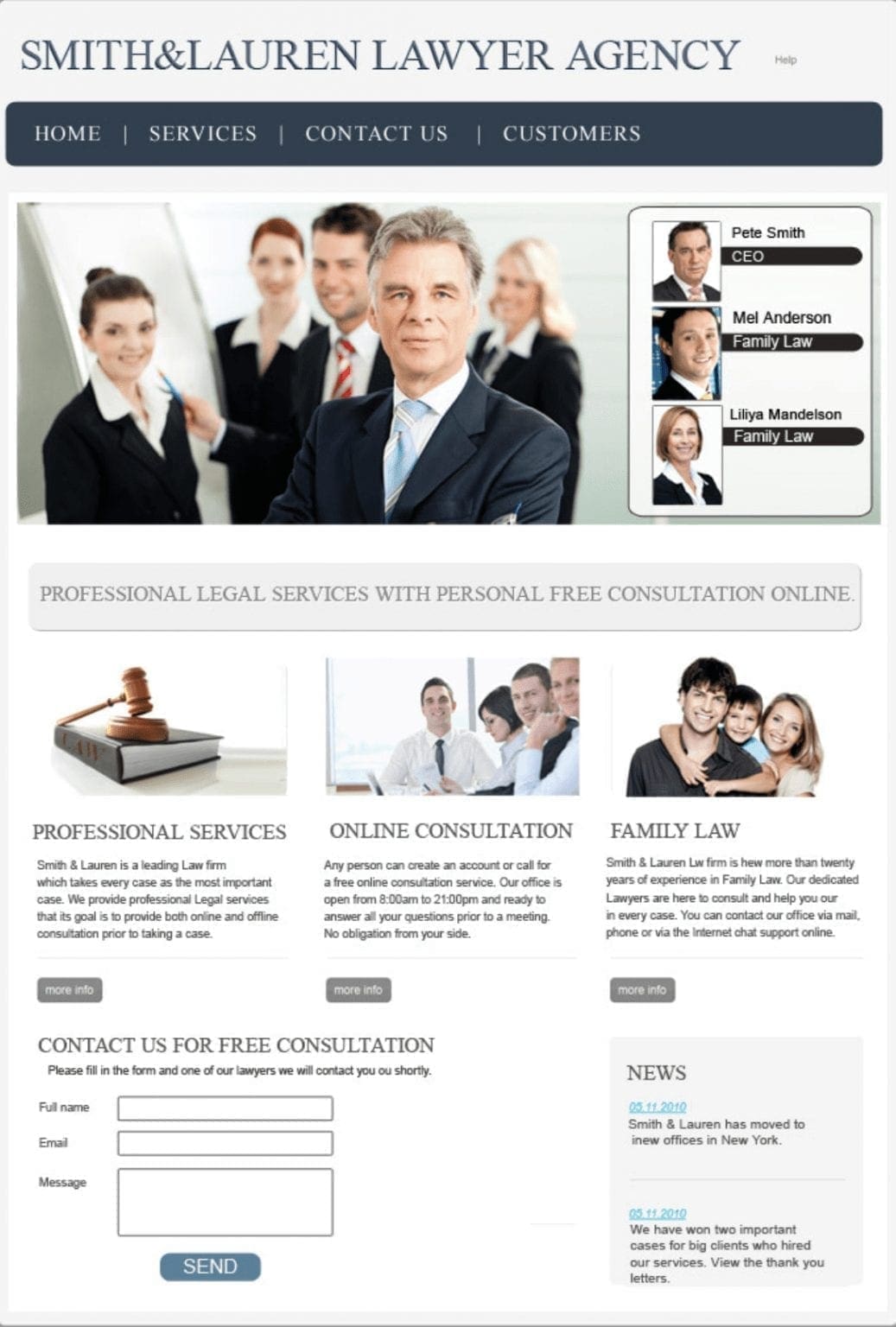
Standard landing page not tailored to the visitor’s interest.
- No specific practice link (e.g., Tort Law) in menu
- Generic header image & copy
- Broad, non-targeted CTA
- No recommended services
- Generic contact form title
Returning/Qualified Lead — Personalized After
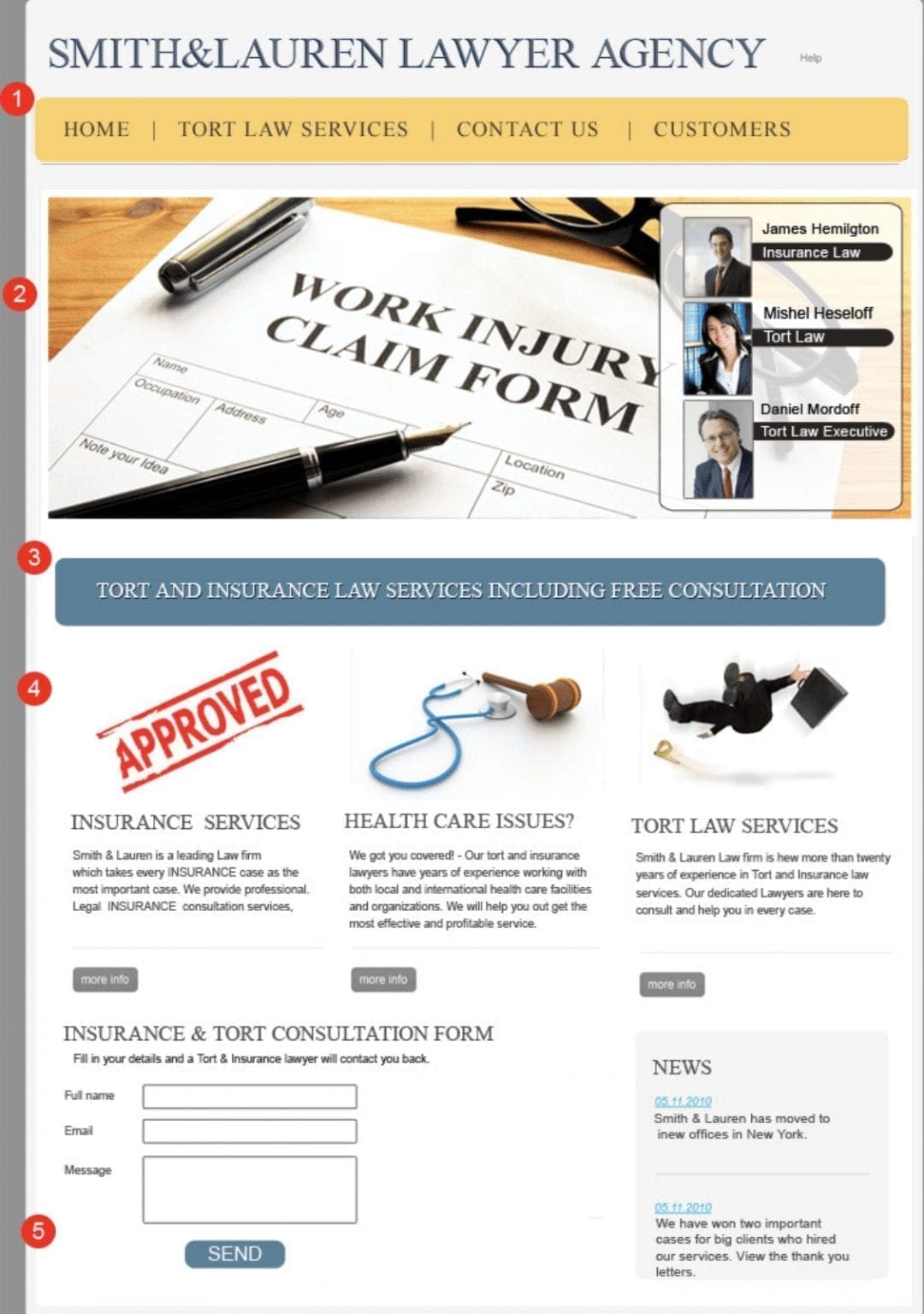
Page adapts to Tort Law interest from campaign/CRM data.
- Menu highlights Tort Law
- Targeted header image & contact suggestions
- Relevant, high-intent CTA
- Recommended services & content
- Contact form title matches interest
Built with Personyze — in three steps.
Detect
Personyze identifies each visitor’s traffic source, campaign, and behavior in real time.
Decide
Rules match the visitor to the right headline, CTA, and form title.
Render
The page updates live to maximize conversion — no page reload, no developer.
How Personyze personalizes this landing page.
Every change you see is driven by a real Personyze capability. Here’s what powers the experience.
Before: Generic Landing Page
The default page shows a standard menu, broad header image, generic CTAs, and a general contact form — none of which reflect the visitor’s Tort Law interest.
After: Personalized Experience
With website personalization enabled, the same visitor sees Tort-Law-specific navigation, a relevant header image and contact prompt, tailored CTA copy, recommended service pages, and a contact form titled to match their interest.
5 Elements That Change
- Menu: adds a clear Tort Law item so discovery is effortless.
- Header + Contact Suggestions: swap to Tort-Law visuals and guidance for how to reach the right team.
- Primary CTA: copy shifts to intent (e.g., “Speak with a Tort Law Specialist”).
- Recommended Services: links to Tort-related practice pages instead of generic services.
- Contact Form Title: re-labels to match interest (e.g., “Tort Law Consultation”).
Why This Works
- Relevance: the page acknowledges the campaign topic (Tort Law) immediately.
- Clarity: navigation and CTAs point to the next best step for this lead.
- Momentum: a form that echoes the visitor’s intent reduces friction to contact.
You can also promote timely offers or bars using the Pop-up & Banner Manager (optional).
How is the Tort Law interest detected?
From the campaign audience (email list segment) and landing URL context.
Do I need to rebuild the page?
No — variants render on top of your current template via the tag/SDK.
Can I test this?
Yes — A/B test the personalized version vs. default and track lead submits.
Demo — lead generation for a law agency: Tort-Law-aware navigation, header, CTAs, service links, and form title.
Personalize your landing pages like this.
This lead-gen example runs entirely on Personyze — source targeting, dynamic content, and A/B testing. Build the same for your site, no code required.