Best Practice Targeted Banners, Promotions, Lead Forms, and Popup Examples

Here are 10 popup examples of how to trigger popups and banners using behavioral targeting, IP intelligence such as visitor’s company, visitor’s weather, or previous product/category views.

Ecommerce Popup Example Based On Visitor Location

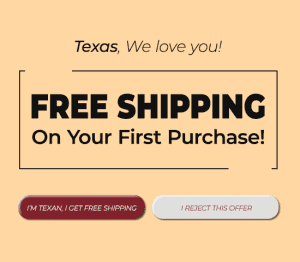
In this popup example, an ecommerce website is seeking to boost conversion in weak states, so they take the 10 states with lowest conversion, and set free shipping offers for those states. In their call-to-action creative text, they also use Personyze to dynamically replace the state name with the visitor’s real-time location.
Clothing Popup Example Based On Visitor Location

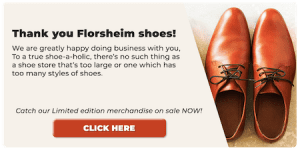
A shoe company wants to target visitors to their site from potential retail carriers, using Personyze’s IP targeting capabilities. With this tool, they manage to create a different experience for potential carriers on their site from the moment visitors land, including a popup contact form specifically mentioning the visitor’s company, a homepage banner with an appropriate B2B message, and a new menu item leading them to landing pages related to corporate sales, normally hidden from other B2C visitors.

Law Firm Popup Example with Targeting Based On Referring UTM Campaign

In this popup example, TA law firm decides to target visitors interested in tort law services with specific content using Personyze, such as personalized banner, landing page content, menu item, content recommendations, and form. They accomplish this using Personyze’s targeting tool for UTM from ad campaigns coming from Google and LinkedIn, along with the many content tools.

Hospitality Popup Example with Targeting Based On Referring UTM Campaign

A hospitality search aggregation site wants to personalize its homepage experience for visitors with specific destination interests, which can be derived from their referral UTM code, based on the ad that referred them. Using personyze’s referral/UTM targeting tool, they provide visitors who are interested in travel to, London, for example, with a personalized homepage banners, recommendations, and discount offers.

Manufacturer Popup Example with Targeting Based On Weather

In this popup example, an international tire manufacturer wants to personalize their retail site based on weather conditions at any given location. They use Personyze’s weather targeting to show specific homepage banner, exit popups, and recommendations for Winter tires and other Winter car products whenever the forecast for a visitor’s location is below freezing. For other visitors who are not experiencing Winter conditions, the site is normal.

Food & Beverage Popup Example with Targeting Based On Weather

A food delivery service wants to push a key delivery message to visitors who are on the site when it’s raining. They use Personyze’s weather targeting to target visitors whose locations have a high chance of precipitation, and push special offers with creative geared towards staying out of the rain, staying in, and enjoying some delivery with Netflix.

Airline Popup Example with Targeting Based On Product and Category View

In this popup example, an airline search aggregator site decides that they want to create a more targeted experience for visitors based on their past product and category views. If a visitor has, for instance, browsed many flights going to Dubai, they create a home page that will show a tailored header, content recommendations, and pre-filled search filters for Dubai.

Automotive Popup Example with Targeting Based On Product and Category View

A car dealership wants to present a targeted experience on their home page, based on the past interactions that visitors have had with their products and product categories. If a visitor has shown interest in trucks, for instance, they’ll see a tailored experience created by Personyze, involving truck-related banners, and product and content recommendations.

Launch Personalized Experiences in Minutes — No Code Needed.

Embed our snippet in your site header—directly or via your tag manager—and start personalizing. Use step-by-step wizards and a no-code personalization toolbox to tailor every part of the customer journey.

Start Free Trial

White Glove Service

Onboarding, training, and campaign setup—guided by your dedicated success manager.

Wizards & Templates

Personyze comes with responsive templates for different industries and scenarios.

Performance Analytics

Continuously improve with a performance dashboard featuring default metrics and custom KPI tracking.

CRM and User Data

360° user profiles for hyper-personalization, with easy plug-and-play integration to your CRM, CDP, or ABM.

API and Integrations

Even easier plug-and-play integrations with popular platforms, such as Segment, WordPress, Shopify, Magento, Salesforce, Hubspot, and more.

Quality Control

Test changes in a safe environment, share preview links, and manage access with SSO and user permissions.

Book a demo with a personalization expert

Discover how Personyze can transform your customer journey and boost conversions. Discuss your use case, ask questions, and see a live demonstration on your website.

  • Live video demo
  • 15 minutes
  • Live Q&A
Personalization expert
In this demo, we’ll review your goals, walk through real examples, and show how personalization can run on your site in real time.
Sounds good—please schedule a quick walkthrough.